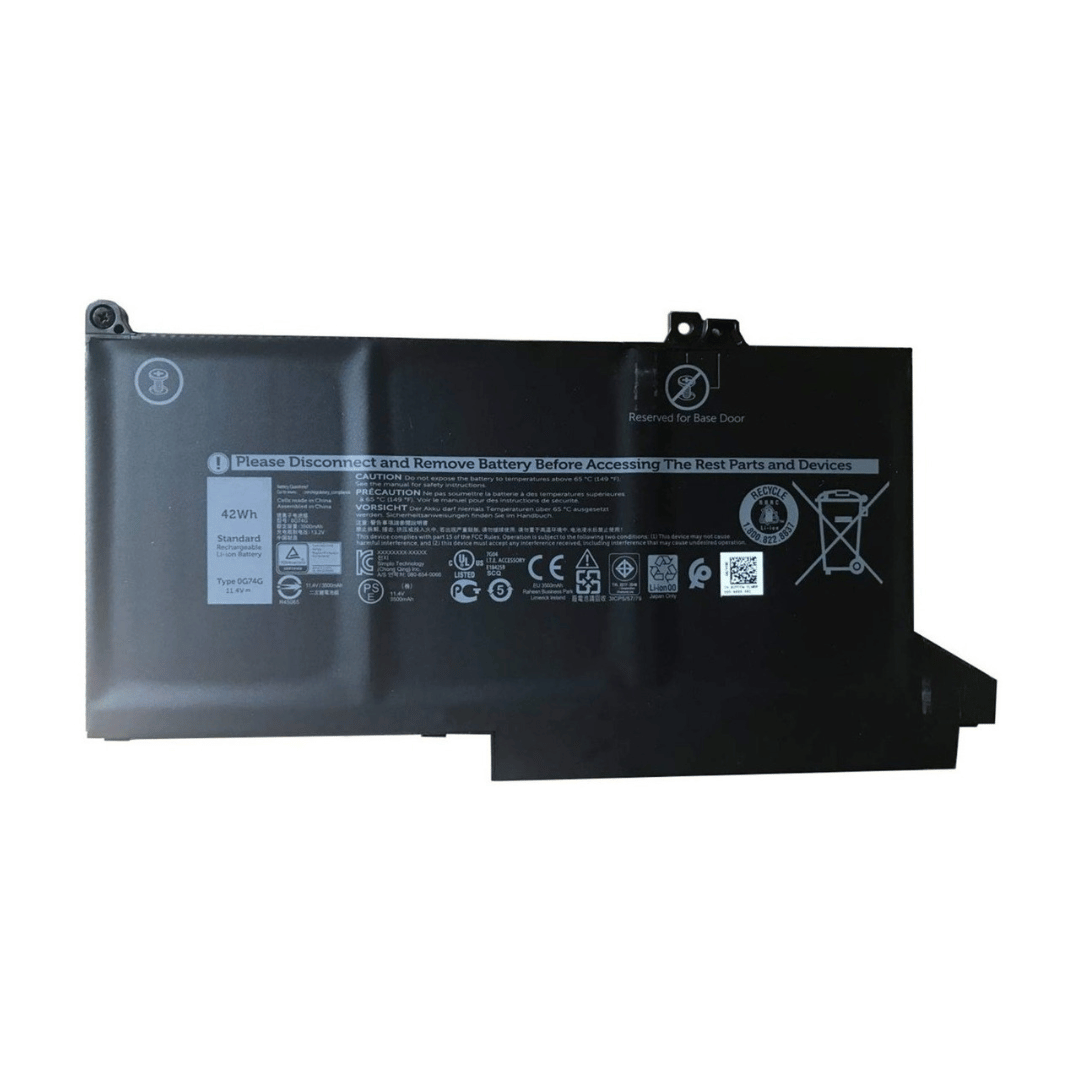

Laptop Battery Compatible for A31N1519 Battery for ASUS X540S X540L X540SA X540S X540LA-SI302 A540 F540 R540LA About this item Compatible model no. :- a31n1519, asus x540s x540l x540sa x540s x540la-si302 a540 f540 r540la Warranty not covered if defects due to external causes, accidental, physical or liquid damage, cut, burnt, misuse and missing warranty stickers or labels Battery capacity/power capability (mah/wattage) may be different from the reference picture but a backup of the battery will be the same as the original Please match your product with the image provided before placing the order for any help please get in touch with us.

OEM-quality trackpad replacement (without flex cable) for MacBook Pro 14″ (Model A2442, 2021, M1 Pro/Max) in Silver finish—designed for precise Force Touch performance, seamless gesture control, and perfect visual integration with the original chassis. Compatible With: MacBook Pro 14-inch (2021, Model A2442) with Apple M1 Pro or M1 Max chip. Part Type: Trackpad only—does not include the flex cable, Taptic Engine, or mounting hardware. Intended for professional technicians who will reuse the original internal components. Finish: Silver—matches the Silver and Space Gray top/bottom case (Apple uses the same trackpad finish across both color variants for this model). Force Touch Capable: Fully supports pressure-sensitive input and haptic feedback when paired with the original Taptic Engine and logic board—ensuring full macOS gesture and functionality support. OEM Precision: Features the same glass surface, curvature, and micro-click mechanism as Apple’s original—delivering consistent tracking accuracy and tactile response. Installation Requirements: Requires complete bottom case removal and careful transfer of the original flex cable and Taptic Engine. Adhesive must be applied precisely to maintain structural integrity and sensor alignment. Recommended for certified or experienced repair professionals only.

A premium pre-owned HP EliteOne 800 G2 all-in-one desktop with 23.8-inch display, 6th Gen Core i7, RAM upgrade options, and SSD storage options. Designed for business professionals who need performance, security, and a clean space-saving workstation.

Logitech MK120 Wired USB Keyboard Mouse Desktop Combo Height: 6.10 in (155 mm) Width: 17.72 in (450 mm) Depth: 0.93 in (23.5 mm) Weight: 19.4 oz (550 g) Cable length: 4.9 ft (150 cm) Height: 4.45 in (113 mm) Width: 2.44 in (62 mm) Depth: 1.50 in (38 mm) Weight: 3.17 oz (90 g) Cable length: 70.87 in (180 cm) Spill-resistant design 1Tested under limited conditions (maximum of 60 ml liquid spillage). Do not immerse the keyboard in liquid. Adjustable keyboard height 10-Key Number pad Caps lock indicator light Num lock indicator light Up to 10 million keystrokes (excludes number lock key) Key type: Deep profile Sensor Technology: Optical tracking Number of Buttons: 3 (Left/Right-click, Middle click) Scrolling: line-by-line Scroll Wheel: Yes, optical Mouse plastics: 72% post-consumer recycled material 2Excludes plastic in cable assembly, printed wiring assembly (PWA) and packaging. Keyboard plastics: 54% post-consumer recycled material 3Excludes plastic in cable assembly, printed wiring assembly (PWA) and packaging. Windows® 10,11 or later Two available USB ports

MacBook Pro Retina 13' Early 2015 A1502 i5 8GB Logic Board MacBook Pro Retina 13′ Early 2015 A1502 i5 8GB Logic Board

2016 Apple 15" MacBook Pro Touch-Bar Logic Board 2.7Ghz i7 16Gb A1707 512GB , With Dual Graphics Radeon Pro 2016 Apple 15″ MacBook Pro Touch-Bar Logic Board 2.7Ghz i7 16Gb A1707 512GB , With Dual Graphics Radeon Pro

Laptop Charger for HP 90W 19.5V 4.62A (Blue Tip) Pavilion 17 15-E 17-E 14-E 15-AK Series Touchsmart Sleekbook M6-K M7-J 17-J M6 M7 709986-004 709986-002 753560-001 710413-001 PPP012D-S AC Adapter

90W AC Charger Fit for Acer Aspire Z 24 Z24-890 Z24-880-UR13 Z22-780 Z24-890-UR11 Z24-890-UA91 Z24-890-UR13 Z24-890-UR16 Aspire 7 A715-76-765N A715-76-73L8 Laptop Adapter Power Supply Cord

LENOVO 20V/3.25A USB PIN Laptop Charger for Lenovo Thinkpad Compatible Part NO.: 45N0236, 45N0237, 45N0238, 45N0239 0B46994, 0B46995, 0B46996, 0B46997, 0B46997, 0B46998, 0B469990B47000, 0B47001, 0B47002, 0B47003, 0B47004, 0B47005, 0B47006

The 85W MagSafe 2 Power Adapter features a magnetic DC connector so if someone should trip over it, the cord disconnects harmlessly and your MacBook Pro stays put safely. It also helps prevent fraying or weakening of the cables over time. In addition, the magnetic DC helps guide the plug into the system for a quick and secure connection. The 85W MagSafe 2 Power Adapter features a magnetic DC connector so if someone should trip over it, the cord disconnects harmlessly and your MacBook Pro stays put safely. It also helps prevent fraying or weakening of the cables over time. In addition, the magnetic DC helps guide the plug into the system for a quick and secure connection. When the connection is secure, an LED located at the head of the DC connector lights up; an amber light lets you know that your notebook is charging, while a green light tells you that you have a full charge. An AC cord is provided with the adapter for maximum cord length, while the AC wall adapter (also provided) gives you an even easier and more compact way to travel. Designed to be the perfect traveling companion, the adapter has a clever design which allows the DC cable to be wound neatly around itself for easy cable storage. Compatible with MacBook Pro with 13-inch Retina display. See this article for more details about choosing the right one. Knowing which specific Mac model you have is important. If you are running OS X Lion (10.7) or later go to the “” menu at the top left of your screen, choose “About this Mac” then click the “More Info…” button. Your Mac model and generation will be displayed. If you are running an earlier version of OS X, you can enter your serial number here to find out which model you have. COMPATIBILITY Mac Models: MacBook Pro (Retina, 13-inch, Late 2012 – 2015)
The 45W MagSafe 2 Power Adapter features a magnetic DC connector so if someone should trip over it, the cord disconnects harmlessly and your MacBook Air stays put safely. It also helps prevent fraying or weakening of the cables over time. In addition, the magnetic DC helps guide the plug into the system for a quick and secure connection. The 45W MagSafe 2 Power Adapter features a magnetic DC connector so if someone should trip over it, the cord disconnects harmlessly and your MacBook Air stays put safely. It also helps prevent fraying or weakening of the cables over time. In addition, the magnetic DC helps guide the plug into the system for a quick and secure connection. When the connection is secure, an LED located at the head of the DC connector lights up; an amber light lets you know that your notebook is charging, while a green light tells you that you have a full charge. An AC cord is provided with the adapter for maximum cord length, while the AC wall adapter (also provided) gives you an even easier and more compact way to travel. Designed to be the perfect traveling companion, the adapter has a clever design which allows the DC cable to be wound neatly around itself for easy cable storage. This power adapter recharges the lithium polymer battery while the system is off, on, or in sleep mode. It also powers the system if you choose to operate without a battery. Compatible only with MacBook Air featuring MagSafe 2 power port. Knowing which specific Mac model you have is important. If you are running OS X Lion (10.7) or later go to the “” menu at the top left of your screen, choose “About this Mac” then click the “More Info…” button. Your Mac model and generation will be displayed. If you are running an earlier version of OS X, you can enter your serial number here to find out which model you have. Mac Models MacBook Air (13-inch, Early 2015 – 2017) MacBook Air (11-inch, Early 2015)

A1707 Battery Replacement, A1820 Battery for MacBook Pro 15″ (Late 2016, Mid 2017) Touch Bar EMC 3072 EMC 3162 MLH32 MLH42 MLW72 MLW82 MPTR2 MPTT2 MLH52 MLW92 MPTU2 MPTV2 MPTW2 MPTX2 Specification】Voltage: 11.4V. Capacity: 76Wh 6667mAh. Battery Type: Li-ion. Condition: Brand new, from high quality materials, top circuit boards and smart chip. 【Compatible Part Number】A1820, A1707, A1707(EMC 3072), A1707(EMC 3162), 020-01728, MacBookPro13,3 , MacBookPro14,3. 【Compatible Laptop Models】MacBook Pro 15-Inch (Late 2016) & (Mid 2017) Model A1707 with touch bar, fit for MLH32LL/A MLH42LL/A MLH52LL/A MLW92LL/A MPTU2LL/A MPTV2LL/A MPTR2LL/A MPTT2LL/A MPTW2LL/A MPTX2LL/A MLW72LL/A MLW82LL/A. 【Note】The tools are included. Double-sided tape is attached to the back of the battery or double-sided tape is included in the package. But No battery installation instruction. The MBP battery is difficult to disassemble, we suggest you search for related installation videos on the Internet or find a technician for help.

The Meetion Mini 4000 Black is a compact wireless keyboard and mouse combo designed for clean and convenient everyday use. With a mini-space-saving layout and stable wireless connection, it’s perfect for office work, home setups, and laptop users who want a neat, clutter-free desk. The Meetion Mini 4000 is a stylish and practical wireless keyboard and mouse set made for users who prefer a compact and modern workspace. Its mini keyboard design saves desk space while still offering comfortable typing for daily tasks. The wireless mouse provides smooth control and easy navigation, making this combo ideal for offices, students, and home users. With plug-and-play wireless connectivity, setup is simple—just connect the receiver and start using it instantly. Wireless Keyboard & Mouse Combo for a clean and clutter-free setup Compact Mini Keyboard Design saves space and fits small desks easily Stable Wireless Connection for smooth performance Plug & Play Receiver – quick setup without drivers Smooth Wireless Mouse for accurate control Comfortable Typing Layout for everyday productivity Modern Black Finish suitable for any workspace Ideal for Laptops & Desktops Perfect for office workers, students, and home users needing a compact wireless combo for laptops or desktops. Works with most devices that support USB.

Arabic Keyboard Cover Skin for MacBook Air 13'' (A1369/A1466, NO Touch ID) 2012 -2017 /MacBook Pro 13" 15'' 2013-2015 with or w/out Retina Display Ultra Thin Silicone Keyboard Protector (Black) Arabic Keyboard Cover Skin for MacBook Air 13” (A1369/A1466, NO Touch ID) 2012 -2017 /MacBook Pro 13″ 15” 2013-2015 with or w/out Retina Display Ultra Thin Silicone Keyboard Protector (Black) About this item COMPATIBLE WITH: 2015 and before 2015 version Macbook: 1) MacBook Air 13″ (Models: A1369 and A1466); 2) MacBook Pro 13.3″ (Model: A1278); 3) MacBook Pro 13.3″ with Retina Display (Models: A1502 and A1425, 2013-2012 released); 4) MacBook Pro 15″ with Retina Display (Model: A1398, 2013-2012 released); 5) MacBook Pro 15.4″ Model: A1286 [√] MORE PROTECTION for KEYBOARD: waterproof, dust-proof and dirt-proof design can prevent liquid, dust, cigarette ash, biscuit crumbs falling onto your keyboard to affect your keyboard’s life. [√] ACCURATE KEYS: every key is specially molded, manufactured to the quality available. Flexible, this cover is easy to apply and remove for cleaning [√] SOFT & ULTRA SKIN: ultra thin silicone keyboard cover skin, made it easier for typing. Soft keyboard protector can weaken the sound in typing [XX] ATTENTION!!: NOT FIT FOR: 2020-2016 Released Macbook Pro 13 inch 15 inch with Touch Bar/2020-2018 Released: Macbook Air 13-Inch. You can find the model number on the bottom of the laptop

The Lenovo ThinkPad T460 features an Intel Core i5 6th Gen processor, 8GB RAM, and a fast 256GB SSD for smooth everyday performance. With a responsive 14-inch touchscreen display and the legendary ThinkPad keyboard, it’s ideal for work, study, and productivity on the go.

WiWU WM108 Wimice Dual‑Mode Mouse – Bluetooth 5.0 and 2.4 GHz wireless mouse with 800/1200/1600 DPI, silent clicks, and ergonomic ABS housing.Long battery life (~6 months standby), USB dongle & silent design—ideal for travel, office, and quiet environments. Model: WiWU Wimice WM108 Connection Modes: Bluetooth 5.0 2.4 GHz wireless via USB dongle Connection Modes: Bluetooth 5.0 2.4 GHz wireless via USB dongle DPI Settings: 800 / 1,200 / 1,600 DPI (adjustable) Buttons: 3 standard buttons + clickable scroll wheel (4 keys total) Range: Up to 10 m wireless connectivity Material/Design: Lightweight (67–130 g, depending on source), ergonomic ABS plastic body, magnetic base or “super magnetic absorption” design Operating Range: ≈10 m Silent Clicks: Quiet operation—silent key action Dimensions: Approx. 108 × 64 × 36 mm Weight: 67 g cited by Star Tech and 130 g by others—likely lighter in official spec Compatibility: Windows, macOS, Linux, Android, etc. Plug-and-play, no driver needed

A1932 A2179 A1965 Battery for MacBook Air 13″ Retina (2018 2019, Early 2020) EMC 3184 3302 MRE82 MRE92 MVFH2 MWTJ2 MVH22 MVFM2 MVFK2 MREE2 MREC2 MREA2 MREF2 MUQT2 MUQU2 MacBookAir8,1 8,2 9,1 📄【Specification】Voltage: 11.4V. Capacity: 49.9Wh 4379mAh. Battery Type: Li-Polymer. Condition: Brand new, from high quality materials, top circuit boards and smart chip. 🔋【Replace Part Number】A1965 A1932(EMC 3184) A2179(EMC 3302) 3ICP4/63/119 MacBookAir8,1 MacBookAir8,2 MacBookAir9,1. 💻【Compatible Models】Only fit for MacBook Air 13″ (Model A1932 & Model A2179) Release 2018 2019 2020, fit for MRE82LL/A, MVFH2LL/A, MVFM2LL/A, MVFK2LL/A, MVFJ2LL/A, MVFN2LL/A, MVFL2LL/A, MREE2LL/A, MREC2LL/A, MREA2LL/A, MREF2LL/A, MRE92LL/A, MWTJ2LL/A, MVH22LL/A, MVH52LL/A, MVH42LL/A, MWTL2LL/A, MWTK2LL/A. Please kindly check the model number at the bottom of your laptop (A****). NOT FIT FOR MODEL A2337. 💻【ANTIEE Promise】Each products has undergone rigorous testing to ensure the correct voltage, circuit protection, stable current, low self-discharge and CE / FCC / RoHS Certified for safety. About 500 recharge cycles over the life.

A well-equipped pre-owned Dell Latitude 5410 with 14" display, 10th Gen Core i5, 16GB RAM, and 512GB SSD—delivering strong performance, security, and portability for business and professional use.

WiWU Pilot Backpack 15.6 inch Travelling Polyester Laptop Business School Travelling Backpack WiWU Pilot Backpack 15.6 inch Travelling Polyester Laptop Business School Travelling Backpack

Genuine-spec touchpad flex cable for MacBook Pro 13″ (Model A1502, Mid 2014)—restores full trackpad functionality, including precise cursor control and physical click response. Essential for repairing unresponsive or erratic trackpad behavior. Compatible With: MacBook Pro 13-inch (Mid 2014, Model A1502, Model Identifier MacBookPro11,1) with Intel Core i5/i7 processors and Retina display. Part Type: Touchpad flex cable only — does not include the trackpad housing, button mechanism, or mounting hardware. This is the ribbon cable that connects the trackpad to the logic board. Function: Transmits cursor movement and click signals (left/right physical clicks) Supports standard multi-touch gestures (two-finger scroll, tap-to-click, pinch-to-zoom) ⚠️ Note: This model uses a physical click mechanism—not Force Touch (no haptic feedback or pressure sensitivity). Transmits cursor movement and click signals (left/right physical clicks) Supports standard multi-touch gestures (two-finger scroll, tap-to-click, pinch-to-zoom) ⚠️ Note: This model uses a physical click mechanism—not Force Touch (no haptic feedback or pressure sensitivity). OEM-Quality Build: Matches Apple’s original in: Cable length and routing path Connector type and pin alignment Insulation and flexibility for long-term reliability Cable length and routing path Connector type and pin alignment Insulation and flexibility for long-term reliability Common Use Cases: Replacing a torn, frayed, or corroded original flex cable Fixing: Unresponsive or intermittent trackpad Cursor jumping or drifting Click function failure (left or right) Complete trackpad disconnect Replacing a torn, frayed, or corroded original flex cable Fixing: Unresponsive or intermittent trackpad Cursor jumping or drifting Click function failure (left or right) Complete trackpad disconnect Unresponsive or intermittent trackpad Cursor jumping or drifting Click function failure (left or right) Complete trackpad disconnect Installation Note: Requires bottom case removal and battery disconnect. Connects via a ZIF (Zero Insertion Force) socket on the logic board—do not force. Cable routes under the battery; handle with care to avoid strain. Suitable for intermediate to advanced DIYers or technicians. Requires bottom case removal and battery disconnect. Connects via a ZIF (Zero Insertion Force) socket on the logic board—do not force. Cable routes under the battery; handle with care to avoid strain. Suitable for intermediate to advanced DIYers or technicians.
