
Huawei IdeaHub Board 2 86-inch display delivers an immersive teaching and collaboration experience with large 4K visuals. It helps teachers present clearly and engage students effectively. As a result, classrooms benefit from better interaction and visibility. The 86-inch screen features 4K UHD resolution with zero-gap laminated glass. Therefore, it reduces reflection and improves clarity. Moreover, the D-LED backlight and 60Hz refresh rate ensure stable and consistent visuals. It supports up to 20 touch points using infrared multi-touch technology. In addition, smart handwriting recognition and annotation allow natural writing. The low latency writing response improves accuracy during lessons. The system includes a quad-core processor with 4GB RAM and 32GB storage. Consequently, it runs applications smoothly. It supports Android, Windows, iOS, and macOS for flexible integration. It also includes key capabilities such as 4K UHD resolution, multi-touch interaction, smart annotation tools, wide connectivity options, and cross-platform support. Huawei IdeaHub Board 2 86-inch display is built to enhance collaboration and simplify teaching. Specifications: 86-inch 4K UHD display with 3840 × 2160 resolution Supports up to 20 touch points with infrared technology Zero-gap laminated glass with D-LED backlight Low latency writing with smart annotation support Quad-core CPU with 4GB RAM and 32GB storage

Genuine-spec touchpad flex cable for MacBook Air 13″ (Model A1534, Early 2015)—essential for restoring full trackpad functionality, including precise cursor control and physical click response, during repair or replacement. Compatible With: MacBook Air 13-inch (Early 2015, Model A1534, Model Identifier MacBookAir7,2). Part Type: Touchpad flex cable only—does not include the trackpad housing, button mechanism, or mounting brackets. This is the ribbon cable that connects the trackpad to the logic board. Function: Carries input signals from the trackpad to the logic board—critical for cursor movement, tap-to-click, and primary/secondary physical click functionality. (Note: This model uses a physical click mechanism, not Force Touch—so no haptic feedback or pressure-sensing.) OEM-Quality Construction: Matches Apple’s original cable in length, connector type, and shielding—ensures reliable signal transmission and long-term durability. Common Use Cases: Replacing a torn, frayed, or damaged original flex cable Completing a trackpad replacement when the original cable is compromised Fixing erratic cursor movement, unresponsive trackpad, or loss of click function Replacing a torn, frayed, or damaged original flex cable Completing a trackpad replacement when the original cable is compromised Fixing erratic cursor movement, unresponsive trackpad, or loss of click function Installation Note: Requires bottom case removal and careful disconnect/reconnect of the ZIF (Zero Insertion Force) connector on the logic board. The cable routes under the battery—handle with care. Suitable for intermediate to advanced DIYers or technicians.


Genuine-spec touchpad flex cable for MacBook Pro 13″ (Model A1502, Mid 2014)—restores full trackpad functionality, including precise cursor control and physical click response. Essential for repairing unresponsive or erratic trackpad behavior. Compatible With: MacBook Pro 13-inch (Mid 2014, Model A1502, Model Identifier MacBookPro11,1) with Intel Core i5/i7 processors and Retina display. Part Type: Touchpad flex cable only — does not include the trackpad housing, button mechanism, or mounting hardware. This is the ribbon cable that connects the trackpad to the logic board. Function: Transmits cursor movement and click signals (left/right physical clicks) Supports standard multi-touch gestures (two-finger scroll, tap-to-click, pinch-to-zoom) ⚠️ Note: This model uses a physical click mechanism—not Force Touch (no haptic feedback or pressure sensitivity). Transmits cursor movement and click signals (left/right physical clicks) Supports standard multi-touch gestures (two-finger scroll, tap-to-click, pinch-to-zoom) ⚠️ Note: This model uses a physical click mechanism—not Force Touch (no haptic feedback or pressure sensitivity). OEM-Quality Build: Matches Apple’s original in: Cable length and routing path Connector type and pin alignment Insulation and flexibility for long-term reliability Cable length and routing path Connector type and pin alignment Insulation and flexibility for long-term reliability Common Use Cases: Replacing a torn, frayed, or corroded original flex cable Fixing: Unresponsive or intermittent trackpad Cursor jumping or drifting Click function failure (left or right) Complete trackpad disconnect Replacing a torn, frayed, or corroded original flex cable Fixing: Unresponsive or intermittent trackpad Cursor jumping or drifting Click function failure (left or right) Complete trackpad disconnect Unresponsive or intermittent trackpad Cursor jumping or drifting Click function failure (left or right) Complete trackpad disconnect Installation Note: Requires bottom case removal and battery disconnect. Connects via a ZIF (Zero Insertion Force) socket on the logic board—do not force. Cable routes under the battery; handle with care to avoid strain. Suitable for intermediate to advanced DIYers or technicians. Requires bottom case removal and battery disconnect. Connects via a ZIF (Zero Insertion Force) socket on the logic board—do not force. Cable routes under the battery; handle with care to avoid strain. Suitable for intermediate to advanced DIYers or technicians.

Genuine-spec Touch Bar assembly with integrated flex cable for 2020 MacBook Pro 13″ models (A2251, A2289, A2338)—restores full Touch ID and Touch Bar functionality with OEM-level fit and performance. Compatible With: MacBook Pro 13″ (2020): A2251 (Intel Core i5/i7, two Thunderbolt ports) A2289 (Intel Core i5/i7, four Thunderbolt ports) A2338 (Apple M1 chip, two Thunderbolt ports) MacBook Pro 13″ (2020): A2251 (Intel Core i5/i7, two Thunderbolt ports) A2289 (Intel Core i5/i7, four Thunderbolt ports) A2338 (Apple M1 chip, two Thunderbolt ports) A2251 (Intel Core i5/i7, two Thunderbolt ports) A2289 (Intel Core i5/i7, four Thunderbolt ports) A2338 (Apple M1 chip, two Thunderbolt ports) Includes: Complete Touch Bar module with integrated flex cable, Touch ID sensor, and ambient light sensor—ready for direct connection to the logic board. Functionality: Fully restores dynamic Touch Bar controls, system functions, app shortcuts, and Touch ID (fingerprint authentication and power button). OEM-Quality Build: Matches Apple’s original design in responsiveness, finish, and sensor alignment—ensures seamless integration with macOS. Color Options: Available in Space Gray and Silver to match your MacBook’s top case (confirm your model’s color before ordering). Installation Note: Requires full top case disassembly and careful handling of adhesive and connectors. The flex cable routes under the speakers and connects near the logic board—precision is essential. Recommended for experienced technicians.

MacBook Pro A1708 Battery A1713 for MacBook Pro 13 Inch A1708 Late 2016 Mid 2017 (EMC 2978 3164), A2171 Laptop Replacement Battery for MacBook Pro 13 Inch A2159 (2019) A2289 (2020) A2338 (2020) 【Macbook pro 13 Inch battery A1713 & A2171 Battery Specification】– Voltage: 11.4V. Capacity: 54.5Wh / 4781mAh, Battery Type: Li-ion 【Newest 4.0 upgraded OEM Battery for Apple macbook pro】– Japan High Performance Electric Core. Cobalt Proportion: >98%. Upgrade chip. Up to 1500+ recharge cycles over the life of the battery. Overcharger and Discharger Circuit Protection, Ensure fast charges and low power consumption, UL-/CE-/FCC-/RoHS-Certified for safety 【Replacement Battery A1713 for A1708 Macbook pro 13 inch】– A1708 Macbook pro 13” Late 2016: MacBook Pro 13-Inch “Core i5” 2.0 & MacBook Pro 13-Inch “Core i7” 2.4 (MacBookPro13,1, EMC2978, MLL42xx/A, MLUQ2xx/A). — A1708 Macbook pro 13” Mid 2017: MacBook Pro 13-Inch “Core i5” 2.3 & MacBook Pro 13-Inch “Core i7” 2.5 (MacBookPro14,1, EMC3164, MPXQ2xx/A, MPXR2xx/A, MPXT2xx/A, MPXU2xx/A) 【Replacement Battery A2171 for A2159 & A2289 & A2338 Macbook pro 13 inch】– A2159 Macbook pro 13” 2019: MacBook Pro 13-Inch “Core i5” 1.4 Touch & “Core i7” 1.7 Touch (MacBookPro15,4, EMC3301, MUHN2xx/A, MUHP2xx/A, MUHQ2xx/A, MUHR2xx/A, MUHR2xx/B). — A2289 Year 2020: MacBook Pro 13-Inch “Core i5” 1.4 & “Core i7” 1.7 (MacBookPro16,3, EMC 3456, MXK32xx/A, MXK52xx/A, MXK62xx/A, MXK72xx/A). — A2338 Year 2020: MacBook Pro 13-Inch “M1” 8-Core 3.2 (MacBookPro17,1, EMC3578, MYDA2LL/A*)

TP-Link 8 Port Gigabit Ethernet Network Switch | Plug and Play | Desktop or Wall-Mount | Plastic Case Ethernet Splitter | Fanless | Traffic Optimization | Unmanaged (TL-SG1008D),Black About this item PLUG-AND-PLAY – Easy setup with no configuration or no software needed ETHERNET SPLITTER – Connectivity to your router or modem router for additional wired connections (laptop, gaming console, printer, etc) 8 Ports GIGABIT ETHERNET – 8 10/100/1000 Mbps Gigabit auto-negotiation RJ45 ports greatly expand network capacity COST EFFECTIVE – Fanless Quiet Design, Desktop design RELIABLE – IEEE 802.3x flow control provides reliable data transfer UP to 80% Power Saving – Automatically adjusts power consumption according to the link status and cable length AUTO-NEGOTIATION – Supports Auto-MDI/MDIX, eliminating the need for crossover cables

Arabic Keyboard Cover Skin for MacBook Air 13'' (A1369/A1466, NO Touch ID) 2012 -2017 /MacBook Pro 13" 15'' 2013-2015 with or w/out Retina Display Ultra Thin Silicone Keyboard Protector (Black) Arabic Keyboard Cover Skin for MacBook Air 13” (A1369/A1466, NO Touch ID) 2012 -2017 /MacBook Pro 13″ 15” 2013-2015 with or w/out Retina Display Ultra Thin Silicone Keyboard Protector (Black) About this item COMPATIBLE WITH: 2015 and before 2015 version Macbook: 1) MacBook Air 13″ (Models: A1369 and A1466); 2) MacBook Pro 13.3″ (Model: A1278); 3) MacBook Pro 13.3″ with Retina Display (Models: A1502 and A1425, 2013-2012 released); 4) MacBook Pro 15″ with Retina Display (Model: A1398, 2013-2012 released); 5) MacBook Pro 15.4″ Model: A1286 [√] MORE PROTECTION for KEYBOARD: waterproof, dust-proof and dirt-proof design can prevent liquid, dust, cigarette ash, biscuit crumbs falling onto your keyboard to affect your keyboard’s life. [√] ACCURATE KEYS: every key is specially molded, manufactured to the quality available. Flexible, this cover is easy to apply and remove for cleaning [√] SOFT & ULTRA SKIN: ultra thin silicone keyboard cover skin, made it easier for typing. Soft keyboard protector can weaken the sound in typing [XX] ATTENTION!!: NOT FIT FOR: 2020-2016 Released Macbook Pro 13 inch 15 inch with Touch Bar/2020-2018 Released: Macbook Air 13-Inch. You can find the model number on the bottom of the laptop

Genuine-spec touchpad flex cable for MacBook Pro 16″ (Model A2141, 2019, Intel)—essential for restoring full Force Touch functionality, haptic feedback, and precise multi-touch gesture control during trackpad repair or replacement. Compatible With: MacBook Pro 16-inch (2019, Model A2141) with Intel Core i7/i9 processors (Model Identifier: MacBookPro16,1) (Note: A2141 is the non-base configuration of the 2019 16″ MacBook Pro—typically higher-end Intel models.) Part Type: Touchpad flex cable only—does not include the trackpad housing, Taptic Engine, or mounting hardware. This is the OEM-style ribbon cable that connects the trackpad to the logic board. Function: Transmits touch coordinates, Force Touch pressure data, and haptic feedback signals—critical for macOS gestures (e.g., Force Click, three-finger lookup, pinch-to-zoom) and Taptic Engine responsiveness. OEM-Quality Construction: Replicated to Apple’s exact specifications—including cable length, connector pitch, EMI shielding, and bend radius—ensuring reliable signal integrity and long-term durability. Common Use Cases: Replacing a torn, creased, or liquid-damaged original flex cable Completing a trackpad replacement when the original cable is compromised Fixing intermittent trackpad behavior, loss of Force Touch, or complete unresponsiveness Replacing a torn, creased, or liquid-damaged original flex cable Completing a trackpad replacement when the original cable is compromised Fixing intermittent trackpad behavior, loss of Force Touch, or complete unresponsiveness Installation Note: Requires full disassembly of the bottom case, speaker removal, and careful routing beneath the battery and logic board. Connectors use ZIF (Zero Insertion Force) sockets—must be aligned and latched gently. Recommended for certified or professional repair technicians only. Important: This is flex cable only—not a complete trackpad assembly. Must be used with the original or compatible A2141 trackpad and Taptic Engine. Not compatible with M1 MacBook Pro 16″ (A2485), 14″ models (A2442), or any MacBook Air. This is flex cable only—not a complete trackpad assembly. Must be used with the original or compatible A2141 trackpad and Taptic Engine. Not compatible with M1 MacBook Pro 16″ (A2485), 14″ models (A2442), or any MacBook Air. Model Verification: Confirm your device is MacBook Pro A2141 (16″, 2019, Intel) via > About This Mac > Model Identifier (should read MacBookPro16,1).

The Asus ZenScreen 15.6″ Portable USB Monitor is the perfect solution for productivity on the go. Its slim and lightweight design makes it easy to carry anywhere. Whether you’re working, studying, or gaming, this portable monitor enhances your experience. With a Full HD 1080p display, the Asus ZenScreen delivers crisp and vibrant visuals. The IPS panel ensures wide viewing angles and accurate colors. Enjoy clear images whether you’re indoors or outdoors. Setting up the Asus ZenScreen 15.6″ Portable USB Monitor is simple. It connects via USB-C or USB-A, making it compatible with laptops, tablets, and smartphones. No need for extra drivers or complicated installations. This monitor features an auto-rotating screen, allowing you to switch between portrait and landscape modes. It’s ideal for coding, reading documents, or multitasking efficiently. With TÜV Rheinland-certified Eye Care technology, the Asus ZenScreen reduces blue light and flicker. This helps minimize eye strain, making it perfect for long hours of use. Work or watch comfortably without discomfort. The Asus ZenScreen Portable USB Monitor comes with a foldable smart case that doubles as a stand. Adjust it to different angles for the best viewing experience. The built-in pen hole also lets you prop up the monitor with a pen. Designed for both professionals and casual users, this monitor is a must-have for portable productivity. Stay efficient and expand your screen space wherever you go. Upgrade your workflow today with the Asus ZenScreen 15.6″ Portable USB Monitor. Specifications: Display : 15.6″ IPS Resolution : FHD (1920×1080) Refresh Rate : 60Hz Response Rate : 5ms GTG Interface : USB-C

Ready to elevate your digital workspace to new heights? Meet the ViewSonic 27″ 60Hz Touch Monitor TD2760, designed to revolutionize your computing experience. With its intuitive touch functionality, this monitor offers unparalleled convenience and versatility. Transitioning smoothly between tasks is effortless with the TD2760’s responsive touch screen. Whether you’re browsing the web, editing documents, or creating digital art, interaction feels natural and intuitive. Furthermore, its expansive 27-inch display provides ample screen real estate for multitasking and immersive viewing experiences. Dive into your work or entertainment content with crisp, clear visuals and vibrant colors. Moreover, the TD2760’s ergonomic design ensures comfortable viewing for extended periods. Easily adjust the monitor’s tilt angle to suit your preferred working position, reducing strain on your neck and eyes. In addition, connectivity options such as HDMI and USB-C offer seamless compatibility with a variety of devices, including laptops, desktops, and smartphones. Effortlessly mirror or extend your screen to enhance productivity or share content with ease. Transitioning to the touch aspect, the TD2760’s precise touch response allows for accurate input, whether you’re tapping, swiping, or drawing. Navigate menus, annotate documents, or play touchscreen-enabled games with unparalleled precision and responsiveness. In conclusion, the ViewSonic 27″ 60Hz Touch Monitor TD2760 is a game-changer for digital professionals and enthusiasts alike. With its seamless touch functionality, expansive display, and ergonomic design, it redefines the way you interact with your digital world. Upgrade your workspace today and experience the difference firsthand. Specifications: Display : 27″ VA Resolution : FHD(1920×1080) Refresh Rate : 60Hz Response Rate : 6ms

90W AC Charger Fit for Acer Aspire Z 24 Z24-890 Z24-880-UR13 Z22-780 Z24-890-UR11 Z24-890-UA91 Z24-890-UR13 Z24-890-UR16 Aspire 7 A715-76-765N A715-76-73L8 Laptop Adapter Power Supply Cord

POUT E3 Angle - Adjustable Angled Ergonomic Laptop Stand Riser - Notebook Computer Holder Compatible w/MacBook Air Pro Dell HP & More 11"-17" Laptops - Foldable & Portable w/ 5 Angles (Silver) POUT E3 Angle – Adjustable Angled Ergonomic Laptop Stand Riser – Notebook Computer Holder Compatible w/MacBook Air Pro Dell HP & More 11″-17″ Laptops – Foldable & Portable w/ 5 Angles (Silver)

The HP Series 5 Pro 23.8″ FHD USB‑C Conferencing Monitor delivers crisp visuals on a 23.8‑inch Full HD IPS screen with a 16:9 aspect ratio. Additionally, it features a built‑in 5 MP Poly Studio tiltable webcam. This webcam, combined with AI noise reduction, ensures clear video and audio during calls. Moreover, the monitor supports USB‑C video input with up to 100 W power delivery. It also provides USB‑C data transfer, HDMI 2.0, DisplayPort 1.4, USB‑A ports with one charging port, an audio combo jack, and an RJ‑45 Ethernet port. These connections simplify hybrid work setups. Furthermore, the ergonomic stand allows height adjustment for comfort. The ambient light sensor with HP Eye Ease reduces blue light while preserving color accuracy. The monitor incorporates recycled materials in its design and comes with a three‑year limited warranty for peace of mind. Specifications: 23.8″ Full HD (1920 × 1080) IPS display with 350 nits brightness and 1500:1 contrast Built‑in 5 MP Poly Studio webcam with AI noise reduction USB‑C video with up to 100 W power delivery and USB‑C data port HDMI 2.0, DisplayPort 1.4, USB‑A ports, Ethernet, and audio combo jack Ergonomic stand with height adjustment and HP Eye Ease ambient light sensor

The Samsung 55″ Neo QLED QN70F 4K Vision AI Smart TV QA55QN70FAUXTW delivers a premium viewing experience with advanced Neo QLED technology. It produces bright, sharp, and detailed images with strong contrast, so movies, sports, and games look clear and immersive on the 55-inch screen. Neo QLED technology uses Quantum Mini LEDs to improve brightness control and contrast accuracy. As a result, dark scenes appear deeper while bright scenes stay vivid and balanced. This creates a more realistic picture across different types of content. Vision AI enhances picture and sound in real time. It analyzes each scene and automatically adjusts brightness, sharpness, and color. Therefore, the TV consistently delivers optimized visuals without manual settings. In addition, AI upscaling improves lower-resolution content closer to 4K quality for better clarity and detail. HDR support expands brightness range and color depth, making visuals more dynamic and lifelike. Fast motion handling also improves clarity, which enhances sports and action viewing. The Smart TV platform provides easy access to streaming apps, gaming features, and smart home controls. It runs smoothly and responds quickly when switching between apps. In addition, the slim design with thin bezels gives the Samsung 55 Neo QLED QN70F 4K Vision AI Smart TV QA55QN70FAUXTW a modern and premium appearance. Overall, this Samsung Neo QLED TV combines strong brightness performance, AI optimization, and smart connectivity for a powerful entertainment experience. Specifications: Neo QLED technology delivers bright, sharp, and detailed picture quality 55-inch 4K display provides immersive viewing experience Vision AI enhances picture and sound automatically in real time HDR improves contrast, brightness, and color depth Smart TV platform supports apps, streaming, and smart features

HP Monitor 27er 27-inch Display Technical specifications LED feature Specification Display size 68.6 cm (27 in) diagonal Display type IPS with LED Backlight Panel active area 59.8 x 33.6 cm (23.5 x 13.2 in) Brightness 250 nits Color gamut 72% Color support Up to 16.7 million colors with the use of FRC technology Pixel pitch 0.3114 x 0.3114 mm 82 PPI Inputs 1 VGA 2 HDMi Viewing angle Horizontal viewing angle (typical): 178 degrees Vertical viewing angle (typical): 178 degrees Recommended resolution (H x V) 1920 x 1080 (Full HD) Aspect ratio 16:9 Static contrast ratio Up to 1000:1 Dynamic contrast ratio Up to 5,000,000:1 Response time 7 ms gray to gray with overdrive Power consumption 28 Watts max Tilt -5 to +25 degrees Power Supply External Dimensions W x D x H (unpacked): 53.1 x 18.3 x 40.4 cm (24.5 x 7.7 x 17.9 in) Weight Unpacked: 3.8 Kg (8.4 lbs) Specifications: HP Monitor 27er 27-inch Display Display size 68.6 cm (27 in) diagonal Display type IPS with LED Backlight Panel active area 59.8 x 33.6 cm (23.5 x 13.2 in) Brightness 250 nits Color gamut 72%

Acer V247YBIV 24 inch Monitor SIZE 1920 x 1080 BRAND Acer DIMENSION 24″ SPEED 4ms MISC Wide 3 Years Warranty

ACER KA220HQbid 21.5″ FHD, HDMI,AMD Freesync VESA 100x100mm Maximum Resolution 1920 x 1080 Colour Supported 16.7 Million Colours Brightness Aspect Ratio 16:9 Response Time 5 ms Backlight Technology LED Horizontal Viewing Angle 90° Vertical Viewing Angle 65° Tilt Angle -5° to 15° Features Flicker-free Features Low Dimming Features Blue Light Speakers No VGA Yes DVI Yes HDMI Yes Operating Power Consumption (Energy Star) 19.50 W Environmental Certification MPR II Package Contents KA220HQ Widescreen LCD Monitor Power Cord 1 x VGA Cable Specifications: ACER KA220HQbid 21.5″ FHD, HDMI,AMD Freesync VESA 100x100mm Maximum Resolution 1920 x 1080 Colour Supported 16.7 Million Colours Brightness 200 cd/m² Technical Information Aspect Ratio 16:9 Response Time 5 ms Backlight Technology LED Horizontal Viewing Angle 90° 1 Year Warranty

The Samsung 75″ Crystal UHD U8000F 4K Smart TV UA75U8000FUXTW uses a 75-inch LCD panel with 3840 × 2160 resolution. It is a basic 4K TV focused on screen size, standard image processing, and everyday smart features. It uses the Crystal Processor 4K for image processing and upscaling. This system converts lower-resolution content into closer-to-4K output. It also supports HDR10 and HDR10+, which adjust contrast between bright and dark areas for compatible content. The panel runs at a native 60 Hz refresh rate. Motion Xcelerator is included to reduce blur during fast scenes such as sports and gaming. Samsung Tizen OS powers the smart platform. It provides access to streaming apps, web browsing, and SmartThings connectivity. It also supports voice control depending on region and setup. Connectivity includes HDMI ports, USB ports, Wi-Fi, Bluetooth, Ethernet LAN, and optical audio output. It supports Auto Low Latency Mode (ALLM) for basic console gaming. This model does not include local dimming or advanced display systems. It focuses on standard 4K performance and basic smart TV functionality for general use. Specifications: 75-inch LCD panel with 3840 × 2160 (4K UHD) resolution Crystal Processor 4K with 4K upscaling support HDR10 and HDR10+ compatibility 60 Hz native refresh rate with Motion Xcelerator Tizen OS with HDMI, USB, Wi-Fi, Bluetooth, Ethernet connectivity

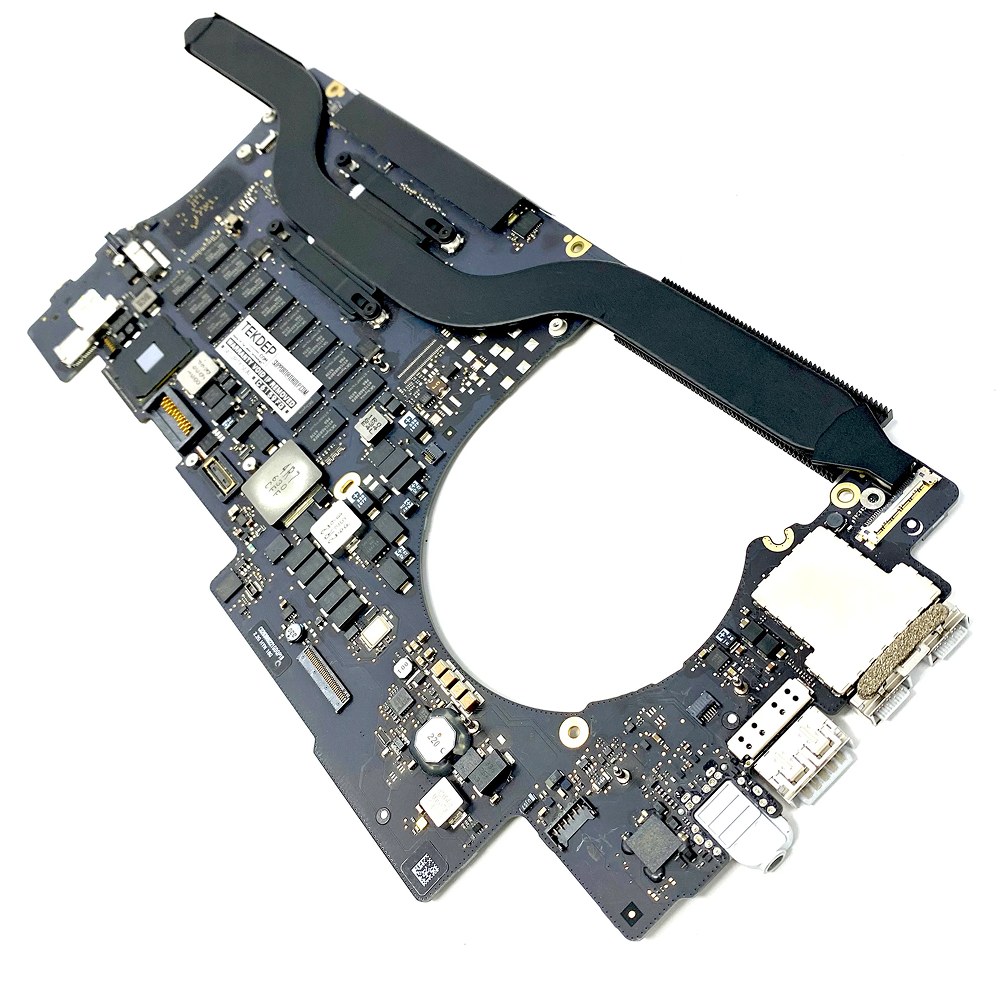
2016 Apple 15" MacBook Pro Touch-Bar Logic Board 2.7Ghz i7 16Gb A1707 512GB , With Dual Graphics Radeon Pro 2016 Apple 15″ MacBook Pro Touch-Bar Logic Board 2.7Ghz i7 16Gb A1707 512GB , With Dual Graphics Radeon Pro
