
Genuine-spec touchpad flex cable for MacBook Pro 13″ (Model A2289, 2020, Intel)—restores full Force Touch functionality, haptic feedback, and preci multi-touch gesture control. OEM-quality replacement for damaged or faulty original cables. Compatible With: MacBook Pro 13-inch (2020, Four Thunderbolt Ports, Model A2289, Model Identifier MacBookPro16,2) with Intel Core i5/i7 processors. Part Type: Touchpad flex cable only — does not include the trackpad housing, Taptic Engine, or mounting hardware. This is the OEM-style ribbon cable that connects the trackpad to the logic board. Function: Transmits: Touch input coordinates Force Touch pressure data Haptic feedback signals to the Taptic Engine Enables full macOS gesture support: Force Click, three-finger lookup, swipe navigation, pinch-to-zoom, and smooth cursor tracking. Touch input coordinates Force Touch pressure data Haptic feedback signals to the Taptic Engine Enables full macOS gesture support: Force Click, three-finger lookup, swipe navigation, pinch-to-zoom, and smooth cursor tracking. OEM-Quality Build: Matches Apple’s original specifications in: Cable length and routing path Connector pitch and ZIF latch design EMI shielding and flex durability Cable length and routing path Connector pitch and ZIF latch design EMI shielding and flex durability Common Use Cases: Replacing a torn, creased, or liquid-damaged original flex cable Completing a trackpad replacement when the original cable is unusable Fixing: Intermittent or erratic trackpad behavior Loss of Force Touch or haptic feedback Complete trackpad unresponsiveness Replacing a torn, creased, or liquid-damaged original flex cable Completing a trackpad replacement when the original cable is unusable Fixing: Intermittent or erratic trackpad behavior Loss of Force Touch or haptic feedback Complete trackpad unresponsiveness Intermittent or erratic trackpad behavior Loss of Force Touch or haptic feedback Complete trackpad unresponsiveness Installation Note: Requires full bottom case removal and battery disconnection. Cable routes under internal components (speaker, logic board)—must follow original path. Connects via ZIF (Zero Insertion Force) socket—align carefully, never force. Recommended for experienced or certified technicians only. Requires full bottom case removal and battery disconnection. Cable routes under internal components (speaker, logic board)—must follow original path. Connects via ZIF (Zero Insertion Force) socket—align carefully, never force. Recommended for experienced or certified technicians only. Important Compatibility Notes: ✅ Only for A2289 (13″, 4 Thunderbolt ports, 2020, Intel) ❌ Not compatible with: A2251 (2 Thunderbolt ports, 2020) A2338 (M1 MacBook Pro, 2020) Any MacBook Air or 14″/16″ MacBook Pro ✅ Only for A2289 (13″, 4 Thunderbolt ports, 2020, Intel) ❌ Not compatible with: A2251 (2 Thunderbolt ports, 2020) A2338 (M1 MacBook Pro, 2020) Any MacBook Air or 14″/16″ MacBook Pro A2251 (2 Thunderbolt ports, 2020) A2338 (M1 MacBook Pro, 2020) Any MacBook Air or 14″/16″ MacBook Pro

The HUAWEI IdeaHub B3 IHB3-65SA is a 65-inch intelligent collaboration device designed for meetings and hybrid workspaces. It combines a 4K interactive display with built-in audio, video, and whiteboard tools for smooth teamwork. Additionally, it supports cloud meetings and wireless sharing for flexible communication. Moreover, it uses a 4K UHD infrared touch screen with low writing latency of about 16 ms. Therefore, users can write and interact smoothly during presentations and discussions. Furthermore, it includes a built-in 4K camera with intelligent tracking. So, it automatically follows speakers and improves video meeting quality. It also integrates multiple microphones and speakers for clear sound pickup and output. In addition, it supports Wi-Fi 6 connectivity and BYOM (Bring Your Own Meeting). Therefore, users can connect their own devices easily and start meetings without extra setup. Also, it runs on Huawei’s collaboration platform with support for cloud meetings, wireless projection, and digital whiteboarding. Overall, the Huawei IdeaHub B3 65-inch delivers an all-in-one meeting solution with smart collaboration tools, strong connectivity, and interactive display performance for modern offices. Specifications: 65-inch 4K UHD infrared touch display Built-in 4K camera with intelligent tracking Low 16 ms writing latency for smooth interaction Wi-Fi 6 support with BYOM connectivity Integrated speakers and multi-microphone system

The Samsung S4 S40GD 24 inch IPS FHD monitor delivers clear visuals with a Full HD resolution and wide viewing angles. Additionally, the IPS panel ensures consistent colors across the screen, which makes it suitable for work and entertainment. The 100Hz refresh rate also improves motion clarity during videos and daily tasks. Moreover, the monitor includes Eye Saver Mode and flicker-free technology to reduce eye strain during long sessions. Therefore, it helps maintain comfort while working or studying for extended hours. The slim and ergonomic design also allows flexible adjustments for better positioning and productivity. Furthermore, it offers strong connectivity with HDMI and DisplayPort inputs, allowing easy connection to laptops and desktops. In addition, the monitor supports tilt, swivel, pivot, and height adjustments for improved comfort. Overall, the Samsung S4 S40GD 24 inch IPS FHD monitor is a reliable choice for everyday use. Specifications: 24 inch IPS panel delivers consistent colors and wide viewing angles for clear visuals 100Hz refresh rate provides smoother motion for videos and everyday tasks Eye Saver Mode and flicker free technology help reduce eye strain during long use Ergonomic design supports height, tilt, swivel, and pivot adjustments for comfort Multiple connectivity options including HDMI and DisplayPort for flexible setup Height Adjustable Stand

Display Panel Size (inch) : 27 Aspect Ratio : 16:9 Display Viewing Area (H x V) : 597.888 x 336.312 mm Display Surface : Non-Glare Backlight Type : LED Panel Type : IPS Viewing Angle (CR≧10, H/V) : 178°/ 178° Pixel Pitch : 0.311mm Resolution : 1920×1080 Color Space (sRGB) : 100% Brightness (Typ.) : 250cd/㎡ Contrast Ratio (Typ.) : 1000:1 ASUS Smart Contrast Ratio (ASCR) : 100000000:1 Display Colors : 16.7M Response Time : 1ms MPRT Refresh Rate (Max) : 144Hz Flicker-free : Yes Video Feature Trace Free Technology : Yes GameVisual : Yes Color Temp. Selection : Yes(4 modes) GamePlus : Yes HDCP : Yes VRR Technology : FreeSync™ Premium GameFast Input technology : Yes Shadow Boost : Yes Low Blue Light : Yes Audio Feature Speaker : Yes(2Wx2) I/O Ports DisplayPort 1.2 x 1 HDMI(v1.4) x 2 Earphone Jack : Yes Signal Frequency Digital Signal Frequency : HDMI: 30~160 KHz (H) / 48~ 144 Hz (V) DisplayPort: 30~160 KHz (H) / 48~144 Hz (V) Power Consumption Power Consumption : <18W* Power Saving Mode : <0.5W Power Off Mode : <0.3W Voltage : 100-240V, 50/60Hz Mechanical Design Tilt : Yes (+22° ~ -5°) VESA Wall Mounting : 75x75mm Kensington Lock : Yes Dimensions (Esti.) Phys. Dimension with Stand (W x H x D) : 612.6x431x213 mm Phys. Dimension without Stand (W x H x D) : 612.6 x 362.5 x 37.7 mm Box Dimension (W x H x D) : 692 x 499 x 183 mm Weight (Esti.) Net Weight with Stand : 3.9 Kg Net Weight without Stand : 3.5 Kg Gross Weight : 6.1 Kg Accessories (vary by regions) DisplayPort cable HDMI cable Power adapter Power cord Quick start guide Warranty Card 90LM05S1-B01E70 manufacturer link

Looking for a high-quality monitor to elevate your viewing experience? Meet the BenQ EW3270U 32″ 4K HDR Monitor. With its impressive 4K resolution, every detail comes to life with stunning clarity. Firstly, let’s talk about the brilliance of HDR technology. Experience richer colors and deeper contrasts that make images and videos pop off the screen. Whether you’re watching movies, gaming, or editing photos, HDR brings content to life like never before. Moreover, the spacious 32-inch screen provides ample space for multitasking and immersive entertainment. Whether you’re working on spreadsheets or enjoying your favorite games, you’ll appreciate the expansive display and crisp visuals. Additionally, the BenQ EW3270U offers advanced eye care features to reduce eye strain during long hours of use. With flicker-free technology and low blue light modes, you can enjoy extended viewing sessions comfortably. Furthermore, connectivity options abound with multiple ports, including HDMI, DisplayPort, and USB-C. Easily connect your devices and enjoy seamless integration with laptops, desktops, gaming consoles, and more. In conclusion, the BenQ EW3270U 32″ 4K HDR Monitor is the perfect choice for those seeking superior visual quality and immersive viewing experiences. Whether you’re a professional creator or a casual user, this monitor delivers unmatched performance and versatility. Upgrade your setup today and see the difference for yourself. Specifications: Display : 31.5″ VA HDR 10 Resolution : 4K UHD Refresh Rate : 60Hz Response Rate : 4 ms Built-in Speaker : 2Wx2

HP P22V G5 Monitor Overview The HP P22V G5 is a 22-inch Full HD monitor designed for daily work and home use. It offers reliable performance and a clean design. As a result, it suits offices, students, and remote workers. 22-Inch Full HD Display This monitor features a 22-inch Full HD resolution. Therefore, text appears sharp and easy to read. Moreover, images look clear and well-defined. Because of this, it supports long working sessions comfortably. In addition, the screen size fits well on most desks. As a result, it saves space without sacrificing clarity. 75Hz Refresh Rate for Smooth Viewing The monitor supports a 75Hz refresh rate. As a result, scrolling feels smoother than standard displays. Furthermore, everyday tasks look more fluid. This makes it suitable for office work and casual entertainment. Eye Comfort and Productivity The HP P22V G5 includes eye comfort features. Therefore, it helps reduce eye strain during long use. In addition, the anti-glare screen improves visibility. As a result, users stay focused throughout the day. Connectivity and Compatibility This monitor includes HDMI and VGA ports. As a result, it connects easily to modern and older devices. Moreover, it supports a wide range of PCs and laptops. Therefore, setup is quick and simple. Design and Mounting Options The monitor features a clean and professional design. In addition, it supports VESA mounting. As a result, users can create a flexible workspace. Everyday Use and Reliability This monitor delivers stable performance for daily tasks. Moreover, it focuses on durability and efficiency. In conclusion, it is a practical choice for work environments. Specifications: Display : 21.45″ VA Resolution : FHD (1920 X 1080) Refresh Rate : 75 Hz Response Rate : 5ms GtG

A next-generation Wi-Fi 6 router delivering AX1500 speeds (1201 Mbps on 5GHz + 300 Mbps on 2.4GHz), 4 high-performance antennas, and Gigabit ports—ideal for 2–3 bedroom homes needing faster speeds, lower latency, and seamless connectivity for 100+ devices. The TP-Link Archer AX12 is a powerful Wi-Fi 6 (802.11ax) dual-band router engineered for modern connected homes. With a combined speed of AX1500—delivering up to 1201 Mbps on the 5GHz band and 300 Mbps on the 2.4GHz band—it provides significantly faster throughput, reduced latency, and improved capacity compared to older Wi-Fi standards. Powered by a 1 GHz dual-core processor and equipped with four fixed high-performance antennas, the Archer AX12 delivers strong, stable coverage throughout 2–3 bedroom homes, eliminating dead zones and buffering. Advanced beamforming technology focuses Wi-Fi signals directly toward connected devices for clearer, stronger connections—even at greater distances. OFDMA + MU-MIMO: Efficiently serves multiple devices simultaneously—perfect for households with smartphones, laptops, smart TVs, and IoT devices connected at once (supports 100+ devices). www.wifi-stock.com WPA3 Security: Next-generation encryption for stronger protection against unauthorized access and cyber threats. www.amazon.in Backward Compatibility: Works seamlessly with all existing Wi-Fi devices (802.11a/b/g/n/ac/ax). www.tp-link.com Wired connectivity includes one Gigabit WAN port and three Gigabit LAN ports for high-speed connections to desktops, game consoles, NAS devices, or smart TVs. Parental Controls: Set schedules, filter content, and manage screen time per device QoS (Quality of Service): Prioritize bandwidth for video calls, gaming, or streaming TP-Link Tether App: Easy setup and management from your smartphone

The Horion Interactive Flat Panel 98″ EDLA delivers immersive collaboration and boardroom-grade display features. It features a 98″ 4K UHD (3840×2160) LED touchscreen with up to 50-point Ultra Precision IR touch. Moreover, Android 13 with Google EDLA support ensures seamless access to Google Meet, Drive, and Docs. Also, the 48 MP AI camera auto frames active speakers for effective video conferencing. In addition, a full 8-array omnidirectional microphone system captures voice clearly from up to 12 m. Besides that, built-in audio includes two 20 W speakers and a 20 W bass speaker for rich sound. Furthermore, the panel uses dual‑band Wi‑Fi 6, Bluetooth 5.3, and NFC for wireless versatility. Therefore, mirroring and file sharing is fast and simple vianative casting or Miracast. It also offers USB‑C (video, audio, charge, touch), HDMI in/out, DisplayPort, VGA, Ethernet, and USB ports. Also, an ultra-fast response time (8 ms) keeps touch and annotation smooth. Plus, brightness is around 380–450 cd/m² and viewing angles reach 178° horizontally and vertically. The CPU combines quad-core A73 + quad-core A53 with Mali GPU, backed by 8 GB RAM + 128 GB storage. Importantly, the panel includes wireless dongle and smart pen for multi-user collaboration. Also, EDLA certification enables Google ecosystem integration including calendar, voting, and whiteboard apps. Moreover, touch latency below 30 ms ensures writing feels natural on-screen. For content sharing, the system supports built‑in voting, timers, and dual-screen mirroring control. Then, remote support and firmware updates keep the board secure and up to date. As a result, classrooms, boardrooms, and hybrid teams benefit from dynamic collaboration. In conclusion, the Horion 98″ EDLA provides advanced interactivity, strong WLAN, high-quality AV, and enterprise-level smart features. Finally, it is ideal for large-scale meetings, teaching, or creative teamwork. Specifications: Display : 98″ Resolution : 4K UHD 2160p Refresh Rate : 60Hz Ram : 8GB Storage : 128GB OS : Android 13.0

BenQ RE8604 86” 4K UHD Interactive Flat Panel is a large interactive display designed for classrooms, meeting rooms, and training environments. It supports touch interaction, built-in Android system, and 4K resolution for collaboration and presentations. It features an 86-inch IPS panel with 3840 × 2160 4K UHD resolution. Therefore, it delivers sharp visuals and wide viewing angles for group use. In addition, it supports up to 40-point multi-touch input for writing and collaboration. Moreover, it runs an Android-based system (EDLA-supported depending on configuration). As a result, users can open apps, use whiteboard tools, and present content directly on the display without an external PC. The display includes anti-glare glass. Therefore, it remains readable in bright environments. In addition, it supports 4K 60Hz output for smooth visuals during presentations and video playback. Furthermore, it includes HDMI, USB, USB-C, LAN, and OPS slot connectivity. As a result, it works with laptops, external PCs, and modular computing systems. It also includes built-in speakers for classroom and meeting audio. Therefore, it supports presentations without extra sound systems. Finally, the BenQ RE8604 delivers a large 4K interactive workspace with multi-touch control and flexible connectivity for education and business use. Specifications: Display: 86-inch IPS panel with 3840×2160 4K UHD resolution Touch: Up to 40-point multi-touch support for collaboration System: Android-based interactive platform (EDLA support depending on model) Connectivity: HDMI, USB, USB-C, LAN, and OPS slot Display: Anti-glare screen with 4K 60Hz smooth output

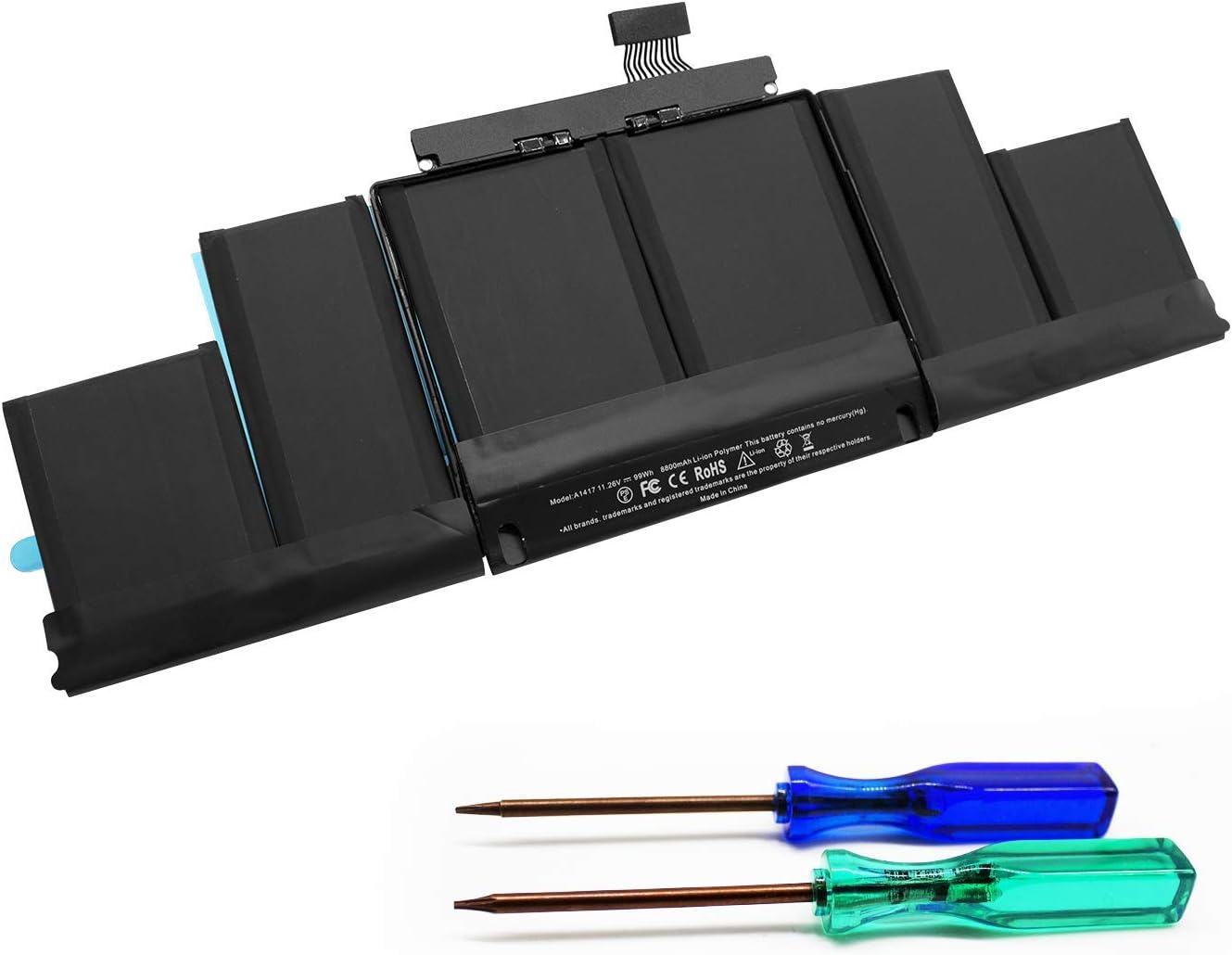
DELL 357F9 11.1V or 11.4V 74Wh Battery For DELL Inspiron 15 5000 Gaming 5576 5577 ,15 7000 Gaming 7557 7559 7566 7567 Laptops Alternant Part Number: 357F9 71JF4 0GFJ6 071FJ4 00GFJ6 P65F001 P57F003 About this item Battery Type:6 cell Li-Polymer Best Quality Voltage &Capacity :11.1V 74Wh 6330mAh , 11.4V 74Wh 6480mAh SANISI Concept: The customer is god, Product Quality and Service must be perfect! We will let every customer feel satisfied Package Contents: 1 pcs Brand New Battery

Acer Nitro VG270bmipx 27 Inch Screen size 27 Inches Display resolution maximum 1920 x 1080 Pixels Brand Acer Special feature AMD FreeSync, Blue Light Filter, Frameless, Tilt Adjustment, Flicker-Free Refresh rate 75 Hz Connectivity technology VGA + HDMI + DP + Audio in/out Aspect ratio 16:9 Specific uses for product Personal, Gaming Response time 1 Milliseconds Colour Black/Red

Introducing the Samsung Odyssey G5 27—a collection of monitors designed to redefine your visual experience and meet the demands of modern users. Embark on a journey of visual excellence with cutting-edge features that distinguish the Samsung Monitor Series. From vibrant displays to advanced technologies, these monitors ensure a superior and immersive viewing experience for users. Beneath their sleek and modern exteriors lies a commitment to seamless functionality. The Samsung Monitor Series is crafted to deliver not only stunning visuals but also user-friendly interfaces, making them an essential tool for both work and entertainment. Delve into the seamless integration of advanced technologies, ensuring these monitors adapt effortlessly to the evolving demands of modern content consumption. Whether you’re working on detailed tasks, streaming high-definition content, or gaming, the Samsung Monitor Series caters to diverse needs. Portability may not be the focus, but these monitors excel in providing flexible setups for various environments. With their slim profiles and versatile designs, the Samsung Monitor Series ensures your viewing experience remains top-tier. In conclusion, elevate your viewing experience with the Samsung Odyssey G5 27. Immerse yourself in cutting-edge features, vibrant displays, and sleek designs. Choose the Samsung Monitor Series for a monitor lineup that seamlessly blends advanced technology with visual brilliance. Specifications: Display : 27″ IPS Resolution : 2560×1440 Response Time : 1ms Refresh Rate : 165Mhz Part Number : LS27AG500PMXZN

WiWU A821CH 8‑in‑1 Stand & Dock – A foldable aluminum laptop stand with a built-in 8‑port USB‑C dock (two USB‑A, two USB‑C, HDMI 4K30, SD/TF, Gigabit Ethernet, PD 100 W).Enhances comfort, cooling, and functionality—perfect for decluttered, professional work setups. Model: WiWU A821CH Design: Sturdy aluminum alloy stand with foldable, portable design, hollow surface for cooling, and silicone pads to prevent slips Dimensions & Weight: Compact when folded (~400 g in aluminum) Docking Hub Ports: 2 × USB-C ports 2 × USB‑A 3.0 ports 1 × HDMI (up to 4K@30 Hz) SD + micro‑SD card slots 1 × RJ‑45 Gigabit Ethernet (1000 Mbps) Docking Hub Ports: 2 × USB-C ports 2 × USB‑A 3.0 ports 1 × HDMI (up to 4K@30 Hz) SD + micro‑SD card slots 1 × RJ‑45 Gigabit Ethernet (1000 Mbps) Power Delivery: USB-C PD 3.0 supports up to 100 W—can charge a laptop while using other ports Connectivity: HDMI supports up to 4K@30 Hz; Ethernet up to Gigabit speed Stand Features: Detachable base—can use stand and hub together or separately, with adjustable ergonomic angles and vents for airflow Durability: Aluminum alloy with frosted texture, scratch-resistant finish, tested to executive standards

Philips 27E1N5900R 27-inch 4K monitor delivers ultra-clear visuals and modern connectivity for work and creative tasks. It focuses on high resolution, accurate colors, and USB-C convenience for clean setups. Additionally, it features a 27-inch IPS panel with 4K UHD resolution (3840 × 2160). This provides sharp detail and high pixel density, so it improves precision in design, editing, and multitasking. Moreover, it supports VESA DisplayHDR 400. As a result, it enhances brightness, contrast, and color depth for more lifelike visuals. The monitor includes USB-C connectivity with power delivery up to 65W. Therefore, it allows video, data, and charging through a single cable for a clean workspace. In addition, it uses IPS technology with wide 178° viewing angles. This ensures consistent colors and image quality from different positions. Furthermore, it supports MultiView with Picture-in-Picture and Picture-by-Picture. So it enables dual device viewing for efficient multitasking. It also includes LowBlue Mode and Flicker-Free technology. These features reduce eye strain during long working sessions. Philips 27E1N5900R 27-inch 4K monitor provides sharp visuals, flexible Specifications: 27-inch IPS panel with 3840 × 2160 4K UHD resolution DisplayHDR 400 for improved brightness and contrast USB-C with up to 65W power delivery 4ms GtG response time with wide 178° viewing angles MultiView support with PIP and PBP multitasking

Arabic Keyboard Cover Skin for MacBook Air 13'' (A1369/A1466, NO Touch ID) 2012 -2017 /MacBook Pro 13" 15'' 2013-2015 with or w/out Retina Display Ultra Thin Silicone Keyboard Protector (Black) Arabic Keyboard Cover Skin for MacBook Air 13” (A1369/A1466, NO Touch ID) 2012 -2017 /MacBook Pro 13″ 15” 2013-2015 with or w/out Retina Display Ultra Thin Silicone Keyboard Protector (Black) About this item COMPATIBLE WITH: 2015 and before 2015 version Macbook: 1) MacBook Air 13″ (Models: A1369 and A1466); 2) MacBook Pro 13.3″ (Model: A1278); 3) MacBook Pro 13.3″ with Retina Display (Models: A1502 and A1425, 2013-2012 released); 4) MacBook Pro 15″ with Retina Display (Model: A1398, 2013-2012 released); 5) MacBook Pro 15.4″ Model: A1286 [√] MORE PROTECTION for KEYBOARD: waterproof, dust-proof and dirt-proof design can prevent liquid, dust, cigarette ash, biscuit crumbs falling onto your keyboard to affect your keyboard’s life. [√] ACCURATE KEYS: every key is specially molded, manufactured to the quality available. Flexible, this cover is easy to apply and remove for cleaning [√] SOFT & ULTRA SKIN: ultra thin silicone keyboard cover skin, made it easier for typing. Soft keyboard protector can weaken the sound in typing [XX] ATTENTION!!: NOT FIT FOR: 2020-2016 Released Macbook Pro 13 inch 15 inch with Touch Bar/2020-2018 Released: Macbook Air 13-Inch. You can find the model number on the bottom of the laptop

Compact, affordable all-in-one inkjet printer for home and small office use—print, scan, and copy in color with easy wireless setup, mobile printing, and HP’s efficient ink system.

AOC Screen 23.8″ VA Panel Model name 24B2XHM Panel 23.8″ (VA) Pixel Pitch (mm) 0.2745 (H) × 0.2745 (V) Effective Viewing Area (mm) 527.04 (H) × 296.46 (V) Brightness (typical) 250 cd/m² Contrast Ratio 3000 : 1 (Typical) 20 Million : 1 (DCR) Response Time 6ms (GtG (BW)) Viewing Angle 178° (H) / 178° (V) (CR > 10) Color Gamut NTSC 80% (CIE1976) / sRGB 101% (CIE1931) Color Accuracy – Optimum Resolution 1920 × 1080 @ 75Hz – HDMI 1920 × 1080 @ 60Hz – VGA Display Colors 16.7 Million Signal Input VGA × 1, HDMI 1.4 × 1 HDCP Version – USB Hub no Power Supply 19V DC, 1.31A Power Consumption (typical) 21W Speakers no Line in & Earphone – Wall-Mount 100mm × 100mm Adjustable Stand Tilt: -5° ~ 20° Product without Stand (mm) 320.94 (H) × 539.47 (W) × 37.6 (D) Product with Stand (mm) 418.35 (H) × 539.47 (W) × 170.94 (D) Product without Stand (kg) 2.41 Product with Stand (kg) 2.73 Cabinet Color Black Regulatory Approvals CE / FCC Specifications: AOC Screen 23.8″ VA Model name 24B2XHM Panel 23.8″ (VA) Pixel Pitch (mm) 0.2745 (H) × 0.2745 (V) Effective Viewing Area (mm) 527.04 (H) × 296.46 (V) 1 Year Warranty Manufacturer Link

Genuine-spec touchpad flex cable for MacBook Pro 15″ (Model A1706 – 2017 and A1989 – 2018/2019)—restores full Force Touch functionality, haptic feedback, and precise multi-touch gesture control during trackpad repair or replacement. Compatible With: MacBook Pro 15″ (2017) – Model A1706 (Model Identifier: MacBookPro14,3) MacBook Pro 15″ (2018–2019) – Model A1989 (Model Identifier: MacBookPro15,2) ✅ Note: Apple used the same trackpad assembly and flex cable across both A1706 and A1989 15″ models—making this part interchangeable between them. MacBook Pro 15″ (2017) – Model A1706 (Model Identifier: MacBookPro14,3) MacBook Pro 15″ (2018–2019) – Model A1989 (Model Identifier: MacBookPro15,2) ✅ Note: Apple used the same trackpad assembly and flex cable across both A1706 and A1989 15″ models—making this part interchangeable between them. ✅ Note: Apple used the same trackpad assembly and flex cable across both A1706 and A1989 15″ models—making this part interchangeable between them. Part Type: Touchpad flex cable only — does not include the trackpad housing, Taptic Engine, or mounting hardware. This is the OEM-style ribbon cable connecting the trackpad to the logic board. Function: Transmits: Touch input coordinates Force Touch pressure data Haptic feedback signals to the Taptic Engine Enables full macOS gesture support: Force Click, three-finger lookup, swipe navigation, pinch-to-zoom, and smooth cursor tracking. Touch input coordinates Force Touch pressure data Haptic feedback signals to the Taptic Engine Enables full macOS gesture support: Force Click, three-finger lookup, swipe navigation, pinch-to-zoom, and smooth cursor tracking. OEM-Quality Build: Matches Apple’s original in: Cable length and routing Connector pitch and ZIF latch design EMI shielding and flex durability Cable length and routing Connector pitch and ZIF latch design EMI shielding and flex durability Common Use Cases: Replacing a torn, creased, or liquid-damaged original flex cable Completing a trackpad replacement when the original cable is compromised Fixing intermittent trackpad behavior, loss of Force Touch, or complete unresponsiveness Replacing a torn, creased, or liquid-damaged original flex cable Completing a trackpad replacement when the original cable is compromised Fixing intermittent trackpad behavior, loss of Force Touch, or complete unresponsiveness Installation Note: Requires full bottom case removal and battery disconnection. Cable routes under internal components near the right speaker and logic board. Connects via a ZIF (Zero Insertion Force) socket—must be aligned carefully and latched gently. Recommended for experienced or certified technicians only. Requires full bottom case removal and battery disconnection. Cable routes under internal components near the right speaker and logic board. Connects via a ZIF (Zero Insertion Force) socket—must be aligned carefully and latched gently. Recommended for experienced or certified technicians only.

Genuine-spec touchpad flex cable for MacBook Pro 16″ (Model A2141, 2019, Intel)—essential for restoring full Force Touch functionality, haptic feedback, and precise multi-touch gesture control during trackpad repair or replacement. Compatible With: MacBook Pro 16-inch (2019, Model A2141) with Intel Core i7/i9 processors (Model Identifier: MacBookPro16,1) (Note: A2141 is the non-base configuration of the 2019 16″ MacBook Pro—typically higher-end Intel models.) Part Type: Touchpad flex cable only—does not include the trackpad housing, Taptic Engine, or mounting hardware. This is the OEM-style ribbon cable that connects the trackpad to the logic board. Function: Transmits touch coordinates, Force Touch pressure data, and haptic feedback signals—critical for macOS gestures (e.g., Force Click, three-finger lookup, pinch-to-zoom) and Taptic Engine responsiveness. OEM-Quality Construction: Replicated to Apple’s exact specifications—including cable length, connector pitch, EMI shielding, and bend radius—ensuring reliable signal integrity and long-term durability. Common Use Cases: Replacing a torn, creased, or liquid-damaged original flex cable Completing a trackpad replacement when the original cable is compromised Fixing intermittent trackpad behavior, loss of Force Touch, or complete unresponsiveness Replacing a torn, creased, or liquid-damaged original flex cable Completing a trackpad replacement when the original cable is compromised Fixing intermittent trackpad behavior, loss of Force Touch, or complete unresponsiveness Installation Note: Requires full disassembly of the bottom case, speaker removal, and careful routing beneath the battery and logic board. Connectors use ZIF (Zero Insertion Force) sockets—must be aligned and latched gently. Recommended for certified or professional repair technicians only. Important: This is flex cable only—not a complete trackpad assembly. Must be used with the original or compatible A2141 trackpad and Taptic Engine. Not compatible with M1 MacBook Pro 16″ (A2485), 14″ models (A2442), or any MacBook Air. This is flex cable only—not a complete trackpad assembly. Must be used with the original or compatible A2141 trackpad and Taptic Engine. Not compatible with M1 MacBook Pro 16″ (A2485), 14″ models (A2442), or any MacBook Air. Model Verification: Confirm your device is MacBook Pro A2141 (16″, 2019, Intel) via > About This Mac > Model Identifier (should read MacBookPro16,1).

Verbatim Vi3000 512 GB NVMe SSD — high-speed PCIe 4.0 storage for desktops & laptops.• Read up to 5,000 MB/s • Write up to 3,200 MB/s • Compact M.2 2280 form factorInterface: PCIe Gen 4 × 4 NVMe 1.4 | Warranty: 3 Years | SKU: Vi3000-512G 🟣 Full Details : The Verbatim Vi3000 512 GB PCIe NVMe M.2 SSD delivers blazing-fast performance for everyday computing, gaming, and creative work. Using the latest PCIe Gen 4 × 4 NVMe 1.4 interface, it achieves read speeds up to 5,000 MB/s and write speeds up to 3,200 MB/s, making it a great upgrade for faster boot times and quicker app loading. PCIe Gen 4 × 4 NVMe 1.4 interface for ultra-fast transfer speeds Up to 5,000 MB/s read and 3,200 MB/s write performance Compact M.2 2280 design for desktops & laptops Low power consumption and quiet operation 3-year limited warranty with Verbatim reliability Works with most modern desktops and laptops that support M.2 NVMe (PCIe) drives. Fully backward compatible with PCIe 3.0 systems (at lower speeds). Verbatim Vi3000 512 GB M.2 NVMe SSD Quick installation & warranty guide
