
Introducing the Samsung Odyssey G6 27—a collection of monitors designed to redefine your visual experience and meet the demands of modern users. Embark on a journey of visual excellence with cutting-edge features that distinguish the Samsung Monitor Series. From vibrant displays to advanced technologies, these monitors ensure a superior and immersive viewing experience for users. Beneath their sleek and modern exteriors lies a commitment to seamless functionality. The Samsung Monitor Series is crafted to deliver not only stunning visuals but also user-friendly interfaces, making them an essential tool for both work and entertainment. Delve into the seamless integration of advanced technologies, ensuring these monitors adapt effortlessly to the evolving demands of modern content consumption. Whether you’re working on detailed tasks, streaming high-definition content, or gaming, the Samsung Monitor Series caters to diverse needs. Portability may not be the focus, but these monitors excel in providing flexible setups for various environments. With their slim profiles and versatile designs, the Samsung Monitor Series ensures your viewing experience remains top-tier. In conclusion, elevate your viewing experience with the Samsung Odyssey G6 27. Immerse yourself in cutting-edge features, vibrant displays, and sleek designs. Choose the Samsung Monitor Series for a monitor lineup that seamlessly blends advanced technology with visual brilliance. Specifications: Display : 27″ VA Resolution : 2560×1440 Response Time : 1ms Refresh Rate : 240Mhz Part Number : LS27BG650EMXUE

The Samsung 75″ QLED Q8F 4K Vision AI Smart TV (2025) | QA75Q8FAAUXTW delivers a premium viewing experience with advanced QLED display technology. It produces bright, sharp, and colorful images, so movies, sports, and games look highly immersive on the large 75-inch screen. QLED technology uses Quantum Dot enhancement to improve color accuracy and brightness performance. As a result, visuals appear more vibrant and balanced in both dark and bright scenes. This helps maintain consistent picture quality across different types of content and lighting conditions. Vision AI enhances picture and sound in real time. It analyzes each scene and automatically adjusts brightness, sharpness, and color for optimal viewing. Therefore, the TV consistently delivers improved visuals without manual tuning. In addition, AI upscaling improves lower-resolution content closer to 4K quality for better clarity and detail. HDR support expands contrast and color depth, making visuals more dynamic and lifelike. Fast motion handling also improves clarity, which enhances sports and action content by reducing blur and improving smoothness. The Smart TV platform provides easy access to streaming apps, gaming features, and smart home controls. It runs smoothly and allows quick switching between apps. In addition, the slim design with thin bezels gives the Samsung 75 QLED Q8F 4K Vision AI Smart TV (2025) | QA75Q8FAAUXTW a modern and premium appearance for large living spaces. Overall, this Samsung QLED TV combines strong brightness performance, AI optimization, and smart connectivity for a powerful home entertainment experience. Specifications: QLED technology delivers bright and vibrant picture quality 75-inch 4K display provides immersive viewing experience Vision AI enhances picture and sound automatically in real time HDR improves contrast, brightness, and color depth Smart TV platform supports apps, streaming, and smart features

The Dell UltraSharp 34 Curved Thunderbolt Hub Monitor transforms your workspace with stunning visuals and seamless connectivity. Ideal for professionals and creatives, this monitor elevates your productivity and entertainment experiences. With its 34-inch curved screen, the Dell UltraSharp Monitor provides an immersive viewing experience. The WQHD resolution ensures sharp and vibrant visuals, making it perfect for detailed work and multimedia consumption. Connectivity is a breeze with the Dell UltraSharp 34 Curved Thunderbolt Hub Monitor. Featuring Thunderbolt 3, USB-C, HDMI, and DisplayPort options, it supports a wide range of devices for a clutter-free workspace. The integrated Thunderbolt hub enhances your workflow by providing power delivery, data transfer, and video output all through a single cable. This simplifies your setup and reduces cable clutter. Designed with comfort in mind, the Dell UltraSharp Monitor offers adjustable height, tilt, and swivel options. You can easily customize your viewing position for maximum comfort during long hours of use. The monitor’s advanced IPS technology ensures consistent color accuracy and wide viewing angles. This makes it ideal for tasks requiring precise color reproduction, such as graphic design and photo editing. Enjoy peace of mind with Dell’s ComfortView feature, which reduces harmful blue light emissions. This helps minimize eye strain, allowing you to work comfortably for extended periods. In conclusion, the Dell UltraSharp 34 Curved Thunderbolt Hub Monitor combines stunning visuals, versatile connectivity, and ergonomic design. Enhance your workspace with this exceptional monitor and boost your productivity and creativity. Specifications: Display : 34″ IPS Resolution : 3440 x 1440 Refresh Rate : 120Hz Response Rate : 5ms

The HUAWEI IdeaHub B3 IHB3-65SA is a 65-inch intelligent collaboration device designed for meetings and hybrid workspaces. It combines a 4K interactive display with built-in audio, video, and whiteboard tools for smooth teamwork. Additionally, it supports cloud meetings and wireless sharing for flexible communication. Moreover, it uses a 4K UHD infrared touch screen with low writing latency of about 16 ms. Therefore, users can write and interact smoothly during presentations and discussions. Furthermore, it includes a built-in 4K camera with intelligent tracking. So, it automatically follows speakers and improves video meeting quality. It also integrates multiple microphones and speakers for clear sound pickup and output. In addition, it supports Wi-Fi 6 connectivity and BYOM (Bring Your Own Meeting). Therefore, users can connect their own devices easily and start meetings without extra setup. Also, it runs on Huawei’s collaboration platform with support for cloud meetings, wireless projection, and digital whiteboarding. Overall, the Huawei IdeaHub B3 65-inch delivers an all-in-one meeting solution with smart collaboration tools, strong connectivity, and interactive display performance for modern offices. Specifications: 65-inch 4K UHD infrared touch display Built-in 4K camera with intelligent tracking Low 16 ms writing latency for smooth interaction Wi-Fi 6 support with BYOM connectivity Integrated speakers and multi-microphone system

The Lenovo L24E-30 24″ 60Hz Monitor offers a perfect blend of style and performance for your computing needs. Whether you’re working, gaming, or streaming, this monitor delivers an exceptional visual experience. With its 24-inch Full HD display, the Lenovo L24E-30 provides crisp and clear visuals. Enjoy stunning detail and vibrant colors that bring your content to life, whether you’re editing photos or watching videos. The 60Hz refresh rate of the Lenovo L24E-30 ensures smooth and fluid motion, reducing screen tearing and ghosting. This makes it ideal for fast-paced games and dynamic videos, offering a more immersive experience. Designed with a slim and sleek profile, the Lenovo L24E-30 adds a modern touch to any workspace. Its narrow bezels create a seamless multi-monitor setup, allowing you to expand your view effortlessly. Featuring AMD FreeSync technology, the Lenovo L24E-30 synchronizes the monitor’s refresh rate with your graphics card. This reduces screen stuttering and provides a smoother gaming experience, even during intense action scenes. The Lenovo L24E-30 24″ 60Hz Monitor is equipped with multiple connectivity options, including HDMI and VGA ports. This ensures compatibility with a wide range of devices, making it a versatile addition to your setup. For comfortable viewing, the Lenovo L24E-30 includes eye-care features like low blue light and flicker-free technology. These features help reduce eye strain during long hours of use, enhancing your overall comfort. In conclusion, the Lenovo L24E-30 24″ 60Hz Monitor combines stylish design, smooth performance, and eye-care features for an outstanding viewing experience. Upgrade to the Lenovo L24E-30 today and enjoy enhanced productivity and entertainment. Specifications: Display : 24″ VA Resolution : FHD 1920 x 1080 Refresh Rate : 60Hz Response Rate : 4ms

Soft Silicone Arabic Language Keyboard Cover Skin Compatible with MacBook Pro 13 inch and 15 inch with Touch Bar Models: A2159 / A1989 / A1990 / A1706/ A1707 - Release 2019 2018 2017 2016 - Black Soft Silicone Arabic Language Keyboard Cover Skin Compatible with MacBook Pro 13 inch and 15 inch with Touch Bar Models: A2159 / A1989 / A1990 / A1706/ A1707 – Release 2019 2018 2017 2016 – Black Perfect compatible for MacBook Pro 13 inch with Touch Bar (models: A2159, A1989, A1706 – MUHN2LL/A, MUHQ2LL/A, MUHP2LL/A, MUHR2LL/A, MV962LL/A, MV992LL/A, MV972LL/A, MV9A2LL/A, MR9Q2LL/A, MR9R2LL/A, MPXV2LL/A, MPXX2LL/A, MPXW2LL/A, MPXY2LL/A, MNQF2LL/A, MNQG2LL/A, MLH12LL/A, MLVP2LL/A — MacBook Pro 15 inch with Touch Bar, models: A1990, A1707 – MV902LL/A, MV922LL/A, MV912LL/A, MV932LL/A, MR932LL/A, MR942LL/A, MPTR2LL/A, MPTU2LL/A, MPTT2LL/A, MPTV2LL/A, MLH32LL/A, MLW72LL/A, MLH42LL/A. Please compare your MacBook keyboard layout and model with product pictures to avoid of buying incompatible one! Any compatible issues, please feel free to contact us at any time. NOTICE: If the “Enter/Return” key looks like Arabic number “7”, this product will not fit your laptop! It ONLY fits US version, the “Enter” key is a rectangle. – Please check the model number “A1xxx” on the back of your MacBook before you purchase this keyboard cover! Arabic Language, super soft silicone, touches smooth and comfortable, This ultra thin keyboard protector helps protect your laptop keyboard against spills, dust, coffee, tea or liquor, and other contaminants because of waterproof and dustproof design. Durable, removable and washable. Easy to apply and remove for cleaning or disinfecting. Extra slim silicone skin, made it easier for typing. Keywords are clearly printed on the keyboard cover.

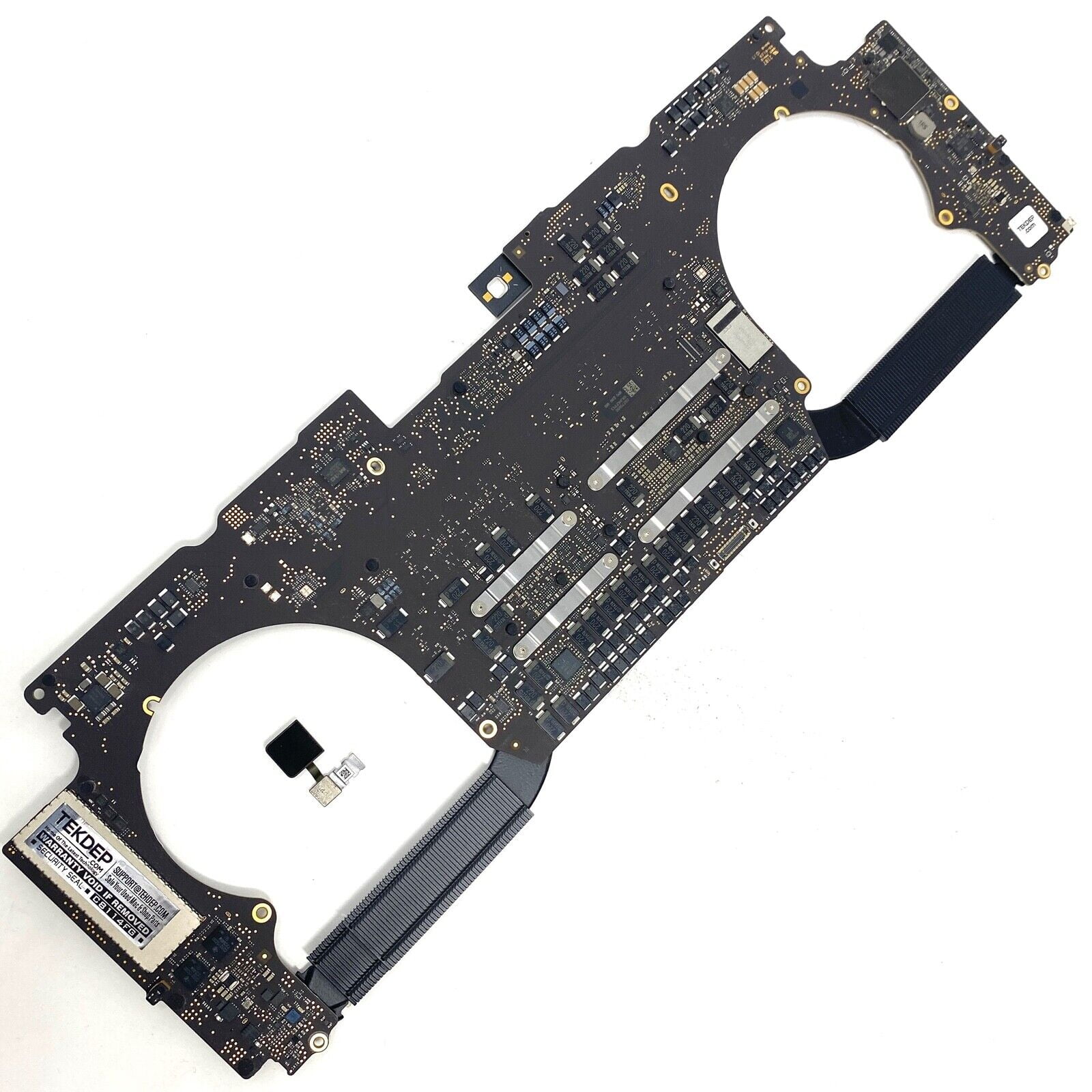
MacBook Pro Retina 13' Early 2015 A1502 i5 8GB Logic Board MacBook Pro Retina 13′ Early 2015 A1502 i5 8GB Logic Board

The Samsung 27″ 120Hz Essential S3 Monitor LS27F320GAMXUE delivers clear and smooth visuals with a Full HD (1920 × 1080) resolution and 120 Hz refresh rate, which helps reduce motion blur and lag during fast‑moving scenes. Additionally, the IPS panel provides wide viewing angles and consistent color across the screen, making it suitable for work, entertainment, and casual gaming. The monitor includes Game Picture Mode to optimize contrast and color settings for different game genres. Moreover, Samsung equips this monitor with Eye Saver Mode and Flicker Free technology to help reduce eye strain during extended use. Therefore, users can stay comfortable during long work or play sessions. The design features a modern, slim bezel look that enhances any desk setup. Connectivity includes two HDMI 1.4 ports for flexible device connection. Specifications: Display : 27″ Resolution : 1920 x 1080 FHD Refresh Rate : 120Hz Response Rate : 5ms

Computer Wireless Keyboard and Mouse Bundle C4120 Item No.: MT-C4120 Brand: MeeTion Color: Black Availability: In Stock EAN: Black: 6970344732155 White: 6970344732162 Description: Full-size keyboard, Adjustable Resolution, Power-efficient wireless technology.

The HP 25X Gaming 25″ Monitor delivers fast, smooth visuals for gaming and everyday use.It features a 25‑inch FHD display that shows crisp images and fluid motion.Moreover, the high refresh rate keeps gameplay smooth and responsive. This gaming monitor uses a panel with wide viewing angles and vibrant color.Additionally, its fast response time helps reduce motion blur during intense action.Anti‑glare coating helps reduce reflections in bright lighting. The HP 25X Gaming Monitor includes HDMI and DisplayPort inputs for easy connection to PCs and consoles.Furthermore, tilt adjustment lets you find a comfortable viewing angle.Low blue light and flicker‑free features help reduce eye strain during long sessions. This display works well for competitive gamers, students, and home users alike.Therefore, it supports gaming, streaming, and everyday computing.Finally, it combines speed, good visuals, and comfort features for daily use. Specifications: 25″ Full HD (1920 × 1080) panel High refresh rate (typically 144 Hz) for smooth motion Fast response time (often 1 ms) for competitive play HDMI + DisplayPort ports for device connection Anti‑glare finish with low blue light & flicker‑free tech

Are you in the market for a reliable and budget-friendly monitor? Let’s delve into the Lenovo 27″ IPS 75Hz LED Monitor, a promising display that caters to both work and entertainment needs. Beginning with its size, the generous 27-inch screen provides an immersive viewing experience without overwhelming your workspace. The IPS technology ensures vibrant colors and wide viewing angles for optimal visual enjoyment. With a refresh rate of 75Hz, this monitor strikes a balance between smooth performance and affordability. Whether you’re working on spreadsheets, watching videos, or gaming casually, the 75Hz refresh rate ensures fluid on-screen motion. The LED backlighting technology not only contributes to energy efficiency but also enhances contrast, delivering deep blacks and bright whites. This feature is particularly advantageous for photo and video editing tasks, providing a more accurate representation of colors. Connecting peripherals is a breeze with the monitor’s versatile ports, including HDMI and VGA. This compatibility ensures seamless integration with various devices, from laptops to gaming consoles, offering flexibility for different usage scenarios. Lenovo’s commitment to user comfort is evident in the adjustable stand. Tilt and swivel functions allow you to find the optimal viewing angle, reducing eye strain during extended use. In terms of affordability, the Lenovo 27″ IPS 75Hz LED Monitor stands out as a cost-effective option without compromising on performance. It strikes a commendable balance between essential features and budget-conscious pricing. In conclusion, if you’re in search of a dependable 27-inch monitor that delivers on performance and affordability, the Lenovo IPS 75Hz LED Monitor is a worthy contender. Elevate your viewing experience without breaking the bank. Specifications: Display : 27″ IPS Resolution : FHD (1920×1080) Response Rate : Up to 4ms Refresh Rate : 75Hz

Philips 27M2N3200FQ is a 27-inch Full HD Fast IPS gaming monitor. It delivers a 1920 × 1080 resolution with a 200Hz refresh rate and 1ms response time. Additionally, it uses a Fast IPS panel for wide viewing angles and consistent color performance. Moreover, it supports Adaptive Sync for smoother visuals with reduced tearing. It includes SmartImage Game mode to optimize display settings for different game types. Furthermore, it features Flicker-Free technology and LowBlue Mode for reduced eye strain during long use. It also includes HDMI and DisplayPort connectivity for display input options. The Philips 27M2N3200FQ monitor provides high refresh Fast IPS performance for smooth gaming and everyday use. Specifications: 27-inch Fast IPS panel with Full HD 1920 × 1080 resolution 200Hz refresh rate for smooth motion display 1ms response time for reduced blur Adaptive Sync support for smoother visuals Flicker-Free technology and LowBlue Mode

256GB SSD Apple Macbook Pro Air 2013 2014 2015 A1502 A1398 A1466 A1465 | Samsung MZ-JPU512T/A06 | 655-1805D ORIGINAL APPLE PART (Apple sources their SSD’s for MacBooks from Samsung) A1502 – A1398 – A1465 – A1466 100% TESTED WORKING Please check compatibility below before you make your purchase: COMPATIBILITY: MacBook Pro Retina Late 2013 – Mid-2015 MacBookPro11,1 (A1502) – ME864LL/A, ME866LL/A, ME867LL/A, MGX72LL/A, MGX92LL/A, & MGXD2LL/A MacBookPro11,2 (A1398) – ME293LL/A & MGXA2LL/A MacBookPro11,3 (A1398) – ME294LL/A, ME874LL/A, MGXC2LL/A, & MGXG2LL/A MacBookPro11,4 (A1398) – MJLQ2LL/A MacBookPro11,5 (A1398) – MJLT2LL/A & MJLU2LL/A MacBookPro12,1 (A1502) – MF839LL/A, MF841LL/A, & MF843LL/A MacBook Air Mid-2013 – Late 2015 MacBookAir6,1 (A1465) – MD711LL/A, MD760LL/A, MD711LL/B, & MF067LL/A MacBookAir6,2 (A1466) – MD760LL/A, MD760LL/B, & MF068LL/A MacBookAir7,1 (A1465) – MJMVM2LL/A MacBookAir7,2 (A1466) – MJVE2LL/A Model Identifier: Samsung Manufacturer Part# MZ-JPU512T/A06

Haixun F20 Barcode Reader – USB 2D handheld scanner supports QR, PDF417, and 1D barcodes.Fast and reliable for retail, inventory, and logistics with plug-and-play setup. Model: Haixun F20 Type: 2D Handheld Barcode Scanner Supported Codes: 1D: EAN-13, UPC-A, Code 39, Code 128, Codabar, etc. 2D: QR Code, PDF417, DataMatrix, etc. Supported Codes: 1D: EAN-13, UPC-A, Code 39, Code 128, Codabar, etc. 2D: QR Code, PDF417, DataMatrix, etc. Sensor Type: CMOS imaging sensor Interface: USB (Plug and Play, no driver needed) Scan Mode: Manual trigger / Continuous / Auto-sensing Scan Speed: Up to 300 scans/sec Resolution: ≥ 4mil (0.1mm) Light Source: Red LED + White fill light Compatibility: Windows, Android, macOS, Linux Design: Ergonomic grip for long use Durable ABS plastic body Design: Ergonomic grip for long use Durable ABS plastic body Cable Length: Approx. 1.5 – 2 meters Power Supply: 5V (via USB) Applications: Retail, Warehouse, POS, Inventory, Logistics

The Lenovo Legion R25f-30 is a 24.5-inch FHD gaming monitor designed for competitive gameplay and fast response performance. It uses a VA panel with high refresh rate support and sharp Full HD resolution. Additionally, it targets gamers who need smooth motion clarity and low input delay. This monitor delivers a 1920 × 1080 resolution with a 240Hz refresh rate, which can be overclocked up to 280Hz in supported setups. Moreover, it features a 0.5ms MPRT response time for reduced motion blur during fast-paced gaming. The Lenovo Legion R25f-30 supports AMD FreeSync Premium to reduce screen tearing and stuttering. Additionally, it includes HDMI 2.1 and DisplayPort 1.4 for high refresh rate connectivity across PCs and consoles. It also provides 99% sRGB color coverage and 3000:1 contrast ratio for richer image depth. Therefore, it balances gaming performance with decent color accuracy for everyday use. The Lenovo Legion R25f-30 is built for esports-focused users who prioritize speed, responsiveness, and smooth visuals in competitive games. Specifications: 24.5-inch Full HD (1920 × 1080) VA gaming display 240Hz refresh rate with up to 280Hz overclock support 0.5ms MPRT response time for fast motion clarity AMD FreeSync Premium for tear-free gaming performance HDMI 2.1 and DisplayPort 1.4 connectivity support

The Dell OptiPlex 7050 Micro combines compact design and solid performance with an Intel Core i5 6th Gen processor, DDR4 RAM options, and SSD storage options. Ideal for business and home use, it delivers reliable speed, energy efficiency, and space-saving desktop performance.

WIWU Pilot Water Resistant High-Capacity Laptop Sleeve Case

This 1.8-meter DisplayPort to HDMI cable lets you connect a DisplayPort-enabled PC or laptop to an HDMI monitor, TV, or projector. It delivers clear high-definition video and reliable signal transmission, making it perfect for office work, presentations, and home entertainment. The DisplayPort to HDMI cable (1.8M) is a simple and reliable solution for connecting modern computers and laptops with a DisplayPort output to HDMI displays. Ideal for upgrading your setup, it supports high-quality video output for monitors, HDTVs, and projectors. With plug-and-play functionality and a durable build, it ensures stable performance for both professional and home use. DisplayPort to HDMI Connection for easy compatibility with HDMI screens 1.8M Cable Length ideal for desk and office setups High-Definition Video Output for clear and sharp visuals Plug & Play no drivers required Durable Connectors & Cable Build for long-term reliability Perfect for Work & Entertainment supports monitors, TVs, and projectors Works with devices that have a DisplayPort output and displays with an HDMI input, including monitors, TVs, projectors, and display systems. Ideal for workstations, presentations, and dual-screen setups.

Genuine-spec touchpad flex cable compatible with both MacBook Air A2179 (Intel, 2020) and A2337 (M1, 2020)—restores full Force Touch functionality, haptic feedback, and precise multi-touch gesture control during trackpad repair or replacement. Compatible With: MacBook Air 13″ (2020, Intel) – Model A2179 (Model Identifier: MacBookAir9,1) MacBook Air 13″ (2020, Apple M1) – Model A2337 (Model Identifier: MacBookAir10,1) MacBook Air 13″ (2020, Intel) – Model A2179 (Model Identifier: MacBookAir9,1) MacBook Air 13″ (2020, Apple M1) – Model A2337 (Model Identifier: MacBookAir10,1) ✅ Important Note: Despite different processors (Intel vs. M1), Apple used the same trackpad assembly and flex cable in both A2179 and A2337. This makes the flex cable fully interchangeable between the two models. Part Type: Touchpad flex cable only — does not include the trackpad housing, Taptic Engine, or mounting hardware. This is the OEM-style ribbon cable that connects the trackpad to the logic board. Function: Transmits: Touch input coordinates Force Touch pressure data Haptic feedback signals to the Taptic Engine Enables full macOS gesture support: Force Click, three-finger lookup, swipe navigation, pinch-to-zoom, and smooth cursor tracking. Touch input coordinates Force Touch pressure data Haptic feedback signals to the Taptic Engine Enables full macOS gesture support: Force Click, three-finger lookup, swipe navigation, pinch-to-zoom, and smooth cursor tracking. OEM-Quality Build: Matches Apple’s original specifications in: Cable length and routing path Connector pitch and ZIF latch design EMI shielding and flex durability Cable length and routing path Connector pitch and ZIF latch design EMI shielding and flex durability Common Use Cases: Replacing a torn, creased, or liquid-damaged original flex cable Completing a trackpad replacement when the original cable is compromised Fixing intermittent trackpad behavior, loss of Force Touch, or complete unresponsiveness Replacing a torn, creased, or liquid-damaged original flex cable Completing a trackpad replacement when the original cable is compromised Fixing intermittent trackpad behavior, loss of Force Touch, or complete unresponsiveness Installation Note: Requires full bottom case removal and battery disconnection. Cable routes under the right side of the battery and logic board. Connects via a ZIF (Zero Insertion Force) socket—align carefully and latch gently. Recommended for experienced or certified technicians only. Requires full bottom case removal and battery disconnection. Cable routes under the right side of the battery and logic board. Connects via a ZIF (Zero Insertion Force) socket—align carefully and latch gently. Recommended for experienced or certified technicians only.

Premium non-slip rubber feet designed to fit MacBook Pro models A1398, A1425, and A1502—restoring grip, stability, and base protection with a perfect OEM-style fit. Keep your MacBook Pro firmly in place with these high-quality skid-proof rubber feet, precision-made for MacBook Pro 13″ and 15″ Retina models: A1398 (15″ Retina, 2012–2015) A1425 (13″ Retina, 2012–2013) A1502 (13″ Retina, 2014–2015) These replacement feet replicate Apple’s original design, offering excellent traction on smooth surfaces like glass, wood, or metal desks—preventing slips during typing or transport. Crafted from soft yet durable silicone-rubber, they also cushion your laptop’s base, reducing scratches and minimizing vibration noise. Each set includes all necessary feet (typically 5 per unit) with strong pre-applied adhesive for quick, secure installation. The matte black finish matches your MacBook Pro’s sleek bottom case for a seamless look. Perfect for replacing worn, missing, or damaged feet due to age, cleaning, or accidental removal. A simple, cost-effective way to restore both function and finish to your MacBook Pro. Installation Tip: Clean the foot areas thoroughly with isopropyl alcohol and let dry before applying. Lightly warming the adhesive (with a hairdryer or fingers) can improve bonding.
