
The Lenovo Monitor C22-20 (62A7KAT1EU) is a 21.5-inch Full HD display designed for office and everyday computing use. It delivers a 1920 × 1080 resolution with a compact screen size suitable for small desks and multi-monitor setups. Additionally, its slim design helps maintain a clean workspace. This monitor uses a TN panel with LED backlighting and supports up to 75Hz refresh rate via HDMI. Moreover, it offers a 5ms response time for basic smoothness in general tasks and light multimedia use. The Lenovo C22-20 provides 200 nits brightness and a 600:1 contrast ratio for standard indoor viewing. Therefore, it is best suited for office work, browsing, and document handling rather than gaming or creative color work. It includes HDMI 1.4 and VGA inputs for flexible connectivity with PCs and older systems. Additionally, it supports VESA mounting for wall or arm installation. The Lenovo Monitor C22-20 (62A7KAT1EU) 21.5″ is a practical and energy-efficient display for everyday productivity and business environments. Specifications: 21.5-inch Full HD (1920 × 1080) display TN panel with LED backlighting 75Hz refresh rate (via HDMI) 5ms response time for basic smooth visuals HDMI 1.4 and VGA connectivity support

The MSI Creator PS321QR Monitor delivers professional visuals with a 32-inch IPS panel and WQHD resolution. It is designed for creators and multitasking workflows. Moreover, it features a 165Hz refresh rate and 1ms response time for smooth motion. This ensures fluid visuals during editing and fast content playback. The monitor supports wide color coverage with 99% Adobe RGB and 95% DCI-P3. It also comes factory calibrated for high color accuracy. It includes VESA DisplayHDR 600 for improved brightness and contrast. This enhances details in both bright and dark scenes. You also get multiple connectivity options such as HDMI, DisplayPort, and USB Type-C. Ergonomic adjustments support tilt and height for better comfort. The MSI Creator PS321QR Monitor is ideal for users who need accurate colors, smooth performance, and professional display quality. Specifications: 32″ WQHD (2560×1440) IPS panel with wide viewing angles 165Hz refresh rate with 1ms response time 99% Adobe RGB and 95% DCI-P3 color coverage VESA DisplayHDR 600 for improved contrast and brightness HDMI, DisplayPort, and USB Type-C connectivity

MacBook Air 13″ Retina A1932(2018-2019-2020) Display Assembly (Silver) MacBook Air 13″ Retina Display 2019 A1932 (EMC 3184 MacBookAir8,2) 1.6 GHz MacBook Air 13″ Retina Display 2020 A2179 (EMC 3302 MacBookAir9,1) 1.1 GHz Core i3 A2179 (EMC 3302 MacBookAir9,1) 1.1 GHz Core i5 A2179 (EMC 3302 MacBookAir9,1) 1.2 GHz Core i7 MacBook Air 13” Retina Display Late 2018 A1932 (EMC 3184 MacBookAir8,1) 1.6 GHz

Late 2019 Apple MacBook Pro with 2.4GHz Intel Core i9 (16 inch, 16GB, 1TB SSD) 4GB AMD Radeon Pro 5500M Space Gray

Specifications : Display Diagonal Viewing Size 86.27 cm 34.14 inches Preset Display Area (H x V) 799.80 mm x 344.80 mm 31.49″ x 13.18″ 267773.04 sq-mm (415.01 sq-inches) Panel Type In-Plane switching Technology Display Screen Coating Antiglare with hard-coating 3H Maximum Preset Resolution 3440 x 1440 at 60Hz Viewing Angles 178° vertical / 178° horizontal Pixel Pitch 0.233 mm x 0.233 mm Pixel Per Inch (PPI) 109 Contrast Ratio 1,000 to 1 (typical) Aspect Ratio 21:9 Backlight Technology LED edgelight system Brightness 300 cd/m² (typical) Response time 8 ms for NORMAL mode 5 ms for FAST mode Adjustability Height adjustable (115 mm), Tilt (-5° to 21°) Swivel (-30° to 30°) Pivot (N/A) PbP / PiP PbP (Yes) PiP (Yes) Daisy Chain Availability No Dell Display Manager Compatibility Yes, Easy Arrange and other key features Remote Asset Management Yes, via Dell Command Monitor Specifications – Service / Support Details 3-Year Advanced Exchange Service and Limited Hardware Warranty Color Support Color Gamut (typical): 99.9% sRGB, CIE1976 (90%), CIE1931 (75%) Color Depth: 1.074 Billion colors Color Calibration Accurancy Delta E < 3 (average) Color Calibration with X-rite colorimeter No Built-in Devices USB 3.0 super-speed hub (with 2 x USB 3.0 upstream port) 4 x USB 3.0 downstream ports Security Security lock slot (cable lock sold separately) Anti-theft stand lock slot (to panel) Compliant Standards BFR/PVC-free (Halogen-free) excluding external cables Meets NFPA 99 leakage current requirements Arsenic-Free glass and Mercury-Free for the panel only Product Safety, EMC and Environmental Datasheets Dell Regulatory Compliance Home Page Dell and the Environment Flat Panel Mount Interface VESA (100 mm) Audio Output 1 x Audio line-out Connectivity 2 x HDMI 2.0 (HDCP 2.2) 1 x DP 1.2 (HDCP 2.2) 2 x USB 3.0 Upstream port 2 x USB 3.0 Downstream port (side) 2 x USB 3.0 Downstream port (bottom) 1 x USB Type-C (DisplayPort DP1.2 Alternate Mode, Power Delivery up to 90W (Typical), and USB 2.0) Dimensions & Weight Height with stand (Compressed ~ Extended) 417.0 mm ~ 532.0 mm 16.42″ ~ 20.94″ Width 813.6 mm 32.03″ Depth 226.4 mm 8.91″ Height without stand 363.7 mm 14.32″ Width without stand 813.6 mm 32.03″ Depth without stand 58.4 mm 2.30″ Weight (panel only – for VESA mount) 8.2 kg 18.07 lb Weight (with packaging) 16.0 kg 35.27 lb Power Voltage Required 100 VAC to 240 VAC / 50 Hz or 60 Hz + 3 Hz / 3 A (typical) Power Consumption (Operational) 54 W (typical) 250 W (maximum)** Power Consumption Stand by / Sleep Less than 0.5W **Maximum power consumption with max luminance, and USB active. Environmental Operating Conditions Temperature Range Operating: 0°C to 40°C (32°F to 104°F) Non-operating: –20°C to 60°C (–4°F to 140°F) Humidity Range Operating: 10% to 80% (non-condensing) Non-Operating: 5% to 90% (non-condensing) Altitude Operating: 5,000 m (16,404 ft) max Non-Operating: 12,192 m (40,000 ft) max In The Box Monitor, Stand Riser, Stand Base 1 x Power cable 1 X DP Cable (DP to DP) 1 X USB Type-C Cable (C to C) 1 x HDMI Cable 1 x USB 3.0 upstream cable Quick setup guide Safety, Environmental, and Regulatory Information Factory Calibration Report 1 Year Warranty manufacturer link

The AOC G2460PF 24″ gaming LCD monitor offers fast and smooth visuals for competitive play and everyday use. Its Full HD panel displays sharp images and crisp text for work and gaming. In addition, the 144 Hz refresh rate keeps motion fluid, helping reduce blur in fast action scenes. The monitor also supports adaptive sync technology, which helps reduce screen tearing during gameplay. Furthermore, its ergonomic stand allows tilt, swivel, and height adjustments so you can set it to your most comfortable position. The monitor includes DisplayPort, HDMI, and VGA inputs, making it easy to connect gaming consoles, PCs, or media players without extra adapters. Therefore, this model fits well in gaming rooms and workspaces alike. Overall, the AOC G2460PF balances speed, smooth visuals, and flexible connections in a reliable 24‑inch display. Specifications: 24″ Full HD (1920×1080) display with sharp visuals 144 Hz refresh rate for fluid motion in games Adaptive sync support to reduce screen tearing Ergonomic stand with tilt, swivel, height adjustment DisplayPort, HDMI, VGA inputs, ideal for gaming and work

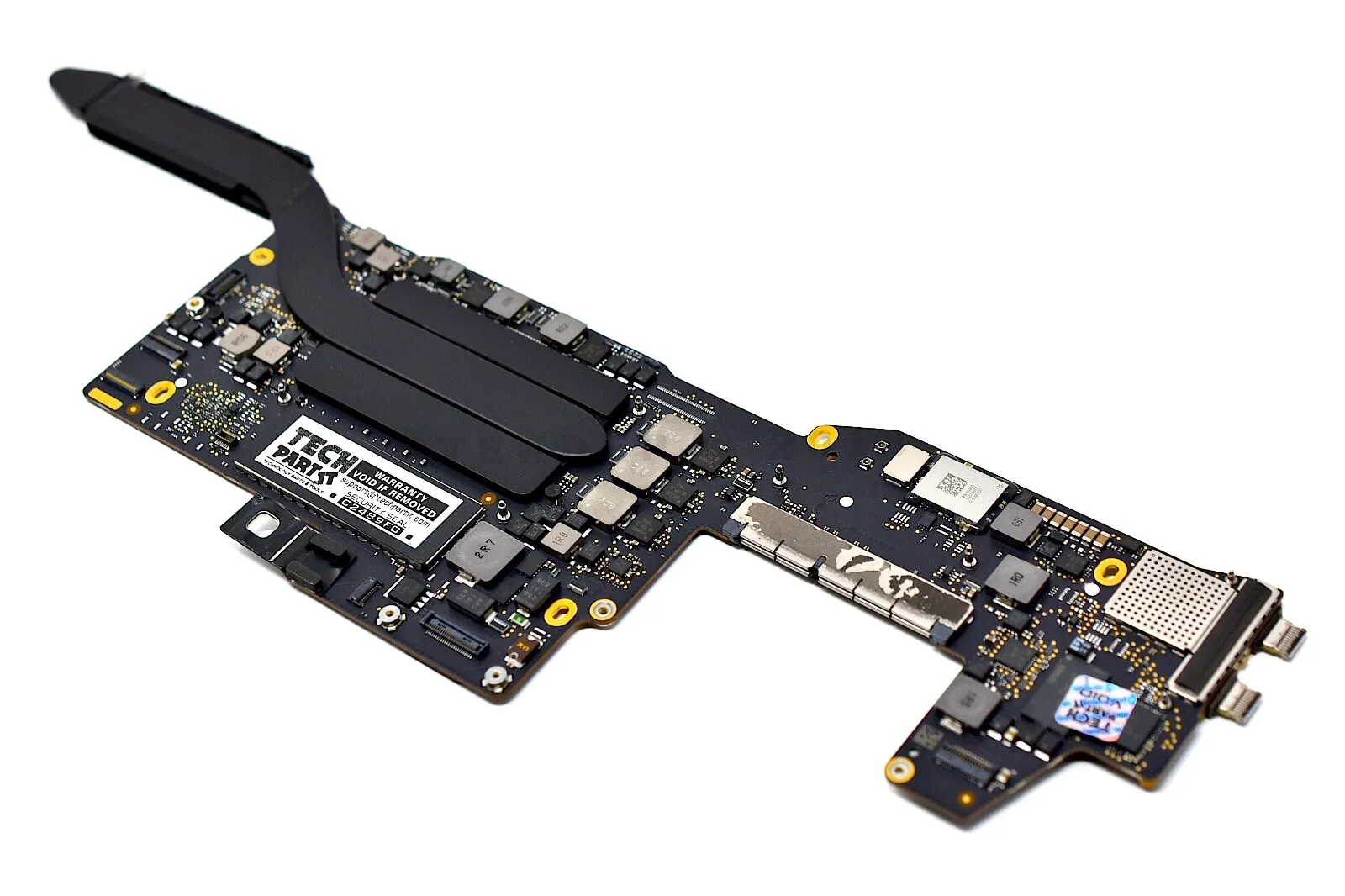
MacBook Pro Retina 13' Early 2015 A1502 i5 8GB Logic Board MacBook Pro Retina 13′ Early 2015 A1502 i5 8GB Logic Board

The HP P24H G5 24” 75Hz FHD Monitor is a modern display designed for everyday work, entertainment, and productivity. It combines clear visuals, smooth motion, and simple usability in a sleek design. First, this monitor features a 23.8-inch Full HD (1920 × 1080) IPS panel for bright colors and wide viewing angles. As a result, text and images stay sharp for work, videos, and browsing. In addition, the HP P24H G5 24” 75Hz FHD Monitor supports a 75 Hz refresh rate, giving smoother motion for videos and casual gaming. Therefore, motion looks more fluid than on basic 60 Hz screens. This display uses wide 178°/178° viewing angles and anti-glare treatment to help reduce reflections and maintain clarity from many positions. This makes it easier to share content with others. The panel also delivers a typical brightness of 250 nits and a contrast ratio of 1000:1, so whites and blacks stay balanced for clear content. Thus, your work and entertainment stay easy to see. The HP P24H G5 includes built-in dual 2 W speakers for basic audio without extra accessories. This helps when you watch videos or join online meetings. Connectivity options include HDMI 1.4, DisplayPort 1.2, and VGA, so you can connect laptops and desktops easily. This makes setup quick with many devices. The stand supports height adjustment and tilt to help you find a comfortable viewing position for long sessions. Also, it has a 3-sided micro-edge bezel for a modern look and cleaner multi-monitor setups. This monitor is also flicker-free with low blue light mode, helping reduce eye strain during extended use. This makes it suitable for office work and daily use. In conclusion, the HP P24H G5 24” 75Hz FHD Monitor offers clear display, smooth visuals, and flexible connectivity for work and play. Overall, it is a strong choice for home, office, and small business setups. Specifications: Display : 23.8″ IPS Resolution : FHD (1920 x 1080) Refresh Rate : 75 Hz Response Rate : 5ms GtG

The HP 32S 32″ Monitor delivers large, clear visuals for work, media, and everyday use.It features a 32‑inch Full HD screen that shows sharp images and smooth video.Moreover, the slim and modern design fits well on home and office desks. This monitor uses an LED panel for bright color and solid picture quality.Additionally, wide viewing angles help keep visuals consistent from different positions.Anti‑glare coating helps reduce reflections in bright rooms. The HP 32S also includes HDMI and VGA ports for flexible connectivity.Furthermore, tilt adjustment lets you find a comfortable viewing angle.Low blue light and flicker‑free features help reduce eye strain during long use. This display works well for students, professionals, and home users alike.Therefore, it supports productivity, browsing, streaming, and casual gaming.Finally, it combines solid performance, easy setup, and comfort features for everyday use. Specifications: 32″ Full HD (1920 × 1080) LED panel HDMI + VGA ports for PC and device connection Anti‑glare coating for comfortable viewing Tilt‑adjustable stand for ergonomic use Low blue light and flicker‑free eye care

WiWU 20W fast Charger for Mobile Phone with USB C Quick Power Adapter in white Wall charger

BATTERY TOSHIBA PA5185U-1BRS Laptop Battery for Toshiba Satellite C50 C55 C55D C55T L55 L55D L55T Series fit C55-B5200 C55-B5270 C55D-B5310 PA5184U-1BRS PA5186U-1BRS PA5195U-1BRS Battery Type: Li-ion Capacity: 2800Mah Voltage: 14.4V Cells: 4-cell Fit Model: Toshiba Satellite PA5185-1BRS PA5184U-1BRS PA5184-1BRS PA5186-1BRS PA5195-1BRS PA5185U1BRS PA5185U PA5185 PA5195U PA5184 Battery Compatible: Toshiba Satellite C55-B5302 C55-B5299 C55-B5287 C55-B5272 C55-B5270 C55-B5200 C55-B5101 C55-B5100 C55D-B5319 C55D-B5310 C55D-B5241 C55D-B5219 C55D-B5214 C55D-B5212 C55D-B5206 C55D-B5203 C55T-B5349 C55T-B5110 C55T-B5230 C55T-B5109 L55-B5294 L55-B5284 L55-B5276 Battery 100% New from Manufacturer. Up to 500 recharge cycles over the life of the battery. CE-/FCC-Certified for safety If you have any questions, please feel free to contact us, our professional service team will provide you with the most guaranteed support

BenQ RE03A 86 inch Board Essential RE8603A is designed for classrooms, training rooms, and interactive presentations. It features an 86-inch 4K UHD IPS display with precision IR touch technology for smooth writing and collaboration. Additionally, it supports up to 40 touch points. Therefore, it helps teachers and teams work together more efficiently. The BenQ RE8603A delivers 3840 × 2160 resolution with 450 nits brightness and anti-glare coating for clear viewing in bright rooms. Moreover, it uses 9H tempered glass for better durability and safer daily use. It also includes low blue light and flicker-free technology to reduce eye strain. In addition, it runs on Android 11 with 4GB memory and 32GB storage for smooth system performance. Furthermore, it provides 3 HDMI 2.0 ports, DisplayPort, USB-A, USB-C, and USB-B for flexible connectivity. As a result, users can connect laptops, cameras, and classroom devices easily. It also includes front-facing 2 × 20W speakers and built-in management tools for daily educational use. Specifications: 86-inch 4K UHD (3840 × 2160) IPS display Precision IR touch with up to 40 touch points Android 11 with 4GB RAM and 32GB storage 450 nits brightness with anti-glare 9H tempered glass 3 HDMI 2.0, DisplayPort, USB-C, and dual 20W speakers

Specifications : Dell Alienware 25 Monitor – AW2521HFL – 63.5cm(25″) Device Type LED edgelight system Panel Type Fast In-Plane Switching Type Native Resolution 1920 x 1080 @ 240 Hz Contrast Ratio 1000 to 1 (typical) Features USB 3.0 Hub Aspect Ratio 16:09 Brightness 400 cd/m² (typical) Response Time 1ms (gray to gray) – Extreme Mode Input Connectors 2 x HDMI (ver 2.0) 1 x DP 1.2 1 x USB 3.0 upstream port (Rear) 2 x USB 3.0 Downstream port (Rear) 2 x USB 3.0 Downstream port [Front Bottom, one with BC1.2 charging capability at 2A(max)] 1 x Headphone-out jack (Front Bottom) 1 x Audio Line-out jack( Rear) manufacturer link

The MSI MAG 275UPD E14 27-inch gaming monitor is built for competitive and immersive gameplay, offering both ultra-sharp visuals and extremely high refresh rates. Its IPS panel delivers vibrant colors and wide viewing angles, making it suitable for gaming, content creation, and everyday use. Moreover, the monitor supports dual display modes, allowing users to switch between ultra-detailed 4K resolution and ultra-fast Full HD performance. This flexibility allows gamers to enjoy crisp visuals for cinematic games or switch to very high refresh rates for competitive titles that require maximum smoothness and responsiveness. Additionally, fast response times help reduce motion blur and ghosting, ensuring smoother gameplay during fast-moving scenes. The MAG 275UPD E14 also features modern connectivity options and an ergonomic design that fits gaming or professional setups. Furthermore, its slim bezels enhance immersion in multi-monitor setups. Therefore, this monitor suits users who want both high resolution and esports-level speed. Finally, it combines versatility, speed, and image quality in one powerful gaming display. Specifications: Screen size: 27-inch IPS panel Resolution modes: 4K UHD (3840×2160) or Full HD (1920×1080) Refresh rate: 144Hz at 4K / up to 288Hz at FHD Response time: 1ms class gaming response time Connectivity: HDMI and DisplayPort inputs for PC and consoles

27-inch UHD 4K IPS display DCI-P3 95% (Typ.) VESA DisplayHDR™ 400 AMD FreeSync™ Dynamic Action Sync, Black Stabilizer Tilt, Height and Pivot Adjustable Stand DISPLAY Size (Inch) 27 Size (cm) 68.4 Resolution 3840 x 2160 Panel Type IPS Aspect Ratio 16:9 Pixel Pitch 0.1554 x 0.1554 Brightness (Min.) 320 cd/m² Brightness (Typ.) 400 cd/m² Color Gamut (Typ.) DCI-P3 95% (CIE1976) Color Depth (Number of Colors) 1.07B Contrast Ratio (Min.) 1000:1 Contrast Ratio (Typ.) 1200:1 Response Time 5ms (GtG at Faster) Viewing Angle (CR≥10) 178º(R/L), 178º(U/D) Surface Treatment Anti-Glare HDR HDR 10 Yes VESA DisplayHDR™ DisplayHDR™ 400 HDR Effect Yes COLOR & CALIBRATION Wide Color Gamut Yes Color Calibrated Yes FEATURES Flicker safe Yes Reader Mode Yes Color Weakness Yes Super Resolution+ Yes RADEON FreeSync™ Yes Black Stabilizer Yes Dynamic Action Sync Yes Smart Energy Saving Yes SOFTWARE APPLICATION Dual Controller Yes OnScreen Control (LG Screen Manager) Yes CONNECTIVITY HDMI Yes (2ea) HDMI (Max. Resolution at Hz) 3840×2160@60Hz DisplayPort Yes(1ea) DP Version 1.4 DP (Max. Resolution at Hz) 3840×2160@60Hz Headphone Out Yes POWER Type External Power(Adapter) AC Input 100~240V (50/60Hz) Power Consumption (Typ.) 40W Power Consumption (Max.) 44W Power Consumption (Energy Star) 24W Power Consumption (Sleep Mode) 0.5W Power Consumption (DC Off) Less than 0.3W MECHANICAL Display Position Adjustments Tilt/Height/Pivot Wall Mountable 100 x 100 mm DIMENSIONS/WEIGHT Dimension with Stand (W x H x D) 613.5 x 569.3 x 239.3 mm (Up) 613.5 x 459.3 x 239.3 mm (Down) Dimension without Stand (W x H x D) 613.5 x 363.5 x 45.4 mm Dimension in Shiping (W x H x D) 694 x 496 x 212 mm Weight with Stand 5.6kg Weight without Stand 3.8kg Weight in Shipping 9kg 3 Years Warranty manufacturer link

lenovo battery 42T4733 42T4235 42T4708 42T4714 Laptop Battery Replacement for Lenovo Ibm Thinkpad Sl410 Sl410k Sl510 T410 T410i T420 T510 T510i T520 E40 E50 E420 E520 Sl410 2842 Sl410 2874 Sl410k(11.1V 5200Mah) About this item Battery Type: Li-ion Voltage: 11.1V Capacity: 5200Mah Compatible Part Number: 42T4235 42T4708 42T4714 42T4733 42T4756 42T4764 42T4798 42T4803 42T4819 42T4848 42T4911 51J0499 57Y4185 57Y4545 ASM 42T4703 42T4752 42T4794 42T4702 Compatible with Battery P/N : LENOVO ThinkPad E40 E50 Edge 0578-47B Edge 14″ 05787UJ d 14″ 05787VJ 14″ 05787WJ Edge 15″ E420 E425 E520 L410 L412 L420 L421 L510 L512 L520 SL410 2842 SL410 2874 SL410k 2842 SL510 SL510 2875 SL510 T410 T410i T420 T510 T510i T520 T520i W510 W520 New from Manufacturer. CE-/FCC-/RoHS-Certified for safety.

The LG UltraGear 32″ 180Hz Curved Monitor | 32GS60QC‑B delivers smooth visuals for gaming and entertainment. It features a large 32‑inch curved screen that wraps your view for greater immersion. Moreover, the high 180Hz refresh rate makes motion look fluid in fast games and movies. This gaming monitor uses a VA panel for rich contrast and deep blacks. Additionally, its quick response time helps reduce blur during rapid action. Adaptive sync support helps reduce screen tearing and stutter for smoother play. The LG UltraGear 32″ 180Hz Curved Monitor also includes HDMI and DisplayPort inputs for easy setup with PCs and consoles. Furthermore, its tilt and height adjustable stand lets you find a comfortable view. Low blue light and flicker‑safe technology help reduce eye strain during long sessions. This display works well for competitive gaming, entertainment, and everyday use. Therefore, it suits gamers, streamers, and media lovers alike. Finally, it combines immersive visuals, strong performance, and user‑friendly features. Specifications: Display : 32″ VA Resolution : QHD (2560 x 1440) Refresh Rate : 180Hz Response Rate : 1ms GTG Curvature : 1000R

Gaming-optimized in-ear headphones in bold red, featuring a built-in microphone, tangle-free flat cable, and signature HyperX comfort—designed for mobile gaming, console use, and on-the-go communication. Model: HyperX Cloud Earbuds (Red Edition) Color: Vibrant Red earbuds with matching red cable accents Type: In-ear headphones with integrated microphone Designed For: Mobile gaming (iOS/Android), Nintendo Switch, PC, and everyday use Key Features: Built-in Microphone: Clear voice pickup for in-game chat, calls, and voice commands Tangle-Free Flat Cable: Durable, lightweight, and resistant to knots Ergonomic Fit: Includes 3 sizes of silicone ear tips (S/M/L) for secure, comfortable wear Universal 3.5mm Jack: Compatible with any device with a standard headphone/mic combo port Works with Nintendo Switch, PC, smartphones, tablets, and more Gaming-Grade Audio: Tuned for immersive sound with enhanced bass and vocal clarity In-Line Controls: Convenient mic mute and call answer/end button Built-in Microphone: Clear voice pickup for in-game chat, calls, and voice commands Tangle-Free Flat Cable: Durable, lightweight, and resistant to knots Ergonomic Fit: Includes 3 sizes of silicone ear tips (S/M/L) for secure, comfortable wear Universal 3.5mm Jack: Compatible with any device with a standard headphone/mic combo port Works with Nintendo Switch, PC, smartphones, tablets, and more Works with Nintendo Switch, PC, smartphones, tablets, and more Gaming-Grade Audio: Tuned for immersive sound with enhanced bass and vocal clarity In-Line Controls: Convenient mic mute and call answer/end button Technical Specifications: Driver Size: 14.2 mm Frequency Response: 20 Hz – 20 kHz Impedance: 60 Ω Sensitivity: 100 dB Cable Length: 1.2 m (3.9 ft) Connector: 3.5mm 4-pole (CTIA standard) Driver Size: 14.2 mm Frequency Response: 20 Hz – 20 kHz Impedance: 60 Ω Sensitivity: 100 dB Cable Length: 1.2 m (3.9 ft) Connector: 3.5mm 4-pole (CTIA standard) What’s in the Box: HyperX Cloud Earbuds (Red) 3 pairs of silicone ear tips (S/M/L) Carrying pouch Quick start guide HyperX Cloud Earbuds (Red) 3 pairs of silicone ear tips (S/M/L) Carrying pouch Quick start guide Ideal For: Mobile gamers (PUBG Mobile, Call of Duty, Fortnite, etc.) Nintendo Switch players Commuters and students needing compact, durable audio Gamers seeking console-compatible audio with mic support Mobile gamers (PUBG Mobile, Call of Duty, Fortnite, etc.) Nintendo Switch players Commuters and students needing compact, durable audio Gamers seeking console-compatible audio with mic support

Genuine-spec touchpad flex cable for MacBook Pro 15″ (Model A1990, 2018–2019, Intel)—essential for restoring full Force Touch functionality, haptic feedback, and precise multi-touch gesture control during trackpad repair or replacement. Compatible With: MacBook Pro 15-inch (2018 & 2019, Model A1990, Model Identifiers MacBookPro15,2) with Intel Core i7/i9 processors. Part Type: Touchpad flex cable only — does not include the trackpad housing, Taptic Engine, or mounting hardware. This is the OEM-style ribbon cable that connects the trackpad to the logic board. Function: Transmits: Touch input coordinates Force Touch pressure data Haptic feedback signals to the Taptic Engine Enables full macOS gesture support: Force Click, three-finger lookup, swipe navigation, pinch-to-zoom, and smooth cursor tracking. Touch input coordinates Force Touch pressure data Haptic feedback signals to the Taptic Engine Enables full macOS gesture support: Force Click, three-finger lookup, swipe navigation, pinch-to-zoom, and smooth cursor tracking. OEM-Quality Build: Matches Apple’s original specifications in: Cable length and routing path Connector pitch and ZIF latch design EMI shielding and flex durability Cable length and routing path Connector pitch and ZIF latch design EMI shielding and flex durability Common Use Cases: Replacing a torn, creased, or liquid-damaged original flex cable Completing a trackpad replacement when the original cable is unusable Fixing intermittent trackpad behavior, loss of Force Touch, or complete unresponsiveness Replacing a torn, creased, or liquid-damaged original flex cable Completing a trackpad replacement when the original cable is unusable Fixing intermittent trackpad behavior, loss of Force Touch, or complete unresponsiveness Installation Note: Requires full bottom case removal and battery disconnection. Cable routes under internal components near the right speaker and logic board. Connects via a ZIF (Zero Insertion Force) socket—must be aligned carefully and latched gently. Recommended for experienced or certified technicians only. Requires full bottom case removal and battery disconnection. Cable routes under internal components near the right speaker and logic board. Connects via a ZIF (Zero Insertion Force) socket—must be aligned carefully and latched gently. Recommended for experienced or certified technicians only.

