
REMAX RB-950HB Binzchi Series ANC Bluetooth Wireless Headphone – Black Description Advanced Active Noise Cancellation (ANC). 8.0 CVC technology for enhanced audio clarity. Patented ergonomic design. Premium ADi noise reduction chip. Large 40mm diaphragm for rich audio. 6-microphone array for crystal-clear calls. Smart infrared wear detection. Specification Color: Black, Blue, White Rated Power: 10mW Driver Unit: 40mm Driver Impedance: 32 ohm Frequency Response: 20Hz~ 20kHz Wireless Connectivity: Bluetooth® 5.3 Bluetooth Range: 10M Compatible with: iOS / Android Integrated Controls: Volume Up/Down, Play/Pause Microphone: Yes Battery Capacity: 600mAh Playing Time: 30 hrs Charging Time: 2-2.5 hrs Standby time: 40 hrs

A4Tech KRS-8372 USB Keyboard QWERTY English Black

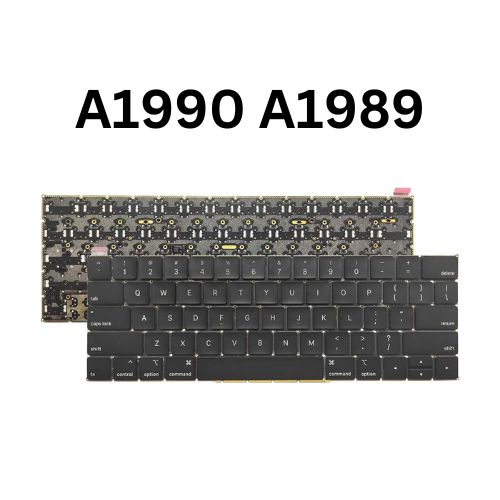
MacBook Pro Keyboard Replacement /Compatible for Apple MacBook - A1990 15" , A1989 13" MacBook Pro Keyboard Replacement /Compatible for Apple MacBook – A1990 15″ , A1989 13″ New A1989 A1990 Keyboard US Standard Replacement for MacBook Pro 13” 15”A1990 A1989 Keyboard 2018 Year

Used OEM Original Apple Logic Board Working, 2019 Model 2.7Ghz I7 251gb 16gb (A1989) + Original Touch ID, Tested using latest industry hardware diagnostic software, Fresh pull from fully Working nearly new unit. SPECIFICATION:

MacBook Pro A1706 / A1708 Display Assembly (Space Gray) Compatibility : MacBook Pro 2017 13″ A1708 (EMC 3164 MacBookPro14,1) 2.3 GHz A1708 (EMC 3164 MacBookPro14,1) 2.5 GHz A1706 (EMC 3163 MacBookPro14,2) 3.1 GHz A1706 (EMC 3163 MacBookPro14,2) 3.3 GHz A1706 (EMC 3163 MacBookPro14,2) 3.5 GHz MacBook Pro 2016 13″ A1706 (EMC 3071 MacBookPro13,2) 2.9 GHz A1706 (EMC 3071 MacBookPro13,2) 3.1 GHz A1706 (EMC 3071 MacBookPro13,2) 3.3 GHz A1708 (EMC 2978 MacBookPro13,1) 2.0 GHz A1708 (EMC 2978 MacBookPro13,1) 2.4 GHz

A1389 A1494 Laptop Battery Replacement for MacBook Pro 15 inch Retina A1398 (Late 2013 & Mid 2014), fit Retina ME293 ME294 MGXA2 MGXC2 MJLQ2 MJLT2 MJLU2 Details : Voltage:11.26V; Capacity: 95Wh; Battery Type: Li-Polymer KINDLY NOTES: Replacement for Apple Macbook Pro 15 inch A1494 A1398 Retina Only fit Late 2013 Mid 2014 Version,Do not fit 2012 & Early 2013 Version Packing: 1 x laptop battery,4 x free screwdrivers Desighed for the original battery 1:1,Please confirm that your laptop’s model number, the original battery’s part number and your laptop’s version correctly

128GB SSD Apple Macbook Pro Air 2013 2014 2015 A1502 A1398 A1466 A1465 | Samsung MZ-JPU512T/A06 | 655-1805D ORIGINAL APPLE PART (Apple sources their SSD’s for MacBooks from Samsung) A1502 – A1398 – A1465 – A1466 100% TESTED WORKING Please check compatibility below before you make your purchase: COMPATIBILITY: MacBook Pro Retina Late 2013 – Mid-2015 MacBookPro11,1 (A1502) – ME864LL/A, ME866LL/A, ME867LL/A, MGX72LL/A, MGX92LL/A, & MGXD2LL/A MacBookPro11,2 (A1398) – ME293LL/A & MGXA2LL/A MacBookPro11,3 (A1398) – ME294LL/A, ME874LL/A, MGXC2LL/A, & MGXG2LL/A MacBookPro11,4 (A1398) – MJLQ2LL/A MacBookPro11,5 (A1398) – MJLT2LL/A & MJLU2LL/A MacBookPro12,1 (A1502) – MF839LL/A, MF841LL/A, & MF843LL/A MacBook Air Mid-2013 – Late 2015 MacBookAir6,1 (A1465) – MD711LL/A, MD760LL/A, MD711LL/B, & MF067LL/A MacBookAir6,2 (A1466) – MD760LL/A, MD760LL/B, & MF068LL/A MacBookAir7,1 (A1465) – MJMVM2LL/A MacBookAir7,2 (A1466) – MJVE2LL/A Model Identifier: Samsung Manufacturer Part# MZ-JPU512T/A06

Remax F27 Fonzyr Desktop Fan – 5 W rechargeable fan with 360° adjustable airflow and multi-installation options.Compact (187×206 mm), lightweight, with fast Type-C charging (~2 h) and built-in 1,200 mAh battery. Model: Remax F27 Fonzyr Series Circulation Desktop Fan Power: 5 W, operates on 5 V/1 A power supply Rotation: 360° adjustable airflow for full-range ventilation Battery: Built-in 1,200 mAh rechargeable battery; Type-C charging, ~2 hours charging time Dimensions & Build: Approx. 187 × 206 mm, lightweight ABS plastic housing (~697 g) Installation: Designed for desktop use, wall mounting, or hanging—ideal for multi-location placement

The Lenovo ThinkPad T460 features an Intel Core i5 6th Gen processor, 8GB RAM, and a fast 256GB SSD for smooth everyday performance. With a responsive 14-inch touchscreen display and the legendary ThinkPad keyboard, it’s ideal for work, study, and productivity on the go.

Apple MacBook Pro 16” (2019) — professional-grade power and stunning Retina display.• Intel Core i9 • 32 GB RAM • 500 GB SSD • 4 GB Dedicated GraphicsRetina Display | macOS |

Short Description HP LaserJet MFP M141w — compact wireless monochrome printer for home and office use.• Print | Scan | Copy • Wireless & USB Connectivity • Fast Printing SpeedCompact Design | Energy Efficient

Sleek, ultra-thin 24-inch Full HD display with micro-edge design, flicker-free technology, and versatile connectivity—ideal for productivity, home office, or multi-display setups. Model: HP V24v G5 Screen Size: 23.8 inches (viewable), 24-inch class Display Type: IPS (In-Plane Switching) panel Resolution: 1920 x 1080 (Full HD) at 60Hz Brightness: 250 cd/m² Contrast Ratio: 1,000:1 (static), 10,000,000:1 (dynamic) Response Time: 7 ms (gray-to-gray) Viewing Angles: 178° horizontal / 178° vertical (excellent color consistency from wide angles) Design Features: 3-sided micro-edge bezel – ideal for seamless multi-monitor setups Ultra-slim profile – modern, minimalist aesthetic Tilt-only stand: -5° to +25° VESA Mount Compatible: 100 x 100 mm (stand removable) 3-sided micro-edge bezel – ideal for seamless multi-monitor setups Ultra-slim profile – modern, minimalist aesthetic Tilt-only stand: -5° to +25° VESA Mount Compatible: 100 x 100 mm (stand removable) Connectivity: 1 x HDMI 1.4 1 x VGA (D-Sub) Audio Line-out (3.5mm) – for use with external speakers/headphones No built-in speakers 1 x HDMI 1.4 1 x VGA (D-Sub) Audio Line-out (3.5mm) – for use with external speakers/headphones No built-in speakers Eye Comfort & Sustainability: Flicker-free backlight HP Eye Ease (TÜV-certified low blue light mode—reduces eye strain without color distortion) ENERGY STAR® certified Made with post-consumer recycled plastics (up to 85% in enclosure) Flicker-free backlight HP Eye Ease (TÜV-certified low blue light mode—reduces eye strain without color distortion) ENERGY STAR® certified Made with post-consumer recycled plastics (up to 85% in enclosure) Ideal For: Home office & remote work Students and professionals Dual/triple monitor productivity setups Everyday computing, web browsing, and document editing Home office & remote work Students and professionals Dual/triple monitor productivity setups Everyday computing, web browsing, and document editing Dimensions (with stand): 21.26 x 7.76 x 15.83 in (540 x 197 x 402 mm) 21.26 x 7.76 x 15.83 in (540 x 197 x 402 mm) Weight: ~7.5 lbs (3.4 kg)

The LB-LINK AX900 USB WiFi adapter delivers fast and stable wireless connectivity with WiFi 6 technology and speeds up to 900Mbps. Featuring dual-band support (2.4GHz + 5GHz), it’s ideal for upgrading PCs and laptops for smoother streaming, gaming, and online work. The LB-LINK AX900 USB WiFi Adapter is a modern wireless solution designed to upgrade your computer to the latest WiFi 6 (802.11ax) standard. It offers improved speed, better network efficiency, and stronger stability compared to older WiFi adapters. With dual-band support, you can connect to either the 2.4GHz band for long-range stability or the 5GHz band for higher speed and lower latency. Its compact USB design makes it perfect for desktops and laptops needing fast internet without installing internal cards. WiFi 6 (802.11ax) Technology for faster performance and better efficiency AX900 Speed (Up to 900Mbps) for smooth streaming and downloads Dual Band Support: 2.4GHz + 5GHz for flexibility and stability USB Plug & Play easy installation (driver may be required) Low Latency Connection ideal for gaming and video calls Compact Portable Design perfect for laptops and desktops Improves WiFi Performance for weak built-in adapters Ideal for PCs and laptops that need faster WiFi speeds and stronger connectivity. Perfect for online gaming, HD streaming, Zoom/Teams meetings, and stable browsing.

Lexar NM620 1TB SSD, M.2 2280 PCIe Gen3x4 NVMe 1.4 Internal SSD, Up to 3500MB/s Read, 3000MB/s Write, 3D NAND Flash Internal Solid State Drive for PC Enthusiasts and Gamers (LNM620X001T-RNNNG) About this item High-speed PCIe Gen3x4 interface: Lexar 1TB SSD up to 3500MB/s read and 3000MB/s write – NVMe 1.4 is supported. Lexar Internal SSD M.2 2280 form factor with 3D NAND Lexar Solid state drive maintains 6x the speed of a SATA-based SSD. Lexar SSD is ideal for PC enthusiasts and gamers. Lexar Internal solid state drive is shock and vibration-resistant without moving parts.

Genuine-spec touchpad flex cable for MacBook Pro 13″ with Touch Bar (Model A1708, 2016–2017)—restores full Force Touch functionality, haptic feedback, and precise multi-touch gesture control during trackpad repair or replacement. Compatible With: MacBook Pro 13″ (2016) – Model A1708 (Model Identifier: MacBookPro13,1) MacBook Pro 13″ (2017) – Model A1708 (Model Identifier: MacBookPro14,1) (Both years share the same internal trackpad assembly and flex cable.) MacBook Pro 13″ (2016) – Model A1708 (Model Identifier: MacBookPro13,1) MacBook Pro 13″ (2017) – Model A1708 (Model Identifier: MacBookPro14,1) (Both years share the same internal trackpad assembly and flex cable.) Part Type: Touchpad flex cable only — does not include the trackpad housing, Taptic Engine, or mounting hardware. This is the OEM-style ribbon cable that connects the trackpad to the logic board. Function: Transmits: Touch input coordinates Force Touch pressure data Haptic feedback signals to the Taptic Engine Enables full macOS gesture support: Force Click, three-finger lookup, swipe navigation, pinch-to-zoom, and smooth cursor tracking. Touch input coordinates Force Touch pressure data Haptic feedback signals to the Taptic Engine Enables full macOS gesture support: Force Click, three-finger lookup, swipe navigation, pinch-to-zoom, and smooth cursor tracking. OEM-Quality Build: Matches Apple’s original specifications in: Cable length and routing path Connector pitch and ZIF latch design EMI shielding and flex durability Cable length and routing path Connector pitch and ZIF latch design EMI shielding and flex durability Common Use Cases: Replacing a torn, creased, or liquid-damaged original flex cable Completing a trackpad replacement when the original cable is compromised Fixing intermittent trackpad behavior, loss of Force Touch, or complete unresponsiveness Replacing a torn, creased, or liquid-damaged original flex cable Completing a trackpad replacement when the original cable is compromised Fixing intermittent trackpad behavior, loss of Force Touch, or complete unresponsiveness Installation Note: Requires full bottom case removal and battery disconnection. Cable routes under internal components near the right speaker and logic board. Connects via a ZIF (Zero Insertion Force) socket—must be aligned carefully and latched gently. Recommended for experienced or certified technicians only. Requires full bottom case removal and battery disconnection. Cable routes under internal components near the right speaker and logic board. Connects via a ZIF (Zero Insertion Force) socket—must be aligned carefully and latched gently. Recommended for experienced or certified technicians only.

The Cudy M1200 AC1200 Mesh WiFi System provides seamless whole-home coverage with stable dual-band speeds up to 1200Mbps. Designed to eliminate dead zones, it delivers smooth roaming, strong signal performance, and reliable connectivity for homes and offices. AC1200 Dual Band WiFi – Combined speeds of up to 1200Mbps (300Mbps on 2.4GHz + 867Mbps on 5GHz) for streaming, browsing, and gaming. Whole-Home Mesh Coverage – Multiple units work together to create a single seamless network, eliminating WiFi dead zones. Seamless Roaming – Automatically connects your devices to the strongest signal as you move around your home. Gigabit Ethernet Ports – High-speed wired connections for smart TVs, gaming consoles, and PCs. Easy Setup & Management – Quick installation and control through a user-friendly interface or mobile app. Flexible Expansion – Easily add more mesh units to extend coverage anytime. Stable & Reliable Performance – Designed for multiple connected devices with consistent speed and signal strength. Gigabit Ethernet Ports (WAN/LAN) Dual Band WiFi (2.4GHz & 5GHz) Mesh Networking Technology WiFi Roaming Support Wireless Security (WPA/WPA2)

Genuine-spec touchpad flex cable for MacBook Pro 13″ (Model A2338, 2020, Apple M1)—essential for restoring full Force Touch functionality, haptic feedback, and precise multi-touch gesture control during trackpad repair or replacement. Compatible With: MacBook Pro 13-inch (2020, Model A2338, Model Identifier MacBookPro17,1) with Apple M1 chip (2 Thunderbolt ports). Part Type: Touchpad flex cable only — does not include the trackpad housing, Taptic Engine, or mounting hardware. This is the OEM-style ribbon cable that connects the trackpad to the logic board. Function: Transmits: Touch input coordinates Force Touch pressure data Haptic feedback signals to the Taptic Engine Enables full macOS gesture support: Force Click, three-finger lookup, swipe navigation, pinch-to-zoom, and smooth cursor tracking. Touch input coordinates Force Touch pressure data Haptic feedback signals to the Taptic Engine Enables full macOS gesture support: Force Click, three-finger lookup, swipe navigation, pinch-to-zoom, and smooth cursor tracking. OEM-Quality Build: Matches Apple’s original specifications in: Cable length and routing Connector pitch and ZIF latch design EMI shielding and flex durability Cable length and routing Connector pitch and ZIF latch design EMI shielding and flex durability Common Use Cases: Replacing a torn, creased, or liquid-damaged original flex cable Completing a trackpad replacement when the original cable is compromised Fixing intermittent trackpad behavior, loss of Force Touch, or complete unresponsiveness Replacing a torn, creased, or liquid-damaged original flex cable Completing a trackpad replacement when the original cable is compromised Fixing intermittent trackpad behavior, loss of Force Touch, or complete unresponsiveness Installation Note: Requires full bottom case removal and battery disconnection. Cable routes under internal components near the right speaker and logic board. Connects via a ZIF (Zero Insertion Force) socket—must be aligned carefully and latched gently. Recommended for experienced or certified technicians only. Requires full bottom case removal and battery disconnection. Cable routes under internal components near the right speaker and logic board. Connects via a ZIF (Zero Insertion Force) socket—must be aligned carefully and latched gently. Recommended for experienced or certified technicians only. Important Compatibility Notes: ✅ Only for A2338 (13″, M1, 2020) ❌ Not compatible with: Intel-based A2251 / A2289 (2020) MacBook Air M1 (A2337) Any MacBook Air or 14″/16″ MacBook Pro ✅ Only for A2338 (13″, M1, 2020) ❌ Not compatible with: Intel-based A2251 / A2289 (2020) MacBook Air M1 (A2337) Any MacBook Air or 14″/16″ MacBook Pro Intel-based A2251 / A2289 (2020) MacBook Air M1 (A2337) Any MacBook Air or 14″/16″ MacBook Pro

WiWU Alpha Slim Sleeve Laptop Case 14/15.4/16 inch Inch Waterproof Bag With Handle For Macbook

The 85W MagSafe 2 Power Adapter features a magnetic DC connector so if someone should trip over it, the cord disconnects harmlessly and your MacBook Pro stays put safely. It also helps prevent fraying or weakening of the cables over time. In addition, the magnetic DC helps guide the plug into the system for a quick and secure connection. The 85W MagSafe 2 Power Adapter features a magnetic DC connector so if someone should trip over it, the cord disconnects harmlessly and your MacBook Pro stays put safely. It also helps prevent fraying or weakening of the cables over time. In addition, the magnetic DC helps guide the plug into the system for a quick and secure connection. When the connection is secure, an LED located at the head of the DC connector lights up; an amber light lets you know that your notebook is charging, while a green light tells you that you have a full charge. An AC cord is provided with the adapter for maximum cord length, while the AC wall adapter (also provided) gives you an even easier and more compact way to travel. Designed to be the perfect traveling companion, the adapter has a clever design which allows the DC cable to be wound neatly around itself for easy cable storage. Compatible with MacBook Pro with 13-inch Retina display. See this article for more details about choosing the right one. Knowing which specific Mac model you have is important. If you are running OS X Lion (10.7) or later go to the “” menu at the top left of your screen, choose “About this Mac” then click the “More Info…” button. Your Mac model and generation will be displayed. If you are running an earlier version of OS X, you can enter your serial number here to find out which model you have. COMPATIBILITY Mac Models: MacBook Pro (Retina, 13-inch, Late 2012 – 2015)

Premium non-slip rubber feet designed to fit MacBook Pro models A1398, A1425, and A1502—restoring grip, stability, and base protection with a perfect OEM-style fit. Keep your MacBook Pro firmly in place with these high-quality skid-proof rubber feet, precision-made for MacBook Pro 13″ and 15″ Retina models: A1398 (15″ Retina, 2012–2015) A1425 (13″ Retina, 2012–2013) A1502 (13″ Retina, 2014–2015) These replacement feet replicate Apple’s original design, offering excellent traction on smooth surfaces like glass, wood, or metal desks—preventing slips during typing or transport. Crafted from soft yet durable silicone-rubber, they also cushion your laptop’s base, reducing scratches and minimizing vibration noise. Each set includes all necessary feet (typically 5 per unit) with strong pre-applied adhesive for quick, secure installation. The matte black finish matches your MacBook Pro’s sleek bottom case for a seamless look. Perfect for replacing worn, missing, or damaged feet due to age, cleaning, or accidental removal. A simple, cost-effective way to restore both function and finish to your MacBook Pro. Installation Tip: Clean the foot areas thoroughly with isopropyl alcohol and let dry before applying. Lightly warming the adhesive (with a hairdryer or fingers) can improve bonding.
