
Genuine Apple MacBook Pro 15″ (A1990) display assembly—carefully removed from original units and tested for quality. Perfect for repairs or replacements with full OEM clarity and color accuracy. Model Compatibility: Designed exclusively for MacBook Pro 15-inch (2018–2019 models, A1990). Original Apple Display: Not a third-party or replica—this is a genuine Apple Retina display assembly pulled from verified MacBook Pro units. Retina Quality: Features a 15.4-inch LED-backlit Retina display with 2880 x 1800 resolution, True Tone technology, and P3 wide color gamut for vibrant, accurate visuals. Includes Full Assembly: Complete with front glass, LCD panel, camera module, ambient light sensor, and bezel—ready for direct installation. Professionally Tested: Each unit undergoes visual and functional inspection to ensure no dead pixels, discoloration, or backlight bleeding. Condition: “Pulled” means it was removed from a working or used MacBook Pro—cosmetically clean with full functionality, but not brand new. Ideal for Repair Technicians: Perfect for screen replacements, device refurbishment, or parts resellers requiring OEM-level quality.

The Lexar NS100 512GB SSD is a 2.5-inch SATA III solid-state drive built to upgrade laptops and desktops with faster boot times, smoother app loading, and silent operation. It uses reliable flash storage to deliver a clear performance boost over traditional hard drives. ⚡ Faster System Performance: Significantly improves boot speed, application loading, and file transfers versus HDDs. 💾 512GB Storage Capacity: Ideal for OS, software, documents, and everyday multimedia. 🧠 SATA III 6Gb/s Interface: Provides stable, high-speed performance and is backward compatible with SATA II/I systems. 🔇 Silent & Shock-Resistant: No moving parts, making it quieter and more durable for laptops and mobile use. 🌡️ Low Power Consumption: Helps reduce heat and extend laptop battery life. 🛠️ Easy Installation: Standard 2.5″ 7mm design fits most laptops and desktops.

Compact and stylish with a zinc alloy shell, the SatcOp 8‑in‑1 USB‑C Multiport Dock delivers essential ports—Ethernet, HDMI, USB, card readers, and charging—in one portable adapter. Ideal for powering your laptop while expanding connectivity on the go. 🖥️ HDMI Port – Connect to external displays in Full HD or 4K (depending on your host device). 🌐 RJ45 Ethernet Port – Provides stable wired internet access with gigabit-speed support. ⚡ USB-C PD Charging – Power your laptop while using other ports (up to 87W pass-through). 🔌 USB 3.0 & USB 2.0 Ports – Connect flash drives, external storage, keyboards, and mice. 💾 SD & TF Card Readers – Quick access to camera and device storage cards. 🧊 Material – Premium zinc alloy casing for durability and efficient heat dissipation. 💼 Design – Slim, lightweight, and perfect for travel, home, or office setups. 💻 Compatibility – Works with most USB-C laptops, including Windows, macOS, Chrome OS, and select Android tablets.

The Cudy M1200 AC1200 Mesh WiFi System provides seamless whole-home coverage with stable dual-band speeds up to 1200Mbps. Designed to eliminate dead zones, it delivers smooth roaming, strong signal performance, and reliable connectivity for homes and offices. AC1200 Dual Band WiFi – Combined speeds of up to 1200Mbps (300Mbps on 2.4GHz + 867Mbps on 5GHz) for streaming, browsing, and gaming. Whole-Home Mesh Coverage – Multiple units work together to create a single seamless network, eliminating WiFi dead zones. Seamless Roaming – Automatically connects your devices to the strongest signal as you move around your home. Gigabit Ethernet Ports – High-speed wired connections for smart TVs, gaming consoles, and PCs. Easy Setup & Management – Quick installation and control through a user-friendly interface or mobile app. Flexible Expansion – Easily add more mesh units to extend coverage anytime. Stable & Reliable Performance – Designed for multiple connected devices with consistent speed and signal strength. Gigabit Ethernet Ports (WAN/LAN) Dual Band WiFi (2.4GHz & 5GHz) Mesh Networking Technology WiFi Roaming Support Wireless Security (WPA/WPA2)

A4tech KR-85 Natural A Rounded Edge Ergonomical Keyboard

256GB SSD Apple Macbook Pro Air 2013 2014 2015 A1502 A1398 A1466 A1465 | Samsung MZ-JPU512T/A06 | 655-1805D ORIGINAL APPLE PART (Apple sources their SSD’s for MacBooks from Samsung) A1502 – A1398 – A1465 – A1466 100% TESTED WORKING Please check compatibility below before you make your purchase: COMPATIBILITY: MacBook Pro Retina Late 2013 – Mid-2015 MacBookPro11,1 (A1502) – ME864LL/A, ME866LL/A, ME867LL/A, MGX72LL/A, MGX92LL/A, & MGXD2LL/A MacBookPro11,2 (A1398) – ME293LL/A & MGXA2LL/A MacBookPro11,3 (A1398) – ME294LL/A, ME874LL/A, MGXC2LL/A, & MGXG2LL/A MacBookPro11,4 (A1398) – MJLQ2LL/A MacBookPro11,5 (A1398) – MJLT2LL/A & MJLU2LL/A MacBookPro12,1 (A1502) – MF839LL/A, MF841LL/A, & MF843LL/A MacBook Air Mid-2013 – Late 2015 MacBookAir6,1 (A1465) – MD711LL/A, MD760LL/A, MD711LL/B, & MF067LL/A MacBookAir6,2 (A1466) – MD760LL/A, MD760LL/B, & MF068LL/A MacBookAir7,1 (A1465) – MJMVM2LL/A MacBookAir7,2 (A1466) – MJVE2LL/A Model Identifier: Samsung Manufacturer Part# MZ-JPU512T/A06

The Lenovo V130 is powered by an Intel Core i5 7th Gen processor, paired with 8GB RAM and a fast 256GB SSD for smooth and reliable everyday performance. Designed for office work, study, and productivity, it features a simple, durable design and a clear 15.6-inch non-touch display for comfortable daily use.

lenovo battery L17M3PG1 L17C3PG1 L17M3PG1 Laptop Battery Compatible with Lenovo Legion Y530-15ICH Y7000 2019 1050 Y7000-2019-PG0 Y540-15IRH-PG0 Y540-17IRH-PG0 Y7000P Series Notebook L17M3PG3 11.34V 52.5Wh About this item 【Battery type】Li-ion. Voltage: 11.34V. Capacity: 52.5Wh 4630mAh . 【Replacement For Laptop】Lenovo Legion Y545-PG0 Legion Y530-15ICH Y7000 2019 1050 Y7000-2019-PG0 Y540-15IRH-PG0 Y540-17IRH-PG0 Y7000P Series. 【Compatible Part Number】L17L3PG1 5B10Q82428 L17C3PG1 5B10Q88561 L17M3PG3 5B10Q93417 L17M3PG1 L17M3PG2 5B10W67238 5B10Q80766 【Connector】Before placing your order, Please refer to the picture and check it. Because the products produced by different factories will have differences in size, cable length, interface, etc.

The 45W MagSafe 2 Power Adapter features a magnetic DC connector so if someone should trip over it, the cord disconnects harmlessly and your MacBook Air stays put safely. It also helps prevent fraying or weakening of the cables over time. In addition, the magnetic DC helps guide the plug into the system for a quick and secure connection. The 45W MagSafe 2 Power Adapter features a magnetic DC connector so if someone should trip over it, the cord disconnects harmlessly and your MacBook Air stays put safely. It also helps prevent fraying or weakening of the cables over time. In addition, the magnetic DC helps guide the plug into the system for a quick and secure connection. When the connection is secure, an LED located at the head of the DC connector lights up; an amber light lets you know that your notebook is charging, while a green light tells you that you have a full charge. An AC cord is provided with the adapter for maximum cord length, while the AC wall adapter (also provided) gives you an even easier and more compact way to travel. Designed to be the perfect traveling companion, the adapter has a clever design which allows the DC cable to be wound neatly around itself for easy cable storage. This power adapter recharges the lithium polymer battery while the system is off, on, or in sleep mode. It also powers the system if you choose to operate without a battery. Compatible only with MacBook Air featuring MagSafe 2 power port. Knowing which specific Mac model you have is important. If you are running OS X Lion (10.7) or later go to the “” menu at the top left of your screen, choose “About this Mac” then click the “More Info…” button. Your Mac model and generation will be displayed. If you are running an earlier version of OS X, you can enter your serial number here to find out which model you have. Mac Models MacBook Air (13-inch, Early 2015 – 2017) MacBook Air (11-inch, Early 2015)

Features: Advanced bluetooth Chip (V5.4): Enjoy seamless and robust connectivity with the latest bluetooth 5.4 technology, providing stable and efficient wireless performance. Superior Sound Quality: Experience immersive HiFi audio with powerful bass and clarity, courtesy of dual 52mm drivers paired with a bass diaphragm designed to deliver exceptional sound. Vibrant RGB Light Display: Half of the speaker surface displays dynamic and colorful RGB lights, creating a visually captivating experience that enhances your music enjoyment. Extended Battery Life: Benefits from extensive playtime powered by a 3000mAh battery, with up to 4 hours of continuous playback and an impressive 180 days of standby time. TWS Pairing: Effortlessly pair two speakers to achieve a rich, enveloping stereo sound that transforms any space into a lively audio environment. Multiple Playback Modes: Versatility at its best with multiple playback options, including FM radio, AUX input, TF card, and USB playback, ensuring you have endless ways to enjoy your favorite tunes.

Dell 19.5V 4.62A 90 Watt Replacement Laptop Adapter/Charger New Small Pin 4.5 x 3.0 mm for Dell Latitude 3500 3379 3400 3301 3590 3490 7370, RWHHR, 450-AECO (Power Cord Included)

Genuine-spec touchpad flex cable for MacBook Air 13″ (Model A1534, Early 2015)—essential for restoring full trackpad functionality, including precise cursor control and physical click response, during repair or replacement. Compatible With: MacBook Air 13-inch (Early 2015, Model A1534, Model Identifier MacBookAir7,2). Part Type: Touchpad flex cable only—does not include the trackpad housing, button mechanism, or mounting brackets. This is the ribbon cable that connects the trackpad to the logic board. Function: Carries input signals from the trackpad to the logic board—critical for cursor movement, tap-to-click, and primary/secondary physical click functionality. (Note: This model uses a physical click mechanism, not Force Touch—so no haptic feedback or pressure-sensing.) OEM-Quality Construction: Matches Apple’s original cable in length, connector type, and shielding—ensures reliable signal transmission and long-term durability. Common Use Cases: Replacing a torn, frayed, or damaged original flex cable Completing a trackpad replacement when the original cable is compromised Fixing erratic cursor movement, unresponsive trackpad, or loss of click function Replacing a torn, frayed, or damaged original flex cable Completing a trackpad replacement when the original cable is compromised Fixing erratic cursor movement, unresponsive trackpad, or loss of click function Installation Note: Requires bottom case removal and careful disconnect/reconnect of the ZIF (Zero Insertion Force) connector on the logic board. The cable routes under the battery—handle with care. Suitable for intermediate to advanced DIYers or technicians.

WiWU Infinite USB‑C to HDMI Adapter (HB004) – Sleek aluminum dongle offering 4K@60Hz output over USB‑C (DP Alt‑Mode), plug-and-play with no drivers needed.Compact, portable, and reliable—a must-have for mobile productivity, gaming, and media streaming. Model: WiWU Infinite USB‑C to HDMI Adapter (HB004) Video Output: HDMI 2.0, supports up to 4K @ 60 Hz resolution Material & Weight: Robust aluminum alloy body, compact, weighs ~69 g Compatibility: Plug-and-play connector works with USB‑C devices supporting DP Alt‑Mode—compatible with laptops, smartphones, tablets, consoles Design & Build: Slim, portable, durable—no driver/software required Use Cases: Ideal for mirroring/extending screens for presentations, streaming, gaming

OEM-quality left and right loudspeaker replacement pair for MacBook Pro 15″ (Models A1707 – 2016/2017 and A1990 – 2018/2019)—restores rich, balanced stereo sound with precision acoustic tuning and seamless fit. Compatible With: MacBook Pro 15″ (2016) – Model A1707 (MacBookPro13,2) MacBook Pro 15″ (2017) – Model A1707 (MacBookPro14,2) MacBook Pro 15″ (2018) – Model A1990 (MacBookPro15,2) MacBook Pro 15″ (2019) – Model A1990 (MacBookPro15,2) (Note: Apple used the same speaker assembly across all four years of the 15″ Touch Bar MacBook Pro.) MacBook Pro 15″ (2016) – Model A1707 (MacBookPro13,2) MacBook Pro 15″ (2017) – Model A1707 (MacBookPro14,2) MacBook Pro 15″ (2018) – Model A1990 (MacBookPro15,2) MacBook Pro 15″ (2019) – Model A1990 (MacBookPro15,2) (Note: Apple used the same speaker assembly across all four years of the 15″ Touch Bar MacBook Pro.) Includes: Complete left and right speaker units with pre-attached flex cables and mounting brackets—ready for direct installation. Audio Performance: Engineered to match Apple’s original high-fidelity stereo system—delivers deep bass, clear mids, and crisp highs with wide soundstage and distortion-free playback. OEM Build Quality: Precision-molded housings, correct grille patterns, and exact cable routing ensure secure fit, no rattling, and full compatibility with macOS audio calibration. Common Use Cases: Replaces speakers damaged by liquid spills, physical impact, or wear (e.g., muffled sound, no audio from one side, crackling, or complete failure). Installation Note: Requires full display and logic board access. Speakers are secured with adhesive and screws in tight compartments. Recommended for certified or experienced technicians only. Important: This speaker pair is exclusive to 15″ Touch Bar MacBook Pro models (A1707/A1990). Not compatible with 13″ models (A1708/A1989), 16″ MacBook Pro (A2141), or non-Touch Bar MacBooks. This speaker pair is exclusive to 15″ Touch Bar MacBook Pro models (A1707/A1990). Not compatible with 13″ models (A1708/A1989), 16″ MacBook Pro (A2141), or non-Touch Bar MacBooks. Model Verification: Confirm your device via > About This Mac > Model Identifier (e.g., MacBookPro13,2 or MacBookPro15,2).

PCE 1500 M8 1500VA 600W PCE UPS SYSTEM M8-1500 1500VA 600W Input Voltage: 220/230/240 VAC, 1Ø2Wires Input Frequency: 50 or 60 Hz +/-10% (auto sensing) Power: 600W Output voltage: 220/230/240VAC+/-1% Output Frequency: 50 or 60 Hz +/-1% Full Protection: Overload, discharge, and overcharge protection PCE UPS SYSTEM M8-1500 1500VA 600W Input Voltage: 220/230/240 VAC, 1Ø2Wires Input Frequency: 50 or 60 Hz +/-10% (auto sensing) Power: 600W Output voltage: 220/230/240VAC+/-1% Output Frequency: 50 or 60 Hz +/-1% Full Protection: Overload, discharge, and overcharge protection

Apple USB-C to Lightning Cable (1m) - With Apple Warranty Apple USB-C to Lightning Cable (1m) – With Apple Warranty Connect your iPhone, iPad or iPod with Lightning connector to your USB-C– or Thunderbolt 3 (USB-C)–enabled Mac for syncing and charging, or to your USB-C–enabled iPad for charging. You can also use this cable with your Apple 18W, 20W, 29W, 30W, 61W, 87W or 96W USB‑C Power Adapter to charge your iOS device and even take advantage of the fast-charging feature on selected iPhone and iPad models.

A1990 Logic Board i7-16GB-512GB-4GB Intel 2.6 GHz Six Core i7 (I7-9750H) 16 GB RAM 512 GB SSD AMD Radeon Pro 555X 4GB Intel UHD Graphics 630 Intel 2.6 GHz Six Core i7 (I7-9750H) 16 GB RAM 512 GB SSD AMD Radeon Pro 555X 4GB Intel UHD Graphics 630

Genuine-spec touchpad flex cable for MacBook Pro 16″ (Model A2485, 2021, M1 Pro/Max)—critical for restoring full Force Touch functionality, haptic feedback, and precise multi-touch gesture control during trackpad repairs. Compatible With: MacBook Pro 16-inch (2021, Model A2485) with Apple M1 Pro or M1 Max chip (Model Identifiers: MacBookPro18,1 / MacBookPro18,2). Part Type: Touchpad flex cable only—does not include the trackpad, Taptic Engine, or mounting hardware. This is the OEM-style ribbon cable that connects the trackpad to the logic board. Function: Transmits touch coordinates, Force Touch pressure data, and haptic feedback signals—essential for macOS gestures (e.g., pinch-to-zoom, Force Click, three-finger lookup) and Taptic Engine operation. OEM-Quality Construction: Precisely replicated to Apple’s original specifications—including cable length, connector type, EMI shielding, and flex routing—ensuring signal integrity and long-term reliability. Common Use Cases: Replacing a torn, frayed, or liquid-damaged original flex cable Completing a trackpad replacement when the original cable is compromised Fixing intermittent trackpad behavior, lost Force Touch, or complete unresponsiveness Replacing a torn, frayed, or liquid-damaged original flex cable Completing a trackpad replacement when the original cable is compromised Fixing intermittent trackpad behavior, lost Force Touch, or complete unresponsiveness Installation Note: Requires full disassembly of the bottom case and careful routing around the battery and logic board. Connectors use ZIF (Zero Insertion Force) sockets—must be aligned and latched gently. Recommended for certified or professional repair technicians only.

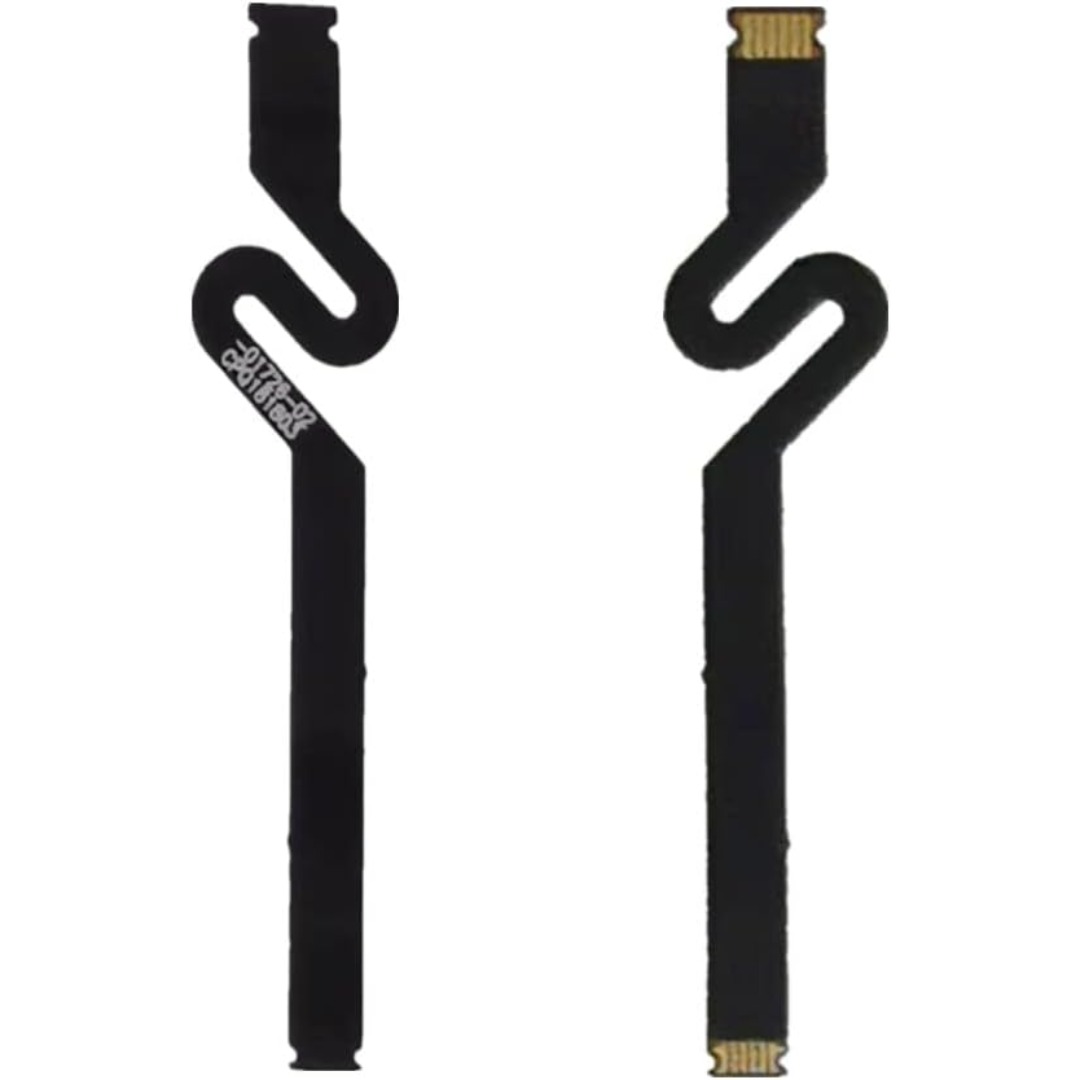
Genuine-spec battery flex cable for MacBook Pro models A2159 (16", 2019), A1708 (13", 2016–2017), and A2338 (13", 2020 M1)—restores critical communication between the battery and logic board for proper power-on, charging, and macOS battery status. Genuine-spec battery flex cable for MacBook Pro models A2159 (16″, 2019), A1708 (13″, 2016–2017), and A2338 (13″, 2020 M1)—restores critical communication between the battery and logic board for proper power-on, charging, and macOS battery status. Carries SMBus (System Management Bus) signals from the battery to the logic board Enables: Accurate battery percentage and health reporting in macOS Proper charging control (start/stop, thermal throttling) Power-on capability (MacBooks will not boot without this connection) Prevention of “Battery Not Charging” or “Service Battery” errors Accurate battery percentage and health reporting in macOS Proper charging control (start/stop, thermal throttling) Power-on capability (MacBooks will not boot without this connection) Prevention of “Battery Not Charging” or “Service Battery” errors MacBook won’t turn on (even with a good battery) Battery shows “–%”, 0%, or “Not Charging” Random shutdowns under load macOS displays “No Battery Available” Logic board powers fans or lights but no display output Battery flex cable only (with OEM-style connector and strain relief) ❌ Does not include: battery, logic board, or trackpad Requires full bottom case removal and battery disconnection Connects via a ZIF or press-fit socket on the logic board Must be routed precisely to avoid tension or micro-tears Highly recommended for experienced or certified technicians—improper installation can cause permanent power or battery communication failure

