
WiWU Linker 721HD Hub – Compact USB-C hub with 7 ports including 100W PD, dual USB-A, USB-C data, HDMI 4K60, and dual SD/TF slots.Aluminum body, plug‑and‑play compatibility with MacBooks and modern USB‑C devices—ideal for laptop expansion. Model: Linker 721HD (WiWU) Material: Aluminum-alloy shell Ports: 2 × USB‑A 3.1 1 × USB‑C 3.1 (data) 1 × USB‑C PD power delivery (up to 100 W) 1 × HDMI (4K @ 60 Hz) SD card slot + micro‑SD (TF) slot (USB 3.0 speed) Ports: 2 × USB‑A 3.1 1 × USB‑C 3.1 (data) 1 × USB‑C PD power delivery (up to 100 W) 1 × HDMI (4K @ 60 Hz) SD card slot + micro‑SD (TF) slot (USB 3.0 speed) Cable: Fixed USB‑C male cable (approx. 15 cm) Compatibility: Plug-and-play with USB-C/Thunderbolt 3/4 devices (MacBook, XPS, Chromebooks, mobile devices with DP-Alt Mode) Design: Compact, space gray finish optimized for travel/work setups Weight: ~150 g

A1417 Battery Only for (Mid 2012 & Early 2013) A1398 MacBook Pro - Replacement Battery for A1398 MacBook Pro 15-inch Retina (Mid 2012, Early 2013 Version) - EMC 2512 or 2673 A1417 Battery Only for (Mid 2012 & Early 2013) A1398 MacBook Pro – Replacement Battery for A1398 MacBook Pro 15-inch Retina (Mid 2012, Early 2013 Version) – EMC 2512 or 2673 [11.26V/99Wh] A1417 A1398 Battery — Health:100%+, Voltage: 11.26V, Capacity: 99Wh(Please confirm the release year before purchase the battery) Suit for 15 inch A1398 MacBook Pro Battery Retina Mid 2012 Early 2013 (EMC 2512 or 2673) >[See more details on the Product Description] Brand new battery-> Directly warranty from Manufacturer, perform as good as the original battery. A1398 Macbook Pro 15 inch battery replacement come with adapted screwdriver. Multi-command chip control-> Contain with Durable A cells,Multi-command chip control makes the battery supply power stably.

Genuine-spec US layout keyboard replacement for MacBook Pro (Model A1398, Late 2011–Mid 2012)—featuring durable scissor-switch keys, backlighting, and OEM-fit design for reliable typing and straightforward installation. Compatible With: MacBook Pro 13″: Late 2011 (Model A1278, but labeled A1398 in some regions) – Model Identifier MacBookPro8,1 MacBook Pro 15″: Early 2011, Late 2011, and Mid 2012 – Model Identifiers MacBookPro8,2 (15″ early/late 2011) and MacBookPro9,1 (15″ mid 2012) *(Note: “A1398” is primarily associated with the 15″ unibody MacBook Pro with Retina display (Mid 2012), which was the first Retina MacBook Pro.)* This keyboard fits the non-Retina 15″ A1398 (Mid 2012) and compatible Late 2011 models. MacBook Pro 13″: Late 2011 (Model A1278, but labeled A1398 in some regions) – Model Identifier MacBookPro8,1 MacBook Pro 15″: Early 2011, Late 2011, and Mid 2012 – Model Identifiers MacBookPro8,2 (15″ early/late 2011) and MacBookPro9,1 (15″ mid 2012) *(Note: “A1398” is primarily associated with the 15″ unibody MacBook Pro with Retina display (Mid 2012), which was the first Retina MacBook Pro.)* This keyboard fits the non-Retina 15″ A1398 (Mid 2012) and compatible Late 2011 models. Layout: Standard US English (QWERTY) with full-size keys, inverted-T arrow keys, and dedicated function row (F1–F12). Keyboard Type: Traditional scissor-switch mechanism—robust, tactile, and serviceable (pre-Butterfly era). Integrated Features: Backlit keys (adjustable brightness via F5/F6) OEM ribbon cable with ZIF connector Matches original key spacing and actuation force Backlit keys (adjustable brightness via F5/F6) OEM ribbon cable with ZIF connector Matches original key spacing and actuation force Build & Fit: Precision-molded plastic frame with exact screw mounts and alignment pegs—ensures secure, rattle-free installation in the top case. Installation Note: Keyboard is secured with screws and minimal adhesive. Requires full top case access and battery disconnect. Recommended for intermediate to advanced users or technicians.

Dell Latitude 5400 — business-class laptop built for reliability and productivity.• Intel Core i5 8th Gen • 8 GB RAM • 256 GB SSD • 14” FHD TouchscreenWindows | Durable Design | Backlit Keyboard

Foloda Wireless Number Pads, Numeric Keypad Numpad 22 Keys Portable 2.4 GHz Financial Accounting Number Keyboard Extensions 10 Key for Laptop, PC, Desktop, Surface Pro, Notebook

MacBook Pro A2485 2021 – 16.2" XDR display, Apple M1 Pro (10-core CPU / 16-core GPU), 32 GB memory, 512 GB SSD.Top-tier creative laptop with blazing performance, superb display, and professional I/O – built for demanding workflows.

256GB SSD Apple Macbook Pro Air 2013 2014 2015 A1502 A1398 A1466 A1465 | Samsung MZ-JPU512T/A06 | 655-1805D ORIGINAL APPLE PART (Apple sources their SSD’s for MacBooks from Samsung) A1502 – A1398 – A1465 – A1466 100% TESTED WORKING Please check compatibility below before you make your purchase: COMPATIBILITY: MacBook Pro Retina Late 2013 – Mid-2015 MacBookPro11,1 (A1502) – ME864LL/A, ME866LL/A, ME867LL/A, MGX72LL/A, MGX92LL/A, & MGXD2LL/A MacBookPro11,2 (A1398) – ME293LL/A & MGXA2LL/A MacBookPro11,3 (A1398) – ME294LL/A, ME874LL/A, MGXC2LL/A, & MGXG2LL/A MacBookPro11,4 (A1398) – MJLQ2LL/A MacBookPro11,5 (A1398) – MJLT2LL/A & MJLU2LL/A MacBookPro12,1 (A1502) – MF839LL/A, MF841LL/A, & MF843LL/A MacBook Air Mid-2013 – Late 2015 MacBookAir6,1 (A1465) – MD711LL/A, MD760LL/A, MD711LL/B, & MF067LL/A MacBookAir6,2 (A1466) – MD760LL/A, MD760LL/B, & MF068LL/A MacBookAir7,1 (A1465) – MJMVM2LL/A MacBookAir7,2 (A1466) – MJVE2LL/A Model Identifier: Samsung Manufacturer Part# MZ-JPU512T/A06

Replacement Keyboard for MacBook Pro 13" inch A1706 & MacBook Pro 15" inch A1707 Touch Bar (for Late 2016 mid 2017 Year) Replacement Keyboard for MacBook Pro 13″ inch A1706 & MacBook Pro 15″ inch A1707 Touch Bar (for Late 2016 mid 2017 Year) 【Compatibility】This replacement keyboard is Compatible with original MacBook Pro 13″ inch A1706 & MacBook Pro 15″ inch A1707 Touch Bar (for Late 2016 mid 2017 Year) Laptop. 【Compatible Part Numbers】661-06377 【Compatible MBP Numbers】A1706 series :MacBook Pro 13 inch 2017 MacBookPro14,2 & MacBook Pro 13 2016 MacBookPro13,2 MNQF2LL/A MNQG2LL/A MLH12LL/A MLVP2LL/A etc A1707 series:MacBook Pro 15 inch 2016 MacBookPro13,3 & MacBook Pro 15 inch 2017 MacBookPro14,3 Release June 2017 MPTR2LL/A MPTU2LL/A MPTT2LL/A MPTV2LL/A Release October 2016 MLH32LL/A MLW72LL/A MLH42LL/A MLW82LL/A

Designed by Apple Deeper, richer bass tones Greater protection from sweat and water Control music and video playback Answer and end calls Works with all devices that have a Lightning connector and support iOS 10 or later, including iPod touch, iPad, and iPhone

MARSRIVA Smart Mini DC UPS KP2 Series | 18 Watts 10000mAh | 0ms AC to DC Transfer | Flame Retardant | Wall Mount Slots | 1 x Passive PoE, 2 x DC and 1 x USB Output Ports | KP2 BLACK Keep Wi-Fi Power On Output:18W (Max.) or 30W (Max.) ● With 1 * Passive PoE, 2 * DC and 1 * USB output ports, DC UPS can power up multiple devices simultaneously. ● AC to DC 0ms transfer technology keeps your devices working when electricity is ON/OFF shifting. ● With wall-mount slots on the back, DC UPS can be mounted on the wall easily. ● Air cooling system provides maximum heat dissipation, ensuring the long-term stability of UPS. ● V-0 flame retardant product housing secures you and your property. ● 16000mAh high-capacity battery (KP2 Plus, KP2 Ultra) provides longer backup time. ● 30W high-power output (KP2 Pro, KP2 Ultra) provides better compatibility.

Speaker Specifications Feature Value Feature Value Input/Output USB Battery Capacity (mAh) 2000 Maximum Wireless Range (m) 10m-20m Touch Screen No Sound Mode Immersive, Stereo, Live, Standard Category Speakers Use HOME Bluetooth Version 5.1 Input Power (W) 50-99W Voice Control No Frequency Range 100Hz-20KHz Display Screen No Waterproof Yes Support APP No Support Memory Card Yes Playback Function Radio, MP3 Remote Control No Intelligent Personal Assistant None Display Screen No Audio Crossover Full-Range Number of Loudspeaker Enclosures 2 Power Source Battery Channels 1 Speaker Type Portable Communication USB Cabinet Material Plastic Brand Name HONOURSACY Origin Mainland China Function HiFi Sound Quality Function2 IPX6 Waterproof Function3 Support TWS Interconnection Function4 Portable Design Function5 80W High Power Function6 Long Endurance

Compact, affordable all-in-one inkjet printer for home and small office use—print, scan, and copy in color with easy wireless setup, mobile printing, and HP’s efficient ink system.

The Cudy WR1200 AC1200 Router offers flexible networking with its 5-in-1 functionality and dual-band WiFi speeds up to 1200Mbps. Ideal for home and office use, it provides stable connectivity, wide coverage, and multiple operating modes to suit different network needs. AC1200 Dual Band WiFi – Combined speeds of up to 1200Mbps (300Mbps on 2.4GHz + 867Mbps on 5GHz) for smooth browsing, streaming, and gaming. 5-in-1 Multi-Mode Functionality – Works as Router, Access Point, Range Extender, WISP, and Client for maximum flexibility. Wide Coverage – High-gain antennas ensure strong and stable WiFi signal throughout your home or office. Fast Ethernet Ports – Reliable wired connections for computers, smart TVs, and other devices. Easy Setup & Management – Simple configuration through an intuitive web interface. Stable Multi-Device Performance – Designed to handle multiple connected devices efficiently. Secure Network – WPA/WPA2 encryption keeps your connection safe and private. 1 × WAN Port 4 × LAN Ports Dual Band WiFi (2.4GHz & 5GHz) Ethernet (RJ45) Wireless Security (WPA/WPA2)

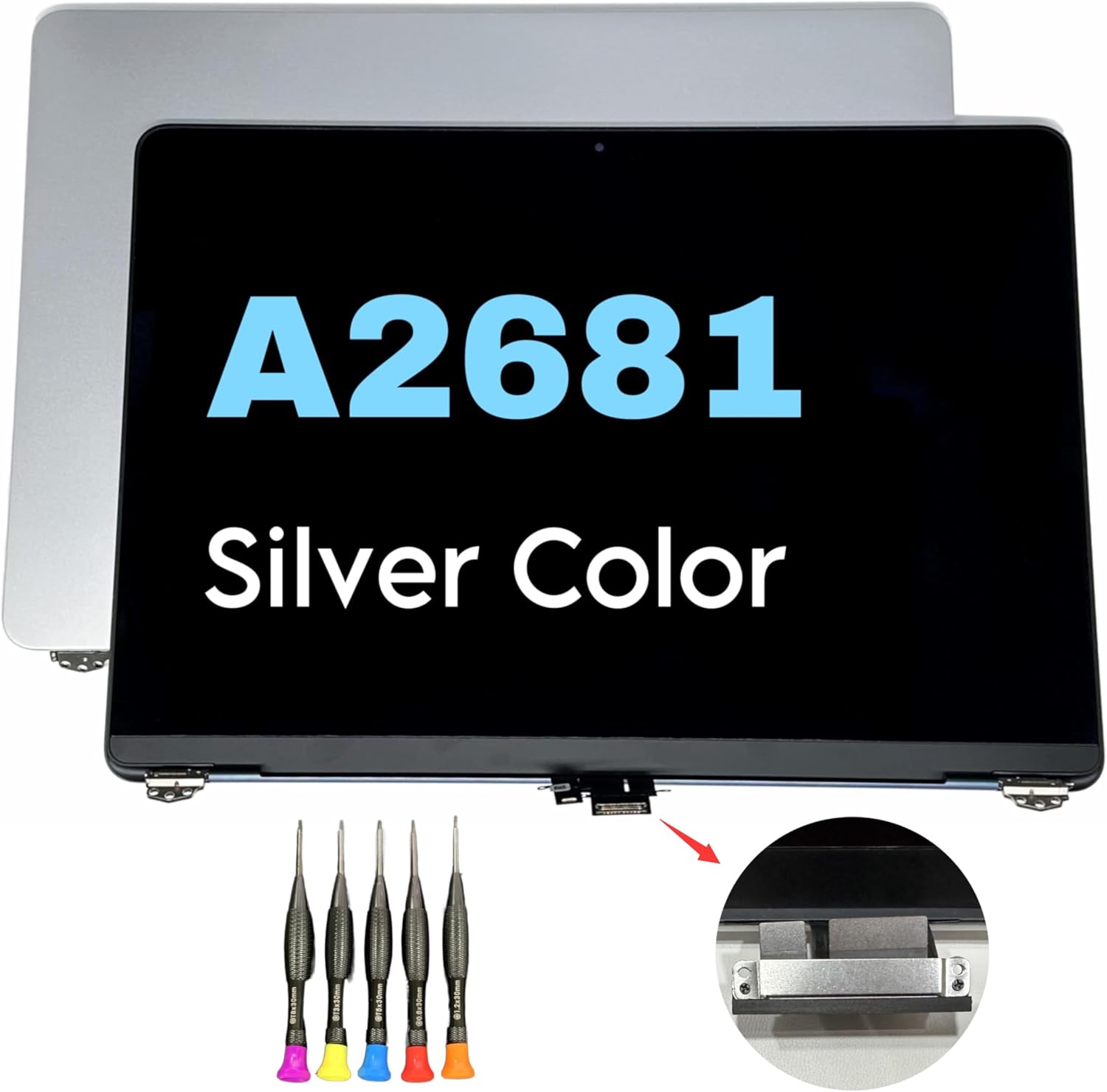
OEM-quality touchpad replacement for MacBook Air 13.6″ (Model A2681, 2022)—available in Gray, Gold, Silver, and Blue to match your original chassis color. Precision-engineered for seamless Force Touch performance and smooth gesture control. Compatible With: MacBook Air 13.6-inch (2022, Model A2681) with M2 chip—includes all color variants: Space Gray, Gold, Silver, and Midnight Blue. Part Type: Touchpad only—does not include the flex cable, connector, or mounting brackets. Intended for technicians reusing the original cable or transferring it during repair. Color-Matched Finish: Available in all four official A2681 colors to maintain aesthetic consistency with your MacBook’s lower case. Force Touch Support: Full compatibility with Force Touch gestures, haptic feedback, and multi-touch functionality (requires original Taptic Engine and logic board). OEM Build Quality: Matches Apple’s original surface texture, curvature, and responsiveness—ensures consistent click feel and tracking accuracy. Installation Note: Requires careful transfer of the original flex cable and Taptic Engine (if not already attached). Full bottom case disassembly is necessary. Recommended for professional repair technicians.

Genuine-spec touchpad flex cable for MacBook Pro 14″ (Model A2442, 2021, M1 Pro/Max)—essential for restoring full Force Touch functionality, haptic feedback, and precise multi-touch gesture control. Compatible With: MacBook Pro 14-inch (2021, Model A2442) with Apple M1 Pro or M1 Max chip (Model Identifiers: MacBookPro18,3 / MacBookPro18,4). Part Type: Touchpad flex cable only—does not include the trackpad, Taptic Engine, or mounting brackets. This is the OEM-style ribbon cable that connects the trackpad to the logic board. Function: Carries touch input, Force Touch pressure data, and haptic feedback signals—critical for macOS trackpad gestures, Force Click, and Taptic Engine responsiveness. OEM-Quality Build: Matches Apple’s original flex circuit in length, connector pitch, shielding, and bend geometry—ensures reliable signal transmission and durability under repeated use. Common Use Cases: Replacing a damaged, torn, or corroded original flex cable Completing a trackpad replacement when the original cable is unusable Fixing intermittent trackpad issues, unresponsiveness, or loss of Force Touch Replacing a damaged, torn, or corroded original flex cable Completing a trackpad replacement when the original cable is unusable Fixing intermittent trackpad issues, unresponsiveness, or loss of Force Touch Installation Note: Requires full bottom case removal and careful routing beneath internal components. Connectors use ZIF (Zero Insertion Force) sockets—must be seated properly without force. Recommended for certified or highly experienced technicians only.

Logitech G403 HERO – Ergonomic wired gaming mouse with HERO 25K sensor and ultra-precise 25,600 DPI tracking.Delivers pro-grade performance with customizable RGB, 6 buttons, and optional weight tuning. ✅ Full Specifications: Model: Logitech G403 HERO Sensor: HERO 25K Optical Sensor DPI: 100 – 25,600 DPI (adjustable with no smoothing, acceleration, or filtering) Polling Rate: 1000 Hz (1ms response time) Tracking Speed: >400 IPS Acceleration: >40G Buttons: 6 programmable buttons (including 2 side buttons) Switches: Mechanical with metal spring button tensioning (rated for 20M+ clicks) Lighting: RGB Lighting (logo and scroll wheel, customizable via G HUB) Weight: Approx. 87g (mouse only) + 10g optional weight Grip Style: Palm and claw grip support Cable: 2.1 meters (standard rubber cable) Build: Ergonomic right-handed design with rubber side grips Software: Logitech G HUB (for DPI, lighting, macros, and profiles) Compatibility: Windows 7 or later, macOS 10.11 or later, Chrome OS Onboard Memory: Yes (save DPI and button settings directly to the mouse)

WiWU WM108 Wimice Dual‑Mode Mouse – Bluetooth 5.0 and 2.4 GHz wireless mouse with 800/1200/1600 DPI, silent clicks, and ergonomic ABS housing.Long battery life (~6 months standby), USB dongle & silent design—ideal for travel, office, and quiet environments. Model: WiWU Wimice WM108 Connection Modes: Bluetooth 5.0 2.4 GHz wireless via USB dongle Connection Modes: Bluetooth 5.0 2.4 GHz wireless via USB dongle DPI Settings: 800 / 1,200 / 1,600 DPI (adjustable) Buttons: 3 standard buttons + clickable scroll wheel (4 keys total) Range: Up to 10 m wireless connectivity Material/Design: Lightweight (67–130 g, depending on source), ergonomic ABS plastic body, magnetic base or “super magnetic absorption” design Operating Range: ≈10 m Silent Clicks: Quiet operation—silent key action Dimensions: Approx. 108 × 64 × 36 mm Weight: 67 g cited by Star Tech and 130 g by others—likely lighter in official spec Compatibility: Windows, macOS, Linux, Android, etc. Plug-and-play, no driver needed

Genuine-spec touchpad flex cable compatible with both MacBook Air A2179 (Intel, 2020) and A2337 (M1, 2020)—restores full Force Touch functionality, haptic feedback, and precise multi-touch gesture control during trackpad repair or replacement. Compatible With: MacBook Air 13″ (2020, Intel) – Model A2179 (Model Identifier: MacBookAir9,1) MacBook Air 13″ (2020, Apple M1) – Model A2337 (Model Identifier: MacBookAir10,1) MacBook Air 13″ (2020, Intel) – Model A2179 (Model Identifier: MacBookAir9,1) MacBook Air 13″ (2020, Apple M1) – Model A2337 (Model Identifier: MacBookAir10,1) ✅ Important Note: Despite different processors (Intel vs. M1), Apple used the same trackpad assembly and flex cable in both A2179 and A2337. This makes the flex cable fully interchangeable between the two models. Part Type: Touchpad flex cable only — does not include the trackpad housing, Taptic Engine, or mounting hardware. This is the OEM-style ribbon cable that connects the trackpad to the logic board. Function: Transmits: Touch input coordinates Force Touch pressure data Haptic feedback signals to the Taptic Engine Enables full macOS gesture support: Force Click, three-finger lookup, swipe navigation, pinch-to-zoom, and smooth cursor tracking. Touch input coordinates Force Touch pressure data Haptic feedback signals to the Taptic Engine Enables full macOS gesture support: Force Click, three-finger lookup, swipe navigation, pinch-to-zoom, and smooth cursor tracking. OEM-Quality Build: Matches Apple’s original specifications in: Cable length and routing path Connector pitch and ZIF latch design EMI shielding and flex durability Cable length and routing path Connector pitch and ZIF latch design EMI shielding and flex durability Common Use Cases: Replacing a torn, creased, or liquid-damaged original flex cable Completing a trackpad replacement when the original cable is compromised Fixing intermittent trackpad behavior, loss of Force Touch, or complete unresponsiveness Replacing a torn, creased, or liquid-damaged original flex cable Completing a trackpad replacement when the original cable is compromised Fixing intermittent trackpad behavior, loss of Force Touch, or complete unresponsiveness Installation Note: Requires full bottom case removal and battery disconnection. Cable routes under the right side of the battery and logic board. Connects via a ZIF (Zero Insertion Force) socket—align carefully and latch gently. Recommended for experienced or certified technicians only. Requires full bottom case removal and battery disconnection. Cable routes under the right side of the battery and logic board. Connects via a ZIF (Zero Insertion Force) socket—align carefully and latch gently. Recommended for experienced or certified technicians only.

Battery Replacement for A1819 MacBook Pro 13" A1706 Late 2016 Mid 2017 MLH12LL MLH12LL/A MLH12LL/A MPXV2LL MPXV2LL/A MPXV2LL/A Battery Replacement for A1819 MacBook Pro 13″ A1706 Late 2016 Mid 2017 MLH12LL MLH12LL/A MLH12LL/A MPXV2LL MPXV2LL/A MPXV2LL/A 【Technical Details:】 Model Number: A1819; Battery type: Li-ion; Voltage: 11.1V; Capacity: 4300mAh 49.02Wh,Condition: brand new 【Compatible with:】 Mid 2017 MacBook Pro 13-inch Series: MacBook Pro 13 inch Touch A1706(Mid 2017); MacBook Pro 13 inch A1706(EMC 3163) (Mid 2017); MacBook Pro 13-inch MPXV2LL/A or MPXW2LL/A or MPXX2LL/A or MPXY2LL/A 【Compatible with:】MacBook Pro 13 inch Touch A1706(Late 2016); MacBook Pro 13 inch A1706(EMC 3071) (Late 2016); MacBook Pro 13-inch MLH12LL/A or MLVP2LL/A or MNQF2LL/A or MNQG2LL/A 【Compatible with:】2016 2017 MacBook Pro 13″ Four Thunderbolt 3 Ports A1706 model: MacBook Pro 13″ Touch i5 2.9GHz A1706(Late 2016); MacBook Pro 13″ Touch i5 3.1GHz A1706(Late 2016); MacBook Pro 13″ Touch i5 3.1GHz A1706(Mid 2017); MacBook Pro 13″ Touch i5 3.3GHz A1706(Mid 2017); MacBook Pro 13″ Touch i7 3.3GHz A1706(Late 2016); MacBook Pro 13″ Touch i7 3.5GHz A1706(Mid 2017)

