
Screen Size 32″ Display Type VA Color Gamut (Typ.) sRGB 95% (CIE1931) Color Depth (Number of Colors) 16.7M Pixel Pitch (mm) 0.36375 x 0.36375 mm Response Time (GTG) 5ms (GtG at Faster), 1ms MBR Refresh Rate 165Hz Aspect Ratio 16:9 Display Resolution FHD Resolution 1920 x 1080 Brightness 300cd/m² Contrast Ratio 3000:1 Viewing Angle 178º (R/L), 178º (U/D) Surface Treatment Anti-Glare INPUT/OUTPUT HDMI Yes x 2 DisplayPort Yes x 1 Headphone Out Yes POWER Type Adapter Input 100-240 Vac, 50/60Hz Power Save/Sleep Mode (Max.) Less than 0.5W DC Off (Max.) Less than 0.3W Power Consumption (Typ.) 40W Power Consumption (Max.) 40W SPECIAL FEATURES NVIDIA G-Sync™ Yes (Compatible) Adaptive Sync AMD FreeSync™ Premium Black Stabilizer® Yes Dynamic Action Sync® Yes Crosshair® Yes Flicker Safe Yes Smart Energy Saving Yes Reader Mode Yes OnScreen Control (OSC) Yes HDR (High Dynamic Range) HDR10 HDR Effect Yes FreeSync (Low Frame Compensation) Yes Motion Blur Reduction Technology Yes 1ms Motion Blur Reduction Yes SOUND Speaker No Built-in Speaker DIMENSIONS/WEIGHTS With Stand (WxHxD) 28.1″ x 23.6″ x 11.5″ (Up), 28.1″ x 19.3″ x 11.5″ (Down) Without Stand (WxHxD) 28.1″ x 16.9″ x 2.0″ Shipping Dimensions (WxHxD) 31.2” x 21.9” x 8.9” With Stand Weight 15.9 lbs Without Stand Weight 11.2 lbs Shipping Weight 22.7 lbs STAND Display Position Adjustments Tilt/Height/Pivot CABINET/ACCESSORIES Wall Mount Size (mm) 100 x 100 mm Display Port Yes 3 Years Warranty manufacturer link

WiWU A821CH 8‑in‑1 Stand & Dock – A foldable aluminum laptop stand with a built-in 8‑port USB‑C dock (two USB‑A, two USB‑C, HDMI 4K30, SD/TF, Gigabit Ethernet, PD 100 W).Enhances comfort, cooling, and functionality—perfect for decluttered, professional work setups. Model: WiWU A821CH Design: Sturdy aluminum alloy stand with foldable, portable design, hollow surface for cooling, and silicone pads to prevent slips Dimensions & Weight: Compact when folded (~400 g in aluminum) Docking Hub Ports: 2 × USB-C ports 2 × USB‑A 3.0 ports 1 × HDMI (up to 4K@30 Hz) SD + micro‑SD card slots 1 × RJ‑45 Gigabit Ethernet (1000 Mbps) Docking Hub Ports: 2 × USB-C ports 2 × USB‑A 3.0 ports 1 × HDMI (up to 4K@30 Hz) SD + micro‑SD card slots 1 × RJ‑45 Gigabit Ethernet (1000 Mbps) Power Delivery: USB-C PD 3.0 supports up to 100 W—can charge a laptop while using other ports Connectivity: HDMI supports up to 4K@30 Hz; Ethernet up to Gigabit speed Stand Features: Detachable base—can use stand and hub together or separately, with adjustable ergonomic angles and vents for airflow Durability: Aluminum alloy with frosted texture, scratch-resistant finish, tested to executive standards

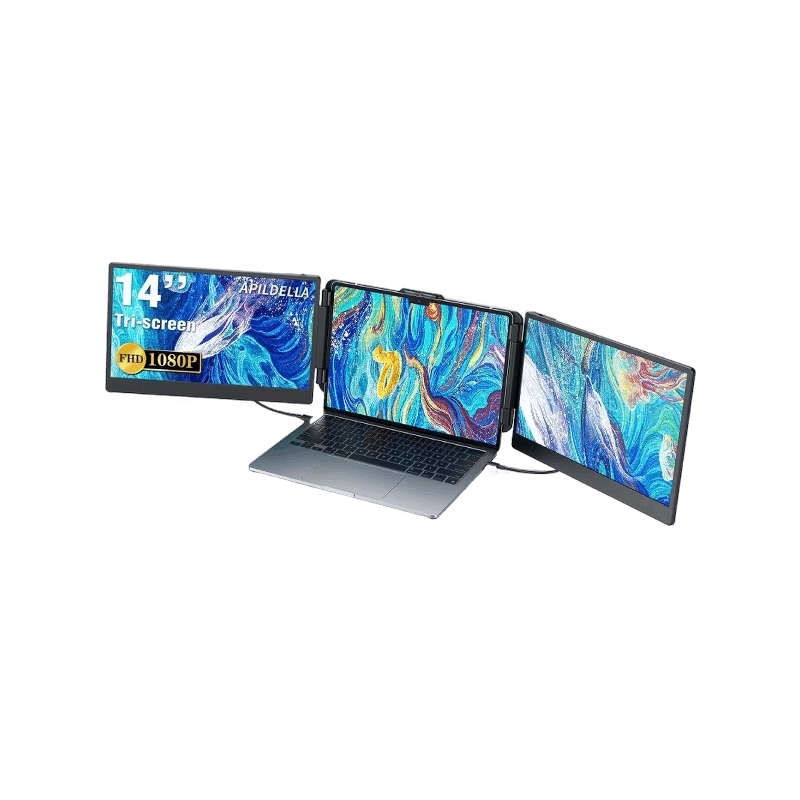
The Maxfree S2 14″ Portable Laptop Screen Extender lets you expand your workspace with dual or triple displays. First, it connects easily via USB-C or HDMI to your laptop. The screen features full HD resolution, anti-glare technology, and a slim, lightweight design for portability. In addition, it supports multiple monitor setups, boosting productivity for work, gaming, or streaming. Moreover, its adjustable stand and foldable design make it easy to carry and set up anywhere. Therefore, users can enjoy a seamless multi-screen experience without compromising desk space or mobility. Specifications: 14″ full HD screen provides sharp visuals for work and entertainment USB-C and HDMI connectivity support dual or triple monitor setups Slim, lightweight design ensures portability and easy setup Adjustable stand and foldable design for versatile positioning Compatible with laptops and devices for seamless multi-screen productivity

The MSI MAG 274CXF 27″ FHD 280Hz Curved Gaming Monitor delivers ultra-smooth motion for competitive gamers and fast action. Its Full HD resolution shows clear images, sharp details, and clean visuals. The 27-inch curved screen gives you immersive viewing and a wide field of vision. This helps you see more game space and stay focused. Moreover, the MSI MAG 274CXF features a blazing 280 Hz refresh rate for lightning-fast visuals. Fast scenes and quick moves look fluid and responsive with minimal blur. The high refresh rate helps you react faster in shooters and action games. In addition, the monitor uses a high-performance panel with strong contrast and rich colors. Blacks are deep and dark scenes feel immersive. The curved 1500R design reduces eye strain and makes long gaming sessions easier. Furthermore, the MSI MAG 274CXF supports Adaptive-Sync technology to match refresh rate and GPU output. This avoids screen tearing and stutter. You get smooth and stable gameplay on PC or console. Also, the monitor offers useful connectivity options like DisplayPort and HDMI. You can connect gaming PCs, laptops, or consoles easily. The slim bezel design gives your setup a clean modern look. It fits well on gaming desks of all sizes. The monitor also includes eye-care features like Flicker-Free and reduced blue light settings. This helps reduce strain during long hours of use. It is ideal for gamers who spend many hours playing. Overall, the MSI MAG 274CXF 27″ FHD 280Hz Curved Gaming Monitor combines speed, smoothness, and immersive design. It boosts your gaming performance, keeps visuals sharp, and ensures comfort during long sessions. It is perfect for competitive gamers and anyone who wants top-tier fluid visuals. Specifications: Display : 27″ Rapid VA Resolution : FHD 1920×1080 Refresh Rate : 280Hz Response Time : 0.5ms Curvature : 1500R

The MSI Pro MP272 E14C is a 27‑inch FHD monitor built for business and productivity. It delivers clear Full HD visuals with a fast 144 Hz refresh rate. Furthermore, its IPS panel provides wide viewing angles and accurate colors, making work and multimedia more enjoyable. It supports a 1 ms (MPRT) response time, which reduces motion blur in videos and fast‑moving content. In addition, Adaptive‑Sync technology helps smooth gameplay and reduce screen tearing. The monitor also includes HDR Ready support for improved contrast and detail. Moreover, the design features a four‑side slim bezel for a clean look and immersive viewing experience. It offers anti‑glare treatment and built‑in speakers for convenient multimedia use. As a result, the MSI Pro MP272 E14C enhances productivity and comfort whether you work, create, or play. . Specifications: 27‑inch FHD (1920 × 1080) IPS panel with wide viewing angles 144 Hz refresh rate with 1 ms (MPRT) response time Adaptive‑Sync support and HDR Ready for smooth visuals HDMI 2.0 and USB‑C (DP Alt Mode with 15 W PD) connectivity Built‑in speakers, anti‑glare surface, and slim bezel design

The Portable Screen PS185 is designed for users who need a lightweight and versatile second display. It is perfect for travel, work, or entertainment. This 18.5-inch portable screen delivers clear and sharp visuals. Colors appear bright, and details are easy to see. It enhances productivity and makes media more enjoyable. The slim and lightweight design makes it easy to carry. It fits in bags without adding bulk. This makes it ideal for professionals on the go. The Portable Screen PS185 supports multiple connectivity options. It includes HDMI and USB-C inputs for flexible use. You can connect it to laptops, consoles, or smartphones. Plug-and-play setup makes it simple to use. No extra software or drivers are required. This ensures quick and smooth operation anywhere. The screen provides wide viewing angles. You can share content with colleagues, friends, or family. Visuals remain clear from different positions. Built-in speakers add convenience for entertainment. You can watch movies or play games without external speakers. The sound is clear for casual use. The Portable Screen PS185 is also energy-efficient. Low power consumption ensures longer use with connected devices. This makes it practical for travel and business trips. Its durable build ensures long-lasting performance. The screen is resistant to scratches and daily wear. It remains reliable for frequent use. In summary, the Portable Screen PS185 combines portability, clarity, and versatility. It is a great tool for work and play. Specifications: Display : 18.5″ IPS Resolution : FHD 1920×1080 Dual Type-C & Mini HDMI

TeamGee Portable Monitor for Laptop, 12” Full HD IPS Display, Dual Triple Monitor Screen Extender, HDMI/USB-A/Type-C Plug and Play for Windows, Chrome & Mac, Work with 13”-16” Laptops Brand TeamGee Mounting Type Desk Mount Color Black Hardware Interface USB, USB Type C, HDMI Connectivity Technology USB, HDMI Package Dimensions 14.02 x 10.04 x 3.58 inches Item Weight 5.7 pounds Manufacturer TeamGee ASIN B09NLKWDMP Item model number P2 1 Year Warranty manufacturer link

Apple 60W MagSafe Power Adapter (for MacBook and 13-inch MacBook Pro) The 60 Watt MagSafe Power Adapter features a magnetic DC connector that ensures your power cable will disconnect if it experiences undue strain and helps prevent fraying or weakening of the cables over time. In addition, the magnetic DC helps guide the plug into the system for a quick and secure connection. When the connection is secure, an LED located at the head of the DC connector will light up; an amber light lets you know that your portable is charging, while a green light tells you that you have a full charge. An AC lead is provided with the adapter for maximum lead length, while the AC wall adapter (also provided) gives users an even easier and more compact way to travel. Designed to be the perfect travelling companion, the adapter has a clever design that allows the DC cable to be wound neatly around itself for easy cable storage. This power adapter recharges the lithium polymer battery while the system is off, on, or in sleep mode. It also powers the system if you choose to operate without a battery. Compatible with MacBook and 13-inch MacBook Pro. See this article for more details about choosing the right one. Knowing which specific Mac model you have is important. If you are running OS X Lion (10.7) or later, go to the “” menu at the top left of your screen, choose “About this Mac” then click the “More Info…” button. Your Mac model and generation will be displayed. If you are running an earlier version of OS X, you can enter your serial number here to find out which model you have.

Genuine-spec keyboard replacement for MacBook Pro 14" & 16" (2021–2025, M1 Pro/Max to M4 Pro/Max)—available in US QWERTY or UK QWERTY (with £ symbol). Features Apple’s Magic Keyboard with scissor-switch mechanism, full backlighting, and precise OEM fit. Genuine-spec keyboard replacement for MacBook Pro 14″ & 16″ (2021–2025, M1 Pro/Max to M4 Pro/Max)—available in US QWERTY or UK QWERTY (with £ symbol). Features Apple’s Magic Keyboard with scissor-switch mechanism, full backlighting, and precise OEM fit. US Layout: Wide Enter key @ above 2, # above 3 Standard inverted-T arrow keys Wide Enter key @ above 2, # above 3 Standard inverted-T arrow keys UK Layout: Tall vertical Enter key £ symbol on key 3 @ accessed via Right Alt + 2 Matches Apple’s official UK regional configuration Tall vertical Enter key £ symbol on key 3 @ accessed via Right Alt + 2 Matches Apple’s official UK regional configuration Keyboard Type: Apple Magic Keyboard with scissor-switch mechanism Backlighting: Full per-key white backlight with ambient light sensor support Function Row: Full-height physical function keys (F1–F12) with macOS shortcut toggling Build Quality: OEM-grade keycaps, consistent actuation force, and precise top-case alignment

Foloda Wireless Number Pads, Numeric Keypad Numpad 22 Keys Portable 2.4 GHz Financial Accounting Number Keyboard Extensions 10 Key for Laptop, PC, Desktop, Surface Pro, Notebook

Genuine-spec touchpad flex cable compatible with both MacBook Air A2179 (Intel, 2020) and A2337 (M1, 2020)—restores full Force Touch functionality, haptic feedback, and precise multi-touch gesture control during trackpad repair or replacement. Compatible With: MacBook Air 13″ (2020, Intel) – Model A2179 (Model Identifier: MacBookAir9,1) MacBook Air 13″ (2020, Apple M1) – Model A2337 (Model Identifier: MacBookAir10,1) MacBook Air 13″ (2020, Intel) – Model A2179 (Model Identifier: MacBookAir9,1) MacBook Air 13″ (2020, Apple M1) – Model A2337 (Model Identifier: MacBookAir10,1) ✅ Important Note: Despite different processors (Intel vs. M1), Apple used the same trackpad assembly and flex cable in both A2179 and A2337. This makes the flex cable fully interchangeable between the two models. Part Type: Touchpad flex cable only — does not include the trackpad housing, Taptic Engine, or mounting hardware. This is the OEM-style ribbon cable that connects the trackpad to the logic board. Function: Transmits: Touch input coordinates Force Touch pressure data Haptic feedback signals to the Taptic Engine Enables full macOS gesture support: Force Click, three-finger lookup, swipe navigation, pinch-to-zoom, and smooth cursor tracking. Touch input coordinates Force Touch pressure data Haptic feedback signals to the Taptic Engine Enables full macOS gesture support: Force Click, three-finger lookup, swipe navigation, pinch-to-zoom, and smooth cursor tracking. OEM-Quality Build: Matches Apple’s original specifications in: Cable length and routing path Connector pitch and ZIF latch design EMI shielding and flex durability Cable length and routing path Connector pitch and ZIF latch design EMI shielding and flex durability Common Use Cases: Replacing a torn, creased, or liquid-damaged original flex cable Completing a trackpad replacement when the original cable is compromised Fixing intermittent trackpad behavior, loss of Force Touch, or complete unresponsiveness Replacing a torn, creased, or liquid-damaged original flex cable Completing a trackpad replacement when the original cable is compromised Fixing intermittent trackpad behavior, loss of Force Touch, or complete unresponsiveness Installation Note: Requires full bottom case removal and battery disconnection. Cable routes under the right side of the battery and logic board. Connects via a ZIF (Zero Insertion Force) socket—align carefully and latch gently. Recommended for experienced or certified technicians only. Requires full bottom case removal and battery disconnection. Cable routes under the right side of the battery and logic board. Connects via a ZIF (Zero Insertion Force) socket—align carefully and latch gently. Recommended for experienced or certified technicians only.

DELL 90W Big/Moti Pin 7.4MM X 5.0MM Laptop Charger for Dell Inspiron N5010 19.5V 4.62A Laptop Adapter with Power Cord Cable,Black

ViewSonic VX2718-2KPC-MHD Gaming Monitor ViewSonic VX2718-2KPC-MHD With an immersive curved screen and 165Hz refresh rate. The ViewSonic VX2718-2KPC-MHD provides a stunning viewing experience. The monitor has been designed with a 1500R curved and borderless panel for an immersive experience. A high 165Hz refresh rate delivers smooth animations with minimal input lag while AMD FreeSync™. Premium prevents screen tearing and stuttering for a fluid gaming experience. With 1ms MPRT response time. the monitor delivers unprecedented screen quality and speed. VX2718-2KPC-MHD is also equipped. with ViewSonic’s exclusive ViewMode™ presets, which offer optimized screen performance. for different home entertainment applications, such as watching movies, editing, or playing video games. In addition, a DisplayPort and two HDMI inputs offer flexible connectivity for both general use and entertainment. Ultimate Immersive Gaming Experience With a 1500R screen curvature, the VX2718-2KPC-MHD provides a truly immersive viewing. experience that lets you enjoy big, bold and stunning panoramic views. Seamless In-Game Actions With a swift 165Hz refresh rate, this monitor delivers great visual fluidity . and flawless graphics no matter how quickly the in-game action unfolds. Smooth Images without Ghosting 1ms (MPRT) response time delivers better performance with smooth . pixel transitions from color to color and reduced ghosting. Prevent Screen Tearing With AMD FreeSync™ technology, the monitor is able to adapt so that there. is less fluctuation and jumpiness in the image. Brace for true darkness See and move fluidly in the shadows with ViewSonic’s Black Stabilization feature. When enabled, the darkest scenes are lit up so can spot . the finer details and stay ahead of the pack. Crisp and Clear Detail At two times the resolution of a traditional 1080p display, QHD results in a much sharper image. with no distortion or stretching, all while maintaining the same 16:9 aspect ratio. Optimal Viewing Conditions ViewSonic’s exclusive ViewMode offers specialized presets to fit different usage including Game. Movie, Web, Text, Mac, and Mono modes. These presets enhance gamma curve, color temperature and brightness to deliver the optimal viewing characteristics for each application. Specifications: Specifications 165Hz refresh rate delivers fluid, tear-free visuals Rapid 1ms (MPRT) response time for crisp movements QHD 1440p resolution AMD FreeSync™ Premium prevents screen tearing 1500R curved screen for a perfect balance of immersion and comfort Flexible connectivity with dual HDMI and DisplayPort input 3-year warranty

The LG 32MA70HY 32″ Monitor delivers large, clear visuals for work, entertainment, and everyday use.It features a 32‑inch screen with Full HD resolution for sharp images and smooth video.Moreover, the slim design fits well on desks in homes and offices. This monitor uses an IPS panel for wide viewing angles and consistent color from many positions.Additionally, anti‑glare coating helps reduce reflections in bright lighting.Fast response time reduces blur during moving content like videos and casual gaming. The LG 32MA70HY also includes HDMI and VGA ports for flexible connectivity.Furthermore, tilt adjustment lets you find a comfortable viewing angle during long sessions.Low blue light and flicker‑safe features help reduce eye strain during extended use. This display suits students, professionals, and home users alike.Therefore, it supports productivity, media viewing, and everyday computing.Finally, it combines solid picture quality, reliable performance, and comfort features. Specifications: 32″ Full HD (1920 × 1080) IPS panel HDMI + VGA ports for PC and device connection Anti‑glare coating for comfortable viewing Tilt‑adjustable stand for ergonomic use Low blue light and flicker‑safe eye care

Sklon Ski Boot Bag – Expandable 55–65 L backpack with waterproof fabric, separate boot space, and padded carry system.Ideal for skiing and snowboarding gear transport with hands-free comfort and smart compartment layout. Model: Sklon10 Ski Boot Bag Backpack Capacity: 55 L (expandable to 65 L via integrated zipper) Dimensions: Approx. 34.9 cm × 30.5 cm × 53.3 cm (13.75″ × 12″ × 21″) Weight: Around 1.9 kg Material: Water-resistant polyester and nylon soft-shell build Compartments: Dedicated boot section to isolate wet gear Helmet and goggle compartments Multiple internal and external zippered pockets Compartments: Dedicated boot section to isolate wet gear Helmet and goggle compartments Multiple internal and external zippered pockets External Features: Adjustable straps to carry skis or snowboard Compact foldable design for storage External Features: Adjustable straps to carry skis or snowboard Compact foldable design for storage Comfort: Ergonomic padded shoulder straps Cushioned back panel Top and side grab handles Comfort: Ergonomic padded shoulder straps Cushioned back panel Top and side grab handles Use Case: Designed for skiing, snowboarding, or as a multi-use travel pack

RK61 RGB Mechanical Keyboard – Compact 60% keyboard with Blue switches, tri-mode (Bluetooth/2.4GHz/Wired), and vibrant RGB.Perfect for minimal desk setups and wireless performance with a unique W-W-B color design. Model: Royal Kludge RK61 Layout: 60% compact (61 keys, no numpad or F-row) Switch Type: Blue Mechanical Switches (clicky + tactile feedback) Backlight: RGB with multiple lighting modes & effects Connection Modes (3C): Bluetooth 5.0 – Pair with up to 3 devices Wired USB-C – For gaming and charging 2.4GHz Wireless (on 3-mode models) Connection Modes (3C): Bluetooth 5.0 – Pair with up to 3 devices Wired USB-C – For gaming and charging 2.4GHz Wireless (on 3-mode models) Battery: 1450mAh rechargeable battery Keycaps: ABS double-shot (W-W-B colorway: White-White-Black) Hot-Swappable: No (unless stated on specific variant) Compatibility: Windows, macOS, Android, iOS Anti-Ghosting: Full N-Key rollover Software Support: RK software for key remapping and RGB control (Windows only) Build Material: ABS plastic case, plastic plate Cable: Detachable USB-C cable included Dimensions: Approx. 290 x 100 x 40 mm Weight: ~500g

Arabic Silicone Keyboard Skin Cover for MacBook Pro 13" A1708 Without Touch bar and MacBook 12" A1534 with Retina Display US Layout (Black) Arabic Silicone Keyboard Skin Cover for MacBook Pro 13″ A1708 Without Touch bar and MacBook 12″ A1534 with Retina Display US Layout (Black) About this item Arabic language silicone keyboard skin, US version, perfect fit for your MacBook 12″ A1534, which was released in 2015 & new MacBook Pro 13-Inch 13″ Model A1708 without/no Touch Bar, which was released in 2016; Do not fit for Europe Version MacBook Handmade Skin – XSKN is the original Manufacturer of these “Keyboard Art Skin” silicone covers. They are durable, thin and soft with a cashmere feel. The keys fit snug over the keyboard, smooth surface treatment, suit for regular laptop user who types a lot and quickly Each XSKN silicone skin is heat molded to ensure, each color is paints taking hand screened using silicone paint which is heat fuses into the silicone keyboard skin to become one, making it Soft, ultra-thin, durable and easy to washable High quality silicone raw material assure no extension with longtime using. Every detail clearly prinited, imported ink keep it looking good, rubber coating help to remain in good condition Aside from being beautiful they protect your keyboard from spills, crumbs, animal hair and dust. Washable, can be cleaned easily

Original 13.3-inch LCD display assembly for MacBook Air A1466, pulled from a working unit. OEM, drop-in replacement for cracked or nonfunctional screens—ideal for restoring perfect visuals. This is a genuine Apple LCD display assembly for the MacBook Air model A1466 (mid-2013 to ~2017). It was removed from a working machine (“pulled”) and tested. It’s intended to replace failed, cracked, or damaged screens with an OEM original part. Key Features & Functionality Factory original LCD panel with LED backlight Includes glass, mounting frame, hinges, display cable Calibrated by Apple for color accuracy, brightness, contrast Tested for display quality, backlight uniformity, dead or stuck pixels Fits directly in A1466 models with correct alignment and cable interface Specifications Important Notes & Caveats Must ensure your MacBook is A1466 — wrong model = mismatch in frame, mounting, cable. As a used component, there may be light cosmetic wear or micro-scratches. Always test before full installation (connect the cable, boot, check display and backlight). Be careful handling: glass is fragile and the flex cable is delicate. Alignment and screw placement are critical — incorrect installation can damage the new screen.

Genuine Apple sleep/wake sensor flex cable (Hall effect sensor) for MacBook Air 13.6″ (Model A2681, 2022, M2)—ensures automatic display sleep when the lid is closed and wake-on-open functionality. OEM part number 821-04129-02. Compatible With: MacBook Air 13.6-inch (2022, Model A2681) with Apple M2 chip (all colors: Silver, Space Gray, Starlight, Midnight). Apple Part Number: 821-04129-02 (exact OEM service part). Function: Contains the Hall effect sensor that detects the magnet in the MacBook Air’s display lid. This allows macOS to: Sleep the system when the lid is closed Wake instantly when opened Prevent false sleep/wake events during use Sleep the system when the lid is closed Wake instantly when opened Prevent false sleep/wake events during use Location: Mounted near the right side of the keyboard, adjacent to the battery and logic board. Common Failure Symptoms: MacBook doesn’t sleep when lid is closed MacBook wakes randomly in a bag “Lid closed” not recognized in macOS Requires manual sleep or power button use MacBook doesn’t sleep when lid is closed MacBook wakes randomly in a bag “Lid closed” not recognized in macOS Requires manual sleep or power button use Part Type: Flex cable with integrated Hall sensor—not just a cable, but a calibrated magnetic sensor module. Installation Note: Requires full bottom case removal and careful disconnection of the battery. The sensor is adhered near the I/O area—do not bend or puncture. Recommended for experienced technicians.

View Sonic VA2215-H 22” Full HD Monitor Eyecare technology for comfortable viewing Eco-mode for low energy consumption ViewMode color rendering options 75Hz FreeSync to eliminate screen tearing and reduce stuttering HDMI and VGA inputs for connectivity
