
Genuine-spec touchpad flex cable for MacBook Pro 16″ (Model A2159, 2019, Intel)—essential for restoring full Force Touch functionality, haptic feedback, and precise trackpad responsiveness during repair or replacement. Compatible With: MacBook Pro 16-inch (2019, Model A2159) with Intel Core i7/i9 processors (Model Identifier: MacBookPro16,1). Part Type: Touchpad flex cable only—does not include the trackpad, Taptic Engine, or mounting hardware. This is the OEM-style ribbon cable that connects the trackpad to the logic board. Function: Transmits touch input, Force Touch pressure data, and haptic feedback signals—critical for macOS gestures (e.g., Force Click, three-finger swipe, pinch-to-zoom) and Taptic Engine operation. OEM-Quality Build: Matches Apple’s original flex circuit in length, connector pitch, shielding, and bend radius—ensures reliable signal integrity and durability under repeated use. Common Use Cases: Replacing a torn, frayed, or corroded original flex cable Completing a trackpad replacement when the original cable is damaged Fixing intermittent or unresponsive trackpad behavior caused by cable failure Replacing a torn, frayed, or corroded original flex cable Completing a trackpad replacement when the original cable is damaged Fixing intermittent or unresponsive trackpad behavior caused by cable failure Installation Note: Requires full bottom case removal and careful routing beneath the battery and logic board. Connectors use ZIF (Zero Insertion Force) sockets—must be properly aligned and latched without force. Recommended for certified or experienced technicians only.

WIWU Pilot Water Resistant High-Capacity Laptop Sleeve Case

Genuine-spec touchpad flex cable for MacBook Pro 16″ (Model A2141, 2019, Intel)—essential for restoring full Force Touch functionality, haptic feedback, and precise multi-touch gesture control during trackpad repair or replacement. Compatible With: MacBook Pro 16-inch (2019, Model A2141) with Intel Core i7/i9 processors (Model Identifier: MacBookPro16,1) (Note: A2141 is the non-base configuration of the 2019 16″ MacBook Pro—typically higher-end Intel models.) Part Type: Touchpad flex cable only—does not include the trackpad housing, Taptic Engine, or mounting hardware. This is the OEM-style ribbon cable that connects the trackpad to the logic board. Function: Transmits touch coordinates, Force Touch pressure data, and haptic feedback signals—critical for macOS gestures (e.g., Force Click, three-finger lookup, pinch-to-zoom) and Taptic Engine responsiveness. OEM-Quality Construction: Replicated to Apple’s exact specifications—including cable length, connector pitch, EMI shielding, and bend radius—ensuring reliable signal integrity and long-term durability. Common Use Cases: Replacing a torn, creased, or liquid-damaged original flex cable Completing a trackpad replacement when the original cable is compromised Fixing intermittent trackpad behavior, loss of Force Touch, or complete unresponsiveness Replacing a torn, creased, or liquid-damaged original flex cable Completing a trackpad replacement when the original cable is compromised Fixing intermittent trackpad behavior, loss of Force Touch, or complete unresponsiveness Installation Note: Requires full disassembly of the bottom case, speaker removal, and careful routing beneath the battery and logic board. Connectors use ZIF (Zero Insertion Force) sockets—must be aligned and latched gently. Recommended for certified or professional repair technicians only. Important: This is flex cable only—not a complete trackpad assembly. Must be used with the original or compatible A2141 trackpad and Taptic Engine. Not compatible with M1 MacBook Pro 16″ (A2485), 14″ models (A2442), or any MacBook Air. This is flex cable only—not a complete trackpad assembly. Must be used with the original or compatible A2141 trackpad and Taptic Engine. Not compatible with M1 MacBook Pro 16″ (A2485), 14″ models (A2442), or any MacBook Air. Model Verification: Confirm your device is MacBook Pro A2141 (16″, 2019, Intel) via > About This Mac > Model Identifier (should read MacBookPro16,1).

Genuine-spec touchpad flex cable for MacBook Pro 15″ (Model A1706 – 2017 and A1989 – 2018/2019)—restores full Force Touch functionality, haptic feedback, and precise multi-touch gesture control during trackpad repair or replacement. Compatible With: MacBook Pro 15″ (2017) – Model A1706 (Model Identifier: MacBookPro14,3) MacBook Pro 15″ (2018–2019) – Model A1989 (Model Identifier: MacBookPro15,2) ✅ Note: Apple used the same trackpad assembly and flex cable across both A1706 and A1989 15″ models—making this part interchangeable between them. MacBook Pro 15″ (2017) – Model A1706 (Model Identifier: MacBookPro14,3) MacBook Pro 15″ (2018–2019) – Model A1989 (Model Identifier: MacBookPro15,2) ✅ Note: Apple used the same trackpad assembly and flex cable across both A1706 and A1989 15″ models—making this part interchangeable between them. ✅ Note: Apple used the same trackpad assembly and flex cable across both A1706 and A1989 15″ models—making this part interchangeable between them. Part Type: Touchpad flex cable only — does not include the trackpad housing, Taptic Engine, or mounting hardware. This is the OEM-style ribbon cable connecting the trackpad to the logic board. Function: Transmits: Touch input coordinates Force Touch pressure data Haptic feedback signals to the Taptic Engine Enables full macOS gesture support: Force Click, three-finger lookup, swipe navigation, pinch-to-zoom, and smooth cursor tracking. Touch input coordinates Force Touch pressure data Haptic feedback signals to the Taptic Engine Enables full macOS gesture support: Force Click, three-finger lookup, swipe navigation, pinch-to-zoom, and smooth cursor tracking. OEM-Quality Build: Matches Apple’s original in: Cable length and routing Connector pitch and ZIF latch design EMI shielding and flex durability Cable length and routing Connector pitch and ZIF latch design EMI shielding and flex durability Common Use Cases: Replacing a torn, creased, or liquid-damaged original flex cable Completing a trackpad replacement when the original cable is compromised Fixing intermittent trackpad behavior, loss of Force Touch, or complete unresponsiveness Replacing a torn, creased, or liquid-damaged original flex cable Completing a trackpad replacement when the original cable is compromised Fixing intermittent trackpad behavior, loss of Force Touch, or complete unresponsiveness Installation Note: Requires full bottom case removal and battery disconnection. Cable routes under internal components near the right speaker and logic board. Connects via a ZIF (Zero Insertion Force) socket—must be aligned carefully and latched gently. Recommended for experienced or certified technicians only. Requires full bottom case removal and battery disconnection. Cable routes under internal components near the right speaker and logic board. Connects via a ZIF (Zero Insertion Force) socket—must be aligned carefully and latched gently. Recommended for experienced or certified technicians only.

Apple USB-C to Lightning Cable (1m) - With Apple Warranty Apple USB-C to Lightning Cable (1m) – With Apple Warranty Connect your iPhone, iPad or iPod with Lightning connector to your USB-C– or Thunderbolt 3 (USB-C)–enabled Mac for syncing and charging, or to your USB-C–enabled iPad for charging. You can also use this cable with your Apple 18W, 20W, 29W, 30W, 61W, 87W or 96W USB‑C Power Adapter to charge your iOS device and even take advantage of the fast-charging feature on selected iPhone and iPad models.

Genuine-spec touchpad flex cable for MacBook Pro 13″ (Model A1502, Mid 2014)—restores full trackpad functionality, including precise cursor control and physical click response. Essential for repairing unresponsive or erratic trackpad behavior. Compatible With: MacBook Pro 13-inch (Mid 2014, Model A1502, Model Identifier MacBookPro11,1) with Intel Core i5/i7 processors and Retina display. Part Type: Touchpad flex cable only — does not include the trackpad housing, button mechanism, or mounting hardware. This is the ribbon cable that connects the trackpad to the logic board. Function: Transmits cursor movement and click signals (left/right physical clicks) Supports standard multi-touch gestures (two-finger scroll, tap-to-click, pinch-to-zoom) ⚠️ Note: This model uses a physical click mechanism—not Force Touch (no haptic feedback or pressure sensitivity). Transmits cursor movement and click signals (left/right physical clicks) Supports standard multi-touch gestures (two-finger scroll, tap-to-click, pinch-to-zoom) ⚠️ Note: This model uses a physical click mechanism—not Force Touch (no haptic feedback or pressure sensitivity). OEM-Quality Build: Matches Apple’s original in: Cable length and routing path Connector type and pin alignment Insulation and flexibility for long-term reliability Cable length and routing path Connector type and pin alignment Insulation and flexibility for long-term reliability Common Use Cases: Replacing a torn, frayed, or corroded original flex cable Fixing: Unresponsive or intermittent trackpad Cursor jumping or drifting Click function failure (left or right) Complete trackpad disconnect Replacing a torn, frayed, or corroded original flex cable Fixing: Unresponsive or intermittent trackpad Cursor jumping or drifting Click function failure (left or right) Complete trackpad disconnect Unresponsive or intermittent trackpad Cursor jumping or drifting Click function failure (left or right) Complete trackpad disconnect Installation Note: Requires bottom case removal and battery disconnect. Connects via a ZIF (Zero Insertion Force) socket on the logic board—do not force. Cable routes under the battery; handle with care to avoid strain. Suitable for intermediate to advanced DIYers or technicians. Requires bottom case removal and battery disconnect. Connects via a ZIF (Zero Insertion Force) socket on the logic board—do not force. Cable routes under the battery; handle with care to avoid strain. Suitable for intermediate to advanced DIYers or technicians.

Digital Device Laptop Keyboard Compatible for MacBook AIR 13″ A1369 A1466 (MID 2011- MID 2017) US Layout 【Unique】Pls see detail compatible models in description below. 【Safe】Easy for you replace your faulty, cracked or broken keyboard ,seller remind that you should replace the keyboard in the off state. All pictures are taken from the real item, please check carefully before bidding, Replacement and high quality, Replace your faulty, cracked or broken keyboard. Each keyboard is tested before shipping Compatibility: MacBook Air 13″ A1369 Mid 2011: MC965LL/A (1.7 GHz Core i5) Mid 2011: MC966LL/A (1.7 GHz Core i5) Mid 2011: MD226LL/A (1.8 GHz Core i7) Compatibility: MacBook Air 13″ A1466 Mid 2012: MD231LL/A (1.8 GHz Core i5) Mid 2012: MD232LL/A (1.8 GHz Core i5) Mid 2012: MD232LL/A (2.0 GHz Core i7) Mid 2013: MD760LL/A (1.3 GHz Core i5) Mid 2013: MD761LL/A (1.3 GHz Core i5) Mid 2013: MD761LL/A (1.7 GHz Core i7) Early 2014: MD760LL/B (1.4 GHz Core i5) Early 2014: MD761LL/B (1.4 GHz Core i5) Early 2014: MD761LL/B (1.7 GHz Core i7) Compatibility: Early 2015: MJVE2LL/A (1.6 GHz Core i5 or 2.2 GHz Core i7) Early 2015: MJVG2LL/A (1.6 GHz Core i5 or 2.2 GHz Core i7) Identifying Numbers APN #: 661-6059, 661-6635, 661-7480

The LB-LINK AX900 USB WiFi adapter delivers fast and stable wireless connectivity with WiFi 6 technology and speeds up to 900Mbps. Featuring dual-band support (2.4GHz + 5GHz), it’s ideal for upgrading PCs and laptops for smoother streaming, gaming, and online work. The LB-LINK AX900 USB WiFi Adapter is a modern wireless solution designed to upgrade your computer to the latest WiFi 6 (802.11ax) standard. It offers improved speed, better network efficiency, and stronger stability compared to older WiFi adapters. With dual-band support, you can connect to either the 2.4GHz band for long-range stability or the 5GHz band for higher speed and lower latency. Its compact USB design makes it perfect for desktops and laptops needing fast internet without installing internal cards. WiFi 6 (802.11ax) Technology for faster performance and better efficiency AX900 Speed (Up to 900Mbps) for smooth streaming and downloads Dual Band Support: 2.4GHz + 5GHz for flexibility and stability USB Plug & Play easy installation (driver may be required) Low Latency Connection ideal for gaming and video calls Compact Portable Design perfect for laptops and desktops Improves WiFi Performance for weak built-in adapters Ideal for PCs and laptops that need faster WiFi speeds and stronger connectivity. Perfect for online gaming, HD streaming, Zoom/Teams meetings, and stable browsing.

REMAX RT-E601 1200MAH TIME II SERIES EYE-CARING LED LAMP Function— Use the power key to turn on/ off the lamp. Tap the power key to adjust the brightness of the lamp (brightest-normal-dimmest-off) four steps are easy to use. When folding the design lamp holder and arm can rotate the angle within a range of 180 degrees up-down adjustment. Press and hold “Mode” Set” Up” Donkey enter normal time mode, alarm clock and snooze mode, birthday reminder mode timer mode, and temperature mode. Time changes 12 hours/24 hours mode and adjusting the hours, minutes, year, month,t,h, and day. Temperature can change to Celsius or Fahrenheit. The red light will be on when it starts charging, and the red light will go out when it is fully charged. Material—ABS+PC Rated voltage—DC5V /0.5A lighting Mode—Direct glow Key Type—Touch key Luminous flux—250m Color rendering index—>80 Rated power—4W Battery Capacity—1200mAh Weight—346g Charging port—Micro SIZE—87*87*263mmCharging time—4-4:30hour Working time—3:30hour

A versatile wireless 2D barcode scanner with desk stand—Beurotika BS104WS supports auto-scan, continuous, and manual modes, with up to 200 scans per second and a 2000mAh rechargeable battery for all-day use. The Beurotika BS104WS is a high-performance wireless 2.4GHz 2D barcode scanner designed for retail, warehouse, logistics, and office environments. It comes with a convenient desktop stand for hands-free operation and features a 32-bit high-speed processor for fast, accurate decoding of 1D and 2D barcodes—including QR Code, Data Matrix, PDF417, and more Three scanning modes: Auto-scan, continuous scan, and manual trigger—ideal for different workflow needs Scanning speed: Up to 200 scans per second for rapid data capture Wireless range: Reliable 2.4GHz connection (via USB dongle) for cord-free mobility Built-in battery: 3.7V 2000mAh lithium-ion battery offering up to 16 hours of continuous use Ergonomic handheld design with desk stand for flexible countertop or portable use Plug-and-play setup via USB receiver—no drivers required for most systems

Xprinter XP-80T 80mm Thermal Receipt Printer Press to download driver: XPrinter Driver Setup V7.77

Reliable, compact, and business-focused—the Dell Latitude 5310 features a 10th Gen Intel Core i5 processor, 8GB RAM, and a fast 256GB SSD in a lightweight 13.3-inch design built for everyday productivity.

Material: Plastic + Mesh fabric Bluetooth version/chipset: 5.4/ATS2853 Transmission Distance: 12M Working voltage: 18.5V Impedance: 4Ω Speaker power: Tweeter: 50W * 2 Subwoofer: 200W Battery (mAh):30000mAH/18.5V*6000;18650/2000mA*15; 3 in series and 5 in parallel Charging time: about 3 hours Calling: 20 hours Music playback: 12 hours Standby time: 6 months 1.5.4 wireless, fast, stable, and efficient connection, excellent sound quality 2 . Sound Card/Karaoke/wireless speaker, all in one, built-in DSP, multiple EQ settings, support internal monitoring/recording/live streaming function, 433/360° omnidirectional remote control (can work through walls) 3. Efficient speakers and power amplifier for loud sound and high-fidelity music playback 4,30000mAh power bank (18.5V*6000mAh; 18650/2000mA*15; 3 in series and 5 in parallel), colorful lights available in various modes, controllable flashing lights CTN GW: 18.5kg ± 0.2kg Carton size: 50.5 * 44.2 * 39cm

BATTERY ASUS A41-X550E X450 X450e X450j X450jf X550e X550z X550za X750j X750ja X751 X751m A450j A450jf A450e F751la F751ma F751mj R751 R752 F751 K751 P750L P750L Series About this item Gomarty:100% Brand NEW, Battery Type: Li-ion Voltage: 15V Capacity: 2600MAH Cells: 4-cell Color: Black, High-Quality Battery for ASUS; Gomarty has registered a U.S. Trademark and the serial number is 87155272 Battery Models: A41-X550E Laptop Battery for Asus X450 X450E X450J X450JF X751M X751MA-DB01Q X751MA X751L X750JA This laptop Battery works with ASUS D451V D451E K450V K550E K550D K550DP F450 F450C F450V F450E F450J F450JF F751 F751L F751LA F751LAV F751LB F751LD F751LDV F751LJ F751LK F751LN F751LX F751M F751MA F751MD F751MJ A450 A450C A450V A450E A450J A450JF Series 0B110-00220000M. Grade A cells ensure fast charges and low power consumption, while built-in circuit protection ensures safety and stability. Customer Questions: If you have any questions, you can contact us. We will respond within 24 hours.

A reliable, budget-friendly Genius KM-100SE wired keyboard and mouse combo featuring a spill-resistant keyboard, ergonomic design, and plug-and-play USB connectivity—ideal for home, office, or classroom use. Spill-resistant design with drainage holes to protect against accidental liquid damage Quiet, low-profile keys with standard layout (including numeric keypad) for comfortable typing Durable construction with a lifespan of up to 10 million keystrokes Integrated wrist rest for improved ergonomics during long sessions Ambidextrous 3-button design with scroll wheel 1000 DPI optical sensor for smooth, precise tracking on most surfaces Ergonomic shape for comfortable right- or left-handed use Plug-and-play USB connection—no drivers required Compatible with Windows, macOS, Linux, and ChromeOS 1.5-meter braided cable for tangle resistance and durability
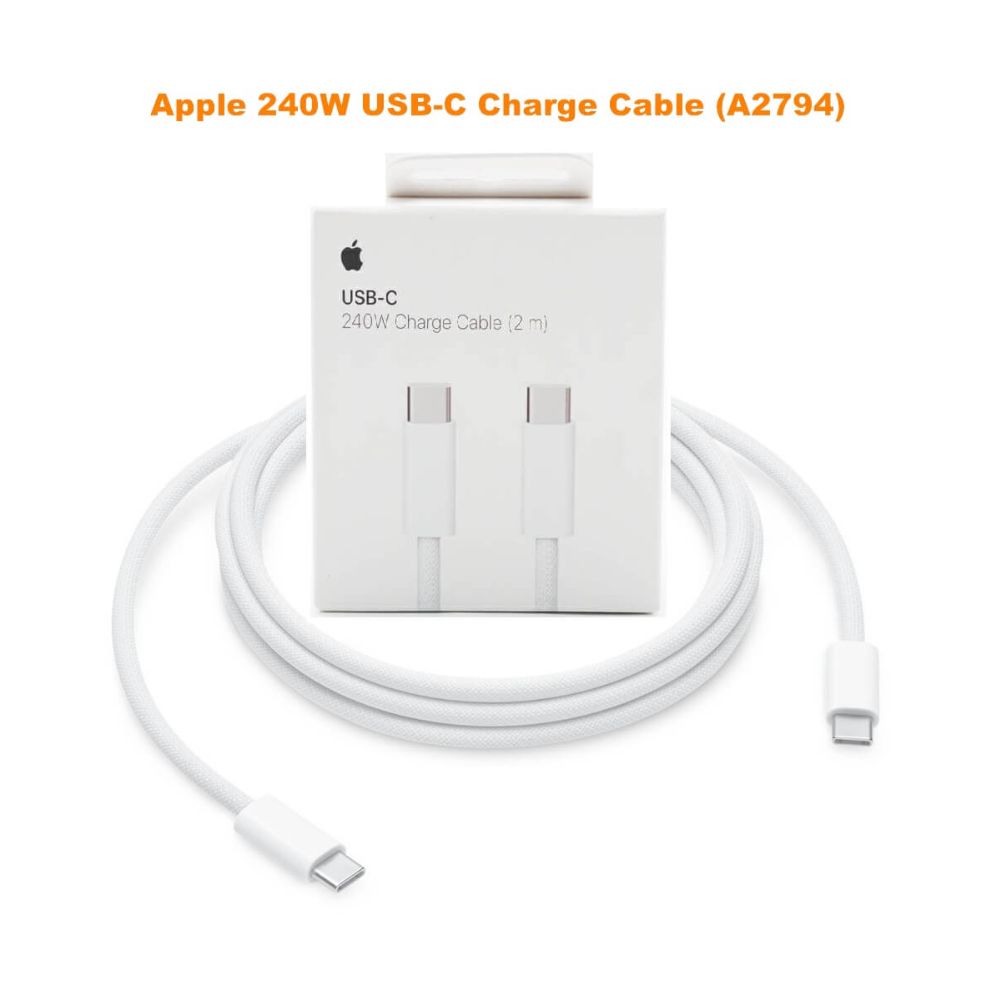
Replacement cable for MacBook Pro A2794, designed to restore proper connection and functionality for damaged or faulty internal cables. Ideal for technicians and repair shops, ensuring reliable performance and correct fit for A2794 models. Type: USB-C to USB-C charging/data cable Model: A2794 Length: 2 meters (≈ 6.6 ft) Color: White Design: Woven braided cable for durability Connectors: USB-C (Male) on both ends Power Delivery: Supports up to 240 W high-power charging when used with a compatible USB-C PD adapter Data Transfer: USB 2.0 transfer speeds Designed for fast charging and syncing between USB-C devices

MacBook Pro A2485 2021 – 16.2" XDR display, Apple M1 Pro (10-core CPU / 16-core GPU), 32 GB memory, 512 GB SSD.Top-tier creative laptop with blazing performance, superb display, and professional I/O – built for demanding workflows.

Wireless freedom with zero compromise. The A4Tech 3330N is a high-performance 2.4GHz wireless combo that combines the GK-3 full-size keyboard with the G3-330N optical mouse. Featuring a 10–15m operating range, 12-month battery life, and 12 multimedia hotkeys, it’s the perfect plug-and-play solution for a clean, cable-free workspace. The A4Tech 3330N Wireless Desktop is engineered for consistent stability and long-term durability. Utilizing advanced Smart Wireless SoC technology, this set minimizes circuit loss and interference, providing a reliable connection that feels as responsive as a wired setup. Key Features: Consistent Wireless Stability: Advanced 2.4GHz powerful wireless connection with a distance of up to 10–15 meters. Auto-channel stabilizing ensures essentially no delays or connection conflicts. Energy Efficient Design: Enjoy up to 12 months of battery life thanks to energy-efficient engineering. The set also features Auto Power Saving with a 4-level sleep mode that activates after just 0.2s of inactivity. Full-Size Multimedia Keyboard: The GK-3 keyboard includes 12 Fn hotkeys for quick access to media controls, along with laser-inscribed keys that never fade and adjustable legs for ergonomic comfort. Precision Optical Mouse: The included G3-330N mouse offers a 1200 DPI resolution for smooth and accurate tracking. Its symmetric design makes it comfortable for both right and left-handed users of all hand sizes. 16-in-One Gestures: The mouse supports 16 different gestures to perform selectable hotkey commands, enhancing your workflow and productivity. Spill-Resistant Durability: The keyboard is designed with built-in drain holes, ensuring that accidental liquid spills won’t end your workday. Specifications at a Glance: Connection: 2.4G Hz Wireless (Nano USB Receiver) Keyboard Model: GK-3 (Full-Size) Mouse Model: G3-330N (1200 DPI Optical) Operating Range: 10 to 15 Meters Hotkeys: 12 Fn Multimedia Hotkeys Battery: 1 AA for Keyboard, 1 AA for Mouse (Up to 12 months) Compatibility: Windows 7 / 8 / 8.1 / 10 / 11

Genuine-spec touchpad flex cable for MacBook Air 13″ (Model A1534, Early 2015)—essential for restoring full trackpad functionality, including precise cursor control and physical click response, during repair or replacement. Compatible With: MacBook Air 13-inch (Early 2015, Model A1534, Model Identifier MacBookAir7,2). Part Type: Touchpad flex cable only—does not include the trackpad housing, button mechanism, or mounting brackets. This is the ribbon cable that connects the trackpad to the logic board. Function: Carries input signals from the trackpad to the logic board—critical for cursor movement, tap-to-click, and primary/secondary physical click functionality. (Note: This model uses a physical click mechanism, not Force Touch—so no haptic feedback or pressure-sensing.) OEM-Quality Construction: Matches Apple’s original cable in length, connector type, and shielding—ensures reliable signal transmission and long-term durability. Common Use Cases: Replacing a torn, frayed, or damaged original flex cable Completing a trackpad replacement when the original cable is compromised Fixing erratic cursor movement, unresponsive trackpad, or loss of click function Replacing a torn, frayed, or damaged original flex cable Completing a trackpad replacement when the original cable is compromised Fixing erratic cursor movement, unresponsive trackpad, or loss of click function Installation Note: Requires bottom case removal and careful disconnect/reconnect of the ZIF (Zero Insertion Force) connector on the logic board. The cable routes under the battery—handle with care. Suitable for intermediate to advanced DIYers or technicians.

Original 13.3-inch Retina LCD display (Space Gray) for MacBook Air A2337 (2020), pulled from a working unit. OEM part, ready to replace cracked or faulty screens with perfect fit and optics. This is a genuine Apple Retina display assembly removed from a working MacBook Air (model A2337, 2020). It’s ideal for repairing a damaged or nonfunctional screen on a matching model, delivering original visuals without resorting to aftermarket knockoffs. Key Features & Functionality True OEM Retina panel with factory calibration Integrated display glass, backlight, and flex cable Designed for model A2337 (Late 2020, M1) iFixit+1 Space Gray finish to match original chassis Tested: Display, backlight, no dead pixels (unless noted) Drop-in replacement requiring alignment and cable reconnection Specifications Important Notes & Considerations Must use exact model A2337 — other models are incompatible Slight blemishes or dust might exist due to being a used part Handle with care: screen glass is fragile Professional installation recommended if you’re not experienced
