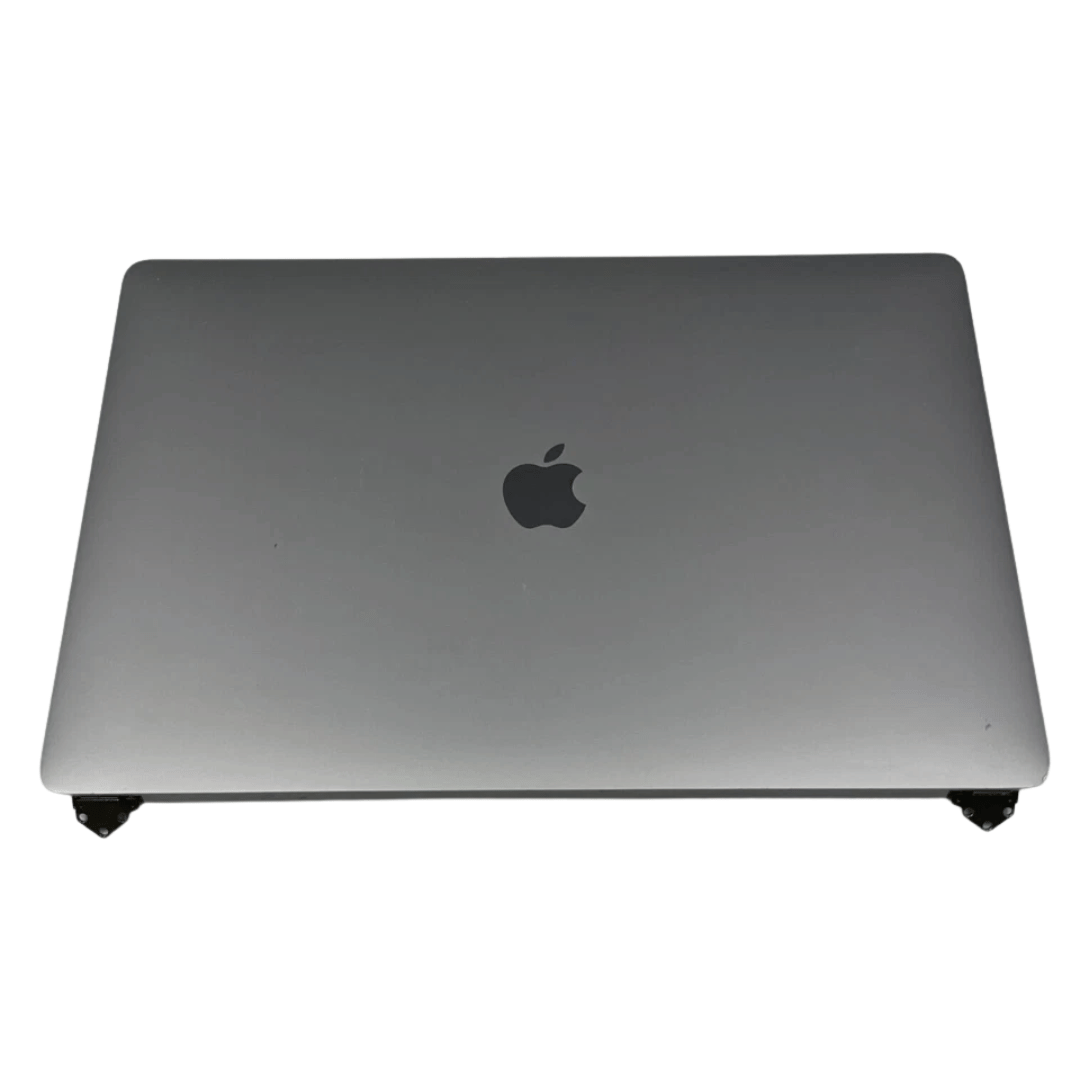

Original 13.3-inch Retina LCD display (Space Gray) for MacBook Air A2337 (2020), pulled from a working unit. OEM part, ready to replace cracked or faulty screens with perfect fit and optics. This is a genuine Apple Retina display assembly removed from a working MacBook Air (model A2337, 2020). It’s ideal for repairing a damaged or nonfunctional screen on a matching model, delivering original visuals without resorting to aftermarket knockoffs. Key Features & Functionality True OEM Retina panel with factory calibration Integrated display glass, backlight, and flex cable Designed for model A2337 (Late 2020, M1) iFixit+1 Space Gray finish to match original chassis Tested: Display, backlight, no dead pixels (unless noted) Drop-in replacement requiring alignment and cable reconnection Specifications Important Notes & Considerations Must use exact model A2337 — other models are incompatible Slight blemishes or dust might exist due to being a used part Handle with care: screen glass is fragile Professional installation recommended if you’re not experienced

Acer KA222Qbi The Acer KA222Qbi entry-level series provide a superb user experience and don’t compromise . on quality. With a choice of display size and a ZeroFrame. design it is ideal for use in homes and offices. Whether it’s running productivity apps or playing games this monitor has it all. Viewable Screen Size Acer KA222Qbi 54.6 cm (21.5″) Aspect Ratio 16:9 Response Time 1 ms VRB Backlight Technology LED Horizontal Viewing Angle 178° Vertical Viewing Angle 178° Panel Technology In-plane Switching (IPS) Technology Frequency (Horizontal/Vertical) 30KHz-85KHz/48Hz-75Hz Pixel Pitch 0.25 mm Tilt Angle -5° to 15° Maximum Adjustable Height No Video Maximum Resolution 1920 x 1080 Native Contrast Ratio 1,000:1 Dynamic Contrast Ratio 100,000,000:1 Colour Supported 16.7 Million Colours Colour Depth 8-bit Color Gamut 72% NTSC Dynamic Contrast Ratio 100,000,000:1 Brightness 250 cd/m² Tearing Prevention Technology AMD FreeSync™ (HDMI VRR) Interfaces/Ports Acer KA222Qbi VGA Yes HDMI Yes Power Description Standby Power Consumption (Energy Star) 270 mW Off-Mode Power Consumption (Energy Star) 210 mW Operating Power Consumption (Energy Star) 15.50 W Miscellaneous Environmental Certification MPR II Package Contents 1 x KA222Q Widescreen LCD Monitor 1 x Power Cord(EURO/UK) 1 x VGA Cable Physical Characteristics Colour Black VESA Mount Compatible Yes VESA Mount Standard 100 x 100 Height 295 mm Width 490 mm Depth 65 mm Weight (Approximate) 3.09 kg Weight with Stand (Approximate) 3.44 kg Specifications: Specifications 21.5″ ZeroFrame FreeSync 1ms, IPS 1 year warranty

Kingston NV3 1TB NVMe SSD — ultra-fast PCIe 4.0 storage in a compact M.2 form.• Read up to 6,000 MB/s • Write up to 4,000 MB/s • 320 TBW enduranceForm Factor: M.2 2280 | Interface: PCIe 4.0 x4 | Warranty: 5-year limitedSKU: SNV3S/1000G Full Details: The Kingston NV3 PCIe 4.0 NVMe M.2 1TB SSD gives you ultra-fast performance and reliable storage for laptops and desktops. Built with PCIe 4.0 technology, it delivers read speeds up to 6,000 MB/s and write speeds up to 4,000 MB/s, making it perfect for gaming, content creation, or simply speeding up your system. PCIe 4.0 × 4 NVMe interface for lightning-fast speed Compact M.2 2280 design for easy installation Up to 6,000 MB/s read and 4,000 MB/s write speeds 1TB capacity for games, media, and apps Low power use and heat for better efficiency Works with most modern desktops and laptops that support M.2 NVMe (PCIe) drives. Backward compatible with PCIe 3.0 systems (at lower speeds). Kingston NV3 1TB M.2 NVMe SSD Quick start/warranty guide

The Samsung S4 S40GD 24 inch IPS FHD monitor delivers clear visuals with a Full HD resolution and wide viewing angles. Additionally, the IPS panel ensures consistent colors across the screen, which makes it suitable for work and entertainment. The 100Hz refresh rate also improves motion clarity during videos and daily tasks. Moreover, the monitor includes Eye Saver Mode and flicker-free technology to reduce eye strain during long sessions. Therefore, it helps maintain comfort while working or studying for extended hours. The slim and ergonomic design also allows flexible adjustments for better positioning and productivity. Furthermore, it offers strong connectivity with HDMI and DisplayPort inputs, allowing easy connection to laptops and desktops. In addition, the monitor supports tilt, swivel, pivot, and height adjustments for improved comfort. Overall, the Samsung S4 S40GD 24 inch IPS FHD monitor is a reliable choice for everyday use. Specifications: 24 inch IPS panel delivers consistent colors and wide viewing angles for clear visuals 100Hz refresh rate provides smoother motion for videos and everyday tasks Eye Saver Mode and flicker free technology help reduce eye strain during long use Ergonomic design supports height, tilt, swivel, and pivot adjustments for comfort Multiple connectivity options including HDMI and DisplayPort for flexible setup Height Adjustable Stand

The ASUS VA249HG 24″ FHD Eye Care Monitor offers clear and sharp Full HD visuals. It provides bright colors and strong contrast. This makes movies, work, and daily tasks look clean and detailed. The 24-inch screen size is perfect for desks and small spaces. Moreover, the ASUS VA249HG 24″ FHD Eye Care Monitor includes a fast 75Hz refresh rate. This improves motion and reduces blur. It gives smoother movement during games and videos. This helps you enjoy a better viewing experience. In addition, the monitor features Adaptive Sync support. This reduces tearing and stuttering during fast action. Your screen stays smooth and steady. This makes it ideal for gamers and casual users. Furthermore, the ASUS VA249HG 24″ FHD Eye Care Monitor includes ASUS Eye Care technology. It reduces blue light and screen flicker. This helps protect your eyes during long hours of use. You can work, watch, or study more comfortably. Also, the monitor uses a VA panel for deep colors. It shows richer blacks and strong contrast levels. This improves the quality of movies and photos. It also works well for everyday design tasks. The clean and modern design of the ASUS VA249HG 24″ FHD Eye Care Monitor fits any workspace. The stand is stable and simple to adjust. You can tilt the screen for better comfort. This helps you find your ideal viewing angle. Overall, the ASUS VA249HG 24″ FHD Eye Care Monitor offers smooth performance, eye protection, and strong image quality. It is a great choice for home, office, and gaming use. It provides comfort, clarity, and value in one dependable display. Specifications: Display : 24″ IPS Resolution : FHD Refresh Rate : 120Hz Response Time : 1ms Model : 90LM02W0-B01171

The Lenovo L22E-30 21.5″ LCD Monitor is designed to enhance your viewing experience with clear and vibrant visuals. Whether you’re working, gaming, or streaming your favorite shows, this monitor delivers exceptional quality. With a full HD resolution of 1920×1080, the Lenovo offers crisp and detailed images. Enjoy true-to-life colors and sharp details that make every task more enjoyable. The sleek and modern design of the Lenovo 21.5″ LCD Monitor complements any workspace. Its slim profile and narrow bezels provide a clean and stylish look that fits seamlessly into your setup. This monitor features a 75Hz refresh rate and a 4ms response time, ensuring smooth and lag-free performance. Whether you’re watching videos or playing games, enjoy a seamless experience without any motion blur. The Lenovo 21.5″ LCD Monitor includes multiple connectivity options, including HDMI and VGA ports. Easily connect your computer, gaming console, or other devices for versatile use. Designed with your comfort in mind, this monitor features TUV Rheinland Eye Comfort certification. Reduce eye strain during extended use with flicker-free technology and a low blue light filter. Adjust the Lenovo to your preferred viewing angle with its tilt-adjustable stand. Find the perfect position for maximum comfort, whether you’re working on a project or watching a movie. In conclusion, the Lenovo L22E-30 21.5″ LCD Monitor offers a perfect blend of style, performance, and comfort. Upgrade your workspace today and enjoy an enhanced viewing experience with this versatile and reliable monitor. Specifications: Display : 21.5″ Resolution : 1920 x 1080 Refresh Rate : 75Hz Response Rate : 4ms

Genuine-spec touchpad flex cable for MacBook Pro 15″ (Model A1707, 2016–2017)—restores full Force Touch functionality, haptic feedback, and precise multi-touch gesture control during trackpad repair or replacement. Compatible With: MacBook Pro 15″ (2016) – Model A1707 (Model Identifier: MacBookPro13,2) MacBook Pro 15″ (2017) – Model A1707 (Model Identifier: MacBookPro14,2) MacBook Pro 15″ (2016) – Model A1707 (Model Identifier: MacBookPro13,2) MacBook Pro 15″ (2017) – Model A1707 (Model Identifier: MacBookPro14,2) Part Type: Touchpad flex cable only — does not include the trackpad housing, Taptic Engine, or mounting hardware. This is the OEM-style ribbon cable that connects the trackpad to the logic board. Function: Transmits: Touch input coordinates Force Touch pressure data Haptic feedback signals to the Taptic Engine Enables full macOS gesture support: Force Click, three-finger lookup, swipe navigation, pinch-to-zoom, and smooth cursor tracking. Touch input coordinates Force Touch pressure data Haptic feedback signals to the Taptic Engine Enables full macOS gesture support: Force Click, three-finger lookup, swipe navigation, pinch-to-zoom, and smooth cursor tracking. OEM-Quality Build: Matches Apple’s original specifications in: Cable length and routing path Connector pitch and ZIF latch design EMI shielding and flex durability Cable length and routing path Connector pitch and ZIF latch design EMI shielding and flex durability Common Use Cases: Replacing a torn, creased, or liquid-damaged original flex cable Completing a trackpad replacement when the original cable is compromised Fixing intermittent trackpad behavior, loss of Force Touch, or complete unresponsiveness Replacing a torn, creased, or liquid-damaged original flex cable Completing a trackpad replacement when the original cable is compromised Fixing intermittent trackpad behavior, loss of Force Touch, or complete unresponsiveness Installation Note: Requires full bottom case removal and battery disconnection. Cable routes under internal components near the right speaker and logic board. Connects via a ZIF (Zero Insertion Force) socket—must be aligned carefully and latched gently. Recommended for experienced or certified technicians only. Requires full bottom case removal and battery disconnection. Cable routes under internal components near the right speaker and logic board. Connects via a ZIF (Zero Insertion Force) socket—must be aligned carefully and latched gently. Recommended for experienced or certified technicians only.

OEM-spec trackpad replacement (without flex cable) for MacBook Air 15.3″ M2 (Model A2941, EMC 8301) in Silver finish—engineered for precise Force Touch response, smooth multi-touch gestures, and seamless integration with the original chassis. Compatible With: MacBook Air 15.3-inch (2023, Model A2941, EMC 8301) with Apple M2 chip. Part Type: Trackpad only—does not include the flex cable, Taptic Engine, or mounting brackets. Designed for technicians who will reuse or transfer the original internal components. Finish: Silver—matches the original Silver and Starlight lower case for perfect visual continuity. Force Touch Support: Fully compatible with pressure-sensitive input and haptic feedback when used with the original Taptic Engine and logic board—no loss of functionality. Precision Build: Mirror-smooth glass surface with exact curvature, texture, and micro-click mechanism matching Apple’s OEM standards for consistent tracking and tactile feel. Installation Requirements: Requires full bottom case disassembly and careful transfer of the original flex cable and Taptic Engine. Proper adhesive application is essential to maintain structural rigidity and sensor alignment. Recommended for professional or certified repair technicians only.

A powerful pre-owned Dell Precision 7550 mobile workstation with 15.6" display, 10th Gen Core i7, 16GB RAM, 256GB SSD, and NVIDIA Quadro T2000 4GB—built for engineers, designers, and professionals who need certified performance and reliability.

The MSI MPG 491CQPX QD-OLED 49″ DQHD 240Hz Curved Gaming Monitor gives you a huge, immersive ultrawide screen for gaming and productivity. The 49-inch panel with 5120 × 1440 resolution delivers sharp, detailed imagery for games, movies, work and editing. The wide 32:9 aspect ratio offers expansive workspace and full immersive views. Moreover, the MSI MPG 491CQPX QD-OLED 49″ DQHD 240Hz Curved Gaming Monitor features a very fast 240 Hz refresh rate. This high refresh makes motion smooth and fluid during fast games and action scenes. With a 0.03 ms GtG response time, visuals stay sharp and input feels responsive. This reduces motion blur and keeps gameplay crisp. In addition, the monitor uses a QD-OLED panel with deep contrast and rich colors. Blacks are deep, colors pop, and images look vivid under different lighting. Furthermore, the MSI MPG 491CQPX QD-OLED 49″ DQHD 240Hz Curved Gaming Monitor supports adaptive sync (G-Sync compatible) to prevent screen tearing. It also supports HDR with high peak brightness for richer highlights. This makes games, movies, and graphics feel more dynamic and realistic. Also, connectivity is modern and versatile. You get HDMI 2.1 and DisplayPort 1.4 for high refresh output, plus USB-C with power delivery for convenience. The monitor’s stand offers tilt, swivel, and height adjustments for a comfortable setup. The sleek design and slim bezels give a clean, premium look. Overall, the MSI MPG 491CQPX QD-OLED 49″ DQHD 240Hz Curved Gaming Monitor blends size, speed, and image quality into one impressive display. It enhances gaming performance, boosts productivity, and elevates media consumption. This monitor is ideal for gamers, creators, and multitaskers who want top-tier visuals and immersive experience. Specifications: Display : 49″ QD-OLED Resolution : 5120 x 1440 (DQHD) Refresh Rate : 240Hz Response Time : 0.03ms Curvature : 1800R

Samsung Monitor 27″ FHD monitor with IPS panel Screen Size (Class)27 Active Display Size (HxV) (mm)596.736 x 335.664 Aspect Ratio16:9 Panel TypeIPS Brightness (Typical)400 cd/㎡ Brightness (Min)320 cd/㎡ Contrast Ratio Static1,000:1(Typ.) Dynamic Contrast RatioMega ∞ DCR HDR(High Dynamic Range)HDR10 Resolution1,920 x 1,080 Response Time1ms (GTG) Viewing Angle (H/V)178°/178° Color SupportedMax 16.7M sRGB Coverage99% Refresh RateMax 240Hz General Feature Eco Saving PlusYes Eco Light SensorYes Eye Saver ModeYes Flicker FreeYes Windows CertificationWindows 10 FreeSyncFreeSync Premium G-SyncG-Sync Compatible Off Timer PlusYes Black EqualizerYes Low Input Lag ModeYes Virtual AIM PointYes Refresh Rate OptimizorYes Specifications: Samsung Monitor 27″ FHD monitor with IPS panel Screen Size (Class)27 Flat / CurvedFlat Active Display Size (HxV) (mm)596.736 x 335.664 Aspect Ratio16:9 Panel TypeIPS Brightness (Typical)400 cd/㎡ 3-Year Warranty

The LG 32UN880K-B 32″ UHD 4K ERGO Monitor is designed to provide outstanding image quality and maximum comfort for work and entertainment. Its large 32-inch 4K UHD display delivers sharp detail and vibrant colors, making it ideal for professional tasks, creative projects, and media consumption. Moreover, the high resolution allows users to multitask efficiently with clear visuals across multiple applications. This monitor features LG’s ERGO stand, which allows flexible adjustments to improve posture and desk organization. Additionally, users can easily adjust height, tilt, swivel, and pivot positions for a more comfortable viewing experience during long working hours. The modern and clean design also helps free up desk space while maintaining a professional setup. The LG 32UN880K-B offers versatile connectivity options, making it simple to connect laptops, PCs, and other devices. Furthermore, its ergonomic flexibility helps reduce strain during extended sessions. Therefore, it is ideal for professionals, designers, and home office users seeking comfort and performance. Finally, it combines stunning 4K visuals with ergonomic convenience for a productive workspace. Specifications: 32″ UHD 4K monitor with ERGO stand High-resolution display for sharp visuals Flexible ergonomic adjustment system Wide viewing angles and accurate colors Multiple connectivity options

Looking to upgrade your gaming setup? The Asus TUF VG279Q1A Gaming Monitor is the perfect solution for an enhanced gaming experience without breaking the bank. First and foremost, indulge in the impressive display quality this monitor offers. With vivid colors and sharp contrasts, your games come to life, providing an immersive and captivating visual feast. The ultra-fast refresh rate ensures smooth and fluid motion, eliminating lag and enhancing your responsiveness during intense gaming sessions. Say goodbye to screen tearing and hello to a competitive edge. Transition seamlessly between tasks with the user-friendly interface. The intuitive controls make adjusting settings a breeze, allowing you to personalize your gaming environment effortlessly. Furthermore connectivity is key, and the Asus TUF VG279Q1A Gaming Monitor delivers. Multiple ports cater to your gaming peripherals, ensuring compatibility with various devices for a versatile gaming setup. Experience comfort during extended gaming sessions with adjustable features. Tilt, swivel, and height adjustments guarantee an ergonomic setup, reducing strain and enhancing your focus on the game. With eye-care technology, this monitor prioritizes your well-being by reducing eye strain and fatigue. Game for hours without compromising on comfort or visual quality. In conclusion, the Asus TUF VG279Q1A Gaming Monitor is a budget-friendly solution that doesn’t compromise on performance. Elevate your gaming setup with its impressive features and enjoy a new level of gaming immersion. Upgrade today! Specifications: Display : 27″ FHD (1920×1080), IPS Refresh Rate : 165Hz Response time : 1ms Part Number : 90LM05X0-B05170

The ASUS ROG Strix XG27ACMS 27” QHD 320Hz Gaming Monitor is a high-performance gaming display designed for ultra-smooth motion and fast response times. It uses a Fast IPS panel that delivers accurate colors and wide viewing angles for gaming and general use. It features a QHD (2560×1440) resolution, which provides sharp image detail and more screen space compared to Full HD. Therefore, it improves clarity for both competitive gaming and productivity tasks. The monitor supports a 320Hz refresh rate, which delivers extremely smooth motion in fast-paced games. In addition, it includes a very fast response time to reduce motion blur during rapid movement. It is designed for competitive gaming performance where speed and clarity matter. Moreover, it supports adaptive sync technology to reduce screen tearing and stuttering when paired with compatible GPUs. The display includes gaming-focused settings and on-screen controls for quick adjustments. As a result, users can optimize visuals based on different game types and preferences. Overall, the ASUS ROG Strix XG27ACMS is built for high refresh rate gaming, low latency performance, and sharp QHD visual quality. Specifications: 27-inch QHD (2560×1440) display 320Hz refresh rate Ultra-fast response time Fast IPS panel Adaptive sync technology

The ViewSonic VX3211-4K-mhd 32″ 4K Monitor is designed to transform your visual experience. Whether you’re working, gaming, or watching movies, this monitor delivers crystal-clear images with incredible detail. Featuring a stunning 32-inch 4K UHD display, the ViewSonic VX3211-4K-mhd provides four times the resolution of Full HD. This means you can enjoy sharper images, vibrant colors, and exceptional clarity, making every detail come to life. The ViewSonic VX3211-4K-mhd supports a wide color gamut, ensuring that colors are accurate and true to life. This makes it an excellent choice for graphic designers, photographers, and video editors who need precise color reproduction. With multiple connectivity options, including HDMI, DisplayPort, and Mini DisplayPort, the ViewSonic VX3211-4K-mhd offers versatility for connecting various devices. Whether you’re connecting a computer, gaming console, or other multimedia devices, this monitor has you covered. The ViewSonic VX3211-4K-mhd also features advanced eye care technology. Flicker-Free and Blue Light Filter functions help reduce eye strain during extended viewing sessions, making it comfortable for long hours of work or entertainment. This monitor is also designed with an ultra-slim bezel, offering a sleek and modern look that complements any workspace or gaming setup. Its VESA compatibility allows for easy mounting, giving you the flexibility to set it up the way you like. In conclusion, the ViewSonic VX3211-4K-mhd 32″ 4K Monitor offers stunning visuals, vibrant colors, and versatile connectivity. Upgrade your display today and experience the difference that 4K resolution can make. Specifications: Display : 32″ UHD Resolution : 4K (3840×2160) Refresh Rate : 60Hz Response Rate : 3ms

Looking for a versatile display that takes your entertainment to new heights? Look no further than the LG 31.5″ Smart Monitor. This all-in-one powerhouse combines stunning visuals with smart features for an unparalleled viewing experience. First and foremost, let’s talk about size. With its expansive 31.5-inch display, you’ll enjoy every detail with clarity and precision. Whether you’re watching movies, gaming, or multitasking, the large screen provides ample space for all your needs. Transitioning to connectivity, the LG Smart Monitor offers a range of options to connect all your devices seamlessly. With built-in Wi-Fi and Bluetooth capabilities, you can stream your favorite content effortlessly from your smartphone, tablet, or laptop. Moreover, the monitor’s smart features elevate your entertainment experience to the next level. With webOS, accessing your favorite streaming apps like Netflix, Disney+, and YouTube is just a click away. Say goodbye to external streaming devices and enjoy hassle-free entertainment. In terms of picture quality, the LG Smart Monitor doesn’t disappoint. With crisp Full HD resolution and vibrant colors, every scene comes to life with stunning clarity and detail. Whether you’re watching movies or browsing photos, the visuals are truly immersive. Furthermore, the monitor’s sleek design adds a touch of elegance to any space. Its slim bezels and minimalist stand complement any décor, making it a stylish addition to your home or office setup. In conclusion, the LG 31.5″ Smart Monitor is the ultimate entertainment hub you’ve been searching for. With its expansive display, smart features, and stunning picture quality, it redefines the way you experience entertainment. Upgrade your viewing experience today and immerse yourself in a world of endless entertainment possibilities. Specifications: Display : 31.5″ IPS Resolution : 1920 x 1080 Response Rate : 8ms TYP Speaker : 5W x2

The Lexar NM620 2TB NVMe SSD delivers exceptional read speeds up to 3,300 MB/s and write speeds up to 3,000 MB/s through its PCIe Gen3x4 NVMe 1.4 interface. Built with 3D NAND Flash and a compact M.2 2280 form factor, it offers fast, efficient, and reliable storage for gaming, video editing, and professional workloads. The Lexar NM620 2TB M.2 2280 NVMe SSD is engineered for users who need high-performance storage without compromise. Using PCIe Gen3x4 lanes and the NVMe 1.4 protocol, it provides up to six times faster transfer speeds than SATA SSDs. Its slim, cable-free design makes it an ideal upgrade for desktops, laptops, and ultrabooks that demand higher data throughput and improved responsiveness. ⚡ High-Speed NVMe Performance: Delivers sequential read/write speeds up to 3,300 MB/s / 3,000 MB/s for faster system boot-ups, game loading, and large-file transfers. 💾 Large 2 TB Capacity: Provides ample storage for 4K media, applications, and high-volume project files. 🔋 Power-Efficient Design: Optimized for lower power draw, helping extend laptop battery life and reduce operating temperatures. 🔒 Advanced Data Protection: Utilizes LDPC (Low-Density Parity-Check) and end-to-end data path protection for accurate, consistent data integrity. 🧊 Compact Form Factor: The M.2 2280 design supports easy installation in modern systems without cables. 🧠 3D NAND Architecture: Ensures improved endurance, sustained performance, and stability during intensive workloads. 🧰 Durability Tested: Resistant to shock and vibration for dependable performance across a range of operating environments.

Looking for a reliable monitor that combines performance and affordability? The BenQ GW2780 monitor might be your perfect choice, offering an array of features to enhance your visual experience. To begin with, the GW2780 boasts a sleek design that seamlessly blends with any workspace. Its slim bezels create a borderless display, providing an immersive viewing experience for work or entertainment. Equipped with a 27-inch Full HD display, the monitor delivers crisp and clear visuals. Whether you’re working on spreadsheets, watching videos, or gaming, the GW2780 ensures sharp images and vibrant colors. The In-Plane Switching (IPS) technology ensures wide viewing angles, allowing you to enjoy consistent colors and brightness from any angle. Say goodbye to distorted colors and limited viewing positions. Eye strain is a thing of the past with the BenQ GW2780. The Low Blue Light technology reduces harmful blue light emissions, and the flicker-free feature eliminates screen flickering, providing a comfortable viewing experience for extended periods. Connectivity is a breeze with the multiple ports, including HDMI and VGA. Easily link your monitor to various devices such as laptops, desktops, and gaming consoles. The user-friendly design ensures a hassle-free setup. The BenQ GW2780 monitor not only prioritizes performance but also energy efficiency. Energy Star certification reflects its commitment to reducing environmental impact, making it an eco-friendly choice. In summary, the BenQ GW2780 monitor offers a winning combination of affordability and top-notch features. Elevate your viewing experience with this reliable display solution that caters to your entertainment and productivity needs effortlessly. Specifications: Display : 27″ IPS Resolution : 1920×1080 IPS Response Time : 5ms Refresh Rate : 60hz

The Samsung 55″ Neo QLED QN85F 4K Vision AI Smart TV QA55QN85FAUXTW delivers a premium viewing experience with advanced Neo QLED display technology and intelligent AI processing. It produces bright, sharp, and detailed images with strong contrast, so movies, sports, and games look clear and immersive on the 55-inch screen. Neo QLED technology uses Quantum Mini LEDs to improve brightness control and contrast accuracy. As a result, dark scenes appear deeper while bright scenes stay vivid and balanced. This creates a more realistic picture across different types of content. Vision AI enhances picture and sound in real time. It analyzes each scene and automatically adjusts brightness, sharpness, and color for better output. Therefore, the TV consistently delivers optimized visuals without manual settings. In addition, AI upscaling improves lower-resolution content closer to 4K quality. HDR support expands brightness range and color depth, making visuals more dynamic and lifelike. Fast motion handling also improves clarity, which enhances sports and action viewing. The Smart TV platform provides easy access to streaming apps, gaming features, and smart home controls. It runs smoothly and responds quickly between apps. In addition, the slim design with thin bezels gives the TV a modern and premium look. Overall, this Samsung Neo QLED TV combines strong brightness performance, AI optimization, and smart connectivity for a powerful entertainment experience. Specifications: Neo QLED technology delivers bright and detailed picture quality 55-inch 4K display provides immersive viewing experience Vision AI enhances picture and sound automatically HDR improves contrast, brightness, and color depth Smart TV platform supports apps, streaming, and smart features

Genuine-spec touchpad flex cable compatible with both MacBook Air A2179 (Intel, 2020) and A2337 (M1, 2020)—restores full Force Touch functionality, haptic feedback, and precise multi-touch gesture control during trackpad repair or replacement. Compatible With: MacBook Air 13″ (2020, Intel) – Model A2179 (Model Identifier: MacBookAir9,1) MacBook Air 13″ (2020, Apple M1) – Model A2337 (Model Identifier: MacBookAir10,1) MacBook Air 13″ (2020, Intel) – Model A2179 (Model Identifier: MacBookAir9,1) MacBook Air 13″ (2020, Apple M1) – Model A2337 (Model Identifier: MacBookAir10,1) ✅ Important Note: Despite different processors (Intel vs. M1), Apple used the same trackpad assembly and flex cable in both A2179 and A2337. This makes the flex cable fully interchangeable between the two models. Part Type: Touchpad flex cable only — does not include the trackpad housing, Taptic Engine, or mounting hardware. This is the OEM-style ribbon cable that connects the trackpad to the logic board. Function: Transmits: Touch input coordinates Force Touch pressure data Haptic feedback signals to the Taptic Engine Enables full macOS gesture support: Force Click, three-finger lookup, swipe navigation, pinch-to-zoom, and smooth cursor tracking. Touch input coordinates Force Touch pressure data Haptic feedback signals to the Taptic Engine Enables full macOS gesture support: Force Click, three-finger lookup, swipe navigation, pinch-to-zoom, and smooth cursor tracking. OEM-Quality Build: Matches Apple’s original specifications in: Cable length and routing path Connector pitch and ZIF latch design EMI shielding and flex durability Cable length and routing path Connector pitch and ZIF latch design EMI shielding and flex durability Common Use Cases: Replacing a torn, creased, or liquid-damaged original flex cable Completing a trackpad replacement when the original cable is compromised Fixing intermittent trackpad behavior, loss of Force Touch, or complete unresponsiveness Replacing a torn, creased, or liquid-damaged original flex cable Completing a trackpad replacement when the original cable is compromised Fixing intermittent trackpad behavior, loss of Force Touch, or complete unresponsiveness Installation Note: Requires full bottom case removal and battery disconnection. Cable routes under the right side of the battery and logic board. Connects via a ZIF (Zero Insertion Force) socket—align carefully and latch gently. Recommended for experienced or certified technicians only. Requires full bottom case removal and battery disconnection. Cable routes under the right side of the battery and logic board. Connects via a ZIF (Zero Insertion Force) socket—align carefully and latch gently. Recommended for experienced or certified technicians only.
