
Are you in search of a high-performance gaming monitor? Look no further! The MSI MPG 274URF QD 27″ 160Hz gaming monitor is here to elevate your gaming experience. This monitor combines cutting-edge technology with sleek design to provide an unbeatable gaming setup. Firstly, let’s talk about the impressive display. The 27-inch screen size offers ample viewing space, making every detail pop. The Quantum Dot technology ensures vibrant and accurate colors, enhancing the overall visual experience. In addition, the 160Hz refresh rate is a game-changer. It ensures smooth and fluid motion, reducing blur and lag. This is essential for fast-paced games where every millisecond counts. With the MSI MPG 274URF QD, you can stay ahead of the competition. Moreover, the 1ms response time minimizes input lag. This allows for quick reactions and precise movements, crucial for competitive gaming. Every action you take will be instantaneously reflected on the screen, providing a seamless gaming experience. Furthermore, this gaming monitor supports HDR, delivering stunning contrast and brightness. You will enjoy deeper blacks and brighter whites, bringing your games to life. The detailed shadows and highlights will immerse you in the game world like never before. Comfort is also a key feature of the MSI MPG 274URF QD. The ergonomic design allows you to adjust the height, tilt, and swivel to find the perfect viewing angle. This ensures you can game comfortably for hours without straining your neck or eyes. Additionally, the monitor comes with multiple connectivity options. Easily connect your PC, console, or other devices with the available HDMI, DisplayPort, and USB ports. This versatility makes it a great addition to any gaming setup. In conclusion, the MSI MPG 274URF QD 27″ 160Hz gaming monitor offers superior performance and stunning visuals. Whether you’re a casual gamer or a professional, this monitor will enhance your gaming experience. Upgrade your setup today and enjoy the best in gaming technology! Specifications: Display : 27″ Rapid IPS Resolution : 3840×2160 (UHD) Refresh Rate : 160Hz Response Rate : 0.5ms

BenQ MOBIUZ EX2710 27″ Display Screen Size 27 inch Panel Type IPS Backlight Technology LED backlight Resolution (max.) 1920×1080 Brightness (typ.) 350 nits Brightness (peak)(HDR) 400 nits HDR HDR10 Native Contrast 1000:1 Viewing Angle (L/R) (CR>=10) 178°/178° Response Times (GtG) 2 ms Response Times (MPRT) 1 ms Refresh Rate (Hz) 144 Color Gamut 99% sRGB Color Mode Cinema HDRi, ePaper, FPS, Game HDRi, HDR, M-Book, Racing game, RPG, sRGB, Standard Aspect Ratio 16:9 Display Colors 16.7 million color PPI 82 Display Screen Coating Anti-Glare Color Temperature Bluish, Normal, Reddish, User Define Gamma 1.8 – 2.6 HDCP 2.2 OSD Language Arabic, Chinese (simplified), Chinese (traditional), Czech, Deutsch, English, French, Hungarian, Italian, Japanese, Korean, Netherlands, Polish, Portuguese, Romanian, Russian, Spanish, Swedish AMA Yes Audio Built-in Speaker 2.5Wx2 Headphone Jack Yes Power Voltage Rating 100 – 240V Power Supply Built-in Power Consumption (normal) 22 W Power Consumption (max) 58 W Power Consumption (sleep mode) <0.5 W Dimension and Weight Tilt (down/up) -5˚ – 20˚ Swivel (left/right) 20˚/ 20˚ Height Adjustment Stand 130 mm Dimensions (HxWxD) (mm) 409.6 – 539.6×614.1×216.7 Dimensions (HxWxD) (inch) 16.1 – 21.2×24.2×8.5 Dimensions (HxWxD) (w/o Base) (mm) 382.2×614.1×64.1 Dimensions (HxWxD) (w/o Base) (inch) 15.1×24.2×2.5 Net Weight (kg) 6.2 Net Weight (lb) 13.7 Net Weight (w/o Base) (kg) 4 Net Weight (w/o Base) (lb) 8.8 VESA Wall Mount 100×100 mm Accessories Other Accessories QSG, Warranty Card Connectivity HDMI (v2.0) 2 DisplayPort (v1.2) 1 Eye Care Flicker-free Technology Yes Low Blue Light Yes Brightness Intelligence Plus (B.I.+) Yes Color Weakness Yes ePaper Yes Certification TUV Certificate Flicker-free, Low Blue Light Video Enjoyment HDRi Yes Professional Video Format Support Yes Specifications: BenQ MOBIUZ EX2710 27″ Screen Size 27 inch Panel Type IPS Backlight Technology LED backlight Resolution (max.) 1920×1080 Brightness (typ.) 350 nits 1 Year Warranty

The MSI Modern MD2412P 24″ 100Hz Monitor is the perfect choice for work and entertainment. It offers a smooth and immersive viewing experience with a 100Hz refresh rate. This monitor ensures sharp visuals and fluid motion. With a 24-inch Full HD display, the MSI Modern MD2412P delivers clear and vibrant colors. The IPS panel provides wide viewing angles, making it great for multitasking. Whether you’re working, watching movies, or gaming, the visuals stay sharp and consistent. The 100Hz refresh rate makes scrolling and animations smoother. This reduces eye strain and improves productivity. Fast-moving visuals are more fluid, which is great for casual gaming and video editing. Setting up the MSI Modern MD2412P 24″ 100Hz Monitor is simple. It comes with an ergonomic stand that allows height, tilt, and swivel adjustments. You can easily find the most comfortable viewing position for long hours of use. Connectivity is easy with multiple ports, including HDMI and DisplayPort. This allows you to connect to laptops, desktops, and gaming consoles effortlessly. It ensures a stable and reliable connection for all your devices. The monitor also features eye-care technology, reducing blue light and flicker. This helps prevent eye fatigue, making it perfect for extended use. Whether you’re working from home or gaming, your eyes will stay comfortable. The MSI Modern MD2412P 24″ 100Hz Monitor combines style and performance. Its modern and slim design fits well in any workspace. The minimal bezels offer a sleek look and maximize screen space. Upgrade your setup with this reliable and stylish monitor today. Specifications: Display : 23.8″ IPS Screen : FHD (1920×1080) Refresh Rate : 100Hz Response Rate : 1ms

A1389 A1494 Laptop Battery Replacement for MacBook Pro 15 inch Retina A1398 (Late 2013 & Mid 2014), fit Retina ME293 ME294 MGXA2 MGXC2 MJLQ2 MJLT2 MJLU2 Details : Voltage:11.26V; Capacity: 95Wh; Battery Type: Li-Polymer KINDLY NOTES: Replacement for Apple Macbook Pro 15 inch A1494 A1398 Retina Only fit Late 2013 Mid 2014 Version,Do not fit 2012 & Early 2013 Version Packing: 1 x laptop battery,4 x free screwdrivers Desighed for the original battery 1:1,Please confirm that your laptop’s model number, the original battery’s part number and your laptop’s version correctly

Genuine-spec touchpad flex cable for Apple’s 12-inch MacBook (Model A1534, Early 2015 / Early 2016 / Mid 2017)—essential for restoring full Force Touch trackpad functionality, haptic feedback, and multi-touch gesture support. Compatible With: MacBook 12″ (Early 2015) – 1.1GHz Core M MacBook 12″ (Early 2016) – 1.1GHz/1.3GHz Core M MacBook 12″ (Mid 2017) – 1.2GHz/1.3GHz Core m3/i5/i7 All share Model Number A1534 and Model Identifier MacBook8,1 / MacBook9,1 / MacBook10,1 respectively. MacBook 12″ (Early 2015) – 1.1GHz Core M MacBook 12″ (Early 2016) – 1.1GHz/1.3GHz Core M MacBook 12″ (Mid 2017) – 1.2GHz/1.3GHz Core m3/i5/i7 All share Model Number A1534 and Model Identifier MacBook8,1 / MacBook9,1 / MacBook10,1 respectively. Part Type: Touchpad flex cable only—does not include the trackpad housing, Taptic Engine, or mounting brackets. This is the ribbon cable that connects the Force Touch trackpad to the logic board. Function: Critical for Force Touch functionality—transmits pressure-sensitive input, multi-touch gestures (e.g., pinch, swipe, Force Click), and haptic feedback signals to the Taptic Engine. OEM-Quality Construction: Precisely matches Apple’s original in length, connector pitch, shielding, and routing—ensures reliable signal integrity and compatibility with macOS. Common Use Cases: Replacing a torn, creased, or liquid-damaged flex cable Restoring unresponsive or erratic trackpad behavior Completing a trackpad replacement when the original cable is unusable Replacing a torn, creased, or liquid-damaged flex cable Restoring unresponsive or erratic trackpad behavior Completing a trackpad replacement when the original cable is unusable Installation Note: Requires full bottom case removal and delicate disconnection of the ZIF connector. The cable routes tightly under the battery—extreme care is required. Recommended for experienced or certified technicians only.

MacBook Air 13″ Retina A1932(2018-2019-2020) Display Assembly (Silver) MacBook Air 13″ Retina Display 2019 A1932 (EMC 3184 MacBookAir8,2) 1.6 GHz MacBook Air 13″ Retina Display 2020 A2179 (EMC 3302 MacBookAir9,1) 1.1 GHz Core i3 A2179 (EMC 3302 MacBookAir9,1) 1.1 GHz Core i5 A2179 (EMC 3302 MacBookAir9,1) 1.2 GHz Core i7 MacBook Air 13” Retina Display Late 2018 A1932 (EMC 3184 MacBookAir8,1) 1.6 GHz

The Transcend TS8XDVDS-K is an ultra-slim, lightweight external portable DVD writer designed for laptops, ultrabooks, and thin desktop computers lacking internal optical drives. Offering fast 8X DVD and 24X CD read/write speeds, it provides a seamless plug-and-play solution for burning media, backing up critical data, and playing movies on the go without requiring an external power adapter. ✅ Full Specifications: Model: Transcend Extra Slim Portable DVD Drive (TS8XDVDS-K) – Black Edition Interface / Connection: Mini-USB to USB Type-A interface (Includes a specialized USB double-headed power/data cable) Performance / Speed: * DVD±R Read/Write: Up to 8X DVD±R DL (Double Layer) Read/Write: Up to 6X DVD-RAM Read/Write: Up to 5X CD-R/RW Read/Write: Up to 24X Performance / Speed: * DVD±R Read/Write: Up to 8X DVD±R DL (Double Layer) Read/Write: Up to 6X DVD-RAM Read/Write: Up to 5X CD-R/RW Read/Write: Up to 24X Capacity / Media Compatibility: Supports standard CD-R/RW, DVD±R, DVD±RW, DVD±R DL, and M-DISC long-term archival media formats. Material & Build: Durable, premium hard plastic housing with a sleek, rounded-edge aesthetic. Design & Form Factor: Extra-slim layout measuring just 13.9mm in thickness. Top-loading tray mechanism with an emergency manual eject hole. Power Setup: Fully USB bus-powered (No external power wall adapter required; draws power directly from host computer USB ports). Security & Software: Includes a free download of CyberLink Media Suite 10 (Media Writer) data burning software via registration. Supports TV Connectivity (allows plugging into supported smart TVs to play media files directly). Compatibility: Windows 11 / 10 / 8 / 7, macOS (10.7 and above), and Linux Dimensions: Approx. 142.8 x 148.0 x 13.9 mm (5.62″ x 5.83″ x 0.55″) Weight: Approx. 264 grams (0.58 lbs)

OEM-quality touchpad replacement for MacBook Air 13.6″ (Model A2681, 2022)—available in Gray, Gold, Silver, and Blue to match your original chassis color. Precision-engineered for seamless Force Touch performance and smooth gesture control. Compatible With: MacBook Air 13.6-inch (2022, Model A2681) with M2 chip—includes all color variants: Space Gray, Gold, Silver, and Midnight Blue. Part Type: Touchpad only—does not include the flex cable, connector, or mounting brackets. Intended for technicians reusing the original cable or transferring it during repair. Color-Matched Finish: Available in all four official A2681 colors to maintain aesthetic consistency with your MacBook’s lower case. Force Touch Support: Full compatibility with Force Touch gestures, haptic feedback, and multi-touch functionality (requires original Taptic Engine and logic board). OEM Build Quality: Matches Apple’s original surface texture, curvature, and responsiveness—ensures consistent click feel and tracking accuracy. Installation Note: Requires careful transfer of the original flex cable and Taptic Engine (if not already attached). Full bottom case disassembly is necessary. Recommended for professional repair technicians.

The Samsung 55″ QLED Q6F 4K Smart TV QA55Q6FAAUXTW delivers vibrant picture quality and smart entertainment features in a sleek and modern design. It uses advanced QLED technology to produce bright colors, sharp details, and impressive clarity, making movies, sports, and games more enjoyable on the 55-inch screen. QLED technology uses Quantum Dot enhancement to improve color accuracy and brightness. As a result, images appear vivid and lifelike across a wide variety of content. Dark scenes retain important details, while bright scenes remain balanced and clear. This creates a more consistent viewing experience in different lighting conditions. The 4K UHD resolution provides exceptional image detail and clarity. Therefore, content looks sharper and more refined than standard Full HD. In addition, Samsung image processing enhances lower-resolution content, helping it appear closer to native 4K quality. HDR support improves contrast and expands the visible color range. This allows brighter highlights and deeper shadows, creating more realistic images. Fast-moving scenes also appear smoother and clearer, making sports broadcasts and action-packed content more enjoyable. The Smart TV platform provides access to popular streaming services, apps, and connected home features. It offers a responsive interface that makes navigation simple and convenient. In addition, the slim design and narrow bezels give the Samsung QLED 55 Q6F 4K Smart TV QA55Q6FAAUXTW a modern appearance that fits well in bedrooms, living rooms, and entertainment areas. Overall, this Samsung QLED TV combines vivid colors, sharp 4K resolution, and smart functionality for a complete home entertainment experience. Specifications: QLED technology delivers vibrant colors and enhanced brightness 55-inch 4K UHD display provides immersive viewing HDR improves contrast and image realism Smart TV platform supports streaming apps and connected features Slim design complements modern living spaces

MacBook Pro A1708 Battery A1713 for MacBook Pro 13 Inch A1708 Late 2016 Mid 2017 (EMC 2978 3164), A2171 Laptop Replacement Battery for MacBook Pro 13 Inch A2159 (2019) A2289 (2020) A2338 (2020) 【Macbook pro 13 Inch battery A1713 & A2171 Battery Specification】– Voltage: 11.4V. Capacity: 54.5Wh / 4781mAh, Battery Type: Li-ion 【Newest 4.0 upgraded OEM Battery for Apple macbook pro】– Japan High Performance Electric Core. Cobalt Proportion: >98%. Upgrade chip. Up to 1500+ recharge cycles over the life of the battery. Overcharger and Discharger Circuit Protection, Ensure fast charges and low power consumption, UL-/CE-/FCC-/RoHS-Certified for safety 【Replacement Battery A1713 for A1708 Macbook pro 13 inch】– A1708 Macbook pro 13” Late 2016: MacBook Pro 13-Inch “Core i5” 2.0 & MacBook Pro 13-Inch “Core i7” 2.4 (MacBookPro13,1, EMC2978, MLL42xx/A, MLUQ2xx/A). — A1708 Macbook pro 13” Mid 2017: MacBook Pro 13-Inch “Core i5” 2.3 & MacBook Pro 13-Inch “Core i7” 2.5 (MacBookPro14,1, EMC3164, MPXQ2xx/A, MPXR2xx/A, MPXT2xx/A, MPXU2xx/A) 【Replacement Battery A2171 for A2159 & A2289 & A2338 Macbook pro 13 inch】– A2159 Macbook pro 13” 2019: MacBook Pro 13-Inch “Core i5” 1.4 Touch & “Core i7” 1.7 Touch (MacBookPro15,4, EMC3301, MUHN2xx/A, MUHP2xx/A, MUHQ2xx/A, MUHR2xx/A, MUHR2xx/B). — A2289 Year 2020: MacBook Pro 13-Inch “Core i5” 1.4 & “Core i7” 1.7 (MacBookPro16,3, EMC 3456, MXK32xx/A, MXK52xx/A, MXK62xx/A, MXK72xx/A). — A2338 Year 2020: MacBook Pro 13-Inch “M1” 8-Core 3.2 (MacBookPro17,1, EMC3578, MYDA2LL/A*)

The Genius KM-100SE is a reliable wired keyboard and mouse combo featuring a full-size 104-key layout and USB plug-and-play connection. Ideal for office, business, and everyday home use, it delivers comfortable typing and smooth mouse control with stable performance. The Genius KM-100SE Keyboard & Mouse Combo is a practical and durable solution for users who need dependable performance for daily work. The full-size keyboard offers a comfortable typing experience with a standard layout that’s perfect for productivity, while the wired optical mouse ensures smooth and accurate cursor control. With USB plug-and-play setup, it works instantly with laptops and desktop PCs—no drivers needed. Full-Size 104-Key Keyboard for efficient and comfortable typing Wired USB Connection for stable, lag-free performance Plug & Play Setup – no software or drivers required Comfortable Key Spacing ideal for long office sessions Wired Optical Mouse Included for smooth and accurate tracking Durable Design suitable for daily professional use Ideal for Office & Home – work, study, and general computing Perfect for business offices, schools, home users, and laptop/desktop setups needing a simple, reliable wired keyboard and mouse set. Compatible with most computers supporting USB.

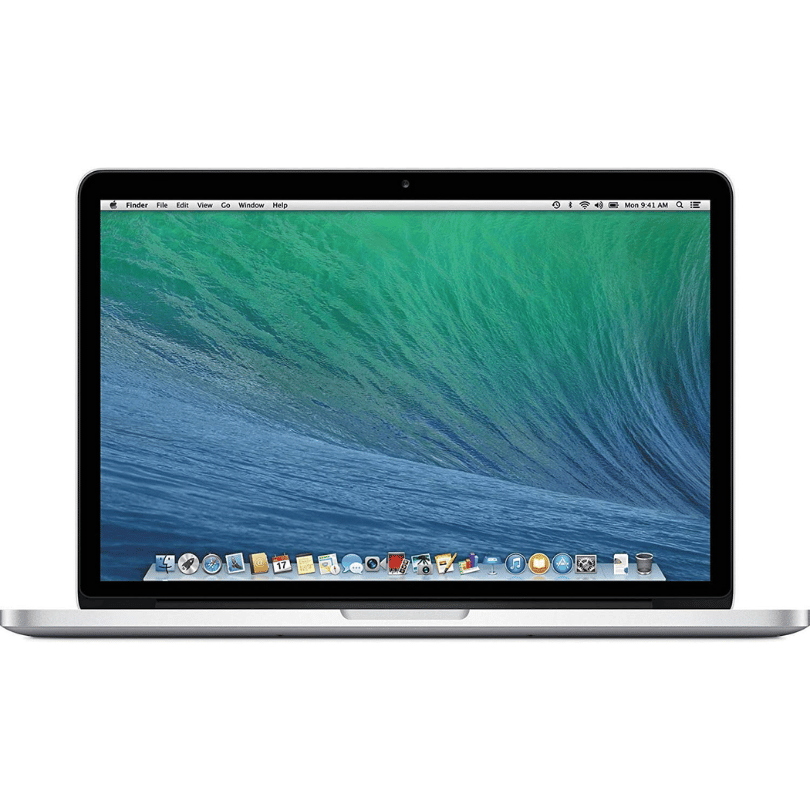
A sleek and responsive pre-owned MacBook Pro 15" (2015) with a brilliant Retina display, upgraded 16GB RAM, fast 128GB SSD, and efficient Intel Iris Pro graphics—ideal for students, developers, and everyday productivity.

BATTERY DELL WDX0R for Dell Inspiron 13 15 5000 7000 Series 5570 7579 7378 5567 7573 5565 5379 5378 Latitude 3490 3590 3340 3400 3390 3500 3190 Vostro 5468 5568 P69G 3CRH3 11.4V 42Wh About this item 【Specification】Dell laptop Replacement Battery Type: Li-ion; Voltage: 11.4V; Capacity: 42WH; Cells:3-Cell. (It is not the same as the 4-cell 33YDH 56Wh battery ) !!! Please make sure to choose the battery according to the shape of the original one, as the batteries for different laptop models may vary 【Stability】WDXOR WDX0R Laptop Battery Replacement battery for Dell offers 600+ recharge cycles over life of battery 【COMPATIBLE MODEL】(Check description below for more models) Dell Laptop Battery WDX0R P69G001 3CRH3 FC92N T2JX4 C4HCW Y3F7Y Dell Battery 3-cell 42WH 11.4v Li-on WDX0R Dell Battery Dell Inspiron 15 5570 Battery Inspiron 13-7378 battery Inspiron 15-7579 battery Dell Inspiron 5379 Battery Dell Inspiron 5567 Battery Dell Inspiron 13 7000 Battery Dell Inspiron p69g Battery Dell Inspiron 7573 Battery Dell Latitude 3340 3590 Battery Dell Vostro 5568 5468 Series Battery

A1707 Battery Replacement, A1820 Battery for MacBook Pro 15″ (Late 2016, Mid 2017) Touch Bar EMC 3072 EMC 3162 MLH32 MLH42 MLW72 MLW82 MPTR2 MPTT2 MLH52 MLW92 MPTU2 MPTV2 MPTW2 MPTX2 Specification】Voltage: 11.4V. Capacity: 76Wh 6667mAh. Battery Type: Li-ion. Condition: Brand new, from high quality materials, top circuit boards and smart chip. 【Compatible Part Number】A1820, A1707, A1707(EMC 3072), A1707(EMC 3162), 020-01728, MacBookPro13,3 , MacBookPro14,3. 【Compatible Laptop Models】MacBook Pro 15-Inch (Late 2016) & (Mid 2017) Model A1707 with touch bar, fit for MLH32LL/A MLH42LL/A MLH52LL/A MLW92LL/A MPTU2LL/A MPTV2LL/A MPTR2LL/A MPTT2LL/A MPTW2LL/A MPTX2LL/A MLW72LL/A MLW82LL/A. 【Note】The tools are included. Double-sided tape is attached to the back of the battery or double-sided tape is included in the package. But No battery installation instruction. The MBP battery is difficult to disassemble, we suggest you search for related installation videos on the Internet or find a technician for help.


MacBook Pro A1706 / A1708 Display Assembly (Space Gray) Compatibility : MacBook Pro 2017 13″ A1708 (EMC 3164 MacBookPro14,1) 2.3 GHz A1708 (EMC 3164 MacBookPro14,1) 2.5 GHz A1706 (EMC 3163 MacBookPro14,2) 3.1 GHz A1706 (EMC 3163 MacBookPro14,2) 3.3 GHz A1706 (EMC 3163 MacBookPro14,2) 3.5 GHz MacBook Pro 2016 13″ A1706 (EMC 3071 MacBookPro13,2) 2.9 GHz A1706 (EMC 3071 MacBookPro13,2) 3.1 GHz A1706 (EMC 3071 MacBookPro13,2) 3.3 GHz A1708 (EMC 2978 MacBookPro13,1) 2.0 GHz A1708 (EMC 2978 MacBookPro13,1) 2.4 GHz

RK ROYAL KLUDGE RK61 Wireless 60% Mechanical Gaming Keyboard, Ultra-Compact 60 Keys Bluetooth Mechanical Keyboard with Programmable Software (Blue Switch, White) Model: RK ROYAL KLUDGE RK61 Layout: 60% compact layout (61 keys, no number pad or function row) Switch Type: Mechanical switches (Red – Linear, Blue – Clicky, Brown – Tactile) Connectivity: Bluetooth 5.0 (connects up to 3 devices) USB-C Wired Optional 2.4GHz Wireless (on some versions) Connectivity: Bluetooth 5.0 (connects up to 3 devices) USB-C Wired Optional 2.4GHz Wireless (on some versions) Backlight: RGB LED with 18+ lighting modes and effects Battery: 1450mAh rechargeable lithium battery Key Rollover: Full N-Key rollover, anti-ghosting Compatibility: Windows, macOS, Android, iOS Software Support: Key remapping and lighting customization (Windows only) Build Quality: ABS plastic frame, double-shot keycaps Dimensions: Approx. 290 x 100 x 40 mm Weight: ~500g Extras: Hot-swappable switch support (on select versions)

Genuine-spec touchpad flex cable for MacBook Pro 15″ (Model A1707, 2016–2017)—restores full Force Touch functionality, haptic feedback, and precise multi-touch gesture control during trackpad repair or replacement. Compatible With: MacBook Pro 15″ (2016) – Model A1707 (Model Identifier: MacBookPro13,2) MacBook Pro 15″ (2017) – Model A1707 (Model Identifier: MacBookPro14,2) MacBook Pro 15″ (2016) – Model A1707 (Model Identifier: MacBookPro13,2) MacBook Pro 15″ (2017) – Model A1707 (Model Identifier: MacBookPro14,2) Part Type: Touchpad flex cable only — does not include the trackpad housing, Taptic Engine, or mounting hardware. This is the OEM-style ribbon cable that connects the trackpad to the logic board. Function: Transmits: Touch input coordinates Force Touch pressure data Haptic feedback signals to the Taptic Engine Enables full macOS gesture support: Force Click, three-finger lookup, swipe navigation, pinch-to-zoom, and smooth cursor tracking. Touch input coordinates Force Touch pressure data Haptic feedback signals to the Taptic Engine Enables full macOS gesture support: Force Click, three-finger lookup, swipe navigation, pinch-to-zoom, and smooth cursor tracking. OEM-Quality Build: Matches Apple’s original specifications in: Cable length and routing path Connector pitch and ZIF latch design EMI shielding and flex durability Cable length and routing path Connector pitch and ZIF latch design EMI shielding and flex durability Common Use Cases: Replacing a torn, creased, or liquid-damaged original flex cable Completing a trackpad replacement when the original cable is compromised Fixing intermittent trackpad behavior, loss of Force Touch, or complete unresponsiveness Replacing a torn, creased, or liquid-damaged original flex cable Completing a trackpad replacement when the original cable is compromised Fixing intermittent trackpad behavior, loss of Force Touch, or complete unresponsiveness Installation Note: Requires full bottom case removal and battery disconnection. Cable routes under internal components near the right speaker and logic board. Connects via a ZIF (Zero Insertion Force) socket—must be aligned carefully and latched gently. Recommended for experienced or certified technicians only. Requires full bottom case removal and battery disconnection. Cable routes under internal components near the right speaker and logic board. Connects via a ZIF (Zero Insertion Force) socket—must be aligned carefully and latched gently. Recommended for experienced or certified technicians only.

The Samsung 55″ OLED 4K S85F Vision AI Smart TV QA55S85FAEXTW delivers a premium home entertainment experience built on advanced OLED technology. It produces deep blacks, rich colors, and strong contrast, so movies, sports, and games look more realistic and immersive on the 55-inch screen. OLED technology controls each pixel individually, so every detail appears with high precision. This improves dark scenes by keeping blacks deep and detailed, while bright areas stay clean and accurate. As a result, the picture remains balanced in both bright and dark environments. Samsung Vision AI improves picture and sound in real time. It analyzes each scene and adjusts brightness, color, and sharpness automatically. Therefore, the Samsung 55 OLED S85F Vision AI Smart TV QA55S85FAEXTW always delivers optimized visuals without manual settings. In addition, AI upscaling improves lower-resolution content closer to 4K quality for better clarity and detail. HDR expands contrast and color depth, making visuals more lifelike and dynamic. Fast motion also appears smoother and clearer, which improves sports and action viewing. The Smart TV system gives access to streaming apps, games, and smart home features. It runs smoothly and is easy to navigate. In addition, the slim design with thin bezels gives the Samsung 55 OLED S85F Vision AI Smart TV QA55S85FAEXTW a modern and premium look. Overall, this Samsung OLED TV combines strong picture quality, AI optimization, and smart connectivity for a high-end viewing experience. Specifications: OLED display delivers deep blacks and strong contrast 55-inch 4K screen provides immersive viewing experience Vision AI optimizes picture and sound automatically HDR improves brightness, contrast, and color depth Smart TV system supports apps, streaming, and smart features

Genuine-spec touchpad flex cable for MacBook Pro 13″ (Model A1502, Mid 2014)—restores full trackpad functionality, including precise cursor control and physical click response. Essential for repairing unresponsive or erratic trackpad behavior. Compatible With: MacBook Pro 13-inch (Mid 2014, Model A1502, Model Identifier MacBookPro11,1) with Intel Core i5/i7 processors and Retina display. Part Type: Touchpad flex cable only — does not include the trackpad housing, button mechanism, or mounting hardware. This is the ribbon cable that connects the trackpad to the logic board. Function: Transmits cursor movement and click signals (left/right physical clicks) Supports standard multi-touch gestures (two-finger scroll, tap-to-click, pinch-to-zoom) ⚠️ Note: This model uses a physical click mechanism—not Force Touch (no haptic feedback or pressure sensitivity). Transmits cursor movement and click signals (left/right physical clicks) Supports standard multi-touch gestures (two-finger scroll, tap-to-click, pinch-to-zoom) ⚠️ Note: This model uses a physical click mechanism—not Force Touch (no haptic feedback or pressure sensitivity). OEM-Quality Build: Matches Apple’s original in: Cable length and routing path Connector type and pin alignment Insulation and flexibility for long-term reliability Cable length and routing path Connector type and pin alignment Insulation and flexibility for long-term reliability Common Use Cases: Replacing a torn, frayed, or corroded original flex cable Fixing: Unresponsive or intermittent trackpad Cursor jumping or drifting Click function failure (left or right) Complete trackpad disconnect Replacing a torn, frayed, or corroded original flex cable Fixing: Unresponsive or intermittent trackpad Cursor jumping or drifting Click function failure (left or right) Complete trackpad disconnect Unresponsive or intermittent trackpad Cursor jumping or drifting Click function failure (left or right) Complete trackpad disconnect Installation Note: Requires bottom case removal and battery disconnect. Connects via a ZIF (Zero Insertion Force) socket on the logic board—do not force. Cable routes under the battery; handle with care to avoid strain. Suitable for intermediate to advanced DIYers or technicians. Requires bottom case removal and battery disconnect. Connects via a ZIF (Zero Insertion Force) socket on the logic board—do not force. Cable routes under the battery; handle with care to avoid strain. Suitable for intermediate to advanced DIYers or technicians.
