
Are you ready to take your gaming to the next level? Meet the Asus ROG Swift PG278QR monitor, the ultimate gaming companion. With its cutting-edge features and sleek design, it’s the perfect choice for gamers seeking excellence. Firstly, let’s talk about the mesmerizing visuals. With a blazing-fast refresh rate and NVIDIA G-SYNC technology, this monitor delivers smooth, tear-free gameplay that will immerse you in every virtual world. Say goodbye to stuttering and lagging! Moreover, the WQHD resolution ensures crisp, detailed images that bring your games to life. Whether you’re exploring vast open worlds or engaging in intense firefights, every scene will be rendered with stunning clarity and precision. But the Asus ROG Swift PG278QR isn’t just about visuals—it’s also designed for comfort and convenience. The ergonomic stand allows you to adjust the height, tilt, swivel, and pivot for the perfect viewing angle, reducing strain during extended gaming sessions. Furthermore, connectivity options abound with DisplayPort 1.2 and HDMI ports, ensuring compatibility with a wide range of devices. Whether you’re gaming on your PC, console, or streaming media from your favorite device, the Asus ROG Swift PG278QR has you covered. In conclusion, if you’re serious about gaming, the Asus ROG Swift PG278QR monitor is a game-changer. Elevate your gaming experience with stunning visuals, smooth gameplay, and unmatched comfort. Get ready to unlock gaming excellence like never before! Specifications: Display : 27″ TN Resolution : 2k(2560×1440) Refresh Rate : 165Hz Response Rate : 1ms

Genuine Apple MagSafe 3 charging cable (2-meter length), originally shipped with MacBook Pro 14"/16" (2021, M1 Pro/Max) and MacBook Pro 16" (2023, M2/M3 Max). Used but fully functional, tested for safe power delivery and data handshake with Apple laptops. Compatibility: MacBook Pro 14″ (2021–2023, M1 Pro/Max, M2 Pro/Max, M3 Pro/Max) MacBook Pro 16″ (2021–2023, M1 Max, M2 Max, M3 Max) Works with Apple 67W, 96W, and 140W USB-C Power Adapters (sold separately) MacBook Pro 14″ (2021–2023, M1 Pro/Max, M2 Pro/Max, M3 Pro/Max) MacBook Pro 16″ (2021–2023, M1 Max, M2 Max, M3 Max) Works with Apple 67W, 96W, and 140W USB-C Power Adapters (sold separately) Connector Type: MagSafe 3 (magnetic, tri-oval tip) on laptop end USB-C on power adapter end MagSafe 3 (magnetic, tri-oval tip) on laptop end USB-C on power adapter end Cable Length: 2 meters (≈6.6 feet) – longer than the standard 1.8m cable, ideal for flexible desk or bedside setups. Condition: Original Apple cable, previously used but fully tested: No fraying, kinks, or exposed wires MagSafe 3 connector intact with strong magnetic hold Charges MacBook at full rated speed (supports up to 140W with compatible adapter) Passes Apple’s authentication handshake (no “Not Supported” warnings) No fraying, kinks, or exposed wires MagSafe 3 connector intact with strong magnetic hold Charges MacBook at full rated speed (supports up to 140W with compatible adapter) Passes Apple’s authentication handshake (no “Not Supported” warnings) What’s Included: MagSafe 3 to USB-C cable only Power adapter NOT included MagSafe 3 to USB-C cable only Power adapter NOT included Why Choose This: Cost-effective alternative to buying new 100% genuine Apple—no third-party risks (overheating, slow charging, compatibility errors) Ideal for backup, travel, or replacing a damaged original cable Cost-effective alternative to buying new 100% genuine Apple—no third-party risks (overheating, slow charging, compatibility errors) Ideal for backup, travel, or replacing a damaged original cable

Aoc Agon 24-inch WQHD 165Hz Gaming Monitor Product Details Size: 23.8 inches. Panel Type: TN (16.7 Million Colours with 170/160 º viewing angles). Resolution: 2K / WQHD (2560x1440p). Refresh Rate: 165Hz. Respomse Time: 1 ms (GTG). Aspect Ratio: 16:9. Sync Technology: Nvidia G-Sync. Brightness: 350 cd/m2. Contrast Ratio: Static: 1000:1, Dynamic: 50M:1 Anti-Glare 3H hard coating with an Ultra Narrow bezel. Adjustable Height within a 13cm range. Tilt Adjustment: -3.5° ~ +21.5°. Swivel: -20° ~ +20°. Pivots up to 90°. VESA Wall Mounting : 100x100mm. (x2) 2W built-in speakers with microphone. Ports: (x1) HDMI 1.4 (x1) DisplayPort 1.2 (x4) USB-A 3.0 (x1) USB-B (x1) 3.5mm audio jack Dimensions (incl base): 55.5 x 21.3 x 49 cm. Lowblue Light mode: Protection from eye strain without sacrificing color composition. Specifications: Aoc Agon 24-inch WQHD 165Hz Gaming Monitor Size: 23.8 inches. Panel Type: TN (16.7 Million Colours with 170/160 º viewing angles). Resolution: 2K / WQHD (2560x1440p). Refresh Rate: 165Hz.

DELL 90W Big/Moti Pin 7.4MM X 5.0MM Laptop Charger for Dell Inspiron N5010 19.5V 4.62A Laptop Adapter with Power Cord Cable,Black

The BenQ GL2780 27″ 75Hz Monitor is a practical and affordable choice for everyday use and light gaming. It features a 27-inch Full HD screen that delivers sharp visuals and clear details for work or play. The monitor offers a 75Hz refresh rate and a fast 1ms response time for smooth motion and reduced blur. Its LED backlight provides good brightness, while the anti-glare screen helps reduce reflections in bright rooms. With BenQ Eye-Care technology, including Flicker-Free and Low Blue Light modes, your eyes stay comfortable longer. The Brightness Intelligence feature adjusts the screen brightness based on room lighting for better viewing. You can connect the monitor easily using HDMI, DisplayPort, VGA, or DVI-D inputs, giving flexibility with devices. It also includes built-in 2W speakers and a headphone jack for simple audio without needing extras. The stand allows tilt adjustment, so you can set the best viewing angle for your desk setup. It’s also VESA mount compatible, giving you the option to mount it on a wall or arm. The design is sleek and clean, fitting nicely in any home office, school, or entertainment space. With solid performance and user-friendly features, it’s a great option for students, professionals, and casual gamers. The BenQ GL2780 27″ 75Hz Monitor offers reliable performance, smooth visuals, and great eye comfort at a budget-friendly price. Specifications: Display : 27″ Resolution : FHD 1920 x 1080 Refresh Rate : 75Hz Response Time : 1ms Speaker : Integrated

The ViewSonic VG2709-MHU 27″ FHD 75Hz Monitor delivers clear and sharp images for work, study, and daily tasks. Its Full HD resolution shows text and pictures with good clarity. The 27‑inch size gives you enough space to multitask comfortably. This makes work and browsing easier. Moreover, the ViewSonic VG2709‑MHU uses a SuperClear IPS panel for wide viewing angles and consistent color. Colors stay true from the sides without fading or distortion. This helps photos, videos, and graphics look natural and smooth. Even large spreadsheets or documents remain easy to read. In addition, the monitor features a smooth 75 Hz refresh rate. This makes motion feel smoother than standard 60 Hz screens. Scrolling, video playback, and light gaming feel more fluid and comfortable. This reduces motion blur during everyday use. Furthermore, the ViewSonic VG2709-MHU includes eye‑care technology for long hours of work. It offers Flicker‑Free display and a Blue Light Filter to help reduce eye strain. This helps your eyes stay comfortable during long sessions. Also, the monitor offers good connectivity with HDMI, VGA, and USB‑C (with 65W power delivery) ports. This makes it simple to connect laptops, desktops, or other devices quickly. The built-in speakers add convenience for calls, videos, or basic media without extra audio devices. Also the design of the ViewSonic VG2709‑MHU is ergonomic and adjustable. You can tilt, swivel, pivot, and adjust height to find a comfortable view. Overall, the ViewSonic VG2709-MHU 27″ FHD 75Hz Monitor combines clear visuals, smooth performance, eye comfort, and flexible connectivity. It improves productivity, browsing, and light media or gaming. It is a great choice for students, professionals, and everyday users who want a dependable and comfortable display. Specifications: Display : 27″ IPS Resolution : FHD Refresh Rate : 75Hz Response Time : 5ms

View Sonic VA2215-H 22” Full HD Monitor Eyecare technology for comfortable viewing Eco-mode for low energy consumption ViewMode color rendering options 75Hz FreeSync to eliminate screen tearing and reduce stuttering HDMI and VGA inputs for connectivity

Acer Nitro VG252QXbmiipx Gaming G-SYNC Screen size 31.5 Inches Display resolution maximum 1920 x 1080 Connectivity technology HDMI Aspect ratio 16:9 Specific uses for product Gaming Response time 4 Milliseconds Resolution FHD 1080p Number of HDMI Ports 2 Image brightness 400 cd/m² Voltage 240 Volts

Samsung Odyssey G5 G50F 32″ QHD Monitor delivers sharp visuals and smooth gameplay for serious gamers. It features a 32-inch 2K flat display with high resolution. As a result, games look more detailed and immersive. Moreover, the VA panel ensures consistent colors and wide viewing angles. It maintains clear visuals from different positions. HDR10 support enhances brightness and contrast for deeper blacks and brighter highlights. Furthermore, the 165Hz refresh rate and 1ms response time reduce motion blur and lag. NVIDIA G-Sync compatibility and AMD FreeSync Premium help deliver smooth and stable frames. Finally, Samsung Odyssey G5 G50F 32″ Monitor includes gaming features like Black Equalizer and Virtual Aim Point. These improve visibility and accuracy. Players gain better control and performance in every match. Specifications: 32-inch QHD (2560×1440) display with sharp visuals and wide viewing angles VA panel ensures consistent colors and clear images from multiple angles 165Hz refresh rate and 1ms response time for smooth, responsive gaming HDR10 support for enhanced brightness, contrast, and realistic visuals Gaming tools like Black Equalizer and Virtual Aim Point for better accuracy

Dell Latitude 5400 — business-class laptop built for reliability and productivity.• Intel Core i5 8th Gen • 8 GB RAM • 256 GB SSD • 14” FHD TouchscreenWindows | Durable Design | Backlit Keyboard

The MSI MAG 27CQ6PF 27″ 2K 180Hz Curved Gaming Monitor delivers smooth visuals and immersive gaming experiences. It is designed for competitive and casual gamers. This monitor combines high performance with stunning image quality. It features a 27-inch curved display for immersive viewing. The 1500R curvature brings you closer to the action. This provides a more natural and engaging experience. The MSI MAG 27CQ6PF offers 2K resolution for sharp details. You can enjoy crisp images in games and media. This improves clarity compared to standard Full HD monitors. With a 180Hz refresh rate, it ensures ultra-smooth gameplay. Fast action scenes feel fluid and responsive. This gives gamers a competitive edge in every match. The monitor also features a fast response time. It reduces motion blur and ghosting in fast-paced games. This provides clear visuals for intense gaming sessions. Adaptive sync technology ensures tear-free and stutter-free performance. It keeps gameplay smooth even during demanding scenes. This enhances your overall gaming experience. The MSI MAG 27CQ6PF includes multiple connectivity options. You can connect gaming consoles, PCs, and other devices. This makes it versatile for entertainment and work. Its sleek design with thin bezels adds style. It fits perfectly in gaming setups or workstations. The adjustable stand improves comfort during long sessions. In summary, the MSI MAG 27CQ6PF 27″ 2K 180Hz Curved Gaming Monitor combines speed, clarity, and immersion. It is perfect for gamers who demand performance. Specifications: Display : 27″ Rapid VA Screen : 2560 x 1440 (WQHD) Refresh Rate : 180Hz Response Rate : 0.5ms Curvature : 1500R

This 1.8-meter DisplayPort to HDMI cable lets you connect a DisplayPort-enabled PC or laptop to an HDMI monitor, TV, or projector. It delivers clear high-definition video and reliable signal transmission, making it perfect for office work, presentations, and home entertainment. The DisplayPort to HDMI cable (1.8M) is a simple and reliable solution for connecting modern computers and laptops with a DisplayPort output to HDMI displays. Ideal for upgrading your setup, it supports high-quality video output for monitors, HDTVs, and projectors. With plug-and-play functionality and a durable build, it ensures stable performance for both professional and home use. DisplayPort to HDMI Connection for easy compatibility with HDMI screens 1.8M Cable Length ideal for desk and office setups High-Definition Video Output for clear and sharp visuals Plug & Play no drivers required Durable Connectors & Cable Build for long-term reliability Perfect for Work & Entertainment supports monitors, TVs, and projectors Works with devices that have a DisplayPort output and displays with an HDMI input, including monitors, TVs, projectors, and display systems. Ideal for workstations, presentations, and dual-screen setups.

The Samsung 75″ The Frame Pro 4K Vision AI Smart TV QA75LS03FWUXTW uses a 75-inch 4K LCD panel with 3840 × 2160 resolution. It is designed for both TV viewing and wall-mounted display use. The TV uses Samsung’s Vision AI and image processing to adjust picture settings in real time. As a result, brightness, contrast, and color are optimized based on content type and scene changes. In addition, the system supports 4K upscaling for lower-resolution content. The display supports HDR formats for compatible content, which improves contrast between bright and dark areas. It also includes motion processing to reduce blur during fast-moving scenes such as sports and action content. Samsung equips this model with Tizen OS. Therefore, users access streaming apps, SmartThings integration, and smart features through a unified interface. The TV also supports wireless connectivity through Wi-Fi and Bluetooth for external devices. Connectivity includes HDMI ports, USB ports, Ethernet LAN, and optical audio output. It also supports external audio systems and gaming consoles through standard input options. This model includes The Frame design concept, which allows the display to function as both a TV and a digital art display when not in use. Specifications: 75-inch 4K UHD LCD panel with 3840 × 2160 resolution Vision AI image processing with automatic adjustments HDR support for compatible content Tizen OS smart platform with streaming apps HDMI, USB, Wi-Fi, Bluetooth, Ethernet connectivity

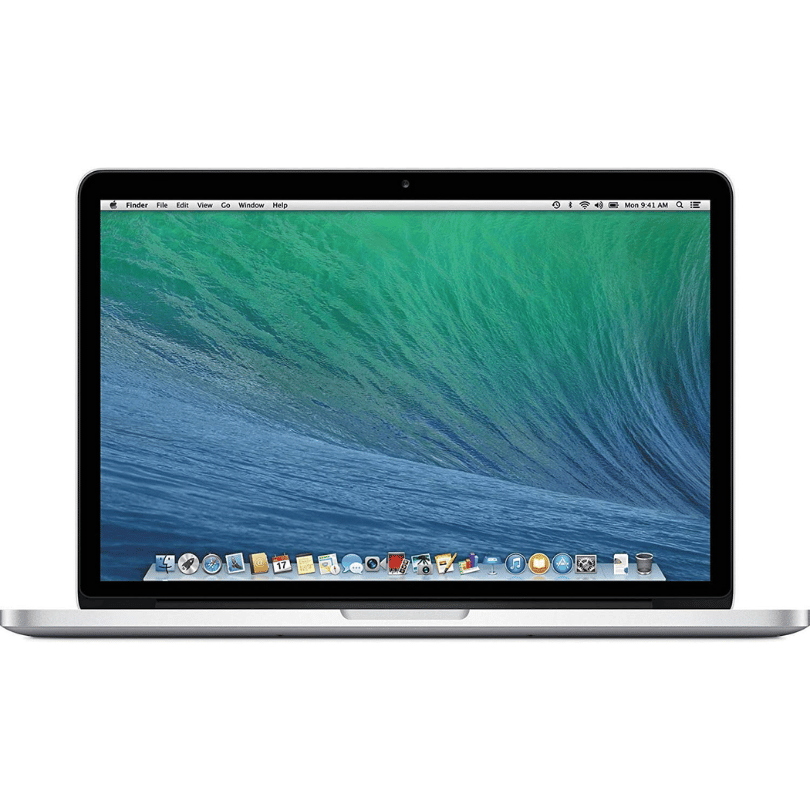
Genuine-spec US layout keyboard replacement for MacBook Pro 13″ (Model A1502, Mid 2014)—featuring durable scissor-switch keys, backlighting, and OEM-fit design for reliable performance and easy installation. Compatible With: MacBook Pro 13-inch (Mid 2014, Model A1502, Model Identifier MacBookPro11,1) with Retina display. Layout: Standard US English (QWERTY) with full-size keys, inverted-T arrow keys, and dedicated function row (F1–F12). Keyboard Type: Traditional scissor-switch mechanism—offers good key travel, tactile feedback, and proven long-term reliability (pre-Butterfly design). Integrated Features: Backlit keys for low-light environments, ambient light sensor compatibility, and original-style ribbon cable connector for direct logic board attachment. Build & Fit: Precision-molded to match Apple’s exact dimensions and mounting points—ensures flush integration into the top case with consistent key alignment. Installation Note: Keyboard is secured with screws and light adhesive—more serviceable than later glued models. Requires top case access and battery disconnection. Suitable for intermediate DIYers or professional technicians.

The Samsung 27″ Smart Monitor M5 M50D (LS27DM501EMXUE) is an all-in-one display designed for work and entertainment. It combines a Full HD monitor with built-in smart TV features. Additionally, it allows direct streaming without a PC using integrated apps. Moreover, it features a 27-inch VA panel with Full HD resolution and a 60Hz refresh rate. It supports HDR10 and delivers wide viewing angles with consistent image quality. Furthermore, the monitor includes built-in speakers, Wi-Fi, and Bluetooth connectivity. It runs on Samsung Tizen OS, enabling access to apps, Samsung TV Plus, and Gaming Hub. It also supports multiple ports, including HDMI and USB-A, for easy device connection. Features like Multi Control and Workspace improve productivity across devices. Overall, the Samsung 27″ Smart Monitor M5 M50D delivers versatile use with streaming, productivity tools, and display performance in one device. Specifications: 27-inch Full HD (1920×1080) VA display 60Hz refresh rate with 4ms response time Built-in smart TV apps with Tizen OS Integrated speakers with HDMI and USB ports Wi-Fi and Bluetooth connectivity support

AOC U32V11N 31.5-inch 4K monitor delivers ultra-clear visuals and large screen workspace for productivity and media use. It focuses on high resolution, strong contrast, and comfortable long-term viewing. Additionally, it features a 31.5-inch VA panel with 4K UHD resolution (3840 × 2160). This resolution provides very fine detail and more screen space, so it improves multitasking and content clarity. Moreover, it supports a 60Hz refresh rate with 4ms GtG response time. As a result, it delivers stable performance for office work, design, and general use. The monitor offers a high 3500:1 contrast ratio with HDR10 support and 10-bit color. Therefore, it enhances color depth and improves brightness and dark scene detail. In addition, it includes Picture-by-Picture and Picture-in-Picture modes. These features allow multiple input sources on one screen, so multitasking becomes more efficient. Furthermore, it includes Low Blue Mode and Flicker-Free technology. So it reduces eye strain during long working hours. The design features a three-sided frameless layout with HDMI 2.0 and DisplayPort 1.4 connectivity. It also supports VESA mounting for flexible setup options. AOC U32V11N 31.5-inch 4K monitor provides sharp visuals, strong contrast, and productivity-focused features for everyday professional use. Specifications: 31.5-inch VA panel with 3840 × 2160 4K UHD resolution 60Hz refresh rate with 4ms GtG response time HDR10 support with 10-bit color depth 3500:1 contrast ratio for deeper blacks and detail PIP and PBP multitasking with HDMI and DisplayPort connectivity

Genuine-spec touchpad flex cable for MacBook Pro 15″ (Model A1707, 2016–2017)—restores full Force Touch functionality, haptic feedback, and precise multi-touch gesture control during trackpad repair or replacement. Compatible With: MacBook Pro 15″ (2016) – Model A1707 (Model Identifier: MacBookPro13,2) MacBook Pro 15″ (2017) – Model A1707 (Model Identifier: MacBookPro14,2) MacBook Pro 15″ (2016) – Model A1707 (Model Identifier: MacBookPro13,2) MacBook Pro 15″ (2017) – Model A1707 (Model Identifier: MacBookPro14,2) Part Type: Touchpad flex cable only — does not include the trackpad housing, Taptic Engine, or mounting hardware. This is the OEM-style ribbon cable that connects the trackpad to the logic board. Function: Transmits: Touch input coordinates Force Touch pressure data Haptic feedback signals to the Taptic Engine Enables full macOS gesture support: Force Click, three-finger lookup, swipe navigation, pinch-to-zoom, and smooth cursor tracking. Touch input coordinates Force Touch pressure data Haptic feedback signals to the Taptic Engine Enables full macOS gesture support: Force Click, three-finger lookup, swipe navigation, pinch-to-zoom, and smooth cursor tracking. OEM-Quality Build: Matches Apple’s original specifications in: Cable length and routing path Connector pitch and ZIF latch design EMI shielding and flex durability Cable length and routing path Connector pitch and ZIF latch design EMI shielding and flex durability Common Use Cases: Replacing a torn, creased, or liquid-damaged original flex cable Completing a trackpad replacement when the original cable is compromised Fixing intermittent trackpad behavior, loss of Force Touch, or complete unresponsiveness Replacing a torn, creased, or liquid-damaged original flex cable Completing a trackpad replacement when the original cable is compromised Fixing intermittent trackpad behavior, loss of Force Touch, or complete unresponsiveness Installation Note: Requires full bottom case removal and battery disconnection. Cable routes under internal components near the right speaker and logic board. Connects via a ZIF (Zero Insertion Force) socket—must be aligned carefully and latched gently. Recommended for experienced or certified technicians only. Requires full bottom case removal and battery disconnection. Cable routes under internal components near the right speaker and logic board. Connects via a ZIF (Zero Insertion Force) socket—must be aligned carefully and latched gently. Recommended for experienced or certified technicians only.

Genuine-spec touchpad flex cable compatible with both MacBook Air A2179 (Intel, 2020) and A2337 (M1, 2020)—restores full Force Touch functionality, haptic feedback, and precise multi-touch gesture control during trackpad repair or replacement. Compatible With: MacBook Air 13″ (2020, Intel) – Model A2179 (Model Identifier: MacBookAir9,1) MacBook Air 13″ (2020, Apple M1) – Model A2337 (Model Identifier: MacBookAir10,1) MacBook Air 13″ (2020, Intel) – Model A2179 (Model Identifier: MacBookAir9,1) MacBook Air 13″ (2020, Apple M1) – Model A2337 (Model Identifier: MacBookAir10,1) ✅ Important Note: Despite different processors (Intel vs. M1), Apple used the same trackpad assembly and flex cable in both A2179 and A2337. This makes the flex cable fully interchangeable between the two models. Part Type: Touchpad flex cable only — does not include the trackpad housing, Taptic Engine, or mounting hardware. This is the OEM-style ribbon cable that connects the trackpad to the logic board. Function: Transmits: Touch input coordinates Force Touch pressure data Haptic feedback signals to the Taptic Engine Enables full macOS gesture support: Force Click, three-finger lookup, swipe navigation, pinch-to-zoom, and smooth cursor tracking. Touch input coordinates Force Touch pressure data Haptic feedback signals to the Taptic Engine Enables full macOS gesture support: Force Click, three-finger lookup, swipe navigation, pinch-to-zoom, and smooth cursor tracking. OEM-Quality Build: Matches Apple’s original specifications in: Cable length and routing path Connector pitch and ZIF latch design EMI shielding and flex durability Cable length and routing path Connector pitch and ZIF latch design EMI shielding and flex durability Common Use Cases: Replacing a torn, creased, or liquid-damaged original flex cable Completing a trackpad replacement when the original cable is compromised Fixing intermittent trackpad behavior, loss of Force Touch, or complete unresponsiveness Replacing a torn, creased, or liquid-damaged original flex cable Completing a trackpad replacement when the original cable is compromised Fixing intermittent trackpad behavior, loss of Force Touch, or complete unresponsiveness Installation Note: Requires full bottom case removal and battery disconnection. Cable routes under the right side of the battery and logic board. Connects via a ZIF (Zero Insertion Force) socket—align carefully and latch gently. Recommended for experienced or certified technicians only. Requires full bottom case removal and battery disconnection. Cable routes under the right side of the battery and logic board. Connects via a ZIF (Zero Insertion Force) socket—align carefully and latch gently. Recommended for experienced or certified technicians only.

lenovo battery L18C3PF2 Laptop Battery Compatible with Lenovo Ideapad L3-15IML05 L340-15API L340-15IWL L340-17API L340-17IWL L340-15API/L340-15IWL Touch Series 5B10T03401 L18M3PF2 L18L3PF1 L18D3PF1 11.25V 36Wh About this item 【Battery type】Li-ion. Voltage: 11.25V. Capacity: 36Wh 3320mAh . 【Compatible Part Number】L18C3PF2 5B10T03401 5B10W67302 L18M3PF2 5B10T03402 5B10W67367 5B10T03404 L18D3PF1 5B10W67278 5B10T03400 L18L3PF1 5B10W67198 5B10T03403 . 【Replacement For Laptop】Lenovo V155-15API V340-17IWL, IdeaPad L3-15IML05, Ideapad L340-15API L340-15IWL L340-17API L340-17IWL L340-15IWL Touch L340-15API Touch Series Notebook. 【Connector】Before placing your order, Please refer to the picture and check it. Because the products produced by different factories will have differences in size, cable length, interface, etc.

Genuine-spec touchpad flex cable for MacBook Pro 15″ (Model A1706 – 2017 and A1989 – 2018/2019)—restores full Force Touch functionality, haptic feedback, and precise multi-touch gesture control during trackpad repair or replacement. Compatible With: MacBook Pro 15″ (2017) – Model A1706 (Model Identifier: MacBookPro14,3) MacBook Pro 15″ (2018–2019) – Model A1989 (Model Identifier: MacBookPro15,2) ✅ Note: Apple used the same trackpad assembly and flex cable across both A1706 and A1989 15″ models—making this part interchangeable between them. MacBook Pro 15″ (2017) – Model A1706 (Model Identifier: MacBookPro14,3) MacBook Pro 15″ (2018–2019) – Model A1989 (Model Identifier: MacBookPro15,2) ✅ Note: Apple used the same trackpad assembly and flex cable across both A1706 and A1989 15″ models—making this part interchangeable between them. ✅ Note: Apple used the same trackpad assembly and flex cable across both A1706 and A1989 15″ models—making this part interchangeable between them. Part Type: Touchpad flex cable only — does not include the trackpad housing, Taptic Engine, or mounting hardware. This is the OEM-style ribbon cable connecting the trackpad to the logic board. Function: Transmits: Touch input coordinates Force Touch pressure data Haptic feedback signals to the Taptic Engine Enables full macOS gesture support: Force Click, three-finger lookup, swipe navigation, pinch-to-zoom, and smooth cursor tracking. Touch input coordinates Force Touch pressure data Haptic feedback signals to the Taptic Engine Enables full macOS gesture support: Force Click, three-finger lookup, swipe navigation, pinch-to-zoom, and smooth cursor tracking. OEM-Quality Build: Matches Apple’s original in: Cable length and routing Connector pitch and ZIF latch design EMI shielding and flex durability Cable length and routing Connector pitch and ZIF latch design EMI shielding and flex durability Common Use Cases: Replacing a torn, creased, or liquid-damaged original flex cable Completing a trackpad replacement when the original cable is compromised Fixing intermittent trackpad behavior, loss of Force Touch, or complete unresponsiveness Replacing a torn, creased, or liquid-damaged original flex cable Completing a trackpad replacement when the original cable is compromised Fixing intermittent trackpad behavior, loss of Force Touch, or complete unresponsiveness Installation Note: Requires full bottom case removal and battery disconnection. Cable routes under internal components near the right speaker and logic board. Connects via a ZIF (Zero Insertion Force) socket—must be aligned carefully and latched gently. Recommended for experienced or certified technicians only. Requires full bottom case removal and battery disconnection. Cable routes under internal components near the right speaker and logic board. Connects via a ZIF (Zero Insertion Force) socket—must be aligned carefully and latched gently. Recommended for experienced or certified technicians only.
