
Acer Nitro VG240YSbmiipx 23.8 inchSize Name: 23.8 Style Name: FHD, 165Hz, DP Pattern Name: Single Screen size 23.8 Inches Display resolution maximum 1920 x 1080 Pixels Brand ACER Special feature Blue Light Filter, Tilt Adjustment, Frameless, Flicker-Free Refresh rate 165 Hz Discover the joys of a seamless game experience with Radeon FreeSync, in vivid IPS With a 165Hz refresh rate and 1ms Visual Response Boost (VRB) technology, gameplay is seamless and practically blur-free An IPS panel lets you view your display clearly at angles of up to 178 degrees while maintaining the same level of high-quality colour Take in the full view of the display with its ZeroFrame design atop the sharply-cut three-pronged stand No need to fiddle with buttons Easily modify your monitor settings via the Display Widget utility software

A capable pre-owned Dell Latitude 5401 with 14" display, 10th Gen Core i7, 16GB RAM, 512GB SSD, and NVIDIA GeForce MX330 2GB—ideal for professionals who need extra graphics power for light creative work or multitasking in a durable business laptop.

LG Ultrawide 34 inch 75Hz IPS Monitor 34WP550-B is designed for multitasking, productivity, and immersive viewing. It features a 34-inch UltraWide Full HD IPS display with a 21:9 aspect ratio. Additionally, it supports AMD FreeSync for smoother visuals. Therefore, it works well for office work, media, and light creative tasks. The LG 34WP550-B delivers 2560 × 1080 resolution with a 75Hz refresh rate and 5ms response time. Moreover, it includes HDR10 support and sRGB 95% color coverage for more accurate visuals. It also offers HDMI connectivity and a 3-side borderless design. In addition, it supports Reader Mode, Black Stabilizer, and Dynamic Action Sync for improved usability. Furthermore, the ultrawide format gives extra horizontal space for multitasking. As a result, users can run multiple windows side by side more easily. It also includes ergonomic tilt and height adjustment for better comfort during long use. Specifications: 34-inch 21:9 UltraWide Full HD (2560 × 1080) IPS display 75Hz refresh rate with AMD FreeSync support HDR10 with sRGB 95% color coverage 5ms response time with gaming features HDMI connectivity with height and tilt adjustment

Genuine-spec touchpad flex cable for Apple’s 12-inch MacBook (Model A1534, Early 2015 / Early 2016 / Mid 2017)—essential for restoring full Force Touch trackpad functionality, haptic feedback, and multi-touch gesture support. Compatible With: MacBook 12″ (Early 2015) – 1.1GHz Core M MacBook 12″ (Early 2016) – 1.1GHz/1.3GHz Core M MacBook 12″ (Mid 2017) – 1.2GHz/1.3GHz Core m3/i5/i7 All share Model Number A1534 and Model Identifier MacBook8,1 / MacBook9,1 / MacBook10,1 respectively. MacBook 12″ (Early 2015) – 1.1GHz Core M MacBook 12″ (Early 2016) – 1.1GHz/1.3GHz Core M MacBook 12″ (Mid 2017) – 1.2GHz/1.3GHz Core m3/i5/i7 All share Model Number A1534 and Model Identifier MacBook8,1 / MacBook9,1 / MacBook10,1 respectively. Part Type: Touchpad flex cable only—does not include the trackpad housing, Taptic Engine, or mounting brackets. This is the ribbon cable that connects the Force Touch trackpad to the logic board. Function: Critical for Force Touch functionality—transmits pressure-sensitive input, multi-touch gestures (e.g., pinch, swipe, Force Click), and haptic feedback signals to the Taptic Engine. OEM-Quality Construction: Precisely matches Apple’s original in length, connector pitch, shielding, and routing—ensures reliable signal integrity and compatibility with macOS. Common Use Cases: Replacing a torn, creased, or liquid-damaged flex cable Restoring unresponsive or erratic trackpad behavior Completing a trackpad replacement when the original cable is unusable Replacing a torn, creased, or liquid-damaged flex cable Restoring unresponsive or erratic trackpad behavior Completing a trackpad replacement when the original cable is unusable Installation Note: Requires full bottom case removal and delicate disconnection of the ZIF connector. The cable routes tightly under the battery—extreme care is required. Recommended for experienced or certified technicians only.

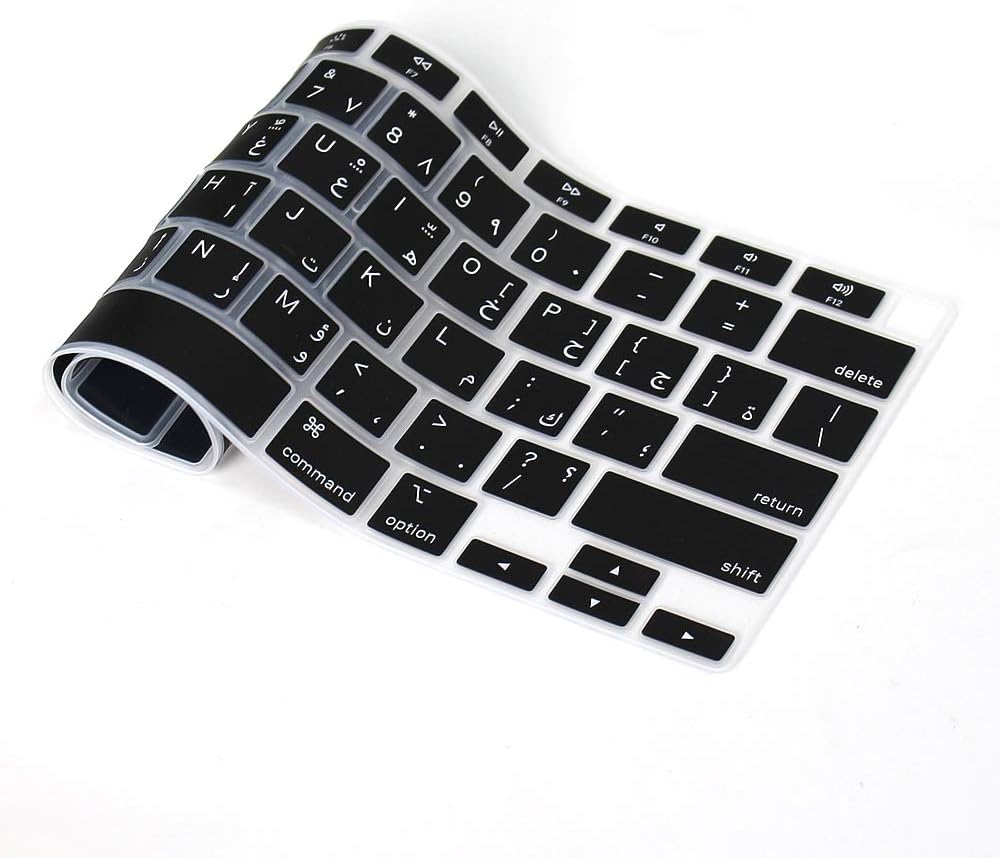
MacBook Pro Keyboard Replacement /Compatible for Apple MacBook - A1990 15" , A1989 13" MacBook Pro Keyboard Replacement /Compatible for Apple MacBook – A1990 15″ , A1989 13″ New A1989 A1990 Keyboard US Standard Replacement for MacBook Pro 13” 15”A1990 A1989 Keyboard 2018 Year

Dell 24 Monitor – E2422HN Functional, space-saving design Convenient connectivity: Connect to current and legacy systems via HDMI, VGA and DP ports. Maximize your desktop: Cut clutter with space-saving features like a compact stand and improved cable management that hides cables while complementing any workspace. Clean, simple design: A slim bezel adds a modern look. Adapts to your needs: Make your workspace your own with VESA-compatible mounts and stands. manufacturer link 1 Year Warranty

The MSI PRO MP251L E2 monitor delivers reliable performance for daily work and home use. It features a 24.5-inch Full HD display that provides clear visuals and consistent color quality. Therefore, users can handle tasks like browsing, office work, and media viewing with ease. Moreover, the 120Hz refresh rate improves screen smoothness during scrolling and light gaming. This creates a more comfortable viewing experience over long periods. In addition, the IPS panel ensures wide viewing angles and stable color reproduction from different positions. Furthermore, the monitor supports eye care features that help reduce strain during extended use. This makes it suitable for professionals and students alike. As a result, users can stay productive while maintaining visual comfort throughout the day. The design also focuses on simplicity and efficiency. It includes essential connectivity options for easy setup with various devices. Consequently, the MSI PRO MP251L E2 monitor offers a balanced combination of performance, comfort, and usability. MSI PRO MP251L E2 monitor is a practical choice for users who need smooth visuals and dependable display quality. Specifications: 24.5-inch Full HD (1920 × 1080) IPS display 120Hz refresh rate for smoother visuals Wide viewing angles with consistent colors Eye care technology for reduced strain Multiple connectivity options for easy setup

Samsung Lebanon 32″ LS32C390EAMXUE The Samsung Lebanon 32″ Introducing the boldest curve ever This , born from years of and the future of monitor technology. Easy on the eyes In tol monitors that have less curve, 1000R fits the human field of view for less eye strain. A clinical study at Seoul National University Hospital shows that the closer to 1000R, the more it limits eye fatigue. Visionary Minimalism Next-generation design. The striking aesthetic is by a backside and premium-quality slim metal stand. The result is a monitor that won’t just catch eyes. but complements any interior, too. What Gamers Want Welcome to your new playground. AMD FreeSync delivers seamless gaming, while 75Hz makes scenes smooth. This flawless imagery comes together with Game Mode and the renowned 1000R curve for Focused Comfort Protect your eyes and do more. The T55’s advanced eye comfort technology reduces eye strain for more comfortable Flicker Free technology continuously removes tiring and irritating screen flicker, while Eye Saver Mode minimizes emitted blue light. Your eyes stay fresh longer. Ready to Entertain Connect to all your favorite devices with a convenient HDMI, DP, and D-Sub triple interface. The built-in 5 Watt speakers make it even easier lost in your favorite movies or TV shows, without plugging in a speaker. Easy on the eyes with 1000R curved screen Minimalist design with the borderless display, fabric-textured backside and slim metal stand Realistic immersion with the renowned 1000R curve and game-related features Running a monitor self-test is a simple and effective way to check the health and functionality of your computer monitor. The purpose of this test is to diagnose any potential issues with the monitor, such as dead pixels, color accuracy, contrast, or brightness problems. Power off both your computer and the monitor. 2Disconnect the signal cable from the back of the computer. 3Power on the monitor. Specifications: Specifications Screen Curvature1000R Active Display Size (HxV) (mm)698.4×392.85 Flat / CurvedCurved Screen Size (Class)32 3 year warranty Manufacturer Link

View Sonic Monitor ViewSonic LCD Display XG2405 XG2405 24″ 24-inch 3-side Borderless Display 144Hz Refresh Rate 1ms (GtG) Response Time AMD FreeSync Specifications: View Sonic Monitor ViewSonic LCD Display XG2405 XG2405 24″ 24-inch 3-side Borderless Display 144Hz Refresh Rate 1ms (GtG) Response Time AMD FreeSync 1 Year Warranty

The ViewSonic VX2476-smhd 24″ 75Hz Monitor offers stunning visuals and smooth performance for both work and play. Its sleek and modern design adds a touch of elegance to any workspace. With a 24-inch Full HD display, the ViewSonic VX2476-smhd delivers crisp and vibrant images. Whether you’re watching movies, editing photos, or browsing the web, you’ll enjoy a clear and immersive viewing experience. The 75Hz refresh rate ensures smooth and fluid motion, reducing screen tearing and stuttering. This makes the ViewSonic VX2476-smhd perfect for gaming and fast-paced videos, providing a seamless experience. Designed with an ultra-thin bezel, the ViewSonic VX2476-smhd maximizes screen space and minimizes distractions. This makes it ideal for multi-monitor setups, allowing you to expand your workspace effortlessly. The ViewSonic VX2476-smhd features advanced IPS technology, ensuring accurate and consistent colors from every angle. This is perfect for collaborative work and shared viewing experiences, as everyone sees the same high-quality image. Connectivity is simple and versatile with the ViewSonic VX2476-smhd. It includes HDMI, DisplayPort, and VGA inputs, making it compatible with a wide range of devices, from computers to gaming consoles. In conclusion, the ViewSonic VX2476-smhd 24″ 75Hz Monitor combines stunning visuals, smooth performance, and sleek design for an exceptional viewing experience. Upgrade to the ViewSonic VX2476-smhd today and transform your digital world. Specifications: Display : 24″ IPS Resolution : FHD 1920 x 1080 Refresh Rate : 75Hz Response Rate : 4ms

WIWU Alpha Double Layer Sleeve Bag For 16\14″ Laptop/MacBook Brand: WIWU The corner patent design protects your laptop from bumps and drops in potential accident. SBS water resistance zipper Retractable waterproof TPU handle, firm and scratch resistant (commonly used in car trailer ropes) 2 compartment zipper design, organize your accessories well Water-resistant material

Genuine-spec touchpad flex cable for MacBook Pro 13″ (Model A2338, 2020, Apple M1)—essential for restoring full Force Touch functionality, haptic feedback, and precise multi-touch gesture control during trackpad repair or replacement. Compatible With: MacBook Pro 13-inch (2020, Model A2338, Model Identifier MacBookPro17,1) with Apple M1 chip (2 Thunderbolt ports). Part Type: Touchpad flex cable only — does not include the trackpad housing, Taptic Engine, or mounting hardware. This is the OEM-style ribbon cable that connects the trackpad to the logic board. Function: Transmits: Touch input coordinates Force Touch pressure data Haptic feedback signals to the Taptic Engine Enables full macOS gesture support: Force Click, three-finger lookup, swipe navigation, pinch-to-zoom, and smooth cursor tracking. Touch input coordinates Force Touch pressure data Haptic feedback signals to the Taptic Engine Enables full macOS gesture support: Force Click, three-finger lookup, swipe navigation, pinch-to-zoom, and smooth cursor tracking. OEM-Quality Build: Matches Apple’s original specifications in: Cable length and routing Connector pitch and ZIF latch design EMI shielding and flex durability Cable length and routing Connector pitch and ZIF latch design EMI shielding and flex durability Common Use Cases: Replacing a torn, creased, or liquid-damaged original flex cable Completing a trackpad replacement when the original cable is compromised Fixing intermittent trackpad behavior, loss of Force Touch, or complete unresponsiveness Replacing a torn, creased, or liquid-damaged original flex cable Completing a trackpad replacement when the original cable is compromised Fixing intermittent trackpad behavior, loss of Force Touch, or complete unresponsiveness Installation Note: Requires full bottom case removal and battery disconnection. Cable routes under internal components near the right speaker and logic board. Connects via a ZIF (Zero Insertion Force) socket—must be aligned carefully and latched gently. Recommended for experienced or certified technicians only. Requires full bottom case removal and battery disconnection. Cable routes under internal components near the right speaker and logic board. Connects via a ZIF (Zero Insertion Force) socket—must be aligned carefully and latched gently. Recommended for experienced or certified technicians only. Important Compatibility Notes: ✅ Only for A2338 (13″, M1, 2020) ❌ Not compatible with: Intel-based A2251 / A2289 (2020) MacBook Air M1 (A2337) Any MacBook Air or 14″/16″ MacBook Pro ✅ Only for A2338 (13″, M1, 2020) ❌ Not compatible with: Intel-based A2251 / A2289 (2020) MacBook Air M1 (A2337) Any MacBook Air or 14″/16″ MacBook Pro Intel-based A2251 / A2289 (2020) MacBook Air M1 (A2337) Any MacBook Air or 14″/16″ MacBook Pro

Acer KA222Qbi The Acer KA222Qbi entry-level series provide a superb user experience and don’t compromise . on quality. With a choice of display size and a ZeroFrame. design it is ideal for use in homes and offices. Whether it’s running productivity apps or playing games this monitor has it all. Viewable Screen Size Acer KA222Qbi 54.6 cm (21.5″) Aspect Ratio 16:9 Response Time 1 ms VRB Backlight Technology LED Horizontal Viewing Angle 178° Vertical Viewing Angle 178° Panel Technology In-plane Switching (IPS) Technology Frequency (Horizontal/Vertical) 30KHz-85KHz/48Hz-75Hz Pixel Pitch 0.25 mm Tilt Angle -5° to 15° Maximum Adjustable Height No Video Maximum Resolution 1920 x 1080 Native Contrast Ratio 1,000:1 Dynamic Contrast Ratio 100,000,000:1 Colour Supported 16.7 Million Colours Colour Depth 8-bit Color Gamut 72% NTSC Dynamic Contrast Ratio 100,000,000:1 Brightness 250 cd/m² Tearing Prevention Technology AMD FreeSync™ (HDMI VRR) Interfaces/Ports Acer KA222Qbi VGA Yes HDMI Yes Power Description Standby Power Consumption (Energy Star) 270 mW Off-Mode Power Consumption (Energy Star) 210 mW Operating Power Consumption (Energy Star) 15.50 W Miscellaneous Environmental Certification MPR II Package Contents 1 x KA222Q Widescreen LCD Monitor 1 x Power Cord(EURO/UK) 1 x VGA Cable Physical Characteristics Colour Black VESA Mount Compatible Yes VESA Mount Standard 100 x 100 Height 295 mm Width 490 mm Depth 65 mm Weight (Approximate) 3.09 kg Weight with Stand (Approximate) 3.44 kg Specifications: Specifications 21.5″ ZeroFrame FreeSync 1ms, IPS 1 year warranty

Battery Model: A1493 A1502 Replacement Laptop Battery for MacBook Pro Retina 13 Inch Late 2013 Mid 2014 ; MacBook Pro A1493 A1582 Battery EMC 2678 2875 2835 ME864 ME865 100% Brand New, Battery Type: Li-Polymer; Capacity: 71.8Wh; Voltage:11.34V; Package include two free screwdriver Compatible:A1502 A1493 (Only for Late 2013, Mid 2014 Version) Apple MacBook Pro 13″ Retina ME864LL/A ME866LL/A ,MacBook Pro “Core i5″ 2.4/2.5 13” Late 2013 Retina Overcharger and Discharger Circuit Protection, CE-/FCC-/RoHS-Certified for safety.

Genuine-spec touchpad flex cable for MacBook Pro 14″ (Model A2442, 2021, M1 Pro/Max)—essential for restoring full Force Touch functionality, haptic feedback, and precise multi-touch gesture control. Compatible With: MacBook Pro 14-inch (2021, Model A2442) with Apple M1 Pro or M1 Max chip (Model Identifiers: MacBookPro18,3 / MacBookPro18,4). Part Type: Touchpad flex cable only—does not include the trackpad, Taptic Engine, or mounting brackets. This is the OEM-style ribbon cable that connects the trackpad to the logic board. Function: Carries touch input, Force Touch pressure data, and haptic feedback signals—critical for macOS trackpad gestures, Force Click, and Taptic Engine responsiveness. OEM-Quality Build: Matches Apple’s original flex circuit in length, connector pitch, shielding, and bend geometry—ensures reliable signal transmission and durability under repeated use. Common Use Cases: Replacing a damaged, torn, or corroded original flex cable Completing a trackpad replacement when the original cable is unusable Fixing intermittent trackpad issues, unresponsiveness, or loss of Force Touch Replacing a damaged, torn, or corroded original flex cable Completing a trackpad replacement when the original cable is unusable Fixing intermittent trackpad issues, unresponsiveness, or loss of Force Touch Installation Note: Requires full bottom case removal and careful routing beneath internal components. Connectors use ZIF (Zero Insertion Force) sockets—must be seated properly without force. Recommended for certified or highly experienced technicians only.

Genuine-spec touchpad flex cable for MacBook Pro 13″ (Model A2289, 2020, Intel)—restores full Force Touch functionality, haptic feedback, and preci multi-touch gesture control. OEM-quality replacement for damaged or faulty original cables. Compatible With: MacBook Pro 13-inch (2020, Four Thunderbolt Ports, Model A2289, Model Identifier MacBookPro16,2) with Intel Core i5/i7 processors. Part Type: Touchpad flex cable only — does not include the trackpad housing, Taptic Engine, or mounting hardware. This is the OEM-style ribbon cable that connects the trackpad to the logic board. Function: Transmits: Touch input coordinates Force Touch pressure data Haptic feedback signals to the Taptic Engine Enables full macOS gesture support: Force Click, three-finger lookup, swipe navigation, pinch-to-zoom, and smooth cursor tracking. Touch input coordinates Force Touch pressure data Haptic feedback signals to the Taptic Engine Enables full macOS gesture support: Force Click, three-finger lookup, swipe navigation, pinch-to-zoom, and smooth cursor tracking. OEM-Quality Build: Matches Apple’s original specifications in: Cable length and routing path Connector pitch and ZIF latch design EMI shielding and flex durability Cable length and routing path Connector pitch and ZIF latch design EMI shielding and flex durability Common Use Cases: Replacing a torn, creased, or liquid-damaged original flex cable Completing a trackpad replacement when the original cable is unusable Fixing: Intermittent or erratic trackpad behavior Loss of Force Touch or haptic feedback Complete trackpad unresponsiveness Replacing a torn, creased, or liquid-damaged original flex cable Completing a trackpad replacement when the original cable is unusable Fixing: Intermittent or erratic trackpad behavior Loss of Force Touch or haptic feedback Complete trackpad unresponsiveness Intermittent or erratic trackpad behavior Loss of Force Touch or haptic feedback Complete trackpad unresponsiveness Installation Note: Requires full bottom case removal and battery disconnection. Cable routes under internal components (speaker, logic board)—must follow original path. Connects via ZIF (Zero Insertion Force) socket—align carefully, never force. Recommended for experienced or certified technicians only. Requires full bottom case removal and battery disconnection. Cable routes under internal components (speaker, logic board)—must follow original path. Connects via ZIF (Zero Insertion Force) socket—align carefully, never force. Recommended for experienced or certified technicians only. Important Compatibility Notes: ✅ Only for A2289 (13″, 4 Thunderbolt ports, 2020, Intel) ❌ Not compatible with: A2251 (2 Thunderbolt ports, 2020) A2338 (M1 MacBook Pro, 2020) Any MacBook Air or 14″/16″ MacBook Pro ✅ Only for A2289 (13″, 4 Thunderbolt ports, 2020, Intel) ❌ Not compatible with: A2251 (2 Thunderbolt ports, 2020) A2338 (M1 MacBook Pro, 2020) Any MacBook Air or 14″/16″ MacBook Pro A2251 (2 Thunderbolt ports, 2020) A2338 (M1 MacBook Pro, 2020) Any MacBook Air or 14″/16″ MacBook Pro

Brand Microsoft Connectivity Technology USB Connector Type USB Compatible Devices Laptops Compatible Phone Models Microsoft Special Feature Travel Mounting Type Wall Mount Total USB Ports 1 Wattage 65 watts Microsoft Surface Power Supply 65W and Power Adapter Non Retail Packaging

The MSI MAG 27CQ6F 27″ is a high-performance gaming monitor made for smooth and sharp visuals. It features a 27-inch curved display that enhances your viewing experience. With a 170Hz refresh rate, the MSI MAG 27CQ6F 27 delivers ultra-smooth action in every game. In addition, the 1ms response time ensures fast and clear visuals with no motion blur. This makes it ideal for fast-paced gaming. Moreover, the MSI MAG 27CQ6F 27″ uses a QHD resolution for crisp and detailed images. Thanks to its VA panel technology, colors appear rich and vibrant from all angles. Plus, the MSI MAG 27CQ6F 27 includes anti-flicker and low blue light features for better eye comfort. You can enjoy long hours of gaming without strain. The design of the MSI MAG 27CQ6F 27″ is sleek and modern, fitting perfectly into any setup. It supports tilt adjustment, so you can find the most comfortable viewing angle. Furthermore, its curved screen brings you closer to the action. For smoother gameplay, the MSI MAG 27CQ6F 27 “includes FreeSync support, reducing screen tearing and stuttering. You get a clear and stable picture every time you play. Also, the monitor has multiple ports for easy device connection. Whether you game, stream, or work, the MSI MAG 27CQ6F 27” offers reliable performance. Its fast response, great colors, and smart design make it a great choice. You’ll enjoy every detail and every moment on this monitor. To sum up, the MSI MAG 27CQ6F 27″ is perfect for gamers who want speed, clarity, and comfort in one screen. Specifications: Display : 27″ Rapid VA Resolution : 2560 x 1440 (WQHD) Refresh Rate : 180Hz Response Time : 0.5ms (GtG, Min.) Curvature : Curve 1500R

A high-performance pre-owned Dell Precision 5540 mobile workstation with 15.6" 4K touchscreen, 9th Gen Core i7, 16GB RAM, 256GB SSD, and NVIDIA Quadro T2000 4GB—engineered for creative professionals, engineers, and designers who demand power and precision.

