
A versatile pre-owned Lenovo ThinkPad L13 Yoga Gen 1 with 13.3" touchscreen, 360° hinge, 10th Gen Core i7, 16GB RAM, and 512GB SSD—perfect for professionals who need flexibility, performance, and portability.

WIWU Osun PU Leather Backpack – Stylish and compact bag crafted from water-resistant PU leather; fits 15.6″ laptops yet weighs only ~387 g.Offers organized storage, durable build, and comfy straps—perfect for daily commutes, work, or travel. Model: WIWU Osun PU Leather Notebook Backpack Material: Water-resistant 1680D polyester exterior with upscale PU leather finish Laptop Compartment: Padded sleeve fits up to 15.6″ laptops, shock-resistant protection Design: Compact “mini” size (26.5 × 21 × 6 cm), yet offers large internal capacity Pockets: Front zip pocket for phone and accessories; interior organization for tech and essentials Comfort: Adjustable padded shoulder straps, soft and skin-friendly inner lining Weight: Approximately 387 g (including packing) Extras: Sleek metal WIWU logo; suitable for travel, business, daily commuting

90W AC Charger Fit for Acer Aspire Z 24 Z24-890 Z24-880-UR13 Z22-780 Z24-890-UR11 Z24-890-UA91 Z24-890-UR13 Z24-890-UR16 Aspire 7 A715-76-765N A715-76-73L8 Laptop Adapter Power Supply Cord

AOC 27G4H 27-inch 200Hz gaming monitor delivers ultra-fast performance for competitive gaming. It focuses on very high refresh rate, low response time, and smooth motion clarity for esports players. Additionally, it features a 27-inch Fast IPS panel with Full HD resolution (1920 × 1080). This panel provides accurate colors and wide viewing angles, so it ensures consistent visuals during gameplay. Moreover, it supports a 200Hz refresh rate with 0.3ms MPRT response time and 1ms GtG. As a result, it delivers extremely smooth motion and reduces blur in fast-paced scenes. The monitor includes Adaptive Sync technology. Therefore, it synchronizes the display with the GPU to reduce tearing and stuttering for fluid gameplay. In addition, it supports HDR10. This improves contrast and enhances visual depth, so games appear more realistic and immersive. Furthermore, it includes gaming features such as low input lag mode, custom crosshair, and preset game modes. These features help improve reaction time and aiming precision. The design also offers ergonomic adjustments with height, tilt, swivel, and pivot support. It includes HDMI 2.0 and DisplayPort 1.4 connectivity for modern gaming setups. AOC 27G4H 27-inch 200Hz gaming monitor provides high-speed performance, precise responsiveness, and advanced gaming features for competitive and serious gamers. Specifications: 27-inch Fast IPS panel with Full HD 1920 × 1080 resolution 200Hz refresh rate for ultra-smooth competitive gaming 0.3ms MPRT and 1ms GtG response time Adaptive Sync for tear-free and stable visuals HDR10 with low input lag and gaming modes

A dependable pre-owned Dell Latitude 5470 with 14" display, 6th Gen Core i5, 8GB RAM, and 256GB SSD—offering solid business performance, security, and durability at an affordable price.

Looking for a monitor that enhances your gaming and multimedia experience? Look no further than the AOC 27B2HM2. With its 27-inch screen size and 100Hz refresh rate, it offers a captivating viewing experience. Transitioning to performance, the 100Hz refresh rate ensures smooth and fluid visuals, eliminating motion blur and screen tearing. Whether you’re gaming, streaming, or watching movies, every frame is displayed with precision and clarity. Moreover, the monitor’s Full HD resolution delivers crisp details and vibrant colors, bringing your content to life. Dive into your favorite games or immerse yourself in cinematic adventures with stunning clarity and realism. In terms of design, the AOC 27B2HM2 features a sleek and modern aesthetic that complements any gaming setup or workspace. Its slim bezels maximize screen real estate, providing an expansive viewing area without distractions. Furthermore, with multiple connectivity options including HDMI and VGA ports, this monitor offers versatility and compatibility with a wide range of devices. Easily connect your gaming console, PC, or laptop and enjoy immersive entertainment. In conclusion, the AOC 27B2HM2 27″ 100Hz Monitor is the perfect choice for gamers and multimedia enthusiasts seeking exceptional performance and stunning visuals. Elevate your viewing experience to new heights with this feature-packed monitor. Specifications: Display : 27″ VA Resolution : 1920 × 1080 (FHD) Refresh Rate : 100Hz Response Rate : 4ms

Professional battery testing flex cable for MacBook Pro 15″ (Model A1990, 2018–2019)—used by technicians to bypass a faulty battery or diagnose power-on issues without permanent battery removal. Enables safe logic board testing and troubleshooting. This is not a replacement battery cable—it’s a diagnostic tool used in repair workflows. It mimics the battery’s presence by providing the necessary SMBus signal and power-enable lines to the logic board, allowing the MacBook to: Power on without a battery installed Test logic board functionality independently Diagnose whether a no-power issue is caused by the battery or logic board MacBook Pro 15″ (2018–2019) Model: A1990 Model Identifiers: MacBookPro15,2 Chip: Intel Core i7/i9 Model: A1990 Model Identifiers: MacBookPro15,2 Chip: Intel Core i7/i9 ⚠️ Not compatible with A1707 (2016–2017), A2159 (16″), or any M1/M2 models. Simulates battery presence via correct SMBus resistance and ID signals Includes power-enable circuitry matching Apple’s safety protocol Pre-terminated with OEM-style connector for A1990 logic board Allows safe bench testing of logic boards during repair Diagnosing “no power, no fan spin, no display” issues Verifying if a logic board powers on without risking a shorted battery Testing after liquid damage or DC-in board replacement Avoiding unnecessary battery replacements during diagnostics Not for permanent installation—intended for temporary diagnostic use only Does not charge or store power—requires connected USB-C power adapter to operate Must be used with a known-good power adapter (87W recommended) Not a consumer part—designed for professional repair shops and technicians

The ViewSonic VG2709-MHU 27″ FHD 75Hz Monitor delivers clear and sharp images for work, study, and daily tasks. Its Full HD resolution shows text and pictures with good clarity. The 27‑inch size gives you enough space to multitask comfortably. This makes work and browsing easier. Moreover, the ViewSonic VG2709‑MHU uses a SuperClear IPS panel for wide viewing angles and consistent color. Colors stay true from the sides without fading or distortion. This helps photos, videos, and graphics look natural and smooth. Even large spreadsheets or documents remain easy to read. In addition, the monitor features a smooth 75 Hz refresh rate. This makes motion feel smoother than standard 60 Hz screens. Scrolling, video playback, and light gaming feel more fluid and comfortable. This reduces motion blur during everyday use. Furthermore, the ViewSonic VG2709-MHU includes eye‑care technology for long hours of work. It offers Flicker‑Free display and a Blue Light Filter to help reduce eye strain. This helps your eyes stay comfortable during long sessions. Also, the monitor offers good connectivity with HDMI, VGA, and USB‑C (with 65W power delivery) ports. This makes it simple to connect laptops, desktops, or other devices quickly. The built-in speakers add convenience for calls, videos, or basic media without extra audio devices. Also the design of the ViewSonic VG2709‑MHU is ergonomic and adjustable. You can tilt, swivel, pivot, and adjust height to find a comfortable view. Overall, the ViewSonic VG2709-MHU 27″ FHD 75Hz Monitor combines clear visuals, smooth performance, eye comfort, and flexible connectivity. It improves productivity, browsing, and light media or gaming. It is a great choice for students, professionals, and everyday users who want a dependable and comfortable display. Specifications: Display : 27″ IPS Resolution : FHD Refresh Rate : 75Hz Response Time : 5ms

Compatible With: MacBook Pro 15.4-inch (Mid 2012, Model A1398, Model Identifier MacBookPro10,1) — the first Retina MacBook Pro. Includes: Complete left and right speaker units with pre-attached connector cables and mounting brackets, ready for direct installation. Audio Performance: Engineered to match Apple’s original acoustic design—delivers clear mid-range, balanced stereo separation, and consistent volume levels across system audio, video calls, and media playback. OEM Build Quality: Precision-molded housing, original grille pattern, and correct wiring length ensure seamless integration into the MacBook’s chassis without rattling or interference. Common Use Cases: Replaces speakers damaged by liquid spills, physical impact, or aging (e.g., crackling, no sound, or distorted audio). Installation Note: Requires full bottom case and logic board access. Speakers are secured with screws and adhesive tape. Recommended for experienced technicians due to tight internal layout and delicate connectors.

Genuine-spec battery flex cable for MacBook Pro models A2159 (16", 2019), A1708 (13", 2016–2017), and A2338 (13", 2020 M1)—restores critical communication between the battery and logic board for proper power-on, charging, and macOS battery status. Genuine-spec battery flex cable for MacBook Pro models A2159 (16″, 2019), A1708 (13″, 2016–2017), and A2338 (13″, 2020 M1)—restores critical communication between the battery and logic board for proper power-on, charging, and macOS battery status. Carries SMBus (System Management Bus) signals from the battery to the logic board Enables: Accurate battery percentage and health reporting in macOS Proper charging control (start/stop, thermal throttling) Power-on capability (MacBooks will not boot without this connection) Prevention of “Battery Not Charging” or “Service Battery” errors Accurate battery percentage and health reporting in macOS Proper charging control (start/stop, thermal throttling) Power-on capability (MacBooks will not boot without this connection) Prevention of “Battery Not Charging” or “Service Battery” errors MacBook won’t turn on (even with a good battery) Battery shows “–%”, 0%, or “Not Charging” Random shutdowns under load macOS displays “No Battery Available” Logic board powers fans or lights but no display output Battery flex cable only (with OEM-style connector and strain relief) ❌ Does not include: battery, logic board, or trackpad Requires full bottom case removal and battery disconnection Connects via a ZIF or press-fit socket on the logic board Must be routed precisely to avoid tension or micro-tears Highly recommended for experienced or certified technicians—improper installation can cause permanent power or battery communication failure

HP SPro 322pe Monitor Overview The HP SPro 322pe is a professional Full HD monitor built for daily business use. It delivers reliable performance and a clean design. As a result, it fits perfectly in offices and work-from-home setups. 21.5-Inch Full HD Display This monitor features a 21.5-inch Full HD resolution. Therefore, text appears sharp and easy to read. Moreover, images look clear and balanced. Because of this, it supports productivity tasks with ease. In addition, the compact size saves desk space. As a result, it works well in smaller work areas. Smooth and Stable Visual Experience The HP SPro 322pe offers smooth and stable visuals. Therefore, everyday tasks feel comfortable. In addition, scrolling and browsing look natural. This makes it suitable for long working hours. Eye Comfort for Long Sessions This monitor includes eye comfort features. As a result, it helps reduce eye fatigue. Moreover, the anti-glare screen improves visibility. Therefore, users stay focused throughout the day. Connectivity and Ease of Use The HP SPro 322pe includes essential connectivity options. As a result, it connects easily to most PCs. Moreover, setup is quick and straightforward. This saves time and effort. Professional Design and Flexibility The monitor features a simple and professional design. In addition, it supports VESA mounting. As a result, users can customize their workspace layout. Ideal for Office and Business Use This monitor focuses on efficiency and reliability. Moreover, it supports daily workloads without distraction. In conclusion, it is a solid choice for professional environments. Specifications: Display : 21.45″ VA Resolution : FHD (1920 X 1080) Connectivity: 1x HDMI 1.4, 1x VGA. Performance: 100Hz refresh rate for smooth motion, 5ms GtG response time.

Acer V247YBIV 24 inch Monitor SIZE 1920 x 1080 BRAND Acer DIMENSION 24″ SPEED 4ms MISC Wide 3 Years Warranty

Genuine-spec touchpad flex cable for MacBook Pro 15″ (Model A2941, 2023, Apple M2)—restores full Force Touch functionality, haptic feedback, and precise multi-touch gesture control during trackpad repair or replacement. Compatible With: MacBook Pro 15-inch (2023, Model A2941) with Apple M2 chip (Model Identifier: MacBookPro19,1) Part Type: Touchpad flex cable only — does not include the trackpad housing, Taptic Engine, or mounting hardware. This is the OEM-style ribbon cable that connects the trackpad to the logic board. Function: Transmits: Touch input coordinates Force Touch pressure data Haptic feedback signals to the Taptic Engine Enables full macOS gesture support: Force Click, three-finger lookup, swipe navigation, pinch-to-zoom, and smooth cursor tracking. Touch input coordinates Force Touch pressure data Haptic feedback signals to the Taptic Engine Enables full macOS gesture support: Force Click, three-finger lookup, swipe navigation, pinch-to-zoom, and smooth cursor tracking. OEM-Quality Build: Matches Apple’s original specifications in: Cable length and routing path Connector pitch and ZIF latch design EMI shielding and flex durability Cable length and routing path Connector pitch and ZIF latch design EMI shielding and flex durability Common Use Cases: Replacing a torn, creased, or liquid-damaged original flex cable Completing a trackpad replacement when the original cable is compromised Fixing intermittent trackpad behavior, loss of Force Touch, or complete unresponsiveness Replacing a torn, creased, or liquid-damaged original flex cable Completing a trackpad replacement when the original cable is compromised Fixing intermittent trackpad behavior, loss of Force Touch, or complete unresponsiveness Installation Note: Requires full bottom case removal and battery disconnection. Cable routes under internal components near the right speaker and logic board. Connects via a ZIF (Zero Insertion Force) socket—must be aligned carefully and latched gently. Recommended for experienced or certified technicians only. Requires full bottom case removal and battery disconnection. Cable routes under internal components near the right speaker and logic board. Connects via a ZIF (Zero Insertion Force) socket—must be aligned carefully and latched gently. Recommended for experienced or certified technicians only.

The Samsung 65″ The Frame Pro 4K Samsung Vision AI Smart TV QA65LS03FWUXTW uses a 65-inch LCD panel with 3840 × 2160 4K resolution. It is designed for standard TV viewing and wall-mounted display use in living spaces. Samsung uses Vision AI and picture processing to adjust image settings in real time. As a result, brightness, contrast, and color adjust based on the scene and content type. In addition, the system supports 4K upscaling to improve lower-resolution content clarity. The display supports HDR formats for compatible content. This improves contrast between bright and dark areas. Also, motion processing reduces blur in fast scenes such as sports and action content. The TV runs Samsung Tizen OS. Therefore, users access streaming apps, SmartThings integration, and smart features through a unified interface. It also supports Wi-Fi and Bluetooth for wireless devices. Connectivity includes HDMI ports, USB ports, Ethernet LAN, and optical audio output. It supports external devices such as gaming consoles and sound systems. This model uses The Frame design concept, which allows the display to function as both a TV and a digital art screen when not in use. Specifications: 65-inch 4K UHD LCD panel with 3840 × 2160 resolution Vision AI image processing with real-time adjustments HDR support for compatible content Tizen OS smart platform with streaming apps HDMI, USB, Wi-Fi, Bluetooth, Ethernet connectivity

A premium pre-owned Lenovo ThinkPad T590 with a 15.6" display, powerful 8th Gen Core i5 processor, 8GB RAM, and fast 256GB SSD—engineered for professionals who need reliability, security, and all-day productivity.

Genuine-spec touchpad flex cable for MacBook Pro 13″ with Touch Bar (Model A1708, 2016–2017)—restores full Force Touch functionality, haptic feedback, and precise multi-touch gesture control during trackpad repair or replacement. Compatible With: MacBook Pro 13″ (2016) – Model A1708 (Model Identifier: MacBookPro13,1) MacBook Pro 13″ (2017) – Model A1708 (Model Identifier: MacBookPro14,1) (Both years share the same internal trackpad assembly and flex cable.) MacBook Pro 13″ (2016) – Model A1708 (Model Identifier: MacBookPro13,1) MacBook Pro 13″ (2017) – Model A1708 (Model Identifier: MacBookPro14,1) (Both years share the same internal trackpad assembly and flex cable.) Part Type: Touchpad flex cable only — does not include the trackpad housing, Taptic Engine, or mounting hardware. This is the OEM-style ribbon cable that connects the trackpad to the logic board. Function: Transmits: Touch input coordinates Force Touch pressure data Haptic feedback signals to the Taptic Engine Enables full macOS gesture support: Force Click, three-finger lookup, swipe navigation, pinch-to-zoom, and smooth cursor tracking. Touch input coordinates Force Touch pressure data Haptic feedback signals to the Taptic Engine Enables full macOS gesture support: Force Click, three-finger lookup, swipe navigation, pinch-to-zoom, and smooth cursor tracking. OEM-Quality Build: Matches Apple’s original specifications in: Cable length and routing path Connector pitch and ZIF latch design EMI shielding and flex durability Cable length and routing path Connector pitch and ZIF latch design EMI shielding and flex durability Common Use Cases: Replacing a torn, creased, or liquid-damaged original flex cable Completing a trackpad replacement when the original cable is compromised Fixing intermittent trackpad behavior, loss of Force Touch, or complete unresponsiveness Replacing a torn, creased, or liquid-damaged original flex cable Completing a trackpad replacement when the original cable is compromised Fixing intermittent trackpad behavior, loss of Force Touch, or complete unresponsiveness Installation Note: Requires full bottom case removal and battery disconnection. Cable routes under internal components near the right speaker and logic board. Connects via a ZIF (Zero Insertion Force) socket—must be aligned carefully and latched gently. Recommended for experienced or certified technicians only. Requires full bottom case removal and battery disconnection. Cable routes under internal components near the right speaker and logic board. Connects via a ZIF (Zero Insertion Force) socket—must be aligned carefully and latched gently. Recommended for experienced or certified technicians only.

Are you in search of a high-quality monitor for work or play? Look no further than the ViewSonic VA3456-MHDJ. With its expansive 34-inch display and smooth 75Hz refresh rate, this monitor delivers an immersive viewing experience like no other. Firstly, let’s delve into the impressive display capabilities of the VA3456-MHDJ. With a spacious 34-inch screen and ultra-wide aspect ratio, you can enjoy stunning visuals with crisp detail and vibrant colors. Whether you’re editing photos, watching movies, or gaming, every image comes to life with remarkable clarity. Moreover, the 75Hz refresh rate ensures smooth and fluid performance, ideal for fast-paced gaming or multimedia content. Say goodbye to motion blur and screen tearing, and enjoy a seamless viewing experience with every frame. Additionally, the VA3456-MHDJ features versatile connectivity options to suit your needs. With HDMI, DisplayPort, and VGA inputs, you can easily connect to a variety of devices, including laptops, desktops, and gaming consoles. Switch between sources effortlessly and enjoy multimedia content from different sources with ease. Furthermore, this monitor is designed with your comfort in mind. The ergonomic stand offers tilt and height adjustment options, allowing you to find the perfect viewing position for extended use. Say goodbye to neck strain and discomfort, and enjoy hours of immersive viewing in total comfort. In conclusion, the ViewSonic VA3456-MHDJ 34″ 75Hz Monitor is the perfect choice for those seeking superior visual quality, smooth performance, and ergonomic design. Elevate your viewing experience and immerse yourself in stunning visuals with this impressive monitor. Specifications: Display : 34″ IPS Resolution : UWQHD 3440 x 1440 Refresh Rate : 75Hz Response Rate : 4ms GTG

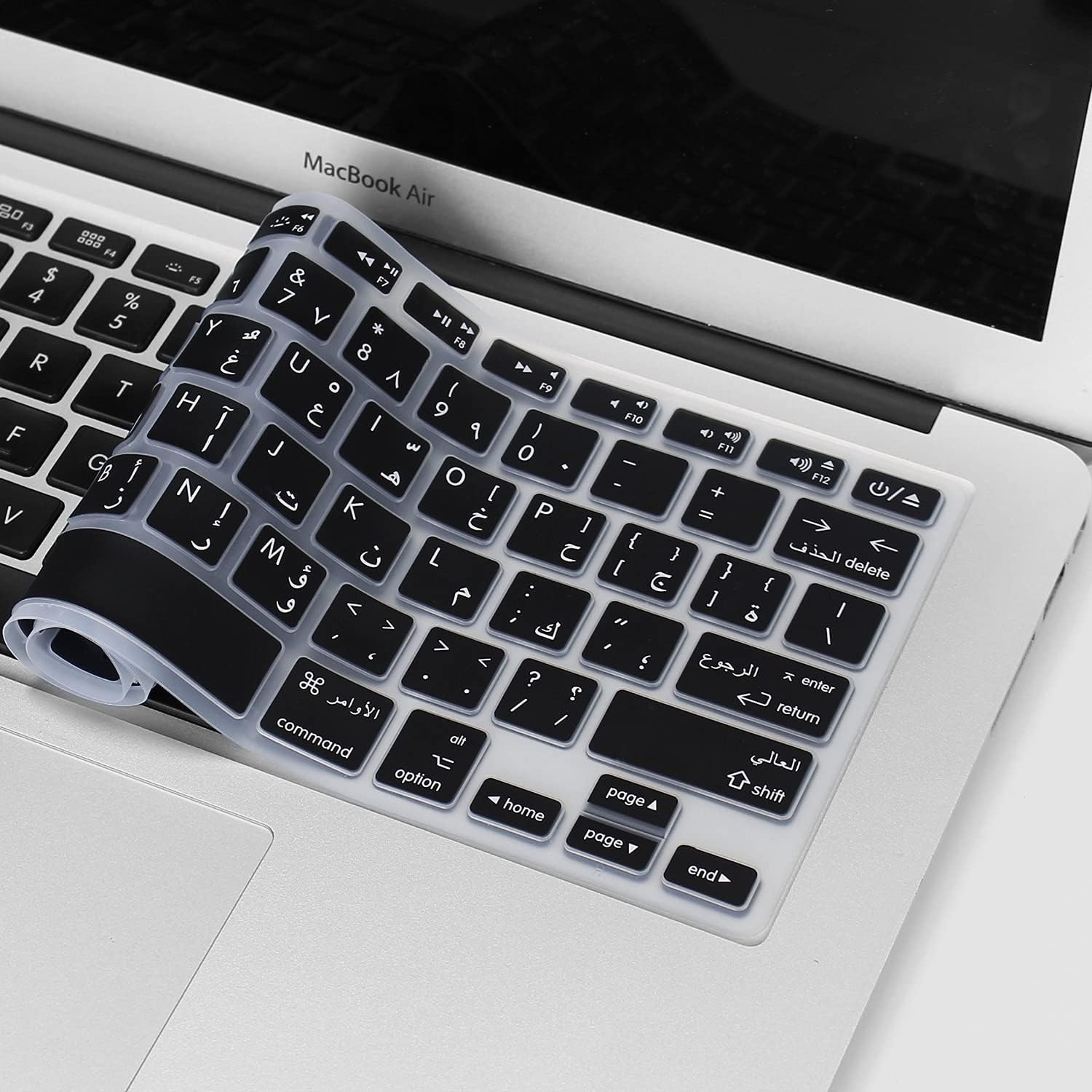
Premium bilingual keyboard replacement for MacBook Pro 13″ (A1278, 2009–2012) — choose US/Arabic or UK/Arabic layout. Features durable scissor-switch keys, OEM fit, and clear dual-language legends for seamless typing in English and Arabic. Compatible With: MacBook Pro 13-inch (Model A1278) from Late 2009, Mid 2010, Early 2011, and Mid 2012 (Model Identifiers: MacBookPro5,5, 6,2, 8,1) Layout Options (select at purchase): US/Arabic: Primary legends in Arabic, secondary (top-left) in US QWERTY — includes @, #, and standard US symbols. UK/Arabic: Primary legends in Arabic, secondary in UK QWERTY — includes £ symbol, taller Enter key, and UK-specific punctuation. Both versions feature full Arabic character set US/Arabic: Primary legends in Arabic, secondary (top-left) in US QWERTY — includes @, #, and standard US symbols. UK/Arabic: Primary legends in Arabic, secondary in UK QWERTY — includes £ symbol, taller Enter key, and UK-specific punctuation. Both versions feature full Arabic character set Keyboard Type: Traditional scissor-switch mechanism—reliable, tactile, and serviceable (pre-Butterfly design). Backlighting: Included on Early 2011 and Mid 2012 models only. Keycaps are translucent for even lighting. (Note: Late 2009 & Mid 2010 A1278 models did not support backlighting—keyboard will still function, but lighting requires compatible hardware.) Build & Fit: Precision-molded frame with correct screw mounts and alignment pegs—ensures flush, secure installation in the original top case with no rattling. Installation: Keyboard is screw-mounted (no adhesive)—one of the most DIY-friendly MacBook keyboards. Requires top case access and battery disconnect. Suitable for intermediate users or professionals.

Are you ready to take your gaming to the next level? Look no further than the Samsung Odyssey G5 27″ Curved Gaming Monitor. This cutting-edge monitor is designed to deliver an immersive gaming experience like no other. Featuring a stunning 27-inch curved display, the Samsung Odyssey G5 brings your games to life with vibrant colors and crystal-clear visuals. Whether you’re exploring virtual worlds or engaging in epic battles, every detail will be rendered with precision and clarity. With a lightning-fast 165Hz refresh rate, this monitor ensures buttery-smooth gameplay with no lag or stuttering. Say goodbye to screen tearing and motion blur, and hello to an ultra-responsive gaming experience. Equipped with AMD FreeSync technology, the Samsung Odyssey G5 syncs the monitor’s refresh rate with your graphics card, eliminating screen tearing and providing silky-smooth gameplay. Transitioning to its design, the Odyssey G5 features a sleek and stylish aesthetic that will complement any gaming setup. Its slim bezels and curved screen create an immersive viewing experience that pulls you into the action. Connectivity is key for gamers, and the Samsung Odyssey G5 doesn’t disappoint. With HDMI and DisplayPort inputs, you can easily connect your gaming PC, console, or other devices for maximum versatility. Furthermore, the Odyssey G5 comes with a range of gaming-centric features, including customizable gaming modes, black equalizer technology, and low input lag. Whether you’re playing fast-paced shooters or strategy games, you can tailor your gaming experience to suit your preferences. In summary, the Samsung Odyssey G5 27″ Curved Gaming Monitor is the ultimate choice for gamers who demand performance, immersion, and style. Upgrade your gaming setup today and experience gaming like never before. Specifications: Display : 27″ VA Curvature : 1000R Resolution : 2,560 x 1,440 Refresh Rate : 165Hz Response Rate : 1ms

Samsung Lebanon 32″ LS32C390EAMXUE The Samsung Lebanon 32″ Introducing the boldest curve ever This , born from years of and the future of monitor technology. Easy on the eyes In tol monitors that have less curve, 1000R fits the human field of view for less eye strain. A clinical study at Seoul National University Hospital shows that the closer to 1000R, the more it limits eye fatigue. Visionary Minimalism Next-generation design. The striking aesthetic is by a backside and premium-quality slim metal stand. The result is a monitor that won’t just catch eyes. but complements any interior, too. What Gamers Want Welcome to your new playground. AMD FreeSync delivers seamless gaming, while 75Hz makes scenes smooth. This flawless imagery comes together with Game Mode and the renowned 1000R curve for Focused Comfort Protect your eyes and do more. The T55’s advanced eye comfort technology reduces eye strain for more comfortable Flicker Free technology continuously removes tiring and irritating screen flicker, while Eye Saver Mode minimizes emitted blue light. Your eyes stay fresh longer. Ready to Entertain Connect to all your favorite devices with a convenient HDMI, DP, and D-Sub triple interface. The built-in 5 Watt speakers make it even easier lost in your favorite movies or TV shows, without plugging in a speaker. Easy on the eyes with 1000R curved screen Minimalist design with the borderless display, fabric-textured backside and slim metal stand Realistic immersion with the renowned 1000R curve and game-related features Running a monitor self-test is a simple and effective way to check the health and functionality of your computer monitor. The purpose of this test is to diagnose any potential issues with the monitor, such as dead pixels, color accuracy, contrast, or brightness problems. Power off both your computer and the monitor. 2Disconnect the signal cable from the back of the computer. 3Power on the monitor. Specifications: Specifications Screen Curvature1000R Active Display Size (HxV) (mm)698.4×392.85 Flat / CurvedCurved Screen Size (Class)32 3 year warranty Manufacturer Link
