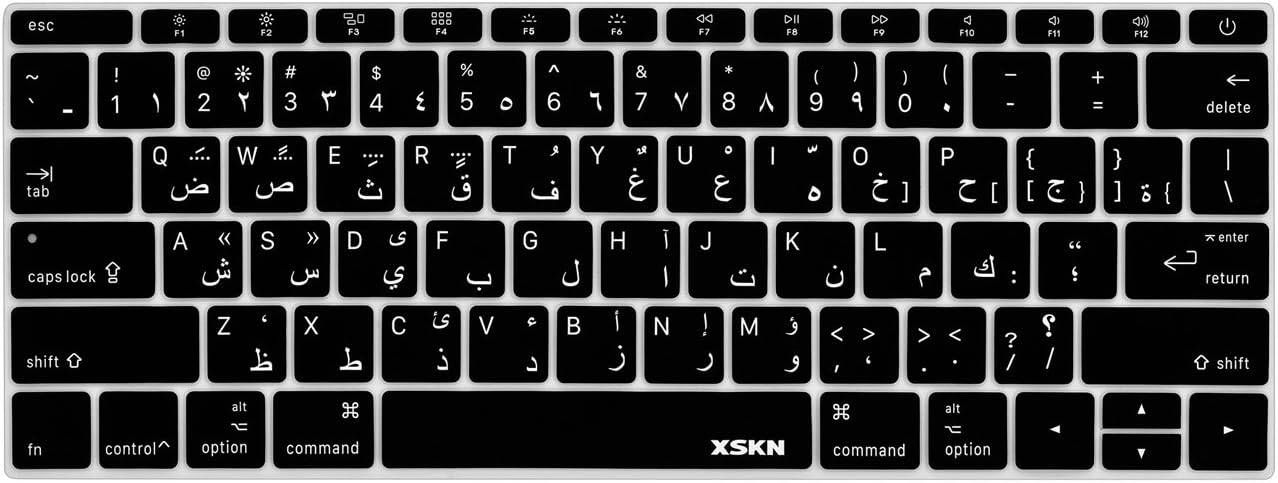

Genuine-spec UK layout (QWERTY) black keyboard replacement for MacBook Air 13.6″ and 15″ models (2023–2025, M2/M3/M4 chips)—featuring Apple’s Magic Keyboard design with scissor-switch mechanism, backlighting, and precise OEM fit. Compatible With: 13.6″ MacBook Air: A2681 (M2, 2022–2023), A3113 (M3, 2023–2024), A3240 (M4, 2024–2025) 15″ MacBook Air: A2941 (M2, 2023), A3114 (M3, 2023–2024), A3241 (M4, 2024–2025) 13.6″ MacBook Air: A2681 (M2, 2022–2023), A3113 (M3, 2023–2024), A3240 (M4, 2024–2025) 15″ MacBook Air: A2941 (M2, 2023), A3114 (M3, 2023–2024), A3241 (M4, 2024–2025) Keyboard Layout: UK English (QWERTY) with £ symbol, taller Enter key, and standard UK key labeling—matches Apple’s original regional configuration. Design: Apple’s Magic Keyboard with scissor-switch mechanism—offering quiet, responsive typing with 1mm travel and improved reliability. Features: Backlit keys, ambient light sensor support, and original-style flex cable connector for seamless integration with the logic board. Color: Matte black keycaps matching the Space Gray and Midnight MacBook Air finishes (also compatible with Silver/Starlight—keycaps are model-agnostic). Precision Engineering: Manufactured to exact OEM specifications for fit, alignment, and tactile performance—ensures flush mounting within the top case. Installation Note: Keyboard is glued into the top case and requires full disassembly and careful re-adhesion. Recommended for professional technicians only due to complexity and risk of damage.

Genuine-spec touchpad flex cable for MacBook Pro 13″ (Model A2251, 2020, Intel)—essential for restoring full Force Touch functionality, haptic feedback, and precise multi-touch gesture control during trackpad repair or replacement. Compatible With: MacBook Pro 13-inch (2020, Two Thunderbolt Ports, Model A2251, Model Identifier MacBookPro16,1) with Intel Core i5/i7 processors. Part Type: Touchpad flex cable only—does not include the trackpad housing, Taptic Engine, or mounting hardware. This is the OEM-style ribbon cable that connects the trackpad to the logic board. Function: Transmits: Precise touch coordinates Force Touch pressure data Haptic feedback signals to the Taptic Engine Enables full macOS gesture support including Force Click, three-finger lookup, swipe navigation, and inertial scrolling. Precise touch coordinates Force Touch pressure data Haptic feedback signals to the Taptic Engine Enables full macOS gesture support including Force Click, three-finger lookup, swipe navigation, and inertial scrolling. OEM-Quality Build: Matches Apple’s original specifications in: Cable length and routing Connector pitch and ZIF latch design EMI shielding and flex durability Cable length and routing Connector pitch and ZIF latch design EMI shielding and flex durability Common Use Cases: Replacing a torn, creased, or liquid-damaged original flex Completing a trackpad replacement when the original cable is compromised Fixing intermittent trackpad behavior, loss of Force Touch, or complete unresponsiveness Replacing a torn, creased, or liquid-damaged original flex Completing a trackpad replacement when the original cable is compromised Fixing intermittent trackpad behavior, loss of Force Touch, or complete unresponsiveness Installation Note: Requires full bottom case removal and partial disassembly (including battery disconnect). Cable routes under the right speaker and logic board—must be seated in original retention channels. Connects via ZIF (Zero Insertion Force) socket—align carefully and latch gently. Recommended for experienced or certified technicians only. Requires full bottom case removal and partial disassembly (including battery disconnect). Cable routes under the right speaker and logic board—must be seated in original retention channels. Connects via ZIF (Zero Insertion Force) socket—align carefully and latch gently. Recommended for experienced or certified technicians only.

Genuine-spec touchpad flex cable compatible with both MacBook Air A2179 (Intel, 2020) and A2337 (M1, 2020)—restores full Force Touch functionality, haptic feedback, and precise multi-touch gesture control during trackpad repair or replacement. Compatible With: MacBook Air 13″ (2020, Intel) – Model A2179 (Model Identifier: MacBookAir9,1) MacBook Air 13″ (2020, Apple M1) – Model A2337 (Model Identifier: MacBookAir10,1) MacBook Air 13″ (2020, Intel) – Model A2179 (Model Identifier: MacBookAir9,1) MacBook Air 13″ (2020, Apple M1) – Model A2337 (Model Identifier: MacBookAir10,1) ✅ Important Note: Despite different processors (Intel vs. M1), Apple used the same trackpad assembly and flex cable in both A2179 and A2337. This makes the flex cable fully interchangeable between the two models. Part Type: Touchpad flex cable only — does not include the trackpad housing, Taptic Engine, or mounting hardware. This is the OEM-style ribbon cable that connects the trackpad to the logic board. Function: Transmits: Touch input coordinates Force Touch pressure data Haptic feedback signals to the Taptic Engine Enables full macOS gesture support: Force Click, three-finger lookup, swipe navigation, pinch-to-zoom, and smooth cursor tracking. Touch input coordinates Force Touch pressure data Haptic feedback signals to the Taptic Engine Enables full macOS gesture support: Force Click, three-finger lookup, swipe navigation, pinch-to-zoom, and smooth cursor tracking. OEM-Quality Build: Matches Apple’s original specifications in: Cable length and routing path Connector pitch and ZIF latch design EMI shielding and flex durability Cable length and routing path Connector pitch and ZIF latch design EMI shielding and flex durability Common Use Cases: Replacing a torn, creased, or liquid-damaged original flex cable Completing a trackpad replacement when the original cable is compromised Fixing intermittent trackpad behavior, loss of Force Touch, or complete unresponsiveness Replacing a torn, creased, or liquid-damaged original flex cable Completing a trackpad replacement when the original cable is compromised Fixing intermittent trackpad behavior, loss of Force Touch, or complete unresponsiveness Installation Note: Requires full bottom case removal and battery disconnection. Cable routes under the right side of the battery and logic board. Connects via a ZIF (Zero Insertion Force) socket—align carefully and latch gently. Recommended for experienced or certified technicians only. Requires full bottom case removal and battery disconnection. Cable routes under the right side of the battery and logic board. Connects via a ZIF (Zero Insertion Force) socket—align carefully and latch gently. Recommended for experienced or certified technicians only.

The ViewSonic VG1655 16″ Portable Monitor is a game-changer for those who need a secondary screen on the go. Whether you’re a digital nomad, a student, or a professional, this portable monitor enhances your productivity and entertainment experience. Firstly this 16″ portable monitor features a Full HD 1080p resolution, delivering sharp and vibrant visuals. From editing documents to watching videos, every detail is clear and crisp on the ViewSonic VG1655. Furthermore designed for portability, the ViewSonic VG1655 is lightweight and slim. It easily fits into your bag, making it an ideal travel companion. Set up is a breeze with the built-in kickstand, allowing you to adjust the screen to your preferred angle. The ViewSonic VG1655 offers versatile connectivity options. With USB-C and Mini HDMI ports, you can connect your laptop, smartphone, or gaming console. This ensures compatibility with a wide range of devices, making it a versatile addition to your tech arsenal. For those who work on the go, the ViewSonic VG1655 features a blue light filter and flicker-free technology. These features help reduce eye strain, allowing you to work comfortably for longer periods. In addition to its impressive display and portability, the ViewSonic VG1655 also boasts robust build quality. The durable design ensures that this portable monitor can withstand the rigors of travel and daily use. In conclusion, the ViewSonic VG1655 16″ Portable Monitor combines portability, high-quality visuals, and versatile connectivity for an unmatched on-the-go experience. Upgrade to the ViewSonic VG1655 today and take your productivity and entertainment to the next level. Specifications: Display : 16″ IPS Resolution : FHS 1920×1080 Refresh Rate : 60Hz Response Rate : 6.5ms Interface : USB-C

HP P24v G5 Monitor Overview The HP P24v G5 is a 24-inch Full HD monitor designed for everyday work. It delivers clear visuals and reliable performance. As a result, it suits offices, home setups, and study spaces. 24-Inch Full HD Display This monitor features a 24-inch Full HD resolution. Therefore, text appears sharp and easy to read. Moreover, images look clear and well defined. Because of this, it supports long working sessions comfortably. In addition, the screen size fits most desks well. As a result, it balances clarity and space efficiency. Smooth Visual Performance The HP P24v G5 provides smooth visuals for daily tasks. As a result, scrolling and browsing feel natural. Furthermore, the display maintains consistent brightness. This improves overall viewing comfort. Eye Comfort and Anti-Glare Screen This monitor includes eye comfort features. Therefore, it helps reduce eye strain. In addition, the anti-glare coating limits reflections. As a result, the screen stays clear in bright environments. Connectivity and Compatibility The HP P24v G5 includes HDMI and VGA ports. As a result, it connects easily to new and older devices. Moreover, setup remains quick and simple. Therefore, users can start working immediately. Design and Mounting Options The monitor features a clean and professional design. In addition, it supports VESA mounting. As a result, users can create a flexible workspace. Ideal for Office and Home Use This monitor focuses on reliability and efficiency. Moreover, it suits office work, browsing, and media viewing. In conclusion, the HP P24v G5 is a practical Full HD monitor for daily use. Specifications: Display Quality: 23.8-inch IPS panel with 1920 x 1080 resolution at 100 Hz, offering 99% sRGB color for accurate visuals. Performance: 100Hz refresh rate and 5ms GtG response time with overdrive minimize screen tearing and ghosting. Connectivity: Equipped with HDMI 1.4 and VGA ports for versatile connectivity.

The MSI Pro MP241X 24″ monitor delivers clear visuals and reliable performance for work and home use. It is built for everyday tasks, browsing, and media viewing. First, this monitor features a 24-inch Full HD display with vibrant colors and sharp details. As a result, your screen content looks crisp and easy to read. In addition, the MSI Pro MP241X 24″ offers a wide viewing angle for shared viewing. Therefore, multiple people can see clear images from different positions. The sleek and slim design makes this monitor look modern on any desk. Also, it takes up minimal space. Moreover, this monitor supports anti-flicker and reduced blue light technology. So, your eyes feel more comfortable during long sessions. Because it uses HDMI and VGA inputs, it connects easily to many devices. Thus, setup stays simple with laptops and desktops. The MSI Pro MP241X 24″ provides consistent performance for work apps and video watching. This makes everyday computing smooth and enjoyable. Furthermore, the stand offers tilt adjustment for better viewing angles. So, you can find the most comfortable position for your eyes. Compared to lower-resolution screens, this Full HD panel shows clearer details. Therefore, text and graphics look sharper and more accurate. It works well for office tasks, video streaming, and school work. Thus, it fits many daily needs. Installation is fast and beginner-friendly with plug-and-play support. As a result, you can start using it right away. The MSI Pro MP241X 24″ also supports stable refresh performance for smoother visuals. This improves motion during videos and general use. Also, the slim bezels help reduce distraction and provide a clean look. Therefore, your workspace stays neat and focused. In conclusion, this monitor offers clear visuals, comfort features, and easy connectivity. Overall, it is a strong choice for work, school, or entertainment. If you want a reliable and sharp 24″ screen, this model is worth choosing. Specifications: Display: 24-inch VA panel, Full HD (1920×1080), 16:9 aspect ratio. Performance: 75Hz refresh rate, 4ms (GTG) response time, 1000:1/3000:1 contrast Connectivity: HDMI™ 1.4b & D-Sub (VGA) ports for versatile device connection

Acer V227Q BIV Monitor Aspect Ratio 16:9 MasterFormat® Number 11 28 00 Model Number *227Q Power Supply No Screen Size (in.) 21.5 3 Years Warranty

Apple Magic Mouse: Wireless, Bluetooth, Rechargeable. Works with Mac or iPad; Multi-Touch Surface - White (Pre-Owned) Apple Magic Mouse: Wireless, Bluetooth, Rechargeable. Works with Mac or iPad; Multi-Touch Surface – White (Pre-Owned) About this item WIRELESS, RECHARGEABLE CONVENIENCE — Magic Mouse connects wirelessly to your device via Bluetooth. And the rechargeable internal battery means no loose batteries to replace. WORKS WITH MAC OR IPAD — It’s ready to go right out of the box and pairs quickly with your Mac or iPad so you can get to work right away. SWIPE AND SCROLL ON THE MULTI-TOUCH SURFACE — The Multi-Touch surface allows you to perform simple gestures such as swiping and scrolling. And an optimized foot design lets Magic Mouse glide smoothly across your desk. GO WEEKS WITHOUT CHARGING — The incredibly long-lasting internal battery will power your Magic Mouse for about a month or more between charges. Comes with a woven USB-C to Lightning Cable that lets you pair and charge by connecting to a USB-C port on your Mac or iPad. SYSTEM REQUIREMENTS — Requires a Bluetooth-enabled Mac with OS X 10.11 or later or an iPad with iPadOS 13.4 or later.

Fast-charging feature available on select iPhone and iPad models.

The Samsung 27″ Odyssey G3 G30D FHD 180Hz Gaming Monitor LS27DG302 delivers smooth and responsive visuals with a Full HD (1920 × 1080) resolution and a 180 Hz refresh rate, which enhances motion clarity in fast‑paced games and videos. Additionally, it features a 1 ms (MPRT) response time for minimal motion blur, helping reduce ghosting during competitive play. The ergonomic stand allows tilt, swivel, pivot, and height adjustments for flexible viewing positions. Moreover, the monitor supports AMD FreeSync technology that helps reduce screen tearing and stuttering by synchronizing the display refresh rate with compatible GPUs. Therefore, gaming scenes and action appear more fluid. It also includes features such as Black Equalizer for improved visibility in dark areas and Virtual Aim Point for on‑screen crosshair alignment. Furthermore, the Odyssey G3 has a 3‑sided borderless design that maximizes the viewing area and supports easy multi‑monitor setups. Eye Saver Mode and Flicker Free technology help reduce eye fatigue during long sessions. The monitor connects via HDMI 2.0 and DisplayPort 1.4 for flexible device compatibility. Specifications: 27″ Full HD (1920 × 1080) resolution for clear, detailed visuals 180 Hz refresh rate with 1 ms (MPRT) response for smoother motion and minimal blur AMD FreeSync technology reduces tearing and stuttering for fluid gameplay Ergonomic stand with tilt, swivel, pivot, and height adjustments for flexible viewing 3‑sided borderless design with Eye Saver Mode and Flicker Free technology

AOC Q27P3CW 27″ QHD monitor with webcam delivers a professional workspace solution with sharp visuals, built-in communication tools, and modern connectivity. It is designed for productivity, remote work, and multitasking environments. Additionally, it features a 27-inch QHD IPS display. This display provides 2560 × 1440 resolution, so it delivers clear detail and accurate colors for work and media. Moreover, it includes a 100Hz refresh rate and 4ms response time. As a result, it ensures smooth visuals and responsive performance during daily tasks. The monitor integrates a 5MP webcam with Windows Hello support. Therefore, it enables secure login and high-quality video calls without extra accessories. In addition, it offers USB-C connectivity with power delivery up to 90W. This allows a single cable to handle display, data, and charging for compatible laptops. Furthermore, it includes built-in dual 5W speakers, USB hub, RJ-45 Ethernet, and multiple display outputs. These features improve workspace efficiency and reduce cable clutter. AOC Q27P3CW 27″ QHD monitor with webcam provides a complete all-in-one display solution for professionals who need clarity, connectivity, and integrated communication tools. Specifications: 27-inch QHD IPS display with 2560 × 1440 resolution 5MP webcam with Windows Hello and built-in microphone USB-C with up to 90W power delivery and data transfer 100Hz refresh rate with 4ms response time Built-in dual 5W speakers, USB hub, and RJ-45 connectivity

The MSI MAG 274QRF QD E2 Gaming Monitor is designed to take your gaming to the next level. With its 27-inch QHD display, you’ll enjoy crystal-clear visuals and vibrant colors that bring your games to life. This monitor features Quantum Dot technology, which enhances color accuracy and brightness. The MSI MAG 274QRF QD E2 delivers a rich and immersive visual experience. Thanks to its 165Hz refresh rate and 1ms response time, the MSI MAG Gaming Monitor ensures smooth and lag-free gameplay. You’ll experience every movement with precision, giving you a competitive edge in any game. The monitor supports NVIDIA G-SYNC technology, which synchronizes the monitor’s refresh rate with your graphics card. This eliminates screen tearing and stuttering, providing a seamless and fluid gaming experience. Designed for comfort during long gaming sessions, the MSI MAG 274QRF QD E2 features an ergonomic stand with adjustable height, tilt, and swivel. You can easily customize the monitor’s position to suit your preferred viewing angle. Connectivity is made easy with multiple ports, including DisplayPort, HDMI, and USB. This ensures compatibility with a wide range of gaming systems and peripherals, so you can set up your gaming station just the way you like it. In conclusion, the MSI MAG 274QRF QD E2 Gaming Monitor combines stunning visuals, fast performance, and ergonomic design for an unparalleled gaming experience. Upgrade to this monitor and immerse yourself in the world of gaming like never before. Specifications: Display : 27″ Rapid IPS Screen : 2560 x 1440 (WQHD) Refresh Rate : 180Hz Response Time : 1ms

The Samsung 85″ The Frame QLED 4K Smart TV QA85LS03FAUXTW uses an 85-inch 4K UHD LCD panel with 3840 × 2160 resolution. It is designed for both standard TV viewing and wall-mounted display use. The display uses a QLED layer with Quantum Dot technology to improve color reproduction. As a result, it produces wider color output and more consistent brightness across different content types. In addition, it supports 4K upscaling for lower-resolution video. The TV supports HDR formats for compatible content. This increases contrast between bright and dark areas and improves detail visibility. Also, motion processing reduces blur during fast-moving scenes such as sports and action content. Samsung runs this model on Tizen OS. Therefore, users access streaming apps, SmartThings integration, and smart features through a unified interface. It also supports Wi-Fi and Bluetooth for wireless device connections. Connectivity includes HDMI ports, USB ports, Ethernet LAN, and optical audio output. It supports external devices such as gaming consoles and sound systems. This model uses The Frame design concept, which allows the TV to function as both a display and a digital art screen when not in use. Specifications: 85-inch 4K UHD LCD panel (3840 × 2160 resolution) Quantum Dot (QLED layer) color enhancement 4K upscaling for lower-resolution content HDR support for compatible content Tizen OS with HDMI, USB, Wi-Fi, Bluetooth, Ethernet connectivity

The ViewSonic VX24G10 24″ FHD 240Hz Gaming Monitor delivers ultra-smooth visuals ideal for gaming and daily use. It displays Full HD resolution with bright colors and crisp detail. The screen uses an IPS panel for wide viewing angles and accurate color. This makes movies, work, and games look clear and vivid. Moreover, the VX24G10 offers a blazing 240 Hz refresh rate. It reduces motion blur and makes fast movements appear fluid. This is especially helpful in competitive games or fast action scenes. The 1 ms response time ensures quick pixel transitions for sharp results. It helps avoid ghosting and lag during gameplay. In addition, the monitor includes modern connectivity options: multiple HDMI ports and DisplayPort. These ports let you connect PCs, laptops, and consoles easily. This flexibility supports many devices without trouble. The monitor also supports adaptive sync (FreeSync / G-Sync), which reduces screen tearing and ensures smooth frame rates. Furthermore, the ViewSonic VX24G10 features eye-friendly technology. Its flicker-free panel and blue-light filter help reduce eye strain during long sessions. The slim bezel design gives a modern look and saves desk space. The stand allows slight tilt adjustment for comfortable viewing angles. Also, the monitor supports HDR10, enhancing contrast and improving dynamic range for richer images. This adds depth to games, movies, and creative work. The combination of IPS quality, fast refresh, and HDR makes the VX24G10 a versatile choice for both gaming and productivity. Overall, the ViewSonic VX24G10 24″ FHD 240Hz Gaming Monitor offers smooth motion, sharp visuals, strong compatibility, and eye care. It is perfect for gamers, creators, and anyone who values performance and comfort. It enhances every task — from gaming to work to watching media. Specifications: Display : 24″ IPS Resolution : 1920×1080 Refresh Rate : 240Hz Response Time : 1ms

This is a logic board (motherboard) for the MacBook Pro 15" model A1398 (year 2015) with an Intel Core i7 processor and 16 GB of RAM. It’s the central brain of the laptop—everything else plugs into it. If your MacBook won’t turn on, has hardware faults, or logic-board damage, replacing this can restore full functionality (just make sure you choose the right version). This is a logic board (motherboard) for the MacBook Pro 15″ model A1398 (year 2015) with an Intel Core i7 processor and 16 GB of RAM. It’s the central brain of the laptop—everything else plugs into it. If your MacBook won’t turn on, has hardware faults, or logic-board damage, replacing this can restore full functionality (just make sure you choose the right version). This logic board is a high-quality replacement for the 2015 MacBook Pro 15″ Retina (model A1398). It features: Processor: Intel Core i7 (various speed variants) Memory: 16 GB soldered RAM (non-upgradeable) Graphics: Depending on version, either integrated Intel Iris Pro or dual graphics (Intel + AMD Radeon R9 M370X) Chipset & Board Info: Part numbers like 820-00138-A, 820-00163-A are common for these boards Compatibility / Model IDs: Works with MacBookPro11,4 / MacBookPro11,5 (EMC numbers 2909 / 2910) for 2015 A1398 models Ports & I/O Integrated: USB 3.0, HDMI, Thunderbolt 2, SD card slot, audio jack, etc. (same as original MacBook Pro 2015) Storage Interface: PCIe SSD slot (Apple’s proprietary SSD interface) Power & Connectors: Logic board includes connections for battery, fans, display, keyboard, trackpad, I/O board flex cables, etc. Condition / Variants: These boards are often “used / tested” when sold as replacements. Always check that all ports and soldered chips are intact. Risks & Notes: You must match the correct board variant (integrated vs dual GPU) or you can face compatibility issues or missing graphics functions.

WiWU Waterproof Large Capacity Minimalist Backpack Business Laptop Backpack Bags with Multi-Pockets For digital gadgets Minimalist Style Water-resistant material,Polyester Large Capacity Have Stock Size:15.6 inch

Laptop Battery for Acer E5-573 Battery for Acer AL15A32, Acer Aspire E5-422, Aspire E5-522, Aspire V3-574 Laptops. About this item Compatible For Preferred Model : Acer Aspire V3-574G E5-473G E5-573G E5-553G E5-522 Warranty Not Covered if Defects due to External Causes, Accidental, Physical or Liquid Damage, Cut, Burnt, Misuse and Missing Warranty Stickers or Labels. Battery Capacity/Power Capability (mAh/Wattage) be different From The Reference Picture But the Backup of the Battery Will Be the Same As the Original Please Match Your Product With The Image Provided Before Placing The Order

The MSI MAG 27CQ6PF 27″ 2K 180Hz Curved Gaming Monitor delivers smooth visuals and immersive gaming experiences. It is designed for competitive and casual gamers. This monitor combines high performance with stunning image quality. It features a 27-inch curved display for immersive viewing. The 1500R curvature brings you closer to the action. This provides a more natural and engaging experience. The MSI MAG 27CQ6PF offers 2K resolution for sharp details. You can enjoy crisp images in games and media. This improves clarity compared to standard Full HD monitors. With a 180Hz refresh rate, it ensures ultra-smooth gameplay. Fast action scenes feel fluid and responsive. This gives gamers a competitive edge in every match. The monitor also features a fast response time. It reduces motion blur and ghosting in fast-paced games. This provides clear visuals for intense gaming sessions. Adaptive sync technology ensures tear-free and stutter-free performance. It keeps gameplay smooth even during demanding scenes. This enhances your overall gaming experience. The MSI MAG 27CQ6PF includes multiple connectivity options. You can connect gaming consoles, PCs, and other devices. This makes it versatile for entertainment and work. Its sleek design with thin bezels adds style. It fits perfectly in gaming setups or workstations. The adjustable stand improves comfort during long sessions. In summary, the MSI MAG 27CQ6PF 27″ 2K 180Hz Curved Gaming Monitor combines speed, clarity, and immersion. It is perfect for gamers who demand performance. Specifications: Display : 27″ Rapid VA Screen : 2560 x 1440 (WQHD) Refresh Rate : 180Hz Response Rate : 0.5ms Curvature : 1500R

Genuine-spec US layout keyboard replacement for MacBook Pro 15″ (2018–2019, Models A1989/A1990)—designed for reliable typing, full compatibility, and seamless integration with original top case assemblies. Compatible With: MacBook Pro 15-inch (2018 A1989 and 2019 A1990 models) with Touch Bar. Layout: Standard US English (QWERTY) with full-size keys, including inverted-T arrow keys and dedicated function row. Integrated Features: Includes built-in backlighting, scissor-switch mechanism (3rd-gen Butterfly or revised Butterfly mechanism, depending on original model year), and ribbon cable connector matching Apple’s OEM design. Functionality: Supports all native keyboard features, including brightness, volume, media controls, and Touch ID power button (note: Touch ID sensor is not included—this is the keyboard only). Build Quality: Precision-engineered to match Apple’s original fit, feel, and durability—ideal for professional repairs or top case refurbishment. Installation Note: Requires full top case disassembly. Keyboard is adhered to the top case and must be carefully removed and replaced using proper tools and techniques. Recommended for experienced technicians. Model Verification: Ensure your MacBook is A1989 (2018) or A1990 (2019) before purchase—keycaps and connectors differ from other MacBook generations.

Genuine-spec touchpad flex cable for Apple’s 12-inch MacBook (Model A1534, Early 2015 / Early 2016 / Mid 2017)—essential for restoring full Force Touch trackpad functionality, haptic feedback, and multi-touch gesture support. Compatible With: MacBook 12″ (Early 2015) – 1.1GHz Core M MacBook 12″ (Early 2016) – 1.1GHz/1.3GHz Core M MacBook 12″ (Mid 2017) – 1.2GHz/1.3GHz Core m3/i5/i7 All share Model Number A1534 and Model Identifier MacBook8,1 / MacBook9,1 / MacBook10,1 respectively. MacBook 12″ (Early 2015) – 1.1GHz Core M MacBook 12″ (Early 2016) – 1.1GHz/1.3GHz Core M MacBook 12″ (Mid 2017) – 1.2GHz/1.3GHz Core m3/i5/i7 All share Model Number A1534 and Model Identifier MacBook8,1 / MacBook9,1 / MacBook10,1 respectively. Part Type: Touchpad flex cable only—does not include the trackpad housing, Taptic Engine, or mounting brackets. This is the ribbon cable that connects the Force Touch trackpad to the logic board. Function: Critical for Force Touch functionality—transmits pressure-sensitive input, multi-touch gestures (e.g., pinch, swipe, Force Click), and haptic feedback signals to the Taptic Engine. OEM-Quality Construction: Precisely matches Apple’s original in length, connector pitch, shielding, and routing—ensures reliable signal integrity and compatibility with macOS. Common Use Cases: Replacing a torn, creased, or liquid-damaged flex cable Restoring unresponsive or erratic trackpad behavior Completing a trackpad replacement when the original cable is unusable Replacing a torn, creased, or liquid-damaged flex cable Restoring unresponsive or erratic trackpad behavior Completing a trackpad replacement when the original cable is unusable Installation Note: Requires full bottom case removal and delicate disconnection of the ZIF connector. The cable routes tightly under the battery—extreme care is required. Recommended for experienced or certified technicians only.
