
A well-equipped pre-owned Dell Latitude 5410 with 14" display, 10th Gen Core i5, 16GB RAM, and 512GB SSD—delivering strong performance, security, and portability for business and professional use.

Feature Specification Packaging and Delivery Details Power Source Battery Selling Units Single item Number of Loudspeaker Enclosure 1 Single package size 19X22X10 cm Cabinet Material Plastic Single gross weight 0.600 kg Display Screen NO Built-in Microphone NO Brand Name Remax Model Number RB-X1 Remax Worldwide Store 9300+ Remax Support Video to see the product and testing Product Name Outdoor Wireless Speaker Color Black Logo Accept Customized Logo Intelligent Personal Assistant None

COMPACT AND WIRELESS Enjoy the freedom of wireless with this versatile combo. The compact keyboard is equipped with a number pad ideal for data entry, calculations and navigation, so you can get more work done in less space. The ambidextrous mouse delivers smooth tracking and scrolling, for easy navigation -at home or at work. COMPACT AND WIRELESS Enjoy the freedom of wireless with this versatile combo. The compact keyboard is equipped with a number pad ideal for data entry, calculations and navigation, so you can get more work done in less space. The ambidextrous mouse delivers smooth tracking and scrolling, for easy navigation -at home or at work. Height: 112 mm Width: 381 mm Depth: 17.78 mm Weight: 320 g Height: 107 mm Width: 60 mm Depth: 40 mm Weight: 112 g 10-Key Number pad Music Controls Up to 5 million keystrokes (excludes number lock key) Key type: Deep-profile Spill-resistant 2Tested under limited conditions (maximum of 60 ml liquid spillage). Do not immerse the keyboard in liquid. 2 AAA batteries (Alkaline Batteries) Sensor Technology: Smooth Optical Tracking Number of Buttons: 3 (Left/Right-click, Middle click) Scrolling: line-by-line Scroll Wheel: Yes, optical 2 AA batteries (Alkaline batteries) Windows® 10,11 or later ChromeOS An available USB ports

Genuine-spec US layout keyboard replacement for MacBook Pro (Model A1398, Late 2011–Mid 2012)—featuring durable scissor-switch keys, backlighting, and OEM-fit design for reliable typing and straightforward installation. Compatible With: MacBook Pro 13″: Late 2011 (Model A1278, but labeled A1398 in some regions) – Model Identifier MacBookPro8,1 MacBook Pro 15″: Early 2011, Late 2011, and Mid 2012 – Model Identifiers MacBookPro8,2 (15″ early/late 2011) and MacBookPro9,1 (15″ mid 2012) *(Note: “A1398” is primarily associated with the 15″ unibody MacBook Pro with Retina display (Mid 2012), which was the first Retina MacBook Pro.)* This keyboard fits the non-Retina 15″ A1398 (Mid 2012) and compatible Late 2011 models. MacBook Pro 13″: Late 2011 (Model A1278, but labeled A1398 in some regions) – Model Identifier MacBookPro8,1 MacBook Pro 15″: Early 2011, Late 2011, and Mid 2012 – Model Identifiers MacBookPro8,2 (15″ early/late 2011) and MacBookPro9,1 (15″ mid 2012) *(Note: “A1398” is primarily associated with the 15″ unibody MacBook Pro with Retina display (Mid 2012), which was the first Retina MacBook Pro.)* This keyboard fits the non-Retina 15″ A1398 (Mid 2012) and compatible Late 2011 models. Layout: Standard US English (QWERTY) with full-size keys, inverted-T arrow keys, and dedicated function row (F1–F12). Keyboard Type: Traditional scissor-switch mechanism—robust, tactile, and serviceable (pre-Butterfly era). Integrated Features: Backlit keys (adjustable brightness via F5/F6) OEM ribbon cable with ZIF connector Matches original key spacing and actuation force Backlit keys (adjustable brightness via F5/F6) OEM ribbon cable with ZIF connector Matches original key spacing and actuation force Build & Fit: Precision-molded plastic frame with exact screw mounts and alignment pegs—ensures secure, rattle-free installation in the top case. Installation Note: Keyboard is secured with screws and minimal adhesive. Requires full top case access and battery disconnect. Recommended for intermediate to advanced users or technicians.

NETIS ST-3108 8-Port Fast Ethernet Switch Network Desktop Hub Retail Eight (8) 10/100Mbps RJ45 ports, Auto-Negotiation & Auto MDI/ MDIX IEEE 802.3x flow control for Full Duplex mode and back pressure for Half Duplex mode 1.6Gbps switching fabric capacity/backplane bandwidth Green Ethernet technology for effective power saving LED indicators for simple diagnostics and management Plug and play, no configuration required Compact plastic case, desktop design for home and office use Interface: 8* 10/100M TX ports LED: PWR, 1-8 Cabling Type 10Base-T:UTP Cat.3 or up, 100Base-TX:UTP Cat.5 or up Standard: IEEE 802.3 10Base-T, IEEE 802.3u 100Base-TX,IEEE802.3ab 1000Base-T Access Method: CSMA/CD Transmission Method: Store and Forward Data Transmission Rate: 10/100Mbps(Half-duplex), 20/200Mbps(Full-duplex) MAC Address Table: 1K Operating Temperature: 0-40C Storage Temperature: -40, 70C Operating Humidity: 10%-90%RH non-condensing Storage Humidity: 5%-90%RH non-condensing Input: 100-240V 0.2A 50/60HZ Output:DC 9V/500mA

The Meetion Mini 4000 Black is a compact wireless keyboard and mouse combo designed for clean and convenient everyday use. With a mini-space-saving layout and stable wireless connection, it’s perfect for office work, home setups, and laptop users who want a neat, clutter-free desk. The Meetion Mini 4000 is a stylish and practical wireless keyboard and mouse set made for users who prefer a compact and modern workspace. Its mini keyboard design saves desk space while still offering comfortable typing for daily tasks. The wireless mouse provides smooth control and easy navigation, making this combo ideal for offices, students, and home users. With plug-and-play wireless connectivity, setup is simple—just connect the receiver and start using it instantly. Wireless Keyboard & Mouse Combo for a clean and clutter-free setup Compact Mini Keyboard Design saves space and fits small desks easily Stable Wireless Connection for smooth performance Plug & Play Receiver – quick setup without drivers Smooth Wireless Mouse for accurate control Comfortable Typing Layout for everyday productivity Modern Black Finish suitable for any workspace Ideal for Laptops & Desktops Perfect for office workers, students, and home users needing a compact wireless combo for laptops or desktops. Works with most devices that support USB.
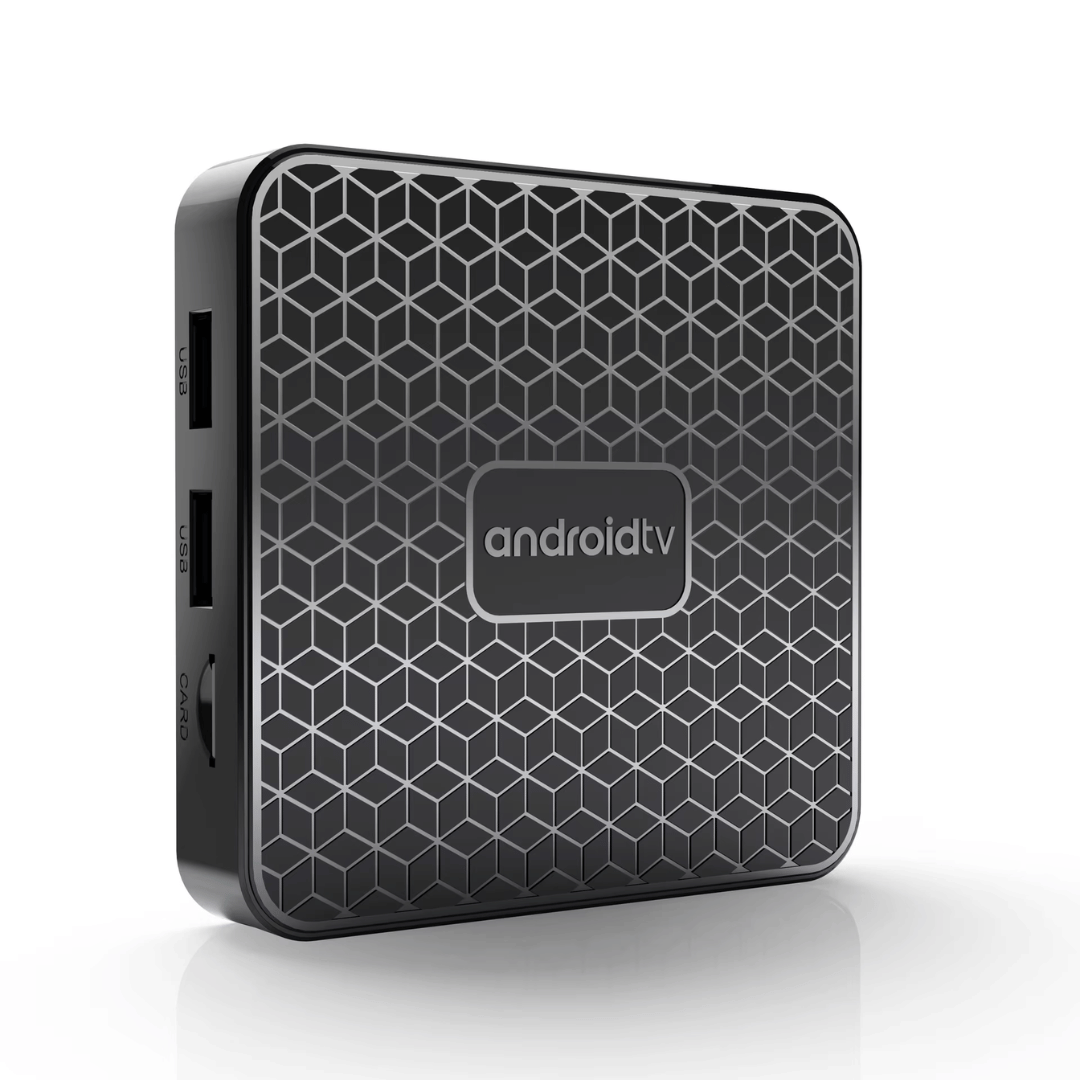
The Mortal T1 Mini is an ultra-compact, budget-friendly Android TV box designed to turn any standard HDMI television into a smart entertainment platform. It features 4K hardware decoding, dual-band Wi-Fi, and a voice-controlled remote, providing a smooth and responsive experience for local IPTV, YouTube, and mainstream streaming applications. ✅ Full Specifications: Model: Mortal T1 Mini 4K Smart Media Player Interface / Connection: Wi-Fi: Dual-Band (2.4GHz / 5GHz) 802.11n Bluetooth: BT 5.0 (Supports wireless remotes, headphones, and controllers) Wired Network: 1 x 10/100Mbps Ethernet LAN Port (Note: Available on standard mini casing configurations) Input/Output Ports: 1 x HDMI Out, USB Ports, 1 x TF/microSD Card Slot, 1 x DC 5V Power Interface / Connection: Wi-Fi: Dual-Band (2.4GHz / 5GHz) 802.11n Bluetooth: BT 5.0 (Supports wireless remotes, headphones, and controllers) Wired Network: 1 x 10/100Mbps Ethernet LAN Port (Note: Available on standard mini casing configurations) Input/Output Ports: 1 x HDMI Out, USB Ports, 1 x TF/microSD Card Slot, 1 x DC 5V Power Performance / Hardware: CPU: Allwinner H313 Quad-Core ARM Cortex-A53 (up to 1.5GHz) (Also distributed in select regional batches with Rockchip quad-core architectures) GPU: Mali-G31 MP2 / Mali-450MP Graphics Engine Resolution Output: Native HDMI 2.0 supporting up to 4K @ 60Hz Video Decode Formats: 4K Ultra HD hardware acceleration decoding including H.265 HEVC, H.264, VP9, and 3D video support High Dynamic Range (HDR): Supports HDR10+, HDR10, and HLG profiles Performance / Hardware: CPU: Allwinner H313 Quad-Core ARM Cortex-A53 (up to 1.5GHz) (Also distributed in select regional batches with Rockchip quad-core architectures) GPU: Mali-G31 MP2 / Mali-450MP Graphics Engine Resolution Output: Native HDMI 2.0 supporting up to 4K @ 60Hz Video Decode Formats: 4K Ultra HD hardware acceleration decoding including H.265 HEVC, H.264, VP9, and 3D video support High Dynamic Range (HDR): Supports HDR10+, HDR10, and HLG profiles Capacity / Memory Options: 2GB RAM + 16GB eMMC Internal Flash Storage (Storage expandable up to 256GB via TF card slot or external USB drive) Material & Build: Durable, matte plastic compact shell engineered with passive thermal management to maintain low operational temperatures Design & Form Factor: Pocket-sized, ultra-light mini layout designed to easily fit behind wall-mounted or desktop televisions Security & Software: Operating System variants run customized, stable Android TV distributions (Android 13 / Android 14) optimized for app longevity, security patch support, and easy layout control Voice Assistant: Includes an ergonomic voice remote control featuring an integrated microphone button for hands-free Google Assistant commands and quick navigation Compatibility: Fully compatible with major applications like YouTube, Netflix, Disney+, Prime Video, various IPTV clients, and Screen Mirroring Cast protocols Dimensions: Approx. 77 x 77 x 12 mm (May vary slightly up to 88 x 88 x 18 mm depending on exact regional shell style) Weight: Approx. 0.25 to 0.35 kg

Designed by Apple Deeper, richer bass tones Greater protection from sweat and water Control music and video playback Answer and end calls Works with all devices that have a Lightning connector and support iOS 10 or later, including iPod touch, iPad, and iPhone

Apple USB-C to Lightning Cable (1m) - With Apple Warranty Apple USB-C to Lightning Cable (1m) – With Apple Warranty Connect your iPhone, iPad or iPod with Lightning connector to your USB-C– or Thunderbolt 3 (USB-C)–enabled Mac for syncing and charging, or to your USB-C–enabled iPad for charging. You can also use this cable with your Apple 18W, 20W, 29W, 30W, 61W, 87W or 96W USB‑C Power Adapter to charge your iOS device and even take advantage of the fast-charging feature on selected iPhone and iPad models.

Genuine-spec touchpad flex cable for MacBook Pro 15″ (Model A1707, 2016–2017)—restores full Force Touch functionality, haptic feedback, and precise multi-touch gesture control during trackpad repair or replacement. Compatible With: MacBook Pro 15″ (2016) – Model A1707 (Model Identifier: MacBookPro13,2) MacBook Pro 15″ (2017) – Model A1707 (Model Identifier: MacBookPro14,2) MacBook Pro 15″ (2016) – Model A1707 (Model Identifier: MacBookPro13,2) MacBook Pro 15″ (2017) – Model A1707 (Model Identifier: MacBookPro14,2) Part Type: Touchpad flex cable only — does not include the trackpad housing, Taptic Engine, or mounting hardware. This is the OEM-style ribbon cable that connects the trackpad to the logic board. Function: Transmits: Touch input coordinates Force Touch pressure data Haptic feedback signals to the Taptic Engine Enables full macOS gesture support: Force Click, three-finger lookup, swipe navigation, pinch-to-zoom, and smooth cursor tracking. Touch input coordinates Force Touch pressure data Haptic feedback signals to the Taptic Engine Enables full macOS gesture support: Force Click, three-finger lookup, swipe navigation, pinch-to-zoom, and smooth cursor tracking. OEM-Quality Build: Matches Apple’s original specifications in: Cable length and routing path Connector pitch and ZIF latch design EMI shielding and flex durability Cable length and routing path Connector pitch and ZIF latch design EMI shielding and flex durability Common Use Cases: Replacing a torn, creased, or liquid-damaged original flex cable Completing a trackpad replacement when the original cable is compromised Fixing intermittent trackpad behavior, loss of Force Touch, or complete unresponsiveness Replacing a torn, creased, or liquid-damaged original flex cable Completing a trackpad replacement when the original cable is compromised Fixing intermittent trackpad behavior, loss of Force Touch, or complete unresponsiveness Installation Note: Requires full bottom case removal and battery disconnection. Cable routes under internal components near the right speaker and logic board. Connects via a ZIF (Zero Insertion Force) socket—must be aligned carefully and latched gently. Recommended for experienced or certified technicians only. Requires full bottom case removal and battery disconnection. Cable routes under internal components near the right speaker and logic board. Connects via a ZIF (Zero Insertion Force) socket—must be aligned carefully and latched gently. Recommended for experienced or certified technicians only.

Genuine-spec touchpad flex cable for MacBook Air 13″ (Model A1932, 2018–2019)—essential for restoring full Force Touch functionality, haptic feedback, and precise multi-touch gesture control during trackpad repair or replacement. Compatible With: MacBook Air 13-inch (2018 & 2019, Model A1932, Model Identifier MacBookAir8,1) with Intel Core i5/i7 processors. Part Type: Touchpad flex cable only—does not include the trackpad housing, Taptic Engine, or mounting hardware. This is the OEM-style ribbon cable that connects the trackpad to the logic board. Function: Transmits touch input, Force Touch pressure data, and haptic feedback signals—critical for macOS gestures like Force Click, three-finger lookup, pinch-to-zoom, and smooth cursor tracking. OEM-Quality Build: Matches Apple’s original in length, connector pitch, EMI shielding, and flexibility—ensures reliable signal integrity and long-term durability. Common Use Cases: Replacing a torn, creased, or liquid-damaged original flex cable Completing a trackpad replacement when the original cable is unusable Fixing intermittent trackpad behavior, loss of Force Touch, or complete unresponsiveness Replacing a torn, creased, or liquid-damaged original flex cable Completing a trackpad replacement when the original cable is unusable Fixing intermittent trackpad behavior, loss of Force Touch, or complete unresponsiveness Installation Note: Requires full bottom case removal and careful routing beneath the battery. The cable connects via a ZIF (Zero Insertion Force) socket on the logic board—must be properly aligned and latched without force. Recommended for experienced or certified technicians. Important: This is flex cable only—not a complete trackpad assembly. Must be used with the original or compatible A1932 trackpad and Taptic Engine. Not compatible with MacBook Air M1 (A2337/A2338), M2 (A2681/A2941), or any MacBook Pro model. This is flex cable only—not a complete trackpad assembly. Must be used with the original or compatible A1932 trackpad and Taptic Engine. Not compatible with MacBook Air M1 (A2337/A2338), M2 (A2681/A2941), or any MacBook Pro model.

SB03XL Battery for HP Elitebook 720 725 G2 820 G1 G2 716726-421 717378-001 HSTNN-LB4T HSTNN-I13C About this item Compatible Computers: Hp EliteBook 820 G1, HP EliteBook 720 G1, HP EliteBook 720 G2, HP EliteBook 725 G1, HP EliteBook 725 G2 E7U25AA E7U25UT F6B38PA Replace Battery List: SB03XL SB03046XL HSTNN-LB4T HSTNN-I13C HSTNN-IB4T HSTNN-I13C 716726-421 716726-1C1 717378-001 Battery Life: Up to 500 recharge cycles over the life of the battery. 100% Brand New from Manufacturer. All products are Certified by CE, and FCC for safety. Strict guidelines for compatibility, and standards compliance for environmental safety.

Genuine-spec touchpad flex cable for MacBook Air 13″ (Model A1534, Early 2015)—essential for restoring full trackpad functionality, including precise cursor control and physical click response, during repair or replacement. Compatible With: MacBook Air 13-inch (Early 2015, Model A1534, Model Identifier MacBookAir7,2). Part Type: Touchpad flex cable only—does not include the trackpad housing, button mechanism, or mounting brackets. This is the ribbon cable that connects the trackpad to the logic board. Function: Carries input signals from the trackpad to the logic board—critical for cursor movement, tap-to-click, and primary/secondary physical click functionality. (Note: This model uses a physical click mechanism, not Force Touch—so no haptic feedback or pressure-sensing.) OEM-Quality Construction: Matches Apple’s original cable in length, connector type, and shielding—ensures reliable signal transmission and long-term durability. Common Use Cases: Replacing a torn, frayed, or damaged original flex cable Completing a trackpad replacement when the original cable is compromised Fixing erratic cursor movement, unresponsive trackpad, or loss of click function Replacing a torn, frayed, or damaged original flex cable Completing a trackpad replacement when the original cable is compromised Fixing erratic cursor movement, unresponsive trackpad, or loss of click function Installation Note: Requires bottom case removal and careful disconnect/reconnect of the ZIF (Zero Insertion Force) connector on the logic board. The cable routes under the battery—handle with care. Suitable for intermediate to advanced DIYers or technicians.

REMAX RB-950HB Binzchi Series ANC Bluetooth Wireless Headphone – Black Description Advanced Active Noise Cancellation (ANC). 8.0 CVC technology for enhanced audio clarity. Patented ergonomic design. Premium ADi noise reduction chip. Large 40mm diaphragm for rich audio. 6-microphone array for crystal-clear calls. Smart infrared wear detection. Specification Color: Black, Blue, White Rated Power: 10mW Driver Unit: 40mm Driver Impedance: 32 ohm Frequency Response: 20Hz~ 20kHz Wireless Connectivity: Bluetooth® 5.3 Bluetooth Range: 10M Compatible with: iOS / Android Integrated Controls: Volume Up/Down, Play/Pause Microphone: Yes Battery Capacity: 600mAh Playing Time: 30 hrs Charging Time: 2-2.5 hrs Standby time: 40 hrs

Genuine-spec touchpad flex cable compatible with both MacBook Air A2179 (Intel, 2020) and A2337 (M1, 2020)—restores full Force Touch functionality, haptic feedback, and precise multi-touch gesture control during trackpad repair or replacement. Compatible With: MacBook Air 13″ (2020, Intel) – Model A2179 (Model Identifier: MacBookAir9,1) MacBook Air 13″ (2020, Apple M1) – Model A2337 (Model Identifier: MacBookAir10,1) MacBook Air 13″ (2020, Intel) – Model A2179 (Model Identifier: MacBookAir9,1) MacBook Air 13″ (2020, Apple M1) – Model A2337 (Model Identifier: MacBookAir10,1) ✅ Important Note: Despite different processors (Intel vs. M1), Apple used the same trackpad assembly and flex cable in both A2179 and A2337. This makes the flex cable fully interchangeable between the two models. Part Type: Touchpad flex cable only — does not include the trackpad housing, Taptic Engine, or mounting hardware. This is the OEM-style ribbon cable that connects the trackpad to the logic board. Function: Transmits: Touch input coordinates Force Touch pressure data Haptic feedback signals to the Taptic Engine Enables full macOS gesture support: Force Click, three-finger lookup, swipe navigation, pinch-to-zoom, and smooth cursor tracking. Touch input coordinates Force Touch pressure data Haptic feedback signals to the Taptic Engine Enables full macOS gesture support: Force Click, three-finger lookup, swipe navigation, pinch-to-zoom, and smooth cursor tracking. OEM-Quality Build: Matches Apple’s original specifications in: Cable length and routing path Connector pitch and ZIF latch design EMI shielding and flex durability Cable length and routing path Connector pitch and ZIF latch design EMI shielding and flex durability Common Use Cases: Replacing a torn, creased, or liquid-damaged original flex cable Completing a trackpad replacement when the original cable is compromised Fixing intermittent trackpad behavior, loss of Force Touch, or complete unresponsiveness Replacing a torn, creased, or liquid-damaged original flex cable Completing a trackpad replacement when the original cable is compromised Fixing intermittent trackpad behavior, loss of Force Touch, or complete unresponsiveness Installation Note: Requires full bottom case removal and battery disconnection. Cable routes under the right side of the battery and logic board. Connects via a ZIF (Zero Insertion Force) socket—align carefully and latch gently. Recommended for experienced or certified technicians only. Requires full bottom case removal and battery disconnection. Cable routes under the right side of the battery and logic board. Connects via a ZIF (Zero Insertion Force) socket—align carefully and latch gently. Recommended for experienced or certified technicians only.

Features: Advanced bluetooth Chip (V5.4): Enjoy seamless and robust connectivity with the latest bluetooth 5.4 technology, providing stable and efficient wireless performance. Superior Sound Quality: Experience immersive HiFi audio with powerful bass and clarity, courtesy of dual 52mm drivers paired with a bass diaphragm designed to deliver exceptional sound. Vibrant RGB Light Display: Half of the speaker surface displays dynamic and colorful RGB lights, creating a visually captivating experience that enhances your music enjoyment. Extended Battery Life: Benefits from extensive playtime powered by a 3000mAh battery, with up to 4 hours of continuous playback and an impressive 180 days of standby time. TWS Pairing: Effortlessly pair two speakers to achieve a rich, enveloping stereo sound that transforms any space into a lively audio environment. Multiple Playback Modes: Versatility at its best with multiple playback options, including FM radio, AUX input, TF card, and USB playback, ensuring you have endless ways to enjoy your favorite tunes.

Foloda Wireless Number Pads, Numeric Keypad Numpad 22 Keys Portable 2.4 GHz Financial Accounting Number Keyboard Extensions 10 Key for Laptop, PC, Desktop, Surface Pro, Notebook

WiWU Pioneer Pro Handbag – Stylish, waterproof laptop bag with soft-lined padded interior and reinforced corners.Ideal for 14″ and 15.6″ laptops, offering excellent protection, comfort, and everyday utility. Model: WiWU Pioneer Pro Sizes: Designed for both 14″ and 15.6″ laptops Material: Durable, water-resistant polyester exterior Interior: Faux-fur lining with thick anti-shock padding Protection: 360° corner reinforcement for enhanced drop resistance Compartments: Main padded laptop section Zippered front organizer for cables, mouse, notebook, and accessories Compartments: Main padded laptop section Zippered front organizer for cables, mouse, notebook, and accessories Carry Options: Top retractable waterproof TPU handle Adjustable and removable shoulder strap Luggage trolley strap on the back Carry Options: Top retractable waterproof TPU handle Adjustable and removable shoulder strap Luggage trolley strap on the back Zippers: High-quality YKK zippers for smooth operation Design: Slim profile, minimalist look, available in Black and Gray Suitable for: Business, school, travel, and daily professional use

TP-Link AC1200 Archer C50 Wireless Dual Band Router Support smooth 4K streaming with AC1200 Wi-Fi 4 external antennas provide stable wireless connections and optimal coverage Easy network management at your fingertips with TP-Link Tether Supports IGMP Proxy/Snooping, Bridge, and Tag VLAN to optimize IPTV streaming Supports Access Point mode to create a new Wi-Fi access point TP-Link AC1200 Archer C50 Wireless Dual Band Router Support smooth 4K streaming with AC1200 Wi-Fi 4 external antennas provide stable wireless connections and optimal coverage Easy network management at your fingertips with TP-Link Tether Supports IGMP Proxy/Snooping, Bridge, and Tag VLAN to optimize IPTV streaming Supports Access Point mode to create a new Wi-Fi access point TP-Link Archer C50 – AC1200 Wireless Dual Band Router Wireless Speed: Up to 1200 Mbps (300 Mbps on 2.4GHz + 867 Mbps on 5GHz) Wi-Fi Standard: 802.11ac – 3x faster than wireless N speeds Bands: Dual Band (2.4GHz & 5GHz) for reduced interference and better performance Antenna: 4 External Antennas for strong and stable wireless coverage Ports: 4× LAN, 1× WAN (10/100 Mbps) Advanced Features: Parental Controls, Guest Network, IPv6 Support, Access Control Security: WPA/WPA2 encryption for secure wireless connections Ease of Use: Easy setup with TP-Link Tether App Ideal For: HD streaming, online gaming, and high-speed downloads in homes and small offices

