
Ultra Thin Arabic Keyboard Cover Skin for MacBook Pro 13 Inch 2022 2021 2020 (Apple M2 Chip/Apple M1 Chip A2338/A2289/A2251) and 2019 MacBook Pro 16 Inch (Model A2141) Protector (Black) Ultra Thin Arabic Keyboard Cover Skin for MacBook Pro 13 Inch 2022 2021 2020 (Apple M2 Chip/Apple M1 Chip A2338/A2289/A2251) and 2019 MacBook Pro 16 Inch (Model A2141) Protector (Black) About this item [√] COMPATIBLE WITH: (1) 2022 MacBook Pro 13-Inch with Apple M2 processor, (2) MacBook Pro 13-Inch 2021 2020 with Apple M1 processor (model: A2338), (3) MacBook Pro 13-Inch Early 2020 released (model: A2289/A2251) and (4) 2019 MacBook Pro 16-Inch (model: A2141) [√] MORE PROTECTION for KEYBOARD: waterproof, dust-proof and dirt-proof design can prevent liquid, dust, cigarette ash, biscuit crumbs falling onto your keyboard to affect your keyboard’s life. [√] ACCURATE KEYS: every key is specially molded, manufactured to the quality available. Flexible, this cover is easy to apply and remove for cleaning or disinfecting. [√] 0.26 MM/0.1 IN THICKNESS: ultra thin silicone keyboard cover skin, made it easier for typing. Soft keyboard protector can weaken the sound in typing. [√] 100% CUSTOMER SERVICE and MONEY BACK GUARANTEE: if you are not fully satisfied with the products you received, please feel free to contact us. We will provide you with a 100% customer service and money back guarantee.

OEM-quality trackpad replacement (without flex cable) for MacBook Air 13.3″ M1 (Model A2337, EMC 3598)—available in Space Gray, Gold, and Silver finishes—engineered for precise Force Touch response, smooth multi-touch gestures, and perfect color-matched integration. Compatible With: MacBook Air 13.3-inch (2020, Model A2337, EMC 3598) with Apple M1 chip. Part Type: Trackpad only—does not include the flex cable, Taptic Engine, or mounting brackets. Intended for professional technicians who will reuse or transfer the original internal components. Color Options: Space Gray – matches Space Gray and Midnight finishes Gold – matches Gold MacBook Air Silver – matches Silver and Starlight finishes Each variant is finished to OEM specifications for seamless visual continuity with the lower case. Space Gray – matches Space Gray and Midnight finishes Gold – matches Gold MacBook Air Silver – matches Silver and Starlight finishes Each variant is finished to OEM specifications for seamless visual continuity with the lower case. Force Touch Support: Fully compatible with pressure-sensitive input and haptic feedback when used with the original Taptic Engine and logic board—ensuring full macOS gesture functionality (e.g., Force Click, Look Up, pressure-sensitive drawing). Precision Engineering: Features the same smooth glass surface, curvature, and micro-click mechanism as Apple’s original—delivering consistent tracking accuracy and tactile feel. Installation Requirements: Requires complete bottom case disassembly and careful transfer of the original flex cable and Taptic Engine. Adhesive must be applied precisely to maintain structural integrity and sensor alignment. Recommended for certified or experienced repair technicians only. Important: This is a bare trackpad assembly—not a plug-and-play module. Functionality depends on correct integration with original electronics.

MARSRIVA Smart Mini DC UPS KP2 Series | 18 Watts 10000mAh | 0ms AC to DC Transfer | Flame Retardant | Wall Mount Slots | 1 x Passive PoE, 2 x DC and 1 x USB Output Ports | KP2 BLACK Keep Wi-Fi Power On Output:18W (Max.) or 30W (Max.) ● With 1 * Passive PoE, 2 * DC and 1 * USB output ports, DC UPS can power up multiple devices simultaneously. ● AC to DC 0ms transfer technology keeps your devices working when electricity is ON/OFF shifting. ● With wall-mount slots on the back, DC UPS can be mounted on the wall easily. ● Air cooling system provides maximum heat dissipation, ensuring the long-term stability of UPS. ● V-0 flame retardant product housing secures you and your property. ● 16000mAh high-capacity battery (KP2 Plus, KP2 Ultra) provides longer backup time. ● 30W high-power output (KP2 Pro, KP2 Ultra) provides better compatibility.

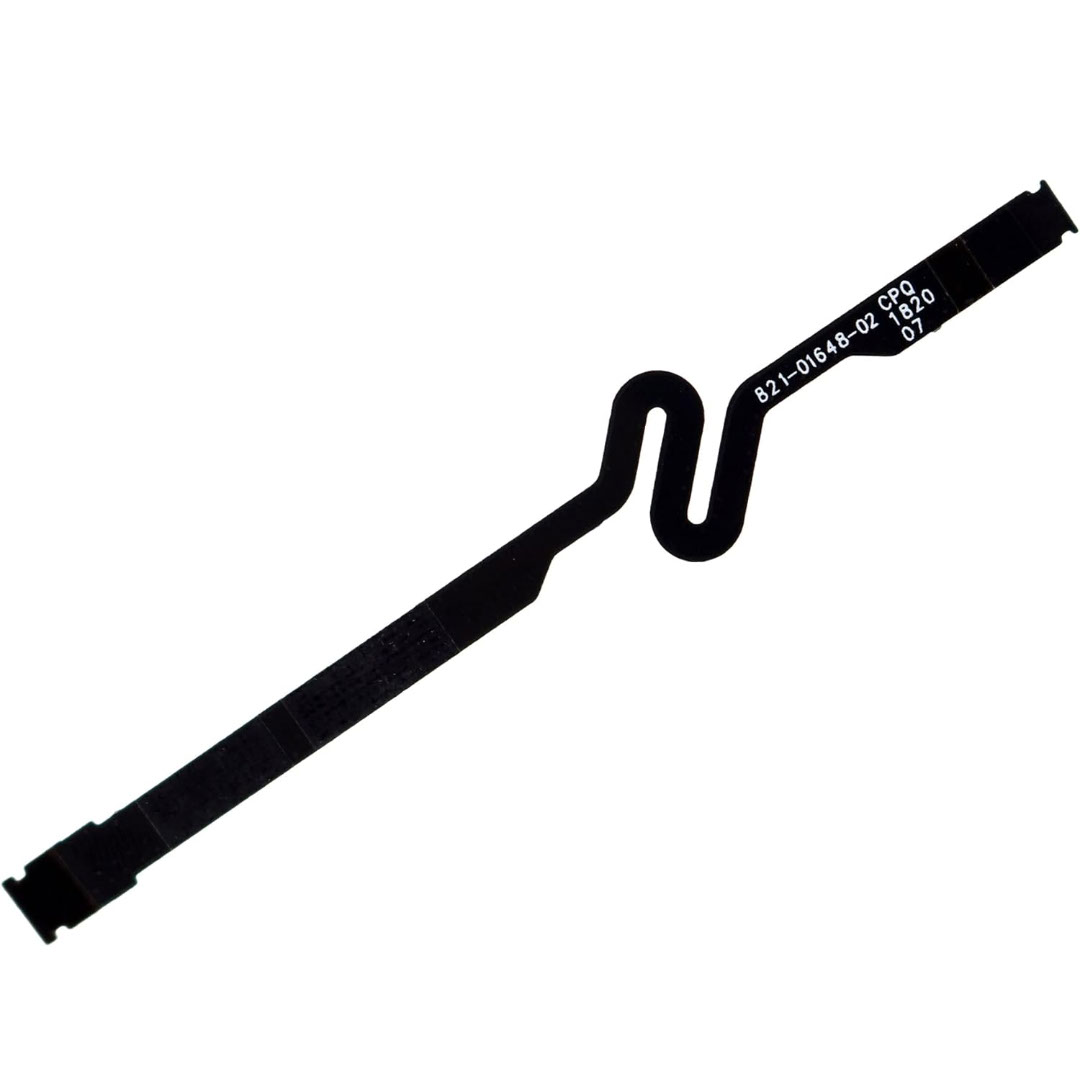
Genuine-spec touchpad flex cable for MacBook Pro 13″ with Touch Bar (Model A1708, 2016–2017)—restores full Force Touch functionality, haptic feedback, and precise multi-touch gesture control during trackpad repair or replacement. Compatible With: MacBook Pro 13″ (2016) – Model A1708 (Model Identifier: MacBookPro13,1) MacBook Pro 13″ (2017) – Model A1708 (Model Identifier: MacBookPro14,1) (Both years share the same internal trackpad assembly and flex cable.) MacBook Pro 13″ (2016) – Model A1708 (Model Identifier: MacBookPro13,1) MacBook Pro 13″ (2017) – Model A1708 (Model Identifier: MacBookPro14,1) (Both years share the same internal trackpad assembly and flex cable.) Part Type: Touchpad flex cable only — does not include the trackpad housing, Taptic Engine, or mounting hardware. This is the OEM-style ribbon cable that connects the trackpad to the logic board. Function: Transmits: Touch input coordinates Force Touch pressure data Haptic feedback signals to the Taptic Engine Enables full macOS gesture support: Force Click, three-finger lookup, swipe navigation, pinch-to-zoom, and smooth cursor tracking. Touch input coordinates Force Touch pressure data Haptic feedback signals to the Taptic Engine Enables full macOS gesture support: Force Click, three-finger lookup, swipe navigation, pinch-to-zoom, and smooth cursor tracking. OEM-Quality Build: Matches Apple’s original specifications in: Cable length and routing path Connector pitch and ZIF latch design EMI shielding and flex durability Cable length and routing path Connector pitch and ZIF latch design EMI shielding and flex durability Common Use Cases: Replacing a torn, creased, or liquid-damaged original flex cable Completing a trackpad replacement when the original cable is compromised Fixing intermittent trackpad behavior, loss of Force Touch, or complete unresponsiveness Replacing a torn, creased, or liquid-damaged original flex cable Completing a trackpad replacement when the original cable is compromised Fixing intermittent trackpad behavior, loss of Force Touch, or complete unresponsiveness Installation Note: Requires full bottom case removal and battery disconnection. Cable routes under internal components near the right speaker and logic board. Connects via a ZIF (Zero Insertion Force) socket—must be aligned carefully and latched gently. Recommended for experienced or certified technicians only. Requires full bottom case removal and battery disconnection. Cable routes under internal components near the right speaker and logic board. Connects via a ZIF (Zero Insertion Force) socket—must be aligned carefully and latched gently. Recommended for experienced or certified technicians only.

A premium ultralight pre-owned Lenovo ThinkPad T14s Gen 3 with 14" display, AMD Ryzen 7 6850U, 16GB RAM, and 512GB SSD—delivering exceptional performance, all-day battery life, and workstation-class integrated graphics in a featherlight business laptop.

HP 83A Black Toner Cartridge | Works with HP LaserJet Pro M201, HP LaserJet Pro MFP M125, M127, M225 Series | CF283A

Model: Cozy Classic Case Material: Waterproof 900D polyester+ Micro Fiber+ Faux fur lining Waterproof material Anti-scratch fur lining Durabl& Smooth YKK zipper Patent anti-drop strip inside Net weight: 14inch/560g, 16inch/650g 14 inch: 35.5*25*4.5cm 16 inch: 39.5*27*4.5 WiWU Cozy Classic Laptop Sleeve Protect your investment with the WiWU Cozy Classic, a premium laptop sleeve that balances elegant aesthetics with rugged, everyday protection. Shockproof Security: Engineered with a specialized 360° anti-drop border and reinforced corners to safeguard your device against accidental falls and impacts. Weatherproof Shield: Made from high-density waterproof polyester, ensuring your laptop remains completely dry and safe from spills or rain. Scratch-Free Interior: Features a luxurious, soft faux-fur lining that cushions your device and prevents surface scratches during transport. Travel-Ready Design: Ultra-slim and lightweight with a sturdy, retractable handle, making it easy to carry alone or slip into a larger bag. Extra Storage: Includes a spacious front zippered pocket to neatly organize your charger, mouse, and cables alongside your laptop. Available for: 14″ | 16″ Models

A next-generation Wi-Fi 6 router delivering AX1500 speeds (1201 Mbps on 5GHz + 300 Mbps on 2.4GHz), 4 high-performance antennas, and Gigabit ports—ideal for 2–3 bedroom homes needing faster speeds, lower latency, and seamless connectivity for 100+ devices. The TP-Link Archer AX12 is a powerful Wi-Fi 6 (802.11ax) dual-band router engineered for modern connected homes. With a combined speed of AX1500—delivering up to 1201 Mbps on the 5GHz band and 300 Mbps on the 2.4GHz band—it provides significantly faster throughput, reduced latency, and improved capacity compared to older Wi-Fi standards. Powered by a 1 GHz dual-core processor and equipped with four fixed high-performance antennas, the Archer AX12 delivers strong, stable coverage throughout 2–3 bedroom homes, eliminating dead zones and buffering. Advanced beamforming technology focuses Wi-Fi signals directly toward connected devices for clearer, stronger connections—even at greater distances. OFDMA + MU-MIMO: Efficiently serves multiple devices simultaneously—perfect for households with smartphones, laptops, smart TVs, and IoT devices connected at once (supports 100+ devices). www.wifi-stock.com WPA3 Security: Next-generation encryption for stronger protection against unauthorized access and cyber threats. www.amazon.in Backward Compatibility: Works seamlessly with all existing Wi-Fi devices (802.11a/b/g/n/ac/ax). www.tp-link.com Wired connectivity includes one Gigabit WAN port and three Gigabit LAN ports for high-speed connections to desktops, game consoles, NAS devices, or smart TVs. Parental Controls: Set schedules, filter content, and manage screen time per device QoS (Quality of Service): Prioritize bandwidth for video calls, gaming, or streaming TP-Link Tether App: Easy setup and management from your smartphone

Wireless freedom with zero compromise. The A4Tech 3330N is a high-performance 2.4GHz wireless combo that combines the GK-3 full-size keyboard with the G3-330N optical mouse. Featuring a 10–15m operating range, 12-month battery life, and 12 multimedia hotkeys, it’s the perfect plug-and-play solution for a clean, cable-free workspace. The A4Tech 3330N Wireless Desktop is engineered for consistent stability and long-term durability. Utilizing advanced Smart Wireless SoC technology, this set minimizes circuit loss and interference, providing a reliable connection that feels as responsive as a wired setup. Key Features: Consistent Wireless Stability: Advanced 2.4GHz powerful wireless connection with a distance of up to 10–15 meters. Auto-channel stabilizing ensures essentially no delays or connection conflicts. Energy Efficient Design: Enjoy up to 12 months of battery life thanks to energy-efficient engineering. The set also features Auto Power Saving with a 4-level sleep mode that activates after just 0.2s of inactivity. Full-Size Multimedia Keyboard: The GK-3 keyboard includes 12 Fn hotkeys for quick access to media controls, along with laser-inscribed keys that never fade and adjustable legs for ergonomic comfort. Precision Optical Mouse: The included G3-330N mouse offers a 1200 DPI resolution for smooth and accurate tracking. Its symmetric design makes it comfortable for both right and left-handed users of all hand sizes. 16-in-One Gestures: The mouse supports 16 different gestures to perform selectable hotkey commands, enhancing your workflow and productivity. Spill-Resistant Durability: The keyboard is designed with built-in drain holes, ensuring that accidental liquid spills won’t end your workday. Specifications at a Glance: Connection: 2.4G Hz Wireless (Nano USB Receiver) Keyboard Model: GK-3 (Full-Size) Mouse Model: G3-330N (1200 DPI Optical) Operating Range: 10 to 15 Meters Hotkeys: 12 Fn Multimedia Hotkeys Battery: 1 AA for Keyboard, 1 AA for Mouse (Up to 12 months) Compatibility: Windows 7 / 8 / 8.1 / 10 / 11

Remax F21 Ruiyal Series – Oscillating water‑cooling fan with 4,000 mAh battery, digital display, and 6 wind levels.Portable and stylish small-table fan with 3 oscillation modes and mist spray cooling. Model: Remax F21 Ruiyal Series Water‑Cooling Oscillating Fan (White) Battery & Power: Built‑in 4,000 mAh battery; USB‑C rechargeable (details unspecified) Cooling Method: Water‑cooling spray system with turbine-style fan blades Wind Speed: 6 adjustable speed levels Oscillation: 3 movement modes—approx. 45°, 90°, or 120° Display & Controls: Digital display showing mode, speed, and battery indicators Dimensions & Weight: Compact tabletop size, ~868 g Power Consumption: Around 8W rated power

Genuine-spec touchpad flex cable for MacBook Pro 16″ (Model A2485, 2021, M1 Pro/Max)—critical for restoring full Force Touch functionality, haptic feedback, and precise multi-touch gesture control during trackpad repairs. Compatible With: MacBook Pro 16-inch (2021, Model A2485) with Apple M1 Pro or M1 Max chip (Model Identifiers: MacBookPro18,1 / MacBookPro18,2). Part Type: Touchpad flex cable only—does not include the trackpad, Taptic Engine, or mounting hardware. This is the OEM-style ribbon cable that connects the trackpad to the logic board. Function: Transmits touch coordinates, Force Touch pressure data, and haptic feedback signals—essential for macOS gestures (e.g., pinch-to-zoom, Force Click, three-finger lookup) and Taptic Engine operation. OEM-Quality Construction: Precisely replicated to Apple’s original specifications—including cable length, connector type, EMI shielding, and flex routing—ensuring signal integrity and long-term reliability. Common Use Cases: Replacing a torn, frayed, or liquid-damaged original flex cable Completing a trackpad replacement when the original cable is compromised Fixing intermittent trackpad behavior, lost Force Touch, or complete unresponsiveness Replacing a torn, frayed, or liquid-damaged original flex cable Completing a trackpad replacement when the original cable is compromised Fixing intermittent trackpad behavior, lost Force Touch, or complete unresponsiveness Installation Note: Requires full disassembly of the bottom case and careful routing around the battery and logic board. Connectors use ZIF (Zero Insertion Force) sockets—must be aligned and latched gently. Recommended for certified or professional repair technicians only.

New BT04XL 14.8V 52WH Notebook Battery for HP EliteBook Folio 9470 9470M 9480m Ultrabook BT04 BA06 HSTNN-IB3Z HSTNN-I10C 687945-001 H4Q47AA 687517-241 HSTNN-DB3Z 687517-171 BA06XL H4Q48AA About this item Battery type: Li-ion; Capacity: 52WH; Voltage: 14.8V; Cells: 6-cell. The battery compatible with P/N.: Spare 687517-171 687517-241 687945-001 696621-001; EliteBook Folio 9470 9470M 9480 9480M Series; fits HSTNN-DB3Z HSTNN-IB3Z HSTNN-I10C 687517-1C1 BT04 BT04XL BA06 BA06XL H4Q47AA H4Q48AA 100% New from Manufacturer. Up to 500 recharge cycles over the life of the battery. Grade A cells ensure fast charges and low power consumption. Grade A cells ensure fast charges and low power consumption; Built-in circuit protection ensures both safety and stability. Brand new from Manufacturer. Up to 500 recharge cycles over the life of the battery. Operation time for standard batteries: Around1.5~3.5 hours, the actual operation time will depend on how much electricity is required by the device and how you use it.

OEM-quality trackpad replacement (without flex cable) for MacBook Pro 14″ (Model A2442, 2021, M1 Pro/Max) in Silver finish—designed for precise Force Touch performance, seamless gesture control, and perfect visual integration with the original chassis. Compatible With: MacBook Pro 14-inch (2021, Model A2442) with Apple M1 Pro or M1 Max chip. Part Type: Trackpad only—does not include the flex cable, Taptic Engine, or mounting hardware. Intended for professional technicians who will reuse the original internal components. Finish: Silver—matches the Silver and Space Gray top/bottom case (Apple uses the same trackpad finish across both color variants for this model). Force Touch Capable: Fully supports pressure-sensitive input and haptic feedback when paired with the original Taptic Engine and logic board—ensuring full macOS gesture and functionality support. OEM Precision: Features the same glass surface, curvature, and micro-click mechanism as Apple’s original—delivering consistent tracking accuracy and tactile response. Installation Requirements: Requires complete bottom case removal and careful transfer of the original flex cable and Taptic Engine. Adhesive must be applied precisely to maintain structural integrity and sensor alignment. Recommended for certified or experienced repair professionals only.

The LB-LINK AX900 USB WiFi adapter delivers fast and stable wireless connectivity with WiFi 6 technology and speeds up to 900Mbps. Featuring dual-band support (2.4GHz + 5GHz), it’s ideal for upgrading PCs and laptops for smoother streaming, gaming, and online work. The LB-LINK AX900 USB WiFi Adapter is a modern wireless solution designed to upgrade your computer to the latest WiFi 6 (802.11ax) standard. It offers improved speed, better network efficiency, and stronger stability compared to older WiFi adapters. With dual-band support, you can connect to either the 2.4GHz band for long-range stability or the 5GHz band for higher speed and lower latency. Its compact USB design makes it perfect for desktops and laptops needing fast internet without installing internal cards. WiFi 6 (802.11ax) Technology for faster performance and better efficiency AX900 Speed (Up to 900Mbps) for smooth streaming and downloads Dual Band Support: 2.4GHz + 5GHz for flexibility and stability USB Plug & Play easy installation (driver may be required) Low Latency Connection ideal for gaming and video calls Compact Portable Design perfect for laptops and desktops Improves WiFi Performance for weak built-in adapters Ideal for PCs and laptops that need faster WiFi speeds and stronger connectivity. Perfect for online gaming, HD streaming, Zoom/Teams meetings, and stable browsing.

Apple USB-C to Lightning Cable (1m) - With Apple Warranty Apple USB-C to Lightning Cable (1m) – With Apple Warranty Connect your iPhone, iPad or iPod with Lightning connector to your USB-C– or Thunderbolt 3 (USB-C)–enabled Mac for syncing and charging, or to your USB-C–enabled iPad for charging. You can also use this cable with your Apple 18W, 20W, 29W, 30W, 61W, 87W or 96W USB‑C Power Adapter to charge your iOS device and even take advantage of the fast-charging feature on selected iPhone and iPad models.

Genuine-spec touchpad flex cable for MacBook Air 13.6″ (Model A2681, 2022, M2)—essential for restoring full Force Touch functionality, haptic feedback, and multi-touch gesture support when replacing or repairing the trackpad assembly. Compatible With: MacBook Air 13.6-inch (2022, Model A2681) with Apple M2 chip (all colors: Silver, Space Gray, Starlight, Midnight). Part Type: Touchpad flex cable only—does not include the trackpad, Taptic Engine, or mounting hardware. This is the ribbon cable assembly that connects the trackpad to the logic board. Function: Transmits touch input, Force Touch pressure data, and haptic feedback signals between the trackpad and logic board—critical for macOS gesture recognition and Taptic Engine operation. OEM-Quality Construction: Matches Apple’s original flex circuit in length, connector type, shielding, and bend radius—ensures reliable signal integrity and long-term durability. Common Use Cases: Replacing a torn, frayed, or damaged original flex cable Completing a trackpad replacement when the original cable was compromised Repairing unresponsive or erratic trackpad behavior caused by cable failure Replacing a torn, frayed, or damaged original flex cable Completing a trackpad replacement when the original cable was compromised Repairing unresponsive or erratic trackpad behavior caused by cable failure Installation Note: Requires full bottom case disassembly and careful routing under the battery and logic board. Connectors use ZIF (Zero Insertion Force) sockets—do not force. Recommended for experienced or certified technicians only.

FAVOURITE WIRELESS COMBO MK270 Wireless Combo brings together the convenience and comfort of a full-sized keyboard with a sculpted, compact mouse. With media keys, a number pad and precise cursor control to make your work a whole lot smoother. Plus, the lag-free wireless makes setup easy and saves space on your desk. No wonder this is the world best selling combo!7Based on independent sales data (in units) including all the models of the MK270 family for wireless combo aggregated from major global markets including Canada, China, France, Germany, Indonesia, Republic of Korea, Russian Federation, Sweden, Taiwan, Turkey, UK, US (Nov'19 - Nov'20 period). Retail channel only. FAVOURITE WIRELESS COMBO MK270 Wireless Combo brings together the convenience and comfort of a full-sized keyboard with a sculpted, compact mouse. With media keys, a number pad and precise cursor control to make your work a whole lot smoother. Plus, the lag-free wireless makes setup easy and saves space on your desk. No wonder this is the world best selling combo!7Based on independent sales data (in units) including all the models of the MK270 family for wireless combo aggregated from major global markets including Canada, China, France, Germany, Indonesia, Republic of Korea, Russian Federation, Sweden, Taiwan, Turkey, UK, US (Nov’19 – Nov’20 period). Retail channel only. Height: 5.87 in (149 mm) Width: 17.36 in (441 mm) Depth: 0.71 in (18 mm) Weight: 17.57 oz (498 g) Height: 3.90 in (99 mm) Width: 2.36 in (60 mm) Depth: 1.54 in (39 mm) Weight: 2.65 oz (75.2 g) Height: 0.74 in (18.7 mm) Width: 0.57 in (14.4 mm) Depth: 0.26 in (6.6 mm) Weight: 0.07 oz (2 g) Spill-resistant design 2Tested under limited conditions (maximum of 60 ml liquid spillage). Do not immerse the keyboard in liquid. Adjustable keyboard height 10-Key Number pad Key type: deep profile Caps lock indicator light On/Off power switch 2 AAA batteries(Alkaline Battery) Battery life: 36 months 3Keyboard battery life calculation based on an estimated two million keystrokes/year in an office environment. User experience may vary. Mouse battery life may vary based on user and computing conditions. Sensor technology: Smooth Optical tracking Number of buttons: 3 (Left/Right-click, Middle click) Scrolling: line-by-line Scroll Wheel: Yes, 2D, optical Connect/Power: On/Off power button 1 AA battery(Alkaline Battery) Battery life: 12 months 4Keyboard battery life calculation based on an estimated two million keystrokes/year in an office environment. User experience may vary. Mouse battery life may vary based on user and computing conditions. Mouse plastics: 49% post-consumer recycled material 5Excludes plastic in printed wiring assembly (PWA), receiver and packaging. Keyboard plastics: 54% post-consumer recycled material 6Excludes plastic in printed wiring assembly (PWA), receiver and packaging. An available USB port ChromeOS Windows 10,11 or later

BATTERY DELL J60J5 7.6V 55Wh Battery Compatible with Dell Latitude E7470 E7270 7470 7270 451-BBSY 451-BBSX 451-BBSU WYWJ2 R1V85 MC34Y 242WD PDNM2 1W2Y2 GG4FM F1KTM NJJ2H 5F08V P61G001 P26S001 J6OJ5 Laptop Battery About this item SPECIFICATION : Model Name: Standard Rechargeable Li-ion battery Type J60J5 ; Device Type: Notebook battery; Battery Type: Lithium ion; Voltage : 7.6V; Capacity : 55Wh; Cells: 4-cell; Dimensions about 9.37×4.17×0.24in; Weight: About 11OZ / 0.69lb; Condition : 100 % New; Packages includes: 1PC J6OJ5 laptop battery(with free screwdrivers for easy installation) COMPATIBILITY : 7.6V 55 WHr 4-Cell Lithium-Ion battery replace manufacturer part J60J5 J6OJ5 451-BBSX 451-BBSY 451-BBSU R1V85 WYWJ2 MC34Y 0MC34Y 242WD PDNM2 1W2Y2 0F1KTM F1KTM NJJ2H GG4FM 5F08V P61G P61G001 P26S P26S001 battery designed for Dell Latitude E7270 Latitude E7470 7270 7470 Series laptop. SECURITY: ECHEER 55Wh 4-cell J60J5 batteries have passed strict intelligent detection, such as short circuit protection, over-voltage protection, discharge protection, and over-current protection, which is very important for the battery’s use cycle and safety. Also, CE, FCC, and RoHS are certificated. Every one of our replacement notebook batteries is tested to meet OEM specifications.

The Dell OptiPlex 7050 Micro combines compact design and solid performance with an Intel Core i5 6th Gen processor, DDR4 RAM options, and SSD storage options. Ideal for business and home use, it delivers reliable speed, energy efficiency, and space-saving desktop performance.

Genuine-spec touchpad flex cable for MacBook Pro 13″ (Model A1502, Mid 2014)—restores full trackpad functionality, including precise cursor control and physical click response. Essential for repairing unresponsive or erratic trackpad behavior. Compatible With: MacBook Pro 13-inch (Mid 2014, Model A1502, Model Identifier MacBookPro11,1) with Intel Core i5/i7 processors and Retina display. Part Type: Touchpad flex cable only — does not include the trackpad housing, button mechanism, or mounting hardware. This is the ribbon cable that connects the trackpad to the logic board. Function: Transmits cursor movement and click signals (left/right physical clicks) Supports standard multi-touch gestures (two-finger scroll, tap-to-click, pinch-to-zoom) ⚠️ Note: This model uses a physical click mechanism—not Force Touch (no haptic feedback or pressure sensitivity). Transmits cursor movement and click signals (left/right physical clicks) Supports standard multi-touch gestures (two-finger scroll, tap-to-click, pinch-to-zoom) ⚠️ Note: This model uses a physical click mechanism—not Force Touch (no haptic feedback or pressure sensitivity). OEM-Quality Build: Matches Apple’s original in: Cable length and routing path Connector type and pin alignment Insulation and flexibility for long-term reliability Cable length and routing path Connector type and pin alignment Insulation and flexibility for long-term reliability Common Use Cases: Replacing a torn, frayed, or corroded original flex cable Fixing: Unresponsive or intermittent trackpad Cursor jumping or drifting Click function failure (left or right) Complete trackpad disconnect Replacing a torn, frayed, or corroded original flex cable Fixing: Unresponsive or intermittent trackpad Cursor jumping or drifting Click function failure (left or right) Complete trackpad disconnect Unresponsive or intermittent trackpad Cursor jumping or drifting Click function failure (left or right) Complete trackpad disconnect Installation Note: Requires bottom case removal and battery disconnect. Connects via a ZIF (Zero Insertion Force) socket on the logic board—do not force. Cable routes under the battery; handle with care to avoid strain. Suitable for intermediate to advanced DIYers or technicians. Requires bottom case removal and battery disconnect. Connects via a ZIF (Zero Insertion Force) socket on the logic board—do not force. Cable routes under the battery; handle with care to avoid strain. Suitable for intermediate to advanced DIYers or technicians.
