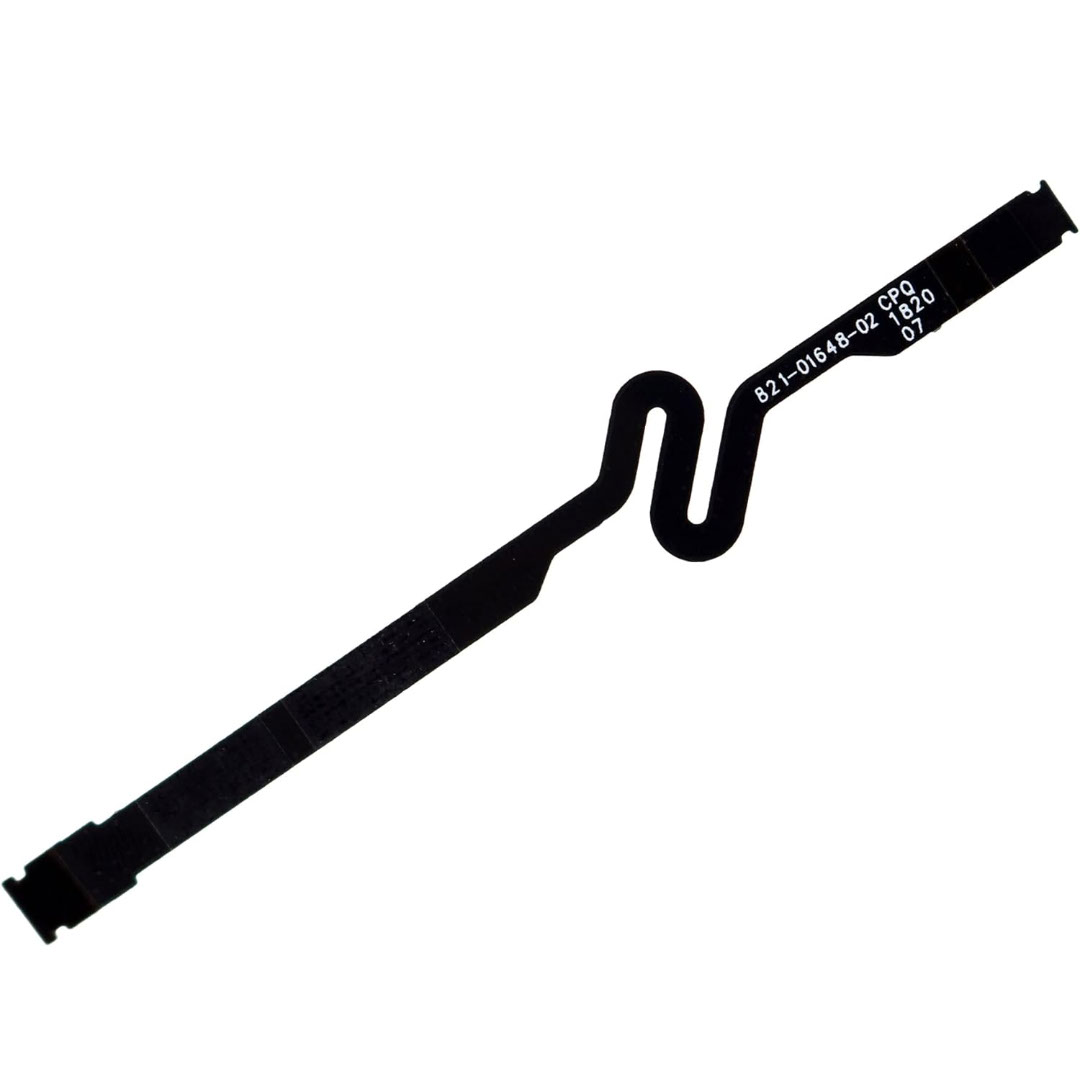

Genuine-spec touchpad flex cable for MacBook Pro 14″ (Model A2442, 2021, M1 Pro/Max)—essential for restoring full Force Touch functionality, haptic feedback, and precise multi-touch gesture control. Compatible With: MacBook Pro 14-inch (2021, Model A2442) with Apple M1 Pro or M1 Max chip (Model Identifiers: MacBookPro18,3 / MacBookPro18,4). Part Type: Touchpad flex cable only—does not include the trackpad, Taptic Engine, or mounting brackets. This is the OEM-style ribbon cable that connects the trackpad to the logic board. Function: Carries touch input, Force Touch pressure data, and haptic feedback signals—critical for macOS trackpad gestures, Force Click, and Taptic Engine responsiveness. OEM-Quality Build: Matches Apple’s original flex circuit in length, connector pitch, shielding, and bend geometry—ensures reliable signal transmission and durability under repeated use. Common Use Cases: Replacing a damaged, torn, or corroded original flex cable Completing a trackpad replacement when the original cable is unusable Fixing intermittent trackpad issues, unresponsiveness, or loss of Force Touch Replacing a damaged, torn, or corroded original flex cable Completing a trackpad replacement when the original cable is unusable Fixing intermittent trackpad issues, unresponsiveness, or loss of Force Touch Installation Note: Requires full bottom case removal and careful routing beneath internal components. Connectors use ZIF (Zero Insertion Force) sockets—must be seated properly without force. Recommended for certified or highly experienced technicians only.

WiWU Pilot Backpack 15.6 inch Travelling Polyester Laptop Business School Travelling Backpack WiWU Pilot Backpack 15.6 inch Travelling Polyester Laptop Business School Travelling Backpack

Compatible With: MacBook Pro 15.4-inch (Mid 2012, Model A1398, Model Identifier MacBookPro10,1) — the first Retina MacBook Pro. Includes: Complete left and right speaker units with pre-attached connector cables and mounting brackets, ready for direct installation. Audio Performance: Engineered to match Apple’s original acoustic design—delivers clear mid-range, balanced stereo separation, and consistent volume levels across system audio, video calls, and media playback. OEM Build Quality: Precision-molded housing, original grille pattern, and correct wiring length ensure seamless integration into the MacBook’s chassis without rattling or interference. Common Use Cases: Replaces speakers damaged by liquid spills, physical impact, or aging (e.g., crackling, no sound, or distorted audio). Installation Note: Requires full bottom case and logic board access. Speakers are secured with screws and adhesive tape. Recommended for experienced technicians due to tight internal layout and delicate connectors.

MacBook Pro 13″ Retina A1989 / A2159 (2018-2019) Display Assembly (Silver) MacBook Pro 13″ Touch Bar 2019z A1989 (EMC 3214 MacBookPro15,2) 2.3 GHz A1989 (EMC 3214 MacBookPro15,2) 2.7 GHz MacBook Pro 13″ Touch Bar 2019 A1989 (EMC 3358 MacBookPro15,2) 2.4 GHz A1989 (EMC 3358 MacBookPro15,2) 2.8 Ghz MacBook Pro 13″ Two Thunderbolt Ports 2019 A2159 (EMC 3301 MacBookPro15,4) 1.4 GHz A2159 (EMC 3301 MacBookPro15,4) 1.7 GHz

The Apple 240W USB-C Charge Cable (2 m) is a durable, braided USB-C to USB-C cable that supports fast charging up to 240W and USB 2.0 data transfer—ideal for powering high-performance MacBooks and other USB-C devices. Length: 2 meters Connector: USB-C to USB-C Power Support: Up to 240W (48V/5A), compatible with the new USB-C PD 3.1 Extended Power Range standard Data Transfer: USB 2.0 speeds (up to 480 Mbps) — this cable prioritizes power delivery over high-speed data Ideal for charging MacBook Pro (2021 and later), MacBook Air (M2 and later), and other high-power laptops Backward-compatible with lower-wattage devices (iPad, iPhone 15 lineup, etc.) Works with any USB-C power adapter, but you’ll only get full 240W output when paired with a compatible high-wattage charger The standard USB-C Charge Cable (2 m, 60W/100W) only supports up to 100W. The Thunderbolt 4 Pro Cable (3 m) supports high-speed data (40 Gb/s) and video output, but maxes at 100W charging. This 240W version is the one to get if your priority is maximum charging power rather than data/video.

Replacement cable for MacBook Pro A2794, designed to restore proper connection and functionality for damaged or faulty internal cables. Ideal for technicians and repair shops, ensuring reliable performance and correct fit for A2794 models. Type: USB-C to USB-C charging/data cable Model: A2794 Length: 2 meters (≈ 6.6 ft) Color: White Design: Woven braided cable for durability Connectors: USB-C (Male) on both ends Power Delivery: Supports up to 240 W high-power charging when used with a compatible USB-C PD adapter Data Transfer: USB 2.0 transfer speeds Designed for fast charging and syncing between USB-C devices

Features: Advanced bluetooth Chip (V5.4): Enjoy seamless and robust connectivity with the latest bluetooth 5.4 technology, providing stable and efficient wireless performance. Superior Sound Quality: Experience immersive HiFi audio with powerful bass and clarity, courtesy of dual 52mm drivers paired with a bass diaphragm designed to deliver exceptional sound. Vibrant RGB Light Display: Half of the speaker surface displays dynamic and colorful RGB lights, creating a visually captivating experience that enhances your music enjoyment. Extended Battery Life: Benefits from extensive playtime powered by a 3000mAh battery, with up to 4 hours of continuous playback and an impressive 180 days of standby time. TWS Pairing: Effortlessly pair two speakers to achieve a rich, enveloping stereo sound that transforms any space into a lively audio environment. Multiple Playback Modes: Versatility at its best with multiple playback options, including FM radio, AUX input, TF card, and USB playback, ensuring you have endless ways to enjoy your favorite tunes.

A1417 Battery Only for (Mid 2012 & Early 2013) A1398 MacBook Pro - Replacement Battery for A1398 MacBook Pro 15-inch Retina (Mid 2012, Early 2013 Version) - EMC 2512 or 2673 A1417 Battery Only for (Mid 2012 & Early 2013) A1398 MacBook Pro – Replacement Battery for A1398 MacBook Pro 15-inch Retina (Mid 2012, Early 2013 Version) – EMC 2512 or 2673 [11.26V/99Wh] A1417 A1398 Battery — Health:100%+, Voltage: 11.26V, Capacity: 99Wh(Please confirm the release year before purchase the battery) Suit for 15 inch A1398 MacBook Pro Battery Retina Mid 2012 Early 2013 (EMC 2512 or 2673) >[See more details on the Product Description] Brand new battery-> Directly warranty from Manufacturer, perform as good as the original battery. A1398 Macbook Pro 15 inch battery replacement come with adapted screwdriver. Multi-command chip control-> Contain with Durable A cells,Multi-command chip control makes the battery supply power stably.

Remax F41 6″ Wireless Clamp Fan – USB‑C rechargeable (4,000 mAh), 4 speeds, 720° rotation, up to 3 hrs runtime.Modular 3‑in‑1 design with detachable grille, washable parts, and night‑light feature. Model: Remax F41 6-inch Wireless Air Circulating Clamp Fan Power & Battery: Rechargeable 4,000 mAh battery; USB-C charging (~3 hours to full charge), offers ~3 hours continuous use at high speeds Operation Modes: 4 fan speeds, 3‑in‑1 usage (desktop, clamp, or hanging), 720° wide-angle rotation Design Features: Detachable, washable grille plus built-in warm night light Care Tips: Recharge every two months if unused; avoid inserting objects into blades

A robust Beurotika cash drawer featuring a 450mm metal body, secure 3-position lock, and compatibility with most POS systems—ideal for retail, restaurants, and small businesses. Secure 3-position key lock: Open, locked, and release-to-print modes for controlled access 6 coin slots + 4 bill compartments: Organized layout for efficient cash handling Heavy-duty steel construction: Reinforced frame and smooth slide rails for daily reliability Standard RJ12 interface: Compatible with most POS systems (e.g., Epson, HP, Bixolon, and Beurotika receipt printers) Auto-open trigger: Automatically opens when connected to a compatible receipt printer during transactions Bottom cable entry: Keeps wiring neat and protected

Digital Device Laptop Keyboard Compatible for MacBook AIR 13″ A1369 A1466 (MID 2011- MID 2017) US Layout 【Unique】Pls see detail compatible models in description below. 【Safe】Easy for you replace your faulty, cracked or broken keyboard ,seller remind that you should replace the keyboard in the off state. All pictures are taken from the real item, please check carefully before bidding, Replacement and high quality, Replace your faulty, cracked or broken keyboard. Each keyboard is tested before shipping Compatibility: MacBook Air 13″ A1369 Mid 2011: MC965LL/A (1.7 GHz Core i5) Mid 2011: MC966LL/A (1.7 GHz Core i5) Mid 2011: MD226LL/A (1.8 GHz Core i7) Compatibility: MacBook Air 13″ A1466 Mid 2012: MD231LL/A (1.8 GHz Core i5) Mid 2012: MD232LL/A (1.8 GHz Core i5) Mid 2012: MD232LL/A (2.0 GHz Core i7) Mid 2013: MD760LL/A (1.3 GHz Core i5) Mid 2013: MD761LL/A (1.3 GHz Core i5) Mid 2013: MD761LL/A (1.7 GHz Core i7) Early 2014: MD760LL/B (1.4 GHz Core i5) Early 2014: MD761LL/B (1.4 GHz Core i5) Early 2014: MD761LL/B (1.7 GHz Core i7) Compatibility: Early 2015: MJVE2LL/A (1.6 GHz Core i5 or 2.2 GHz Core i7) Early 2015: MJVG2LL/A (1.6 GHz Core i5 or 2.2 GHz Core i7) Identifying Numbers APN #: 661-6059, 661-6635, 661-7480

A lightweight and efficient pre-owned Lenovo ThinkPad T14s Gen 2 with 14" display, AMD Ryzen 5 5650U, 16GB RAM, and 512GB SSD—featuring integrated AMD Radeon graphics for smooth productivity and all-day battery life in a premium ultraportable.

7.4V 51WH Laptop Battery G5M10 for DELL Latitude E5450 E5550 Notebook 15.6" G5M10 8V5GX R9XM9 WYJC2 1KY05-SIKER 7.4V 51WH Laptop Battery G5M10 for DELL Latitude E5450 E5550 Notebook 15.6″ G5M10 8V5GX R9XM9 WYJC2 1KY05-SIKER About this item Battery type: Li-ion Capacity:7.4V 51WH 100% New Manufacturer Features 100% Brand Replacement New battery

RK ROYAL KLUDGE RK61 Wireless 60% Mechanical Gaming Keyboard, Ultra-Compact 60 Keys Bluetooth Mechanical Keyboard with Programmable Software (Blue Switch, White) Model: RK ROYAL KLUDGE RK61 Layout: 60% compact layout (61 keys, no number pad or function row) Switch Type: Mechanical switches (Red – Linear, Blue – Clicky, Brown – Tactile) Connectivity: Bluetooth 5.0 (connects up to 3 devices) USB-C Wired Optional 2.4GHz Wireless (on some versions) Connectivity: Bluetooth 5.0 (connects up to 3 devices) USB-C Wired Optional 2.4GHz Wireless (on some versions) Backlight: RGB LED with 18+ lighting modes and effects Battery: 1450mAh rechargeable lithium battery Key Rollover: Full N-Key rollover, anti-ghosting Compatibility: Windows, macOS, Android, iOS Software Support: Key remapping and lighting customization (Windows only) Build Quality: ABS plastic frame, double-shot keycaps Dimensions: Approx. 290 x 100 x 40 mm Weight: ~500g Extras: Hot-swappable switch support (on select versions)

Non-slip, skid-proof rubber feet designed to perfectly fit MacBook Air models A1466, A1369, and A1370—restoring grip, stability, and protection for your laptop’s base. Keep your MacBook Air steady and scratch-free with these high-quality replacement rubber feet, engineered to match the original Apple design for MacBook Air models A1466 (2010–2017), A1369 (11″ 2010–2011), and A1370 (11″ 2011–2015). These skid-proof rubber feet provide excellent traction on desks, tables, and other smooth surfaces, preventing unwanted sliding during typing or use. Made from durable, soft-touch silicone-rubber material, they also help protect your laptop’s bottom case from scratches and reduce vibration noise. Each set includes all necessary feet (typically 5 per MacBook Air model) with pre-applied adhesive for easy, secure installation. The matte black finish blends seamlessly with your MacBook’s original aesthetic. Ideal for restoring worn, missing, or damaged feet—whether due to age, cleaning, or accidental removal—this is a simple, affordable way to maintain your MacBook’s functionality and appearance. Note: Surface must be clean and dry for optimal adhesion. For best results, gently warm the adhesive before applying.

Used, original 35 W USB-C charger for Mac — reliable Apple power adapter (dual USB-C) for charging your Mac and other devices. This is an authentic Apple 35 W USB-C power adapter (dual-port) — used but tested. It’s built to charge MacBooks, iPhones, iPads, and other USB-C devices. Though lower wattage than larger Mac adapters, it works well for light use or supplemental charging. Features & Behavior Dual USB-C ports: can charge two devices simultaneously Intelligent power distribution: if both ports are used, the output splits evenly (~17.5 W each) USB Power Delivery support across standard profiles (5V, 9V, 15V, 20V) Accepts input 100-240V AC, so usable worldwide (with correct plug) Compact form factor in one variant, or standard “duckhead” plug style in another Specifications Strengths & Limitations Pros Authentic Apple unit — safer and more reliable than generic chargers Dual ports give flexibility — charge phone + Mac concurrently Portable and suitable for travel (universal voltage) Cons 35 W is low for MacBook Pro under load — might not maintain charging during heavy use When both ports used, power is halved (~17.5 W each) Used condition may include wear, scuffs, or reduced efficiency

Apple USB-C to Lightning Cable (1m) - With Apple Warranty Apple USB-C to Lightning Cable (1m) – With Apple Warranty Connect your iPhone, iPad or iPod with Lightning connector to your USB-C– or Thunderbolt 3 (USB-C)–enabled Mac for syncing and charging, or to your USB-C–enabled iPad for charging. You can also use this cable with your Apple 18W, 20W, 29W, 30W, 61W, 87W or 96W USB‑C Power Adapter to charge your iOS device and even take advantage of the fast-charging feature on selected iPhone and iPad models.

240W USB-C Original Charge Cable (2m) (Second Hand) This 2-meter charge cable—with USB-C connectors on both ends—is ideal for charging, syncing, and transferring data between USB-C devices. Pair the USB-C Charge Cable with a compatible USB-C power adapter to conveniently charge your devices from a wall outlet and take advantage of fast-charging capabilities. USB-C Power Adapters sold separately. 240W USB-C Original Charge Cable (2m) (Second Hand) This 2-meter charge cable—with USB-C connectors on both ends—is ideal for charging, syncing, and transferring data between USB-C devices. Pair the USB-C Charge Cable with a compatible USB-C power adapter to conveniently charge your devices from a wall outlet and take advantage of fast-charging capabilities. USB-C Power Adapters sold separately. This 2-metre charging cable is made with a woven design — with USB-C connectors on both ends — and is ideal for charging, syncing and transferring data between USB-C devices. It supports charging of up to 240 watts and transfers data at USB 2 rates. Pair the USB-C Charge Cable with a compatible USB-C power adapter to conveniently charge your devices from a power point and take advantage of fast-charging capabilities. USB-C power adapters sold separately.

Genuine-spec touchpad flex cable for MacBook Pro 13″ (Model A2289, 2020, Intel)—restores full Force Touch functionality, haptic feedback, and preci multi-touch gesture control. OEM-quality replacement for damaged or faulty original cables. Compatible With: MacBook Pro 13-inch (2020, Four Thunderbolt Ports, Model A2289, Model Identifier MacBookPro16,2) with Intel Core i5/i7 processors. Part Type: Touchpad flex cable only — does not include the trackpad housing, Taptic Engine, or mounting hardware. This is the OEM-style ribbon cable that connects the trackpad to the logic board. Function: Transmits: Touch input coordinates Force Touch pressure data Haptic feedback signals to the Taptic Engine Enables full macOS gesture support: Force Click, three-finger lookup, swipe navigation, pinch-to-zoom, and smooth cursor tracking. Touch input coordinates Force Touch pressure data Haptic feedback signals to the Taptic Engine Enables full macOS gesture support: Force Click, three-finger lookup, swipe navigation, pinch-to-zoom, and smooth cursor tracking. OEM-Quality Build: Matches Apple’s original specifications in: Cable length and routing path Connector pitch and ZIF latch design EMI shielding and flex durability Cable length and routing path Connector pitch and ZIF latch design EMI shielding and flex durability Common Use Cases: Replacing a torn, creased, or liquid-damaged original flex cable Completing a trackpad replacement when the original cable is unusable Fixing: Intermittent or erratic trackpad behavior Loss of Force Touch or haptic feedback Complete trackpad unresponsiveness Replacing a torn, creased, or liquid-damaged original flex cable Completing a trackpad replacement when the original cable is unusable Fixing: Intermittent or erratic trackpad behavior Loss of Force Touch or haptic feedback Complete trackpad unresponsiveness Intermittent or erratic trackpad behavior Loss of Force Touch or haptic feedback Complete trackpad unresponsiveness Installation Note: Requires full bottom case removal and battery disconnection. Cable routes under internal components (speaker, logic board)—must follow original path. Connects via ZIF (Zero Insertion Force) socket—align carefully, never force. Recommended for experienced or certified technicians only. Requires full bottom case removal and battery disconnection. Cable routes under internal components (speaker, logic board)—must follow original path. Connects via ZIF (Zero Insertion Force) socket—align carefully, never force. Recommended for experienced or certified technicians only. Important Compatibility Notes: ✅ Only for A2289 (13″, 4 Thunderbolt ports, 2020, Intel) ❌ Not compatible with: A2251 (2 Thunderbolt ports, 2020) A2338 (M1 MacBook Pro, 2020) Any MacBook Air or 14″/16″ MacBook Pro ✅ Only for A2289 (13″, 4 Thunderbolt ports, 2020, Intel) ❌ Not compatible with: A2251 (2 Thunderbolt ports, 2020) A2338 (M1 MacBook Pro, 2020) Any MacBook Air or 14″/16″ MacBook Pro A2251 (2 Thunderbolt ports, 2020) A2338 (M1 MacBook Pro, 2020) Any MacBook Air or 14″/16″ MacBook Pro

Genuine-spec touchpad flex cable for MacBook Pro 15″ (Model A1706 – 2017 and A1989 – 2018/2019)—restores full Force Touch functionality, haptic feedback, and precise multi-touch gesture control during trackpad repair or replacement. Compatible With: MacBook Pro 15″ (2017) – Model A1706 (Model Identifier: MacBookPro14,3) MacBook Pro 15″ (2018–2019) – Model A1989 (Model Identifier: MacBookPro15,2) ✅ Note: Apple used the same trackpad assembly and flex cable across both A1706 and A1989 15″ models—making this part interchangeable between them. MacBook Pro 15″ (2017) – Model A1706 (Model Identifier: MacBookPro14,3) MacBook Pro 15″ (2018–2019) – Model A1989 (Model Identifier: MacBookPro15,2) ✅ Note: Apple used the same trackpad assembly and flex cable across both A1706 and A1989 15″ models—making this part interchangeable between them. ✅ Note: Apple used the same trackpad assembly and flex cable across both A1706 and A1989 15″ models—making this part interchangeable between them. Part Type: Touchpad flex cable only — does not include the trackpad housing, Taptic Engine, or mounting hardware. This is the OEM-style ribbon cable connecting the trackpad to the logic board. Function: Transmits: Touch input coordinates Force Touch pressure data Haptic feedback signals to the Taptic Engine Enables full macOS gesture support: Force Click, three-finger lookup, swipe navigation, pinch-to-zoom, and smooth cursor tracking. Touch input coordinates Force Touch pressure data Haptic feedback signals to the Taptic Engine Enables full macOS gesture support: Force Click, three-finger lookup, swipe navigation, pinch-to-zoom, and smooth cursor tracking. OEM-Quality Build: Matches Apple’s original in: Cable length and routing Connector pitch and ZIF latch design EMI shielding and flex durability Cable length and routing Connector pitch and ZIF latch design EMI shielding and flex durability Common Use Cases: Replacing a torn, creased, or liquid-damaged original flex cable Completing a trackpad replacement when the original cable is compromised Fixing intermittent trackpad behavior, loss of Force Touch, or complete unresponsiveness Replacing a torn, creased, or liquid-damaged original flex cable Completing a trackpad replacement when the original cable is compromised Fixing intermittent trackpad behavior, loss of Force Touch, or complete unresponsiveness Installation Note: Requires full bottom case removal and battery disconnection. Cable routes under internal components near the right speaker and logic board. Connects via a ZIF (Zero Insertion Force) socket—must be aligned carefully and latched gently. Recommended for experienced or certified technicians only. Requires full bottom case removal and battery disconnection. Cable routes under internal components near the right speaker and logic board. Connects via a ZIF (Zero Insertion Force) socket—must be aligned carefully and latched gently. Recommended for experienced or certified technicians only.
