
lenovo battery L16L2PB2 L16M2PB1 L16S2PB2 L16C2PB2 Laptop Notebook Battery for Lenovo 5000-15 2ICP6/55/90 Series 7.4V 30Wh 4050mAh About this item Condition: New Voltage: 7.4V Capacity: 30Wh/4050mAh Replace Part Number: L16M2PB1 L16L2PB2 L16M2PB2 L16S2PB1 L16L2PB3 L16C2PB1 L17L2PF1 L17M2PB7 L16C2PB2 L16L2PB1 L16M2PB3 2ICP6/55/90 Fit For: Lenovo 5000-15 Series Raise the battery life: 1: After receiving the battery, Please charge it fully, discharge it to around 10, and do it three times. 2: If you don’t use the battery for a long time, please charge and discharge it once a month

A1990 Logic Board i7-16GB-512GB-4GB Intel 2.6 GHz Six Core i7 (I7-9750H) 16 GB RAM 512 GB SSD AMD Radeon Pro 555X 4GB Intel UHD Graphics 630 Intel 2.6 GHz Six Core i7 (I7-9750H) 16 GB RAM 512 GB SSD AMD Radeon Pro 555X 4GB Intel UHD Graphics 630

Viewsonic VA2406-MH 24” The Viewsonic VA2406-MH 24” is a 24” Full HD monitor with HDMI . and VGA input for business or home usage.Delivering a stunning image quality . this monitor provides six ViewMode presets that deliver optimized screen performance based on your needs. The eye care technology that comes standard with all VA monitors helps to eliminate eyestrain from extended viewing periods. A VESA-compatible mount makes this monitor is easy to setup on the wall or with a wide range of industry-standard mounts. Viewsonic VA2406-MH 24” Viewing Clarity from Wide Angles Enjoy superb performance and better viewing quality from horizontal to vertical angles. With SuperClear® Vertical Alignment panel technology, the monitor remains clear and in good contrast color . from 178° all around, whether you are looking at the screen from above, below, the front. Viewsonic VA2406-MH 24” Full HD 1080p Full HD 1920×1080 resolution creates unbelievably clear pixel-by-pixel image performance. Experience amazing clarity and detail while working, gaming, or enjoying the latest entertainment. Comfortable Viewing Flicker-Free technology and a Blue Light Filter help to eliminate eye strain from extended viewing periods. Color Rendering Options ViewSonic’s ViewMode feature offers “Game”, “Movie”, “Web”, “Text”, and “Mono” presets. These presets enhance gamma curve, color temperature, contrast, and brightness to deliver an optimized viewing experience for different uses. Low Energy Consumption Designed for energy efficiency in mind, ViewSonic’s Eco Mode results in a smaller carbon footprint and reduced office overhead costs. Specifications Viewsonic VA2406-MH 24” Display Size (in.): 24 Viewable Area (in.): 23.8 Panel Type: VA Technology Resolution: 1920 x 1080 Resolution Type: FHD (Full HD) Static Contrast Ratio: 5,000:1 (typ) Dynamic Contrast Ratio: 50M:1 Light Source: LED Brightness: 250 cd/m² (typ) Colors: 16.7M Color Space Support: 8 bit (6 bit + FRC) Aspect Ratio: 16:9 Response Time (Typical GTG): 4ms Viewing Angles: 178º horizontal, 178º vertical Backlight Life (Hours): 30000 Hrs (Min) Curvature: Flat Refresh Rate (Hz): 75 Blue Light Filter: Yes Flicker-Free: Yes Color Gamut: NTSC: 72% size (Typ) sRGB: 104% size (Typ) Pixel Size: 0.275 mm (H) x 0.275 mm (V) Surface TreatmenViewsonic VA2406-MH 24” t: Anti-Glare, Hard Coating (3H) Compatibility PC Resolution (max): 1920×1080 Mac® Resolution (max): 1920×1080 PC Operating System: Windows 10/11 certified; macOS tested Mac® Resolution (min): 1920×1080 Connector VGA: 1 3.5mm Audio Out: 1 HDMI 1.4: 1 Power in: DC Socket (Center Positive) Specifications: Key Features SuperClear® VA panel Eye-care technology for comfortable viewing Eco-mode for low energy consumption ViewMode color rendering options HDMI and VGA inputs for connectivity HD 24″ Display 1 year warranty Manufacturer Link

The MSI Pro MP253 24.5″ 100Hz Business Monitor is designed for professionals seeking smooth performance and high efficiency. It delivers a crisp Full HD display for sharp visuals and clear text. With a 100Hz refresh rate, this business monitor provides fluid motion and reduces screen tearing. Scrolling through documents and web pages feels smoother, improving your workflow. The fast response time ensures minimal motion blur for a better viewing experience. The MSI Pro MP253 24.5″ 100Hz Business Monitor features a sleek and modern design. Its ultra-slim bezels maximize screen space, making it ideal for multi-monitor setups. The stand is sturdy and adjustable, ensuring comfortable viewing angles. This business monitor comes with anti-flicker and low blue light technology. It reduces eye strain, making it perfect for long working hours. The comfortable viewing experience enhances focus and productivity. Connectivity options include HDMI and DisplayPort, allowing easy connection to various devices. Whether using a laptop, desktop, or docking station, this MSI business monitor ensures seamless compatibility. The MSI Pro MP253 24.5″ 100Hz Business Monitor offers vibrant colors and excellent contrast. The IPS panel provides wide viewing angles, ensuring clear visuals from any position. With energy-efficient performance, this business monitor consumes less power without compromising quality. It is an eco-friendly choice for offices and home workspaces. For professionals needing a reliable display, the MSI Pro MP253 24.5″ 100Hz Business Monitor is a great choice. It offers smooth visuals, eye-care features, and a stylish design to enhance productivity. Specifications: Display : 24.5″ IPS Resolution : 1920×1080 FHD Refresh Rate : 100Hz Response Rate : 1ms Speaker : 3W x2

PCE M8-700 UPS (line-interactive) — 700 VA / 360 W backup unit for 220–240 V input. Protects PCs, routers, small electronics from outages and voltage swings. The PCE M8-700 is a line-interactive UPS designed for home or small office use. It provides backup power, voltage regulation (AVR), surge protection, and supports automatic switching during outages. Ideal for desktop PCs, network gear, monitors, or point-of-sale systems. Features & Capabilities Line-interactive topology: regulates input voltage without switching to battery when voltage fluctuates mildly. Automatic Voltage Regulation (AVR) to correct undervolt/overvolt conditions. Simulated (stepped) sine wave output in battery mode. Surge, overload, short circuit, discharge protections built in. Cold start capability (ability to power on from battery with no mains) LED + audible alarms for status (battery mode, overload, fault) USB / RS232 interface in some variants for power management (shutdown, monitoring) Technical Specifications What “Input 220–240 VAC, 50/60 Hz, 3.7 A” Means (and Caveats) If the specification you’re giving is “3.7 A” at input, that corresponds to a maximum input current draw when the UPS is handling a heavy load or during charging cycles. At 230 V × 3.7 A ≈ 850 W of input capacity. The unit’s 360 W output means there’s overhead for losses, inverter inefficiency, battery charging, etc. The UPS must operate within the stated voltage and frequency ranges — if input is too low or too high, it may switch to battery or go into protection mode.

The XPPen 4K UHD Artist Pro 19 Gen2 is a professional pen display designed for artists, designers, and creative professionals.It features a 19-inch 4K UHD screen with vibrant colors and sharp details, providing a high level of precision for digital artwork. Moreover, its fully laminated display reduces parallax for accurate pen tracking. This pen display comes with a battery-free stylus that offers 8192 levels of pressure sensitivity. Additionally, tilt recognition allows natural brush strokes and smooth drawing experiences. The anti-glare screen minimizes reflections in bright environments, making it easier to work for long hours. HDMI and USB-C connectivity ensure compatibility with most computers and laptops. Furthermore, the adjustable stand allows you to work at a comfortable angle. XPPen’s custom shortcut keys increase workflow efficiency for professional projects. This display is ideal for illustrators, animators, graphic designers, and creative professionals. Therefore, it supports digital painting, photo editing, and animation tasks. Finally, it combines high-resolution visuals, precise stylus control, and ergonomic design for professional use. Specifications: 19″ 4K UHD (3840 × 2160) fully laminated display for sharp and vivid visuals Battery-free stylus with 8192 levels of pressure sensitivity Tilt recognition for natural brush strokes HDMI + USB-C connectivity for versatile setup Adjustable stand and customizable shortcut keys for comfort and efficiency 156% sRGB Graphic Tablet with 1.07 Billion Colors

NB OMS160 able Stand for LED / LCD / Plasma fits most 17″ to 30″ displays – Dual Screen model with Ergonomic design – Articulating stand with Rotation 360°, Swivel ±90° and Tilt angle +85° to -30° – Upright lift distance: 10” (260mm) – Maximum extension 21 ” (535mm) – Support load from 2 to 9 kg x 2 – Mounting VESA compliance 75×75, 100×100 mm Specifications: Specifications able Stand for LED / LCD / Plasma fits most 17″ to 30″ displays – Dual Screen model with Ergonomic design – Articulating stand with Rotation 360°, Swivel ±90° and Tilt angle +85° to -30° – Upright lift distance: 10” (260mm) – Maximum extension 21 ” (535mm) – Support load from 2 to 9 kg x 2 – Mounting VESA compliance 75×75, 100×100 mm PRODUCT CODE OMS160 BRAND Other COLOR Black

LG UltraFine 27 inch 4K UHD IPS Monitor 27UN880 is designed for clear visuals and flexible workspace setup. It features a 27-inch IPS display with 4K UHD resolution and USB Type-C connectivity. Additionally, it supports VESA DisplayHDR 400 and sRGB 99% color coverage. Therefore, it works well for office tasks, creative work, and content viewing. The LG UltraFine 27 inch 4K UHD IPS Monitor 27UN880 delivers 3840 × 2160 resolution with a 60Hz refresh rate and 5ms response time. Moreover, it includes 350 nits brightness and a 1000:1 contrast ratio for balanced image quality. It provides USB Type-C with 60W power delivery, two HDMI ports, one DisplayPort, and headphone out. In addition, the Ergo Stand supports extend, retract, swivel, height, pivot, and tilt adjustment for better comfort. Furthermore, the monitor includes AMD FreeSync, Reader Mode, Flicker Safe, and built-in speakers for smoother daily use. As a result, users can improve comfort and workflow during long sessions. It also supports VESA 100 × 100 wall mounting for flexible desk arrangements. Specifications: 27-inch IPS display with 3840 × 2160 4K UHD resolution USB Type-C with 60W power delivery VESA DisplayHDR 400 with sRGB 99% color gamut Ergo Stand with full ergonomic adjustment HDMI, DisplayPort, USB hub, and built-in speakers

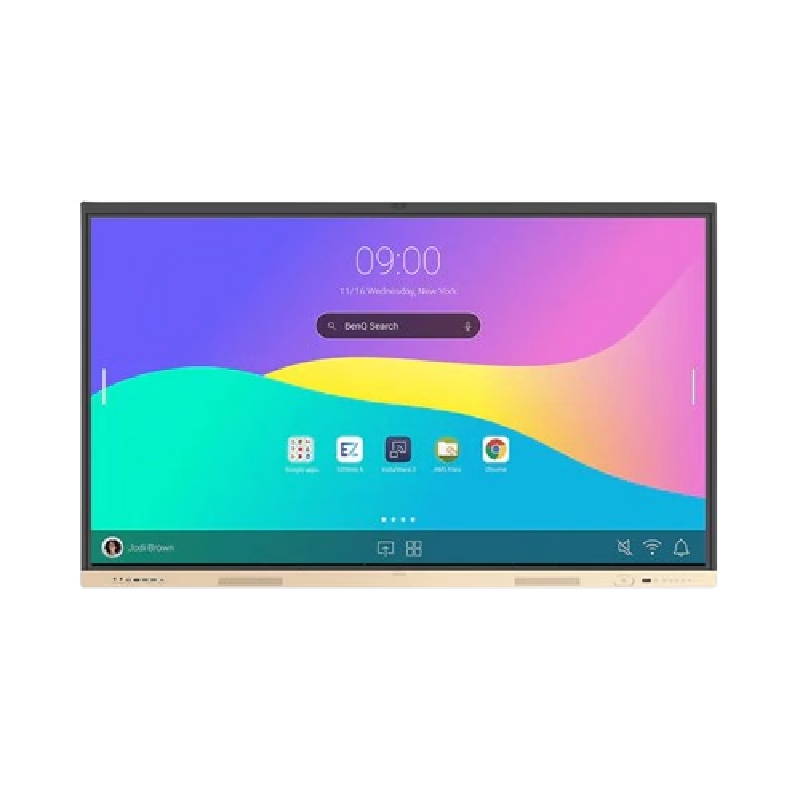
Are you seeking a versatile solution for your presentation and collaboration needs? Look no further than the BenQ RE03A 75″ Board Essential. This cutting-edge interactive whiteboard redefines productivity and engagement in meeting rooms and classrooms alike. With its expansive 75-inch display, the BenQ RE03A offers ample space for showcasing your ideas and content. Whether you’re delivering a presentation, brainstorming with colleagues, or teaching a class, this interactive board provides a captivating canvas for your creativity. Transitioning to functionality, the BenQ RE03A boasts intuitive touch controls that make navigation and interaction effortless. Its responsive touch technology ensures smooth and precise input, allowing you to annotate, draw, and manipulate content with ease. Furthermore, the board’s seamless connectivity options enable seamless integration with your existing devices and software. Whether you’re using a laptop, tablet, or smartphone, the BenQ RE03A ensures compatibility and flexibility for all your presentation needs. In addition, collaboration features such as screen sharing and real-time annotation foster teamwork and idea exchange among participants. Break down communication barriers and enhance productivity with the BenQ RE03A’s collaborative tools. Moreover, the board’s durable construction and anti-glare surface ensure reliability and visibility even in brightly lit environments. Say goodbye to distractions and glare, and hello to clear, crisp visuals every time. In conclusion, the BenQ RE03A 75″ Board Essential is a game-changer for presentations and collaboration. With its large display, intuitive controls, and collaborative features, it empowers users to deliver impactful presentations and foster teamwork like never before. Upgrade your meeting room or classroom with the BenQ RE03A and unlock new possibilities for productivity and engagement. Specifications: Screen Size : 75″ Panel Type : IPS Resolution : UHD 3840×2160 Response Time : 8ms

Used, original 35 W USB-C charger for Mac — reliable Apple power adapter (dual USB-C) for charging your Mac and other devices. This is an authentic Apple 35 W USB-C power adapter (dual-port) — used but tested. It’s built to charge MacBooks, iPhones, iPads, and other USB-C devices. Though lower wattage than larger Mac adapters, it works well for light use or supplemental charging. Features & Behavior Dual USB-C ports: can charge two devices simultaneously Intelligent power distribution: if both ports are used, the output splits evenly (~17.5 W each) USB Power Delivery support across standard profiles (5V, 9V, 15V, 20V) Accepts input 100-240V AC, so usable worldwide (with correct plug) Compact form factor in one variant, or standard “duckhead” plug style in another Specifications Strengths & Limitations Pros Authentic Apple unit — safer and more reliable than generic chargers Dual ports give flexibility — charge phone + Mac concurrently Portable and suitable for travel (universal voltage) Cons 35 W is low for MacBook Pro under load — might not maintain charging during heavy use When both ports used, power is halved (~17.5 W each) Used condition may include wear, scuffs, or reduced efficiency

HP M24fwa Monitor Overview The HP M24fwa is a 24-inch Full HD monitor designed for modern workspaces. It combines a slim design with clear visuals. As a result, it suits offices, home use, and study setups. 24-Inch Full HD Display This monitor features a 24-inch Full HD resolution. Therefore, text appears sharp and easy to read. Moreover, images look clear and vibrant. Because of this, it supports long working and browsing sessions. In addition, wide viewing angles keep content visible from different positions. As a result, collaboration becomes easier. Smooth and Comfortable Viewing The HP M24fwa delivers smooth performance for daily tasks. As a result, scrolling and multitasking feel natural. Furthermore, the display maintains balanced brightness. This improves overall viewing comfort. Eye Comfort and Anti-Glare Protection This monitor includes eye comfort features. Therefore, it helps reduce eye strain during extended use. In addition, the anti-glare screen limits reflections. As a result, the display stays clear in bright rooms. Connectivity and Easy Setup The HP M24fwa includes HDMI connectivity. As a result, it connects easily to laptops and desktops. Moreover, setup remains quick and simple. Therefore, users can start working immediately. Slim Design and Mounting Support The monitor features a slim and modern design. In addition, it supports VESA mounting. As a result, users can save desk space and create flexible setups. Ideal for Daily Use This monitor focuses on clarity and reliability. Moreover, it suits office work, studying, and media viewing. In conclusion, it offers a practical and stylish display solution. Specifications: Display: 23.8-inch IPS panel with 178-degree ultra-wide viewing angles. Resolution: FHD (1920 X 1080) at 75Hz refresh rate. Visual Quality: 300 nits brightness, 1000:1 contrast ratio, and 99% sRGB color gamut for accurate, vibrant, and consistent colors. Gaming/Performance: AMD Free Sync technology reduces screen tearing and stuttering

The ViewSonic 22″ 60Hz Monitor offers a perfect blend of style and performance for your daily computing needs. Whether you’re working, watching videos, or browsing the web, this monitor delivers stunning visuals. Featuring a Full HD resolution of 1920×1080 pixels, the ViewSonic 22″ 60Hz Monitor provides sharp and clear images. You’ll enjoy every detail, from vibrant colors to crisp text, making it ideal for both work and entertainment. With a refresh rate of 60Hz, this monitor ensures smooth and fluid motion. Whether you’re watching videos or playing games, you’ll experience less lag and more enjoyment. The ViewSonic 22″ 60Hz Monitor is designed with user comfort in mind. Its flicker-free technology and blue light filter reduce eye strain, allowing you to work or play for longer periods without discomfort. Connectivity is simple with the ViewSonic 22″ 60Hz Monitor. It features VGA and HDMI inputs, making it easy to connect to your computer, laptop, or gaming console. You’ll have a seamless setup for all your devices. This monitor’s sleek and modern design adds a touch of elegance to any workspace. Its slim bezels provide a larger viewing area, giving you an immersive visual experience. In conclusion, the ViewSonic 22″ 60Hz Monitor is a reliable and stylish choice for anyone seeking quality visuals and performance. Upgrade your viewing experience with this exceptional monitor and enjoy clear, vibrant, and comfortable viewing every day. Specifications: Display : 22″ TN Resolution : FHD 1920 x 1080 Refresh Rate : 60Hz Response Rate : 2ms GTG

Are you in search of the ultimate gaming monitor for an immersive experience? Look no further than the BenQ Mobiuz 27″ 4K 144Hz Gaming Monitor. With its stunning display and advanced features, it’s a game-changer. Firstly, let’s talk about the visual brilliance. This monitor boasts a 4K resolution, delivering crisp and clear images that bring games to life. Whether you’re exploring vast landscapes or engaging in intense firefights, every detail is rendered with precision. The 144Hz refresh rate ensures buttery-smooth gameplay, eliminating motion blur and ghosting for a seamless experience. Say goodbye to lag and hello to responsiveness like never before. Experience true-to-life colors with the monitor’s HDRi technology. It enhances contrast and clarity, making colors pop with vibrancy. Get ready to dive into games with stunning visuals that rival real life. Immerse yourself in the action with the monitor’s integrated speakers. With rich, immersive sound, you’ll feel like you’re right in the middle of the game. Say goodbye to external speakers cluttering your desk. Enhance your gaming experience further with customizable features. From adjustable height and tilt to built-in eye-care technology, this monitor is designed with the gamer in mind. Stay comfortable during extended gaming sessions without sacrificing performance. In conclusion, the BenQ Mobiuz 27″ 4K 144Hz Gaming Monitor is a powerhouse that takes your gaming to the next level. With its stunning visuals, smooth gameplay, and ergonomic design, it’s a must-have for any serious gamer. Upgrade your setup today and elevate your gaming experience. Specifications: Display : 27″ IPS Resolution : 4K(3840×2160) Refresh Rate : 144hz Response Rate : 1 ms

Verbatim Vi3000 512 GB NVMe SSD — high-speed PCIe 4.0 storage for desktops & laptops.• Read up to 5,000 MB/s • Write up to 3,200 MB/s • Compact M.2 2280 form factorInterface: PCIe Gen 4 × 4 NVMe 1.4 | Warranty: 3 Years | SKU: Vi3000-512G 🟣 Full Details : The Verbatim Vi3000 512 GB PCIe NVMe M.2 SSD delivers blazing-fast performance for everyday computing, gaming, and creative work. Using the latest PCIe Gen 4 × 4 NVMe 1.4 interface, it achieves read speeds up to 5,000 MB/s and write speeds up to 3,200 MB/s, making it a great upgrade for faster boot times and quicker app loading. PCIe Gen 4 × 4 NVMe 1.4 interface for ultra-fast transfer speeds Up to 5,000 MB/s read and 3,200 MB/s write performance Compact M.2 2280 design for desktops & laptops Low power consumption and quiet operation 3-year limited warranty with Verbatim reliability Works with most modern desktops and laptops that support M.2 NVMe (PCIe) drives. Fully backward compatible with PCIe 3.0 systems (at lower speeds). Verbatim Vi3000 512 GB M.2 NVMe SSD Quick installation & warranty guide

Genuine-spec touchpad flex cable for MacBook Pro 13″ (Model A2251, 2020, Intel)—essential for restoring full Force Touch functionality, haptic feedback, and precise multi-touch gesture control during trackpad repair or replacement. Compatible With: MacBook Pro 13-inch (2020, Two Thunderbolt Ports, Model A2251, Model Identifier MacBookPro16,1) with Intel Core i5/i7 processors. Part Type: Touchpad flex cable only—does not include the trackpad housing, Taptic Engine, or mounting hardware. This is the OEM-style ribbon cable that connects the trackpad to the logic board. Function: Transmits: Precise touch coordinates Force Touch pressure data Haptic feedback signals to the Taptic Engine Enables full macOS gesture support including Force Click, three-finger lookup, swipe navigation, and inertial scrolling. Precise touch coordinates Force Touch pressure data Haptic feedback signals to the Taptic Engine Enables full macOS gesture support including Force Click, three-finger lookup, swipe navigation, and inertial scrolling. OEM-Quality Build: Matches Apple’s original specifications in: Cable length and routing Connector pitch and ZIF latch design EMI shielding and flex durability Cable length and routing Connector pitch and ZIF latch design EMI shielding and flex durability Common Use Cases: Replacing a torn, creased, or liquid-damaged original flex Completing a trackpad replacement when the original cable is compromised Fixing intermittent trackpad behavior, loss of Force Touch, or complete unresponsiveness Replacing a torn, creased, or liquid-damaged original flex Completing a trackpad replacement when the original cable is compromised Fixing intermittent trackpad behavior, loss of Force Touch, or complete unresponsiveness Installation Note: Requires full bottom case removal and partial disassembly (including battery disconnect). Cable routes under the right speaker and logic board—must be seated in original retention channels. Connects via ZIF (Zero Insertion Force) socket—align carefully and latch gently. Recommended for experienced or certified technicians only. Requires full bottom case removal and partial disassembly (including battery disconnect). Cable routes under the right speaker and logic board—must be seated in original retention channels. Connects via ZIF (Zero Insertion Force) socket—align carefully and latch gently. Recommended for experienced or certified technicians only.

The 45W MagSafe 2 Power Adapter features a magnetic DC connector so if someone should trip over it, the cord disconnects harmlessly and your MacBook Air stays put safely. It also helps prevent fraying or weakening of the cables over time. In addition, the magnetic DC helps guide the plug into the system for a quick and secure connection. The 45W MagSafe 2 Power Adapter features a magnetic DC connector so if someone should trip over it, the cord disconnects harmlessly and your MacBook Air stays put safely. It also helps prevent fraying or weakening of the cables over time. In addition, the magnetic DC helps guide the plug into the system for a quick and secure connection. When the connection is secure, an LED located at the head of the DC connector lights up; an amber light lets you know that your notebook is charging, while a green light tells you that you have a full charge. An AC cord is provided with the adapter for maximum cord length, while the AC wall adapter (also provided) gives you an even easier and more compact way to travel. Designed to be the perfect traveling companion, the adapter has a clever design which allows the DC cable to be wound neatly around itself for easy cable storage. This power adapter recharges the lithium polymer battery while the system is off, on, or in sleep mode. It also powers the system if you choose to operate without a battery. Compatible only with MacBook Air featuring MagSafe 2 power port. Knowing which specific Mac model you have is important. If you are running OS X Lion (10.7) or later go to the “” menu at the top left of your screen, choose “About this Mac” then click the “More Info…” button. Your Mac model and generation will be displayed. If you are running an earlier version of OS X, you can enter your serial number here to find out which model you have. Mac Models MacBook Air (13-inch, Early 2015 – 2017) MacBook Air (11-inch, Early 2015)

FAVOURITE WIRELESS COMBO MK270 Wireless Combo brings together the convenience and comfort of a full-sized keyboard with a sculpted, compact mouse. With media keys, a number pad and precise cursor control to make your work a whole lot smoother. Plus, the lag-free wireless makes setup easy and saves space on your desk. No wonder this is the world best selling combo!7Based on independent sales data (in units) including all the models of the MK270 family for wireless combo aggregated from major global markets including Canada, China, France, Germany, Indonesia, Republic of Korea, Russian Federation, Sweden, Taiwan, Turkey, UK, US (Nov'19 - Nov'20 period). Retail channel only. FAVOURITE WIRELESS COMBO MK270 Wireless Combo brings together the convenience and comfort of a full-sized keyboard with a sculpted, compact mouse. With media keys, a number pad and precise cursor control to make your work a whole lot smoother. Plus, the lag-free wireless makes setup easy and saves space on your desk. No wonder this is the world best selling combo!7Based on independent sales data (in units) including all the models of the MK270 family for wireless combo aggregated from major global markets including Canada, China, France, Germany, Indonesia, Republic of Korea, Russian Federation, Sweden, Taiwan, Turkey, UK, US (Nov’19 – Nov’20 period). Retail channel only. Height: 5.87 in (149 mm) Width: 17.36 in (441 mm) Depth: 0.71 in (18 mm) Weight: 17.57 oz (498 g) Height: 3.90 in (99 mm) Width: 2.36 in (60 mm) Depth: 1.54 in (39 mm) Weight: 2.65 oz (75.2 g) Height: 0.74 in (18.7 mm) Width: 0.57 in (14.4 mm) Depth: 0.26 in (6.6 mm) Weight: 0.07 oz (2 g) Spill-resistant design 2Tested under limited conditions (maximum of 60 ml liquid spillage). Do not immerse the keyboard in liquid. Adjustable keyboard height 10-Key Number pad Key type: deep profile Caps lock indicator light On/Off power switch 2 AAA batteries(Alkaline Battery) Battery life: 36 months 3Keyboard battery life calculation based on an estimated two million keystrokes/year in an office environment. User experience may vary. Mouse battery life may vary based on user and computing conditions. Sensor technology: Smooth Optical tracking Number of buttons: 3 (Left/Right-click, Middle click) Scrolling: line-by-line Scroll Wheel: Yes, 2D, optical Connect/Power: On/Off power button 1 AA battery(Alkaline Battery) Battery life: 12 months 4Keyboard battery life calculation based on an estimated two million keystrokes/year in an office environment. User experience may vary. Mouse battery life may vary based on user and computing conditions. Mouse plastics: 49% post-consumer recycled material 5Excludes plastic in printed wiring assembly (PWA), receiver and packaging. Keyboard plastics: 54% post-consumer recycled material 6Excludes plastic in printed wiring assembly (PWA), receiver and packaging. An available USB port ChromeOS Windows 10,11 or later

The Samsung S3 Essential (D362) 27″ Full‑HD VA Curved Monitor (LS27D362GAMXUE) offers a large curved screen with a 100 Hz refresh rate for smoother motion in games and videos. Additionally, the VA panel produces deep contrast with wide viewing angles for everyday computing, entertainment, and casual gaming. The monitor also supports Game Mode to optimize color and image contrast for more vivid scenes. Moreover, advanced eye comfort technologies such as Eye Saver Mode and flicker‑free operation help reduce eye strain during long sessions. Therefore, it supports extended use for work or entertainment without discomfort. The curved design enhances immersion and helps minimize peripheral distractions. Furthermore, connectivity includes HDMI and VGA ports for easy connection to PCs and other devices. The monitor also includes a headphone jack for audio output. It comes with a stand that allows tilt adjustment, and it supports VESA wall mounting for flexible setups. The monitor is backed by a three‑year warranty for peace of mind. Specifications: 27″ curved VA panel with Full HD (1920 × 1080) resolution for clear visuals 100 Hz refresh rate for smoother motion in games and videos Game Mode optimizes color and contrast for more vivid scenes Eye Saver Mode and flicker‑free technology reduce eye strain HDMI and VGA connectivity plus headphone jack for flexible connections

WiWU WI‑C052 Converter – Compact aluminum adapter enables OTG and fast PD-style charging (≈27 W) with USB‑C/Lightning on USB‑A ports.Supports high-speed 10 Gbps data transfer, is plug‑and‑play, and works across phones, tablets, and laptops. Functionality: OTG-capable USB-A to USB-C (A→C) Data Transfer: Supports USB 3.2 (up to 10 Gbps) and backward compatible with USB 3.0/2.0 Fast Charging: Supports PD profile fast charging (up to ~27W Apple PD equivalent) without triggering charge pop-ups Build: Durable aluminum-alloy shell with silicone lanyard design for portability and heat dissipation Compatibility: Works with smartphones, tablets, laptops—enabling USB-A peripherals, USB-C or Lightning cables Plug & Play: No drivers required; reversible connector design Portability: Lightweight, compact—easy to carry

Logitech G403 HERO – Ergonomic wired gaming mouse with HERO 25K sensor and ultra-precise 25,600 DPI tracking.Delivers pro-grade performance with customizable RGB, 6 buttons, and optional weight tuning. ✅ Full Specifications: Model: Logitech G403 HERO Sensor: HERO 25K Optical Sensor DPI: 100 – 25,600 DPI (adjustable with no smoothing, acceleration, or filtering) Polling Rate: 1000 Hz (1ms response time) Tracking Speed: >400 IPS Acceleration: >40G Buttons: 6 programmable buttons (including 2 side buttons) Switches: Mechanical with metal spring button tensioning (rated for 20M+ clicks) Lighting: RGB Lighting (logo and scroll wheel, customizable via G HUB) Weight: Approx. 87g (mouse only) + 10g optional weight Grip Style: Palm and claw grip support Cable: 2.1 meters (standard rubber cable) Build: Ergonomic right-handed design with rubber side grips Software: Logitech G HUB (for DPI, lighting, macros, and profiles) Compatibility: Windows 7 or later, macOS 10.11 or later, Chrome OS Onboard Memory: Yes (save DPI and button settings directly to the mouse)
