
Samsung Odyssey G5 G50F 32″ QHD Monitor delivers sharp visuals and smooth gameplay for serious gamers. It features a 32-inch 2K flat display with high resolution. As a result, games look more detailed and immersive. Moreover, the VA panel ensures consistent colors and wide viewing angles. It maintains clear visuals from different positions. HDR10 support enhances brightness and contrast for deeper blacks and brighter highlights. Furthermore, the 165Hz refresh rate and 1ms response time reduce motion blur and lag. NVIDIA G-Sync compatibility and AMD FreeSync Premium help deliver smooth and stable frames. Finally, Samsung Odyssey G5 G50F 32″ Monitor includes gaming features like Black Equalizer and Virtual Aim Point. These improve visibility and accuracy. Players gain better control and performance in every match. Specifications: 32-inch QHD (2560×1440) display with sharp visuals and wide viewing angles VA panel ensures consistent colors and clear images from multiple angles 165Hz refresh rate and 1ms response time for smooth, responsive gaming HDR10 support for enhanced brightness, contrast, and realistic visuals Gaming tools like Black Equalizer and Virtual Aim Point for better accuracy

Arabic Language Silicone Keyboard Cover Skin for MacBook Air 13" Macbook Pro with / without Retina Display 13"15" 17" MC184LL/B, NOT COMPATIBLE WITH NEW MacBook Air 13” A1932 (Black) Arabic Language Silicone Keyboard Cover Skin for MacBook Air 13″ Macbook Pro with / without Retina Display 13″15″ 17″ MC184LL/B, NOT COMPATIBLE WITH NEW MacBook Air 13” A1932 (Black) About this item Only compatible with MacBook Air 13″ (Model: A1369 & A1466) , MacBook Pro 13-Inch with DVD Drive (Model: A1278), Pro 13 inch with Retina Display (Model: A1425 & A1502), Pro 15 inch with DVD Drive (Model: A1286), Pro 15 inch with Retina Display (Model: A1398), Pro 17 inch (Model: A1297) and Apple Wireless Bluetooth Keyboard MC184LL/B (A1314). NOT COMPATIBLE WITH NEWEST MacBook Air 13″ 2018 (Model: A1932) Fit for American Version( “Enter” key is a rectangle), DO NOT FIT FOR Europe Version (“Enter” key looks like “7”) Extra slim silicone skin, made it easier for typing. Soft silicone can ELIMINATE THE SOUND when typing FLEXIBLE, WASHABLE, easy to apply and remove for cleaning or disinfecting. Manufactured to the highest quality available, Ultra thin design lets you open and close your computer without any affection

The Samsung Crystal UHD U8000F 43″ 4K Tizen OS Smart TV UA43U8000FUXTW uses a 43-inch LCD panel with 3840 × 2160 resolution. It delivers standard 4K output for everyday viewing, streaming, and console use in smaller rooms. Samsung uses the Crystal Processor 4K for image processing and upscaling. As a result, lower-resolution content converts closer to 4K quality on the display. In addition, the TV supports HDR10 and HDR10+, which improve contrast between bright and dark areas for compatible content. The display runs at a 60 Hz refresh rate. Also, Motion Xcelerator reduces blur during fast motion scenes such as sports and action content. Samsung equips the TV with Tizen OS. Therefore, users access streaming apps, SmartThings integration, and smart features through a responsive interface. Connectivity includes HDMI ports, USB ports, Wi-Fi, Bluetooth, Ethernet LAN, and optical audio output. In addition, the TV supports ALLM for basic console gaming responsiveness. This model focuses on 4K resolution, standard HDR performance, and essential smart TV features without advanced gaming or local dimming technology. Specifications: 43-inch LCD panel with 3840 × 2160 4K UHD resolution Crystal Processor 4K with upscaling support HDR10 and HDR10+ compatibility 60 Hz refresh rate with Motion Xcelerator Tizen OS with HDMI, USB, Wi-Fi, Bluetooth, Ethernet connectivity

MacBook Pro A1706 / A1708 Display Assembly (Space Gray) Compatibility : MacBook Pro 2017 13″ A1708 (EMC 3164 MacBookPro14,1) 2.3 GHz A1708 (EMC 3164 MacBookPro14,1) 2.5 GHz A1706 (EMC 3163 MacBookPro14,2) 3.1 GHz A1706 (EMC 3163 MacBookPro14,2) 3.3 GHz A1706 (EMC 3163 MacBookPro14,2) 3.5 GHz MacBook Pro 2016 13″ A1706 (EMC 3071 MacBookPro13,2) 2.9 GHz A1706 (EMC 3071 MacBookPro13,2) 3.1 GHz A1706 (EMC 3071 MacBookPro13,2) 3.3 GHz A1708 (EMC 2978 MacBookPro13,1) 2.0 GHz A1708 (EMC 2978 MacBookPro13,1) 2.4 GHz

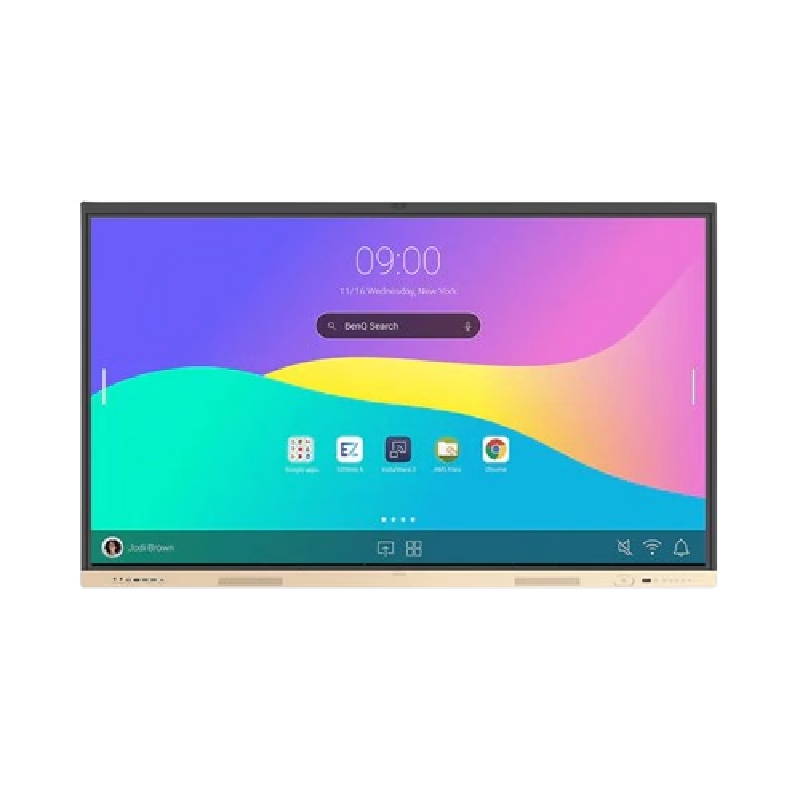
The Horion Interactive Flat Panel 65″ transforms any space into a dynamic and interactive environment. Whether in classrooms or conference rooms, it enhances collaboration and productivity. Featuring a stunning 65-inch 4K UHD display, the Horion Interactive Flat Panel delivers crystal-clear visuals and vibrant colors. This ensures every detail is visible, making presentations and lessons more engaging. The Interactive Flat Panel comes with advanced touch technology, allowing multiple users to interact with the screen simultaneously. This fosters teamwork and encourages active participation. With built-in annotation tools, the Interactive Flat Panel 65″ makes it easy to highlight key points and add notes during presentations. These tools are intuitive and user-friendly, making it accessible for everyone. Connectivity is seamless with the Interactive Flat Panel. It offers multiple ports, including HDMI, USB, and wireless options, ensuring compatibility with various devices. This flexibility makes it easy to integrate into your existing setup. The Interactive Flat Panel 65″ is designed for ease of use. Its user-friendly interface and responsive touch screen make it simple to navigate and control. Whether you’re a teacher or a business professional, you’ll find it easy to use. In addition, the Interactive Flat Panel includes powerful built-in speakers, delivering clear and immersive audio. This enhances the overall experience, making it ideal for multimedia presentations. In conclusion, the Horion Interactive Flat Panel 65″ combines stunning visuals, interactive features, and ease of use for a superior collaborative experience. Upgrade your space with the Interactive Flat Panel and boost engagement and productivity today. Specifications: Display : 65″ Resolution : 4K (3840×2160) Refresh Rate : 60Hz CPU : Octacore Ram : 8GB Memory : 128GB GPU : Mali G52-MP8 OS : Android 13.0 Sensor : Infrared, NFC, Light Sensor

OEM-quality trackpad replacement (without flex cable) for MacBook Pro 13″ (Models A2251 and A2289, 2020) in Silver finish—engineered for precise Force Touch response, smooth multi-touch gestures, and seamless integration with the original chassis. Compatible With: MacBook Pro 13″ (2020, Two Thunderbolt Ports) – Model A2251 (Intel Core i5/i7) MacBook Pro 13″ (2020, Four Thunderbolt Ports) – Model A2289 (Intel Core i5/i7) (Note: Both models share the same trackpad assembly despite port differences.) MacBook Pro 13″ (2020, Two Thunderbolt Ports) – Model A2251 (Intel Core i5/i7) MacBook Pro 13″ (2020, Four Thunderbolt Ports) – Model A2289 (Intel Core i5/i7) (Note: Both models share the same trackpad assembly despite port differences.) Part Type: Trackpad only—does not include the flex cable, Taptic Engine, or mounting hardware. Designed for technicians who will reuse the original internal components. Finish: Silver—matches the Silver MacBook Pro 13″ top and bottom case for perfect aesthetic continuity. Force Touch Support: Fully compatible with pressure-sensitive input and haptic feedback when paired with the original Taptic Engine and logic board—ensuring full macOS gesture functionality (e.g., Force Click, Lookup, Pressure-sensitive drawing). Precision Build: Features the same glass surface texture, curvature, and micro-click mechanism as Apple’s original—delivering consistent tracking accuracy and tactile feel. Installation Requirements: Requires full bottom case disassembly and careful transfer of the original flex cable and Taptic Engine. Adhesive must be applied precisely to maintain structural rigidity and sensor alignment. Recommended for certified or experienced repair technicians only.

Professional Lavalier Microphone Candc DC-C6 Candc DC-C6 Lavalier Microphone for Smartphones, DSLR, Camcorders, Audio recorders, PC etc. Clip microphone to help you get music or sound.One-directional microphone with anti-noise function. type jack can be connected to PC / laptop / wireless microphone transmitter with 3.5mm line-in / mic in. Built-in clip can be easily attached to collar, tie or other clothes-no installation required. Features: Type: microphone Cable length: about 116 cm Sensitivity: -46 ± 2db : one way Operating voltage: DC1.0V-10 VAcurrent consumption

Genuine-spec touchpad flex cable for MacBook Pro 13″ (Model A1502, Mid 2014)—restores full trackpad functionality, including precise cursor control and physical click response. Essential for repairing unresponsive or erratic trackpad behavior. Compatible With: MacBook Pro 13-inch (Mid 2014, Model A1502, Model Identifier MacBookPro11,1) with Intel Core i5/i7 processors and Retina display. Part Type: Touchpad flex cable only — does not include the trackpad housing, button mechanism, or mounting hardware. This is the ribbon cable that connects the trackpad to the logic board. Function: Transmits cursor movement and click signals (left/right physical clicks) Supports standard multi-touch gestures (two-finger scroll, tap-to-click, pinch-to-zoom) ⚠️ Note: This model uses a physical click mechanism—not Force Touch (no haptic feedback or pressure sensitivity). Transmits cursor movement and click signals (left/right physical clicks) Supports standard multi-touch gestures (two-finger scroll, tap-to-click, pinch-to-zoom) ⚠️ Note: This model uses a physical click mechanism—not Force Touch (no haptic feedback or pressure sensitivity). OEM-Quality Build: Matches Apple’s original in: Cable length and routing path Connector type and pin alignment Insulation and flexibility for long-term reliability Cable length and routing path Connector type and pin alignment Insulation and flexibility for long-term reliability Common Use Cases: Replacing a torn, frayed, or corroded original flex cable Fixing: Unresponsive or intermittent trackpad Cursor jumping or drifting Click function failure (left or right) Complete trackpad disconnect Replacing a torn, frayed, or corroded original flex cable Fixing: Unresponsive or intermittent trackpad Cursor jumping or drifting Click function failure (left or right) Complete trackpad disconnect Unresponsive or intermittent trackpad Cursor jumping or drifting Click function failure (left or right) Complete trackpad disconnect Installation Note: Requires bottom case removal and battery disconnect. Connects via a ZIF (Zero Insertion Force) socket on the logic board—do not force. Cable routes under the battery; handle with care to avoid strain. Suitable for intermediate to advanced DIYers or technicians. Requires bottom case removal and battery disconnect. Connects via a ZIF (Zero Insertion Force) socket on the logic board—do not force. Cable routes under the battery; handle with care to avoid strain. Suitable for intermediate to advanced DIYers or technicians.

The Samsung Odyssey G9 LS49DG952SMXUE features a 49-inch OLED panel with Dual QHD resolution (5120 × 1440) and a 32:9 aspect ratio. The ultrawide format provides the screen space of two 27-inch QHD monitors in a single display, making it suitable for gaming, multitasking, and content creation. The monitor supports a refresh rate of up to 240Hz and a response time of 0.03ms GTG. As a result, fast-moving content appears smoother and more responsive during competitive gaming. In addition, AMD FreeSync Premium Pro support helps reduce screen tearing and stuttering. Samsung uses OLED panel technology to provide per-pixel lighting control. Therefore, the display delivers deep blacks, high contrast, and accurate color reproduction without a traditional backlight. The monitor includes Samsung Smart TV functionality powered by Tizen OS. Users can access streaming applications and smart features directly from the monitor without connecting a PC. Connectivity includes HDMI, DisplayPort, USB ports, Wi-Fi, Bluetooth, and Ethernet support. In addition, the monitor supports Picture-by-Picture and Picture-in-Picture modes for multitasking across multiple input sources. This model focuses on high-refresh-rate gaming, OLED image quality, and integrated smart features within a 49-inch curved ultrawide display. Specifications: 49-inch OLED panel with 5120 × 1440 Dual QHD resolution 240Hz refresh rate and 0.03ms GTG response time 32:9 ultrawide aspect ratio AMD FreeSync Premium Pro support Tizen OS with HDMI, DisplayPort, USB, Wi-Fi, and Bluetooth connectivity

Genuine-spec touchpad flex cable compatible with both MacBook Air A2179 (Intel, 2020) and A2337 (M1, 2020)—restores full Force Touch functionality, haptic feedback, and precise multi-touch gesture control during trackpad repair or replacement. Compatible With: MacBook Air 13″ (2020, Intel) – Model A2179 (Model Identifier: MacBookAir9,1) MacBook Air 13″ (2020, Apple M1) – Model A2337 (Model Identifier: MacBookAir10,1) MacBook Air 13″ (2020, Intel) – Model A2179 (Model Identifier: MacBookAir9,1) MacBook Air 13″ (2020, Apple M1) – Model A2337 (Model Identifier: MacBookAir10,1) ✅ Important Note: Despite different processors (Intel vs. M1), Apple used the same trackpad assembly and flex cable in both A2179 and A2337. This makes the flex cable fully interchangeable between the two models. Part Type: Touchpad flex cable only — does not include the trackpad housing, Taptic Engine, or mounting hardware. This is the OEM-style ribbon cable that connects the trackpad to the logic board. Function: Transmits: Touch input coordinates Force Touch pressure data Haptic feedback signals to the Taptic Engine Enables full macOS gesture support: Force Click, three-finger lookup, swipe navigation, pinch-to-zoom, and smooth cursor tracking. Touch input coordinates Force Touch pressure data Haptic feedback signals to the Taptic Engine Enables full macOS gesture support: Force Click, three-finger lookup, swipe navigation, pinch-to-zoom, and smooth cursor tracking. OEM-Quality Build: Matches Apple’s original specifications in: Cable length and routing path Connector pitch and ZIF latch design EMI shielding and flex durability Cable length and routing path Connector pitch and ZIF latch design EMI shielding and flex durability Common Use Cases: Replacing a torn, creased, or liquid-damaged original flex cable Completing a trackpad replacement when the original cable is compromised Fixing intermittent trackpad behavior, loss of Force Touch, or complete unresponsiveness Replacing a torn, creased, or liquid-damaged original flex cable Completing a trackpad replacement when the original cable is compromised Fixing intermittent trackpad behavior, loss of Force Touch, or complete unresponsiveness Installation Note: Requires full bottom case removal and battery disconnection. Cable routes under the right side of the battery and logic board. Connects via a ZIF (Zero Insertion Force) socket—align carefully and latch gently. Recommended for experienced or certified technicians only. Requires full bottom case removal and battery disconnection. Cable routes under the right side of the battery and logic board. Connects via a ZIF (Zero Insertion Force) socket—align carefully and latch gently. Recommended for experienced or certified technicians only.

The HP ENVY 27 4K Monitor delivers stunning visuals for work, entertainment, and creative tasks.It features a 27-inch 4K UHD screen that shows sharp details and vivid color.Moreover, the slim profile and modern design look great on any desk. This monitor uses an advanced panel for wide viewing angles and accurate colors.Additionally, 4K resolution makes photos, videos, and text look crisp and lifelike.Anti-glare coating helps reduce reflections in bright lighting. The HP ENVY 27 4K also includes multiple ports like HDMI and DisplayPort for flexible connections.Furthermore, USB-C connectivity supports video, data, and power delivery with one cable.Tilt and height adjustment allow comfortable viewing during long sessions. This display works well for professionals, creators, and home users alike.Therefore, it supports productivity, media editing, and streaming.Finally, it combines high picture quality, versatile connections, and ergonomic features for daily use. Specifications: 27″ 4K UHD (3840 × 2160) display HDMI + DisplayPort + USB-C connectivity Anti-glare panel for clearer viewing Tilt and height adjustable stand Accurate color and wide viewing angles

The Lenovo L24E-30 24″ 60Hz Monitor offers a perfect blend of style and performance for your computing needs. Whether you’re working, gaming, or streaming, this monitor delivers an exceptional visual experience. With its 24-inch Full HD display, the Lenovo L24E-30 provides crisp and clear visuals. Enjoy stunning detail and vibrant colors that bring your content to life, whether you’re editing photos or watching videos. The 60Hz refresh rate of the Lenovo L24E-30 ensures smooth and fluid motion, reducing screen tearing and ghosting. This makes it ideal for fast-paced games and dynamic videos, offering a more immersive experience. Designed with a slim and sleek profile, the Lenovo L24E-30 adds a modern touch to any workspace. Its narrow bezels create a seamless multi-monitor setup, allowing you to expand your view effortlessly. Featuring AMD FreeSync technology, the Lenovo L24E-30 synchronizes the monitor’s refresh rate with your graphics card. This reduces screen stuttering and provides a smoother gaming experience, even during intense action scenes. The Lenovo L24E-30 24″ 60Hz Monitor is equipped with multiple connectivity options, including HDMI and VGA ports. This ensures compatibility with a wide range of devices, making it a versatile addition to your setup. For comfortable viewing, the Lenovo L24E-30 includes eye-care features like low blue light and flicker-free technology. These features help reduce eye strain during long hours of use, enhancing your overall comfort. In conclusion, the Lenovo L24E-30 24″ 60Hz Monitor combines stylish design, smooth performance, and eye-care features for an outstanding viewing experience. Upgrade to the Lenovo L24E-30 today and enjoy enhanced productivity and entertainment. Specifications: Display : 24″ VA Resolution : FHD 1920 x 1080 Refresh Rate : 60Hz Response Rate : 4ms

The MSI MAG 244C 24″ FHD 180Hz Curved Gaming Monitor delivers smooth and immersive visuals for gaming, movies, and everyday use. Its Full HD resolution shows clean details in games, videos, and work tasks. The 24-inch curved screen wraps slightly around your view for deeper immersion. This helps you stay focused and engaged while playing or working. Moreover, the MSI MAG 244C 24″ FHD 180Hz Curved Gaming Monitor features a fast 180 Hz refresh rate. This refresh rate makes motion look fluid and responsive. Fast games and action scenes appear more detailed and smooth. This reduces motion blur and improves your reaction time during gameplay. In addition, the monitor offers a 1 ms (MPRT) response time. This helps reduce ghosting and keeps fast visuals clear. Your controls feel responsive and snappy. This makes it easier to compete in shooters and other fast-paced games. Furthermore, the MSI MAG 244C 24″ FHD 180Hz Curved Gaming Monitor uses a VA panel with deep contrast. Blacks appear darker and scenes look richer for games and movies. The panel also supports a wide color gamut for decent color reproduction. This improves visuals for media, gaming, and creative content. Also, the monitor supports adaptive sync technology. This sync helps prevent screen tearing and stuttering when your GPU’s frame rate changes. The curved screen and smooth frame rate combine to deliver a more immersive gaming experience. The design of the MSI MAG 244C 24″ FHD 180Hz Curved Gaming Monitor is clean with slim bezels. It fits well on most desks without taking too much space. The stand allows tilt adjustment so you can set a comfortable viewing angle. Overall, the MSI MAG 244C 24″ FHD 180Hz Curved Gaming Monitor blends speed, clarity, and immersion in one strong display. It improves gaming performance, enhances media enjoyment, and works well for everyday computing. This monitor is ideal for gamers and users who want responsive, smooth visuals without a large screen footprint. Specifications: Display : 24″ VA Resolution : FHD 1920×1080 Refresh Rate : 180Hz Response Time : 1ms Curvature : 1500R

Remax F41 6″ Wireless Clamp Fan – USB‑C rechargeable (4,000 mAh), 4 speeds, 720° rotation, up to 3 hrs runtime.Modular 3‑in‑1 design with detachable grille, washable parts, and night‑light feature. Model: Remax F41 6-inch Wireless Air Circulating Clamp Fan Power & Battery: Rechargeable 4,000 mAh battery; USB-C charging (~3 hours to full charge), offers ~3 hours continuous use at high speeds Operation Modes: 4 fan speeds, 3‑in‑1 usage (desktop, clamp, or hanging), 720° wide-angle rotation Design Features: Detachable, washable grille plus built-in warm night light Care Tips: Recharge every two months if unused; avoid inserting objects into blades

Acer KA222Qbi The Acer KA222Qbi entry-level series provide a superb user experience and don’t compromise . on quality. With a choice of display size and a ZeroFrame. design it is ideal for use in homes and offices. Whether it’s running productivity apps or playing games this monitor has it all. Viewable Screen Size Acer KA222Qbi 54.6 cm (21.5″) Aspect Ratio 16:9 Response Time 1 ms VRB Backlight Technology LED Horizontal Viewing Angle 178° Vertical Viewing Angle 178° Panel Technology In-plane Switching (IPS) Technology Frequency (Horizontal/Vertical) 30KHz-85KHz/48Hz-75Hz Pixel Pitch 0.25 mm Tilt Angle -5° to 15° Maximum Adjustable Height No Video Maximum Resolution 1920 x 1080 Native Contrast Ratio 1,000:1 Dynamic Contrast Ratio 100,000,000:1 Colour Supported 16.7 Million Colours Colour Depth 8-bit Color Gamut 72% NTSC Dynamic Contrast Ratio 100,000,000:1 Brightness 250 cd/m² Tearing Prevention Technology AMD FreeSync™ (HDMI VRR) Interfaces/Ports Acer KA222Qbi VGA Yes HDMI Yes Power Description Standby Power Consumption (Energy Star) 270 mW Off-Mode Power Consumption (Energy Star) 210 mW Operating Power Consumption (Energy Star) 15.50 W Miscellaneous Environmental Certification MPR II Package Contents 1 x KA222Q Widescreen LCD Monitor 1 x Power Cord(EURO/UK) 1 x VGA Cable Physical Characteristics Colour Black VESA Mount Compatible Yes VESA Mount Standard 100 x 100 Height 295 mm Width 490 mm Depth 65 mm Weight (Approximate) 3.09 kg Weight with Stand (Approximate) 3.44 kg Specifications: Specifications 21.5″ ZeroFrame FreeSync 1ms, IPS 1 year warranty

The Alienware AW2724HF 27″ 360Hz Gaming Monitor is built for serious gamers who want speed and clarity. It features a 27-inch Full HD Fast IPS display with sharp visuals and wide viewing angles. With a 360Hz refresh rate via DisplayPort and up to 255Hz through HDMI, the monitor delivers smooth motion in fast-paced games. A 0.5ms response time reduces blur, making every action look sharp and clear. The monitor supports AMD FreeSync Premium and VESA Adaptive-Sync, helping eliminate screen tearing for smoother gameplay. It also covers 99% of the sRGB color range and supports HDR10, offering rich and vibrant visuals. It comes with plenty of ports, including two DisplayPort 1.4, one HDMI 1.4, four USB 3.2 Gen 1 ports, and one USB upstream. This gives you flexible options to connect accessories and gaming gear. The stand is fully adjustable with options to tilt, swivel, pivot, and adjust height for better comfort. It also supports VESA mounting, allowing you to set it up the way you want. The design features thin bezels, making it great for multi-monitor setups. It also includes game-enhancing tools like crosshair overlays and display modes to give players an edge. Overall, the Alienware AW2724HF combines high refresh rates, fast response, and rich visuals in a sleek and adjustable design, perfect for competitive and casual gamers alike. Specifications: Display : 27″ Fast IPS Resolution : 1920×1080 FHD Refresh Rate : 360Hz Response Time : 0.5ms

HP M24fwa Monitor Overview The HP M24fwa is a 24-inch Full HD monitor designed for modern workspaces. It combines a slim design with clear visuals. As a result, it suits offices, home use, and study setups. 24-Inch Full HD Display This monitor features a 24-inch Full HD resolution. Therefore, text appears sharp and easy to read. Moreover, images look clear and vibrant. Because of this, it supports long working and browsing sessions. In addition, wide viewing angles keep content visible from different positions. As a result, collaboration becomes easier. Smooth and Comfortable Viewing The HP M24fwa delivers smooth performance for daily tasks. As a result, scrolling and multitasking feel natural. Furthermore, the display maintains balanced brightness. This improves overall viewing comfort. Eye Comfort and Anti-Glare Protection This monitor includes eye comfort features. Therefore, it helps reduce eye strain during extended use. In addition, the anti-glare screen limits reflections. As a result, the display stays clear in bright rooms. Connectivity and Easy Setup The HP M24fwa includes HDMI connectivity. As a result, it connects easily to laptops and desktops. Moreover, setup remains quick and simple. Therefore, users can start working immediately. Slim Design and Mounting Support The monitor features a slim and modern design. In addition, it supports VESA mounting. As a result, users can save desk space and create flexible setups. Ideal for Daily Use This monitor focuses on clarity and reliability. Moreover, it suits office work, studying, and media viewing. In conclusion, it offers a practical and stylish display solution. Specifications: Display: 23.8-inch IPS panel with 178-degree ultra-wide viewing angles. Resolution: FHD (1920 X 1080) at 75Hz refresh rate. Visual Quality: 300 nits brightness, 1000:1 contrast ratio, and 99% sRGB color gamut for accurate, vibrant, and consistent colors. Gaming/Performance: AMD Free Sync technology reduces screen tearing and stuttering

The 85W MagSafe 2 Power Adapter features a magnetic DC connector so if someone should trip over it, the cord disconnects harmlessly and your MacBook Pro stays put safely. It also helps prevent fraying or weakening of the cables over time. In addition, the magnetic DC helps guide the plug into the system for a quick and secure connection. The 85W MagSafe 2 Power Adapter features a magnetic DC connector so if someone should trip over it, the cord disconnects harmlessly and your MacBook Pro stays put safely. It also helps prevent fraying or weakening of the cables over time. In addition, the magnetic DC helps guide the plug into the system for a quick and secure connection. When the connection is secure, an LED located at the head of the DC connector lights up; an amber light lets you know that your notebook is charging, while a green light tells you that you have a full charge. An AC cord is provided with the adapter for maximum cord length, while the AC wall adapter (also provided) gives you an even easier and more compact way to travel. Designed to be the perfect traveling companion, the adapter has a clever design which allows the DC cable to be wound neatly around itself for easy cable storage. Compatible with MacBook Pro with 13-inch Retina display. See this article for more details about choosing the right one. Knowing which specific Mac model you have is important. If you are running OS X Lion (10.7) or later go to the “” menu at the top left of your screen, choose “About this Mac” then click the “More Info…” button. Your Mac model and generation will be displayed. If you are running an earlier version of OS X, you can enter your serial number here to find out which model you have. COMPATIBILITY Mac Models: MacBook Pro (Retina, 13-inch, Late 2012 – 2015)

WiWU Ora Laptop Sleeve Size: 14" and 16" Color: Black/Grey/Ivory Extra Storage Space - Two pockets in front, enough space to keep mouse, cable, cellphone, memory cards, external hard drive, pens, etc. Ultra-slim & Lightweight - Slim, portable, and lightweight to take alone, or slide into your briefcase, backpack, or any other bag, perfect for business, school, or travel. Shockproof - Multiple Layers Protection, polyester foam padding layer, and nylon fabric lining for bump and shock absorption, protect your computer from accidental scratches. Excellent Detail: Use an Exquisite zipper and reinforced stitching on all stress points, ensuring the bag does not fall apart when carrying heavy goods. The first verticle-designed laptop bag, you will feel the beauty of simple and good texture. WiWU Ora Laptop Sleeve Size: 14″ and 16″ Color: Black/Grey/Ivory Extra Storage Space – Two pockets in front, enough space to keep mouse, cable, cellphone, memory cards, external hard drive, pens, etc. Ultra-slim & Lightweight – Slim, portable, and lightweight to take alone, or slide into your briefcase, backpack, or any other bag, perfect for business, school, or travel. Shockproof – Multiple Layers Protection, polyester foam padding layer, and nylon fabric lining for bump and shock absorption, protect your computer from accidental scratches. Excellent Detail: Use an Exquisite zipper and reinforced stitching on all stress points, ensuring the bag does not fall apart when carrying heavy goods. The first verticle-designed laptop bag, you will feel the beauty of simple and good texture.

The MSI Pro MP161 E2 15.6″ 60Hz Portable Monitor is a lightweight and versatile display for professionals and gamers. It offers a compact design, making it easy to carry anywhere. This portable monitor features a 15.6-inch Full HD display with a resolution of 1920 x 1080. The 60Hz refresh rate ensures smooth visuals for work, entertainment, and gaming. The IPS panel delivers vibrant colors and wide viewing angles. With ultra-slim bezels, the MSI Pro MP161 E2 provides a sleek and modern look. It enhances your workspace without taking up too much space. The anti-glare screen ensures comfortable viewing in different lighting conditions. The portable monitor supports multiple connectivity options, including USB-C and Mini HDMI. This allows easy connection to laptops, tablets, and gaming consoles. Plug-and-play functionality makes setup quick and hassle-free. Weighing only 0.75 kg, the MSI Pro MP161 E2 15.6″ 60Hz Portable Monitor is perfect for travel. Its ultra-slim profile fits easily into bags, making it ideal for remote work or presentations. The built-in stand allows flexible positioning for better comfort. You can adjust the screen angle for the best viewing experience. The durable design ensures long-term reliability. With low blue light technology, this portable monitor reduces eye strain during extended use. It is perfect for professionals who spend hours in front of a screen. In conclusion, the MSI Pro MP161 E2 15.6″ 60Hz Portable Monitor is a great choice for those needing a secondary display. Its lightweight design, excellent visuals, and versatile connectivity make it ideal for work and entertainment. Specifications: Display : 15.6″ IPS Resolution : 1920×1080 FHD Refresh Rate : 60Hz Response Rate : 4ms Speaker : 1.5W x2
