
Huawei IdeaHub Board 2 86-inch display delivers an immersive teaching and collaboration experience with large 4K visuals. It helps teachers present clearly and engage students effectively. As a result, classrooms benefit from better interaction and visibility. The 86-inch screen features 4K UHD resolution with zero-gap laminated glass. Therefore, it reduces reflection and improves clarity. Moreover, the D-LED backlight and 60Hz refresh rate ensure stable and consistent visuals. It supports up to 20 touch points using infrared multi-touch technology. In addition, smart handwriting recognition and annotation allow natural writing. The low latency writing response improves accuracy during lessons. The system includes a quad-core processor with 4GB RAM and 32GB storage. Consequently, it runs applications smoothly. It supports Android, Windows, iOS, and macOS for flexible integration. It also includes key capabilities such as 4K UHD resolution, multi-touch interaction, smart annotation tools, wide connectivity options, and cross-platform support. Huawei IdeaHub Board 2 86-inch display is built to enhance collaboration and simplify teaching. Specifications: 86-inch 4K UHD display with 3840 × 2160 resolution Supports up to 20 touch points with infrared technology Zero-gap laminated glass with D-LED backlight Low latency writing with smart annotation support Quad-core CPU with 4GB RAM and 32GB storage

Genuine-spec touchpad flex cable for MacBook Pro 13″ (Model A2289, 2020, Intel)—restores full Force Touch functionality, haptic feedback, and preci multi-touch gesture control. OEM-quality replacement for damaged or faulty original cables. Compatible With: MacBook Pro 13-inch (2020, Four Thunderbolt Ports, Model A2289, Model Identifier MacBookPro16,2) with Intel Core i5/i7 processors. Part Type: Touchpad flex cable only — does not include the trackpad housing, Taptic Engine, or mounting hardware. This is the OEM-style ribbon cable that connects the trackpad to the logic board. Function: Transmits: Touch input coordinates Force Touch pressure data Haptic feedback signals to the Taptic Engine Enables full macOS gesture support: Force Click, three-finger lookup, swipe navigation, pinch-to-zoom, and smooth cursor tracking. Touch input coordinates Force Touch pressure data Haptic feedback signals to the Taptic Engine Enables full macOS gesture support: Force Click, three-finger lookup, swipe navigation, pinch-to-zoom, and smooth cursor tracking. OEM-Quality Build: Matches Apple’s original specifications in: Cable length and routing path Connector pitch and ZIF latch design EMI shielding and flex durability Cable length and routing path Connector pitch and ZIF latch design EMI shielding and flex durability Common Use Cases: Replacing a torn, creased, or liquid-damaged original flex cable Completing a trackpad replacement when the original cable is unusable Fixing: Intermittent or erratic trackpad behavior Loss of Force Touch or haptic feedback Complete trackpad unresponsiveness Replacing a torn, creased, or liquid-damaged original flex cable Completing a trackpad replacement when the original cable is unusable Fixing: Intermittent or erratic trackpad behavior Loss of Force Touch or haptic feedback Complete trackpad unresponsiveness Intermittent or erratic trackpad behavior Loss of Force Touch or haptic feedback Complete trackpad unresponsiveness Installation Note: Requires full bottom case removal and battery disconnection. Cable routes under internal components (speaker, logic board)—must follow original path. Connects via ZIF (Zero Insertion Force) socket—align carefully, never force. Recommended for experienced or certified technicians only. Requires full bottom case removal and battery disconnection. Cable routes under internal components (speaker, logic board)—must follow original path. Connects via ZIF (Zero Insertion Force) socket—align carefully, never force. Recommended for experienced or certified technicians only. Important Compatibility Notes: ✅ Only for A2289 (13″, 4 Thunderbolt ports, 2020, Intel) ❌ Not compatible with: A2251 (2 Thunderbolt ports, 2020) A2338 (M1 MacBook Pro, 2020) Any MacBook Air or 14″/16″ MacBook Pro ✅ Only for A2289 (13″, 4 Thunderbolt ports, 2020, Intel) ❌ Not compatible with: A2251 (2 Thunderbolt ports, 2020) A2338 (M1 MacBook Pro, 2020) Any MacBook Air or 14″/16″ MacBook Pro A2251 (2 Thunderbolt ports, 2020) A2338 (M1 MacBook Pro, 2020) Any MacBook Air or 14″/16″ MacBook Pro

HP M24fwa Monitor Overview The HP M24fwa is a 24-inch Full HD monitor designed for modern workspaces. It combines a slim design with clear visuals. As a result, it suits offices, home use, and study setups. 24-Inch Full HD Display This monitor features a 24-inch Full HD resolution. Therefore, text appears sharp and easy to read. Moreover, images look clear and vibrant. Because of this, it supports long working and browsing sessions. In addition, wide viewing angles keep content visible from different positions. As a result, collaboration becomes easier. Smooth and Comfortable Viewing The HP M24fwa delivers smooth performance for daily tasks. As a result, scrolling and multitasking feel natural. Furthermore, the display maintains balanced brightness. This improves overall viewing comfort. Eye Comfort and Anti-Glare Protection This monitor includes eye comfort features. Therefore, it helps reduce eye strain during extended use. In addition, the anti-glare screen limits reflections. As a result, the display stays clear in bright rooms. Connectivity and Easy Setup The HP M24fwa includes HDMI connectivity. As a result, it connects easily to laptops and desktops. Moreover, setup remains quick and simple. Therefore, users can start working immediately. Slim Design and Mounting Support The monitor features a slim and modern design. In addition, it supports VESA mounting. As a result, users can save desk space and create flexible setups. Ideal for Daily Use This monitor focuses on clarity and reliability. Moreover, it suits office work, studying, and media viewing. In conclusion, it offers a practical and stylish display solution. Specifications: Display: 23.8-inch IPS panel with 178-degree ultra-wide viewing angles. Resolution: FHD (1920 X 1080) at 75Hz refresh rate. Visual Quality: 300 nits brightness, 1000:1 contrast ratio, and 99% sRGB color gamut for accurate, vibrant, and consistent colors. Gaming/Performance: AMD Free Sync technology reduces screen tearing and stuttering

A4Tech KRS-8372 USB Keyboard QWERTY English Black

The Horion Interactive Flat Panel 65″ transforms any space into a dynamic and interactive environment. Whether in classrooms or conference rooms, it enhances collaboration and productivity. Featuring a stunning 65-inch 4K UHD display, the Horion Interactive Flat Panel delivers crystal-clear visuals and vibrant colors. This ensures every detail is visible, making presentations and lessons more engaging. The Interactive Flat Panel comes with advanced touch technology, allowing multiple users to interact with the screen simultaneously. This fosters teamwork and encourages active participation. With built-in annotation tools, the Interactive Flat Panel 65″ makes it easy to highlight key points and add notes during presentations. These tools are intuitive and user-friendly, making it accessible for everyone. Connectivity is seamless with the Interactive Flat Panel. It offers multiple ports, including HDMI, USB, and wireless options, ensuring compatibility with various devices. This flexibility makes it easy to integrate into your existing setup. The Interactive Flat Panel 65″ is designed for ease of use. Its user-friendly interface and responsive touch screen make it simple to navigate and control. Whether you’re a teacher or a business professional, you’ll find it easy to use. In addition, the Interactive Flat Panel includes powerful built-in speakers, delivering clear and immersive audio. This enhances the overall experience, making it ideal for multimedia presentations. In conclusion, the Horion Interactive Flat Panel 65″ combines stunning visuals, interactive features, and ease of use for a superior collaborative experience. Upgrade your space with the Interactive Flat Panel and boost engagement and productivity today. Specifications: Display : 65″ Resolution : 4K (3840×2160) Refresh Rate : 60Hz CPU : Octacore Ram : 8GB Memory : 128GB GPU : Mali G52-MP8 OS : Android 13.0 Sensor : Infrared, NFC, Light Sensor

The Dell Latitude 5410 is a dependable, enterprise-grade 14-inch business laptop built for smooth multitasking and daily office productivity. Powered by a 10th Generation Intel Core i5 processor and fast SSD storage, this pre-owned Grade-B unit offers excellent performance value with minor, visible cosmetic wear on the outer chassis.

The Samsung 65″ QLED Q7F 4K Vision AI Smart TV QA65Q7FAAUXTW delivers a premium viewing experience with advanced QLED display technology. It produces bright, sharp, and colorful images, so movies, sports, and games look clear and immersive on the 65-inch screen. QLED technology uses Quantum Dot enhancement to improve brightness and color accuracy. As a result, visuals appear more vivid and balanced across both dark and bright scenes. This helps maintain consistent picture quality in different lighting conditions and content types. Samsung Vision AI enhances picture and sound in real time. It analyzes each scene and automatically adjusts brightness, sharpness, and color for optimal results. Therefore, the TV consistently delivers improved visuals without manual tuning. In addition, AI upscaling improves lower-resolution content closer to 4K quality for better clarity and detail. HDR support expands contrast and color depth, making visuals more dynamic and lifelike. Fast motion handling also improves clarity, which enhances sports and action content by reducing blur and improving smoothness. The Smart TV platform provides easy access to streaming apps, gaming features, and smart home controls. It runs smoothly and allows quick switching between applications. In addition, the slim design with thin bezels gives the Samsung 65 QLED 4K Smart TV QA65Q7FAAUXTW a modern and premium appearance suitable for any living space. Overall, this Samsung QLED TV combines strong brightness performance, AI optimization, and smart connectivity for a powerful home entertainment experience. Specifications: QLED technology delivers bright, sharp, and colorful visuals 65-inch 4K display provides immersive viewing experience Vision AI enhances picture and sound automatically in real time HDR improves contrast, brightness, and color depth Smart TV platform supports apps, streaming, and smart features

The Samsung LS27R750QEMXZN Space Monitor is a 27-inch WQHD display that combines clear picture quality with a space-saving design. Its 2560 × 1440 resolution shows crisp text and detailed images for work, play, and media. In addition, the VA panel delivers wide viewing angles so colors appear consistent from different positions. This monitor includes a 144 Hz refresh rate for smoother motion during games, video, and web browsing. Furthermore, its zero-level height adjustable stand allows you to slide the screen back toward the wall or pull it forward for comfortable viewing without taking up much desk space. The stand also keeps cables concealed, helping your workspace stay organized. Therefore, the Space Monitor blends performance and practical design, making it suitable for both home offices and workstations that need extra desk area. Specifications: 27″ WQHD (2560×1440) VA display for detailed visuals 144 Hz refresh rate for smooth motion Space-saving adjustable stand design Wide viewing angles for consistent color Practical connectivity and organized cable management

VSTAR UA80 800VA UPS | Compact Power Backup | 230V Output | Battery Included | For PCs, Routers, POS & More | Universal Outlet Design | Available in Black | Model UPS-U80 Reliable 800VA Power CapacityThe VSTAR UA80 delivers dependable 800VA of backup power—ideal for protecting home or office equipment from sudden power loss and voltage fluctuations. Compact & Efficient DesignSleek and space-saving, this unit fits easily into tight workspaces or under desks without sacrificing performance. Universal Output SocketEquipped with universal-style outlets, allowing compatibility with a wide variety of plugs and devices including PCs, routers, POS systems, and more. Steady 230V OutputProvides consistent 230V output, helping to keep electronics safe during sags, surges, and outages. Easy OperationPlug-and-play functionality with intuitive indicators for power status and battery mode—no complicated setup required. Backup Battery IncludedShips ready to use with internal battery installed. Offers enough runtime to safely power down or continue short-term tasks during outages. Ideal for Light LoadsPerfect for use with routers, modems, home surveillance systems, basic desktops, and point-of-sale devices. Durable Plastic EnclosureBuilt with sturdy, insulated plastic to ensure safety, lightweight portability, and long-term durability. Trusted VSTAR QualityBacked by VSTAR’s reputation for reliability in affordable UPS power protection.

The Dell UltraSharp 34 Curved Thunderbolt Hub Monitor transforms your workspace with stunning visuals and seamless connectivity. Ideal for professionals and creatives, this monitor elevates your productivity and entertainment experiences. With its 34-inch curved screen, the Dell UltraSharp Monitor provides an immersive viewing experience. The WQHD resolution ensures sharp and vibrant visuals, making it perfect for detailed work and multimedia consumption. Connectivity is a breeze with the Dell UltraSharp 34 Curved Thunderbolt Hub Monitor. Featuring Thunderbolt 3, USB-C, HDMI, and DisplayPort options, it supports a wide range of devices for a clutter-free workspace. The integrated Thunderbolt hub enhances your workflow by providing power delivery, data transfer, and video output all through a single cable. This simplifies your setup and reduces cable clutter. Designed with comfort in mind, the Dell UltraSharp Monitor offers adjustable height, tilt, and swivel options. You can easily customize your viewing position for maximum comfort during long hours of use. The monitor’s advanced IPS technology ensures consistent color accuracy and wide viewing angles. This makes it ideal for tasks requiring precise color reproduction, such as graphic design and photo editing. Enjoy peace of mind with Dell’s ComfortView feature, which reduces harmful blue light emissions. This helps minimize eye strain, allowing you to work comfortably for extended periods. In conclusion, the Dell UltraSharp 34 Curved Thunderbolt Hub Monitor combines stunning visuals, versatile connectivity, and ergonomic design. Enhance your workspace with this exceptional monitor and boost your productivity and creativity. Specifications: Display : 34″ IPS Resolution : 3440 x 1440 Refresh Rate : 120Hz Response Rate : 5ms

BenQ GW2791 27″ 1080p FHD 100Hz IPS Eye-Care Monitor | 3 Years Warranty is designed for work, study, and everyday entertainment. It combines a Full HD IPS panel, a 100Hz refresh rate, and BenQ Eye-Care technologies to deliver comfortable viewing throughout the day. The monitor features a 27-inch IPS display with a Full HD resolution of 1920 × 1080. Therefore, it produces clear images, accurate colors, and wide 178° viewing angles. In addition, it covers 99% of the sRGB color space, making it suitable for office work, web browsing, and media consumption. Moreover, the 100Hz refresh rate and 5ms GtG response time provide smoother motion when scrolling, streaming videos, or playing casual games. As a result, everyday use feels more responsive and fluid. BenQ Eye-Care technologies include Flicker-Free, Low Blue Light, EyeSafe 2.0 certification, and an ePaper mode. Therefore, the monitor helps reduce eye strain during long work or reading sessions. In addition, the anti-glare matte screen minimizes reflections for improved viewing comfort. The monitor includes one HDMI 1.4 port, one DisplayPort 1.2 input, and a headphone jack for flexible connectivity. Furthermore, the stand supports tilt adjustment, and the monitor is VESA 100 × 100 mm compatible for wall or arm mounting. Finally, the BenQ GW2791 delivers smooth performance, accurate colors, and advanced eye-care features for home, office, and everyday computing. Specifications: Display: 27-inch IPS panel with 1920 × 1080 Full HD resolution Refresh Rate: 100Hz with 5ms GtG response time Color: 99% sRGB coverage with 178° viewing angles Eye Care: Flicker-Free, Low Blue Light, EyeSafe 2.0, and ePaper mode Connectivity: HDMI 1.4, DisplayPort 1.2, headphone jack, and VESA 100 × 100 mm support

The Lenovo Legion Pro 32UD-10 69D0GACBEU is a premium 31.5-inch UHD gaming monitor built for high-end gaming and content creation. It uses a QD-OLED panel with 4K resolution, ultra-fast response time, and advanced HDR support. Additionally, it combines esports-level speed with strong color accuracy and deep contrast. This monitor delivers a 3840 × 2160 UHD resolution with a 240Hz refresh rate for smooth gameplay and detailed visuals. Moreover, it features an extremely fast 0.03ms GtG response time that reduces motion blur during competitive gaming sessions. The Lenovo Legion Pro 32UD-10 also supports AMD FreeSync Premium Pro and VESA Adaptive Sync for tear-free gaming performance. The QD-OLED panel provides 99% sRGB and 99% DCI-P3 color coverage with True 10-bit color depth. Therefore, the monitor delivers rich colors, deep blacks, and strong HDR performance for gaming, streaming, and creative workloads. It also supports DisplayHDR True Black 400 and Dolby Vision technologies for enhanced contrast and brightness handling. The Lenovo Legion Pro 32UD-10 includes HDMI 2.1, DisplayPort 1.4, USB-C, and USB hub connectivity for gaming PCs, consoles, and accessories. Additionally, the ergonomic stand supports height, tilt, swivel, and pivot adjustments for flexible positioning. VESA mount support also allows wall or monitor arm installation. Community feedback highlights the monitor’s excellent image quality, fast OLED response performance, and strong HDR gaming experience. However, some users discussed HDR brightness behavior and Dolby Vision driver quirks in early usage reports. Specifications: 31.5-inch 4K UHD QD-OLED gaming display 240Hz refresh rate for ultra-smooth gameplay 0.03ms GtG response time for minimal motion blur DisplayHDR True Black 400 and Dolby Vision support HDMI 2.1, DisplayPort 1.4, USB-C, and USB hub connectivity

This 1.8-meter DisplayPort to HDMI cable lets you connect a DisplayPort-enabled PC or laptop to an HDMI monitor, TV, or projector. It delivers clear high-definition video and reliable signal transmission, making it perfect for office work, presentations, and home entertainment. The DisplayPort to HDMI cable (1.8M) is a simple and reliable solution for connecting modern computers and laptops with a DisplayPort output to HDMI displays. Ideal for upgrading your setup, it supports high-quality video output for monitors, HDTVs, and projectors. With plug-and-play functionality and a durable build, it ensures stable performance for both professional and home use. DisplayPort to HDMI Connection for easy compatibility with HDMI screens 1.8M Cable Length ideal for desk and office setups High-Definition Video Output for clear and sharp visuals Plug & Play no drivers required Durable Connectors & Cable Build for long-term reliability Perfect for Work & Entertainment supports monitors, TVs, and projectors Works with devices that have a DisplayPort output and displays with an HDMI input, including monitors, TVs, projectors, and display systems. Ideal for workstations, presentations, and dual-screen setups.

Looking for a monitor that enhances your gaming and multimedia experience? Look no further than the AOC 27B2HM2. With its 27-inch screen size and 100Hz refresh rate, it offers a captivating viewing experience. Transitioning to performance, the 100Hz refresh rate ensures smooth and fluid visuals, eliminating motion blur and screen tearing. Whether you’re gaming, streaming, or watching movies, every frame is displayed with precision and clarity. Moreover, the monitor’s Full HD resolution delivers crisp details and vibrant colors, bringing your content to life. Dive into your favorite games or immerse yourself in cinematic adventures with stunning clarity and realism. In terms of design, the AOC 27B2HM2 features a sleek and modern aesthetic that complements any gaming setup or workspace. Its slim bezels maximize screen real estate, providing an expansive viewing area without distractions. Furthermore, with multiple connectivity options including HDMI and VGA ports, this monitor offers versatility and compatibility with a wide range of devices. Easily connect your gaming console, PC, or laptop and enjoy immersive entertainment. In conclusion, the AOC 27B2HM2 27″ 100Hz Monitor is the perfect choice for gamers and multimedia enthusiasts seeking exceptional performance and stunning visuals. Elevate your viewing experience to new heights with this feature-packed monitor. Specifications: Display : 27″ VA Resolution : 1920 × 1080 (FHD) Refresh Rate : 100Hz Response Rate : 4ms

A1990 Logic Board i7-16GB-512GB-4GB Intel 2.6 GHz Six Core i7 (I7-9750H) 16 GB RAM 512 GB SSD AMD Radeon Pro 555X 4GB Intel UHD Graphics 630 Intel 2.6 GHz Six Core i7 (I7-9750H) 16 GB RAM 512 GB SSD AMD Radeon Pro 555X 4GB Intel UHD Graphics 630

The Lenovo G34w-10 34″ Monitor delivers immersive and smooth visuals for gaming and multimedia.It features a 34-inch WQHD curved display that provides crisp details and vibrant colors. Moreover, its high refresh rate ensures fluid motion in fast-paced games and videos. This monitor uses a VA panel for strong contrast and wide viewing angles. Additionally, the fast response time helps reduce blur and ghosting during competitive gaming. The curved design and anti-glare screen enhance immersion and minimize reflections in bright environments. HDMI and DisplayPort inputs allow easy connection to PCs, laptops, and gaming consoles. Furthermore, tilt adjustment helps you find a comfortable viewing angle during long sessions. Low blue light and flicker-free technologies reduce eye strain over extended use. This display is ideal for gamers, streamers, and home users alike. Therefore, it supports competitive gaming, media streaming, and everyday computing. Finally, it combines immersive visuals, fast performance, and comfort features for daily use. Specifications: Screen Size: 34″ WQHD curved VA panel Resolution: 3440 × 1440 Refresh Rate: High for smooth motion Ports: HDMI + DisplayPort Features: Anti-glare, low blue light, flicker-free eye care

Feature Specification Packaging and Delivery Details Power Source Battery Selling Units Single item Number of Loudspeaker Enclosure 1 Single package size 19X22X10 cm Cabinet Material Plastic Single gross weight 0.600 kg Display Screen NO Built-in Microphone NO Brand Name Remax Model Number RB-X1 Remax Worldwide Store 9300+ Remax Support Video to see the product and testing Product Name Outdoor Wireless Speaker Color Black Logo Accept Customized Logo Intelligent Personal Assistant None

Genuine-spec touchpad flex cable for MacBook Air 13″ (Model A1534, Early 2015)—essential for restoring full trackpad functionality, including precise cursor control and physical click response, during repair or replacement. Compatible With: MacBook Air 13-inch (Early 2015, Model A1534, Model Identifier MacBookAir7,2). Part Type: Touchpad flex cable only—does not include the trackpad housing, button mechanism, or mounting brackets. This is the ribbon cable that connects the trackpad to the logic board. Function: Carries input signals from the trackpad to the logic board—critical for cursor movement, tap-to-click, and primary/secondary physical click functionality. (Note: This model uses a physical click mechanism, not Force Touch—so no haptic feedback or pressure-sensing.) OEM-Quality Construction: Matches Apple’s original cable in length, connector type, and shielding—ensures reliable signal transmission and long-term durability. Common Use Cases: Replacing a torn, frayed, or damaged original flex cable Completing a trackpad replacement when the original cable is compromised Fixing erratic cursor movement, unresponsive trackpad, or loss of click function Replacing a torn, frayed, or damaged original flex cable Completing a trackpad replacement when the original cable is compromised Fixing erratic cursor movement, unresponsive trackpad, or loss of click function Installation Note: Requires bottom case removal and careful disconnect/reconnect of the ZIF (Zero Insertion Force) connector on the logic board. The cable routes under the battery—handle with care. Suitable for intermediate to advanced DIYers or technicians.

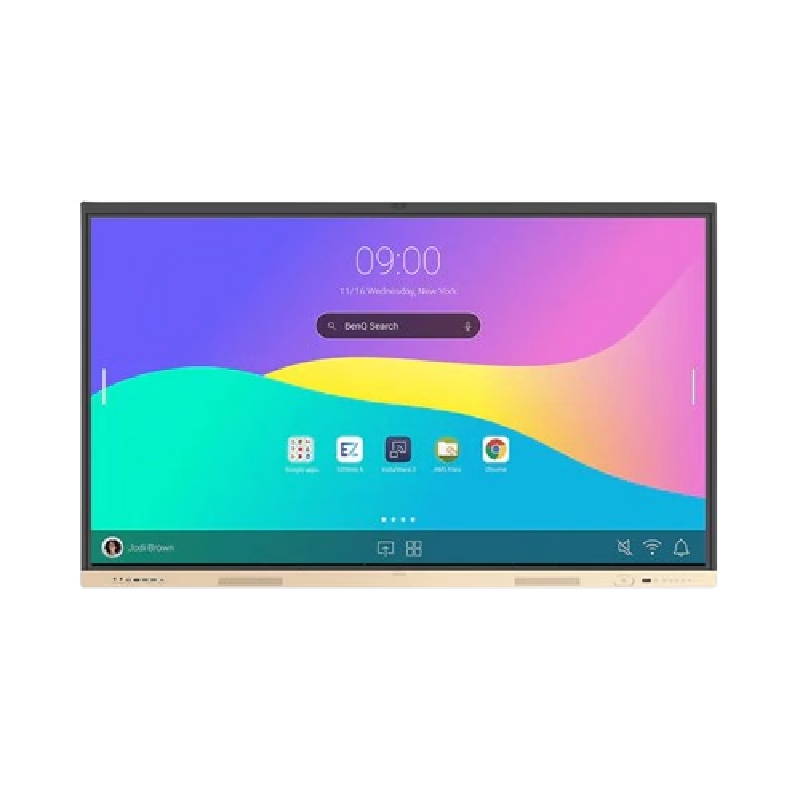
Are you seeking a versatile solution for your presentation and collaboration needs? Look no further than the BenQ RE03A 75″ Board Essential. This cutting-edge interactive whiteboard redefines productivity and engagement in meeting rooms and classrooms alike. With its expansive 75-inch display, the BenQ RE03A offers ample space for showcasing your ideas and content. Whether you’re delivering a presentation, brainstorming with colleagues, or teaching a class, this interactive board provides a captivating canvas for your creativity. Transitioning to functionality, the BenQ RE03A boasts intuitive touch controls that make navigation and interaction effortless. Its responsive touch technology ensures smooth and precise input, allowing you to annotate, draw, and manipulate content with ease. Furthermore, the board’s seamless connectivity options enable seamless integration with your existing devices and software. Whether you’re using a laptop, tablet, or smartphone, the BenQ RE03A ensures compatibility and flexibility for all your presentation needs. In addition, collaboration features such as screen sharing and real-time annotation foster teamwork and idea exchange among participants. Break down communication barriers and enhance productivity with the BenQ RE03A’s collaborative tools. Moreover, the board’s durable construction and anti-glare surface ensure reliability and visibility even in brightly lit environments. Say goodbye to distractions and glare, and hello to clear, crisp visuals every time. In conclusion, the BenQ RE03A 75″ Board Essential is a game-changer for presentations and collaboration. With its large display, intuitive controls, and collaborative features, it empowers users to deliver impactful presentations and foster teamwork like never before. Upgrade your meeting room or classroom with the BenQ RE03A and unlock new possibilities for productivity and engagement. Specifications: Screen Size : 75″ Panel Type : IPS Resolution : UHD 3840×2160 Response Time : 8ms

Genuine Apple MagSafe 3 charging cable (2-meter length), originally shipped with MacBook Pro 14"/16" (2021, M1 Pro/Max) and MacBook Pro 16" (2023, M2/M3 Max). Used but fully functional, tested for safe power delivery and data handshake with Apple laptops. Compatibility: MacBook Pro 14″ (2021–2023, M1 Pro/Max, M2 Pro/Max, M3 Pro/Max) MacBook Pro 16″ (2021–2023, M1 Max, M2 Max, M3 Max) Works with Apple 67W, 96W, and 140W USB-C Power Adapters (sold separately) MacBook Pro 14″ (2021–2023, M1 Pro/Max, M2 Pro/Max, M3 Pro/Max) MacBook Pro 16″ (2021–2023, M1 Max, M2 Max, M3 Max) Works with Apple 67W, 96W, and 140W USB-C Power Adapters (sold separately) Connector Type: MagSafe 3 (magnetic, tri-oval tip) on laptop end USB-C on power adapter end MagSafe 3 (magnetic, tri-oval tip) on laptop end USB-C on power adapter end Cable Length: 2 meters (≈6.6 feet) – longer than the standard 1.8m cable, ideal for flexible desk or bedside setups. Condition: Original Apple cable, previously used but fully tested: No fraying, kinks, or exposed wires MagSafe 3 connector intact with strong magnetic hold Charges MacBook at full rated speed (supports up to 140W with compatible adapter) Passes Apple’s authentication handshake (no “Not Supported” warnings) No fraying, kinks, or exposed wires MagSafe 3 connector intact with strong magnetic hold Charges MacBook at full rated speed (supports up to 140W with compatible adapter) Passes Apple’s authentication handshake (no “Not Supported” warnings) What’s Included: MagSafe 3 to USB-C cable only Power adapter NOT included MagSafe 3 to USB-C cable only Power adapter NOT included Why Choose This: Cost-effective alternative to buying new 100% genuine Apple—no third-party risks (overheating, slow charging, compatibility errors) Ideal for backup, travel, or replacing a damaged original cable Cost-effective alternative to buying new 100% genuine Apple—no third-party risks (overheating, slow charging, compatibility errors) Ideal for backup, travel, or replacing a damaged original cable
