
The Lenovo ThinkVision T27-40 27″ FHD monitor delivers clear and sharp visuals that enhance both work and everyday use. Its Full HD panel shows crisp text and vivid images, which makes spreadsheets, web pages, and media easier to view. In addition, the IPS panel provides wide viewing angles so colors remain consistent even when viewed from different sides. Furthermore, this monitor includes quick response performance that helps reduce motion blur during videos and casual gaming. It also offers flexible connectivity options, allowing you to connect laptops, desktops, or media players without extra adapters. Therefore, it fits well in home and office setups alike. Overall, the ThinkVision T27-40 blends sharp display quality and practical features in a reliable 27″ design. Specifications: 27″ Full HD IPS display for clear visuals Wide viewing angles for consistent color Quick response performance for smooth motion Flexible connectivity for multiple devices Reliable design for work and everyday use

View Sonic Monitor ViewSonic LCD Display XG2405 XG2405 24″ 24-inch 3-side Borderless Display 144Hz Refresh Rate 1ms (GtG) Response Time AMD FreeSync Specifications: View Sonic Monitor ViewSonic LCD Display XG2405 XG2405 24″ 24-inch 3-side Borderless Display 144Hz Refresh Rate 1ms (GtG) Response Time AMD FreeSync 1 Year Warranty

Panel Size (inch) : 23.8 Aspect Ratio : 16:9 Display Viewing Area (H x V) : 527.04 x 296.46 mm Display Surface : Non-Glare Backlight Type : LED Panel Type : IPS Viewing Angle (CR≧10, H/V) : 178°/ 178° Pixel Pitch : 0.2745mm Resolution : 1920×1080 Color Space (sRGB) : 99% Brightness (Typ.) : 250cd/㎡ Contrast Ratio (Typ.) : 1000:1 ASUS Smart Contrast Ratio (ASCR) : 100000000:1 Display Colors : 16.7M Response Time : 5ms(GTG) Refresh Rate (Max) : 75Hz Flicker-free : Yes Video Feature Trace Free Technology : Yes SPLENDID Technology : Yes Color Temp. Selection : Yes(4 modes) GamePlus : Yes QuickFit : Yes HDCP : Yes VRR Technology : FreeSync™ Low Blue Light : Yes I/O Ports HDMI(v1.4) x 1 DVI x 1 VGA x 1 Signal Frequency Digital Signal Frequency : 24~84 KHz (H) / 48~75 Hz (V) Analog Signal Frequency : 24~84 KHz (H) / 48~60 Hz (V) Power Consumption Power Consumption : 13.2W Power Saving Mode : <0.5W Power Off Mode : <0.5W Voltage : 100-240V, 50/60Hz Mechanical Design Tilt : Yes (+23° ~ -5°) VESA Wall Mounting : 100x100mm Kensington Lock : Yes Dimensions (Esti.) Phys. Dimension with Stand (W x H x D) : 540.45 x 403.67 x 203.94 mm Phys. Dimension without Stand (W x H x D) : 540.45 x 324.67 x 44.4 mm Box Dimension (W x H x D) : 559 x 415 x 127 mm Weight (Esti.) Net Weight with Stand : 3.57 Kg Net Weight without Stand : 3.18 Kg Gross Weight : 5.50 Kg 3 Years Warranty manufacturer link

✅ Full Specifications: Model: HyperX Cloud II Headphone Type: Over-Ear, Closed-Back Gaming Headset Connection: Wired USB for PC/Mac 3.5mm jack for consoles & mobile Drivers: 53mm Neodymium Surround Sound: Virtual 7.1 Surround Sound (via USB sound card) Frequency Response: Headphones: 15Hz – 25kHz Microphone: 50Hz – 18kHz Impedance: 60 Ohms Sound Pressure Level: 98 ± 3 dB Microphone: Detachable noise-canceling mic TeamSpeak & Discord certified Build: Aluminum frame Memory foam ear cushions Leatherette or velour ear pads Cable Length: 1m headset cable 2m extension with USB control box Compatibility: PC, Mac, PS4, PS5, Xbox (via 3.5mm), Nintendo Switch, Mobile

MacBook Pro Retina 13' Early 2015 A1502 i5 8GB Logic Board MacBook Pro Retina 13′ Early 2015 A1502 i5 8GB Logic Board

The ViewSonic VA2450-H-12 24″ FHD 100Hz Monitor offers smooth visuals for work, entertainment, and gaming. It delivers sharp Full HD clarity with bright colors. The screen shows clean images that make videos and documents look better. This helps you enjoy a more comfortable viewing experience. Moreover, the ViewSonic VA2450-H-12 24″ FHD 100Hz Monitor features a fast 100Hz refresh rate. This reduces motion blur during fast scenes. It makes gaming smoother and more responsive. It also improves scrolling and general use. In addition, the monitor includes HDMI and VGA ports. These connections make setup quick and simple. You can use the monitor with laptops, PCs, and media devices. This offers strong flexibility for daily tasks. Furthermore, the ViewSonic VA2450-H-12 24″ FHD 100Hz Monitor has an eye-care design. It includes flicker-free technology to reduce strain. The blue light filter helps protect your eyes during long sessions. This makes the monitor ideal for work and study. Also, the slim frame design gives the monitor a modern look. It saves space on your desk and improves your workspace. The clean edges make multi-monitor setups easy and seamless. This helps create a professional environment. The stand on the ViewSonic VA2450-H-12 24″ FHD 100Hz Monitor offers stable support. You can tilt the screen for better viewing comfort. This helps you find a position that suits your posture. It improves your daily productivity. Overall, the ViewSonic VA2450-H-12 24″ FHD 100Hz Monitor provides clear visuals, smooth motion, and strong comfort. It works well for gaming, work, streaming, and general use. It is a reliable choice for users who want performance and simplicity. Specifications: Display : 24″ IPS Resolution : 1920×1080 Refresh Rate : 100Hz Response Time : 5ms

A1989 Battery Replacement, A1964 Battery for MacBook Pro 13″ A1989 (Mid 2018 2019) A2251(2020 Release) EMC 3214 3358 3348 MR9Q2LL/A MR9R2LL/A MR9T2LL/A MR9U2LL/A MR9V2LL/A MV962LL/A MV9A2LL/A 【Specification】Voltage: 11.41V. Capacity: 58Wh/ 5086mAh. Battery Type: Li-ion. Condition: Brand new, from high quality materials, top circuit boards and smart chip. 【Compatible Part Number】A1964 A1989 A1989(EMC 3214) A1989(EMC 3358) A2251(EMC 3348) 020-02497 616-00419. 【Compatible Laptop Models】MacBook Pro 13-Inch model A1989 (Mid 2018, Mid 2019) , A2251(2020 Release), Order No MR9Q2LL/A MR9R2LL/A MR9T2LL/A MR9U2LL/A MR9V2LL/A MV962LL/A MV972LL/A MV982LL/A MV992LL/A MV9A2LL/A MWP72LL/A MWP82LL/A MWP42LL/A MWP52LL/A MWP62LL/A MR9Q2 MR9R2 MR9T2 MR9U2 MR9V2 MV962 MV972 MV982 MV992 MV9A2 MWP62. 【Note】The tools are included. Double-sided tape is attached to the back of the battery, but NO battery installation instruction. The MBP battery is difficult to disassemble, we suggest you search for related installation videos or find a technician for help.

OEM-quality trackpad replacement (without flex cable) for MacBook Air 13″ (Model A2179, 2020)—available in Space Gray and Silver finishes—engineered for precise Force Touch performance, smooth multi-touch gestures, and seamless visual integration. Compatible With: MacBook Air 13-inch (2020, Model A2179) with Intel Core i3/i5/i7 processors (non-M1). Part Type: Trackpad only—does not include the flex cable, Taptic Engine, or mounting hardware. Designed for technicians who will reuse the original internal components. Color Options: Space Gray: Matches Space Gray and Midnight finishes Silver: Matches Silver and Starlight finishes (Note: “Z1” typically refers to Apple’s internal regional/part code—this listing covers standard OEM trackpads for A2179.) Space Gray: Matches Space Gray and Midnight finishes Silver: Matches Silver and Starlight finishes (Note: “Z1” typically refers to Apple’s internal regional/part code—this listing covers standard OEM trackpads for A2179.) Force Touch Capable: Fully supports pressure-sensitive input and haptic feedback when paired with the original Taptic Engine and logic board—ensuring full macOS gesture functionality. Precision Build: Mirror-smooth glass surface with exact curvature, texture, and micro-click mechanism matching Apple’s original design for consistent tracking and tactile response. Installation Requirements: Requires full bottom case disassembly and careful transfer of the original flex cable and Taptic Engine. Proper adhesive application is critical for structural integrity and sensor alignment. Recommended for professional or experienced repair technicians only. Important: This is a bare trackpad assembly—not a plug-and-play module. Functionality depends on correct integration with original electronics.

Led Desk Lamp REMAX RT-E815 ReSee Series Smart Eye-Caring 1500mAh RT-E815 With Container · Eye-caring lightning · Large-area lighting · 1500mAh · Delayed light-off · Soft lighting · Stepless dimming · Pen/phone holder · With rechargeable battery · Plug and use · A soft hose of 360-degree adjustment.

Genuine-spec touchpad flex cable for MacBook Pro 13″ (Model A2289, 2020, Intel)—restores full Force Touch functionality, haptic feedback, and preci multi-touch gesture control. OEM-quality replacement for damaged or faulty original cables. Compatible With: MacBook Pro 13-inch (2020, Four Thunderbolt Ports, Model A2289, Model Identifier MacBookPro16,2) with Intel Core i5/i7 processors. Part Type: Touchpad flex cable only — does not include the trackpad housing, Taptic Engine, or mounting hardware. This is the OEM-style ribbon cable that connects the trackpad to the logic board. Function: Transmits: Touch input coordinates Force Touch pressure data Haptic feedback signals to the Taptic Engine Enables full macOS gesture support: Force Click, three-finger lookup, swipe navigation, pinch-to-zoom, and smooth cursor tracking. Touch input coordinates Force Touch pressure data Haptic feedback signals to the Taptic Engine Enables full macOS gesture support: Force Click, three-finger lookup, swipe navigation, pinch-to-zoom, and smooth cursor tracking. OEM-Quality Build: Matches Apple’s original specifications in: Cable length and routing path Connector pitch and ZIF latch design EMI shielding and flex durability Cable length and routing path Connector pitch and ZIF latch design EMI shielding and flex durability Common Use Cases: Replacing a torn, creased, or liquid-damaged original flex cable Completing a trackpad replacement when the original cable is unusable Fixing: Intermittent or erratic trackpad behavior Loss of Force Touch or haptic feedback Complete trackpad unresponsiveness Replacing a torn, creased, or liquid-damaged original flex cable Completing a trackpad replacement when the original cable is unusable Fixing: Intermittent or erratic trackpad behavior Loss of Force Touch or haptic feedback Complete trackpad unresponsiveness Intermittent or erratic trackpad behavior Loss of Force Touch or haptic feedback Complete trackpad unresponsiveness Installation Note: Requires full bottom case removal and battery disconnection. Cable routes under internal components (speaker, logic board)—must follow original path. Connects via ZIF (Zero Insertion Force) socket—align carefully, never force. Recommended for experienced or certified technicians only. Requires full bottom case removal and battery disconnection. Cable routes under internal components (speaker, logic board)—must follow original path. Connects via ZIF (Zero Insertion Force) socket—align carefully, never force. Recommended for experienced or certified technicians only. Important Compatibility Notes: ✅ Only for A2289 (13″, 4 Thunderbolt ports, 2020, Intel) ❌ Not compatible with: A2251 (2 Thunderbolt ports, 2020) A2338 (M1 MacBook Pro, 2020) Any MacBook Air or 14″/16″ MacBook Pro ✅ Only for A2289 (13″, 4 Thunderbolt ports, 2020, Intel) ❌ Not compatible with: A2251 (2 Thunderbolt ports, 2020) A2338 (M1 MacBook Pro, 2020) Any MacBook Air or 14″/16″ MacBook Pro A2251 (2 Thunderbolt ports, 2020) A2338 (M1 MacBook Pro, 2020) Any MacBook Air or 14″/16″ MacBook Pro

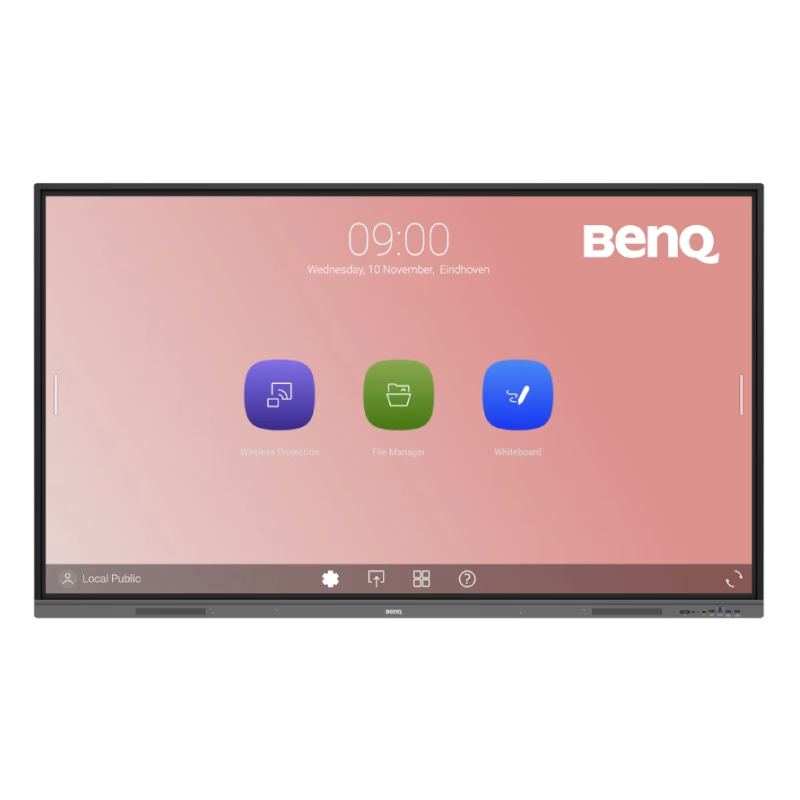
The Riotouch 65″ Interactive Panel is designed to transform educational and professional environments with its cutting-edge features and user-friendly interface. This interactive flat panel offers a seamless blend of performance, connectivity, and intuitive design, making it an ideal choice for classrooms and conference rooms. Featuring a 65-inch 4K UHD display (3840 x 2160 resolution), the panel delivers crisp visuals and vibrant colors. Its 4mm anti-glare tempered glass ensures clear visibility from any angle, reducing eye strain during prolonged use. The panel supports up to 40-point multi-touch and 20-point multi-writing capabilities, allowing multiple users to interact simultaneously. This feature fosters collaborative learning and dynamic presentations, enhancing engagement and productivity. Powered by a quad-core Cortex-A55 processor and equipped with 4GB RAM and 32GB storage, the Riotouch panel ensures smooth performance. Its dual operating system support (Android and Windows) provides versatility, accommodating various software applications and user preferences. Connectivity is robust, with multiple ports including HDMI, USB 3.0, USB-C, VGA, and RJ45, facilitating easy integration with other devices. Built-in Wi-Fi and Bluetooth capabilities enable wireless connections, promoting a clutter-free workspace. The panel comes with integrated 2x15W front-facing speakers, delivering clear audio for multimedia presentations. Additionally, it includes a built-in 13MP 4K camera and microphone, supporting high-quality video conferencing and remote collaboration. Designed with user convenience in mind, the Riotouch panel features intuitive front controls for power, volume, and input selection. Its slim aluminum frame and wall-mountable design ensure it fits seamlessly into any environment. In summary, the Riotouch 65″ Interactive Panel combines high-resolution display, multi-touch interactivity, and versatile connectivity, making it a comprehensive solution for modern collaborative spaces. Specifications: Display : 65″ 4K UHD Touch Memory : 4GB Storage : 32GB OS : Android 11

The NCTS HDMI 2.0 cable (3 meters) delivers high-speed and reliable audio/video transmission with support for 4K UHD resolution. Perfect for TVs, monitors, gaming consoles, and home theater systems, it provides a stable connection and clear visuals for everyday and entertainment use. The NCTS HDMI 2.0 Cable 3M is a dependable solution for connecting devices such as laptops, PCs, gaming consoles, and media players to TVs, monitors, and projectors. Supporting 4K UHD video, this cable ensures sharp image quality and smooth performance for movies, gaming, and presentations. Its 3-meter length offers flexible setup options, making it ideal for home, office, and entertainment environments. HDMI 2.0 Standard for high-quality video and audio Supports 4K UHD Resolution for sharp and detailed visuals High-Speed Performance for smooth playback and stable signal 3M Length perfect for flexible positioning and setups Compatible with TVs, Monitors, and Projectors Ideal for PS4 / Xbox / TV Boxes / PCs Durable Build Quality designed for long-term use Plug & Play no setup required Works with all HDMI-enabled devices, including TVs, monitors, projectors, PlayStation, Xbox, laptops, PCs, receivers, and streaming devices. Ideal for users who need a longer cable for home theater setups, gaming stations, or office installations.

Lenovo ThinkVision T32h-20 61F1GAT2EU The Lenovo ThinkVision T32h-20 .Do more than just optimize your productivity . with the ThinkVision T32h-20 monitor. An enhanced view of and easy navigation. through documents, spreadsheets, or designs on this sleek display that complements your modern workspace. Its vast 31.5-inch screen with QHD resolution delivers more screen real estate with higher clarity than FHD, making data-intensive work, number crunching, and content editing a breeze. The one-cable solution USB Type-C, HDMI, and DP ports provide multiple interface options. Integrated with Smart Power, the USB Type-C also doubles up. as a charger for dynamic consumption and intelligent power management. Top Features 31.5″QHD (2560 x 1440) 3-side Near-edgeless display USB Type-C one cable solution HDMI, DP ports with USB hub Ergonomic and space-saving design & UE Specifications Brightness 350 cd/m2 Contrast ratio 1000:1 Connection type 1 x USB Type-C Gen1 (DP1.2 Alt Mode)4 x USB 3.1 Gen1 ports (Downstream, incl. 1 x BC) Panel type In-Plane Switching Display stand Lift, Tilt, Pivot, Swivel EU energy class E Power requirement AC 100 to 240 V (50-60 Hz) Brand ThinkVision Anti-reflex Yes Color calibration accuracy Yes Color coverage 99% sRGB Color depth 10-bit Color support 1.07 Billion Measure without packaging 235.0 x 469.4 x 714.6 mm, 9.25 x 18.48 x 28.13 inches Gentle on the eyes Yes Screen dimensions (without foot) 714.6 x 426.0 x 51.0 mm, 28.13 x 16.77 x 2.01 inches Height adjustable Yes Kensington lock Yes Almost borderless Yes Sound bar support (optional) Yes Power consumption 28 W Typ. 138 W Max. TCO Edge 2.0 Display weight (without foot) 6.78 kg, 14.95 lbs. Weight with packaging 12.96 kg, 28.57 lbs. Weight without packaging 9.85 kg, 21.72 lbs. Description The Lenovo ThinkVision T32h-20’s large display can be used to open and work on several documents at once Its near bezel-less design fits into any modern workplace. Integrated USB Type-C dock with charging function up to 75 W (1 x USB 3.1 Type-C upstream. 4 x USB 3.1 Type-A downstream) – Smart Power for energy – TÜV Rheinland Eye Comfort Specifications: Specifications Product name Lenovo ThinkVision T32h-20 Monitor Product type Desktop monitor Display Display size 81.3 cm (32.0″) Physical resolution 2.560 x 1.440 WQHD Aspect ratio 16:9 Contrast 1000:1 Brightness 350 cd/m² Panel technology IPS Viewing angle (horizontal / vertical) 178° / 178° Response time 6 ms Display surface Matt Backlight White LED 1 year warranty

Remax F27 Fonzyr Desktop Fan – 5 W rechargeable fan with 360° adjustable airflow and multi-installation options.Compact (187×206 mm), lightweight, with fast Type-C charging (~2 h) and built-in 1,200 mAh battery. Model: Remax F27 Fonzyr Series Circulation Desktop Fan Power: 5 W, operates on 5 V/1 A power supply Rotation: 360° adjustable airflow for full-range ventilation Battery: Built-in 1,200 mAh rechargeable battery; Type-C charging, ~2 hours charging time Dimensions & Build: Approx. 187 × 206 mm, lightweight ABS plastic housing (~697 g) Installation: Designed for desktop use, wall mounting, or hanging—ideal for multi-location placement

Genuine-spec Touch Bar assembly with integrated flex cable for 2020 MacBook Pro 13″ models (A2251, A2289, A2338)—restores full Touch ID and Touch Bar functionality with OEM-level fit and performance. Compatible With: MacBook Pro 13″ (2020): A2251 (Intel Core i5/i7, two Thunderbolt ports) A2289 (Intel Core i5/i7, four Thunderbolt ports) A2338 (Apple M1 chip, two Thunderbolt ports) MacBook Pro 13″ (2020): A2251 (Intel Core i5/i7, two Thunderbolt ports) A2289 (Intel Core i5/i7, four Thunderbolt ports) A2338 (Apple M1 chip, two Thunderbolt ports) A2251 (Intel Core i5/i7, two Thunderbolt ports) A2289 (Intel Core i5/i7, four Thunderbolt ports) A2338 (Apple M1 chip, two Thunderbolt ports) Includes: Complete Touch Bar module with integrated flex cable, Touch ID sensor, and ambient light sensor—ready for direct connection to the logic board. Functionality: Fully restores dynamic Touch Bar controls, system functions, app shortcuts, and Touch ID (fingerprint authentication and power button). OEM-Quality Build: Matches Apple’s original design in responsiveness, finish, and sensor alignment—ensures seamless integration with macOS. Color Options: Available in Space Gray and Silver to match your MacBook’s top case (confirm your model’s color before ordering). Installation Note: Requires full top case disassembly and careful handling of adhesive and connectors. The flex cable routes under the speakers and connects near the logic board—precision is essential. Recommended for experienced technicians.

Genuine-spec battery flex cable for MacBook Pro models A2159 (16", 2019), A1708 (13", 2016–2017), and A2338 (13", 2020 M1)—restores critical communication between the battery and logic board for proper power-on, charging, and macOS battery status. Genuine-spec battery flex cable for MacBook Pro models A2159 (16″, 2019), A1708 (13″, 2016–2017), and A2338 (13″, 2020 M1)—restores critical communication between the battery and logic board for proper power-on, charging, and macOS battery status. Carries SMBus (System Management Bus) signals from the battery to the logic board Enables: Accurate battery percentage and health reporting in macOS Proper charging control (start/stop, thermal throttling) Power-on capability (MacBooks will not boot without this connection) Prevention of “Battery Not Charging” or “Service Battery” errors Accurate battery percentage and health reporting in macOS Proper charging control (start/stop, thermal throttling) Power-on capability (MacBooks will not boot without this connection) Prevention of “Battery Not Charging” or “Service Battery” errors MacBook won’t turn on (even with a good battery) Battery shows “–%”, 0%, or “Not Charging” Random shutdowns under load macOS displays “No Battery Available” Logic board powers fans or lights but no display output Battery flex cable only (with OEM-style connector and strain relief) ❌ Does not include: battery, logic board, or trackpad Requires full bottom case removal and battery disconnection Connects via a ZIF or press-fit socket on the logic board Must be routed precisely to avoid tension or micro-tears Highly recommended for experienced or certified technicians—improper installation can cause permanent power or battery communication failure

Experience gaming and entertainment like never before with the ViewSonic 32” 75Hz 2K QHD Monitor. Boasting a spacious screen and crisp resolution, it delivers stunning visuals that immerse you in every detail. Transitioning smoothly between tasks is effortless with this monitor’s 75Hz refresh rate, ensuring fluid motion and responsiveness. Whether you’re gaming, watching videos, or browsing the web, enjoy a seamless experience without lag or stuttering. Additionally, the built-in speakers provide clear and immersive audio to complement the vibrant visuals. Say goodbye to cluttered desk space and external speakers – this monitor offers a streamlined solution for both audio and visual needs. Furthermore, its sleek and modern design adds a touch of elegance to any workspace or gaming setup. With slim bezels and a minimalist aesthetic, the VA3209-2K seamlessly blends into your environment, enhancing the overall look and feel of your space. Moreover, the monitor’s QHD resolution delivers sharp and detailed images, making every scene come to life with clarity and precision. Whether you’re editing photos, watching movies, or gaming, enjoy an immersive viewing experience like never before. In conclusion, the ViewSonic 32” 75Hz 2K QHD Monitor VA3209-2K is a versatile display solution that combines stunning visuals, smooth performance, and immersive audio. Upgrade your viewing experience today and immerse yourself in a world of vibrant colors and crisp details. Specifications: Display : 32″ IPS Resolution : QHD(2560 x 1440) Refresh Rate : 75Hz Response Rate : 4ms

The MSI PRO MP252L features a 25-inch Full HD IPS display with a smooth 120Hz refresh rate and 1ms MPRT response time. Equipped with HDMI and DisplayPort connectivity plus eye-care technology, it’s ideal for productivity, study, and everyday use. The MSI PRO MP252L is a professional-grade monitor designed for office work, learning, and home use. Its 25-inch Full HD IPS panel delivers sharp visuals and accurate colors, while the 120Hz refresh rate ensures smoother scrolling and motion. With versatile connectivity options, it easily integrates into modern and legacy setups. 25” Full HD Display (1920×1080): Clear and detailed visuals for work and entertainment. IPS Panel Technology: Wide viewing angles and consistent color accuracy. 120Hz Refresh Rate: Smoother visuals compared to standard 60Hz monitors. 1ms MPRT Response Time: Reduces motion blur for improved clarity. Eye Care Technology: Anti-Flicker and Less Blue Light reduce eye strain. 1× HDMI Port: Easy connection to laptops, desktops, and media devices. 1× DisplayPort: Stable and high-quality video signal for modern systems. Headphone Out: Convenient audio output for headphones or external speakers. Built with MSI’s trusted quality standards, the PRO MP252L features a durable yet sleek design that fits perfectly in professional and home environments.

A capable pre-owned Dell Latitude 5401 with 14" display, 10th Gen Core i7, 16GB RAM, 512GB SSD, and NVIDIA GeForce MX330 2GB—ideal for professionals who need extra graphics power for light creative work or multitasking in a durable business laptop.

Genuine-spec touchpad flex cable for MacBook Pro 16″ (Model A2141, 2019, Intel)—essential for restoring full Force Touch functionality, haptic feedback, and precise multi-touch gesture control during trackpad repair or replacement. Compatible With: MacBook Pro 16-inch (2019, Model A2141) with Intel Core i7/i9 processors (Model Identifier: MacBookPro16,1) (Note: A2141 is the non-base configuration of the 2019 16″ MacBook Pro—typically higher-end Intel models.) Part Type: Touchpad flex cable only—does not include the trackpad housing, Taptic Engine, or mounting hardware. This is the OEM-style ribbon cable that connects the trackpad to the logic board. Function: Transmits touch coordinates, Force Touch pressure data, and haptic feedback signals—critical for macOS gestures (e.g., Force Click, three-finger lookup, pinch-to-zoom) and Taptic Engine responsiveness. OEM-Quality Construction: Replicated to Apple’s exact specifications—including cable length, connector pitch, EMI shielding, and bend radius—ensuring reliable signal integrity and long-term durability. Common Use Cases: Replacing a torn, creased, or liquid-damaged original flex cable Completing a trackpad replacement when the original cable is compromised Fixing intermittent trackpad behavior, loss of Force Touch, or complete unresponsiveness Replacing a torn, creased, or liquid-damaged original flex cable Completing a trackpad replacement when the original cable is compromised Fixing intermittent trackpad behavior, loss of Force Touch, or complete unresponsiveness Installation Note: Requires full disassembly of the bottom case, speaker removal, and careful routing beneath the battery and logic board. Connectors use ZIF (Zero Insertion Force) sockets—must be aligned and latched gently. Recommended for certified or professional repair technicians only. Important: This is flex cable only—not a complete trackpad assembly. Must be used with the original or compatible A2141 trackpad and Taptic Engine. Not compatible with M1 MacBook Pro 16″ (A2485), 14″ models (A2442), or any MacBook Air. This is flex cable only—not a complete trackpad assembly. Must be used with the original or compatible A2141 trackpad and Taptic Engine. Not compatible with M1 MacBook Pro 16″ (A2485), 14″ models (A2442), or any MacBook Air. Model Verification: Confirm your device is MacBook Pro A2141 (16″, 2019, Intel) via > About This Mac > Model Identifier (should read MacBookPro16,1).
