
The Samsung 34″ Odyssey G55T Curved Gaming Monitor LC34G55TWWMXZN features a 34-inch VA panel with Ultra WQHD resolution (3440 × 1440) and a 21:9 aspect ratio. The ultrawide format provides additional screen space for gaming, multitasking, and content creation. The monitor uses a 1000R curved display designed to match the natural field of view. As a result, the screen wraps more closely around the user compared to traditional flat monitors. In addition, the VA panel delivers a typical 2500:1 contrast ratio for deeper blacks and improved shadow detail. The display supports a maximum refresh rate of 165Hz and a 1ms MPRT response time. Therefore, motion appears smoother during fast-paced gaming. AMD FreeSync Premium support also helps reduce screen tearing and stuttering when paired with compatible graphics hardware. HDR10 support allows compatible content to display a wider brightness range. Also, gaming features such as Black Equalizer, Low Input Lag Mode, and Refresh Rate Optimizer provide additional control over image settings. Connectivity includes one DisplayPort 1.4, one HDMI 2.0 port, and a headphone output. The monitor also supports Picture-by-Picture mode, Eye Saver Mode, and Flicker Free technology. This model focuses on ultrawide gaming performance with a high refresh rate, aggressive 1000R curvature, and Ultra WQHD resolution. Community feedback often highlights the immersive curve and gaming experience, while some users note that the curvature is more aggressive than typical curved monitors. manufacturer link Specifications: 34-inch VA panel with Ultra WQHD (3440 × 1440) resolution 165Hz refresh rate and 1ms MPRT response time 1000R curved display with 21:9 aspect ratio AMD FreeSync Premium support DisplayPort 1.4 and HDMI 2.0 connectivity options

Samsung Lebanon 32″ Flat The Samsung Lebanon 32″ Flat Everything you need is right in your screen. Watch, work and chat – all without connecting a separate PC – with Smart Monitor. Your favorite content, productivity and video call apps are built-in. for a simpler and more stylish desk setup that’s a joy to use every time. Smart TV Experience Effortless entertainment. Enjoy Netflix, YouTube and other streaming services by simply connecting the monitor to WiFi. Samsung TV Plus also offers free live and on-demand content with no downloads or sign-up needed. while Universal Guide provides personalized content recommendations. Workspace Experience PC-less. Browse the web, edit documents and work on projects, all without the need for a separate PC. With new Workmode, you can also remotely access another PC, use Microsoft 365 programs . and even connect to Samsung mobile devices with Samsung DeX for seamless working. SlimFit camera Jump into any conversation. The SlimFit camera with tilt functionality allows you to create the perfect angle while using. your favorite video call apps like Google Duo, which can be accessed directly through the monitor. Plus, the camera cover and option to fully detach always protect your privacy. IoT Hub Turn your Smart Monitor into a control center for the home by connecting it to your IoT home products with SmartThings. Relax by turning off the lights, pulling down the blinds and setting the thermostat. to the perfect temperature all with the Smart Monitor for a perfectly relaxed evening. Mobile connectivity Convenient connectivity. With AirPlay integration, you can wirelessly connect Apple devices to the Smart Monitor and view on a bigger screen. Enjoy your favorite content from an iPhone, iPad, and Mac on the Smart Monitor and even mirror apps, documents, and websites. Adaptive Picture Sensational picture, day or night. Surrounding light is detected by a sensor to adjust brightness automatically with Adaptive Picture. Even in broad daylight, watch dark, gritty dramas without squinting and straining your eyes to see the picture. Specifications: Specifications Aspect Ratio16:9 Brightness (Typical)250 cd/㎡ Contrast Ratio Static3,000:1 (Typ.) Resolution1,920 x 1,080 Response Time4ms (GTG) Viewing Angle (H/V)178°/178° 3 year warranty Manufacturer Link

The LG 32MA70HY 32″ Monitor delivers large, clear visuals for work, entertainment, and everyday use.It features a 32‑inch screen with Full HD resolution for sharp images and smooth video.Moreover, the slim design fits well on desks in homes and offices. This monitor uses an IPS panel for wide viewing angles and consistent color from many positions.Additionally, anti‑glare coating helps reduce reflections in bright lighting.Fast response time reduces blur during moving content like videos and casual gaming. The LG 32MA70HY also includes HDMI and VGA ports for flexible connectivity.Furthermore, tilt adjustment lets you find a comfortable viewing angle during long sessions.Low blue light and flicker‑safe features help reduce eye strain during extended use. This display suits students, professionals, and home users alike.Therefore, it supports productivity, media viewing, and everyday computing.Finally, it combines solid picture quality, reliable performance, and comfort features. Specifications: 32″ Full HD (1920 × 1080) IPS panel HDMI + VGA ports for PC and device connection Anti‑glare coating for comfortable viewing Tilt‑adjustable stand for ergonomic use Low blue light and flicker‑safe eye care

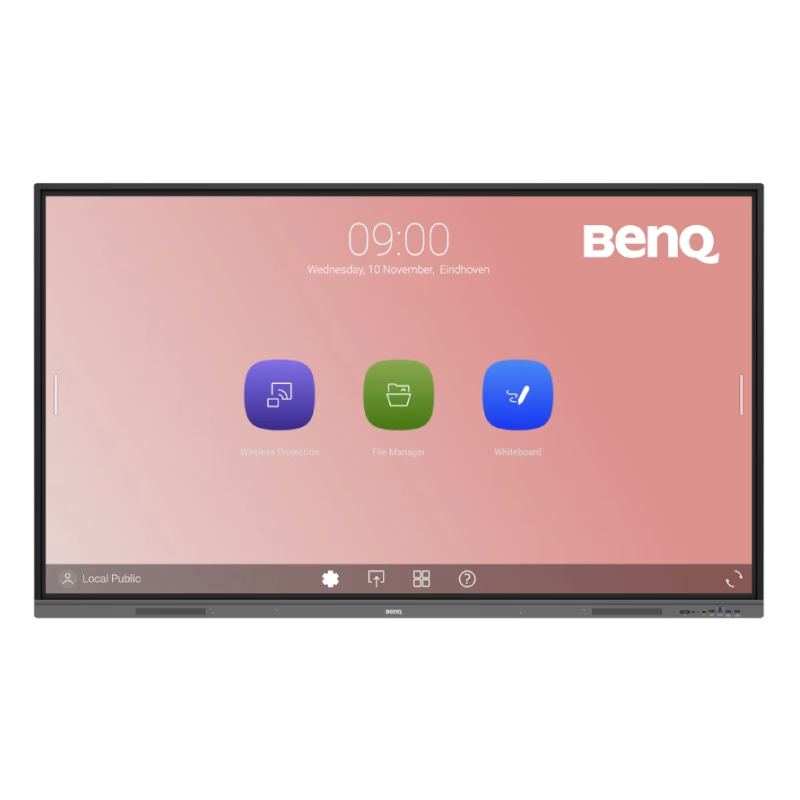
BenQ RE6504 65” 4K UHD Interactive Flat Panel with Android 13 is a large interactive display designed for classrooms, meeting rooms, and training environments. It combines a 4K touchscreen, built-in Android system, and collaboration tools for interactive presentations. It features a 65-inch IPS panel with 3840 × 2160 (4K UHD) resolution. Therefore, it delivers sharp visuals and wide viewing angles for group interaction. In addition, it supports up to 40-point touch input for multi-user collaboration and writing. Moreover, the panel runs Android (EDLA certified, Android 14/13 depending on region) with built-in apps and Google services support. As a result, users can install apps, browse content, and run teaching or presentation tools directly on the display without an external PC. The RE6504 uses precision IR touch technology. Therefore, it provides fast and accurate writing with low delay. In addition, it includes anti-glare and tempered 9H glass for durability and better visibility in bright rooms. Furthermore, it includes multiple connectivity options such as HDMI, USB, USB-C, OPS slot, and LAN. As a result, it supports laptops, media players, and modular PC systems for flexible installation. It also includes built-in speakers and collaboration software tools. Therefore, it supports presentations, whiteboarding, screen sharing, and remote teaching or meeting scenarios. Finally, the BenQ RE6504 delivers a large 4K interactive workspace with Android integration, multi-touch control, and strong connectivity for education and business use. Specifications: Display: 65-inch IPS panel with 3840×2160 4K UHD resolution Touch: Up to 40-point multi-touch for collaboration System: Built-in Android (EDLA support with Google services) Glass: Anti-glare 9H tempered glass for durability Connectivity: HDMI, USB, USB-C, OPS slot, and LAN support

The Xprinter XP-365B is a compact thermal label printer designed for barcode, shipping, and product labeling. It supports thermal direct printing, USB connectivity, and 58–108mm label widths, making it suitable for retail, logistics, warehousing, and eCommerce operations. Driver Support: Seagull Driver, Xprinter Driver The Xprinter XP-365B is a high-efficiency thermal label printer designed for fast and reliable label printing. It uses direct thermal technology, eliminating the need for ink or toner. With support for a wide range of label types and sizes, the XP-365B is ideal for shipping labels, barcode labels, price tags, shelf labels, and warehouse identification. ⚡ Fast Printing: Up to 127 mm/s for quick label production. 🧾 Flexible Media Support: Works with different label sizes and roll types (gap, continuous, black-mark). 💸 No Ink Needed: Direct thermal technology reduces long-term printing costs. 🖥️ Wide Compatibility: Works with Windows, Linux, and many POS/eCommerce systems. 🔧 Easy Setup: Plug-and-play USB connection with simple driver installation. 🏷️ Perfect for Business Use: Ideal for shipping labels, barcode tags, supermarket labels, and warehouse management.

The Samsung 65-Inch OLED Smart TV | QA65S90FAEXTW is a premium entertainment display designed to deliver exceptional picture quality and advanced smart features. Featuring OLED technology, this television produces deep blacks, vibrant colors, and impressive contrast for a truly immersive viewing experience. In addition, the 65-inch screen size provides an ideal balance between cinematic entertainment and everyday home use. The OLED panel uses self-illuminating pixels, and it allows precise control over brightness and contrast in every scene. As a result, movies, sports, and games appear more realistic and detailed. Furthermore, the 4K UHD resolution delivers sharp image quality, ensuring that content looks crisp and lifelike. Samsung enhances the viewing experience with intelligent AI-powered picture processing. Therefore, the TV automatically optimizes image quality, color accuracy, and motion performance based on the content being displayed. In addition, AI upscaling improves lower-resolution content, bringing it closer to 4K clarity. HDR support expands brightness and contrast levels, so viewers can enjoy more realistic highlights and deeper shadows. Meanwhile, Samsung’s Smart TV platform provides convenient access to streaming services, gaming features, and smart home integration from a single interface. The slim and modern design complements any living room setup while maximizing screen space. Overall, the Samsung 65-Inch OLED Smart TV | QA65S90FAEXTW combines premium OLED technology, intelligent processing, and smart connectivity to deliver a high-quality home entertainment experience. Specifications: OLED technology delivers deep blacks and exceptional contrast performance 65-inch 4K UHD display provides sharp and detailed visuals AI-powered processing enhances picture quality and content clarity HDR support improves brightness, contrast, and color accuracy Smart TV platform offers streaming apps and connected home features

The Apple Magic Mouse (USB-C version) is a sleek, minimalist multi-touch wireless mouse built for Mac users. It offers smooth gesture support, Bluetooth connectivity and a built-in rechargeable battery — a great choice if you prefer a clean desk setup and full compatibility with macOS and iPadOS. General Name: Magic Mouse (USB-C) — part of Apple’s pointing-device lineup. Wireless connectivity: Bluetooth. Rechargeable battery: built-in, no disposable AA cells. Charging / port: USB-C port (bottom of mouse) for pairing and charging. Compatibility: Requires a Mac with macOS 15.1 or later, or an iPad with iPadOS 18.1 or later. Size & Weight Height: ~0.85 inch (2.16 cm) Width: ~2.25 inch (5.71 cm) Depth: ~4.47 inch (11.35 cm) Weight: ~0.22 pound (0.099 kg) (varies slightly by manufacturing) Features Multi-Touch surface: supports gestures such as swiping between pages, scrolling through documents, zooming. Glide / foot design: optimized for smooth movement across desktop surfaces. Rechargeable battery life: about a month or more between charges (typical use) per Apple spec. Used Condition ConsiderationsSince you’re specifying a used unit: Check for wear on the bottom feet / skates — these degrade and affect glide. Verify battery capacity / health (rechargeable batteries age). Confirm the port is functioning (USB-C) and Bluetooth connectivity is stable. Look for signs of excessive surface scratches on the multi-touch top — may impair gestures. Ensure the firmware / Mac recognizes it fully (gestures working). Upgradability / Limitations Not user-upgradable: You cannot replace the internal battery or change internals easily. Design limitation: The USB-C port remains on the bottom of the mouse, meaning you cannot use it while charging unless you flip it. This design is still criticized. Ergonomics: The flat, low-profile design is stylish but may not suit extended-use comfort for some users.

A space-saving pre-owned Lenovo ThinkCentre M920z all-in-one desktop with 24-inch display, 8th Gen Core i5, RAM upgrade options, and SSD storage options. Ideal for offices, education, and home use with clean design and reliable performance.

The Samsung Crystal UHD U8000F 43″ 4K Tizen OS Smart TV UA43U8000FUXTW uses a 43-inch LCD panel with 3840 × 2160 resolution. It delivers standard 4K output for everyday viewing, streaming, and console use in smaller rooms. Samsung uses the Crystal Processor 4K for image processing and upscaling. As a result, lower-resolution content converts closer to 4K quality on the display. In addition, the TV supports HDR10 and HDR10+, which improve contrast between bright and dark areas for compatible content. The display runs at a 60 Hz refresh rate. Also, Motion Xcelerator reduces blur during fast motion scenes such as sports and action content. Samsung equips the TV with Tizen OS. Therefore, users access streaming apps, SmartThings integration, and smart features through a responsive interface. Connectivity includes HDMI ports, USB ports, Wi-Fi, Bluetooth, Ethernet LAN, and optical audio output. In addition, the TV supports ALLM for basic console gaming responsiveness. This model focuses on 4K resolution, standard HDR performance, and essential smart TV features without advanced gaming or local dimming technology. Specifications: 43-inch LCD panel with 3840 × 2160 4K UHD resolution Crystal Processor 4K with upscaling support HDR10 and HDR10+ compatibility 60 Hz refresh rate with Motion Xcelerator Tizen OS with HDMI, USB, Wi-Fi, Bluetooth, Ethernet connectivity

Genuine-spec UK layout (QWERTY) black keyboard replacement for MacBook Air 13.6″ and 15″ models (2023–2025, M2/M3/M4 chips)—featuring Apple’s Magic Keyboard design with scissor-switch mechanism, backlighting, and precise OEM fit. Compatible With: 13.6″ MacBook Air: A2681 (M2, 2022–2023), A3113 (M3, 2023–2024), A3240 (M4, 2024–2025) 15″ MacBook Air: A2941 (M2, 2023), A3114 (M3, 2023–2024), A3241 (M4, 2024–2025) 13.6″ MacBook Air: A2681 (M2, 2022–2023), A3113 (M3, 2023–2024), A3240 (M4, 2024–2025) 15″ MacBook Air: A2941 (M2, 2023), A3114 (M3, 2023–2024), A3241 (M4, 2024–2025) Keyboard Layout: UK English (QWERTY) with £ symbol, taller Enter key, and standard UK key labeling—matches Apple’s original regional configuration. Design: Apple’s Magic Keyboard with scissor-switch mechanism—offering quiet, responsive typing with 1mm travel and improved reliability. Features: Backlit keys, ambient light sensor support, and original-style flex cable connector for seamless integration with the logic board. Color: Matte black keycaps matching the Space Gray and Midnight MacBook Air finishes (also compatible with Silver/Starlight—keycaps are model-agnostic). Precision Engineering: Manufactured to exact OEM specifications for fit, alignment, and tactile performance—ensures flush mounting within the top case. Installation Note: Keyboard is glued into the top case and requires full disassembly and careful re-adhesion. Recommended for professional technicians only due to complexity and risk of damage.

Genuine-spec touchpad flex cable for Apple’s 12-inch MacBook (Model A1534, Early 2015 / Early 2016 / Mid 2017)—essential for restoring full Force Touch trackpad functionality, haptic feedback, and multi-touch gesture support. Compatible With: MacBook 12″ (Early 2015) – 1.1GHz Core M MacBook 12″ (Early 2016) – 1.1GHz/1.3GHz Core M MacBook 12″ (Mid 2017) – 1.2GHz/1.3GHz Core m3/i5/i7 All share Model Number A1534 and Model Identifier MacBook8,1 / MacBook9,1 / MacBook10,1 respectively. MacBook 12″ (Early 2015) – 1.1GHz Core M MacBook 12″ (Early 2016) – 1.1GHz/1.3GHz Core M MacBook 12″ (Mid 2017) – 1.2GHz/1.3GHz Core m3/i5/i7 All share Model Number A1534 and Model Identifier MacBook8,1 / MacBook9,1 / MacBook10,1 respectively. Part Type: Touchpad flex cable only—does not include the trackpad housing, Taptic Engine, or mounting brackets. This is the ribbon cable that connects the Force Touch trackpad to the logic board. Function: Critical for Force Touch functionality—transmits pressure-sensitive input, multi-touch gestures (e.g., pinch, swipe, Force Click), and haptic feedback signals to the Taptic Engine. OEM-Quality Construction: Precisely matches Apple’s original in length, connector pitch, shielding, and routing—ensures reliable signal integrity and compatibility with macOS. Common Use Cases: Replacing a torn, creased, or liquid-damaged flex cable Restoring unresponsive or erratic trackpad behavior Completing a trackpad replacement when the original cable is unusable Replacing a torn, creased, or liquid-damaged flex cable Restoring unresponsive or erratic trackpad behavior Completing a trackpad replacement when the original cable is unusable Installation Note: Requires full bottom case removal and delicate disconnection of the ZIF connector. The cable routes tightly under the battery—extreme care is required. Recommended for experienced or certified technicians only.

Gain the competitive advantage with the Bloody ES7, featuring a high-performance 6000 CPI PixArt Optical Engine. With ultra-fast 1ms click response and customizable 16.8 million color RGB lighting, this mouse is built for gamers who demand precision, speed, and comfort in every match. The A4Tech Bloody ES7 is a professional-grade esports tool designed to translate every hand movement into on-screen action with 1:1 tracking accuracy. Driven by the reliable PixArt Optical Engine, it eliminates “angle snapping” and artificial corrections, ensuring your aim remains raw and precise. Its ergonomic symmetrical shape supports various grip styles, while the anti-sweat matte finish ensures you stay in control even during the most intense gaming sessions. PixArt Optical Engine (6000 CPI): High-precision tracking with 5-level adjustable sensitivity (1000/1200/1600/2000/6000 CPI). Fine-tune your control via software to suit any game genre. Lightning-Fast 1ms Response: Equipped with ahead-of-the-curve technology, the ES7 reacts instantly to your clicks, providing the low-latency performance required for competitive play. Vibrant RGB Lighting: Immerse yourself in your gaming setup with 16.8 million customizable RGB colors and dynamic lighting effects. Customizable “M” Button: The dedicated M button can be programmed via software to execute complex macros or combined functions, putting more power at your fingertips. Extreme Durability: Built to last, the primary buttons are rated for over 10 million clicks, and the high-quality scroll wheel is tested for over 500,000 scrolls. Braided 1.8m Cable: The robust, tangle-free braided cable ensures a stable connection and long-term durability against wear and tear. Sensor: PixArt Optical Engine Resolution: 100 – 6,000 CPI Report Rate: 125 – 1,000 Hz (Adjustable) Key Response: 1 ms Acceleration: 15 g Tracking Speed: 45 ips Frame Speed: 6,000 fps Buttons: 7 Buttons Memory: 256K Onboard Memory Interface: USB Wired (1.8m Cable) System Requirements: Windows 7/8/8.1/10/11 or later Bloody ES7 Esports Gaming Mouse Quick Start Guide

WIWU Pilot Water Resistant High-Capacity Laptop Sleeve Case

Replacement Keyboard for MacBook Pro 13" inch A1706 & MacBook Pro 15" inch A1707 Touch Bar (for Late 2016 mid 2017 Year) Replacement Keyboard for MacBook Pro 13″ inch A1706 & MacBook Pro 15″ inch A1707 Touch Bar (for Late 2016 mid 2017 Year) 【Compatibility】This replacement keyboard is Compatible with original MacBook Pro 13″ inch A1706 & MacBook Pro 15″ inch A1707 Touch Bar (for Late 2016 mid 2017 Year) Laptop. 【Compatible Part Numbers】661-06377 【Compatible MBP Numbers】A1706 series :MacBook Pro 13 inch 2017 MacBookPro14,2 & MacBook Pro 13 2016 MacBookPro13,2 MNQF2LL/A MNQG2LL/A MLH12LL/A MLVP2LL/A etc A1707 series:MacBook Pro 15 inch 2016 MacBookPro13,3 & MacBook Pro 15 inch 2017 MacBookPro14,3 Release June 2017 MPTR2LL/A MPTU2LL/A MPTT2LL/A MPTV2LL/A Release October 2016 MLH32LL/A MLW72LL/A MLH42LL/A MLW82LL/A

Acer Nitro VG240YSbmiipx 23.8 inchSize Name: 23.8 Style Name: FHD, 165Hz, DP Pattern Name: Single Screen size 23.8 Inches Display resolution maximum 1920 x 1080 Pixels Brand ACER Special feature Blue Light Filter, Tilt Adjustment, Frameless, Flicker-Free Refresh rate 165 Hz Discover the joys of a seamless game experience with Radeon FreeSync, in vivid IPS With a 165Hz refresh rate and 1ms Visual Response Boost (VRB) technology, gameplay is seamless and practically blur-free An IPS panel lets you view your display clearly at angles of up to 178 degrees while maintaining the same level of high-quality colour Take in the full view of the display with its ZeroFrame design atop the sharply-cut three-pronged stand No need to fiddle with buttons Easily modify your monitor settings via the Display Widget utility software

VSTAR UA80 800VA UPS | Compact Power Backup | 230V Output | Battery Included | For PCs, Routers, POS & More | Universal Outlet Design | Available in Black | Model UPS-U80 Reliable 800VA Power CapacityThe VSTAR UA80 delivers dependable 800VA of backup power—ideal for protecting home or office equipment from sudden power loss and voltage fluctuations. Compact & Efficient DesignSleek and space-saving, this unit fits easily into tight workspaces or under desks without sacrificing performance. Universal Output SocketEquipped with universal-style outlets, allowing compatibility with a wide variety of plugs and devices including PCs, routers, POS systems, and more. Steady 230V OutputProvides consistent 230V output, helping to keep electronics safe during sags, surges, and outages. Easy OperationPlug-and-play functionality with intuitive indicators for power status and battery mode—no complicated setup required. Backup Battery IncludedShips ready to use with internal battery installed. Offers enough runtime to safely power down or continue short-term tasks during outages. Ideal for Light LoadsPerfect for use with routers, modems, home surveillance systems, basic desktops, and point-of-sale devices. Durable Plastic EnclosureBuilt with sturdy, insulated plastic to ensure safety, lightweight portability, and long-term durability. Trusted VSTAR QualityBacked by VSTAR’s reputation for reliability in affordable UPS power protection.

Genuine-spec touchpad flex cable for MacBook Pro 13″ (Model A1502, Mid 2014)—restores full trackpad functionality, including precise cursor control and physical click response. Essential for repairing unresponsive or erratic trackpad behavior. Compatible With: MacBook Pro 13-inch (Mid 2014, Model A1502, Model Identifier MacBookPro11,1) with Intel Core i5/i7 processors and Retina display. Part Type: Touchpad flex cable only — does not include the trackpad housing, button mechanism, or mounting hardware. This is the ribbon cable that connects the trackpad to the logic board. Function: Transmits cursor movement and click signals (left/right physical clicks) Supports standard multi-touch gestures (two-finger scroll, tap-to-click, pinch-to-zoom) ⚠️ Note: This model uses a physical click mechanism—not Force Touch (no haptic feedback or pressure sensitivity). Transmits cursor movement and click signals (left/right physical clicks) Supports standard multi-touch gestures (two-finger scroll, tap-to-click, pinch-to-zoom) ⚠️ Note: This model uses a physical click mechanism—not Force Touch (no haptic feedback or pressure sensitivity). OEM-Quality Build: Matches Apple’s original in: Cable length and routing path Connector type and pin alignment Insulation and flexibility for long-term reliability Cable length and routing path Connector type and pin alignment Insulation and flexibility for long-term reliability Common Use Cases: Replacing a torn, frayed, or corroded original flex cable Fixing: Unresponsive or intermittent trackpad Cursor jumping or drifting Click function failure (left or right) Complete trackpad disconnect Replacing a torn, frayed, or corroded original flex cable Fixing: Unresponsive or intermittent trackpad Cursor jumping or drifting Click function failure (left or right) Complete trackpad disconnect Unresponsive or intermittent trackpad Cursor jumping or drifting Click function failure (left or right) Complete trackpad disconnect Installation Note: Requires bottom case removal and battery disconnect. Connects via a ZIF (Zero Insertion Force) socket on the logic board—do not force. Cable routes under the battery; handle with care to avoid strain. Suitable for intermediate to advanced DIYers or technicians. Requires bottom case removal and battery disconnect. Connects via a ZIF (Zero Insertion Force) socket on the logic board—do not force. Cable routes under the battery; handle with care to avoid strain. Suitable for intermediate to advanced DIYers or technicians.

View Sonic Monitor ViewSonic LCD Display XG2405 XG2405 24″ 24-inch 3-side Borderless Display 144Hz Refresh Rate 1ms (GtG) Response Time AMD FreeSync Specifications: View Sonic Monitor ViewSonic LCD Display XG2405 XG2405 24″ 24-inch 3-side Borderless Display 144Hz Refresh Rate 1ms (GtG) Response Time AMD FreeSync 1 Year Warranty

The Lenovo Monitor 32″ C32U‑40 (63DAGAT2EU) delivers crisp and detailed visuals with its 32‑inch 4K UHD display. Its high resolution shows clear text and sharp images, making it easier to work on spreadsheets, view photos, or stream video content. In addition, the IPS panel provides wide viewing angles so colors stay accurate when viewed from different positions. Furthermore, this monitor includes smooth motion support with a 60 Hz refresh rate that keeps everyday use and video playback fluid. It also offers essential connectivity options, allowing you to connect laptops, desktops, and media players without extra adapters. Therefore, it fits well in both home and office setups needing dependable display quality and practical performance. Overall, the Lenovo C32U‑40 combines large‑screen clarity, wide viewing angles, and flexible connections in a reliable 32‑inch design that supports both productivity and entertainment. Specifications: 32″ 4K UHD (3840×2160) IPS display for detailed visuals Wide viewing angles for consistent color Smooth everyday performance Essential connectivity for laptops and desktops Practical design for work and media use

