
OEM-quality touchpad replacement (without flex cable) for MacBook Air 15″ (Model A2941, 2023)—in Space Gray finish—designed for precise Force Touch performance and seamless integration with the original chassis. Compatible With: MacBook Air 15-inch (2023, Model A2941) with Apple M2 chip. Part Type: Touchpad only—does not include the flex cable, Taptic Engine, or mounting hardware. Intended for technicians who will reuse or transfer the original internal components. Color: Space Gray—matches the original lower case of Space Gray A2941 models. Force Touch Ready: Fully supports pressure-sensitive gestures and haptic feedback when paired with the original Taptic Engine and logic board. OEM Build Quality: Matches Apple’s original surface texture, curvature, and responsiveness for consistent tracking and click feel. Installation Note: Requires full bottom case disassembly and careful transfer of the original flex cable and Taptic Engine. Adhesive and alignment must be precise to avoid gaps or malfunction. Recommended for professional repair technicians.

Verbatim Vi3000 512 GB NVMe SSD — high-speed PCIe 4.0 storage for desktops & laptops.• Read up to 5,000 MB/s • Write up to 3,200 MB/s • Compact M.2 2280 form factorInterface: PCIe Gen 4 × 4 NVMe 1.4 | Warranty: 3 Years | SKU: Vi3000-512G 🟣 Full Details : The Verbatim Vi3000 512 GB PCIe NVMe M.2 SSD delivers blazing-fast performance for everyday computing, gaming, and creative work. Using the latest PCIe Gen 4 × 4 NVMe 1.4 interface, it achieves read speeds up to 5,000 MB/s and write speeds up to 3,200 MB/s, making it a great upgrade for faster boot times and quicker app loading. PCIe Gen 4 × 4 NVMe 1.4 interface for ultra-fast transfer speeds Up to 5,000 MB/s read and 3,200 MB/s write performance Compact M.2 2280 design for desktops & laptops Low power consumption and quiet operation 3-year limited warranty with Verbatim reliability Works with most modern desktops and laptops that support M.2 NVMe (PCIe) drives. Fully backward compatible with PCIe 3.0 systems (at lower speeds). Verbatim Vi3000 512 GB M.2 NVMe SSD Quick installation & warranty guide

SanDisk 1TB Portable SSD - Up to 800MB/s, USB-C, USB 3.2 Gen 2, Updated Firmware - External Solid State Drive - SDSSDE30-1T00-326 SanDisk 1TB Portable SSD – Up to 800MB/s, USB-C, USB 3.2 Gen 2, Updated Firmware – External Solid State Drive – SDSSDE30-1T00-326 About this item Solid state performance with up to 800MB/s read speeds in a portable drive. (Based on internal testing; performance may be lower depending on host device, interface, usage conditions, and other factors. 1 MB = 1,000,000 bytes.) Back up your content and memories on a storage solution that fits seamlessly into your mobile lifestyle. Take it with you on your adventures—up to a two-meter drop, protection means this durable drive can take a beating. (Based on internal testing.) Secure it to your belt loop or backpack for extra peace of mind thanks to the tough rubber hook. From SanDisk, a brand professional photographers trust to take on assignments.
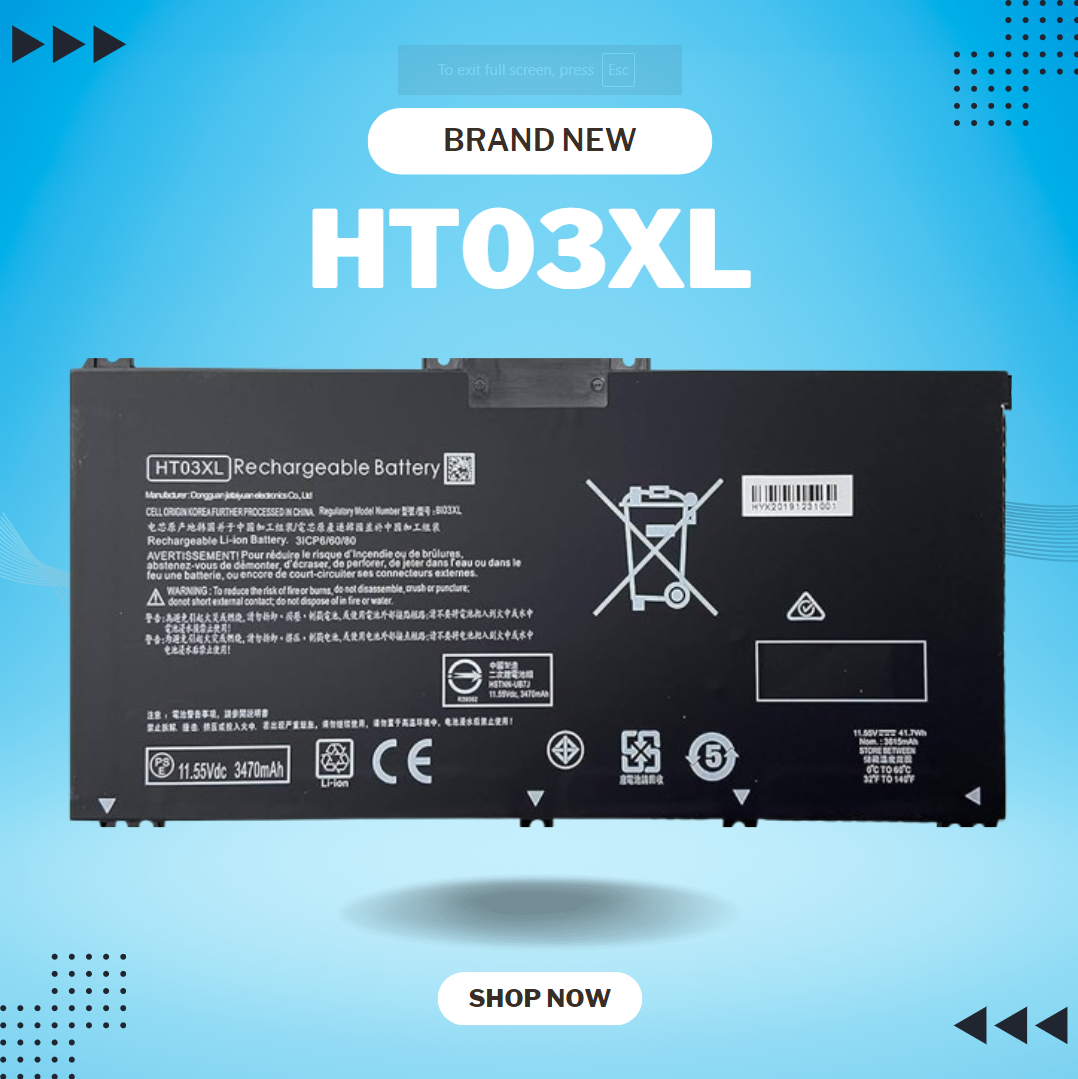
HT03XL L11119-855 Laptop Battery for HP Pavilion 14-CE 14-CF 14-DF 15-CS 15-DA 15-DB 15-DW 17-by 17-CA Series 15-CS0053CL 15-DW0033NR 15-DA0014DX L11421-542 L11421-2C2 HSTNN-UB7J HSTNN-DB8R HT03041XL About this item Compatible with: HP HT03XL Battery, for HP Pavilion 14-CE 14-CF 14-CK 14-cm 14-DF 14-MA 14Q-CS 14Q-CY 14S-CF 14S-CR 15-CS 15-CW 15-DA 15-DB 15G-DR 15T-DA 15T-DB 17-by 17-CA Series 14-CE0000 14-CE0020TX 14-CE0025TX 14-CE0027TU 14-CE0028TX 14-CE0029TX 14-CE0030TX 14-CE0034TX 14-CE1058WM 14-CE0068ST 14-CE1056WM 14-CE0064ST 14-CE0006DX 14-CF0000 14-CF0014DX 14-CF1015CL 14-CM0000 14-CM0020NR 14-CM0012NR 14Q-CS0000 14Q-CS0006TU 15-CR0000 15-CR0087CL 15-CR0052OD 15-CR0055OD 15-CR0037WM 15-CR0051CL 15-CR0091MS 15-CR0010NR Replacement Battery for HP Pavilion 15-CS0000 15-CS2010NR 15-CS025CL 15-CS2073CL 15-CS2079NR 15-CS1063CL 15-CS0072WM 15-CS0051WM 15-CS1065CL 15-CW0000 15-CW1063WM 15-DA0000 15-DA0066CL 15-DA0002DX 15-DA0079NR 15-DA1005DX 15-DA0032WM 15-DA0033WM 15-DA0073MS 15-DA0012DX 15-DA0071MS 15-DA0086OD 15-DB0000 15-DB0015DX 15-DB0031NR 15-DB0011DX 15-DB0066WM 15-DB0005DX 15-DB0048NR 15-DB0051OD 15-DB0048CA 17-BY0000 17-BY1053DX 17-BY1033DX 17-BY0060NR 17-BY0021DX 17-BY0053CL 17-BY0021CY 17-BY1055CL Laptop Compatible for HP Pavilion 240 G7, 245 G7, 250 G7, 255 G7, 340 G5, 348 G5 Series;P/N: HSTNN-DB8R HSTNN-DB8S HSTNN-IB80 HSTNN-IB8O HSTNN-LB8L HSTNN-LB8M HSTNN-UB7J HT03041XL HTO3XL HT03XL L11119-855 L11421-1C1 L11421-1C2 L11421-2C1 L11421-2C2 L11421 -2C3 L11421-2D1 L11421-2D2 L11421-421 L11421-422 L11421-423 L11421-542 L11421-544 L11421-545 TPN-C136 TPN-I130 TPN-I131 TPN-I132 TPN-I133 TPN-I134 TPN-Q207 TPN-Q208 TPN-Q209 TPN-Q210 Specifications: ht03xl battery for hp, Battery Type: Li-ion Voltage: 11.55V Capacity: 41.7WH 3470mAh;Cells: 3-cell; Color: Black Packages includes: l11119-855 hp battery, with Two Free Screwdrivers; HTO3XL Battery for hp model 15-cs0085cl 15-cs0073cl 15-cs3075cl 15-cs3073c 15t-cs300 15t-cs200 15-da0021cy 15-da0011la 15t-db000 14-cf0013dx 14-cf0051od 15-ef0023dx Compatible devices: HP HT03XL Rechargeable li-ion Battery, for HP Pavilion 14-CE 14-CF 14-CK 14-cm 14-DF 14-DH 14-MA 14Q-CS 14Q-CY 14S-CF 14S-CR 15-CS 15-CW 15-DA 15-DB 15G-DR 15T-DA 15T-DB 17-by 17-CA Series 15-cs0053cl 15-cs1063cl 15-cs2064st 15-cs3063cl 15-cs3075cl 15t-cs200 15-da0032wm 15-da0014dx 17-by0063cl 17-by2075cl 17-by0071cl 17-by1022cl 17-by0088cl 17-by0062st 17-by0020cy 17-by0017cy 17-by1003cy 17-ca1010ds 17-by0019ds 17-by2003ca 17-by3613dx 17-by1972cl 17-ca1031dx 17-ca1061nr 17-ca0054cl

The MSI PRO MP252L features a 25-inch Full HD IPS display with a smooth 120Hz refresh rate and 1ms MPRT response time. Equipped with HDMI and DisplayPort connectivity plus eye-care technology, it’s ideal for productivity, study, and everyday use. The MSI PRO MP252L is a professional-grade monitor designed for office work, learning, and home use. Its 25-inch Full HD IPS panel delivers sharp visuals and accurate colors, while the 120Hz refresh rate ensures smoother scrolling and motion. With versatile connectivity options, it easily integrates into modern and legacy setups. 25” Full HD Display (1920×1080): Clear and detailed visuals for work and entertainment. IPS Panel Technology: Wide viewing angles and consistent color accuracy. 120Hz Refresh Rate: Smoother visuals compared to standard 60Hz monitors. 1ms MPRT Response Time: Reduces motion blur for improved clarity. Eye Care Technology: Anti-Flicker and Less Blue Light reduce eye strain. 1× HDMI Port: Easy connection to laptops, desktops, and media devices. 1× DisplayPort: Stable and high-quality video signal for modern systems. Headphone Out: Convenient audio output for headphones or external speakers. Built with MSI’s trusted quality standards, the PRO MP252L features a durable yet sleek design that fits perfectly in professional and home environments.

MULTI-FUNCTIONAL: Portable retro speaker, support Bluetooth, U disk, Memory Card, AUX (connect to MP3, MP4 player, smartphone, PC) to play music. It is easy to enjoy stereo sound for music lovers. LONG BATTERY LIFE: Bluetooth speaker has a built-in 1800mAh battery, rechargeable and environmentally friendly, providing 8 hours of battery life, ensuring you can enjoy your favorite music and radio stations for a long time. CLEAR SOUND: The radio speaker’s built-in powerful DSP chip and antenna provide excellent reception, allowing you to experience clear sound. Stations can be easily selected, making it convenient to find your favorite FM channels. POWERFUL: This speaker is compact but with high power, the 5W speaker delivers powerful sound quality. Allows you to enjoy rich and immersive sound, transforming your room into a charming listening environment. RETRO DESIGN: The small FM radio speaker with charming and versatile design incorporates classic aesthetics, making it a delightful addition to your sound collection. For living rooms, bedrooms, parties, etc.

Genuine-spec touchpad flex cable for MacBook Pro 13″ (Model A1502, Mid 2014)—restores full trackpad functionality, including precise cursor control and physical click response. Essential for repairing unresponsive or erratic trackpad behavior. Compatible With: MacBook Pro 13-inch (Mid 2014, Model A1502, Model Identifier MacBookPro11,1) with Intel Core i5/i7 processors and Retina display. Part Type: Touchpad flex cable only — does not include the trackpad housing, button mechanism, or mounting hardware. This is the ribbon cable that connects the trackpad to the logic board. Function: Transmits cursor movement and click signals (left/right physical clicks) Supports standard multi-touch gestures (two-finger scroll, tap-to-click, pinch-to-zoom) ⚠️ Note: This model uses a physical click mechanism—not Force Touch (no haptic feedback or pressure sensitivity). Transmits cursor movement and click signals (left/right physical clicks) Supports standard multi-touch gestures (two-finger scroll, tap-to-click, pinch-to-zoom) ⚠️ Note: This model uses a physical click mechanism—not Force Touch (no haptic feedback or pressure sensitivity). OEM-Quality Build: Matches Apple’s original in: Cable length and routing path Connector type and pin alignment Insulation and flexibility for long-term reliability Cable length and routing path Connector type and pin alignment Insulation and flexibility for long-term reliability Common Use Cases: Replacing a torn, frayed, or corroded original flex cable Fixing: Unresponsive or intermittent trackpad Cursor jumping or drifting Click function failure (left or right) Complete trackpad disconnect Replacing a torn, frayed, or corroded original flex cable Fixing: Unresponsive or intermittent trackpad Cursor jumping or drifting Click function failure (left or right) Complete trackpad disconnect Unresponsive or intermittent trackpad Cursor jumping or drifting Click function failure (left or right) Complete trackpad disconnect Installation Note: Requires bottom case removal and battery disconnect. Connects via a ZIF (Zero Insertion Force) socket on the logic board—do not force. Cable routes under the battery; handle with care to avoid strain. Suitable for intermediate to advanced DIYers or technicians. Requires bottom case removal and battery disconnect. Connects via a ZIF (Zero Insertion Force) socket on the logic board—do not force. Cable routes under the battery; handle with care to avoid strain. Suitable for intermediate to advanced DIYers or technicians.

PCE 900 M8 900VA 480W Output Power: 700VA (M8 700), 900VA (M8 900) Voltage Input Range: 220-240 VAC with 102 wires (M8 700), 140-300 VAC (M8 900) Output Protection: Overload, discharge, and overcharge protection (M8 700), Fault protection (M8 900) Waveform: Simulated Sine Wave LED Indicators: Green lighting (M8 700), Green flashing (M8 900) Frequency: 50 or 60 Hz +/- 10% (auto sensing) (M8 700), 50 or 60 Hz +/- 1% (M8 900) Voltage (backup mode): 12V/9AH x 1 (M8 700), 12V/7AH x 1 (M8 900) Frequency (backup mode): 50 or 60 Hz +/- 1% (M8 700 and M8 900) Transfer time (M8 700): Typical 2 to 6 ms Backup time (M8 900): 10-20min depending on load level Net Weight: 4.3 kg (9.46 lbs) (M8 700), 4.8 kg (10.56 lbs) (M8 900) Output Receptacles: Universal sockets x 2 or German x 2 (M8 700), Universal sockets x 4 (M8 900) Audible Noise: Sounding every 10 seconds (M8 700), Sounding every second (M8 900) Dimensions: 100x278x140 (3.9″x10.8″x5.5″) (M8 700), 130x320x182 (5.07″x12.48″x7.1″) (M8 900) Compatibility: Windows 2000/XP/2003/2008/Vista/7, NOVELL, LINUX, UNIX (M8 700), Optional Interface with power management software (M8 900) Certifications: EN 50091-1-1/EN 69050 (RD), IEC 60950, TUV GC-Mark, EN 50091-2, EN 50022/B, IEC 62040-2, IEC 61000-3-2, IEC 61000-3-3, ISO 9001, ISO 14001 (M8 700 and M8 900)

DELL Battery YRDD6 Laptop for replaceable Dell Inspiron 7586 5482 5485 5491 3310 2-in-1 3493 3582 3593 3793 5493 5593 5480 5590 5591 5594 5598 15 3583 3584 Vostro 3491 5481 5581 5490 5590 VM732 About this item Battery Type: 3cell Li-Polymer Voltage &Capacity : 11.4V 42WH Safeguard features against incorrect voltage, short circuit, internal overheating 100% Brand new ,Grade A cells battery; Quality assurance;every battery has passed factory testing; 500+ recharge cycles over

MacBook Pro A2485 2021 – 16.2" XDR display, Apple M1 Pro (10-core CPU / 16-core GPU), 32 GB memory, 512 GB SSD.Top-tier creative laptop with blazing performance, superb display, and professional I/O – built for demanding workflows.

SanDisk Ultra Flair USB 3.0 – SDCZ73 – High-speed flash drive with sleek metal design.Up to 150MB/s transfer speeds and password protection software included. Model: SanDisk Ultra Flair USB 3.0 Flash Drive (SDCZ73) Interface: USB 3.0 (Backward compatible with USB 2.0) Read Speed: Up to 150MB/s (on supported USB 3.0 ports) Capacity Options: 64GB / 128GB / 256GB Material: Sleek and durable metal casing Design: Compact with built-in keyring loop Security: Includes SanDisk SecureAccess software for password protection Compatibility: Windows, macOS (reformat may be required), Linux Dimensions: Approx. 42.42 x 13.21 x 6.60 mm Weight: Approx. 5.2 grams

Logitech C270 HD webcam — 720p USB camera with built-in mic and automatic light correction. Solid pick for video calls, remote work, or basic streaming. This is the Logitech C270 HD Webcam, a budget plug-and-play USB camera suited for everyday video calls. It doesn’t strive for professional streaming quality, but it reliably handles meeting needs, student calls, or backup cam duties. Key Features & Functionality Records video in HD 720p at 30 fps Fixed focus lens (no autofocus) Built-in mono microphone with noise reduction (captures voice clearly in standard environments) Automatic light correction (RightLight / similar tech) to adjust in low or uneven lighting Universal mounting clip: works on laptop lids, monitors, or can sit on a shelf USB 2.0 interface, 1.5 m (≈ 5 ft) cable length Technical Specifications Strengths & Limitations Pros: Reliable and easy to set up: plug and play Good for video calls in decent lighting Noise suppression in mic helps reduce background hiss Affordable alternative if your built-in camera fails Cons: Only 720p — not ideal for high quality streaming Fixed focus — manual adjusting can’t zoom/focus No privacy shutter (you may need stickers or external cover) Color and sharpness aren’t top tier under weak light

Replacement Audio Board with IPD Cable for MacBook Air M1 2020 (A2337). Compatible with part numbers 820-01929-A, 821-03452-A, 923-03672, 923-03663, and more. Ideal for fixing audio issues, headphone jack problems, or sound board failures. The Audio Board with IPD Cable for MacBook Air (M1, 2020) is a high-quality replacement spare part designed to restore proper sound functionality on MacBook Air A2337 models. If your MacBook is experiencing no sound output, headphone jack issues, distorted audio, or audio board failure, this replacement board provides a reliable solution. It includes the required IPD cable for proper installation and connection, making it ideal for professional repairs and technician use. Replacement Audio Board + IPD Cable for MacBook Air M1 Fixes audio issues such as no sound, headphone jack failure, or audio distortion Includes IPD cable for correct connection and repair High-quality build for stable and long-term performance Ideal for technicians, repair shops, and spare part replacement Compatible with multiple Apple part numbers for easy matching ✔ MacBook Air (M1, 2020) A2337 Compatible only with MacBook Air A2337 (M1, 2020). Please match your device model and part number before ordering to ensure correct fit.

The TP-Link TL-WA855RE N300 Universal Range Extender boosts your existing 2.4GHz Wi-Fi signal up to 300Mbps to eliminate dead zones and extend coverage. With a compact wall-plug design, dual external antennas, and one-touch WPS setup, it’s perfect for home and office use. The TP-Link TL-WA855RE N300 Universal Wireless Range Extender is an easy and affordable solution to extend your Wi-Fi coverage into areas where your router signal is weak or unavailable. It works with almost any wireless router to repeat and strengthen your existing network, providing improved connectivity for streaming, browsing, video calls, and everyday online tasks. Featuring two external antennas for better signal strength, an Ethernet port for wired devices, and a smart signal indicator for optimal placement, it ensures stable coverage across your space. N300 Wi-Fi Speed (Up to 300Mbps) on 2.4GHz Universal Compatibility works with most Wi-Fi routers and access points Boosts Coverage & Removes Dead Zones for stronger wireless signal Two External Antennas improve range and stability One-Touch WPS Setup for quick and simple connection Smart Signal Indicator helps you find the best placement Ethernet Port for wired connection to TVs, PCs, or consoles Compact Wall Plug Design ideal for home or office use Ideal for homes, offices, apartments, and small businesses needing better Wi-Fi coverage. Works with laptops, smartphones, smart TVs, tablets, IP cameras, and other Wi-Fi devices.

MARSRIVA Smart Mini DC UPS KP2 Series | 18 Watts 10000mAh | 0ms AC to DC Transfer | Flame Retardant | Wall Mount Slots | 1 x Passive PoE, 2 x DC and 1 x USB Output Ports | KP2 BLACK Keep Wi-Fi Power On Output:18W (Max.) or 30W (Max.) ● With 1 * Passive PoE, 2 * DC and 1 * USB output ports, DC UPS can power up multiple devices simultaneously. ● AC to DC 0ms transfer technology keeps your devices working when electricity is ON/OFF shifting. ● With wall-mount slots on the back, DC UPS can be mounted on the wall easily. ● Air cooling system provides maximum heat dissipation, ensuring the long-term stability of UPS. ● V-0 flame retardant product housing secures you and your property. ● 16000mAh high-capacity battery (KP2 Plus, KP2 Ultra) provides longer backup time. ● 30W high-power output (KP2 Pro, KP2 Ultra) provides better compatibility.

Experience professional-grade power with this pre-owned ThinkPad E14 Gen 2. Featuring a robust AMD Ryzen 7 4700U 8-core processor, 16GB RAM, and a 256GB NVMe SSD, this 14-inch laptop is built for high-speed productivity, secure data management, and long-lasting durability.

Boost your daily productivity with the Lenovo ThinkPad E14 Gen 2, featuring a powerful 11th Gen Intel Core i5 processor. With flexible configurations of up to 16GB RAM and a fast 512GB NVMe SSD, this 14-inch business laptop offers the perfect blend of performance, security, and legendary ThinkPad durability

Digital Device Laptop Keyboard Compatible for MacBook AIR 13″ A1369 A1466 (MID 2011- MID 2017) US Layout 【Unique】Pls see detail compatible models in description below. 【Safe】Easy for you replace your faulty, cracked or broken keyboard ,seller remind that you should replace the keyboard in the off state. All pictures are taken from the real item, please check carefully before bidding, Replacement and high quality, Replace your faulty, cracked or broken keyboard. Each keyboard is tested before shipping Compatibility: MacBook Air 13″ A1369 Mid 2011: MC965LL/A (1.7 GHz Core i5) Mid 2011: MC966LL/A (1.7 GHz Core i5) Mid 2011: MD226LL/A (1.8 GHz Core i7) Compatibility: MacBook Air 13″ A1466 Mid 2012: MD231LL/A (1.8 GHz Core i5) Mid 2012: MD232LL/A (1.8 GHz Core i5) Mid 2012: MD232LL/A (2.0 GHz Core i7) Mid 2013: MD760LL/A (1.3 GHz Core i5) Mid 2013: MD761LL/A (1.3 GHz Core i5) Mid 2013: MD761LL/A (1.7 GHz Core i7) Early 2014: MD760LL/B (1.4 GHz Core i5) Early 2014: MD761LL/B (1.4 GHz Core i5) Early 2014: MD761LL/B (1.7 GHz Core i7) Compatibility: Early 2015: MJVE2LL/A (1.6 GHz Core i5 or 2.2 GHz Core i7) Early 2015: MJVG2LL/A (1.6 GHz Core i5 or 2.2 GHz Core i7) Identifying Numbers APN #: 661-6059, 661-6635, 661-7480

Genuine-spec US layout (QWERTY) black keyboard replacement for MacBook Air 13.6″ and 15″ models (2023–2025, M2/M3/M4 chips)—featuring Apple’s Magic Keyboard with scissor-switch mechanism, backlighting, and precise OEM fit. Compatible With: 13.6″ MacBook Air: A2681 (M2, 2022–2023), A3113 (M3, 2023–2024), A3240 (M4, 2024–2025) 15″ MacBook Air: A2941 (M2, 2023), A3114 (M3, 2023–2024), A3241 (M4, 2024–2025) 13.6″ MacBook Air: A2681 (M2, 2022–2023), A3113 (M3, 2023–2024), A3240 (M4, 2024–2025) 15″ MacBook Air: A2941 (M2, 2023), A3114 (M3, 2023–2024), A3241 (M4, 2024–2025) Keyboard Layout: Standard US English (QWERTY) with wide Enter key, dedicated left/right arrow keys in inverted-T layout, and full function row—matches Apple’s original US configuration. Design: Apple’s Magic Keyboard with scissor-switch mechanism—providing quiet, stable, and responsive typing with 1mm key travel and enhanced durability. Features: Integrated backlighting for low-light use, ambient light sensor compatibility, and OEM-style flex cable for direct logic board connection. Color: Sleek black keycaps—ideal for Space Gray and Midnight finishes, and visually consistent across all color variants. Precision Fit: Engineered to exact Apple specifications for alignment, key spacing, and mounting—ensures seamless integration into the original top case. Installation Note: The keyboard is factory-glued into the top case. Replacement requires full disassembly, careful removal, and professional-grade re-adhesion. Recommended for experienced technicians only.

A robust Beurotika cash drawer featuring a 450mm metal body, secure 3-position lock, and compatibility with most POS systems—ideal for retail, restaurants, and small businesses. Secure 3-position key lock: Open, locked, and release-to-print modes for controlled access 6 coin slots + 4 bill compartments: Organized layout for efficient cash handling Heavy-duty steel construction: Reinforced frame and smooth slide rails for daily reliability Standard RJ12 interface: Compatible with most POS systems (e.g., Epson, HP, Bixolon, and Beurotika receipt printers) Auto-open trigger: Automatically opens when connected to a compatible receipt printer during transactions Bottom cable entry: Keeps wiring neat and protected
