
Reliable, secure, and built for productivity—the Lenovo ThinkPad T14 features a 10th Gen Intel Core i5 processor, 16GB RAM, and a fast 256GB SSD in a durable,14-inch business laptop.

Genuine-spec keyboard replacement for MacBook Air 13″ (Model A2179, 2020, Intel) — choose US QWERTY or UK QWERTY (with £ symbol). Features Apple’s reliable scissor-switch mechanism, backlighting, and OEM-fit design for seamless performance and aesthetics. Compatible With: MacBook Air 13-inch (2020, Model A2179, EMC 3597) with Intel Core i3/i5/i7 processors (non-M1). Layout Options (select at purchase): US Layout: Standard QWERTY with wide Enter key, @ above 2, # above 3, and full inverted-T arrow keys. UK Layout: QWERTY with £ symbol, tall vertical Enter key, @ accessed via right Alt, and UK-specific punctuation—matches Apple’s official UK regional configuration. US Layout: Standard QWERTY with wide Enter key, @ above 2, # above 3, and full inverted-T arrow keys. UK Layout: QWERTY with £ symbol, tall vertical Enter key, @ accessed via right Alt, and UK-specific punctuation—matches Apple’s official UK regional configuration. Keyboard Type: Traditional scissor-switch mechanism (not Butterfly, not Magic Keyboard)—robust, tactile, and serviceable, with good key travel and proven durability. Integrated Features: Full backlit keys for low-light use Ambient light sensor compatibility OEM-style ribbon cable pre-attached for direct logic board connection Full backlit keys for low-light use Ambient light sensor compatibility OEM-style ribbon cable pre-attached for direct logic board connection Precision Build: Molded to exact Apple specifications—ensures flush mounting, consistent key alignment, and seamless integration into the original top case. Installation Note: Keyboard is screw-mounted with light adhesive—more accessible than glued Butterfly/Magic keyboards. Requires top case access and battery disconnect. Suitable for intermediate DIYers or professional technicians. Important: This is keyboard only—does not include the top case, battery, trackpad, or logic board. Not compatible with M1 MacBook Air (A2337/A2338) or M2 models (A2681/A2941). This is keyboard only—does not include the top case, battery, trackpad, or logic board. Not compatible with M1 MacBook Air (A2337/A2338) or M2 models (A2681/A2941). Model Verification: Confirm your device is MacBook Air A2179 (13″, Intel, 2020) via > About This Mac > Model Identifier (e.g., MacBookAir9,1).

A4tech KR-85 Natural A Rounded Edge Ergonomical Keyboard

Genuine-spec touchpad flex cable for MacBook Pro 16″ (Model A2159, 2019, Intel)—essential for restoring full Force Touch functionality, haptic feedback, and precise trackpad responsiveness during repair or replacement. Compatible With: MacBook Pro 16-inch (2019, Model A2159) with Intel Core i7/i9 processors (Model Identifier: MacBookPro16,1). Part Type: Touchpad flex cable only—does not include the trackpad, Taptic Engine, or mounting hardware. This is the OEM-style ribbon cable that connects the trackpad to the logic board. Function: Transmits touch input, Force Touch pressure data, and haptic feedback signals—critical for macOS gestures (e.g., Force Click, three-finger swipe, pinch-to-zoom) and Taptic Engine operation. OEM-Quality Build: Matches Apple’s original flex circuit in length, connector pitch, shielding, and bend radius—ensures reliable signal integrity and durability under repeated use. Common Use Cases: Replacing a torn, frayed, or corroded original flex cable Completing a trackpad replacement when the original cable is damaged Fixing intermittent or unresponsive trackpad behavior caused by cable failure Replacing a torn, frayed, or corroded original flex cable Completing a trackpad replacement when the original cable is damaged Fixing intermittent or unresponsive trackpad behavior caused by cable failure Installation Note: Requires full bottom case removal and careful routing beneath the battery and logic board. Connectors use ZIF (Zero Insertion Force) sockets—must be properly aligned and latched without force. Recommended for certified or experienced technicians only.

The Lexar NM620 2TB NVMe SSD delivers exceptional read speeds up to 3,300 MB/s and write speeds up to 3,000 MB/s through its PCIe Gen3x4 NVMe 1.4 interface. Built with 3D NAND Flash and a compact M.2 2280 form factor, it offers fast, efficient, and reliable storage for gaming, video editing, and professional workloads. The Lexar NM620 2TB M.2 2280 NVMe SSD is engineered for users who need high-performance storage without compromise. Using PCIe Gen3x4 lanes and the NVMe 1.4 protocol, it provides up to six times faster transfer speeds than SATA SSDs. Its slim, cable-free design makes it an ideal upgrade for desktops, laptops, and ultrabooks that demand higher data throughput and improved responsiveness. ⚡ High-Speed NVMe Performance: Delivers sequential read/write speeds up to 3,300 MB/s / 3,000 MB/s for faster system boot-ups, game loading, and large-file transfers. 💾 Large 2 TB Capacity: Provides ample storage for 4K media, applications, and high-volume project files. 🔋 Power-Efficient Design: Optimized for lower power draw, helping extend laptop battery life and reduce operating temperatures. 🔒 Advanced Data Protection: Utilizes LDPC (Low-Density Parity-Check) and end-to-end data path protection for accurate, consistent data integrity. 🧊 Compact Form Factor: The M.2 2280 design supports easy installation in modern systems without cables. 🧠 3D NAND Architecture: Ensures improved endurance, sustained performance, and stability during intensive workloads. 🧰 Durability Tested: Resistant to shock and vibration for dependable performance across a range of operating environments.

WiWU Pilot Backpack 15.6 inch Travelling Polyester Laptop Business School Travelling Backpack WiWU Pilot Backpack 15.6 inch Travelling Polyester Laptop Business School Travelling Backpack

POUT E3 Angle - Adjustable Angled Ergonomic Laptop Stand Riser - Notebook Computer Holder Compatible w/MacBook Air Pro Dell HP & More 11"-17" Laptops - Foldable & Portable w/ 5 Angles (Silver) POUT E3 Angle – Adjustable Angled Ergonomic Laptop Stand Riser – Notebook Computer Holder Compatible w/MacBook Air Pro Dell HP & More 11″-17″ Laptops – Foldable & Portable w/ 5 Angles (Silver)

Computer Wireless Keyboard and Mouse Bundle C4120 Item No.: MT-C4120 Brand: MeeTion Color: Black Availability: In Stock EAN: Black: 6970344732155 White: 6970344732162 Description: Full-size keyboard, Adjustable Resolution, Power-efficient wireless technology.

WiWU 14-inch & 15.6-inch Minimalist Laptop Sleeve for Macbook Air 2020 Protective Case Minimalist Laptop Sleeve Water resistant polyester+ Fax fur lining Ultra slim design with front pocket Including packing weight:14inch 280g/15.6inch 320g WiWU 14-inch & 15.6-inch Minimalist Laptop Sleeve for Macbook Air 2020 Protective Case

BATTERY TOSHIBA PA5136U-1BRS for Toshiba Portege Z30 Z30-A Z30-A1301 Series PA5136U Tablet Rechargeable Notebook Battery Pack 14.8V 3380mAh About this item Battery type: Voltage: 14.8V Capacity: 3380 mAh(52Wh) Cells: 4-cell Li-Polymer 100% New from Manufacturer Full Compatible for Part# PA5136U-1BRS,500+ recharge cycles over Every battery has passed factory testing; CE-/FCC-/RoHS-Certified ensures safety. Grade A cells battery; Quality assurance This compatibility list is non-exhaustive, if your original part# or your laptop model NO is not included in the compatibility list, but our battery may still fit your laptop. Please feel free to contact us to confirm the compatibility

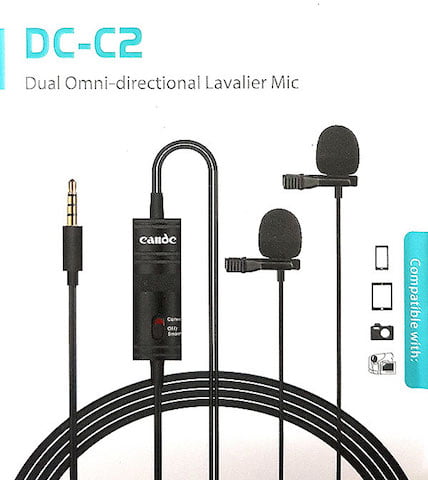
Professional Grade K9 Dual Wireless Lavalier Mic For Android Smartphones Type C K9 Wireless Collar Microphone For YouTube Voice Recording Live Videos Vlog ASMR Podcast & Interview Expert Features 【Wireless Lavalier Microphone (2 Pcs) 】: Ideal for USB-C, iPhone, Smartphones, iPads and Macs with USB-C ports, Android devices, and laptops with USportsPort | Auto Noise Reduction. 【Dual Microphone Set】:Includes two wireless Lavalier microphones for versatile audio recording options. Simply plug the microphone into the USB port for instant connectivity and ease of use. 【Wide Compatibility】:Ideal for use with USB-C devices, iPhones, smartphones, iPads, Macs, Android devices, and laptops with USB-C ports, ensuring compatibility across various platforms. 【Auto Noise Reduction】: Features built-in noise reduction technology to minimize background noise and ensure clear and crisp audio. 【Long Battery Life】:Powered by lithium-ion batteries, providing reliable performance for extended recording sessions. 【Versatile Applications】:Suitable for a wide range of applications, including vlogging, interviews, presentations, podcasting, and more.

Reliable, compact, and business-focused—the Dell Latitude 5310 features a 10th Gen Intel Core i5 processor, 8GB RAM, and a fast 256GB SSD in a lightweight 13.3-inch design built for everyday productivity.

Genuine-spec touchpad flex cable for MacBook Pro 16″ (Model A2141, 2019, Intel)—essential for restoring full Force Touch functionality, haptic feedback, and precise multi-touch gesture control during trackpad repair or replacement. Compatible With: MacBook Pro 16-inch (2019, Model A2141) with Intel Core i7/i9 processors (Model Identifier: MacBookPro16,1) (Note: A2141 is the non-base configuration of the 2019 16″ MacBook Pro—typically higher-end Intel models.) Part Type: Touchpad flex cable only—does not include the trackpad housing, Taptic Engine, or mounting hardware. This is the OEM-style ribbon cable that connects the trackpad to the logic board. Function: Transmits touch coordinates, Force Touch pressure data, and haptic feedback signals—critical for macOS gestures (e.g., Force Click, three-finger lookup, pinch-to-zoom) and Taptic Engine responsiveness. OEM-Quality Construction: Replicated to Apple’s exact specifications—including cable length, connector pitch, EMI shielding, and bend radius—ensuring reliable signal integrity and long-term durability. Common Use Cases: Replacing a torn, creased, or liquid-damaged original flex cable Completing a trackpad replacement when the original cable is compromised Fixing intermittent trackpad behavior, loss of Force Touch, or complete unresponsiveness Replacing a torn, creased, or liquid-damaged original flex cable Completing a trackpad replacement when the original cable is compromised Fixing intermittent trackpad behavior, loss of Force Touch, or complete unresponsiveness Installation Note: Requires full disassembly of the bottom case, speaker removal, and careful routing beneath the battery and logic board. Connectors use ZIF (Zero Insertion Force) sockets—must be aligned and latched gently. Recommended for certified or professional repair technicians only. Important: This is flex cable only—not a complete trackpad assembly. Must be used with the original or compatible A2141 trackpad and Taptic Engine. Not compatible with M1 MacBook Pro 16″ (A2485), 14″ models (A2442), or any MacBook Air. This is flex cable only—not a complete trackpad assembly. Must be used with the original or compatible A2141 trackpad and Taptic Engine. Not compatible with M1 MacBook Pro 16″ (A2485), 14″ models (A2442), or any MacBook Air. Model Verification: Confirm your device is MacBook Pro A2141 (16″, 2019, Intel) via > About This Mac > Model Identifier (should read MacBookPro16,1).

MacBook Pro Retina 13' Early 2015 A1502 i5 8GB Logic Board MacBook Pro Retina 13′ Early 2015 A1502 i5 8GB Logic Board

GSAN GS-3021 POS All in One Touch 15.6" - Intel i5 - 8GB - 128GB SSD with Customer Display Main Board: POS motherboard CPU: I5-3RD GEN Memory: DDR3 8GB Hard Disk: 128GB Power: External power supply Input: 110V-240V 50/63Hz 2A Output: 12V DC 8A 96W MAX Interface: 6 USB port 1 LAN port

MacBook Air 13″ Retina A1932(2018-2019-2020) Display Assembly (Silver) MacBook Air 13″ Retina Display 2019 A1932 (EMC 3184 MacBookAir8,2) 1.6 GHz MacBook Air 13″ Retina Display 2020 A2179 (EMC 3302 MacBookAir9,1) 1.1 GHz Core i3 A2179 (EMC 3302 MacBookAir9,1) 1.1 GHz Core i5 A2179 (EMC 3302 MacBookAir9,1) 1.2 GHz Core i7 MacBook Air 13” Retina Display Late 2018 A1932 (EMC 3184 MacBookAir8,1) 1.6 GHz

Laptop Accessories US Version Keyboard for MacBook Retina 13 M1 A2338 2020 EMC 3578 Original Computer Replacement Keyboards Laptop Accessories US Version Keyboard for Macbook Retina 13 M1 A2338 2020 EMC 3578

Original MacBook Pro 13″ (A2338) Display Assembly in Silver, including LCD, Retina panel, backlight, camera, Wi-Fi antennas, hinges, and aluminum lid. Compatible with M1 MacBook Pro 13″ (2020). Ideal for replacing cracked, damaged, or faulty screens. ✔️ Complete Display Assembly: Includes LCD, digitizer, housing, hinges, webcam, and antenna modules. ✔️ Retina Resolution: 2560 × 1600 native resolution with True Tone support. ✔️ Genuine Fit for A2338: Designed specifically for the MacBook Pro 13″ (A2338) – M1 2020 model. ✔️ Accurate Color & Brightness: 500 nits brightness, P3 wide color gamut, and high contrast. ✔️ Silver Aluminum Finish: OEM-grade aluminum lid matching the original color and texture. ✔️ Plug-and-Play Replacement: No programming required — direct connector compatibility. ✔️ Ideal for Repair: Suitable for replacing damaged, flickering, bleeding, or cracked screens.

Led Desk Lamp REMAX RT-E815 ReSee Series Smart Eye-Caring 1500mAh RT-E815 With Container · Eye-caring lightning · Large-area lighting · 1500mAh · Delayed light-off · Soft lighting · Stepless dimming · Pen/phone holder · With rechargeable battery · Plug and use · A soft hose of 360-degree adjustment.

Genuine-spec touchpad flex cable for MacBook Pro 15″ (Model A1706 – 2017 and A1989 – 2018/2019)—restores full Force Touch functionality, haptic feedback, and precise multi-touch gesture control during trackpad repair or replacement. Compatible With: MacBook Pro 15″ (2017) – Model A1706 (Model Identifier: MacBookPro14,3) MacBook Pro 15″ (2018–2019) – Model A1989 (Model Identifier: MacBookPro15,2) ✅ Note: Apple used the same trackpad assembly and flex cable across both A1706 and A1989 15″ models—making this part interchangeable between them. MacBook Pro 15″ (2017) – Model A1706 (Model Identifier: MacBookPro14,3) MacBook Pro 15″ (2018–2019) – Model A1989 (Model Identifier: MacBookPro15,2) ✅ Note: Apple used the same trackpad assembly and flex cable across both A1706 and A1989 15″ models—making this part interchangeable between them. ✅ Note: Apple used the same trackpad assembly and flex cable across both A1706 and A1989 15″ models—making this part interchangeable between them. Part Type: Touchpad flex cable only — does not include the trackpad housing, Taptic Engine, or mounting hardware. This is the OEM-style ribbon cable connecting the trackpad to the logic board. Function: Transmits: Touch input coordinates Force Touch pressure data Haptic feedback signals to the Taptic Engine Enables full macOS gesture support: Force Click, three-finger lookup, swipe navigation, pinch-to-zoom, and smooth cursor tracking. Touch input coordinates Force Touch pressure data Haptic feedback signals to the Taptic Engine Enables full macOS gesture support: Force Click, three-finger lookup, swipe navigation, pinch-to-zoom, and smooth cursor tracking. OEM-Quality Build: Matches Apple’s original in: Cable length and routing Connector pitch and ZIF latch design EMI shielding and flex durability Cable length and routing Connector pitch and ZIF latch design EMI shielding and flex durability Common Use Cases: Replacing a torn, creased, or liquid-damaged original flex cable Completing a trackpad replacement when the original cable is compromised Fixing intermittent trackpad behavior, loss of Force Touch, or complete unresponsiveness Replacing a torn, creased, or liquid-damaged original flex cable Completing a trackpad replacement when the original cable is compromised Fixing intermittent trackpad behavior, loss of Force Touch, or complete unresponsiveness Installation Note: Requires full bottom case removal and battery disconnection. Cable routes under internal components near the right speaker and logic board. Connects via a ZIF (Zero Insertion Force) socket—must be aligned carefully and latched gently. Recommended for experienced or certified technicians only. Requires full bottom case removal and battery disconnection. Cable routes under internal components near the right speaker and logic board. Connects via a ZIF (Zero Insertion Force) socket—must be aligned carefully and latched gently. Recommended for experienced or certified technicians only.
