
Genuine-spec UK layout (QWERTY) black keyboard replacement for MacBook Air 13.6″ and 15″ models (2023–2025, M2/M3/M4 chips)—featuring Apple’s Magic Keyboard design with scissor-switch mechanism, backlighting, and precise OEM fit. Compatible With: 13.6″ MacBook Air: A2681 (M2, 2022–2023), A3113 (M3, 2023–2024), A3240 (M4, 2024–2025) 15″ MacBook Air: A2941 (M2, 2023), A3114 (M3, 2023–2024), A3241 (M4, 2024–2025) 13.6″ MacBook Air: A2681 (M2, 2022–2023), A3113 (M3, 2023–2024), A3240 (M4, 2024–2025) 15″ MacBook Air: A2941 (M2, 2023), A3114 (M3, 2023–2024), A3241 (M4, 2024–2025) Keyboard Layout: UK English (QWERTY) with £ symbol, taller Enter key, and standard UK key labeling—matches Apple’s original regional configuration. Design: Apple’s Magic Keyboard with scissor-switch mechanism—offering quiet, responsive typing with 1mm travel and improved reliability. Features: Backlit keys, ambient light sensor support, and original-style flex cable connector for seamless integration with the logic board. Color: Matte black keycaps matching the Space Gray and Midnight MacBook Air finishes (also compatible with Silver/Starlight—keycaps are model-agnostic). Precision Engineering: Manufactured to exact OEM specifications for fit, alignment, and tactile performance—ensures flush mounting within the top case. Installation Note: Keyboard is glued into the top case and requires full disassembly and careful re-adhesion. Recommended for professional technicians only due to complexity and risk of damage.

Genuine-spec touchpad flex cable for MacBook Pro 16″ (Model A2141, 2019, Intel)—essential for restoring full Force Touch functionality, haptic feedback, and precise multi-touch gesture control during trackpad repair or replacement. Compatible With: MacBook Pro 16-inch (2019, Model A2141) with Intel Core i7/i9 processors (Model Identifier: MacBookPro16,1) (Note: A2141 is the non-base configuration of the 2019 16″ MacBook Pro—typically higher-end Intel models.) Part Type: Touchpad flex cable only—does not include the trackpad housing, Taptic Engine, or mounting hardware. This is the OEM-style ribbon cable that connects the trackpad to the logic board. Function: Transmits touch coordinates, Force Touch pressure data, and haptic feedback signals—critical for macOS gestures (e.g., Force Click, three-finger lookup, pinch-to-zoom) and Taptic Engine responsiveness. OEM-Quality Construction: Replicated to Apple’s exact specifications—including cable length, connector pitch, EMI shielding, and bend radius—ensuring reliable signal integrity and long-term durability. Common Use Cases: Replacing a torn, creased, or liquid-damaged original flex cable Completing a trackpad replacement when the original cable is compromised Fixing intermittent trackpad behavior, loss of Force Touch, or complete unresponsiveness Replacing a torn, creased, or liquid-damaged original flex cable Completing a trackpad replacement when the original cable is compromised Fixing intermittent trackpad behavior, loss of Force Touch, or complete unresponsiveness Installation Note: Requires full disassembly of the bottom case, speaker removal, and careful routing beneath the battery and logic board. Connectors use ZIF (Zero Insertion Force) sockets—must be aligned and latched gently. Recommended for certified or professional repair technicians only. Important: This is flex cable only—not a complete trackpad assembly. Must be used with the original or compatible A2141 trackpad and Taptic Engine. Not compatible with M1 MacBook Pro 16″ (A2485), 14″ models (A2442), or any MacBook Air. This is flex cable only—not a complete trackpad assembly. Must be used with the original or compatible A2141 trackpad and Taptic Engine. Not compatible with M1 MacBook Pro 16″ (A2485), 14″ models (A2442), or any MacBook Air. Model Verification: Confirm your device is MacBook Pro A2141 (16″, 2019, Intel) via > About This Mac > Model Identifier (should read MacBookPro16,1).

A reliable pre-owned Dell Latitude 5410 with 14" display, 10th Gen Core i5, 8GB RAM, and 256GB SSD—ideal for business users and students seeking solid performance, security, and portability.

A capable pre-owned Dell Latitude 5401 with 14" display, 10th Gen Core i7, 16GB RAM, 512GB SSD, and NVIDIA GeForce MX330 2GB—ideal for professionals who need extra graphics power for light creative work or multitasking in a durable business laptop.

TP-Link AC1200 Archer C50 Wireless Dual Band Router Support smooth 4K streaming with AC1200 Wi-Fi 4 external antennas provide stable wireless connections and optimal coverage Easy network management at your fingertips with TP-Link Tether Supports IGMP Proxy/Snooping, Bridge, and Tag VLAN to optimize IPTV streaming Supports Access Point mode to create a new Wi-Fi access point TP-Link AC1200 Archer C50 Wireless Dual Band Router Support smooth 4K streaming with AC1200 Wi-Fi 4 external antennas provide stable wireless connections and optimal coverage Easy network management at your fingertips with TP-Link Tether Supports IGMP Proxy/Snooping, Bridge, and Tag VLAN to optimize IPTV streaming Supports Access Point mode to create a new Wi-Fi access point TP-Link Archer C50 – AC1200 Wireless Dual Band Router Wireless Speed: Up to 1200 Mbps (300 Mbps on 2.4GHz + 867 Mbps on 5GHz) Wi-Fi Standard: 802.11ac – 3x faster than wireless N speeds Bands: Dual Band (2.4GHz & 5GHz) for reduced interference and better performance Antenna: 4 External Antennas for strong and stable wireless coverage Ports: 4× LAN, 1× WAN (10/100 Mbps) Advanced Features: Parental Controls, Guest Network, IPv6 Support, Access Control Security: WPA/WPA2 encryption for secure wireless connections Ease of Use: Easy setup with TP-Link Tether App Ideal For: HD streaming, online gaming, and high-speed downloads in homes and small offices

WiWU Linker 721HD Hub – Compact USB-C hub with 7 ports including 100W PD, dual USB-A, USB-C data, HDMI 4K60, and dual SD/TF slots.Aluminum body, plug‑and‑play compatibility with MacBooks and modern USB‑C devices—ideal for laptop expansion. Model: Linker 721HD (WiWU) Material: Aluminum-alloy shell Ports: 2 × USB‑A 3.1 1 × USB‑C 3.1 (data) 1 × USB‑C PD power delivery (up to 100 W) 1 × HDMI (4K @ 60 Hz) SD card slot + micro‑SD (TF) slot (USB 3.0 speed) Ports: 2 × USB‑A 3.1 1 × USB‑C 3.1 (data) 1 × USB‑C PD power delivery (up to 100 W) 1 × HDMI (4K @ 60 Hz) SD card slot + micro‑SD (TF) slot (USB 3.0 speed) Cable: Fixed USB‑C male cable (approx. 15 cm) Compatibility: Plug-and-play with USB-C/Thunderbolt 3/4 devices (MacBook, XPS, Chromebooks, mobile devices with DP-Alt Mode) Design: Compact, space gray finish optimized for travel/work setups Weight: ~150 g

The TP-Link TL-WA855RE N300 Universal Range Extender boosts your existing 2.4GHz Wi-Fi signal up to 300Mbps to eliminate dead zones and extend coverage. With a compact wall-plug design, dual external antennas, and one-touch WPS setup, it’s perfect for home and office use. The TP-Link TL-WA855RE N300 Universal Wireless Range Extender is an easy and affordable solution to extend your Wi-Fi coverage into areas where your router signal is weak or unavailable. It works with almost any wireless router to repeat and strengthen your existing network, providing improved connectivity for streaming, browsing, video calls, and everyday online tasks. Featuring two external antennas for better signal strength, an Ethernet port for wired devices, and a smart signal indicator for optimal placement, it ensures stable coverage across your space. N300 Wi-Fi Speed (Up to 300Mbps) on 2.4GHz Universal Compatibility works with most Wi-Fi routers and access points Boosts Coverage & Removes Dead Zones for stronger wireless signal Two External Antennas improve range and stability One-Touch WPS Setup for quick and simple connection Smart Signal Indicator helps you find the best placement Ethernet Port for wired connection to TVs, PCs, or consoles Compact Wall Plug Design ideal for home or office use Ideal for homes, offices, apartments, and small businesses needing better Wi-Fi coverage. Works with laptops, smartphones, smart TVs, tablets, IP cameras, and other Wi-Fi devices.

Laptop Battery Compatible for A31N1519 Battery for ASUS X540S X540L X540SA X540S X540LA-SI302 A540 F540 R540LA About this item Compatible model no. :- a31n1519, asus x540s x540l x540sa x540s x540la-si302 a540 f540 r540la Warranty not covered if defects due to external causes, accidental, physical or liquid damage, cut, burnt, misuse and missing warranty stickers or labels Battery capacity/power capability (mah/wattage) may be different from the reference picture but a backup of the battery will be the same as the original Please match your product with the image provided before placing the order for any help please get in touch with us.

A reliable pre-owned Dell Latitude 5400 with 14" display, 8th Gen Core i5, 16GB RAM, and 512GB SSD—ideal for business users and students seeking solid performance, security, and durability in a compact form.

A compact and durable pre-owned Dell Latitude 7480 with 14" display, 6th Gen Core i5, 8GB RAM, and 128GB SSD—ideal for light office tasks, students, or as a secure secondary business device.

OEM-quality trackpad replacement (without flex cable) for MacBook Air 13″ (Model A2179, 2020)—available in Space Gray and Silver finishes—engineered for precise Force Touch performance, smooth multi-touch gestures, and seamless visual integration. Compatible With: MacBook Air 13-inch (2020, Model A2179) with Intel Core i3/i5/i7 processors (non-M1). Part Type: Trackpad only—does not include the flex cable, Taptic Engine, or mounting hardware. Designed for technicians who will reuse the original internal components. Color Options: Space Gray: Matches Space Gray and Midnight finishes Silver: Matches Silver and Starlight finishes (Note: “Z1” typically refers to Apple’s internal regional/part code—this listing covers standard OEM trackpads for A2179.) Space Gray: Matches Space Gray and Midnight finishes Silver: Matches Silver and Starlight finishes (Note: “Z1” typically refers to Apple’s internal regional/part code—this listing covers standard OEM trackpads for A2179.) Force Touch Capable: Fully supports pressure-sensitive input and haptic feedback when paired with the original Taptic Engine and logic board—ensuring full macOS gesture functionality. Precision Build: Mirror-smooth glass surface with exact curvature, texture, and micro-click mechanism matching Apple’s original design for consistent tracking and tactile response. Installation Requirements: Requires full bottom case disassembly and careful transfer of the original flex cable and Taptic Engine. Proper adhesive application is critical for structural integrity and sensor alignment. Recommended for professional or experienced repair technicians only. Important: This is a bare trackpad assembly—not a plug-and-play module. Functionality depends on correct integration with original electronics.

Experience fluid motion and edge-to-edge clarity with this ultra-smooth 100Hz Full HD display. Featuring a frameless IPS panel and a modern minimalist design, it’s the perfect upgrade for smooth office workflows and casual gaming. Model: Buerotika B24M1 Primary Specs: 23.8-inch (24″ class) Display/Performance: IPS (In-Plane Switching) for superior color accuracy Visual/Build Quality: 1920 x 1080 (Full HD) Resolution Aesthetic: Frameless “Zero-Bezel” design for immersive viewing and seamless multi-monitor setups Build: Ultra-slim profile with a sturdy, modern base Adjustability: Tilt-adjustable stand for ergonomic positioning Input/Output: HDMI and VGA ports for universal compatibility with PCs and laptops Compatibility: Plug-and-play support for Windows and macOS Smooth Motion: 100Hz Refresh Rate (provides significantly smoother scrolling and video compared to standard 60Hz) Eye Care: Low Blue Light technology and Flicker-Free backlight to reduce eye fatigue during long sessions Response Time: 14ms (typical) – optimized for stable, everyday professional use Home & Office: Enhancing productivity with smooth window transitions. Content Consumption: Watching movies and streaming with vibrant IPS colors. Multi-Monitor Arrays: The frameless edges make it ideal for side-by-side configurations. Casual Gaming: A budget-friendly entry into high-refresh-rate smoothness.

Tabletop Desk Metal Stand for lPad/Tablet/Mobile Phones-Adjustable Multi Angle Long Arm-Device 3.5~10.6 inches- Office, Home, Watching Movie, Drawing, Live Streaming Stand Holder is suitable for tablets and cell phones whose size of 3.5 to 10.6 inches. 【Flexible】- stand mount with long arm can adjust freely in multi angle. Its head can be rotated 360 degrees. That’s stable and durable. 【Many suitable occasions】- Play online recipes, Baking Crafting Demo Video. In bedroom: Enjoy your free time to watch online movies, videos, browsing, YouTube, TikTok etc. In office: Participate in online meeting, and as a desk organizer to clean the office environment. 【Strong design】-Tablet Stand adjustable has a high-end metal extended arm and a clamp clip that can be easily operated with one hand and a charging hole reserved. 【LIVE stream equipment】- Place the tablet and cell phone stand on the desktop and then you can live streaming showing upper body that very convenient to avoid blurring caused by hand-shake..

Genuine-spec touchpad flex cable for MacBook Pro 15″ (Model A2941, 2023, Apple M2)—restores full Force Touch functionality, haptic feedback, and precise multi-touch gesture control during trackpad repair or replacement. Compatible With: MacBook Pro 15-inch (2023, Model A2941) with Apple M2 chip (Model Identifier: MacBookPro19,1) Part Type: Touchpad flex cable only — does not include the trackpad housing, Taptic Engine, or mounting hardware. This is the OEM-style ribbon cable that connects the trackpad to the logic board. Function: Transmits: Touch input coordinates Force Touch pressure data Haptic feedback signals to the Taptic Engine Enables full macOS gesture support: Force Click, three-finger lookup, swipe navigation, pinch-to-zoom, and smooth cursor tracking. Touch input coordinates Force Touch pressure data Haptic feedback signals to the Taptic Engine Enables full macOS gesture support: Force Click, three-finger lookup, swipe navigation, pinch-to-zoom, and smooth cursor tracking. OEM-Quality Build: Matches Apple’s original specifications in: Cable length and routing path Connector pitch and ZIF latch design EMI shielding and flex durability Cable length and routing path Connector pitch and ZIF latch design EMI shielding and flex durability Common Use Cases: Replacing a torn, creased, or liquid-damaged original flex cable Completing a trackpad replacement when the original cable is compromised Fixing intermittent trackpad behavior, loss of Force Touch, or complete unresponsiveness Replacing a torn, creased, or liquid-damaged original flex cable Completing a trackpad replacement when the original cable is compromised Fixing intermittent trackpad behavior, loss of Force Touch, or complete unresponsiveness Installation Note: Requires full bottom case removal and battery disconnection. Cable routes under internal components near the right speaker and logic board. Connects via a ZIF (Zero Insertion Force) socket—must be aligned carefully and latched gently. Recommended for experienced or certified technicians only. Requires full bottom case removal and battery disconnection. Cable routes under internal components near the right speaker and logic board. Connects via a ZIF (Zero Insertion Force) socket—must be aligned carefully and latched gently. Recommended for experienced or certified technicians only.

WIWU Pilot Water Resistant High-Capacity Laptop Sleeve Case

WiWU S500 Foldable Lightweight Plastic Laptop Stand Description WiWU S500 Foldable Lightweight Plastic Laptop Stand Brand: wiwu Material: ABS+Aluminum alloy Foldable Height Adjustment. Laptop stand with foldable technology, light weight, easy to carry Adjustable from 20 to 40 degrees and height adjustable from 3.15 to 5.12 inches. There are 6 corners Compatible with laptops (11 inch-15 inch) Macbook, iMac, ipad, Microsoft Surface PR, Thinkpad, Lenovo, Dell, HP and more. With anti-slip rubber pad

BATTERY ASUS A41-X550E X450 X450e X450j X450jf X550e X550z X550za X750j X750ja X751 X751m A450j A450jf A450e F751la F751ma F751mj R751 R752 F751 K751 P750L P750L Series About this item Gomarty:100% Brand NEW, Battery Type: Li-ion Voltage: 15V Capacity: 2600MAH Cells: 4-cell Color: Black, High-Quality Battery for ASUS; Gomarty has registered a U.S. Trademark and the serial number is 87155272 Battery Models: A41-X550E Laptop Battery for Asus X450 X450E X450J X450JF X751M X751MA-DB01Q X751MA X751L X750JA This laptop Battery works with ASUS D451V D451E K450V K550E K550D K550DP F450 F450C F450V F450E F450J F450JF F751 F751L F751LA F751LAV F751LB F751LD F751LDV F751LJ F751LK F751LN F751LX F751M F751MA F751MD F751MJ A450 A450C A450V A450E A450J A450JF Series 0B110-00220000M. Grade A cells ensure fast charges and low power consumption, while built-in circuit protection ensures safety and stability. Customer Questions: If you have any questions, you can contact us. We will respond within 24 hours.

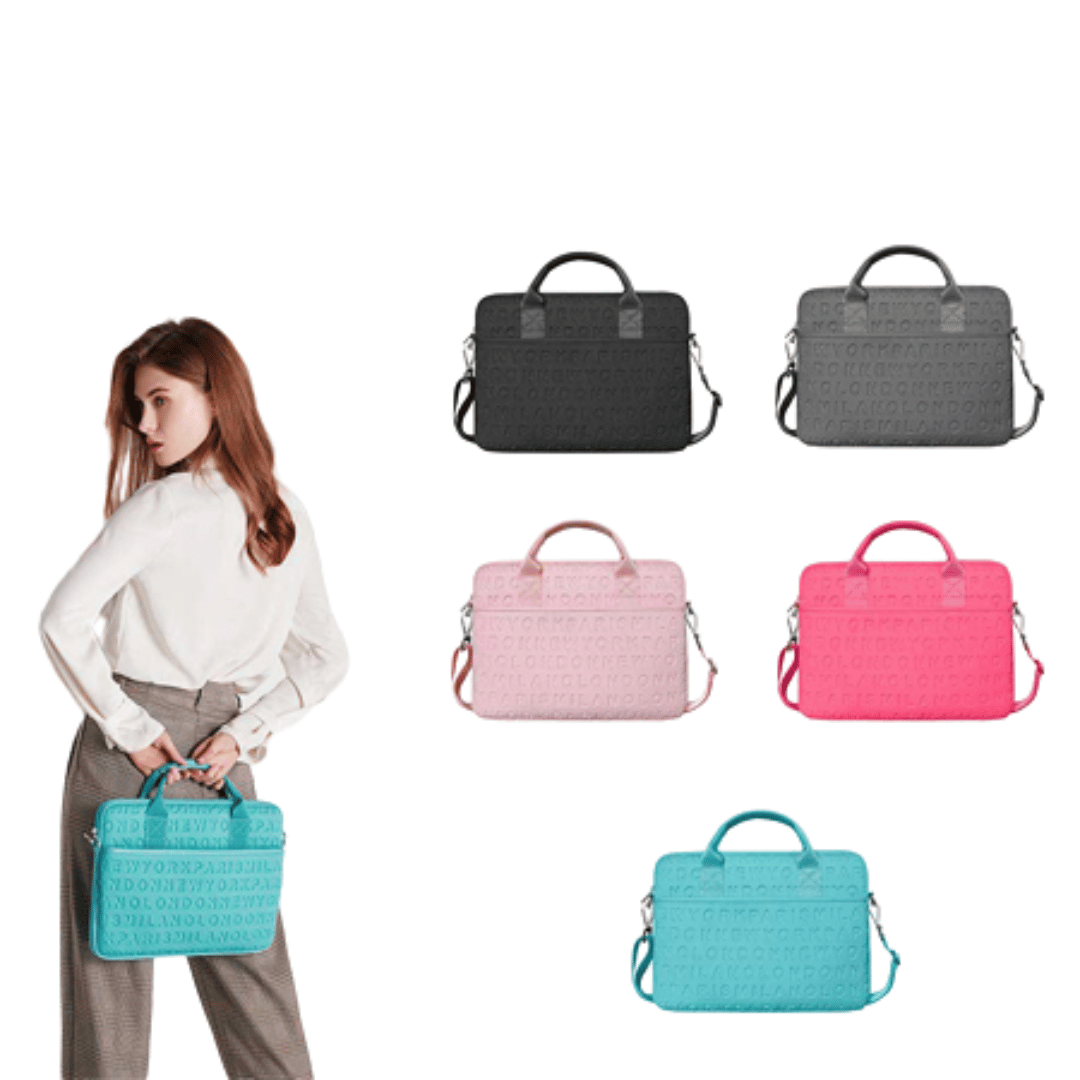
WiWU Factory Customize Eco-friendly Laptop Handbag Laptop bag for Macbook Air Pro

Genuine-spec touchpad flex cable for MacBook Pro 14″ (Model A2442, 2021, M1 Pro/Max)—essential for restoring full Force Touch functionality, haptic feedback, and precise multi-touch gesture control. Compatible With: MacBook Pro 14-inch (2021, Model A2442) with Apple M1 Pro or M1 Max chip (Model Identifiers: MacBookPro18,3 / MacBookPro18,4). Part Type: Touchpad flex cable only—does not include the trackpad, Taptic Engine, or mounting brackets. This is the OEM-style ribbon cable that connects the trackpad to the logic board. Function: Carries touch input, Force Touch pressure data, and haptic feedback signals—critical for macOS trackpad gestures, Force Click, and Taptic Engine responsiveness. OEM-Quality Build: Matches Apple’s original flex circuit in length, connector pitch, shielding, and bend geometry—ensures reliable signal transmission and durability under repeated use. Common Use Cases: Replacing a damaged, torn, or corroded original flex cable Completing a trackpad replacement when the original cable is unusable Fixing intermittent trackpad issues, unresponsiveness, or loss of Force Touch Replacing a damaged, torn, or corroded original flex cable Completing a trackpad replacement when the original cable is unusable Fixing intermittent trackpad issues, unresponsiveness, or loss of Force Touch Installation Note: Requires full bottom case removal and careful routing beneath internal components. Connectors use ZIF (Zero Insertion Force) sockets—must be seated properly without force. Recommended for certified or highly experienced technicians only.

