
✅ Full Specifications: Model: HyperX Cloud II Headphone Type: Over-Ear, Closed-Back Gaming Headset Connection: Wired USB for PC/Mac 3.5mm jack for consoles & mobile Drivers: 53mm Neodymium Surround Sound: Virtual 7.1 Surround Sound (via USB sound card) Frequency Response: Headphones: 15Hz – 25kHz Microphone: 50Hz – 18kHz Impedance: 60 Ohms Sound Pressure Level: 98 ± 3 dB Microphone: Detachable noise-canceling mic TeamSpeak & Discord certified Build: Aluminum frame Memory foam ear cushions Leatherette or velour ear pads Cable Length: 1m headset cable 2m extension with USB control box Compatibility: PC, Mac, PS4, PS5, Xbox (via 3.5mm), Nintendo Switch, Mobile

Keyboard Compatible for MacBook PRO Retina 15″ A1398 (Late 2013-MID 2015) US Layout Compatibility: MacBook Pro Retina 15″ A1398 Late 2013 (IG): ME293LL/A (2.0 Core i7) Late 2013 (IG): ME293LL/A (2.3 Core i7) Late 2013 (IG): ME293LL/A (2.6 Core i7) Mid 2014 (IG): MGXA2LL/A (2.2 Core i7) Mid 2014 (IG): MGXA2LL/A (2.5 Core i7) Mid 2014 (IG): MGXA2LL/A (2.8 Core i7) Late 2013 (DG): ME294LL/A (2.3 Core i7) Late 2013 (DG): ME294LL/A (2.6 Core i7) Compatibility: Mid 2014 (DG): MGXC2LL/A (2.5 Core i7) Mid 2014 (DG): MGXC2LL/A (2.8 Core i7) Mid 2015 (IG): MJLQ2LL/A (2.2 GHz Core i7) Mid 2015 (IG): MJLQ2LL/A BTO (2.5 GHz Core i7) Mid 2015 (IG): MJLQ2LL/A BTO (2.8 GHz Core i7) Mid 2015 (DG): MJLT2LL/A (2.5 GHz Core i7) Mid 2015 (DG): MJLT2LL/A BTO (2.8 GHz Core i7) Identifying Numbers APN: 661-6532, 661-8311,661-02536 Specification】The keyboard is without frame! pls see detail compatible model in descrirption. Safe】Easy for you replace your faulty,cracked or broken keyboard ,seller remind that you should replace the keyboard in the off state. All pictures are taken from the real item, please check carefully before biddingReplacement and high quality,Replace your faulty, cracked or broken keyboard Replacement and high quality,Replace your faulty, cracked or broken keyboard Each keyboard is tested before shipping Please contact us if you have any question or problems.

HomBreez 10″ Desk Air Circulator Fan with Remote, 90° +90° Oscillating Table Fan, Quiet Portable Battery Powered Fan for Bedroom, Home, Office, 12 Speeds, 12H Timer About this item Powerful Air Circulation – This air circulation fan provides cool air throughout your entire room, ensuring every corner enjoys refreshing airflow and enhancing your home comfort. Long-lasting Rechargeable Battery – The oscillating fan features a built-in high-capacity battery, lasting up to 12 hours on the minimum wind speed and 3 hours on the maximum wind speed, allowing you to enjoy extended cooling without frequent recharging. Ultra-Quiet Operation – This desk fan utilizes advanced noise reduction technology, operating at less than 20 dB at the minimum wind speed and below 48 dB at the maximum wind speed, ensuring a peaceful environment for rest and work. Full Range Oscillation – Capable of 90° left and right, and 90° up and down oscillation, it evenly distributes cool air throughout the room, covering a wider area. Smart Remote Control – The included remote allows you to effortlessly adjust 12-speed settings and set a timer for up to 12 hours, giving you convenient control without needing to get up.

A1389 A1494 Laptop Battery Replacement for MacBook Pro 15 inch Retina A1398 (Late 2013 & Mid 2014), fit Retina ME293 ME294 MGXA2 MGXC2 MJLQ2 MJLT2 MJLU2 Details : Voltage:11.26V; Capacity: 95Wh; Battery Type: Li-Polymer KINDLY NOTES: Replacement for Apple Macbook Pro 15 inch A1494 A1398 Retina Only fit Late 2013 Mid 2014 Version,Do not fit 2012 & Early 2013 Version Packing: 1 x laptop battery,4 x free screwdrivers Desighed for the original battery 1:1,Please confirm that your laptop’s model number, the original battery’s part number and your laptop’s version correctly

A1932 A2179 A1965 Battery for MacBook Air 13″ Retina (2018 2019, Early 2020) EMC 3184 3302 MRE82 MRE92 MVFH2 MWTJ2 MVH22 MVFM2 MVFK2 MREE2 MREC2 MREA2 MREF2 MUQT2 MUQU2 MacBookAir8,1 8,2 9,1 📄【Specification】Voltage: 11.4V. Capacity: 49.9Wh 4379mAh. Battery Type: Li-Polymer. Condition: Brand new, from high quality materials, top circuit boards and smart chip. 🔋【Replace Part Number】A1965 A1932(EMC 3184) A2179(EMC 3302) 3ICP4/63/119 MacBookAir8,1 MacBookAir8,2 MacBookAir9,1. 💻【Compatible Models】Only fit for MacBook Air 13″ (Model A1932 & Model A2179) Release 2018 2019 2020, fit for MRE82LL/A, MVFH2LL/A, MVFM2LL/A, MVFK2LL/A, MVFJ2LL/A, MVFN2LL/A, MVFL2LL/A, MREE2LL/A, MREC2LL/A, MREA2LL/A, MREF2LL/A, MRE92LL/A, MWTJ2LL/A, MVH22LL/A, MVH52LL/A, MVH42LL/A, MWTL2LL/A, MWTK2LL/A. Please kindly check the model number at the bottom of your laptop (A****). NOT FIT FOR MODEL A2337. 💻【ANTIEE Promise】Each products has undergone rigorous testing to ensure the correct voltage, circuit protection, stable current, low self-discharge and CE / FCC / RoHS Certified for safety. About 500 recharge cycles over the life.

A compact and reliable pre-owned Lenovo ThinkPad L390 with 13.3" display, 8th Gen Core i7, 8GB RAM, and 256GB SSD—ideal for mobile professionals and students who need performance and portability in a durable business laptop.

256GB SSD Apple Macbook Pro Air 2013 2014 2015 A1502 A1398 A1466 A1465 | Samsung MZ-JPU512T/A06 | 655-1805D ORIGINAL APPLE PART (Apple sources their SSD’s for MacBooks from Samsung) A1502 – A1398 – A1465 – A1466 100% TESTED WORKING Please check compatibility below before you make your purchase: COMPATIBILITY: MacBook Pro Retina Late 2013 – Mid-2015 MacBookPro11,1 (A1502) – ME864LL/A, ME866LL/A, ME867LL/A, MGX72LL/A, MGX92LL/A, & MGXD2LL/A MacBookPro11,2 (A1398) – ME293LL/A & MGXA2LL/A MacBookPro11,3 (A1398) – ME294LL/A, ME874LL/A, MGXC2LL/A, & MGXG2LL/A MacBookPro11,4 (A1398) – MJLQ2LL/A MacBookPro11,5 (A1398) – MJLT2LL/A & MJLU2LL/A MacBookPro12,1 (A1502) – MF839LL/A, MF841LL/A, & MF843LL/A MacBook Air Mid-2013 – Late 2015 MacBookAir6,1 (A1465) – MD711LL/A, MD760LL/A, MD711LL/B, & MF067LL/A MacBookAir6,2 (A1466) – MD760LL/A, MD760LL/B, & MF068LL/A MacBookAir7,1 (A1465) – MJMVM2LL/A MacBookAir7,2 (A1466) – MJVE2LL/A Model Identifier: Samsung Manufacturer Part# MZ-JPU512T/A06

WiWU WM108 Wimice Dual‑Mode Mouse – Bluetooth 5.0 and 2.4 GHz wireless mouse with 800/1200/1600 DPI, silent clicks, and ergonomic ABS housing.Long battery life (~6 months standby), USB dongle & silent design—ideal for travel, office, and quiet environments. Model: WiWU Wimice WM108 Connection Modes: Bluetooth 5.0 2.4 GHz wireless via USB dongle Connection Modes: Bluetooth 5.0 2.4 GHz wireless via USB dongle DPI Settings: 800 / 1,200 / 1,600 DPI (adjustable) Buttons: 3 standard buttons + clickable scroll wheel (4 keys total) Range: Up to 10 m wireless connectivity Material/Design: Lightweight (67–130 g, depending on source), ergonomic ABS plastic body, magnetic base or “super magnetic absorption” design Operating Range: ≈10 m Silent Clicks: Quiet operation—silent key action Dimensions: Approx. 108 × 64 × 36 mm Weight: 67 g cited by Star Tech and 130 g by others—likely lighter in official spec Compatibility: Windows, macOS, Linux, Android, etc. Plug-and-play, no driver needed

Arabic MacBook Pro Keyboard Cover 2023 2022 14 inch A2779 A2442 - Pro 16 inch A2780 A2485 M1-2022 MacBook Air Keyboard Cover 13.6 inch M2 A2681 Silicone Skin Ultra Thin, Arabic Language Arabic MacBook Pro Keyboard Cover 2023 2022 14 inch A2779 A2442 – Pro 16 inch A2780 A2485 M1-2022 MacBook Air Keyboard Cover 13.6 inch M2 A2681 Silicone Skin Ultra Thin, Arabic Language About this item Arabic Keyboard Layout Fits Perfectly 2023 MacBook Pro 14 inch keyboard cover A2779 A2442 M1 Pro Max Chip and Pro 16 inch A2780 A2485 2022 MacBook Air M2 keyboard skin A2681. Kuzy Mac keyboard cover have been engineered to fit snugly onto the low profile keyboard We employed the best industry standards in this Mac Book keyboard cover. Kuzy laptop keyboard covers made out of High Elastic Silicon. Every key is individually molded for a long lasting professional look. Advanced Spill and Dust Protection Soft Flexible and Washable Silicone keyboard skin makes typing quiet and soft to the touch. Flexible, environmentally smart keyboard protector design lets you roll up the MacBook keyboard cover for storage and travel. Quickly apply and remove Keyboard Cover Compatible with 14 inch MacBook Pro model A2779 A2442 also 16 inch MacBook Pro A2780 A2485 and 13.6 inch MacBook Air A2681. Maintain the longevity of your Apple device by eliminating key wear and tear with Kuzy computer keyboard covers

WiWU Waterproof Lycra Cosmo Laptop Slim Bag Laptop Handbag with Strap for Men and Women

Genuine-spec keyboard replacement for MacBook Pro 13″ (Model A2251, 2020) — choose US QWERTY or UK QWERTY (with £ symbol). Features Apple’s reliable Magic Keyboard with scissor-switch mechanism, backlighting, and precise OEM fit. Compatible With: MacBook Pro 13-inch (2020, Two Thunderbolt Ports, Model A2251, Model Identifier MacBookPro16,1) with Intel Core i5/i7 processors. Layout Options (select at purchase): US Layout: Standard QWERTY with wide Enter key, @ above 2, # above 3, and full function row. UK Layout: QWERTY with £ symbol, tall vertical Enter key, @ accessed via right Alt, and UK-specific punctuation. US Layout: Standard QWERTY with wide Enter key, @ above 2, # above 3, and full function row. UK Layout: QWERTY with £ symbol, tall vertical Enter key, @ accessed via right Alt, and UK-specific punctuation. Keyboard Type: Apple’s Magic Keyboard with scissor-switch mechanism—offering improved durability, quieter typing, and 1mm key travel compared to Butterfly keyboards. Integrated Features: Full backlit keys for low-light environments Ambient light sensor support OEM-style flex cable pre-attached for direct connection to the logic board Full backlit keys for low-light environments Ambient light sensor support OEM-style flex cable pre-attached for direct connection to the logic board Precision Build: Engineered to match Apple’s exact dimensions, key spacing, and top-case curvature—ensures seamless visual and functional integration. Installation Note: The keyboard is factory-glued into the top case. Replacement requires full disassembly, careful adhesive removal, and professional re-adhesion. Recommended for experienced or certified repair technicians only.

Apple Magic Mouse: Wireless, Bluetooth, Rechargeable. Works with Mac or iPad; Multi-Touch Surface - White (Pre-Owned) Apple Magic Mouse: Wireless, Bluetooth, Rechargeable. Works with Mac or iPad; Multi-Touch Surface – White (Pre-Owned) About this item WIRELESS, RECHARGEABLE CONVENIENCE — Magic Mouse connects wirelessly to your device via Bluetooth. And the rechargeable internal battery means no loose batteries to replace. WORKS WITH MAC OR IPAD — It’s ready to go right out of the box and pairs quickly with your Mac or iPad so you can get to work right away. SWIPE AND SCROLL ON THE MULTI-TOUCH SURFACE — The Multi-Touch surface allows you to perform simple gestures such as swiping and scrolling. And an optimized foot design lets Magic Mouse glide smoothly across your desk. GO WEEKS WITHOUT CHARGING — The incredibly long-lasting internal battery will power your Magic Mouse for about a month or more between charges. Comes with a woven USB-C to Lightning Cable that lets you pair and charge by connecting to a USB-C port on your Mac or iPad. SYSTEM REQUIREMENTS — Requires a Bluetooth-enabled Mac with OS X 10.11 or later or an iPad with iPadOS 13.4 or later.

Genuine-spec touchpad flex cable for MacBook Pro 16″ (Model A2159, 2019, Intel)—essential for restoring full Force Touch functionality, haptic feedback, and precise trackpad responsiveness during repair or replacement. Compatible With: MacBook Pro 16-inch (2019, Model A2159) with Intel Core i7/i9 processors (Model Identifier: MacBookPro16,1). Part Type: Touchpad flex cable only—does not include the trackpad, Taptic Engine, or mounting hardware. This is the OEM-style ribbon cable that connects the trackpad to the logic board. Function: Transmits touch input, Force Touch pressure data, and haptic feedback signals—critical for macOS gestures (e.g., Force Click, three-finger swipe, pinch-to-zoom) and Taptic Engine operation. OEM-Quality Build: Matches Apple’s original flex circuit in length, connector pitch, shielding, and bend radius—ensures reliable signal integrity and durability under repeated use. Common Use Cases: Replacing a torn, frayed, or corroded original flex cable Completing a trackpad replacement when the original cable is damaged Fixing intermittent or unresponsive trackpad behavior caused by cable failure Replacing a torn, frayed, or corroded original flex cable Completing a trackpad replacement when the original cable is damaged Fixing intermittent or unresponsive trackpad behavior caused by cable failure Installation Note: Requires full bottom case removal and careful routing beneath the battery and logic board. Connectors use ZIF (Zero Insertion Force) sockets—must be properly aligned and latched without force. Recommended for certified or experienced technicians only.

The Genius KM-100SE is a reliable wired keyboard and mouse combo featuring a full-size 104-key layout and USB plug-and-play connection. Ideal for office, business, and everyday home use, it delivers comfortable typing and smooth mouse control with stable performance. The Genius KM-100SE Keyboard & Mouse Combo is a practical and durable solution for users who need dependable performance for daily work. The full-size keyboard offers a comfortable typing experience with a standard layout that’s perfect for productivity, while the wired optical mouse ensures smooth and accurate cursor control. With USB plug-and-play setup, it works instantly with laptops and desktop PCs—no drivers needed. Full-Size 104-Key Keyboard for efficient and comfortable typing Wired USB Connection for stable, lag-free performance Plug & Play Setup – no software or drivers required Comfortable Key Spacing ideal for long office sessions Wired Optical Mouse Included for smooth and accurate tracking Durable Design suitable for daily professional use Ideal for Office & Home – work, study, and general computing Perfect for business offices, schools, home users, and laptop/desktop setups needing a simple, reliable wired keyboard and mouse set. Compatible with most computers supporting USB.

Apple 140W USB-C Power Adapter | MLYU3AM/A

Professional Lavalier Microphone Candc DC-C6 Professional Lavalier Microphone Candc DC-C6 Candc DC-C6 Lavalier Microphone for Smartphones, DSLR, Camcorders, Audio recorders, PC etc. Clip microphone to help you get music or sound.One-directional microphone with anti-noise function. type jack can be connected to PC / laptop / wireless microphone transmitter with 3.5mm line-in / mic in. Built-in clip can be easily attached to collar, tie or other clothes-no installation required. Features: Type: microphone Cable length: about 116 cm Sensitivity: -46 ± 2db : one way Operating voltage: DC1.0V-10 VAcurrent consumption

Genuine-spec keyboard replacement for MacBook Pro 14" & 16" (2021–2025, M1 Pro/Max to M4 Pro/Max)—available in US QWERTY or UK QWERTY (with £ symbol). Features Apple’s Magic Keyboard with scissor-switch mechanism, full backlighting, and precise OEM fit. Genuine-spec keyboard replacement for MacBook Pro 14″ & 16″ (2021–2025, M1 Pro/Max to M4 Pro/Max)—available in US QWERTY or UK QWERTY (with £ symbol). Features Apple’s Magic Keyboard with scissor-switch mechanism, full backlighting, and precise OEM fit. US Layout: Wide Enter key @ above 2, # above 3 Standard inverted-T arrow keys Wide Enter key @ above 2, # above 3 Standard inverted-T arrow keys UK Layout: Tall vertical Enter key £ symbol on key 3 @ accessed via Right Alt + 2 Matches Apple’s official UK regional configuration Tall vertical Enter key £ symbol on key 3 @ accessed via Right Alt + 2 Matches Apple’s official UK regional configuration Keyboard Type: Apple Magic Keyboard with scissor-switch mechanism Backlighting: Full per-key white backlight with ambient light sensor support Function Row: Full-height physical function keys (F1–F12) with macOS shortcut toggling Build Quality: OEM-grade keycaps, consistent actuation force, and precise top-case alignment

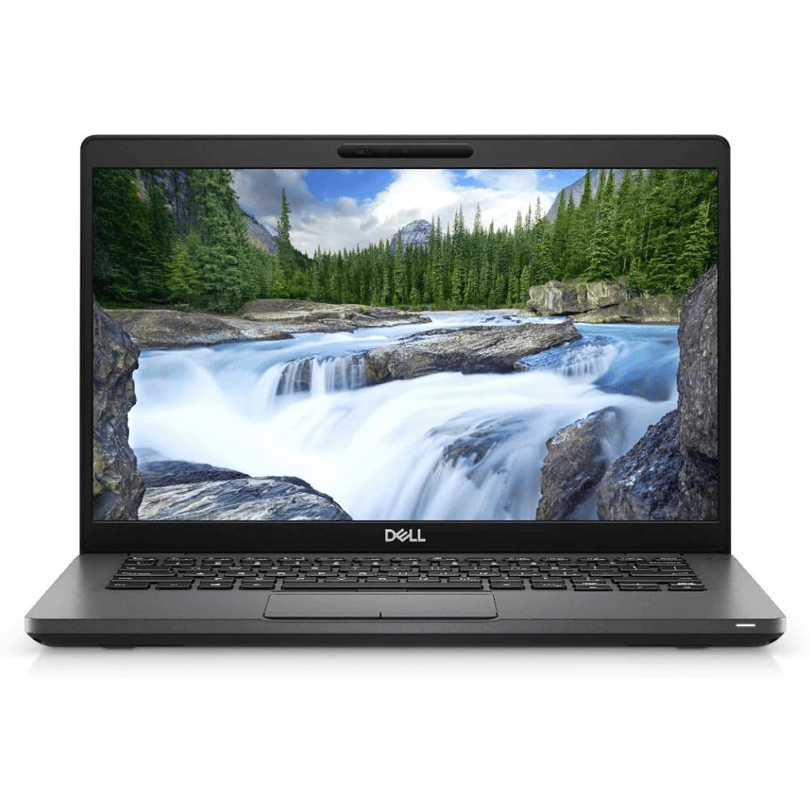
A dependable pre-owned Dell Latitude 5490 with 14" display, 8th Gen Core i5, 16GB RAM, and 512GB SSD—offering strong performance, enterprise security, and durability for business and professional use.

Genuine-spec touchpad flex cable for MacBook Pro 13″ with Touch Bar (Model A1708, 2016–2017)—restores full Force Touch functionality, haptic feedback, and precise multi-touch gesture control during trackpad repair or replacement. Compatible With: MacBook Pro 13″ (2016) – Model A1708 (Model Identifier: MacBookPro13,1) MacBook Pro 13″ (2017) – Model A1708 (Model Identifier: MacBookPro14,1) (Both years share the same internal trackpad assembly and flex cable.) MacBook Pro 13″ (2016) – Model A1708 (Model Identifier: MacBookPro13,1) MacBook Pro 13″ (2017) – Model A1708 (Model Identifier: MacBookPro14,1) (Both years share the same internal trackpad assembly and flex cable.) Part Type: Touchpad flex cable only — does not include the trackpad housing, Taptic Engine, or mounting hardware. This is the OEM-style ribbon cable that connects the trackpad to the logic board. Function: Transmits: Touch input coordinates Force Touch pressure data Haptic feedback signals to the Taptic Engine Enables full macOS gesture support: Force Click, three-finger lookup, swipe navigation, pinch-to-zoom, and smooth cursor tracking. Touch input coordinates Force Touch pressure data Haptic feedback signals to the Taptic Engine Enables full macOS gesture support: Force Click, three-finger lookup, swipe navigation, pinch-to-zoom, and smooth cursor tracking. OEM-Quality Build: Matches Apple’s original specifications in: Cable length and routing path Connector pitch and ZIF latch design EMI shielding and flex durability Cable length and routing path Connector pitch and ZIF latch design EMI shielding and flex durability Common Use Cases: Replacing a torn, creased, or liquid-damaged original flex cable Completing a trackpad replacement when the original cable is compromised Fixing intermittent trackpad behavior, loss of Force Touch, or complete unresponsiveness Replacing a torn, creased, or liquid-damaged original flex cable Completing a trackpad replacement when the original cable is compromised Fixing intermittent trackpad behavior, loss of Force Touch, or complete unresponsiveness Installation Note: Requires full bottom case removal and battery disconnection. Cable routes under internal components near the right speaker and logic board. Connects via a ZIF (Zero Insertion Force) socket—must be aligned carefully and latched gently. Recommended for experienced or certified technicians only. Requires full bottom case removal and battery disconnection. Cable routes under internal components near the right speaker and logic board. Connects via a ZIF (Zero Insertion Force) socket—must be aligned carefully and latched gently. Recommended for experienced or certified technicians only.

Apple 60W MagSafe Power Adapter (for MacBook and 13-inch MacBook Pro) The 60 Watt MagSafe Power Adapter features a magnetic DC connector that ensures your power cable will disconnect if it experiences undue strain and helps prevent fraying or weakening of the cables over time. In addition, the magnetic DC helps guide the plug into the system for a quick and secure connection. When the connection is secure, an LED located at the head of the DC connector will light up; an amber light lets you know that your portable is charging, while a green light tells you that you have a full charge. An AC lead is provided with the adapter for maximum lead length, while the AC wall adapter (also provided) gives users an even easier and more compact way to travel. Designed to be the perfect travelling companion, the adapter has a clever design that allows the DC cable to be wound neatly around itself for easy cable storage. This power adapter recharges the lithium polymer battery while the system is off, on, or in sleep mode. It also powers the system if you choose to operate without a battery. Compatible with MacBook and 13-inch MacBook Pro. See this article for more details about choosing the right one. Knowing which specific Mac model you have is important. If you are running OS X Lion (10.7) or later, go to the “” menu at the top left of your screen, choose “About this Mac” then click the “More Info…” button. Your Mac model and generation will be displayed. If you are running an earlier version of OS X, you can enter your serial number here to find out which model you have.
