
OEM-quality left and right loudspeaker replacement pair for MacBook Pro 14″ (Model A2442, 2021, M1 Pro/Max)—restores Apple’s high-fidelity six-speaker audio system with precise sound staging, rich bass, and clear highs. Compatible With: MacBook Pro 14-inch (2021, Model A2442) with Apple M1 Pro or M1 Max chip (Model Identifier: MacBookPro18,3 or MacBookPro18,4). Includes: Complete left and right speaker assemblies, each containing: Dual-driver units (force-cancelling woofers + tweeters) Pre-attached flex cables with OEM connectors Mounting brackets and acoustic seals Dual-driver units (force-cancelling woofers + tweeters) Pre-attached flex cables with OEM connectors Mounting brackets and acoustic seals Audio Performance: Matches Apple’s advanced six-speaker sound system with: Wide stereo separation High dynamic range Spatial audio and Dolby Atmos support (when paired with original logic board and firmware) Wide stereo separation High dynamic range Spatial audio and Dolby Atmos support (when paired with original logic board and firmware) OEM Build Quality: Precision-engineered housings with exact acoustic chambers, grille alignment, and cable routing—ensures zero rattling and full macOS audio calibration compatibility. Common Use Cases: Replaces speakers damaged by liquid ingress, physical impact, or internal failure (e.g., no sound, distorted audio, or imbalance between channels). Installation Note: Requires full bottom case and logic board disassembly. Speakers are secured with screws and acoustic adhesive. Highly recommended for certified Apple technicians or experienced professionals only due to complex internal layout and sensitivity of audio components. Important: This speaker pair is exclusive to A2442 (14″, 2021, M1 Pro/Max). Not compatible with 16″ MacBook Pro (A2485), 13″ models, or Intel-based MacBooks. This speaker pair is exclusive to A2442 (14″, 2021, M1 Pro/Max). Not compatible with 16″ MacBook Pro (A2485), 13″ models, or Intel-based MacBooks. Model Verification: Confirm your device via > About This Mac > Model Identifier (must be MacBookPro18,3 or MacBookPro18,4).

Genuine-spec US layout keyboard replacement for MacBook Pro (Model A1398, Late 2011–Mid 2012)—featuring durable scissor-switch keys, backlighting, and OEM-fit design for reliable typing and straightforward installation. Compatible With: MacBook Pro 13″: Late 2011 (Model A1278, but labeled A1398 in some regions) – Model Identifier MacBookPro8,1 MacBook Pro 15″: Early 2011, Late 2011, and Mid 2012 – Model Identifiers MacBookPro8,2 (15″ early/late 2011) and MacBookPro9,1 (15″ mid 2012) *(Note: “A1398” is primarily associated with the 15″ unibody MacBook Pro with Retina display (Mid 2012), which was the first Retina MacBook Pro.)* This keyboard fits the non-Retina 15″ A1398 (Mid 2012) and compatible Late 2011 models. MacBook Pro 13″: Late 2011 (Model A1278, but labeled A1398 in some regions) – Model Identifier MacBookPro8,1 MacBook Pro 15″: Early 2011, Late 2011, and Mid 2012 – Model Identifiers MacBookPro8,2 (15″ early/late 2011) and MacBookPro9,1 (15″ mid 2012) *(Note: “A1398” is primarily associated with the 15″ unibody MacBook Pro with Retina display (Mid 2012), which was the first Retina MacBook Pro.)* This keyboard fits the non-Retina 15″ A1398 (Mid 2012) and compatible Late 2011 models. Layout: Standard US English (QWERTY) with full-size keys, inverted-T arrow keys, and dedicated function row (F1–F12). Keyboard Type: Traditional scissor-switch mechanism—robust, tactile, and serviceable (pre-Butterfly era). Integrated Features: Backlit keys (adjustable brightness via F5/F6) OEM ribbon cable with ZIF connector Matches original key spacing and actuation force Backlit keys (adjustable brightness via F5/F6) OEM ribbon cable with ZIF connector Matches original key spacing and actuation force Build & Fit: Precision-molded plastic frame with exact screw mounts and alignment pegs—ensures secure, rattle-free installation in the top case. Installation Note: Keyboard is secured with screws and minimal adhesive. Requires full top case access and battery disconnect. Recommended for intermediate to advanced users or technicians.

The Acer V226HQL widescreen LCD monitor offers reliable everyday performance for home and office use. It features a 21.5‑inch display with clear visuals and wide viewing angles, making it suitable for work, school tasks, or streaming content. As a result, you can enjoy crisp text and vibrant colors without strain. In addition, the monitor provides fast response times for smooth motion during videos and light gaming. Furthermore, its slim profile and narrow bezels help maximize screen space while fitting easily into most desk setups. The monitor also includes key connectivity options, so you can connect laptops, desktops, and media players quickly and without extra adapters. Overall, the Acer V226HQL balances essential features with dependable visual performance. Therefore, it is a smart choice for users seeking an affordable and functional widescreen display for everyday computing. Specifications: 21.5‑inch widescreen LCD display for clear visuals Fast response time for smooth motion Slim profile with narrow bezels Essential connectivity for multiple devices Reliable everyday performance for home and office use

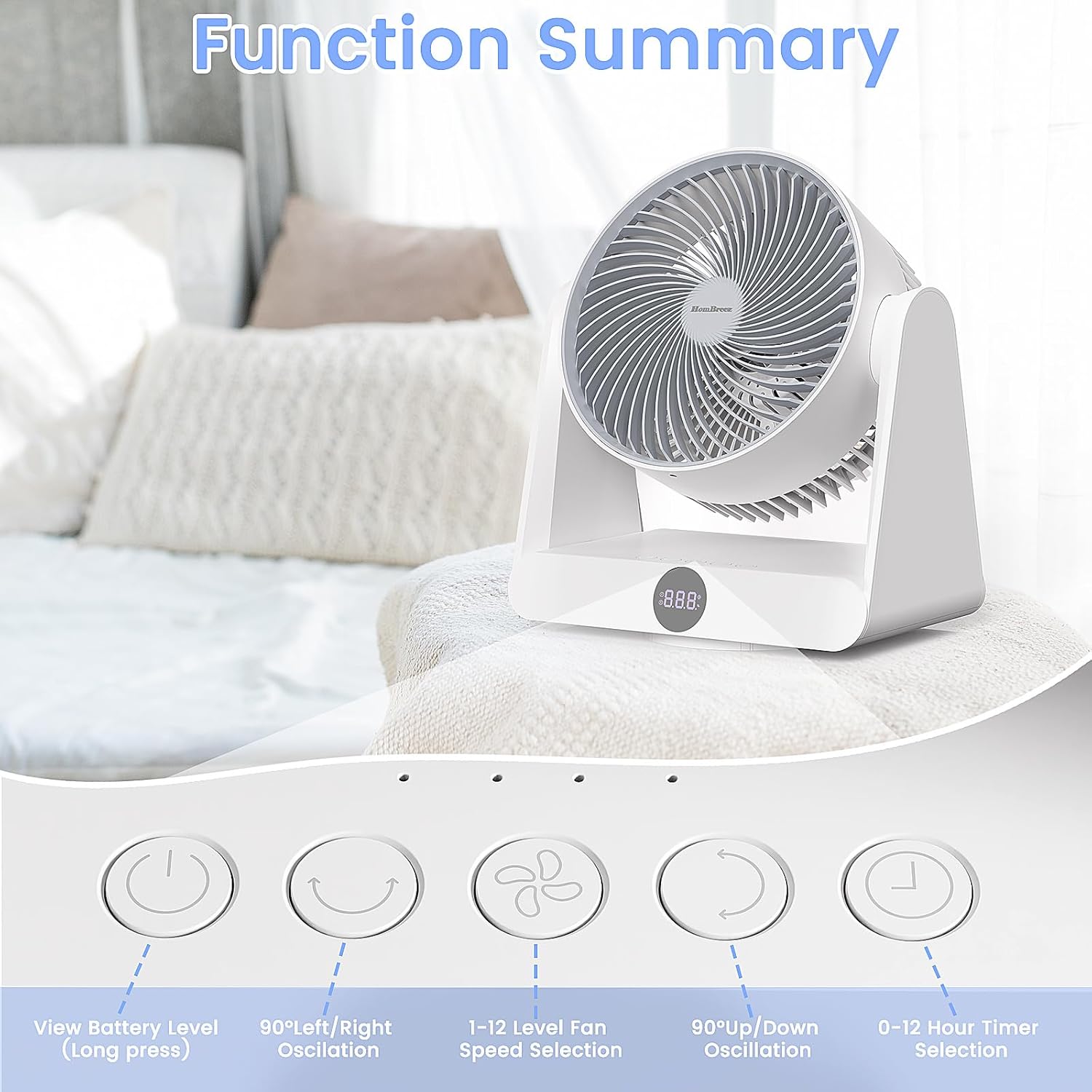
Remax F21 Ruiyal Series – Oscillating water‑cooling fan with 4,000 mAh battery, digital display, and 6 wind levels.Portable and stylish small-table fan with 3 oscillation modes and mist spray cooling. Model: Remax F21 Ruiyal Series Water‑Cooling Oscillating Fan (White) Battery & Power: Built‑in 4,000 mAh battery; USB‑C rechargeable (details unspecified) Cooling Method: Water‑cooling spray system with turbine-style fan blades Wind Speed: 6 adjustable speed levels Oscillation: 3 movement modes—approx. 45°, 90°, or 120° Display & Controls: Digital display showing mode, speed, and battery indicators Dimensions & Weight: Compact tabletop size, ~868 g Power Consumption: Around 8W rated power

HP SPro 322pe Monitor Overview The HP SPro 322pe is a professional Full HD monitor built for daily business use. It delivers reliable performance and a clean design. As a result, it fits perfectly in offices and work-from-home setups. 21.5-Inch Full HD Display This monitor features a 21.5-inch Full HD resolution. Therefore, text appears sharp and easy to read. Moreover, images look clear and balanced. Because of this, it supports productivity tasks with ease. In addition, the compact size saves desk space. As a result, it works well in smaller work areas. Smooth and Stable Visual Experience The HP SPro 322pe offers smooth and stable visuals. Therefore, everyday tasks feel comfortable. In addition, scrolling and browsing look natural. This makes it suitable for long working hours. Eye Comfort for Long Sessions This monitor includes eye comfort features. As a result, it helps reduce eye fatigue. Moreover, the anti-glare screen improves visibility. Therefore, users stay focused throughout the day. Connectivity and Ease of Use The HP SPro 322pe includes essential connectivity options. As a result, it connects easily to most PCs. Moreover, setup is quick and straightforward. This saves time and effort. Professional Design and Flexibility The monitor features a simple and professional design. In addition, it supports VESA mounting. As a result, users can customize their workspace layout. Ideal for Office and Business Use This monitor focuses on efficiency and reliability. Moreover, it supports daily workloads without distraction. In conclusion, it is a solid choice for professional environments. Specifications: Display : 21.45″ VA Resolution : FHD (1920 X 1080) Connectivity: 1x HDMI 1.4, 1x VGA. Performance: 100Hz refresh rate for smooth motion, 5ms GtG response time.

Samsung S24D300 24″ Essential S3 Monitor offers a 24‑inch Full HD (1920 × 1080) IPS display for clear and detailed visuals. Additionally, it provides a smooth experience with up to 100 Hz refresh rate, which can show motion more fluidly than standard 60 Hz panels. The flat screen and simple design make it suitable for home, study, or office use. Moreover, it includes Eye Saver Mode and Flicker Free technology to help reduce eye strain during long sessions. Therefore, users can stay comfortable while working, browsing, or watching content. The monitor provides basic connectivity options with HDMI and VGA ports. Furthermore, its slim bezel enhances a modern setup and fits well with other devices. In addition, the tilt‑adjustable stand allows users to set a comfortable viewing angle. Samsung backs the product with a three‑year warranty for added peace of mind. Specifications: Display : 24″ IPS Resolution : 1920 x 1080 FHD Refresh Rate : 100Hz Response Rate : 5ms

Brand Microsoft Connectivity Technology USB Connector Type USB Compatible Devices Laptops Compatible Phone Models Microsoft Special Feature Travel Mounting Type Wall Mount Total USB Ports 1 Wattage 65 watts Microsoft Surface Power Supply 65W and Power Adapter Non Retail Packaging

The HP Series 5 Pro 23.8″ FHD USB‑C Conferencing Monitor delivers crisp visuals on a 23.8‑inch Full HD IPS screen with a 16:9 aspect ratio. Additionally, it features a built‑in 5 MP Poly Studio tiltable webcam. This webcam, combined with AI noise reduction, ensures clear video and audio during calls. Moreover, the monitor supports USB‑C video input with up to 100 W power delivery. It also provides USB‑C data transfer, HDMI 2.0, DisplayPort 1.4, USB‑A ports with one charging port, an audio combo jack, and an RJ‑45 Ethernet port. These connections simplify hybrid work setups. Furthermore, the ergonomic stand allows height adjustment for comfort. The ambient light sensor with HP Eye Ease reduces blue light while preserving color accuracy. The monitor incorporates recycled materials in its design and comes with a three‑year limited warranty for peace of mind. Specifications: 23.8″ Full HD (1920 × 1080) IPS display with 350 nits brightness and 1500:1 contrast Built‑in 5 MP Poly Studio webcam with AI noise reduction USB‑C video with up to 100 W power delivery and USB‑C data port HDMI 2.0, DisplayPort 1.4, USB‑A ports, Ethernet, and audio combo jack Ergonomic stand with height adjustment and HP Eye Ease ambient light sensor

The Lenovo ThinkVision T24d‑30 is a 24″ WUXGA (1920×1200) IPS monitor designed for professional and office use. It delivers crisp detail with a 16:10 aspect ratio and broad viewing angles. The panel features anti‑glare treatment and 300 cd/m² brightness to support long work sessions with reduced eye strain. This monitor includes diverse connectivity with HDMI, DisplayPort, and VGA inputs. It also offers a built‑in USB hub and integrated stereo speakers. Adjustable ergonomics with height, pivot, tilt, and swivel make it easy to position for comfort. The monitor supports VESA mount and includes low blue light and flicker‑free technologies for user comfort. Specifications: 24″ WUXGA (1920×1200) IPS display with 16:10 aspect ratio Anti‑glare panel with 300 cd/m² brightness for clear visuals HDMI, DisplayPort, and VGA inputs for versatile connectivity Built‑in USB hub and integrated stereo speakers Adjustable height, tilt, swivel, and pivot stand with VESA support

The ViewSonic VA2710-mh 27″ 60Hz Monitor brings stunning visuals to your desk. With its 27-inch Full HD display, you can enjoy vibrant colors and sharp details, perfect for work, entertainment, or gaming. This monitor features a sleek and modern design, making it a stylish addition to any workspace. The slim bezels provide a clean and uncluttered look, enhancing your viewing experience. The ViewSonic VA2710-mh offers versatile connectivity options, including HDMI and VGA inputs. This makes it easy to connect your computer, laptop, or gaming console, ensuring compatibility with various devices. With a 60Hz refresh rate, the ViewSonic VA2710-mh delivers smooth and fluid visuals. Whether you’re watching movies, playing games, or working on graphic design, you’ll appreciate the clarity and responsiveness of this monitor. The SuperClear IPS panel technology provides consistent brightness and accurate colors from any viewing angle. This means you can enjoy the same high-quality visuals, whether you’re sitting directly in front of the screen or off to the side. The ViewSonic VA2710-mh is designed for comfort and productivity. It features flicker-free technology and a Blue Light Filter, reducing eye strain during extended viewing sessions. This makes it an ideal choice for those who spend long hours in front of their screens. In conclusion, the ViewSonic VA2710-mh 27″ 60Hz Monitor combines stunning visuals, versatile connectivity, and a sleek design for an exceptional viewing experience. Upgrade your setup today and enjoy vibrant and clear visuals with the ViewSonic VA2710-mh monitor. Specifications: Display : 27″ IPS Resolution : FHS 1920×1080 Refresh Rate : 60Hz Response Rate : 5ms

The ViewSonic VG2456 24″ FHD 60Hz Monitor delivers clear visuals for office tasks and daily computer use. Its Full HD resolution shows sharp text and clean image details. The 24-inch screen offers enough space for multitasking and focused work. This makes it a strong choice for desks at home or work. Moreover, the ViewSonic VG2456 24″ FHD 60Hz Monitor features a stable 60 Hz refresh rate. This keeps everyday motion smooth and comfortable. Scrolling, typing, and video playback remain steady and easy on the eyes. As a result, long work hours feel more relaxed. In addition, the monitor uses an IPS panel for wide viewing angles. Colors stay accurate even when viewed from the side. This helps during meetings, teamwork, and shared screen moments. The image remains clear from different positions. Furthermore, the ViewSonic VG2456 24″ FHD 60Hz Monitor includes strong eye comfort features. The low blue light mode helps reduce eye strain during long sessions. The flicker-free design supports healthy viewing all day. These features add comfort for daily use. Also, the monitor offers modern connection options. It supports USB-C, HDMI, DisplayPort, and Ethernet connection through one display. This allows single-cable laptop charging and data transfer. Desk setup becomes clean and simple. In addition, the ergonomic stand allows full adjustment. You can change height, tilt, swivel, and rotation easily. Portrait mode is useful for reading and coding. This improves posture and workspace comfort. Moreover, the slim bezel design gives a clean and modern look. It fits smoothly into business and home offices. The professional style keeps your desk looking organized and neat. Overall, the ViewSonic VG2456 24″ FHD 60Hz Monitor delivers comfort, clarity, and stable daily performance. It supports smooth work hours and simple connectivity. This monitor is ideal for office users, students, and professionals who need reliability and ease of use. Specifications: Display : 24″ IPS Resolution : FHD 1920 x 1080 Refresh Rate : 60Hz Response Time : 5ms

The MSI MAG 275QF 27″ 180Hz Gaming Monitor delivers an immersive experience for competitive and casual gamers. With its high refresh rate, it ensures smooth gameplay. This 27-inch gaming monitor features a Fast IPS panel with a 2560 x 1440 (QHD) resolution. The display offers sharp visuals and vibrant colors, enhancing gaming performance. The wide color gamut ensures lifelike images, making every scene more realistic. With a 180Hz refresh rate and 1ms response time, motion blur is minimized. This allows fast-paced action to remain clear and fluid. It gives gamers an advantage in competitive matches, reducing input lag. The MSI MAG 275QF 27″ 180Hz Gaming Monitor supports Adaptive Sync technology. This feature eliminates screen tearing and stuttering for a smooth experience. Whether playing FPS, racing, or RPG games, visuals stay sharp and fluid. It comes with multiple connectivity options, including DisplayPort and HDMI. This ensures compatibility with gaming PCs, consoles, and other devices. The ergonomic stand allows height, tilt, and swivel adjustments for better comfort. With Eye Care technology, the monitor reduces blue light and flicker. This helps minimize eye strain during long gaming sessions. Gamers can enjoy extended playtime without discomfort. The sleek and modern design of the MSI MAG 275QF 27″ 180Hz Gaming Monitor makes it a great addition to any setup. The ultra-thin bezels provide a more immersive viewing experience, perfect for multi-monitor setups. For gamers looking for speed, clarity, and smooth performance, this monitor is an excellent choice. It enhances both gameplay and overall visual experience. Specifications: Display : 27″ Rapid IPS Resolution : 2560×1440 (WQHD) Refresh Rate : 180Hz Response Rate : 0.5ms

Are you in search of the ultimate gaming monitor for an immersive experience? Look no further than the BenQ Mobiuz 27″ 4K 144Hz Gaming Monitor. With its stunning display and advanced features, it’s a game-changer. Firstly, let’s talk about the visual brilliance. This monitor boasts a 4K resolution, delivering crisp and clear images that bring games to life. Whether you’re exploring vast landscapes or engaging in intense firefights, every detail is rendered with precision. The 144Hz refresh rate ensures buttery-smooth gameplay, eliminating motion blur and ghosting for a seamless experience. Say goodbye to lag and hello to responsiveness like never before. Experience true-to-life colors with the monitor’s HDRi technology. It enhances contrast and clarity, making colors pop with vibrancy. Get ready to dive into games with stunning visuals that rival real life. Immerse yourself in the action with the monitor’s integrated speakers. With rich, immersive sound, you’ll feel like you’re right in the middle of the game. Say goodbye to external speakers cluttering your desk. Enhance your gaming experience further with customizable features. From adjustable height and tilt to built-in eye-care technology, this monitor is designed with the gamer in mind. Stay comfortable during extended gaming sessions without sacrificing performance. In conclusion, the BenQ Mobiuz 27″ 4K 144Hz Gaming Monitor is a powerhouse that takes your gaming to the next level. With its stunning visuals, smooth gameplay, and ergonomic design, it’s a must-have for any serious gamer. Upgrade your setup today and elevate your gaming experience. Specifications: Display : 27″ IPS Resolution : 4K(3840×2160) Refresh Rate : 144hz Response Rate : 1 ms

TE03XL Battery TE03061XL for HP Omen 15-ax000:15-ax033dx 15-ax210nr 15-ax001ns;HP Pavilion 15-bc000:15-bc008tx and More 849910-850 849570-541 542 543 HSTNN-UB7A TPN-Q173-11.55V 61.6Wh 3-Cell About this item Specifications: – Battery type: Li-ion || Voltage: 11.55VV|| Capacity: 61.6Wh || Cells: 3-cell Compatible Models: – HP Omen 15-ax000:(15-ax000~15-ax099);HP Pavilion 15-BC000 Series (15-bc000~099;15-bc300~399) Replacement Part Number: – HP TE03XL HSTNN-UB7A TPN-Q173 TE03061XL 849910-850 849570-541 849570-542 849570-543 3ICP7/65/80Replacment Part Number: – HP TE03XL HSTNN-UB7A TPN-Q173 TE03061XL 849910-850 849570-541 849570-542 849570-543 3ICP7/65/80 Easy Installation: The replacement process is straightforward and provides our tools.

Genuine-spec touchpad flex cable for MacBook Pro 15″ (Model A2941, 2023, Apple M2)—restores full Force Touch functionality, haptic feedback, and precise multi-touch gesture control during trackpad repair or replacement. Compatible With: MacBook Pro 15-inch (2023, Model A2941) with Apple M2 chip (Model Identifier: MacBookPro19,1) Part Type: Touchpad flex cable only — does not include the trackpad housing, Taptic Engine, or mounting hardware. This is the OEM-style ribbon cable that connects the trackpad to the logic board. Function: Transmits: Touch input coordinates Force Touch pressure data Haptic feedback signals to the Taptic Engine Enables full macOS gesture support: Force Click, three-finger lookup, swipe navigation, pinch-to-zoom, and smooth cursor tracking. Touch input coordinates Force Touch pressure data Haptic feedback signals to the Taptic Engine Enables full macOS gesture support: Force Click, three-finger lookup, swipe navigation, pinch-to-zoom, and smooth cursor tracking. OEM-Quality Build: Matches Apple’s original specifications in: Cable length and routing path Connector pitch and ZIF latch design EMI shielding and flex durability Cable length and routing path Connector pitch and ZIF latch design EMI shielding and flex durability Common Use Cases: Replacing a torn, creased, or liquid-damaged original flex cable Completing a trackpad replacement when the original cable is compromised Fixing intermittent trackpad behavior, loss of Force Touch, or complete unresponsiveness Replacing a torn, creased, or liquid-damaged original flex cable Completing a trackpad replacement when the original cable is compromised Fixing intermittent trackpad behavior, loss of Force Touch, or complete unresponsiveness Installation Note: Requires full bottom case removal and battery disconnection. Cable routes under internal components near the right speaker and logic board. Connects via a ZIF (Zero Insertion Force) socket—must be aligned carefully and latched gently. Recommended for experienced or certified technicians only. Requires full bottom case removal and battery disconnection. Cable routes under internal components near the right speaker and logic board. Connects via a ZIF (Zero Insertion Force) socket—must be aligned carefully and latched gently. Recommended for experienced or certified technicians only.

Genuine-spec touchpad flex cable for MacBook Pro 16″ (Model A2485, 2021, M1 Pro/Max)—critical for restoring full Force Touch functionality, haptic feedback, and precise multi-touch gesture control during trackpad repairs. Compatible With: MacBook Pro 16-inch (2021, Model A2485) with Apple M1 Pro or M1 Max chip (Model Identifiers: MacBookPro18,1 / MacBookPro18,2). Part Type: Touchpad flex cable only—does not include the trackpad, Taptic Engine, or mounting hardware. This is the OEM-style ribbon cable that connects the trackpad to the logic board. Function: Transmits touch coordinates, Force Touch pressure data, and haptic feedback signals—essential for macOS gestures (e.g., pinch-to-zoom, Force Click, three-finger lookup) and Taptic Engine operation. OEM-Quality Construction: Precisely replicated to Apple’s original specifications—including cable length, connector type, EMI shielding, and flex routing—ensuring signal integrity and long-term reliability. Common Use Cases: Replacing a torn, frayed, or liquid-damaged original flex cable Completing a trackpad replacement when the original cable is compromised Fixing intermittent trackpad behavior, lost Force Touch, or complete unresponsiveness Replacing a torn, frayed, or liquid-damaged original flex cable Completing a trackpad replacement when the original cable is compromised Fixing intermittent trackpad behavior, lost Force Touch, or complete unresponsiveness Installation Note: Requires full disassembly of the bottom case and careful routing around the battery and logic board. Connectors use ZIF (Zero Insertion Force) sockets—must be aligned and latched gently. Recommended for certified or professional repair technicians only.

The LG 32UR500K-B 32 Inch Monitor delivers large-screen clarity and detailed visuals for work, entertainment, and everyday computing. Its spacious 32-inch display provides an immersive viewing experience, making it ideal for productivity, content consumption, and multitasking. Moreover, the high-resolution panel ensures sharp images and vibrant colors, allowing users to enjoy clear visuals across various applications. This monitor offers wide viewing angles and accurate color reproduction, making it suitable for office tasks, media editing, and home entertainment. Additionally, the sleek and modern design fits easily into professional or home setups while maximizing desk space efficiency. The large screen size also allows users to work with multiple windows comfortably without constant switching. The LG 32UR500K-B includes multiple connectivity options, making it easy to connect PCs, laptops, and consoles. Furthermore, ergonomic tilt adjustments allow comfortable viewing during long work or entertainment sessions. Therefore, it is perfect for professionals, students, and home users seeking performance and comfort. Finally, it combines large-screen immersion, clarity, and modern design for everyday use. Specifications: 32-inch monitor for work and entertainment High-resolution display for clear visuals Wide viewing angles and accurate colors Multiple connectivity options Sleek and modern design

✅ Full Specifications: Model: A4Tech HS-30i Type: Over-Ear Stereo Headset Connectivity: 1 x 3.5mm Combo Jack (for audio + mic) Speaker Driver Unit: 40mm Microphone: Built-in adjustable boom mic Noise-canceling for clear voice capture Frequency Response: Speaker: 20Hz – 20kHz Microphone: 100Hz – 10kHz Impedance: 32 Ohms Sensitivity: Speaker: 105dB ± 3dB Microphone: -58dB ± 3dB Cable Length: Approx. 2 meters Design Features: Adjustable headband Soft ear cushions for long-term comfort Compatibility: PC, laptop, mobile (with combo jack)

Genuine-spec touchpad flex cable for MacBook Air 13″ (Model A1932, 2018–2019)—essential for restoring full Force Touch functionality, haptic feedback, and precise multi-touch gesture control during trackpad repair or replacement. Compatible With: MacBook Air 13-inch (2018 & 2019, Model A1932, Model Identifier MacBookAir8,1) with Intel Core i5/i7 processors. Part Type: Touchpad flex cable only—does not include the trackpad housing, Taptic Engine, or mounting hardware. This is the OEM-style ribbon cable that connects the trackpad to the logic board. Function: Transmits touch input, Force Touch pressure data, and haptic feedback signals—critical for macOS gestures like Force Click, three-finger lookup, pinch-to-zoom, and smooth cursor tracking. OEM-Quality Build: Matches Apple’s original in length, connector pitch, EMI shielding, and flexibility—ensures reliable signal integrity and long-term durability. Common Use Cases: Replacing a torn, creased, or liquid-damaged original flex cable Completing a trackpad replacement when the original cable is unusable Fixing intermittent trackpad behavior, loss of Force Touch, or complete unresponsiveness Replacing a torn, creased, or liquid-damaged original flex cable Completing a trackpad replacement when the original cable is unusable Fixing intermittent trackpad behavior, loss of Force Touch, or complete unresponsiveness Installation Note: Requires full bottom case removal and careful routing beneath the battery. The cable connects via a ZIF (Zero Insertion Force) socket on the logic board—must be properly aligned and latched without force. Recommended for experienced or certified technicians. Important: This is flex cable only—not a complete trackpad assembly. Must be used with the original or compatible A1932 trackpad and Taptic Engine. Not compatible with MacBook Air M1 (A2337/A2338), M2 (A2681/A2941), or any MacBook Pro model. This is flex cable only—not a complete trackpad assembly. Must be used with the original or compatible A1932 trackpad and Taptic Engine. Not compatible with MacBook Air M1 (A2337/A2338), M2 (A2681/A2941), or any MacBook Pro model.

Led Curved Gaming Monitor Display Screen Size (Inch):23.5 Screen Size (cm):59.8 Screen Size (Class):24 Flat / Curved : Curved Active Display Size (HxV) (mm) :521.3952(H) * 293.2848(V) Screen Curvature : 1800R Aspect Ratio : 16:9 Panel Type : VA Brightness (Typical) : 250cd/m2 Peak Brightness (Typical) : 250cd/m2 cd/㎡ Brightness (Min) : 200cd/m2 Contrast Ratio Static : 3,000:1(Typ) Dynamic Contrast Ratio : Mega DCR Resolution : 1,920 x 1,080 Response Time : 4ms (GTG) Viewing Angle (H/V) : 178°(H)/178°(V) Color Supported : 16.7M Color Gamut (NTSC 1976) : 72% Refresh Rate : 144Hz Specifications: Led Curved Gaming Monitor Display Screen Size (Inch):23.5 Screen Size (cm):59.8 Screen Size (Class):24 Flat / Curved : Curved 3 year warranty
