
Enhance Your Viewing Experience with the HP FHD 27” Monitor | V27i In today’s digital age, having a reliable and clear monitor is essential. The HP FHD 27” Monitor | V27i delivers. Transitioning from your old monitor to the V27i is straightforward, even if you’re not tech-savvy. This 27-inch monitor offers a spacious screen, perfect for work, entertainment, and everyday tasks. Its user-friendly interface ensures anyone can use it without complicated settings. The V27i provides crisp and clear visuals with Full HD resolution, enhancing your viewing experience. With its sleek and minimalist design, it complements any workspace or home setup. The monitor’s energy-efficient design saves power and reduces your environmental impact. In summary, the HP FHD 27” Monitor | V27i offers a simple and impressive solution for your computing needs. Elevate your viewing experience with this accessible and reliable display. you can always check here and if you like to see more options you can always check here! Specifications: HP V27i G5 FHD Monitor (65P64AS) Display size (diagonal) 68.6 cm (27″) Low blue light Yes (TÜV certified) Panel bit depth 8 bit (6 bit + FRC) Pixels per inch (ppi) 82 ppi Resolution (maximum) FHD (1920 x 1080 @ 75 Hz) 1 year warranty

Compact and stylish with a zinc alloy shell, the SatcOp 8‑in‑1 USB‑C Multiport Dock delivers essential ports—Ethernet, HDMI, USB, card readers, and charging—in one portable adapter. Ideal for powering your laptop while expanding connectivity on the go. 🖥️ HDMI Port – Connect to external displays in Full HD or 4K (depending on your host device). 🌐 RJ45 Ethernet Port – Provides stable wired internet access with gigabit-speed support. ⚡ USB-C PD Charging – Power your laptop while using other ports (up to 87W pass-through). 🔌 USB 3.0 & USB 2.0 Ports – Connect flash drives, external storage, keyboards, and mice. 💾 SD & TF Card Readers – Quick access to camera and device storage cards. 🧊 Material – Premium zinc alloy casing for durability and efficient heat dissipation. 💼 Design – Slim, lightweight, and perfect for travel, home, or office setups. 💻 Compatibility – Works with most USB-C laptops, including Windows, macOS, Chrome OS, and select Android tablets.

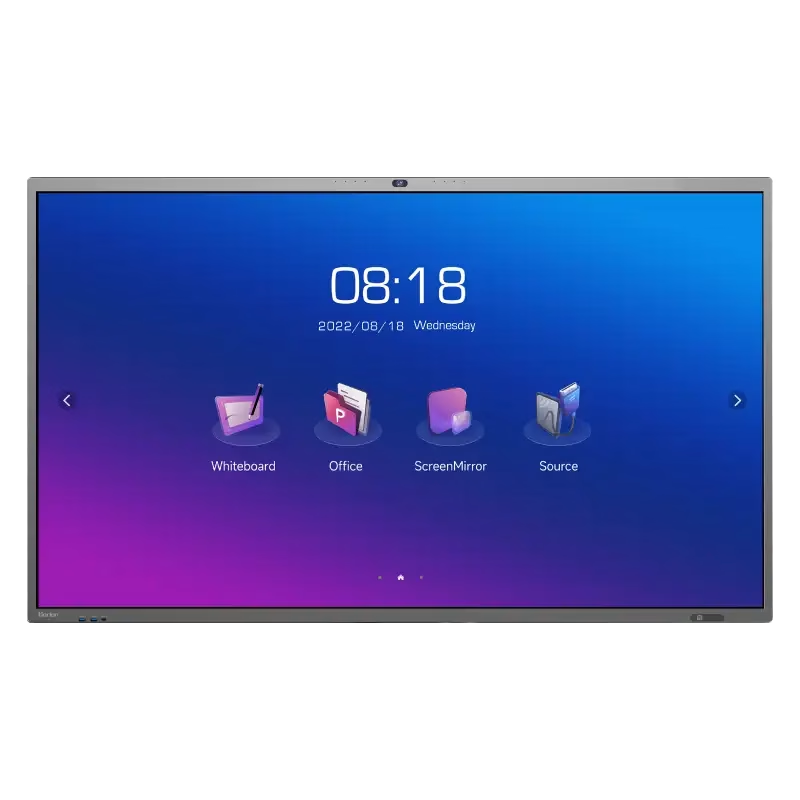
BenQ Board Essential Series 65 inch RE6504FV is designed for classrooms, meeting rooms, and interactive collaboration. It features a 65-inch 4K UHD IPS display with precision IR touch technology for smooth writing and presentations. Additionally, it supports up to 40 touch points. Therefore, it helps teams and teachers work together more efficiently. The BenQ RE6504FV delivers 3840 × 2160 resolution with 450 nits brightness and anti-glare coating for clear viewing in bright rooms. Moreover, it uses 9H tempered glass for better durability and safer daily use. It also includes low blue light and flicker-free technology to reduce eye strain. In addition, it runs on Android 14 with 8GB memory and 128GB storage depending on region for smooth system performance. Furthermore, it provides 3 HDMI 2.0 ports, DisplayPort, USB-A, USB-C with 65W PD, and USB-B for flexible connectivity. As a result, users can connect laptops, cameras, and classroom devices easily. It also includes an 8-microphone array, built-in camera, and 2 × 20W speakers for daily educational and business use. Specifications: 65-inch 4K UHD (3840 × 2160) IPS display Precision IR touch with up to 40 touch points Android 14 with 8GB RAM and 128GB storage 450 nits brightness with anti-glare 9H tempered glass USB-C 65W PD, 8-mic array, camera, and dual 20W speakers

Remax F27 Fonzyr Desktop Fan – 5 W rechargeable fan with 360° adjustable airflow and multi-installation options.Compact (187×206 mm), lightweight, with fast Type-C charging (~2 h) and built-in 1,200 mAh battery. Model: Remax F27 Fonzyr Series Circulation Desktop Fan Power: 5 W, operates on 5 V/1 A power supply Rotation: 360° adjustable airflow for full-range ventilation Battery: Built-in 1,200 mAh rechargeable battery; Type-C charging, ~2 hours charging time Dimensions & Build: Approx. 187 × 206 mm, lightweight ABS plastic housing (~697 g) Installation: Designed for desktop use, wall mounting, or hanging—ideal for multi-location placement

Screen Size 32″ Display Type VA Color Gamut (Typ.) sRGB 95% (CIE1931) Color Depth (Number of Colors) 16.7M Pixel Pitch (mm) 0.36375 x 0.36375 mm Response Time (GTG) 5ms (GtG at Faster), 1ms MBR Refresh Rate 165Hz Aspect Ratio 16:9 Display Resolution FHD Resolution 1920 x 1080 Brightness 300cd/m² Contrast Ratio 3000:1 Viewing Angle 178º (R/L), 178º (U/D) Surface Treatment Anti-Glare INPUT/OUTPUT HDMI Yes x 2 DisplayPort Yes x 1 Headphone Out Yes POWER Type Adapter Input 100-240 Vac, 50/60Hz Power Save/Sleep Mode (Max.) Less than 0.5W DC Off (Max.) Less than 0.3W Power Consumption (Typ.) 40W Power Consumption (Max.) 40W SPECIAL FEATURES NVIDIA G-Sync™ Yes (Compatible) Adaptive Sync AMD FreeSync™ Premium Black Stabilizer® Yes Dynamic Action Sync® Yes Crosshair® Yes Flicker Safe Yes Smart Energy Saving Yes Reader Mode Yes OnScreen Control (OSC) Yes HDR (High Dynamic Range) HDR10 HDR Effect Yes FreeSync (Low Frame Compensation) Yes Motion Blur Reduction Technology Yes 1ms Motion Blur Reduction Yes SOUND Speaker No Built-in Speaker DIMENSIONS/WEIGHTS With Stand (WxHxD) 28.1″ x 23.6″ x 11.5″ (Up), 28.1″ x 19.3″ x 11.5″ (Down) Without Stand (WxHxD) 28.1″ x 16.9″ x 2.0″ Shipping Dimensions (WxHxD) 31.2” x 21.9” x 8.9” With Stand Weight 15.9 lbs Without Stand Weight 11.2 lbs Shipping Weight 22.7 lbs STAND Display Position Adjustments Tilt/Height/Pivot CABINET/ACCESSORIES Wall Mount Size (mm) 100 x 100 mm Display Port Yes 3 Years Warranty manufacturer link

Lexar NM620 SSD 512GB PCIe Gen3 NVMe M.2 2280 Internal Solid State Drive, Up to 3300MB/s Read, for Gamers and PC Enthusiasts (LNM620X512G-RNNNU) About this item High-speed PCIe Gen3x4 interface: 3300MB/s read and 3000MB/s write – NVMe 1.4 supported M.2 2280 form factor with 3D NAND Get 6x the speed of a SATA-based SSD Ideal for PC enthusiasts and gamers Shock and vibration resistant with no moving parts

DELL Battery YRDD6 Laptop for replaceable Dell Inspiron 7586 5482 5485 5491 3310 2-in-1 3493 3582 3593 3793 5493 5593 5480 5590 5591 5594 5598 15 3583 3584 Vostro 3491 5481 5581 5490 5590 VM732 About this item Battery Type: 3cell Li-Polymer Voltage &Capacity : 11.4V 42WH Safeguard features against incorrect voltage, short circuit, internal overheating 100% Brand new ,Grade A cells battery; Quality assurance;every battery has passed factory testing; 500+ recharge cycles over

Apple Magic Mouse: Wireless, Bluetooth, Rechargeable. Works with Mac or iPad; Multi-Touch Surface - White (Pre-Owned) Apple Magic Mouse: Wireless, Bluetooth, Rechargeable. Works with Mac or iPad; Multi-Touch Surface – White (Pre-Owned) About this item WIRELESS, RECHARGEABLE CONVENIENCE — Magic Mouse connects wirelessly to your device via Bluetooth. And the rechargeable internal battery means no loose batteries to replace. WORKS WITH MAC OR IPAD — It’s ready to go right out of the box and pairs quickly with your Mac or iPad so you can get to work right away. SWIPE AND SCROLL ON THE MULTI-TOUCH SURFACE — The Multi-Touch surface allows you to perform simple gestures such as swiping and scrolling. And an optimized foot design lets Magic Mouse glide smoothly across your desk. GO WEEKS WITHOUT CHARGING — The incredibly long-lasting internal battery will power your Magic Mouse for about a month or more between charges. Comes with a woven USB-C to Lightning Cable that lets you pair and charge by connecting to a USB-C port on your Mac or iPad. SYSTEM REQUIREMENTS — Requires a Bluetooth-enabled Mac with OS X 10.11 or later or an iPad with iPadOS 13.4 or later.

Apple USB-C Charge Cable (1m) , With Apple Warranty This 1-metre charge cable is made with a woven design — with USB-C connectors on both ends — and is ideal for charging, syncing and transferring data between USB-C devices. Pair the USB-C Charge Cable with a compatible USB-C power adapter to conveniently charge your devices from a power point and take advantage of fast-charging capabilities. USB-C power adapters sold separately.

Genuine-spec touchpad flex cable for MacBook Pro 14″ (Model A2442, 2021, M1 Pro/Max)—essential for restoring full Force Touch functionality, haptic feedback, and precise multi-touch gesture control. Compatible With: MacBook Pro 14-inch (2021, Model A2442) with Apple M1 Pro or M1 Max chip (Model Identifiers: MacBookPro18,3 / MacBookPro18,4). Part Type: Touchpad flex cable only—does not include the trackpad, Taptic Engine, or mounting brackets. This is the OEM-style ribbon cable that connects the trackpad to the logic board. Function: Carries touch input, Force Touch pressure data, and haptic feedback signals—critical for macOS trackpad gestures, Force Click, and Taptic Engine responsiveness. OEM-Quality Build: Matches Apple’s original flex circuit in length, connector pitch, shielding, and bend geometry—ensures reliable signal transmission and durability under repeated use. Common Use Cases: Replacing a damaged, torn, or corroded original flex cable Completing a trackpad replacement when the original cable is unusable Fixing intermittent trackpad issues, unresponsiveness, or loss of Force Touch Replacing a damaged, torn, or corroded original flex cable Completing a trackpad replacement when the original cable is unusable Fixing intermittent trackpad issues, unresponsiveness, or loss of Force Touch Installation Note: Requires full bottom case removal and careful routing beneath internal components. Connectors use ZIF (Zero Insertion Force) sockets—must be seated properly without force. Recommended for certified or highly experienced technicians only.

Logitech MK120 Wired USB Keyboard Mouse Desktop Combo Height: 6.10 in (155 mm) Width: 17.72 in (450 mm) Depth: 0.93 in (23.5 mm) Weight: 19.4 oz (550 g) Cable length: 4.9 ft (150 cm) Height: 4.45 in (113 mm) Width: 2.44 in (62 mm) Depth: 1.50 in (38 mm) Weight: 3.17 oz (90 g) Cable length: 70.87 in (180 cm) Spill-resistant design 1Tested under limited conditions (maximum of 60 ml liquid spillage). Do not immerse the keyboard in liquid. Adjustable keyboard height 10-Key Number pad Caps lock indicator light Num lock indicator light Up to 10 million keystrokes (excludes number lock key) Key type: Deep profile Sensor Technology: Optical tracking Number of Buttons: 3 (Left/Right-click, Middle click) Scrolling: line-by-line Scroll Wheel: Yes, optical Mouse plastics: 72% post-consumer recycled material 2Excludes plastic in cable assembly, printed wiring assembly (PWA) and packaging. Keyboard plastics: 54% post-consumer recycled material 3Excludes plastic in cable assembly, printed wiring assembly (PWA) and packaging. Windows® 10,11 or later Two available USB ports

Genuine-spec touchpad flex cable for MacBook Pro 13″ (Model A2289, 2020, Intel)—restores full Force Touch functionality, haptic feedback, and preci multi-touch gesture control. OEM-quality replacement for damaged or faulty original cables. Compatible With: MacBook Pro 13-inch (2020, Four Thunderbolt Ports, Model A2289, Model Identifier MacBookPro16,2) with Intel Core i5/i7 processors. Part Type: Touchpad flex cable only — does not include the trackpad housing, Taptic Engine, or mounting hardware. This is the OEM-style ribbon cable that connects the trackpad to the logic board. Function: Transmits: Touch input coordinates Force Touch pressure data Haptic feedback signals to the Taptic Engine Enables full macOS gesture support: Force Click, three-finger lookup, swipe navigation, pinch-to-zoom, and smooth cursor tracking. Touch input coordinates Force Touch pressure data Haptic feedback signals to the Taptic Engine Enables full macOS gesture support: Force Click, three-finger lookup, swipe navigation, pinch-to-zoom, and smooth cursor tracking. OEM-Quality Build: Matches Apple’s original specifications in: Cable length and routing path Connector pitch and ZIF latch design EMI shielding and flex durability Cable length and routing path Connector pitch and ZIF latch design EMI shielding and flex durability Common Use Cases: Replacing a torn, creased, or liquid-damaged original flex cable Completing a trackpad replacement when the original cable is unusable Fixing: Intermittent or erratic trackpad behavior Loss of Force Touch or haptic feedback Complete trackpad unresponsiveness Replacing a torn, creased, or liquid-damaged original flex cable Completing a trackpad replacement when the original cable is unusable Fixing: Intermittent or erratic trackpad behavior Loss of Force Touch or haptic feedback Complete trackpad unresponsiveness Intermittent or erratic trackpad behavior Loss of Force Touch or haptic feedback Complete trackpad unresponsiveness Installation Note: Requires full bottom case removal and battery disconnection. Cable routes under internal components (speaker, logic board)—must follow original path. Connects via ZIF (Zero Insertion Force) socket—align carefully, never force. Recommended for experienced or certified technicians only. Requires full bottom case removal and battery disconnection. Cable routes under internal components (speaker, logic board)—must follow original path. Connects via ZIF (Zero Insertion Force) socket—align carefully, never force. Recommended for experienced or certified technicians only. Important Compatibility Notes: ✅ Only for A2289 (13″, 4 Thunderbolt ports, 2020, Intel) ❌ Not compatible with: A2251 (2 Thunderbolt ports, 2020) A2338 (M1 MacBook Pro, 2020) Any MacBook Air or 14″/16″ MacBook Pro ✅ Only for A2289 (13″, 4 Thunderbolt ports, 2020, Intel) ❌ Not compatible with: A2251 (2 Thunderbolt ports, 2020) A2338 (M1 MacBook Pro, 2020) Any MacBook Air or 14″/16″ MacBook Pro A2251 (2 Thunderbolt ports, 2020) A2338 (M1 MacBook Pro, 2020) Any MacBook Air or 14″/16″ MacBook Pro

Asus VG248QG Gaming Monitor -24″ 24” Full HD gaming monitor with an ultra-fast 165Hz(overclockable) refresh rate and Adaptive-Sync technology to eliminate screen tearing and choppy frame rates Certified as G-SYNC Compatible, FreeSync Premium technology delivering a seamless, tear-free gaming experience by enabling VRR (variable refresh rate) by default. 0.5ms* response time for smooth gameplay, and ASUS Extreme Low Motion Blur (ELMB) Technology to further reduce ghosting and motion blur ASUS-exclusive GamePlus hotkey for in-game enhancements while GameVisual for optimized visuals TUV Rheinland Certification for Flicker-free and Low Blue Light technology to ensure a comfortable viewing experience Supports both Adaptive-Sync with NVIDIA GeForce* graphics cards and FreeSync with AMD Radeon graphics cards *Compatible with NVIDIA GeForce GTX 10 series, GTX 16 series, RTX 20 series and newer graphics cards

The Lenovo Monitor 32″ C32U‑40 (63DAGAT2EU) delivers crisp and detailed visuals with its 32‑inch 4K UHD display. Its high resolution shows clear text and sharp images, making it easier to work on spreadsheets, view photos, or stream video content. In addition, the IPS panel provides wide viewing angles so colors stay accurate when viewed from different positions. Furthermore, this monitor includes smooth motion support with a 60 Hz refresh rate that keeps everyday use and video playback fluid. It also offers essential connectivity options, allowing you to connect laptops, desktops, and media players without extra adapters. Therefore, it fits well in both home and office setups needing dependable display quality and practical performance. Overall, the Lenovo C32U‑40 combines large‑screen clarity, wide viewing angles, and flexible connections in a reliable 32‑inch design that supports both productivity and entertainment. Specifications: 32″ 4K UHD (3840×2160) IPS display for detailed visuals Wide viewing angles for consistent color Smooth everyday performance Essential connectivity for laptops and desktops Practical design for work and media use

LENOVO 11.1V or 11.4V 24Wh 68 Laptop Battery 0C52861 45N1124 45N1775 45N1126 45N1127 For Lenovo ThinkPad X240 X240S X250 X260 X270 T440 T440S T450 T450S T460 T460P T470P T550 T560 W550 L450 L460 About this item Battery Type: 3-Cell Lithium-Ion Voltage &Capacity :11.1V 24Wh 2.09AH or 11.4V 24Wh 2.06Ah , in fact , 11.1V is same as 11.4V , because one cell voltage is 3.7V or 3.8V . SANISI Concept: The customer is god, Product Quality and Service must be perfect! We will let every customer feel satisfied Package Contents: 1 pcs Brand New Battery

The Samsung 32″ Essential S3 Curved Monitor LS32D392GAMXUE features a 32-inch VA panel with Full HD resolution (1920 × 1080). It uses a 1500R curved screen design that follows the natural field of view for a more immersive viewing experience. The monitor supports a refresh rate of up to 100Hz. As a result, motion appears smoother during everyday work, video playback, and casual gaming. In addition, the 4ms GTG response time helps reduce motion blur during fast-moving content. Samsung uses a VA panel with a typical 3000:1 contrast ratio and 250 cd/m² brightness. Therefore, the display delivers deeper blacks and improved contrast compared to many standard IPS and TN panels. The monitor also covers up to 95% of the sRGB color space. Eye Saver Mode and Flicker Free technology help reduce eye strain during extended use. Also, Game Mode adjusts image settings to improve visibility in darker scenes. Connectivity includes one HDMI 1.4 port, one D-Sub (VGA) port, and a headphone output. The monitor supports VESA 75 × 75 mm wall mounting and tilt adjustment from -2° to 22°. This model focuses on everyday productivity, media consumption, and general home use while providing a large curved display and higher-than-standard refresh rate. Specifications: 32-inch VA panel with Full HD (1920 × 1080) resolution 1500R curved screen design Up to 100Hz refresh rate 4ms GTG response time HDMI 1.4, D-Sub (VGA), and headphone connectivity

LG 22 inch 100Hz FHD Monitor 22MR410-B is designed for smooth daily work, study, and casual gaming. It features a 21.45-inch Full HD VA display with a 3-side borderless design. Additionally, it supports a 100Hz refresh rate and AMD FreeSync for smoother motion. Therefore, it works well for office tasks and everyday entertainment. The LG 22 inch 100Hz FHD Monitor 22MR410-B delivers 1920 × 1080 resolution with a 5ms response time and 250 cd/m² brightness. Moreover, it includes a 3000:1 contrast ratio and sRGB 99% color coverage for balanced image quality. It supports one HDMI port, D-Sub input, and headphone out for flexible connectivity. Furthermore, the monitor includes Reader Mode, Flicker Safe, Black Stabilizer, and Dynamic Action Sync for better comfort and smoother viewing. In addition, the stand supports tilt adjustment and VESA 100 × 100 wall mounting. As a result, users get a practical setup for home or office use. Specifications: 21.45-inch Full HD 1920 × 1080 VA display 100Hz refresh rate with AMD FreeSync support 5ms response time with 3000:1 contrast ratio HDMI, D-Sub, and headphone out connectivity Tilt adjustment with VESA 100 × 100 mount support

The Meetion Mini 4000 Black is a compact wireless keyboard and mouse combo designed for clean and convenient everyday use. With a mini-space-saving layout and stable wireless connection, it’s perfect for office work, home setups, and laptop users who want a neat, clutter-free desk. The Meetion Mini 4000 is a stylish and practical wireless keyboard and mouse set made for users who prefer a compact and modern workspace. Its mini keyboard design saves desk space while still offering comfortable typing for daily tasks. The wireless mouse provides smooth control and easy navigation, making this combo ideal for offices, students, and home users. With plug-and-play wireless connectivity, setup is simple—just connect the receiver and start using it instantly. Wireless Keyboard & Mouse Combo for a clean and clutter-free setup Compact Mini Keyboard Design saves space and fits small desks easily Stable Wireless Connection for smooth performance Plug & Play Receiver – quick setup without drivers Smooth Wireless Mouse for accurate control Comfortable Typing Layout for everyday productivity Modern Black Finish suitable for any workspace Ideal for Laptops & Desktops Perfect for office workers, students, and home users needing a compact wireless combo for laptops or desktops. Works with most devices that support USB.

Fast-charging feature available on select iPhone and iPad models.

Genuine-spec touchpad flex cable for MacBook Pro 15″ (Model A1706 – 2017 and A1989 – 2018/2019)—restores full Force Touch functionality, haptic feedback, and precise multi-touch gesture control during trackpad repair or replacement. Compatible With: MacBook Pro 15″ (2017) – Model A1706 (Model Identifier: MacBookPro14,3) MacBook Pro 15″ (2018–2019) – Model A1989 (Model Identifier: MacBookPro15,2) ✅ Note: Apple used the same trackpad assembly and flex cable across both A1706 and A1989 15″ models—making this part interchangeable between them. MacBook Pro 15″ (2017) – Model A1706 (Model Identifier: MacBookPro14,3) MacBook Pro 15″ (2018–2019) – Model A1989 (Model Identifier: MacBookPro15,2) ✅ Note: Apple used the same trackpad assembly and flex cable across both A1706 and A1989 15″ models—making this part interchangeable between them. ✅ Note: Apple used the same trackpad assembly and flex cable across both A1706 and A1989 15″ models—making this part interchangeable between them. Part Type: Touchpad flex cable only — does not include the trackpad housing, Taptic Engine, or mounting hardware. This is the OEM-style ribbon cable connecting the trackpad to the logic board. Function: Transmits: Touch input coordinates Force Touch pressure data Haptic feedback signals to the Taptic Engine Enables full macOS gesture support: Force Click, three-finger lookup, swipe navigation, pinch-to-zoom, and smooth cursor tracking. Touch input coordinates Force Touch pressure data Haptic feedback signals to the Taptic Engine Enables full macOS gesture support: Force Click, three-finger lookup, swipe navigation, pinch-to-zoom, and smooth cursor tracking. OEM-Quality Build: Matches Apple’s original in: Cable length and routing Connector pitch and ZIF latch design EMI shielding and flex durability Cable length and routing Connector pitch and ZIF latch design EMI shielding and flex durability Common Use Cases: Replacing a torn, creased, or liquid-damaged original flex cable Completing a trackpad replacement when the original cable is compromised Fixing intermittent trackpad behavior, loss of Force Touch, or complete unresponsiveness Replacing a torn, creased, or liquid-damaged original flex cable Completing a trackpad replacement when the original cable is compromised Fixing intermittent trackpad behavior, loss of Force Touch, or complete unresponsiveness Installation Note: Requires full bottom case removal and battery disconnection. Cable routes under internal components near the right speaker and logic board. Connects via a ZIF (Zero Insertion Force) socket—must be aligned carefully and latched gently. Recommended for experienced or certified technicians only. Requires full bottom case removal and battery disconnection. Cable routes under internal components near the right speaker and logic board. Connects via a ZIF (Zero Insertion Force) socket—must be aligned carefully and latched gently. Recommended for experienced or certified technicians only.
