
AOC 24B30H2 23.8-inch IPS monitor delivers smooth and clear performance for work, study, and casual use. It focuses on reliable Full HD visuals, wide viewing angles, and stable refresh rate for daily tasks. Additionally, it features a 23.8-inch IPS panel with Full HD resolution (1920 × 1080). This panel provides consistent colors and wide viewing angles, so it ensures clear visuals from different positions. Moreover, it supports a 100Hz refresh rate with 1ms MPRT response time. As a result, it delivers smoother motion and reduces blur during scrolling and light gaming. The monitor includes Adaptive Sync technology. Therefore, it reduces screen tearing and stuttering for more stable visual performance. In addition, it supports HDR and wide color coverage. This improves image depth and color accuracy for media and general use. Furthermore, it offers HDMI 1.4 and VGA connectivity with a frameless design. So it supports modern and legacy devices while keeping a clean desk setup. AOC 24B30H2 23.8-inch IPS monitor provides balanced performance, smooth visuals, and essential features for everyday productivity. Specifications: 23.8-inch IPS panel with Full HD 1920 × 1080 resolution 100Hz refresh rate for smoother visual performance 1ms MPRT response time for reduced motion blur Adaptive Sync for tear-free and stable visuals HDMI 1.4 and VGA connectivity for wide compatibility

A professional pre-owned HP EliteBook 840 G5 or G6 with 14" display, 8th Gen Core i5, 8GB RAM, and 256GB SSD—offering reliable performance, enterprise security, and portability for business and everyday use.

Samsung Odyssey G5 G50F QHD 180Hz Gaming Monitor delivers smooth gameplay and sharp visuals for competitive players. It features a 27-inch QHD display with high detail and clarity. As a result, games appear more immersive and realistic on screen. Moreover, the Fast IPS panel ensures consistent colors and wide viewing angles. It maintains clear visuals from different positions. In addition, HDR10 enhances brightness and contrast for deeper blacks and brighter highlights. Furthermore, the 180Hz refresh rate and 1ms response time reduce motion blur and lag. This allows faster reactions during intense gameplay. NVIDIA G-Sync compatibility and AMD FreeSync also help deliver smooth and stable frames. Finally, Samsung Odyssey G5 G50F QHD 180Hz Gaming Monitor includes gaming tools like Black Equalizer and Virtual Aim Point. These features improve visibility and accuracy. Therefore, players gain better control and performance in every match. Specifications: 27-inch QHD (2560×1440) resolution for sharp and detailed visuals Fast IPS panel with wide 178° viewing angles and consistent colors 180Hz refresh rate with 1ms response time for smooth gameplay HDR10 support for improved contrast and realistic image depth NVIDIA G-Sync Compatible and AMD FreeSync for reduced tearing and lag

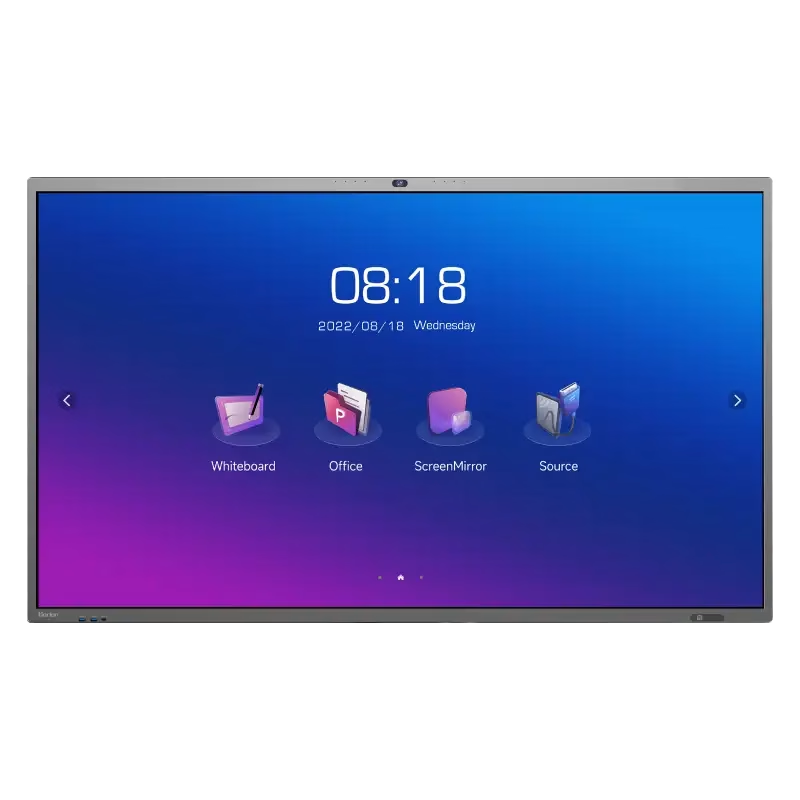
The Horion Interactive Flat Panel 65″ transforms any space into a dynamic and interactive environment. Whether in classrooms or conference rooms, it enhances collaboration and productivity. Featuring a stunning 65-inch 4K UHD display, the Horion Interactive Flat Panel delivers crystal-clear visuals and vibrant colors. This ensures every detail is visible, making presentations and lessons more engaging. The Interactive Flat Panel comes with advanced touch technology, allowing multiple users to interact with the screen simultaneously. This fosters teamwork and encourages active participation. With built-in annotation tools, the Interactive Flat Panel 65″ makes it easy to highlight key points and add notes during presentations. These tools are intuitive and user-friendly, making it accessible for everyone. Connectivity is seamless with the Interactive Flat Panel. It offers multiple ports, including HDMI, USB, and wireless options, ensuring compatibility with various devices. This flexibility makes it easy to integrate into your existing setup. The Interactive Flat Panel 65″ is designed for ease of use. Its user-friendly interface and responsive touch screen make it simple to navigate and control. Whether you’re a teacher or a business professional, you’ll find it easy to use. In addition, the Interactive Flat Panel includes powerful built-in speakers, delivering clear and immersive audio. This enhances the overall experience, making it ideal for multimedia presentations. In conclusion, the Horion Interactive Flat Panel 65″ combines stunning visuals, interactive features, and ease of use for a superior collaborative experience. Upgrade your space with the Interactive Flat Panel and boost engagement and productivity today. Specifications: Display : 65″ Resolution : 4K (3840×2160) Refresh Rate : 60Hz CPU : Octacore Ram : 8GB Memory : 128GB GPU : Mali G52-MP8 OS : Android 13.0 Sensor : Infrared, NFC, Light Sensor

WiWU Linker 721HD Hub – Compact USB-C hub with 7 ports including 100W PD, dual USB-A, USB-C data, HDMI 4K60, and dual SD/TF slots.Aluminum body, plug‑and‑play compatibility with MacBooks and modern USB‑C devices—ideal for laptop expansion. Model: Linker 721HD (WiWU) Material: Aluminum-alloy shell Ports: 2 × USB‑A 3.1 1 × USB‑C 3.1 (data) 1 × USB‑C PD power delivery (up to 100 W) 1 × HDMI (4K @ 60 Hz) SD card slot + micro‑SD (TF) slot (USB 3.0 speed) Ports: 2 × USB‑A 3.1 1 × USB‑C 3.1 (data) 1 × USB‑C PD power delivery (up to 100 W) 1 × HDMI (4K @ 60 Hz) SD card slot + micro‑SD (TF) slot (USB 3.0 speed) Cable: Fixed USB‑C male cable (approx. 15 cm) Compatibility: Plug-and-play with USB-C/Thunderbolt 3/4 devices (MacBook, XPS, Chromebooks, mobile devices with DP-Alt Mode) Design: Compact, space gray finish optimized for travel/work setups Weight: ~150 g

Genuine-spec touchpad flex cable for Apple’s 12-inch MacBook (Model A1534, Early 2015 / Early 2016 / Mid 2017)—essential for restoring full Force Touch trackpad functionality, haptic feedback, and multi-touch gesture support. Compatible With: MacBook 12″ (Early 2015) – 1.1GHz Core M MacBook 12″ (Early 2016) – 1.1GHz/1.3GHz Core M MacBook 12″ (Mid 2017) – 1.2GHz/1.3GHz Core m3/i5/i7 All share Model Number A1534 and Model Identifier MacBook8,1 / MacBook9,1 / MacBook10,1 respectively. MacBook 12″ (Early 2015) – 1.1GHz Core M MacBook 12″ (Early 2016) – 1.1GHz/1.3GHz Core M MacBook 12″ (Mid 2017) – 1.2GHz/1.3GHz Core m3/i5/i7 All share Model Number A1534 and Model Identifier MacBook8,1 / MacBook9,1 / MacBook10,1 respectively. Part Type: Touchpad flex cable only—does not include the trackpad housing, Taptic Engine, or mounting brackets. This is the ribbon cable that connects the Force Touch trackpad to the logic board. Function: Critical for Force Touch functionality—transmits pressure-sensitive input, multi-touch gestures (e.g., pinch, swipe, Force Click), and haptic feedback signals to the Taptic Engine. OEM-Quality Construction: Precisely matches Apple’s original in length, connector pitch, shielding, and routing—ensures reliable signal integrity and compatibility with macOS. Common Use Cases: Replacing a torn, creased, or liquid-damaged flex cable Restoring unresponsive or erratic trackpad behavior Completing a trackpad replacement when the original cable is unusable Replacing a torn, creased, or liquid-damaged flex cable Restoring unresponsive or erratic trackpad behavior Completing a trackpad replacement when the original cable is unusable Installation Note: Requires full bottom case removal and delicate disconnection of the ZIF connector. The cable routes tightly under the battery—extreme care is required. Recommended for experienced or certified technicians only.

Genuine-spec touchpad flex cable for MacBook Pro 13″ (Model A2289, 2020, Intel)—restores full Force Touch functionality, haptic feedback, and preci multi-touch gesture control. OEM-quality replacement for damaged or faulty original cables. Compatible With: MacBook Pro 13-inch (2020, Four Thunderbolt Ports, Model A2289, Model Identifier MacBookPro16,2) with Intel Core i5/i7 processors. Part Type: Touchpad flex cable only — does not include the trackpad housing, Taptic Engine, or mounting hardware. This is the OEM-style ribbon cable that connects the trackpad to the logic board. Function: Transmits: Touch input coordinates Force Touch pressure data Haptic feedback signals to the Taptic Engine Enables full macOS gesture support: Force Click, three-finger lookup, swipe navigation, pinch-to-zoom, and smooth cursor tracking. Touch input coordinates Force Touch pressure data Haptic feedback signals to the Taptic Engine Enables full macOS gesture support: Force Click, three-finger lookup, swipe navigation, pinch-to-zoom, and smooth cursor tracking. OEM-Quality Build: Matches Apple’s original specifications in: Cable length and routing path Connector pitch and ZIF latch design EMI shielding and flex durability Cable length and routing path Connector pitch and ZIF latch design EMI shielding and flex durability Common Use Cases: Replacing a torn, creased, or liquid-damaged original flex cable Completing a trackpad replacement when the original cable is unusable Fixing: Intermittent or erratic trackpad behavior Loss of Force Touch or haptic feedback Complete trackpad unresponsiveness Replacing a torn, creased, or liquid-damaged original flex cable Completing a trackpad replacement when the original cable is unusable Fixing: Intermittent or erratic trackpad behavior Loss of Force Touch or haptic feedback Complete trackpad unresponsiveness Intermittent or erratic trackpad behavior Loss of Force Touch or haptic feedback Complete trackpad unresponsiveness Installation Note: Requires full bottom case removal and battery disconnection. Cable routes under internal components (speaker, logic board)—must follow original path. Connects via ZIF (Zero Insertion Force) socket—align carefully, never force. Recommended for experienced or certified technicians only. Requires full bottom case removal and battery disconnection. Cable routes under internal components (speaker, logic board)—must follow original path. Connects via ZIF (Zero Insertion Force) socket—align carefully, never force. Recommended for experienced or certified technicians only. Important Compatibility Notes: ✅ Only for A2289 (13″, 4 Thunderbolt ports, 2020, Intel) ❌ Not compatible with: A2251 (2 Thunderbolt ports, 2020) A2338 (M1 MacBook Pro, 2020) Any MacBook Air or 14″/16″ MacBook Pro ✅ Only for A2289 (13″, 4 Thunderbolt ports, 2020, Intel) ❌ Not compatible with: A2251 (2 Thunderbolt ports, 2020) A2338 (M1 MacBook Pro, 2020) Any MacBook Air or 14″/16″ MacBook Pro A2251 (2 Thunderbolt ports, 2020) A2338 (M1 MacBook Pro, 2020) Any MacBook Air or 14″/16″ MacBook Pro

LENOVO 20V/4.5A USB PIN Laptop Charger for Lenovo Thinkpad Compatible Part NO.: 45N0236, 45N0237, 45N0238, 45N0239 0B46994, 0B46995, 0B46996, 0B46997, 0B46997, 0B46998, 0B469990B47000, 0B47001, 0B47002, 0B47003, 0B47004, 0B47005, 0B47006

Genuine-spec touchpad flex cable for MacBook Pro 13″ (Model A2251, 2020, Intel)—essential for restoring full Force Touch functionality, haptic feedback, and precise multi-touch gesture control during trackpad repair or replacement. Compatible With: MacBook Pro 13-inch (2020, Two Thunderbolt Ports, Model A2251, Model Identifier MacBookPro16,1) with Intel Core i5/i7 processors. Part Type: Touchpad flex cable only—does not include the trackpad housing, Taptic Engine, or mounting hardware. This is the OEM-style ribbon cable that connects the trackpad to the logic board. Function: Transmits: Precise touch coordinates Force Touch pressure data Haptic feedback signals to the Taptic Engine Enables full macOS gesture support including Force Click, three-finger lookup, swipe navigation, and inertial scrolling. Precise touch coordinates Force Touch pressure data Haptic feedback signals to the Taptic Engine Enables full macOS gesture support including Force Click, three-finger lookup, swipe navigation, and inertial scrolling. OEM-Quality Build: Matches Apple’s original specifications in: Cable length and routing Connector pitch and ZIF latch design EMI shielding and flex durability Cable length and routing Connector pitch and ZIF latch design EMI shielding and flex durability Common Use Cases: Replacing a torn, creased, or liquid-damaged original flex Completing a trackpad replacement when the original cable is compromised Fixing intermittent trackpad behavior, loss of Force Touch, or complete unresponsiveness Replacing a torn, creased, or liquid-damaged original flex Completing a trackpad replacement when the original cable is compromised Fixing intermittent trackpad behavior, loss of Force Touch, or complete unresponsiveness Installation Note: Requires full bottom case removal and partial disassembly (including battery disconnect). Cable routes under the right speaker and logic board—must be seated in original retention channels. Connects via ZIF (Zero Insertion Force) socket—align carefully and latch gently. Recommended for experienced or certified technicians only. Requires full bottom case removal and partial disassembly (including battery disconnect). Cable routes under the right speaker and logic board—must be seated in original retention channels. Connects via ZIF (Zero Insertion Force) socket—align carefully and latch gently. Recommended for experienced or certified technicians only.

The ViewSonic 27″ 75Hz Monitor delivers vibrant visuals and smooth performance for all your computing needs. Whether you’re working, gaming, or streaming, this monitor provides an immersive viewing experience. With a Full HD 1080p resolution, the ViewSonic 27″ 75Hz Monitor offers crisp and clear images. Every detail is sharp and vivid, making it perfect for tasks that require high visual clarity. The 75Hz refresh rate ensures smooth and fluid motion on the ViewSonic 27″ Monitor. This is especially beneficial for gaming and watching videos, as it reduces blur and enhances the overall viewing experience. Designed with versatility in mind, the ViewSonic 27″ 75Hz Monitor features multiple connectivity options. It includes HDMI, VGA, and DisplayPort inputs, allowing you to connect various devices effortlessly. The slim bezel design of the ViewSonic 27″ 75Hz Monitor maximizes screen space and provides a sleek, modern look. It fits seamlessly into any workspace or home setup, adding a touch of elegance to your environment. The ViewSonic 27″ 75Hz Monitor is also equipped with eye care technology to reduce eye strain during extended use. Features like Flicker-Free and Blue Light Filter make it comfortable for long hours of work or play. Setting up the ViewSonic 27″ 75Hz Monitor is easy and hassle-free. The adjustable stand allows you to find the perfect viewing angle, ensuring comfort and productivity throughout the day. In conclusion, the ViewSonic 27″ 75Hz Monitor combines stunning visuals, smooth performance, and versatile connectivity for an exceptional viewing experience. Upgrade to the ViewSonic 27″ 75Hz Monitor today and enjoy the best in display technology. Specifications: Display : 27″ TN Resolution : FHD 1920 x 1080 Refresh Rate : 75Hz Response Rate : 1.5ms GTG

Replacement Audio Board with IPD Cable for MacBook Air M1 2020 (A2337). Compatible with part numbers 820-01929-A, 821-03452-A, 923-03672, 923-03663, and more. Ideal for fixing audio issues, headphone jack problems, or sound board failures. The Audio Board with IPD Cable for MacBook Air (M1, 2020) is a high-quality replacement spare part designed to restore proper sound functionality on MacBook Air A2337 models. If your MacBook is experiencing no sound output, headphone jack issues, distorted audio, or audio board failure, this replacement board provides a reliable solution. It includes the required IPD cable for proper installation and connection, making it ideal for professional repairs and technician use. Replacement Audio Board + IPD Cable for MacBook Air M1 Fixes audio issues such as no sound, headphone jack failure, or audio distortion Includes IPD cable for correct connection and repair High-quality build for stable and long-term performance Ideal for technicians, repair shops, and spare part replacement Compatible with multiple Apple part numbers for easy matching ✔ MacBook Air (M1, 2020) A2337 Compatible only with MacBook Air A2337 (M1, 2020). Please match your device model and part number before ordering to ensure correct fit.

The ViewSonic VX2480-2K-SHD 24″ 75Hz Monitor elevates your visual experience with its stunning 24-inch display. Whether you’re working, gaming, or watching movies, this monitor delivers crisp and clear images. With a 2K resolution, the ViewSonic VX2480-2K-SHD ensures every detail is visible and vibrant. Enjoy sharp, lifelike visuals that make your content come alive, from photos to videos and everything in between. The 75Hz refresh rate provides smooth and fluid motion, making it perfect for gaming and fast-paced videos. Say goodbye to screen tearing and lag, and enjoy a seamless viewing experience with the ViewSonic VX2480-2K-SHD. Designed for versatility, this monitor offers multiple connectivity options, including HDMI and DisplayPort. Easily connect your devices and switch between them without hassle, making your workspace more efficient. The ViewSonic VX2480-2K-SHD 24″ Monitor features an ultra-slim bezel design, maximizing your screen space and creating a sleek, modern look. Its ergonomic stand allows you to adjust the height and tilt for the most comfortable viewing position. Eye-care technology in the ViewSonic VX2480-2K-SHD reduces eye strain during extended use. With features like Flicker-Free and Blue Light Filter, you can work or play for longer without discomfort. In conclusion, the ViewSonic VX2480-2K-SHD 24″ 75Hz Monitor offers a perfect blend of stunning visuals, smooth performance, and ergonomic design. Upgrade to the ViewSonic VX2480-2K-SHD today and transform your viewing experience. Specifications: Display : 24″ IPS Resolution : QHD 2560 x 1440 Refresh Rate : 75Hz Response Rate : 3.89ms

Genuine-spec touchpad flex cable for MacBook Pro 13″ with Touch Bar (Model A1708, 2016–2017)—restores full Force Touch functionality, haptic feedback, and precise multi-touch gesture control during trackpad repair or replacement. Compatible With: MacBook Pro 13″ (2016) – Model A1708 (Model Identifier: MacBookPro13,1) MacBook Pro 13″ (2017) – Model A1708 (Model Identifier: MacBookPro14,1) (Both years share the same internal trackpad assembly and flex cable.) MacBook Pro 13″ (2016) – Model A1708 (Model Identifier: MacBookPro13,1) MacBook Pro 13″ (2017) – Model A1708 (Model Identifier: MacBookPro14,1) (Both years share the same internal trackpad assembly and flex cable.) Part Type: Touchpad flex cable only — does not include the trackpad housing, Taptic Engine, or mounting hardware. This is the OEM-style ribbon cable that connects the trackpad to the logic board. Function: Transmits: Touch input coordinates Force Touch pressure data Haptic feedback signals to the Taptic Engine Enables full macOS gesture support: Force Click, three-finger lookup, swipe navigation, pinch-to-zoom, and smooth cursor tracking. Touch input coordinates Force Touch pressure data Haptic feedback signals to the Taptic Engine Enables full macOS gesture support: Force Click, three-finger lookup, swipe navigation, pinch-to-zoom, and smooth cursor tracking. OEM-Quality Build: Matches Apple’s original specifications in: Cable length and routing path Connector pitch and ZIF latch design EMI shielding and flex durability Cable length and routing path Connector pitch and ZIF latch design EMI shielding and flex durability Common Use Cases: Replacing a torn, creased, or liquid-damaged original flex cable Completing a trackpad replacement when the original cable is compromised Fixing intermittent trackpad behavior, loss of Force Touch, or complete unresponsiveness Replacing a torn, creased, or liquid-damaged original flex cable Completing a trackpad replacement when the original cable is compromised Fixing intermittent trackpad behavior, loss of Force Touch, or complete unresponsiveness Installation Note: Requires full bottom case removal and battery disconnection. Cable routes under internal components near the right speaker and logic board. Connects via a ZIF (Zero Insertion Force) socket—must be aligned carefully and latched gently. Recommended for experienced or certified technicians only. Requires full bottom case removal and battery disconnection. Cable routes under internal components near the right speaker and logic board. Connects via a ZIF (Zero Insertion Force) socket—must be aligned carefully and latched gently. Recommended for experienced or certified technicians only.

A high-efficiency pre-owned HP EliteBook 865 G9 with 16" display, AMD Ryzen 7 6850U, 16GB RAM, 512GB SSD, and integrated AMD Radeon 680M graphics—ideal for business professionals seeking all-day battery life, strong performance, and enterprise security.

Step into the world of unparalleled gaming visuals with the AOC 24G4 24″ 180Hz Gaming Monitor. This cutting-edge display is designed to elevate your gaming experience to new heights. Boasting a 180Hz refresh rate, the AOC 24G4 ensures ultra-smooth gameplay, minimizing motion blur and providing a competitive edge. Immerse yourself in fluid graphics for a truly captivating gaming session. Equipped with a 24-inch screen, this gaming monitor strikes the perfect balance between size and clarity. Enjoy crisp details and vibrant colors, enhancing every pixel of your favorite games. Featuring AMD FreeSync technology, the AOC 24G4 synchronizes your monitor’s refresh rate with your graphics card, reducing screen tearing and stuttering. Say goodbye to disruptions and hello to seamless gaming performance. The sleek design of the monitor adds a touch of sophistication to your gaming setup. Its thin bezels create an expansive view, making you feel completely immersed in the action on-screen. Connectivity is a breeze with multiple ports, including HDMI and DisplayPort. Easily hook up your gaming console, PC, or other devices for a hassle-free gaming setup. In summary, the AOC 24G4 24″ 180Hz Gaming Monitor is a game-changer for avid gamers. With its high refresh rate, vivid display, and advanced features, it delivers an immersive gaming experience like no other. Upgrade your setup and take your gaming to the next level today! Specifications: Display : 23.8″ Fast IPS Resolution : 1920 × 1080 (FHD) Refresh Rate : 180Hz Response Time : 1ms

Aoc Agon 24-inch WQHD 165Hz Gaming Monitor Product Details Size: 23.8 inches. Panel Type: TN (16.7 Million Colours with 170/160 º viewing angles). Resolution: 2K / WQHD (2560x1440p). Refresh Rate: 165Hz. Respomse Time: 1 ms (GTG). Aspect Ratio: 16:9. Sync Technology: Nvidia G-Sync. Brightness: 350 cd/m2. Contrast Ratio: Static: 1000:1, Dynamic: 50M:1 Anti-Glare 3H hard coating with an Ultra Narrow bezel. Adjustable Height within a 13cm range. Tilt Adjustment: -3.5° ~ +21.5°. Swivel: -20° ~ +20°. Pivots up to 90°. VESA Wall Mounting : 100x100mm. (x2) 2W built-in speakers with microphone. Ports: (x1) HDMI 1.4 (x1) DisplayPort 1.2 (x4) USB-A 3.0 (x1) USB-B (x1) 3.5mm audio jack Dimensions (incl base): 55.5 x 21.3 x 49 cm. Lowblue Light mode: Protection from eye strain without sacrificing color composition. Specifications: Aoc Agon 24-inch WQHD 165Hz Gaming Monitor Size: 23.8 inches. Panel Type: TN (16.7 Million Colours with 170/160 º viewing angles). Resolution: 2K / WQHD (2560x1440p). Refresh Rate: 165Hz.

Looking to enhance your visual experience? The AOC 22B3HM 21″ 75Hz Monitor is here to elevate your viewing pleasure. With its sleek design and impressive features, it’s the perfect addition to any setup. First and foremost, let’s talk about clarity. The AOC 22B3HM boasts a vibrant 21-inch display that delivers crisp and clear visuals. Whether you’re watching movies, browsing the web, or gaming, every detail will pop with vividness. Transitioning to performance, this monitor offers a smooth and seamless viewing experience with its 75Hz refresh rate. Say goodbye to motion blur and hello to fluid motion, whether you’re scrolling through content or gaming. Moreover, its slim bezel design provides an immersive viewing experience, allowing you to focus entirely on the content at hand. Get ready to dive into your favorite movies and games like never before. In addition, the monitor’s adjustable stand offers ergonomic comfort, allowing you to find the perfect viewing angle for extended use. Say goodbye to neck strain and hello to comfortable viewing for hours on end. Furthermore, with multiple connectivity options, including HDMI and VGA ports, the AOC 22B3HM ensures compatibility with a wide range of devices. Connect your gaming console, PC, or laptop effortlessly and enjoy your content in style. In conclusion, the AOC 22B3HM 21″ 75Hz Monitor is a game-changer in the world of displays. With its stunning visuals, smooth performance, and ergonomic design, it’s the perfect choice for anyone looking to enhance their viewing experience. Upgrade your setup today and immerse yourself in the world of vibrant visuals. Check out other option here! Specifications: Display : 21.5″ VA Resolution : 1920 x 1080 (FHD) Refresh Rate : 75Hz Response Rate : 4ms

Genuine-spec touchpad flex cable for MacBook Pro 13″ (Model A2338, 2020, Apple M1)—essential for restoring full Force Touch functionality, haptic feedback, and precise multi-touch gesture control during trackpad repair or replacement. Compatible With: MacBook Pro 13-inch (2020, Model A2338, Model Identifier MacBookPro17,1) with Apple M1 chip (2 Thunderbolt ports). Part Type: Touchpad flex cable only — does not include the trackpad housing, Taptic Engine, or mounting hardware. This is the OEM-style ribbon cable that connects the trackpad to the logic board. Function: Transmits: Touch input coordinates Force Touch pressure data Haptic feedback signals to the Taptic Engine Enables full macOS gesture support: Force Click, three-finger lookup, swipe navigation, pinch-to-zoom, and smooth cursor tracking. Touch input coordinates Force Touch pressure data Haptic feedback signals to the Taptic Engine Enables full macOS gesture support: Force Click, three-finger lookup, swipe navigation, pinch-to-zoom, and smooth cursor tracking. OEM-Quality Build: Matches Apple’s original specifications in: Cable length and routing Connector pitch and ZIF latch design EMI shielding and flex durability Cable length and routing Connector pitch and ZIF latch design EMI shielding and flex durability Common Use Cases: Replacing a torn, creased, or liquid-damaged original flex cable Completing a trackpad replacement when the original cable is compromised Fixing intermittent trackpad behavior, loss of Force Touch, or complete unresponsiveness Replacing a torn, creased, or liquid-damaged original flex cable Completing a trackpad replacement when the original cable is compromised Fixing intermittent trackpad behavior, loss of Force Touch, or complete unresponsiveness Installation Note: Requires full bottom case removal and battery disconnection. Cable routes under internal components near the right speaker and logic board. Connects via a ZIF (Zero Insertion Force) socket—must be aligned carefully and latched gently. Recommended for experienced or certified technicians only. Requires full bottom case removal and battery disconnection. Cable routes under internal components near the right speaker and logic board. Connects via a ZIF (Zero Insertion Force) socket—must be aligned carefully and latched gently. Recommended for experienced or certified technicians only. Important Compatibility Notes: ✅ Only for A2338 (13″, M1, 2020) ❌ Not compatible with: Intel-based A2251 / A2289 (2020) MacBook Air M1 (A2337) Any MacBook Air or 14″/16″ MacBook Pro ✅ Only for A2338 (13″, M1, 2020) ❌ Not compatible with: Intel-based A2251 / A2289 (2020) MacBook Air M1 (A2337) Any MacBook Air or 14″/16″ MacBook Pro Intel-based A2251 / A2289 (2020) MacBook Air M1 (A2337) Any MacBook Air or 14″/16″ MacBook Pro

WiWU A821CH 8‑in‑1 Stand & Dock – A foldable aluminum laptop stand with a built-in 8‑port USB‑C dock (two USB‑A, two USB‑C, HDMI 4K30, SD/TF, Gigabit Ethernet, PD 100 W).Enhances comfort, cooling, and functionality—perfect for decluttered, professional work setups. Model: WiWU A821CH Design: Sturdy aluminum alloy stand with foldable, portable design, hollow surface for cooling, and silicone pads to prevent slips Dimensions & Weight: Compact when folded (~400 g in aluminum) Docking Hub Ports: 2 × USB-C ports 2 × USB‑A 3.0 ports 1 × HDMI (up to 4K@30 Hz) SD + micro‑SD card slots 1 × RJ‑45 Gigabit Ethernet (1000 Mbps) Docking Hub Ports: 2 × USB-C ports 2 × USB‑A 3.0 ports 1 × HDMI (up to 4K@30 Hz) SD + micro‑SD card slots 1 × RJ‑45 Gigabit Ethernet (1000 Mbps) Power Delivery: USB-C PD 3.0 supports up to 100 W—can charge a laptop while using other ports Connectivity: HDMI supports up to 4K@30 Hz; Ethernet up to Gigabit speed Stand Features: Detachable base—can use stand and hub together or separately, with adjustable ergonomic angles and vents for airflow Durability: Aluminum alloy with frosted texture, scratch-resistant finish, tested to executive standards

Genuine-spec touchpad flex cable for MacBook Pro 13″ (Model A1502, Mid 2014)—restores full trackpad functionality, including precise cursor control and physical click response. Essential for repairing unresponsive or erratic trackpad behavior. Compatible With: MacBook Pro 13-inch (Mid 2014, Model A1502, Model Identifier MacBookPro11,1) with Intel Core i5/i7 processors and Retina display. Part Type: Touchpad flex cable only — does not include the trackpad housing, button mechanism, or mounting hardware. This is the ribbon cable that connects the trackpad to the logic board. Function: Transmits cursor movement and click signals (left/right physical clicks) Supports standard multi-touch gestures (two-finger scroll, tap-to-click, pinch-to-zoom) ⚠️ Note: This model uses a physical click mechanism—not Force Touch (no haptic feedback or pressure sensitivity). Transmits cursor movement and click signals (left/right physical clicks) Supports standard multi-touch gestures (two-finger scroll, tap-to-click, pinch-to-zoom) ⚠️ Note: This model uses a physical click mechanism—not Force Touch (no haptic feedback or pressure sensitivity). OEM-Quality Build: Matches Apple’s original in: Cable length and routing path Connector type and pin alignment Insulation and flexibility for long-term reliability Cable length and routing path Connector type and pin alignment Insulation and flexibility for long-term reliability Common Use Cases: Replacing a torn, frayed, or corroded original flex cable Fixing: Unresponsive or intermittent trackpad Cursor jumping or drifting Click function failure (left or right) Complete trackpad disconnect Replacing a torn, frayed, or corroded original flex cable Fixing: Unresponsive or intermittent trackpad Cursor jumping or drifting Click function failure (left or right) Complete trackpad disconnect Unresponsive or intermittent trackpad Cursor jumping or drifting Click function failure (left or right) Complete trackpad disconnect Installation Note: Requires bottom case removal and battery disconnect. Connects via a ZIF (Zero Insertion Force) socket on the logic board—do not force. Cable routes under the battery; handle with care to avoid strain. Suitable for intermediate to advanced DIYers or technicians. Requires bottom case removal and battery disconnect. Connects via a ZIF (Zero Insertion Force) socket on the logic board—do not force. Cable routes under the battery; handle with care to avoid strain. Suitable for intermediate to advanced DIYers or technicians.
