
Keyboard Compatible for MacBook PRO Retina 15″ A1398 (Late 2013-MID 2015) US Layout Compatibility: MacBook Pro Retina 15″ A1398 Late 2013 (IG): ME293LL/A (2.0 Core i7) Late 2013 (IG): ME293LL/A (2.3 Core i7) Late 2013 (IG): ME293LL/A (2.6 Core i7) Mid 2014 (IG): MGXA2LL/A (2.2 Core i7) Mid 2014 (IG): MGXA2LL/A (2.5 Core i7) Mid 2014 (IG): MGXA2LL/A (2.8 Core i7) Late 2013 (DG): ME294LL/A (2.3 Core i7) Late 2013 (DG): ME294LL/A (2.6 Core i7) Compatibility: Mid 2014 (DG): MGXC2LL/A (2.5 Core i7) Mid 2014 (DG): MGXC2LL/A (2.8 Core i7) Mid 2015 (IG): MJLQ2LL/A (2.2 GHz Core i7) Mid 2015 (IG): MJLQ2LL/A BTO (2.5 GHz Core i7) Mid 2015 (IG): MJLQ2LL/A BTO (2.8 GHz Core i7) Mid 2015 (DG): MJLT2LL/A (2.5 GHz Core i7) Mid 2015 (DG): MJLT2LL/A BTO (2.8 GHz Core i7) Identifying Numbers APN: 661-6532, 661-8311,661-02536 Specification】The keyboard is without frame! pls see detail compatible model in descrirption. Safe】Easy for you replace your faulty,cracked or broken keyboard ,seller remind that you should replace the keyboard in the off state. All pictures are taken from the real item, please check carefully before biddingReplacement and high quality,Replace your faulty, cracked or broken keyboard Replacement and high quality,Replace your faulty, cracked or broken keyboard Each keyboard is tested before shipping Please contact us if you have any question or problems.

The ASUS VG34VQL3A Curved Gaming Monitor, 34″ WQHD delivers immersive gaming and smooth visuals for modern PC players. It is designed for gamers, creators, and anyone who wants a wider view and fast performance. First, this monitor features a 34-inch Ultra-Wide QHD (3440 × 1440) curved display with a 1500R curvature that wraps around your vision and feels more natural. As a result, games, movies, and multitasking feel more engaging. In addition, the ASUS VG34VQL3A supports a high refresh rate up to 180 Hz (OC) and a 1 ms response time (GTG) for smooth motion and minimal blur. This helps you react faster in fast-paced games. This model also uses AMD FreeSync Premium Pro for adaptive sync technology that reduces screen tearing and stuttering in supported games. Therefore, visuals stay smooth and clear with compatible GPUs. The screen covers 125% of the sRGB color gamut and supports DisplayHDR™ 400 with HDR10, giving bright highlights and rich contrast for vivid colors in HDR content. Thus, games and movies look more dynamic. Because the panel uses VA technology, it delivers deep contrast and solid black levels that make details pop in dark scenes. Also, the anti-glare coating helps reduce reflections in bright rooms. The ASUS VG34VQL3A includes built-in features like Picture-in-Picture (PiP), Picture-by-Picture (PbP), ASUS GamePlus, and low blue light modes for added convenience and comfort. This makes it versatile for work and play. Connectivity options include DisplayPort 1.4, HDMI 2.0, and USB 3.2 Gen 2 hub ports to link to PCs, laptops, and peripherals easily. As a result, setup stays flexible for many systems. The ergonomic stand offers height, tilt, and swivel adjustments plus VESA mount support, so you can position the monitor comfortably. This helps reduce neck and eye strain during long sessions. In conclusion, the ASUS VG34VQL3A Curved Gaming Monitor, 34″ WQHD combines speed, clarity, and wide ultrawide visuals. Overall, it is a strong choice for immersive gaming and productivity. Specifications: Display :34″ VA Panel, 1500R Curved, Anti-Glare. Resolution :Ultrawide QHD (3440 x 1440). Refresh Rate : Up to 180Hz (OC) for smooth motion. Response Time : 1ms (GTG) for reduced ghosting. HDR: Display HDR 400 with HDR10 support for enhanced contrast.

Are you in the market for a gaming monitor that delivers top-notch performance without breaking the bank? Look no further than the MSI Optix MAG272CQR. In this comprehensive review, we’ll explore the features that make this monitor stand out. To start with, the MSI Optix MAG272CQR boasts a stunning 27-inch curved display, providing an immersive gaming experience. The curvature enhances your field of view, pulling you deeper into the game. Equipped with a 2560 x 1440 Quad HD resolution, this monitor delivers crisp and detailed visuals. Dive into your favorite games with clarity and precision, experiencing every detail as the developers intended. The 165Hz refresh rate ensures buttery-smooth gameplay, reducing motion blur for a competitive edge. Combined with a 1ms response time, the MSI Optix MAG272CQR is a stellar choice for fast-paced gaming scenarios. Adaptive Sync technology minimizes screen tearing and stuttering, creating a seamless and enjoyable gaming experience. Whether you’re into FPS, RPG, or MOBA games, this monitor adapts to your playstyle. Connectivity is a breeze with multiple ports, including HDMI and DisplayPort, providing versatility for various devices. The adjustable stand allows you to find the perfect viewing angle, ensuring comfort during those marathon gaming sessions. In summary, the MSI Optix MAG272CQR is a gaming monitor that ticks all the boxes – immersive display, high resolution, fast refresh rate, and adaptive sync technology. Elevate your gaming experience without breaking the bank. Make the smart choice with the MSI Optix MAG272CQR. Specifications: Size : 27″ Curve : 1500R Refresh Rate : 165Hz Response Time : 1ms

A reliable pre-owned Dell Latitude 5400 with 14" display, 8th Gen Core i5, 16GB RAM, and 512GB SSD—ideal for business users and students seeking solid performance, security, and durability in a compact form.

WiWU Linker 721HD Hub – Compact USB-C hub with 7 ports including 100W PD, dual USB-A, USB-C data, HDMI 4K60, and dual SD/TF slots.Aluminum body, plug‑and‑play compatibility with MacBooks and modern USB‑C devices—ideal for laptop expansion. Model: Linker 721HD (WiWU) Material: Aluminum-alloy shell Ports: 2 × USB‑A 3.1 1 × USB‑C 3.1 (data) 1 × USB‑C PD power delivery (up to 100 W) 1 × HDMI (4K @ 60 Hz) SD card slot + micro‑SD (TF) slot (USB 3.0 speed) Ports: 2 × USB‑A 3.1 1 × USB‑C 3.1 (data) 1 × USB‑C PD power delivery (up to 100 W) 1 × HDMI (4K @ 60 Hz) SD card slot + micro‑SD (TF) slot (USB 3.0 speed) Cable: Fixed USB‑C male cable (approx. 15 cm) Compatibility: Plug-and-play with USB-C/Thunderbolt 3/4 devices (MacBook, XPS, Chromebooks, mobile devices with DP-Alt Mode) Design: Compact, space gray finish optimized for travel/work setups Weight: ~150 g

Acer KA222Q Widescreen LCD Monitor The entry-level KA2 series provide a superb user experience and don’t compromise on quality. With a choice of display size and a ZeroFrame design it is ideal for use in homes and offices. Whether it’s running productivity apps or playing games this monitor has it all. Specifications: Acer KA222Q Widescreen LCD Monitor 1 Year Warranty

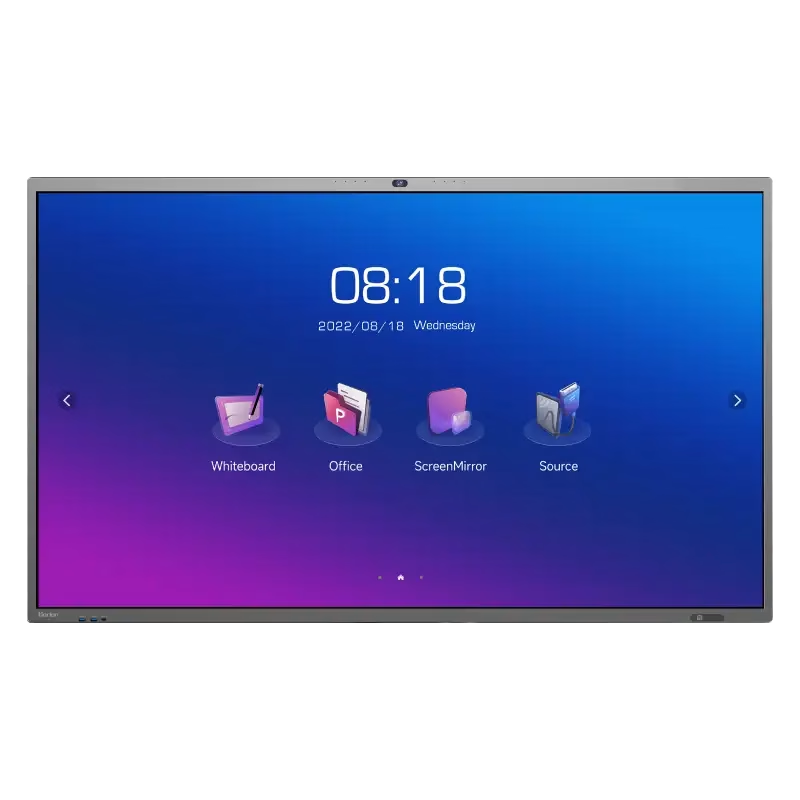
Huawei IdeaHub Board 2 86-inch display delivers an immersive teaching and collaboration experience with large 4K visuals. It helps teachers present clearly and engage students effectively. As a result, classrooms benefit from better interaction and visibility. The 86-inch screen features 4K UHD resolution with zero-gap laminated glass. Therefore, it reduces reflection and improves clarity. Moreover, the D-LED backlight and 60Hz refresh rate ensure stable and consistent visuals. It supports up to 20 touch points using infrared multi-touch technology. In addition, smart handwriting recognition and annotation allow natural writing. The low latency writing response improves accuracy during lessons. The system includes a quad-core processor with 4GB RAM and 32GB storage. Consequently, it runs applications smoothly. It supports Android, Windows, iOS, and macOS for flexible integration. It also includes key capabilities such as 4K UHD resolution, multi-touch interaction, smart annotation tools, wide connectivity options, and cross-platform support. Huawei IdeaHub Board 2 86-inch display is built to enhance collaboration and simplify teaching. Specifications: 86-inch 4K UHD display with 3840 × 2160 resolution Supports up to 20 touch points with infrared technology Zero-gap laminated glass with D-LED backlight Low latency writing with smart annotation support Quad-core CPU with 4GB RAM and 32GB storage

The MSI MAG 322UPF 32″ 4K Gaming Monitor delivers ultra-smooth gameplay and stunning visuals. With a 160Hz refresh rate and 1ms response time, it ensures fast and fluid action. Its 32-inch Rapid IPS panel offers 4K UHD resolution, providing sharp and vibrant images. The monitor supports AMD FreeSync™ Premium, eliminating screen tearing for a seamless experience. VESA DisplayHDR 400 enhances contrast and color accuracy, bringing games to life. The anti-glare screen and wide 178° viewing angles ensure clarity from any position. Connectivity is versatile with DisplayPort 1.4a, two HDMI 2.1 ports, and a USB-C port supporting 90W power delivery. This setup accommodates PCs, consoles, and laptops effortlessly. The monitor includes a USB hub with three Type-A and one Type-B ports, plus a headphone jack for convenience. Its ergonomic stand allows tilt, swivel, and height adjustments to suit your comfort. Additional features like Picture-in-Picture (PIP), Picture-by-Picture (PBP), and a built-in KVM switch enhance multitasking capabilities. The frameless design adds a modern touch to any setup. In summary, the MSI MAG 322UPF 32″ 4K Gaming Monitor combines high performance, rich features, and sleek design, making it an excellent choice for gamers and professionals alike. Specifications: Display : 32″ Rapid IPS Resolution : 3840 x 2160 (UHD) Refresh Rate : 160Hz Response Rate : 1ms (GTG)

HP 83A Black Toner Cartridge | Works with HP LaserJet Pro M201, HP LaserJet Pro MFP M125, M127, M225 Series | CF283A

The Lenovo ThinkVision T27-40 27″ FHD monitor delivers clear and sharp visuals that enhance both work and everyday use. Its Full HD panel shows crisp text and vivid images, which makes spreadsheets, web pages, and media easier to view. In addition, the IPS panel provides wide viewing angles so colors remain consistent even when viewed from different sides. Furthermore, this monitor includes quick response performance that helps reduce motion blur during videos and casual gaming. It also offers flexible connectivity options, allowing you to connect laptops, desktops, or media players without extra adapters. Therefore, it fits well in home and office setups alike. Overall, the ThinkVision T27-40 blends sharp display quality and practical features in a reliable 27″ design. Specifications: 27″ Full HD IPS display for clear visuals Wide viewing angles for consistent color Quick response performance for smooth motion Flexible connectivity for multiple devices Reliable design for work and everyday use

Genuine-spec touchpad flex cable for MacBook Pro 13″ (Model A1502, Mid 2014)—restores full trackpad functionality, including precise cursor control and physical click response. Essential for repairing unresponsive or erratic trackpad behavior. Compatible With: MacBook Pro 13-inch (Mid 2014, Model A1502, Model Identifier MacBookPro11,1) with Intel Core i5/i7 processors and Retina display. Part Type: Touchpad flex cable only — does not include the trackpad housing, button mechanism, or mounting hardware. This is the ribbon cable that connects the trackpad to the logic board. Function: Transmits cursor movement and click signals (left/right physical clicks) Supports standard multi-touch gestures (two-finger scroll, tap-to-click, pinch-to-zoom) ⚠️ Note: This model uses a physical click mechanism—not Force Touch (no haptic feedback or pressure sensitivity). Transmits cursor movement and click signals (left/right physical clicks) Supports standard multi-touch gestures (two-finger scroll, tap-to-click, pinch-to-zoom) ⚠️ Note: This model uses a physical click mechanism—not Force Touch (no haptic feedback or pressure sensitivity). OEM-Quality Build: Matches Apple’s original in: Cable length and routing path Connector type and pin alignment Insulation and flexibility for long-term reliability Cable length and routing path Connector type and pin alignment Insulation and flexibility for long-term reliability Common Use Cases: Replacing a torn, frayed, or corroded original flex cable Fixing: Unresponsive or intermittent trackpad Cursor jumping or drifting Click function failure (left or right) Complete trackpad disconnect Replacing a torn, frayed, or corroded original flex cable Fixing: Unresponsive or intermittent trackpad Cursor jumping or drifting Click function failure (left or right) Complete trackpad disconnect Unresponsive or intermittent trackpad Cursor jumping or drifting Click function failure (left or right) Complete trackpad disconnect Installation Note: Requires bottom case removal and battery disconnect. Connects via a ZIF (Zero Insertion Force) socket on the logic board—do not force. Cable routes under the battery; handle with care to avoid strain. Suitable for intermediate to advanced DIYers or technicians. Requires bottom case removal and battery disconnect. Connects via a ZIF (Zero Insertion Force) socket on the logic board—do not force. Cable routes under the battery; handle with care to avoid strain. Suitable for intermediate to advanced DIYers or technicians.

MSI Modern MD272XP Monitor Are you searching for a monitor that can help you level up your productivity, whether at work or in your home office? Look no further than the MSI Modern MD272XP monitor. It’s an efficient and feature-packed solution tailored to meet your professional needs. First and foremost, the MSI Modern MD272XP features a spacious 27-inch display, providing ample screen real estate for your tasks. Whether you’re working on documents, spreadsheets, or simply browsing the web, this monitor offers a comfortable and efficient workspace. In addition to its size, the monitor offers a crisp and clear Full HD resolution. This ensures that text, images, and videos are displayed with exceptional clarity, enhancing your overall viewing experience. Furthermore, the anti-glare technology incorporated into the monitor allows you to work for extended periods without straining your eyes. This feature remains effective even in well-lit environments, reducing potential discomfort. Connectivity is a breeze thanks to the HDMI and DisplayPort ports, accommodating various devices such as laptops and desktops. This flexibility ensures seamless transitions between work and personal tasks. The MSI Modern MD272XP features a sleek, modern design that seamlessly integrates into any office or home office setup, adding a touch of sophistication to your workspace. For ergonomic comfort, the monitor offers tilt adjustability. This feature enables you to find the perfect viewing angle for your specific needs, minimizing discomfort during extended work hours. Specifications: Screen Size : 27″ Resolution : 1920 x 1080 (FHD) Refresh Rate : 100Hz Response Time : 1ms (MPRT) / 4ms (GTG) Panel Type : IPS Viewing Angles : 178°(H) / 178°(V) Aspect Ratio : 16:9 Contrast Ratio : 1000:1

Genuine-spec touchpad flex cable for MacBook Pro 15″ (Model A1707, 2016–2017)—restores full Force Touch functionality, haptic feedback, and precise multi-touch gesture control during trackpad repair or replacement. Compatible With: MacBook Pro 15″ (2016) – Model A1707 (Model Identifier: MacBookPro13,2) MacBook Pro 15″ (2017) – Model A1707 (Model Identifier: MacBookPro14,2) MacBook Pro 15″ (2016) – Model A1707 (Model Identifier: MacBookPro13,2) MacBook Pro 15″ (2017) – Model A1707 (Model Identifier: MacBookPro14,2) Part Type: Touchpad flex cable only — does not include the trackpad housing, Taptic Engine, or mounting hardware. This is the OEM-style ribbon cable that connects the trackpad to the logic board. Function: Transmits: Touch input coordinates Force Touch pressure data Haptic feedback signals to the Taptic Engine Enables full macOS gesture support: Force Click, three-finger lookup, swipe navigation, pinch-to-zoom, and smooth cursor tracking. Touch input coordinates Force Touch pressure data Haptic feedback signals to the Taptic Engine Enables full macOS gesture support: Force Click, three-finger lookup, swipe navigation, pinch-to-zoom, and smooth cursor tracking. OEM-Quality Build: Matches Apple’s original specifications in: Cable length and routing path Connector pitch and ZIF latch design EMI shielding and flex durability Cable length and routing path Connector pitch and ZIF latch design EMI shielding and flex durability Common Use Cases: Replacing a torn, creased, or liquid-damaged original flex cable Completing a trackpad replacement when the original cable is compromised Fixing intermittent trackpad behavior, loss of Force Touch, or complete unresponsiveness Replacing a torn, creased, or liquid-damaged original flex cable Completing a trackpad replacement when the original cable is compromised Fixing intermittent trackpad behavior, loss of Force Touch, or complete unresponsiveness Installation Note: Requires full bottom case removal and battery disconnection. Cable routes under internal components near the right speaker and logic board. Connects via a ZIF (Zero Insertion Force) socket—must be aligned carefully and latched gently. Recommended for experienced or certified technicians only. Requires full bottom case removal and battery disconnection. Cable routes under internal components near the right speaker and logic board. Connects via a ZIF (Zero Insertion Force) socket—must be aligned carefully and latched gently. Recommended for experienced or certified technicians only.

The MSI G2412F Gaming Monitor delivers smooth gameplay with a 180Hz refresh rate and Full HD resolution. It ensures fast and responsive performance for competitive gaming. Moreover, the Rapid IPS panel provides accurate colors and wide viewing angles. It maintains consistent image quality from different positions. The monitor features a 1ms response time to reduce motion blur in fast scenes. This improves clarity during intense gameplay. It also supports Adaptive Sync technology to eliminate screen tearing and stuttering. This ensures smooth and stable visuals. Additional features include Night Vision for better visibility in dark areas. Anti-flicker and low blue light help reduce eye strain during long sessions. The MSI G2412F Gaming Monitor is a strong choice for users who want speed, clarity, and reliable performance. Specifications: 24″ Full HD Rapid IPS panel with wide viewing angles 180Hz refresh rate for smooth and responsive gaming 1ms (GtG) response time for reduced motion blur Adaptive Sync to eliminate screen tearing Night Vision with anti-flicker and low blue light technology

AOC 27G40E 27-inch 180Hz gaming monitor delivers smooth performance for fast-paced gaming with responsive visuals and modern display features. It is designed for users who want fluid gameplay and reliable everyday performance. Additionally, it features a 27-inch Fast IPS panel. This panel provides wide viewing angles and consistent color accuracy, so it improves both gaming and general use. Moreover, the monitor supports a 180Hz refresh rate with 0.5ms MPRT response time. As a result, it delivers smoother motion and reduces blur during competitive gameplay. The display offers Full HD resolution (1920 × 1080). Therefore, it allows higher frame rates and stable performance, especially in esports titles. In addition, it includes Adaptive Sync and G-SYNC compatibility. This reduces screen tearing and stuttering, so gameplay stays smooth and responsive. Furthermore, it supports HDR10 and gaming features such as Shadow Control and low input lag mode. These features improve visibility and responsiveness during gameplay. The monitor also includes HDMI and DisplayPort connectivity with a slim gaming design. It supports easy setup for PCs and consoles. AOC 27G40E 27-inch 180Hz gaming monitor provides fast refresh performance, responsive gameplay, and essential features for competitive and casual gamers. Specifications: 27-inch Fast IPS panel with wide viewing angles 180Hz refresh rate for ultra-smooth gameplay 0.5ms MPRT response time for reduced motion blur Adaptive Sync and G-SYNC compatible support Full HD 1920 × 1080 resolution for high FPS gaming

The LG 32GN600-B 32″ Monitor delivers clear and smooth visuals for gaming and everyday use.It features a 32-inch QHD display with sharp details and vibrant colors. Moreover, its high refresh rate ensures fluid motion in fast-paced games and videos. This monitor uses a VA panel for strong contrast and wide viewing angles. Additionally, the fast response time reduces blur and ghosting during competitive gaming. The anti-glare screen helps minimize reflections in bright environments. HDMI and DisplayPort inputs allow easy connection to PCs, laptops, and gaming consoles. Furthermore, tilt adjustment helps you find a comfortable viewing angle for long sessions. Low blue light and flicker-free technologies reduce eye strain during extended use. This display is ideal for gamers, streamers, and home users alike. Therefore, it supports competitive gaming, media streaming, and productivity tasks. Finally, it combines sharp visuals, fast performance, and comfort features for daily use. Specifications: Screen Size: 32″ QHD VA panel Resolution: 2560 × 1440 Refresh Rate: High for smooth motion Ports: HDMI + DisplayPort Features: Anti-glare, low blue light, flicker-free eye care

BenQ RE03A 86 inch Board Essential RE8603A is designed for classrooms, training rooms, and interactive presentations. It features an 86-inch 4K UHD IPS display with precision IR touch technology for smooth writing and collaboration. Additionally, it supports up to 40 touch points. Therefore, it helps teachers and teams work together more efficiently. The BenQ RE8603A delivers 3840 × 2160 resolution with 450 nits brightness and anti-glare coating for clear viewing in bright rooms. Moreover, it uses 9H tempered glass for better durability and safer daily use. It also includes low blue light and flicker-free technology to reduce eye strain. In addition, it runs on Android 11 with 4GB memory and 32GB storage for smooth system performance. Furthermore, it provides 3 HDMI 2.0 ports, DisplayPort, USB-A, USB-C, and USB-B for flexible connectivity. As a result, users can connect laptops, cameras, and classroom devices easily. It also includes front-facing 2 × 20W speakers and built-in management tools for daily educational use. Specifications: 86-inch 4K UHD (3840 × 2160) IPS display Precision IR touch with up to 40 touch points Android 11 with 4GB RAM and 32GB storage 450 nits brightness with anti-glare 9H tempered glass 3 HDMI 2.0, DisplayPort, USB-C, and dual 20W speakers

The Logitech C270 is an affordable, plug-and-play HD webcam delivering 720p video and clear audio—perfect for video calls, remote learning, and everyday communication on Windows, macOS, and ChromeOS. Dual stereo microphones with noise reduction for clearer voice pickup Universal compatibility: Works seamlessly with Zoom, Microsoft Teams, Google Meet, Skype, and more Plug-and-play USB-A connection: No drivers needed—just connect and start your call Adjustable clip-on mount: Fits laptops, LCD monitors, or tripods (tripod not included) Compact, lightweight design with privacy-friendly lens cover (manual)

HP SPro 322pe Monitor Overview The HP SPro 322pe is a professional Full HD monitor built for daily business use. It delivers reliable performance and a clean design. As a result, it fits perfectly in offices and work-from-home setups. 21.5-Inch Full HD Display This monitor features a 21.5-inch Full HD resolution. Therefore, text appears sharp and easy to read. Moreover, images look clear and balanced. Because of this, it supports productivity tasks with ease. In addition, the compact size saves desk space. As a result, it works well in smaller work areas. Smooth and Stable Visual Experience The HP SPro 322pe offers smooth and stable visuals. Therefore, everyday tasks feel comfortable. In addition, scrolling and browsing look natural. This makes it suitable for long working hours. Eye Comfort for Long Sessions This monitor includes eye comfort features. As a result, it helps reduce eye fatigue. Moreover, the anti-glare screen improves visibility. Therefore, users stay focused throughout the day. Connectivity and Ease of Use The HP SPro 322pe includes essential connectivity options. As a result, it connects easily to most PCs. Moreover, setup is quick and straightforward. This saves time and effort. Professional Design and Flexibility The monitor features a simple and professional design. In addition, it supports VESA mounting. As a result, users can customize their workspace layout. Ideal for Office and Business Use This monitor focuses on efficiency and reliability. Moreover, it supports daily workloads without distraction. In conclusion, it is a solid choice for professional environments. Specifications: Display : 21.45″ VA Resolution : FHD (1920 X 1080) Connectivity: 1x HDMI 1.4, 1x VGA. Performance: 100Hz refresh rate for smooth motion, 5ms GtG response time.

PCE 900 M8 900VA 480W Output Power: 700VA (M8 700), 900VA (M8 900) Voltage Input Range: 220-240 VAC with 102 wires (M8 700), 140-300 VAC (M8 900) Output Protection: Overload, discharge, and overcharge protection (M8 700), Fault protection (M8 900) Waveform: Simulated Sine Wave LED Indicators: Green lighting (M8 700), Green flashing (M8 900) Frequency: 50 or 60 Hz +/- 10% (auto sensing) (M8 700), 50 or 60 Hz +/- 1% (M8 900) Voltage (backup mode): 12V/9AH x 1 (M8 700), 12V/7AH x 1 (M8 900) Frequency (backup mode): 50 or 60 Hz +/- 1% (M8 700 and M8 900) Transfer time (M8 700): Typical 2 to 6 ms Backup time (M8 900): 10-20min depending on load level Net Weight: 4.3 kg (9.46 lbs) (M8 700), 4.8 kg (10.56 lbs) (M8 900) Output Receptacles: Universal sockets x 2 or German x 2 (M8 700), Universal sockets x 4 (M8 900) Audible Noise: Sounding every 10 seconds (M8 700), Sounding every second (M8 900) Dimensions: 100x278x140 (3.9″x10.8″x5.5″) (M8 700), 130x320x182 (5.07″x12.48″x7.1″) (M8 900) Compatibility: Windows 2000/XP/2003/2008/Vista/7, NOVELL, LINUX, UNIX (M8 700), Optional Interface with power management software (M8 900) Certifications: EN 50091-1-1/EN 69050 (RD), IEC 60950, TUV GC-Mark, EN 50091-2, EN 50022/B, IEC 62040-2, IEC 61000-3-2, IEC 61000-3-3, ISO 9001, ISO 14001 (M8 700 and M8 900)
