
The Dell OptiPlex 7050 Micro combines compact design and solid performance with an Intel Core i5 6th Gen processor, DDR4 RAM options, and SSD storage options. Ideal for business and home use, it delivers reliable speed, energy efficiency, and space-saving desktop performance.

13" Mid-2017 Apple MacBook Pro A1708 Logic Board 16Gb 2.3Ghz i5 13″ Mid-2017 Apple MacBook Pro A1708 Logic Board 16Gb 2.3Ghz i5

Genuine-spec Touch Bar assembly with integrated flex cable for 2020 MacBook Pro 13″ models (A2251, A2289, A2338)—restores full Touch ID and Touch Bar functionality with OEM-level fit and performance. Compatible With: MacBook Pro 13″ (2020): A2251 (Intel Core i5/i7, two Thunderbolt ports) A2289 (Intel Core i5/i7, four Thunderbolt ports) A2338 (Apple M1 chip, two Thunderbolt ports) MacBook Pro 13″ (2020): A2251 (Intel Core i5/i7, two Thunderbolt ports) A2289 (Intel Core i5/i7, four Thunderbolt ports) A2338 (Apple M1 chip, two Thunderbolt ports) A2251 (Intel Core i5/i7, two Thunderbolt ports) A2289 (Intel Core i5/i7, four Thunderbolt ports) A2338 (Apple M1 chip, two Thunderbolt ports) Includes: Complete Touch Bar module with integrated flex cable, Touch ID sensor, and ambient light sensor—ready for direct connection to the logic board. Functionality: Fully restores dynamic Touch Bar controls, system functions, app shortcuts, and Touch ID (fingerprint authentication and power button). OEM-Quality Build: Matches Apple’s original design in responsiveness, finish, and sensor alignment—ensures seamless integration with macOS. Color Options: Available in Space Gray and Silver to match your MacBook’s top case (confirm your model’s color before ordering). Installation Note: Requires full top case disassembly and careful handling of adhesive and connectors. The flex cable routes under the speakers and connects near the logic board—precision is essential. Recommended for experienced technicians.

WiWU 20W fast Charger for Mobile Phone with USB C Quick Power Adapter in white Wall charger

LENOVO 11.1V or 11.4V 24Wh 68 Laptop Battery 0C52861 45N1124 45N1775 45N1126 45N1127 For Lenovo ThinkPad X240 X240S X250 X260 X270 T440 T440S T450 T450S T460 T460P T470P T550 T560 W550 L450 L460 About this item Battery Type: 3-Cell Lithium-Ion Voltage &Capacity :11.1V 24Wh 2.09AH or 11.4V 24Wh 2.06Ah , in fact , 11.1V is same as 11.4V , because one cell voltage is 3.7V or 3.8V . SANISI Concept: The customer is god, Product Quality and Service must be perfect! We will let every customer feel satisfied Package Contents: 1 pcs Brand New Battery

Features Stylish and compact Bluetooth speaker, easy to carry. Supports wireless connectivity via Bluetooth. True Wireless Stereo (TWS): Connect two speakers simultaneously. Durable ABS plastic material with a fabric-covered front panel. Built-in microphone for hands-free calls. LED indicator to display working status. Water-resistant with an IPX7 rating. Continuous playback for 8-12 hours (depending on volume). 5-watt speaker delivering Hi-Fi audio quality. On-speaker controls for music playback and volume adjustment. Built-in battery with Type-C charging port for easy recharging. Technical Specifications Bluetooth Version: V5.4 Transmission Distance: 10 meters Rated Power: 5W Driver Unit: 40mm Input: DC5V Battery Capacity: 1200mAh Charging Time: 2 hours Playback Time: 8-12 hours (depending on volume)

The Cudy WR3000 AX3000 WiFi 6 Router delivers ultra-fast wireless speeds and improved network efficiency with the latest WiFi 6 technology. Designed for modern homes and offices, it offers high-speed Gigabit connectivity, wider coverage, and stable performance for multiple devices. AX3000 WiFi 6 Speed – Combined speeds of up to 3000Mbps for ultra-smooth streaming, gaming, and downloads. Next-Gen WiFi 6 Technology – Improved efficiency, lower latency, and better performance for multiple connected devices. Gigabit Ethernet Ports – High-speed WAN and LAN ports for maximum wired performance. Enhanced Coverage – High-performance antennas provide strong and stable WiFi signal across your space. OFDMA & MU-MIMO – Efficient data transmission to multiple devices simultaneously without slowing down the network. Multiple Operating Modes – Supports Router, Access Point, and Repeater modes for flexible setup. Advanced Security – WPA3/WPA2 encryption ensures a secure and protected network. 1 × Gigabit WAN Port 4 × Gigabit LAN Ports Dual Band WiFi (2.4GHz & 5GHz) WiFi 6 (802.11ax) Ethernet (RJ45) Wireless Security (WPA2/WPA3)

MacBook Pro A1708 Battery A1713 for MacBook Pro 13 Inch A1708 Late 2016 Mid 2017 (EMC 2978 3164), A2171 Laptop Replacement Battery for MacBook Pro 13 Inch A2159 (2019) A2289 (2020) A2338 (2020) 【Macbook pro 13 Inch battery A1713 & A2171 Battery Specification】– Voltage: 11.4V. Capacity: 54.5Wh / 4781mAh, Battery Type: Li-ion 【Newest 4.0 upgraded OEM Battery for Apple macbook pro】– Japan High Performance Electric Core. Cobalt Proportion: >98%. Upgrade chip. Up to 1500+ recharge cycles over the life of the battery. Overcharger and Discharger Circuit Protection, Ensure fast charges and low power consumption, UL-/CE-/FCC-/RoHS-Certified for safety 【Replacement Battery A1713 for A1708 Macbook pro 13 inch】– A1708 Macbook pro 13” Late 2016: MacBook Pro 13-Inch “Core i5” 2.0 & MacBook Pro 13-Inch “Core i7” 2.4 (MacBookPro13,1, EMC2978, MLL42xx/A, MLUQ2xx/A). — A1708 Macbook pro 13” Mid 2017: MacBook Pro 13-Inch “Core i5” 2.3 & MacBook Pro 13-Inch “Core i7” 2.5 (MacBookPro14,1, EMC3164, MPXQ2xx/A, MPXR2xx/A, MPXT2xx/A, MPXU2xx/A) 【Replacement Battery A2171 for A2159 & A2289 & A2338 Macbook pro 13 inch】– A2159 Macbook pro 13” 2019: MacBook Pro 13-Inch “Core i5” 1.4 Touch & “Core i7” 1.7 Touch (MacBookPro15,4, EMC3301, MUHN2xx/A, MUHP2xx/A, MUHQ2xx/A, MUHR2xx/A, MUHR2xx/B). — A2289 Year 2020: MacBook Pro 13-Inch “Core i5” 1.4 & “Core i7” 1.7 (MacBookPro16,3, EMC 3456, MXK32xx/A, MXK52xx/A, MXK62xx/A, MXK72xx/A). — A2338 Year 2020: MacBook Pro 13-Inch “M1” 8-Core 3.2 (MacBookPro17,1, EMC3578, MYDA2LL/A*)

The Meetion C235 is an economical wired keyboard and mouse combo featuring a full-size 104-key layout and reliable USB connectivity. Designed for business and office use, it offers comfortable typing, smooth mouse control, and plug-and-play compatibility with laptops and desktops. The Meetion C235 Keyboard & Mouse Combo is a practical and cost-effective solution for everyday office and business needs. With a full-size 104-key keyboard, it provides a familiar and comfortable typing experience, making it perfect for work, study, and daily computer use. The included wired mouse ensures precise and smooth control, while the USB plug-and-play setup makes installation quick and effortless on both laptops and desktop PCs. Full-Size 104-Key Keyboard for comfortable and efficient typing Wired USB Connection for stable, lag-free performance Plug & Play – no drivers required Comfortable Key Layout ideal for office and business work Smooth Wired Mouse Included for accurate control Durable Design suitable for long working hours Compatible with Laptop & Desktop PCs Economical Combo Set perfect for home or office setups Ideal for business offices, schools, home setups, and laptop users who need a reliable keyboard and mouse combo for productivity. Works with most computers and laptops supporting USB.

COMPACT AND WIRELESS Enjoy the freedom of wireless with this versatile combo. The compact keyboard is equipped with a number pad ideal for data entry, calculations and navigation, so you can get more work done in less space. The ambidextrous mouse delivers smooth tracking and scrolling, for easy navigation -at home or at work. COMPACT AND WIRELESS Enjoy the freedom of wireless with this versatile combo. The compact keyboard is equipped with a number pad ideal for data entry, calculations and navigation, so you can get more work done in less space. The ambidextrous mouse delivers smooth tracking and scrolling, for easy navigation -at home or at work. Height: 112 mm Width: 381 mm Depth: 17.78 mm Weight: 320 g Height: 107 mm Width: 60 mm Depth: 40 mm Weight: 112 g 10-Key Number pad Music Controls Up to 5 million keystrokes (excludes number lock key) Key type: Deep-profile Spill-resistant 2Tested under limited conditions (maximum of 60 ml liquid spillage). Do not immerse the keyboard in liquid. 2 AAA batteries (Alkaline Batteries) Sensor Technology: Smooth Optical Tracking Number of Buttons: 3 (Left/Right-click, Middle click) Scrolling: line-by-line Scroll Wheel: Yes, optical 2 AA batteries (Alkaline batteries) Windows® 10,11 or later ChromeOS An available USB ports

The 45W MagSafe 2 Power Adapter features a magnetic DC connector so if someone should trip over it, the cord disconnects harmlessly and your MacBook Air stays put safely. It also helps prevent fraying or weakening of the cables over time. In addition, the magnetic DC helps guide the plug into the system for a quick and secure connection. The 45W MagSafe 2 Power Adapter features a magnetic DC connector so if someone should trip over it, the cord disconnects harmlessly and your MacBook Air stays put safely. It also helps prevent fraying or weakening of the cables over time. In addition, the magnetic DC helps guide the plug into the system for a quick and secure connection. When the connection is secure, an LED located at the head of the DC connector lights up; an amber light lets you know that your notebook is charging, while a green light tells you that you have a full charge. An AC cord is provided with the adapter for maximum cord length, while the AC wall adapter (also provided) gives you an even easier and more compact way to travel. Designed to be the perfect traveling companion, the adapter has a clever design which allows the DC cable to be wound neatly around itself for easy cable storage. This power adapter recharges the lithium polymer battery while the system is off, on, or in sleep mode. It also powers the system if you choose to operate without a battery. Compatible only with MacBook Air featuring MagSafe 2 power port. Knowing which specific Mac model you have is important. If you are running OS X Lion (10.7) or later go to the “” menu at the top left of your screen, choose “About this Mac” then click the “More Info…” button. Your Mac model and generation will be displayed. If you are running an earlier version of OS X, you can enter your serial number here to find out which model you have. Mac Models MacBook Air (13-inch, Early 2015 – 2017) MacBook Air (11-inch, Early 2015)

Brand-new UK-layout keyboard replacement (Z1 Black) for MacBook Air models with M2, M3, and M4 chips (13.6″ and 15″, 2023–2025). Compatible with A2681 and A2941—precision-engineered for seamless fit and reliable typing performance. This is a brand-new, high-quality keyboard replacement designed specifically for the latest MacBook Air models featuring Apple’s M2, M3, and M4 chips (released 2023–2025). It fits both the 13.6-inch (Model A2681) and 15-inch (Model A2941) MacBook Air variants and comes in the sleek Z1 Black (Space Black) finish with a UK English layout (including the £ symbol and correct key positioning). Engineered to match Apple’s original specifications, this keyboard ensures a responsive, quiet, and comfortable typing experience with consistent key travel and tactile feedback. It includes the full top case assembly with integrated backlighting, function keys, and Touch ID sensor cutout (sensor not included), making it ideal for professional repairs or replacements after liquid damage, wear, or key failure. Installation requires technical expertise and proper tools due to the integrated nature of the MacBook Air’s top case design. Recommended for certified technicians or experienced repair professionals. Important Notes: This is a keyboard + top case assembly, not just keycaps. Touch ID sensor is not included—you must transfer your original sensor to maintain functionality. Compatible only with MacBook Air M2 (2022–2023), M3 (2023–2024), and M4 (2024–2025) models in 13.6″ (A2681) and 15″ (A2941) sizes. Color: Z1 Black (Space Black) – matches official Apple Space Black finish. Layout: UK English (ISO) – features the correct “£” key and shifted Enter key.

Gain the competitive advantage with the Bloody ES7, featuring a high-performance 6000 CPI PixArt Optical Engine. With ultra-fast 1ms click response and customizable 16.8 million color RGB lighting, this mouse is built for gamers who demand precision, speed, and comfort in every match. The A4Tech Bloody ES7 is a professional-grade esports tool designed to translate every hand movement into on-screen action with 1:1 tracking accuracy. Driven by the reliable PixArt Optical Engine, it eliminates “angle snapping” and artificial corrections, ensuring your aim remains raw and precise. Its ergonomic symmetrical shape supports various grip styles, while the anti-sweat matte finish ensures you stay in control even during the most intense gaming sessions. PixArt Optical Engine (6000 CPI): High-precision tracking with 5-level adjustable sensitivity (1000/1200/1600/2000/6000 CPI). Fine-tune your control via software to suit any game genre. Lightning-Fast 1ms Response: Equipped with ahead-of-the-curve technology, the ES7 reacts instantly to your clicks, providing the low-latency performance required for competitive play. Vibrant RGB Lighting: Immerse yourself in your gaming setup with 16.8 million customizable RGB colors and dynamic lighting effects. Customizable “M” Button: The dedicated M button can be programmed via software to execute complex macros or combined functions, putting more power at your fingertips. Extreme Durability: Built to last, the primary buttons are rated for over 10 million clicks, and the high-quality scroll wheel is tested for over 500,000 scrolls. Braided 1.8m Cable: The robust, tangle-free braided cable ensures a stable connection and long-term durability against wear and tear. Sensor: PixArt Optical Engine Resolution: 100 – 6,000 CPI Report Rate: 125 – 1,000 Hz (Adjustable) Key Response: 1 ms Acceleration: 15 g Tracking Speed: 45 ips Frame Speed: 6,000 fps Buttons: 7 Buttons Memory: 256K Onboard Memory Interface: USB Wired (1.8m Cable) System Requirements: Windows 7/8/8.1/10/11 or later Bloody ES7 Esports Gaming Mouse Quick Start Guide

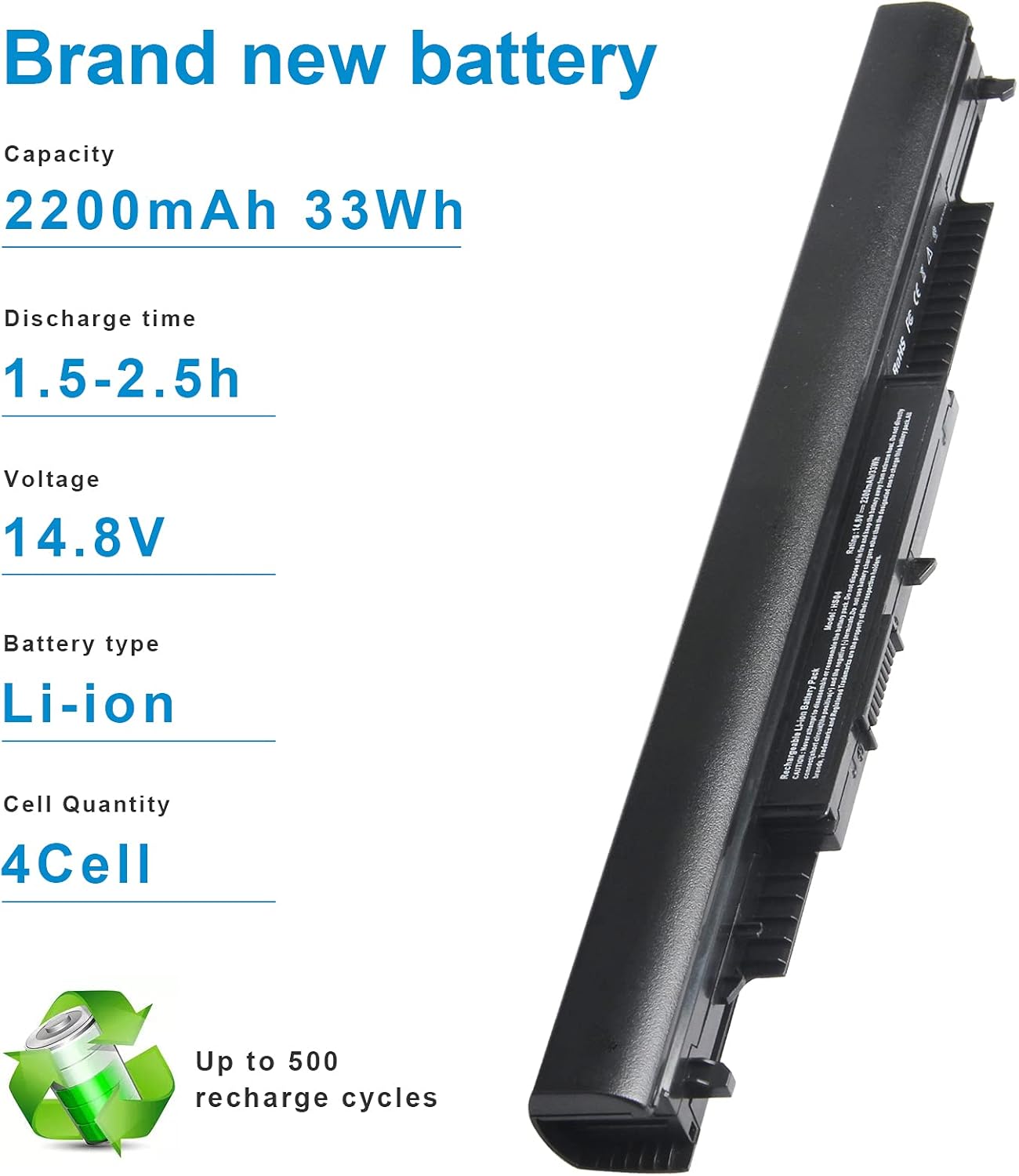
VI04 V104 Replacement Laptop Battery for HP Envy 14 15 17 Series HP Pavilion 15 17 Notebook Series TPN Q139 Q140 Q141 Q142 Q143 Spare 756743-001 About this item Battery Type: Li-ion; Voltage: 14.8V; Capacity: 2200MAH; Cells:4-cell Replacement Battery for HP Envy 14 15 17 Laptop Series 14-v000-v099 15-k000-k099 17-f000 -f099 m7-k211dx m7-k111dx m7-k211dx 15t-k100 15t-k200 17t-k000; HP Pavilion 15 17 Laptop Series 15-p000 to p099, 15-x000 to x099, 17-f000 to f099, 17-x000 to x099; 14-V006LA 15-P030NR 15-P390NR 15-P099NR 15-P100DX 15-P133CL 15-P114DX 17-F053US 17-F113DX Compatible Models for HP ProBook 440 G2 445 G2 450 G2 455 G2 756743-001 756744-001 756745-001 756479-421 756478-421 756478-422 756478-851 HSTNN-DB6K HSTNN-DB6J HSTNN-LB6K HSTNN-LB6I All products are Certified by CE FCC for safety; Strict guidelines for compatibility, and standards compliance for environmental safety

A1417 Battery Only for (Mid 2012 & Early 2013) A1398 MacBook Pro - Replacement Battery for A1398 MacBook Pro 15-inch Retina (Mid 2012, Early 2013 Version) - EMC 2512 or 2673 A1417 Battery Only for (Mid 2012 & Early 2013) A1398 MacBook Pro – Replacement Battery for A1398 MacBook Pro 15-inch Retina (Mid 2012, Early 2013 Version) – EMC 2512 or 2673 [11.26V/99Wh] A1417 A1398 Battery — Health:100%+, Voltage: 11.26V, Capacity: 99Wh(Please confirm the release year before purchase the battery) Suit for 15 inch A1398 MacBook Pro Battery Retina Mid 2012 Early 2013 (EMC 2512 or 2673) >[See more details on the Product Description] Brand new battery-> Directly warranty from Manufacturer, perform as good as the original battery. A1398 Macbook Pro 15 inch battery replacement come with adapted screwdriver. Multi-command chip control-> Contain with Durable A cells,Multi-command chip control makes the battery supply power stably.

Fast-charging feature available on select iPhone and iPad models.

A1953 A1990 Battery Replacement for MacBook Pro 15″ Mid 2018 2019 EMC 3215 EMC 3359 Touch Bar MV902LL/A MV912LL/A MV922LL/A MV932LL/A MV942LL/A MV952LL/A MV962LL/A MV972LL/A MV902B/A MR962LL/A 【Specification】Voltage: 11.4V. Capacity: 83.6Wh 7336mAh. Battery Type: Li-ion. Condition:100% New from Manufacturer. Condition: Brand new, from high quality materials, top circuit boards and smart chip. 【Compatible Part Number】A1953 A1990 (EMC 3215) A1990 (EMC 3359) 020-02391 820-01095 080-333-400 2217-2548 MacBookPro15,1 MacBookPro15,3. 【Compatible Laptop Models】Battery replacement for MacBook Pro (15-inch, Model A1990, Mid 2018, Mid 2019) : MR962LL/A, MR972LL/A, MR932LL/A, MR942LL/A, MV922LL/A, MV932LL/A, MV902LL/A, MV912LL/A, MV942LL/A, MV952LL/A, MV962LL/A, MV972LL/A, MR952LL/A, MV902xx/A, MV912, MV922, MV932, MV942, MV952, MR932, MR942, MR952, MR962, MR972, MUQH2. 【ANTIEE Promise】Everyone of our replacement batteries has tested with strict quality control standards to ensure the true capacity, stable current and low self-discharge. All ANTIEE batteries are UL / CE / FCC / RoHS Certified for safety, we are confident in the performance of the replacement battery.

REMAX RT-E601 1200MAH TIME II SERIES EYE-CARING LED LAMP Function— Use the power key to turn on/ off the lamp. Tap the power key to adjust the brightness of the lamp (brightest-normal-dimmest-off) four steps are easy to use. When folding the design lamp holder and arm can rotate the angle within a range of 180 degrees up-down adjustment. Press and hold “Mode” Set” Up” Donkey enter normal time mode, alarm clock and snooze mode, birthday reminder mode timer mode, and temperature mode. Time changes 12 hours/24 hours mode and adjusting the hours, minutes, year, month,t,h, and day. Temperature can change to Celsius or Fahrenheit. The red light will be on when it starts charging, and the red light will go out when it is fully charged. Material—ABS+PC Rated voltage—DC5V /0.5A lighting Mode—Direct glow Key Type—Touch key Luminous flux—250m Color rendering index—>80 Rated power—4W Battery Capacity—1200mAh Weight—346g Charging port—Micro SIZE—87*87*263mmCharging time—4-4:30hour Working time—3:30hour

Genuine-spec touchpad flex cable for MacBook Pro 13″ (Model A2338, 2020, Apple M1)—essential for restoring full Force Touch functionality, haptic feedback, and precise multi-touch gesture control during trackpad repair or replacement. Compatible With: MacBook Pro 13-inch (2020, Model A2338, Model Identifier MacBookPro17,1) with Apple M1 chip (2 Thunderbolt ports). Part Type: Touchpad flex cable only — does not include the trackpad housing, Taptic Engine, or mounting hardware. This is the OEM-style ribbon cable that connects the trackpad to the logic board. Function: Transmits: Touch input coordinates Force Touch pressure data Haptic feedback signals to the Taptic Engine Enables full macOS gesture support: Force Click, three-finger lookup, swipe navigation, pinch-to-zoom, and smooth cursor tracking. Touch input coordinates Force Touch pressure data Haptic feedback signals to the Taptic Engine Enables full macOS gesture support: Force Click, three-finger lookup, swipe navigation, pinch-to-zoom, and smooth cursor tracking. OEM-Quality Build: Matches Apple’s original specifications in: Cable length and routing Connector pitch and ZIF latch design EMI shielding and flex durability Cable length and routing Connector pitch and ZIF latch design EMI shielding and flex durability Common Use Cases: Replacing a torn, creased, or liquid-damaged original flex cable Completing a trackpad replacement when the original cable is compromised Fixing intermittent trackpad behavior, loss of Force Touch, or complete unresponsiveness Replacing a torn, creased, or liquid-damaged original flex cable Completing a trackpad replacement when the original cable is compromised Fixing intermittent trackpad behavior, loss of Force Touch, or complete unresponsiveness Installation Note: Requires full bottom case removal and battery disconnection. Cable routes under internal components near the right speaker and logic board. Connects via a ZIF (Zero Insertion Force) socket—must be aligned carefully and latched gently. Recommended for experienced or certified technicians only. Requires full bottom case removal and battery disconnection. Cable routes under internal components near the right speaker and logic board. Connects via a ZIF (Zero Insertion Force) socket—must be aligned carefully and latched gently. Recommended for experienced or certified technicians only. Important Compatibility Notes: ✅ Only for A2338 (13″, M1, 2020) ❌ Not compatible with: Intel-based A2251 / A2289 (2020) MacBook Air M1 (A2337) Any MacBook Air or 14″/16″ MacBook Pro ✅ Only for A2338 (13″, M1, 2020) ❌ Not compatible with: Intel-based A2251 / A2289 (2020) MacBook Air M1 (A2337) Any MacBook Air or 14″/16″ MacBook Pro Intel-based A2251 / A2289 (2020) MacBook Air M1 (A2337) Any MacBook Air or 14″/16″ MacBook Pro

Genuine-spec touchpad flex cable for Apple’s 12-inch MacBook (Model A1534, Early 2015 / Early 2016 / Mid 2017)—essential for restoring full Force Touch trackpad functionality, haptic feedback, and multi-touch gesture support. Compatible With: MacBook 12″ (Early 2015) – 1.1GHz Core M MacBook 12″ (Early 2016) – 1.1GHz/1.3GHz Core M MacBook 12″ (Mid 2017) – 1.2GHz/1.3GHz Core m3/i5/i7 All share Model Number A1534 and Model Identifier MacBook8,1 / MacBook9,1 / MacBook10,1 respectively. MacBook 12″ (Early 2015) – 1.1GHz Core M MacBook 12″ (Early 2016) – 1.1GHz/1.3GHz Core M MacBook 12″ (Mid 2017) – 1.2GHz/1.3GHz Core m3/i5/i7 All share Model Number A1534 and Model Identifier MacBook8,1 / MacBook9,1 / MacBook10,1 respectively. Part Type: Touchpad flex cable only—does not include the trackpad housing, Taptic Engine, or mounting brackets. This is the ribbon cable that connects the Force Touch trackpad to the logic board. Function: Critical for Force Touch functionality—transmits pressure-sensitive input, multi-touch gestures (e.g., pinch, swipe, Force Click), and haptic feedback signals to the Taptic Engine. OEM-Quality Construction: Precisely matches Apple’s original in length, connector pitch, shielding, and routing—ensures reliable signal integrity and compatibility with macOS. Common Use Cases: Replacing a torn, creased, or liquid-damaged flex cable Restoring unresponsive or erratic trackpad behavior Completing a trackpad replacement when the original cable is unusable Replacing a torn, creased, or liquid-damaged flex cable Restoring unresponsive or erratic trackpad behavior Completing a trackpad replacement when the original cable is unusable Installation Note: Requires full bottom case removal and delicate disconnection of the ZIF connector. The cable routes tightly under the battery—extreme care is required. Recommended for experienced or certified technicians only.
