
Genuine-spec touchpad flex cable for MacBook Pro 15″ (Model A1706 – 2017 and A1989 – 2018/2019)—restores full Force Touch functionality, haptic feedback, and precise multi-touch gesture control during trackpad repair or replacement. Compatible With: MacBook Pro 15″ (2017) – Model A1706 (Model Identifier: MacBookPro14,3) MacBook Pro 15″ (2018–2019) – Model A1989 (Model Identifier: MacBookPro15,2) ✅ Note: Apple used the same trackpad assembly and flex cable across both A1706 and A1989 15″ models—making this part interchangeable between them. MacBook Pro 15″ (2017) – Model A1706 (Model Identifier: MacBookPro14,3) MacBook Pro 15″ (2018–2019) – Model A1989 (Model Identifier: MacBookPro15,2) ✅ Note: Apple used the same trackpad assembly and flex cable across both A1706 and A1989 15″ models—making this part interchangeable between them. ✅ Note: Apple used the same trackpad assembly and flex cable across both A1706 and A1989 15″ models—making this part interchangeable between them. Part Type: Touchpad flex cable only — does not include the trackpad housing, Taptic Engine, or mounting hardware. This is the OEM-style ribbon cable connecting the trackpad to the logic board. Function: Transmits: Touch input coordinates Force Touch pressure data Haptic feedback signals to the Taptic Engine Enables full macOS gesture support: Force Click, three-finger lookup, swipe navigation, pinch-to-zoom, and smooth cursor tracking. Touch input coordinates Force Touch pressure data Haptic feedback signals to the Taptic Engine Enables full macOS gesture support: Force Click, three-finger lookup, swipe navigation, pinch-to-zoom, and smooth cursor tracking. OEM-Quality Build: Matches Apple’s original in: Cable length and routing Connector pitch and ZIF latch design EMI shielding and flex durability Cable length and routing Connector pitch and ZIF latch design EMI shielding and flex durability Common Use Cases: Replacing a torn, creased, or liquid-damaged original flex cable Completing a trackpad replacement when the original cable is compromised Fixing intermittent trackpad behavior, loss of Force Touch, or complete unresponsiveness Replacing a torn, creased, or liquid-damaged original flex cable Completing a trackpad replacement when the original cable is compromised Fixing intermittent trackpad behavior, loss of Force Touch, or complete unresponsiveness Installation Note: Requires full bottom case removal and battery disconnection. Cable routes under internal components near the right speaker and logic board. Connects via a ZIF (Zero Insertion Force) socket—must be aligned carefully and latched gently. Recommended for experienced or certified technicians only. Requires full bottom case removal and battery disconnection. Cable routes under internal components near the right speaker and logic board. Connects via a ZIF (Zero Insertion Force) socket—must be aligned carefully and latched gently. Recommended for experienced or certified technicians only.

The BYL-2207 2-in-1 LAN adapter provides fast and stable wired internet through a Gigabit Ethernet port using either USB-C or USB 3.0. Perfect for laptops, MacBooks, and PCs without an Ethernet port, it ensures smooth streaming, online meetings, and reliable network performance. The BYL-2207 2-in-1 Type-C / USB 3.0 to Gigabit LAN Adapter is designed for users who need a reliable wired connection on modern laptops and devices. It supports both USB-C and USB 3.0, making it compatible with a wide range of systems including MacBooks, ultrabooks, and desktops. With Gigabit Ethernet speed, it provides faster and more stable internet compared to Wi-Fi, making it ideal for work, gaming, and streaming. 2-in-1 Connector (USB-C + USB 3.0) for wide compatibility Gigabit Ethernet Port (RJ45) for fast and stable wired internet High-Speed Performance supports up to 1000Mbps network speed Plug & Play installation on most systems Compact & Portable Design easy to carry anywhere Ideal for Work & Streaming improves stability for meetings and downloads Reliable Connection reduces lag compared to Wi-Fi Ideal for MacBooks, laptops, ultrabooks, desktops, and tablets that need a stable wired internet connection. Perfect for online meetings, remote work, gaming, IPTV, streaming, and downloading.

Genuine-spec touchpad flex cable for MacBook Pro 16″ (Model A2485, 2021, M1 Pro/Max)—critical for restoring full Force Touch functionality, haptic feedback, and precise multi-touch gesture control during trackpad repairs. Compatible With: MacBook Pro 16-inch (2021, Model A2485) with Apple M1 Pro or M1 Max chip (Model Identifiers: MacBookPro18,1 / MacBookPro18,2). Part Type: Touchpad flex cable only—does not include the trackpad, Taptic Engine, or mounting hardware. This is the OEM-style ribbon cable that connects the trackpad to the logic board. Function: Transmits touch coordinates, Force Touch pressure data, and haptic feedback signals—essential for macOS gestures (e.g., pinch-to-zoom, Force Click, three-finger lookup) and Taptic Engine operation. OEM-Quality Construction: Precisely replicated to Apple’s original specifications—including cable length, connector type, EMI shielding, and flex routing—ensuring signal integrity and long-term reliability. Common Use Cases: Replacing a torn, frayed, or liquid-damaged original flex cable Completing a trackpad replacement when the original cable is compromised Fixing intermittent trackpad behavior, lost Force Touch, or complete unresponsiveness Replacing a torn, frayed, or liquid-damaged original flex cable Completing a trackpad replacement when the original cable is compromised Fixing intermittent trackpad behavior, lost Force Touch, or complete unresponsiveness Installation Note: Requires full disassembly of the bottom case and careful routing around the battery and logic board. Connectors use ZIF (Zero Insertion Force) sockets—must be aligned and latched gently. Recommended for certified or professional repair technicians only.

MacBook Air 13″ Retina A1932(2018-2019-2020) Display Assembly (Silver) MacBook Air 13″ Retina Display 2019 A1932 (EMC 3184 MacBookAir8,2) 1.6 GHz MacBook Air 13″ Retina Display 2020 A2179 (EMC 3302 MacBookAir9,1) 1.1 GHz Core i3 A2179 (EMC 3302 MacBookAir9,1) 1.1 GHz Core i5 A2179 (EMC 3302 MacBookAir9,1) 1.2 GHz Core i7 MacBook Air 13” Retina Display Late 2018 A1932 (EMC 3184 MacBookAir8,1) 1.6 GHz

External Seagate 2TB/4TB HDD Expansion Portable Drive Easily store and access 2TB/4TB of content on the go with Seagate Expansion Portable hard drive This external hard drive for Windows computers makes backup a snap just drag and drop To get set up, connect the portable hard drive to your Windows computer for automatic recognition no software required This USB drive provides plug and play simplicity with the included 18 inch USB 3.0 cable Enjoy long term peace of mind with the included one year limited warranty

Product Name WiWU Dual USB Quick Wall Charger 20W Fast Charging For Smart PhoneColorWhiteFeature& Photos

Candc DC-C2 Lavalier Dual Head Mic Buy Online in Qatar, record high quality sounds using this branded duel mic. Candc DC-C2 is a Dual Omnidirectional lavalier microphone, designed for Smartphones, DSLR, Camcorders, Audio recorders PC, etc. PRODUCT DETAILS OF CANDC DC-C2 LAVALIER COLLAR MICROPHONE FOR CANON NIKON DSLR CAMCORDER

LENOVO BATTERY L19M4PC0 Compatible for Lenovo Legion 5P-15IMH05 Legion 5-15IMH05 5-15ARH05 Series 5B10W86196 L19M4PC0 5B10W86195 L19M4PC1 5B10W86192 L19C4PC1 5B10W86194 Laptop Battery About this item 【Battery type】Li-ion. Voltage: 15.44V. Capacity: 60Wh 4000mAh . Compatible Models (use “Ctrl+F to find your model quickly”) Fit for Legion 5P-15IMH05 Series Fit for Legion 5P-15IMH05H Series Fit for Legion 5P-15ARH05H Series Fit for Legion 5-15IMH05 Series Fit for Legion 5-15IMH05H Series Fit for Legion 5-15ARH05 Series Fit for Legion 5-15ARH05H Series. .Replacement for Part Number: L19C4PC0 5B10W86196 L19M4PC0 5B10W86195 L19M4PC1 5B10W86192 L19C4PC1 5B10W86194.

MacBook Pro 15″ Top case A1990 2018 2019 MacBook Pro 15″ A1990 MacBookPro15,1 Mid 2018: MR932LL/A or MR962LL/A (2.2 GHz Core i7) MacBookPro15,1 Mid 2018: MR942LL/A or MR972LL/A (2.6 GHz Core i7) MacBookPro15,3 Mid 2018: BTO/CTO (2.6 GHz Core i7) MacBookPro15,3 Mid 2018: BTO/CTO (2.9 GHz Core i9)

MacBook Pro A1708 Battery A1713 for MacBook Pro 13 Inch A1708 Late 2016 Mid 2017 (EMC 2978 3164), A2171 Laptop Replacement Battery for MacBook Pro 13 Inch A2159 (2019) A2289 (2020) A2338 (2020) 【Macbook pro 13 Inch battery A1713 & A2171 Battery Specification】– Voltage: 11.4V. Capacity: 54.5Wh / 4781mAh, Battery Type: Li-ion 【Newest 4.0 upgraded OEM Battery for Apple macbook pro】– Japan High Performance Electric Core. Cobalt Proportion: >98%. Upgrade chip. Up to 1500+ recharge cycles over the life of the battery. Overcharger and Discharger Circuit Protection, Ensure fast charges and low power consumption, UL-/CE-/FCC-/RoHS-Certified for safety 【Replacement Battery A1713 for A1708 Macbook pro 13 inch】– A1708 Macbook pro 13” Late 2016: MacBook Pro 13-Inch “Core i5” 2.0 & MacBook Pro 13-Inch “Core i7” 2.4 (MacBookPro13,1, EMC2978, MLL42xx/A, MLUQ2xx/A). — A1708 Macbook pro 13” Mid 2017: MacBook Pro 13-Inch “Core i5” 2.3 & MacBook Pro 13-Inch “Core i7” 2.5 (MacBookPro14,1, EMC3164, MPXQ2xx/A, MPXR2xx/A, MPXT2xx/A, MPXU2xx/A) 【Replacement Battery A2171 for A2159 & A2289 & A2338 Macbook pro 13 inch】– A2159 Macbook pro 13” 2019: MacBook Pro 13-Inch “Core i5” 1.4 Touch & “Core i7” 1.7 Touch (MacBookPro15,4, EMC3301, MUHN2xx/A, MUHP2xx/A, MUHQ2xx/A, MUHR2xx/A, MUHR2xx/B). — A2289 Year 2020: MacBook Pro 13-Inch “Core i5” 1.4 & “Core i7” 1.7 (MacBookPro16,3, EMC 3456, MXK32xx/A, MXK52xx/A, MXK62xx/A, MXK72xx/A). — A2338 Year 2020: MacBook Pro 13-Inch “M1” 8-Core 3.2 (MacBookPro17,1, EMC3578, MYDA2LL/A*)

Feature Specification Packaging and Delivery Details Power Source Battery Selling Units Single item Number of Loudspeaker Enclosure 1 Single package size 19X22X10 cm Cabinet Material Plastic Single gross weight 0.600 kg Display Screen NO Built-in Microphone NO Brand Name Remax Model Number RB-X1 Remax Worldwide Store 9300+ Remax Support Video to see the product and testing Product Name Outdoor Wireless Speaker Color Black Logo Accept Customized Logo Intelligent Personal Assistant None

Genuine-spec bilingual UK/Arabic layout keyboard replacement for MacBook Pro 13″ (Model A1708, 2016–2017)—featuring Apple’s second-generation Butterfly mechanism, backlighting, and OEM fit for seamless typing in both English and Arabic. Compatible With: MacBook Pro 13-inch with Touch Bar (2016 & 2017 models, A1708, Model Identifiers MacBookPro13,1 / MacBookPro14,1). Layout: Bilingual UK/Arabic—primary legends in Arabic, secondary (top-left) legends in UK English (QWERTY). Includes £ symbol, Arabic numerals (٠١٢٣…), and standard Arabic character set aligned with Apple’s regional configuration. Keyboard Type: Apple’s 2nd-generation Butterfly mechanism—thin profile with reduced key travel; requires careful handling and clean environment during installation. Integrated Features: Backlit keys (essential for low-light use—legends remain legible) Ambient light sensor support Original-style ribbon cable connector for direct logic board attachment Backlit keys (essential for low-light use—legends remain legible) Ambient light sensor support Original-style ribbon cable connector for direct logic board attachment Build & Fit: Precision-engineered to match Apple’s original dimensions, key alignment, and top-case curvature—ensures consistent actuation and aesthetic continuity. Installation Note: Keyboard is fully glued into the top case. Replacement requires complete disassembly, meticulous adhesive removal, and professional re-gluing. Recommended for certified or highly experienced technicians only.

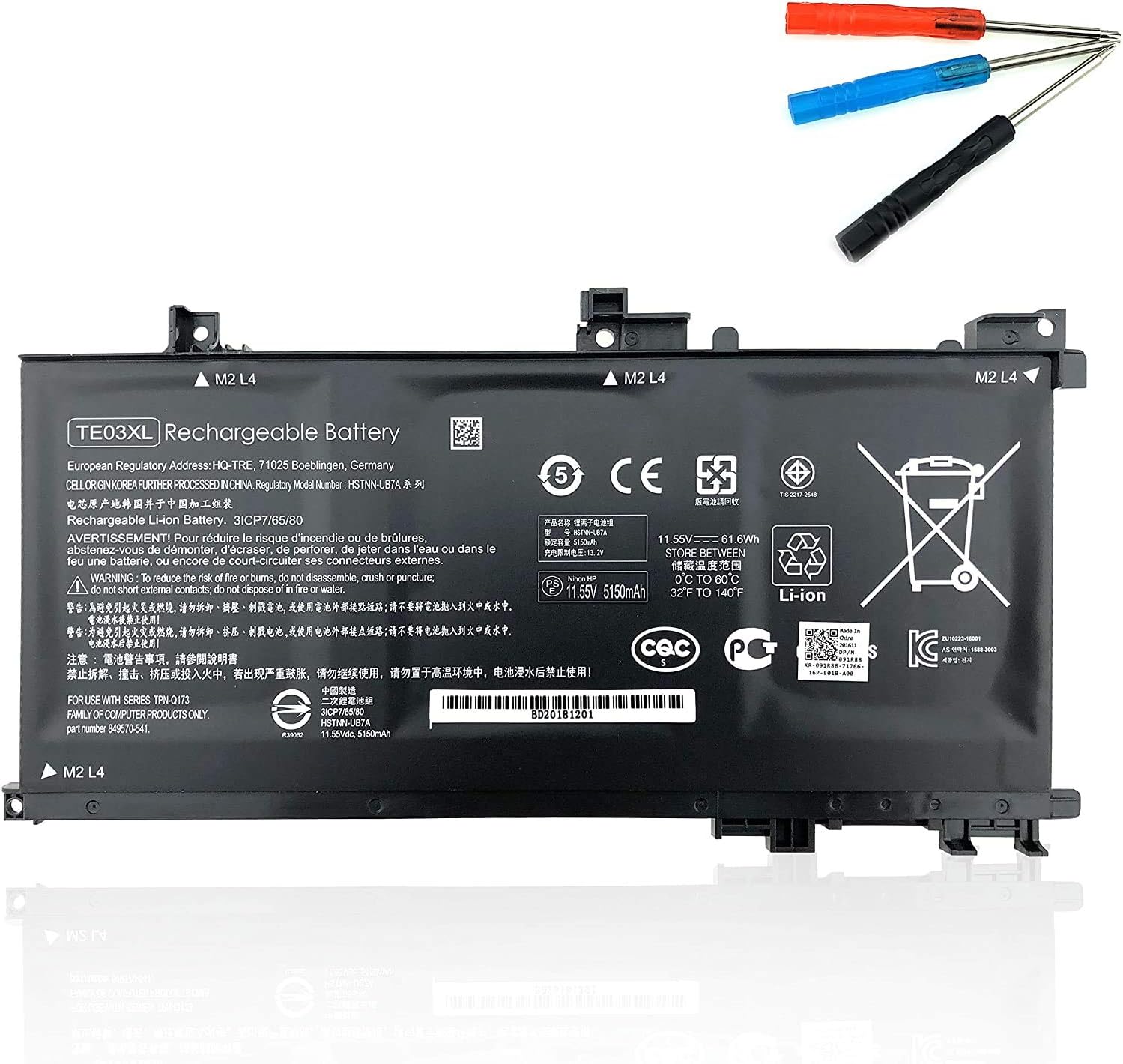
Battery Model: A1493 A1502 Replacement Laptop Battery for MacBook Pro Retina 13 Inch Late 2013 Mid 2014 ; MacBook Pro A1493 A1582 Battery EMC 2678 2875 2835 ME864 ME865 100% Brand New, Battery Type: Li-Polymer; Capacity: 71.8Wh; Voltage:11.34V; Package include two free screwdriver Compatible:A1502 A1493 (Only for Late 2013, Mid 2014 Version) Apple MacBook Pro 13″ Retina ME864LL/A ME866LL/A ,MacBook Pro “Core i5″ 2.4/2.5 13” Late 2013 Retina Overcharger and Discharger Circuit Protection, CE-/FCC-/RoHS-Certified for safety.

Genuine-spec touchpad flex cable for MacBook Pro 15″ (Model A2941, 2023, Apple M2)—restores full Force Touch functionality, haptic feedback, and precise multi-touch gesture control during trackpad repair or replacement. Compatible With: MacBook Pro 15-inch (2023, Model A2941) with Apple M2 chip (Model Identifier: MacBookPro19,1) Part Type: Touchpad flex cable only — does not include the trackpad housing, Taptic Engine, or mounting hardware. This is the OEM-style ribbon cable that connects the trackpad to the logic board. Function: Transmits: Touch input coordinates Force Touch pressure data Haptic feedback signals to the Taptic Engine Enables full macOS gesture support: Force Click, three-finger lookup, swipe navigation, pinch-to-zoom, and smooth cursor tracking. Touch input coordinates Force Touch pressure data Haptic feedback signals to the Taptic Engine Enables full macOS gesture support: Force Click, three-finger lookup, swipe navigation, pinch-to-zoom, and smooth cursor tracking. OEM-Quality Build: Matches Apple’s original specifications in: Cable length and routing path Connector pitch and ZIF latch design EMI shielding and flex durability Cable length and routing path Connector pitch and ZIF latch design EMI shielding and flex durability Common Use Cases: Replacing a torn, creased, or liquid-damaged original flex cable Completing a trackpad replacement when the original cable is compromised Fixing intermittent trackpad behavior, loss of Force Touch, or complete unresponsiveness Replacing a torn, creased, or liquid-damaged original flex cable Completing a trackpad replacement when the original cable is compromised Fixing intermittent trackpad behavior, loss of Force Touch, or complete unresponsiveness Installation Note: Requires full bottom case removal and battery disconnection. Cable routes under internal components near the right speaker and logic board. Connects via a ZIF (Zero Insertion Force) socket—must be aligned carefully and latched gently. Recommended for experienced or certified technicians only. Requires full bottom case removal and battery disconnection. Cable routes under internal components near the right speaker and logic board. Connects via a ZIF (Zero Insertion Force) socket—must be aligned carefully and latched gently. Recommended for experienced or certified technicians only.

BATTERY ACER AS16A5K AS16A8K Battery for Acer Aspire E5-523 E5-553 E5-576 E5-774G N16Q2 E5-576G E5-575G E5-475 F5-573 E5-575-52JF E5-575-33BM E5-575G-76YK E5-575-54SM E5-575G-57D4 E5-576-392H E5-575-54E8 4ICR19/66 About this item 【Battery type】 Voltage:14.8V; Capacity: 2200mAh /33Wh Color:black 【Note】It is not compatible with E5-575G-53VG, E5-575G-549D,E5-575G-5341,E5-575G-33BM, E5-575G-51VI. Before placing an order, please ensure your old battery’s model is AS16A5K, KAS16A7K, and AS16A8K (14.8V 4-cell). Please do not order this battery if your old battery’s model is s AS16B5J or AS16B8J (10.95V /11.1V 6-cell). They can not replace each other 【Compatible 】Laptop Models for Acer Aspire E15 E5-475 E5-475G E5-523 E5-523G E5-553 E5-553G E5-575 E5-575G E5-575T E5-575TG E5-576 E5-576G E5-774 E5-774G F5-573 F5-573G F5-573T F5-771 F5-771G Series E5-575-52IF E5-575-53EJ E5-575G-59EE E5-575G-53VG E5-575G-57KJ E5-575-74RC E5-575-72N3 E5-575G-52RJ E576G-5762 E5-575G-53VG E5-575G-549D E5-575G-5341 E5-575G-33BM E5-575G-51VI E5-575G-59EE E5-575G-59GV E5-575G-765N E5-575G-76YK 【Compatible Part Number】AS16A5K AS16A7K AS16A8K 4ICR19/66 N16Q1 N16Q2 KT.00605.002 KT.00405.001 KT.00407.004 KT.0040G.007 【Security】All our products are Certified by CE, and FCC for safety. Strict guidelines for compatibility, and standards compliance for environment safety.

Genuine-spec touchpad flex cable compatible with both MacBook Air A2179 (Intel, 2020) and A2337 (M1, 2020)—restores full Force Touch functionality, haptic feedback, and precise multi-touch gesture control during trackpad repair or replacement. Compatible With: MacBook Air 13″ (2020, Intel) – Model A2179 (Model Identifier: MacBookAir9,1) MacBook Air 13″ (2020, Apple M1) – Model A2337 (Model Identifier: MacBookAir10,1) MacBook Air 13″ (2020, Intel) – Model A2179 (Model Identifier: MacBookAir9,1) MacBook Air 13″ (2020, Apple M1) – Model A2337 (Model Identifier: MacBookAir10,1) ✅ Important Note: Despite different processors (Intel vs. M1), Apple used the same trackpad assembly and flex cable in both A2179 and A2337. This makes the flex cable fully interchangeable between the two models. Part Type: Touchpad flex cable only — does not include the trackpad housing, Taptic Engine, or mounting hardware. This is the OEM-style ribbon cable that connects the trackpad to the logic board. Function: Transmits: Touch input coordinates Force Touch pressure data Haptic feedback signals to the Taptic Engine Enables full macOS gesture support: Force Click, three-finger lookup, swipe navigation, pinch-to-zoom, and smooth cursor tracking. Touch input coordinates Force Touch pressure data Haptic feedback signals to the Taptic Engine Enables full macOS gesture support: Force Click, three-finger lookup, swipe navigation, pinch-to-zoom, and smooth cursor tracking. OEM-Quality Build: Matches Apple’s original specifications in: Cable length and routing path Connector pitch and ZIF latch design EMI shielding and flex durability Cable length and routing path Connector pitch and ZIF latch design EMI shielding and flex durability Common Use Cases: Replacing a torn, creased, or liquid-damaged original flex cable Completing a trackpad replacement when the original cable is compromised Fixing intermittent trackpad behavior, loss of Force Touch, or complete unresponsiveness Replacing a torn, creased, or liquid-damaged original flex cable Completing a trackpad replacement when the original cable is compromised Fixing intermittent trackpad behavior, loss of Force Touch, or complete unresponsiveness Installation Note: Requires full bottom case removal and battery disconnection. Cable routes under the right side of the battery and logic board. Connects via a ZIF (Zero Insertion Force) socket—align carefully and latch gently. Recommended for experienced or certified technicians only. Requires full bottom case removal and battery disconnection. Cable routes under the right side of the battery and logic board. Connects via a ZIF (Zero Insertion Force) socket—align carefully and latch gently. Recommended for experienced or certified technicians only.

WIWU Osun PU Leather Backpack – Stylish and compact bag crafted from water-resistant PU leather; fits 15.6″ laptops yet weighs only ~387 g.Offers organized storage, durable build, and comfy straps—perfect for daily commutes, work, or travel. Model: WIWU Osun PU Leather Notebook Backpack Material: Water-resistant 1680D polyester exterior with upscale PU leather finish Laptop Compartment: Padded sleeve fits up to 15.6″ laptops, shock-resistant protection Design: Compact “mini” size (26.5 × 21 × 6 cm), yet offers large internal capacity Pockets: Front zip pocket for phone and accessories; interior organization for tech and essentials Comfort: Adjustable padded shoulder straps, soft and skin-friendly inner lining Weight: Approximately 387 g (including packing) Extras: Sleek metal WIWU logo; suitable for travel, business, daily commuting

BATTERY DELL RYXXH Laptop Battery Compatible with DELL Latitude E5250 P25S001 Latitude E5450 E5550 DELL Latitude 3150 P21T001 Series Notebook 09P4D2 9P4D2 0YD8XC R5MD0 5TFCY VVXTW VY9ND 38Wh 11.1V About this item 【Basic Details】Item Model: RYXXH ; Battery Type: Li-ion; Voltage: 11.1V; Capacity: 38Wh; Battery Color: Black. 【Compatible P/N 】RYXXH 0RYXXH 9P4D2 R5MD0 YD8XC 5TFCY VVXTW VY9ND 0VY9ND Laptop Battery. 【Compatible Laptop Models】 DELL Latitude 12 5000 Series, DELL Latitude 12 E5250 Series, DELL Latitude E5450 Series, DELL Latitude E5550 Series, DELL Latitude 3150 Series, DELL Latitude 3160 Series. 【Note】The package includes: 1*battery and 1*Instructions. Packaged by sponge or bubbles to prevent damage. Before purchasing, please open the back cover of the laptop to confirm the battery model and shape.

The Apple Magic Mouse (USB-C version) is a sleek, minimalist multi-touch wireless mouse built for Mac users. It offers smooth gesture support, Bluetooth connectivity and a built-in rechargeable battery — a great choice if you prefer a clean desk setup and full compatibility with macOS and iPadOS. General Name: Magic Mouse (USB-C) — part of Apple’s pointing-device lineup. Wireless connectivity: Bluetooth. Rechargeable battery: built-in, no disposable AA cells. Charging / port: USB-C port (bottom of mouse) for pairing and charging. Compatibility: Requires a Mac with macOS 15.1 or later, or an iPad with iPadOS 18.1 or later. Size & Weight Height: ~0.85 inch (2.16 cm) Width: ~2.25 inch (5.71 cm) Depth: ~4.47 inch (11.35 cm) Weight: ~0.22 pound (0.099 kg) (varies slightly by manufacturing) Features Multi-Touch surface: supports gestures such as swiping between pages, scrolling through documents, zooming. Glide / foot design: optimized for smooth movement across desktop surfaces. Rechargeable battery life: about a month or more between charges (typical use) per Apple spec. Used Condition ConsiderationsSince you’re specifying a used unit: Check for wear on the bottom feet / skates — these degrade and affect glide. Verify battery capacity / health (rechargeable batteries age). Confirm the port is functioning (USB-C) and Bluetooth connectivity is stable. Look for signs of excessive surface scratches on the multi-touch top — may impair gestures. Ensure the firmware / Mac recognizes it fully (gestures working). Upgradability / Limitations Not user-upgradable: You cannot replace the internal battery or change internals easily. Design limitation: The USB-C port remains on the bottom of the mouse, meaning you cannot use it while charging unless you flip it. This design is still criticized. Ergonomics: The flat, low-profile design is stylish but may not suit extended-use comfort for some users.

A4tech KR-85 Natural A Rounded Edge Ergonomical Keyboard
