
Genuine-spec touchpad flex cable for MacBook Pro 13″ (Model A2338, 2020, Apple M1)—essential for restoring full Force Touch functionality, haptic feedback, and precise multi-touch gesture control during trackpad repair or replacement. Compatible With: MacBook Pro 13-inch (2020, Model A2338, Model Identifier MacBookPro17,1) with Apple M1 chip (2 Thunderbolt ports). Part Type: Touchpad flex cable only — does not include the trackpad housing, Taptic Engine, or mounting hardware. This is the OEM-style ribbon cable that connects the trackpad to the logic board. Function: Transmits: Touch input coordinates Force Touch pressure data Haptic feedback signals to the Taptic Engine Enables full macOS gesture support: Force Click, three-finger lookup, swipe navigation, pinch-to-zoom, and smooth cursor tracking. Touch input coordinates Force Touch pressure data Haptic feedback signals to the Taptic Engine Enables full macOS gesture support: Force Click, three-finger lookup, swipe navigation, pinch-to-zoom, and smooth cursor tracking. OEM-Quality Build: Matches Apple’s original specifications in: Cable length and routing Connector pitch and ZIF latch design EMI shielding and flex durability Cable length and routing Connector pitch and ZIF latch design EMI shielding and flex durability Common Use Cases: Replacing a torn, creased, or liquid-damaged original flex cable Completing a trackpad replacement when the original cable is compromised Fixing intermittent trackpad behavior, loss of Force Touch, or complete unresponsiveness Replacing a torn, creased, or liquid-damaged original flex cable Completing a trackpad replacement when the original cable is compromised Fixing intermittent trackpad behavior, loss of Force Touch, or complete unresponsiveness Installation Note: Requires full bottom case removal and battery disconnection. Cable routes under internal components near the right speaker and logic board. Connects via a ZIF (Zero Insertion Force) socket—must be aligned carefully and latched gently. Recommended for experienced or certified technicians only. Requires full bottom case removal and battery disconnection. Cable routes under internal components near the right speaker and logic board. Connects via a ZIF (Zero Insertion Force) socket—must be aligned carefully and latched gently. Recommended for experienced or certified technicians only. Important Compatibility Notes: ✅ Only for A2338 (13″, M1, 2020) ❌ Not compatible with: Intel-based A2251 / A2289 (2020) MacBook Air M1 (A2337) Any MacBook Air or 14″/16″ MacBook Pro ✅ Only for A2338 (13″, M1, 2020) ❌ Not compatible with: Intel-based A2251 / A2289 (2020) MacBook Air M1 (A2337) Any MacBook Air or 14″/16″ MacBook Pro Intel-based A2251 / A2289 (2020) MacBook Air M1 (A2337) Any MacBook Air or 14″/16″ MacBook Pro

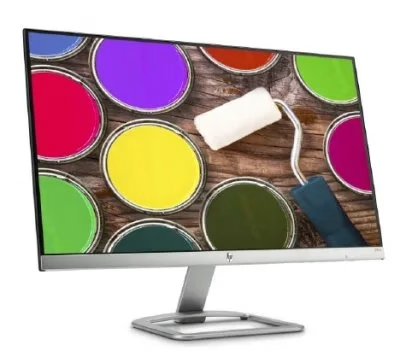
HP 5 Pro 524pf Monitor Overview The HP 5 Pro 524pf is a 24-inch Full HD monitor designed for daily productivity. It delivers clear visuals and a clean modern design. As a result, it fits offices, students, and home workspaces. 24-Inch Full HD Display This monitor features a 24-inch Full HD resolution. Therefore, text appears sharp and easy to read. Moreover, images look clear and balanced. Because of this, it supports long working sessions without fatigue. In addition, wide viewing angles improve visibility. As a result, content stays clear from different positions. Smooth Performance for Daily Tasks The HP 5 Pro 524pf provides smooth visuals for everyday use. As a result, scrolling and browsing feel natural. Furthermore, the display maintains consistent brightness. This improves overall viewing comfort. Eye Comfort and Anti-Glare Screen This monitor includes eye comfort features. Therefore, it helps reduce eye strain during extended use. In addition, the anti-glare coating limits reflections. As a result, the screen stays clear in bright environments. Connectivity and Easy Setup The HP 5 Pro 524pf includes HDMI connectivity. As a result, it connects easily to laptops and desktops. Moreover, setup is quick and simple. Therefore, users can start working immediately. Sleek Design and Mounting Options The monitor features a slim and modern design. In addition, it supports VESA mounting. As a result, users can customize their workspace layout. Ideal for Work and Home Use This monitor focuses on clarity and reliability. Moreover, it suits office work, studying, and media viewing. In conclusion, the HP 5 Pro 524pf is a practical Full HD monitor for everyday use. Specifications: Display: 23.8-inch diagonal, IPS panel, 16:9 aspect ratio, 93 PPI, anti-glare. Performance: 100Hz refresh rate (50-100Hz range), 5ms GtG response time, 350 nits brightness. Connectivity: HDMI 1.4, DisplayPort 1.2, and a USB hub.

WiWU Linker 721HD Hub – Compact USB-C hub with 7 ports including 100W PD, dual USB-A, USB-C data, HDMI 4K60, and dual SD/TF slots.Aluminum body, plug‑and‑play compatibility with MacBooks and modern USB‑C devices—ideal for laptop expansion. Model: Linker 721HD (WiWU) Material: Aluminum-alloy shell Ports: 2 × USB‑A 3.1 1 × USB‑C 3.1 (data) 1 × USB‑C PD power delivery (up to 100 W) 1 × HDMI (4K @ 60 Hz) SD card slot + micro‑SD (TF) slot (USB 3.0 speed) Ports: 2 × USB‑A 3.1 1 × USB‑C 3.1 (data) 1 × USB‑C PD power delivery (up to 100 W) 1 × HDMI (4K @ 60 Hz) SD card slot + micro‑SD (TF) slot (USB 3.0 speed) Cable: Fixed USB‑C male cable (approx. 15 cm) Compatibility: Plug-and-play with USB-C/Thunderbolt 3/4 devices (MacBook, XPS, Chromebooks, mobile devices with DP-Alt Mode) Design: Compact, space gray finish optimized for travel/work setups Weight: ~150 g

Genuine-spec touchpad flex cable for MacBook Pro 15″ (Model A1990, 2018–2019, Intel)—essential for restoring full Force Touch functionality, haptic feedback, and precise multi-touch gesture control during trackpad repair or replacement. Compatible With: MacBook Pro 15-inch (2018 & 2019, Model A1990, Model Identifiers MacBookPro15,2) with Intel Core i7/i9 processors. Part Type: Touchpad flex cable only — does not include the trackpad housing, Taptic Engine, or mounting hardware. This is the OEM-style ribbon cable that connects the trackpad to the logic board. Function: Transmits: Touch input coordinates Force Touch pressure data Haptic feedback signals to the Taptic Engine Enables full macOS gesture support: Force Click, three-finger lookup, swipe navigation, pinch-to-zoom, and smooth cursor tracking. Touch input coordinates Force Touch pressure data Haptic feedback signals to the Taptic Engine Enables full macOS gesture support: Force Click, three-finger lookup, swipe navigation, pinch-to-zoom, and smooth cursor tracking. OEM-Quality Build: Matches Apple’s original specifications in: Cable length and routing path Connector pitch and ZIF latch design EMI shielding and flex durability Cable length and routing path Connector pitch and ZIF latch design EMI shielding and flex durability Common Use Cases: Replacing a torn, creased, or liquid-damaged original flex cable Completing a trackpad replacement when the original cable is unusable Fixing intermittent trackpad behavior, loss of Force Touch, or complete unresponsiveness Replacing a torn, creased, or liquid-damaged original flex cable Completing a trackpad replacement when the original cable is unusable Fixing intermittent trackpad behavior, loss of Force Touch, or complete unresponsiveness Installation Note: Requires full bottom case removal and battery disconnection. Cable routes under internal components near the right speaker and logic board. Connects via a ZIF (Zero Insertion Force) socket—must be aligned carefully and latched gently. Recommended for experienced or certified technicians only. Requires full bottom case removal and battery disconnection. Cable routes under internal components near the right speaker and logic board. Connects via a ZIF (Zero Insertion Force) socket—must be aligned carefully and latched gently. Recommended for experienced or certified technicians only.

WiWU Vivid Laptop Bag – Durable waterproof case with faux-fur lining and two compartments, available in both 14″ and 15.6″ sizes.Stylish, lightweight, and well-padded—perfect for daily professional or student use. Model: WiWU Vivid Laptop Handbag Material: Water-resistant polyester exterior, soft faux-fur lining interior Sizes: 14″ version: fits up to 14-inch laptops 15.6″ version: fits standard 15.6-inch laptops Sizes: 14″ version: fits up to 14-inch laptops 15.6″ version: fits standard 15.6-inch laptops Protection: Shock-resistant padded compartment, anti-scratch lining Storage: Main laptop compartment Zippered front pocket for charger, cables, mouse, or tablet Storage: Main laptop compartment Zippered front pocket for charger, cables, mouse, or tablet Carrying Options: Comfortable padded handles + optional adjustable shoulder strap Design: Lightweight and slim profile with minimalist look; available in multiple colors Weight: Approx. 365 g (14″), approx. 420 g (15.6″) Use Case: Designed for work, school, commuting, or travel

The Lenovo ThinkPad T480s features an Intel Core i5 8th Gen processor, 8GB RAM, 256GB NVMe SSD, and a 14-inch Full HD touchscreen. Lightweight, durable, and business-ready, it’s ideal for productivity, office work, and mobile use.

The Dell P3424WEB Pro Plus 34″ 4K 60Hz Video Conferencing Monitor delivers a large, immersive screen ideal for work, meetings, and multitasking. You get a wide curved display that fills your field of view. It lets you open many windows side by side for improved productivity. Moreover, the Dell P3424WEB Pro Plus 34″ 4K 60Hz Video Conferencing Monitor includes a high-quality built-in webcam. The camera captures sharp and clear video for meetings. Integrated microphones and speakers provide clear sound without extra devices. This makes virtual calls simple and effective. In addition, the monitor supports USB-C with up to 90W power delivery. You can connect and charge a laptop with a single cable. This reduces desk clutter and simplifies setup. It also supports HDMI, DisplayPort, Ethernet and multiple USB ports for many devices. Furthermore, the Dell P3424WEB Pro Plus 34″ 4K 60Hz Video Conferencing Monitor uses a wide IPS curved panel with great color accuracy. Colors stay vivid and natural from wide viewing angles. This is useful for design work, video editing, or media viewing. The large screen enhances focus and comfort. Also, the monitor includes adjustable stand for height, tilt, and swivel. You can adjust it to a comfortable viewing position. The thin bezels and modern frame give a clean, professional look to any office space. The curved shape reduces glare and eyestrain during long hours. Overall, the Dell P3424WEB Pro Plus 34″ 4K 60Hz Video Conferencing Monitor combines a large display, smart connectivity, and built-in conferencing tools. It improves productivity, simplifies video calls, and enhances work comfort. This monitor is ideal for professionals, remote workers, creators, and teams needing an all-in-one display solution. Specifications: Display : 34″ IPS Resolution : WQHD 3440 x 1440 Refresh Rate : 60Hz Response Time : 8ms Curvature : 3800R

The Asus VP228HE 22″ 60Hz Gaming Monitor is designed for gamers who want smooth visuals and fast response times. It offers a great balance of performance and affordability for casual and competitive players. This gaming monitor features a 22-inch Full HD display with a 1920 x 1080 resolution. The screen delivers sharp visuals with vibrant colors, enhancing your gaming experience. The 60Hz refresh rate ensures smooth motion in fast-paced games. With a 1ms response time, the Asus VP228HE reduces motion blur and ghosting. This makes gameplay more responsive, giving you an advantage in action-packed games. The monitor also includes ASUS GamePlus technology with crosshair and timer functions for better accuracy. The Asus VP228HE 22″ 60Hz Gaming Monitor features ASUS Eye Care technology. It includes a flicker-free display and a blue light filter to reduce eye strain. You can game for longer periods without discomfort. For connectivity, this monitor includes HDMI and VGA ports, making it compatible with gaming consoles, PCs, and laptops. It provides flexibility for different gaming setups. The built-in speakers deliver clear sound, eliminating the need for external speakers. The gaming monitor has a sleek and compact design that fits any setup. It is lightweight and easy to adjust, ensuring comfortable viewing angles. The durable build ensures long-lasting performance. If you need a reliable and affordable gaming monitor, the Asus VP228HE 22″ 60Hz Gaming Monitor is a great choice. It delivers smooth visuals, fast response times, and eye care features for comfortable gaming. Specifications: Display : 22″ TN Resolution : 1920×1080 Refresh Rate : 60Hz Response Rate : 1ms Speaker : 1.5W x2

The HP P24V G5 FHD VA monitor delivers clear and vibrant visuals with its 24‑inch Full HD display. As a result, it makes everyday computing, work tasks, and media viewing more enjoyable with sharp detail and rich colors. In addition, the VA panel provides wide viewing angles, so the image stays consistent even when you move around your desk. Furthermore, this monitor includes fast response times that help reduce motion blur when watching videos or casual gaming. It also offers essential connectivity options, making it easy to connect laptops, desktops, or media players without adapter hassles. Therefore, it fits well in both home and office setups. Overall, the HP P24V G5 strikes a good balance between performance and practicality, giving users dependable display quality at an affordable level. Specifications: 24″ Full HD VA display with wide viewing angles Clear visuals and vibrant colors Fast response for smooth motion Essential connectivity for multiple devices Ideal for everyday work and entertainment use

Screen Gigabyte Monistor AORUS KD25F 24.5″ FHD Gaming Monitor 240Hz

Looking for a reliable monitor that combines performance and affordability? The BenQ GW2780 monitor might be your perfect choice, offering an array of features to enhance your visual experience. To begin with, the GW2780 boasts a sleek design that seamlessly blends with any workspace. Its slim bezels create a borderless display, providing an immersive viewing experience for work or entertainment. Equipped with a 27-inch Full HD display, the monitor delivers crisp and clear visuals. Whether you’re working on spreadsheets, watching videos, or gaming, the GW2780 ensures sharp images and vibrant colors. The In-Plane Switching (IPS) technology ensures wide viewing angles, allowing you to enjoy consistent colors and brightness from any angle. Say goodbye to distorted colors and limited viewing positions. Eye strain is a thing of the past with the BenQ GW2780. The Low Blue Light technology reduces harmful blue light emissions, and the flicker-free feature eliminates screen flickering, providing a comfortable viewing experience for extended periods. Connectivity is a breeze with the multiple ports, including HDMI and VGA. Easily link your monitor to various devices such as laptops, desktops, and gaming consoles. The user-friendly design ensures a hassle-free setup. The BenQ GW2780 monitor not only prioritizes performance but also energy efficiency. Energy Star certification reflects its commitment to reducing environmental impact, making it an eco-friendly choice. In summary, the BenQ GW2780 monitor offers a winning combination of affordability and top-notch features. Elevate your viewing experience with this reliable display solution that caters to your entertainment and productivity needs effortlessly. Specifications: Display : 27″ IPS Resolution : 1920×1080 IPS Response Time : 5ms Refresh Rate : 60hz

Replacement Keyboard for MacBook Pro 13" inch A1706 & MacBook Pro 15" inch A1707 Touch Bar (for Late 2016 mid 2017 Year) Replacement Keyboard for MacBook Pro 13″ inch A1706 & MacBook Pro 15″ inch A1707 Touch Bar (for Late 2016 mid 2017 Year) 【Compatibility】This replacement keyboard is Compatible with original MacBook Pro 13″ inch A1706 & MacBook Pro 15″ inch A1707 Touch Bar (for Late 2016 mid 2017 Year) Laptop. 【Compatible Part Numbers】661-06377 【Compatible MBP Numbers】A1706 series :MacBook Pro 13 inch 2017 MacBookPro14,2 & MacBook Pro 13 2016 MacBookPro13,2 MNQF2LL/A MNQG2LL/A MLH12LL/A MLVP2LL/A etc A1707 series:MacBook Pro 15 inch 2016 MacBookPro13,3 & MacBook Pro 15 inch 2017 MacBookPro14,3 Release June 2017 MPTR2LL/A MPTU2LL/A MPTT2LL/A MPTV2LL/A Release October 2016 MLH32LL/A MLW72LL/A MLH42LL/A MLW82LL/A

The ViewSonic VX2776-SH 27″ FHD 75Hz Monitor delivers clear visuals for work, entertainment, and daily use. Its Full HD resolution shows sharp details in videos, documents, and web browsing. The 27-inch screen gives wide space for multitasking and viewing comfort. This helps improve focus and productivity. Moreover, the ViewSonic VX2776-SH 27″ FHD 75Hz Monitor features a smooth 75 Hz refresh rate. This makes scrolling softer and motion more natural. Videos play smoothly with less blur. As a result, eye comfort improves during long viewing sessions. In addition, the monitor uses an IPS panel for wide viewing angles. Colors stay accurate even when viewed from the side. This helps during shared viewing and team work. The image remains bright and clear from different positions. Furthermore, the ViewSonic VX2776-SH 27″ FHD 75Hz Monitor includes eye comfort features for daily protection. The low blue light mode helps reduce eye strain. The flicker-free design supports longer use without discomfort. These features make it suitable for extended work and entertainment. Also, the monitor offers simple and flexible connectivity. It supports HDMI and VGA for easy device connection. You can connect laptops, desktops, and media players with ease. Switching sources becomes quick and smooth. In addition, the slim and modern design fits well in any space. The thin bezels give a clean and stylish look. The stand allows tilt adjustment for basic comfort. Wall mounting is also supported for flexible setups. Moreover, the large screen makes movies and shows more enjoyable. Text appears clear and easy to read. Daily tasks feel more comfortable and organized. The monitor blends well into both home and office spaces. Overall, the ViewSonic VX2776-SH 27″ FHD 75Hz Monitor delivers clarity, smooth motion, and daily comfort. It improves viewing quality for work, study, and entertainment. This monitor is a strong choice for users who want a large, smooth, and reliable display. Specifications: Display : 27″ IPS Resolution : FHD 1920 x 1080 Refresh Rate : 75Hz Response Time : 5ms

Are you seeking a more immersive and intuitive computing experience? Look no further than the ViewSonic 22” IR Touch Monitor. This cutting-edge display redefines interaction with its seamless touch functionality. Let’s start with responsiveness. The IR touch technology ensures swift and accurate touch responses, making navigation a breeze. Whether you’re scrolling through documents or playing interactive games, every touch is effortlessly detected. Additionally, the monitor’s sleek design and compact size make it perfect for any workspace. Its slim bezel and adjustable stand provide versatility, allowing you to customize your viewing angle for maximum comfort. Transitioning to visuals, prepare to be captivated by vibrant colors and sharp details. The Full HD resolution delivers crisp images, whether you’re watching movies, browsing photos, or working on creative projects. Furthermore, the monitor’s anti-glare coating reduces reflections, ensuring clear visibility even in brightly lit environments. Say goodbye to distracting glare and hello to uninterrupted viewing pleasure. Moreover, connectivity options such as HDMI and VGA ensure compatibility with a wide range of devices, from laptops to gaming consoles. Seamlessly switch between tasks or devices with ease, enhancing productivity and convenience. In conclusion, the ViewSonic 22” IR Touch Monitor offers an unparalleled touch experience. With its responsive touch technology, stunning visuals, and versatile design, it’s the perfect addition to any home or office setup. Upgrade your interaction today and discover a new level of computing convenience. Specifications: Display : 22″ Panel Type : TN Resolution : 1920×1080 FHD Response Time : 5ms Refresh Rate : 75Hz

The Apple 240W USB-C Charge Cable (2 m) is a durable, braided USB-C to USB-C cable that supports fast charging up to 240W and USB 2.0 data transfer—ideal for powering high-performance MacBooks and other USB-C devices. Length: 2 meters Connector: USB-C to USB-C Power Support: Up to 240W (48V/5A), compatible with the new USB-C PD 3.1 Extended Power Range standard Data Transfer: USB 2.0 speeds (up to 480 Mbps) — this cable prioritizes power delivery over high-speed data Ideal for charging MacBook Pro (2021 and later), MacBook Air (M2 and later), and other high-power laptops Backward-compatible with lower-wattage devices (iPad, iPhone 15 lineup, etc.) Works with any USB-C power adapter, but you’ll only get full 240W output when paired with a compatible high-wattage charger The standard USB-C Charge Cable (2 m, 60W/100W) only supports up to 100W. The Thunderbolt 4 Pro Cable (3 m) supports high-speed data (40 Gb/s) and video output, but maxes at 100W charging. This 240W version is the one to get if your priority is maximum charging power rather than data/video.

OEM-quality trackpad replacement (without flex cable) for MacBook Pro 14″ (Model A2442, 2021, M1 Pro/Max) in Space Gray finish—engineered for precise Force Touch response, smooth multi-touch gestures, and seamless integration with the original chassis. Compatible With: MacBook Pro 14-inch (2021, Model A2442) with Apple M1 Pro or M1 Max chip. Part Type: Trackpad only—does not include the flex cable, Taptic Engine, or mounting brackets. Designed for professional technicians who will reuse or transfer the original internal components. Finish: Space Gray—matches the Space Gray MacBook Pro 14″ for flawless aesthetic continuity. (Note: Apple uses color-matched trackpads, and Space Gray units require this specific finish.) Force Touch Support: Fully compatible with pressure-sensitive input and haptic feedback when paired with the original Taptic Engine and logic board—ensuring full macOS gesture functionality. Precision Engineering: Features the same glass surface texture, curvature, and micro-click mechanism as Apple’s original—delivering consistent tracking accuracy and tactile feel. Installation Requirements: Requires complete bottom case disassembly and careful transfer of the original flex cable and Taptic Engine. Proper adhesive application is critical to maintain structural integrity and sensor alignment. Recommended for certified or experienced repair technicians only.

Genuine-spec touchpad flex cable for MacBook Pro 13″ (Model A2251, 2020, Intel)—essential for restoring full Force Touch functionality, haptic feedback, and precise multi-touch gesture control during trackpad repair or replacement. Compatible With: MacBook Pro 13-inch (2020, Two Thunderbolt Ports, Model A2251, Model Identifier MacBookPro16,1) with Intel Core i5/i7 processors. Part Type: Touchpad flex cable only—does not include the trackpad housing, Taptic Engine, or mounting hardware. This is the OEM-style ribbon cable that connects the trackpad to the logic board. Function: Transmits: Precise touch coordinates Force Touch pressure data Haptic feedback signals to the Taptic Engine Enables full macOS gesture support including Force Click, three-finger lookup, swipe navigation, and inertial scrolling. Precise touch coordinates Force Touch pressure data Haptic feedback signals to the Taptic Engine Enables full macOS gesture support including Force Click, three-finger lookup, swipe navigation, and inertial scrolling. OEM-Quality Build: Matches Apple’s original specifications in: Cable length and routing Connector pitch and ZIF latch design EMI shielding and flex durability Cable length and routing Connector pitch and ZIF latch design EMI shielding and flex durability Common Use Cases: Replacing a torn, creased, or liquid-damaged original flex Completing a trackpad replacement when the original cable is compromised Fixing intermittent trackpad behavior, loss of Force Touch, or complete unresponsiveness Replacing a torn, creased, or liquid-damaged original flex Completing a trackpad replacement when the original cable is compromised Fixing intermittent trackpad behavior, loss of Force Touch, or complete unresponsiveness Installation Note: Requires full bottom case removal and partial disassembly (including battery disconnect). Cable routes under the right speaker and logic board—must be seated in original retention channels. Connects via ZIF (Zero Insertion Force) socket—align carefully and latch gently. Recommended for experienced or certified technicians only. Requires full bottom case removal and partial disassembly (including battery disconnect). Cable routes under the right speaker and logic board—must be seated in original retention channels. Connects via ZIF (Zero Insertion Force) socket—align carefully and latch gently. Recommended for experienced or certified technicians only.

The ViewSonic XG2409 24″ 180Hz Gaming Monitor is built for smooth and responsive gaming performance. With a fast 180Hz refresh rate, it delivers fluid visuals and reduced motion blur, ideal for action-packed games. Its 1ms MPRT response time ensures clear images with minimal ghosting or lag. The SuperClear® IPS panel offers rich colors and wide viewing angles, making every scene vivid and immersive. The ViewSonic XG2409 24″ 180Hz Gaming Monitor features AMD FreeSync™ support, which helps prevent screen tearing and stuttering during gameplay. HDR10 support boosts contrast and detail, offering more lifelike visuals. The Full HD resolution (1920 x 1080) produces sharp and detailed images for gaming, movies, and work. With 250 nits brightness and a 1,000:1 contrast ratio, it maintains clarity even in brighter environments. Connectivity is simple with two HDMI 1.4 ports and one DisplayPort 1.2, giving you flexibility with multiple devices. It also includes a 3.5mm audio output for easy audio integration. Designed with comfort in mind, the monitor stand is adjustable for height, tilt, swivel, and pivot, helping you find the perfect viewing angle. It also supports VESA mounting for custom setups. The anti-glare coating helps reduce screen reflections, making it easier to focus on your game. Its clean, minimal design blends well with any gaming or home office setup. In conclusion, the ViewSonic XG2409 24″ 180Hz Gaming Monitor offers smooth visuals, fast response, and ergonomic features, making it a great choice for gamers who want performance and value. Specifications: Display : 24″ IPS Resolution : 1920 x 1080 FHD Refresh Rate : 180Hz Response Rate : 1ms MPRT

RK61 RGB Mechanical Keyboard – Compact 60% keyboard with Blue switches, tri-mode (Bluetooth/2.4GHz/Wired), and vibrant RGB.Perfect for minimal desk setups and wireless performance with a unique W-W-B color design. Model: Royal Kludge RK61 Layout: 60% compact (61 keys, no numpad or F-row) Switch Type: Blue Mechanical Switches (clicky + tactile feedback) Backlight: RGB with multiple lighting modes & effects Connection Modes (3C): Bluetooth 5.0 – Pair with up to 3 devices Wired USB-C – For gaming and charging 2.4GHz Wireless (on 3-mode models) Connection Modes (3C): Bluetooth 5.0 – Pair with up to 3 devices Wired USB-C – For gaming and charging 2.4GHz Wireless (on 3-mode models) Battery: 1450mAh rechargeable battery Keycaps: ABS double-shot (W-W-B colorway: White-White-Black) Hot-Swappable: No (unless stated on specific variant) Compatibility: Windows, macOS, Android, iOS Anti-Ghosting: Full N-Key rollover Software Support: RK software for key remapping and RGB control (Windows only) Build Material: ABS plastic case, plastic plate Cable: Detachable USB-C cable included Dimensions: Approx. 290 x 100 x 40 mm Weight: ~500g

The Samsung S4 S40GD 24 inch IPS FHD monitor delivers clear visuals with a Full HD resolution and wide viewing angles. Additionally, the IPS panel ensures consistent colors across the screen, which makes it suitable for work and entertainment. The 100Hz refresh rate also improves motion clarity during videos and daily tasks. Moreover, the monitor includes Eye Saver Mode and flicker-free technology to reduce eye strain during long sessions. Therefore, it helps maintain comfort while working or studying for extended hours. The slim and ergonomic design also allows flexible adjustments for better positioning and productivity. Furthermore, it offers strong connectivity with HDMI and DisplayPort inputs, allowing easy connection to laptops and desktops. In addition, the monitor supports tilt, swivel, pivot, and height adjustments for improved comfort. Overall, the Samsung S4 S40GD 24 inch IPS FHD monitor is a reliable choice for everyday use. Specifications: 24 inch IPS panel delivers consistent colors and wide viewing angles for clear visuals 100Hz refresh rate provides smoother motion for videos and everyday tasks Eye Saver Mode and flicker free technology help reduce eye strain during long use Ergonomic design supports height, tilt, swivel, and pivot adjustments for comfort Multiple connectivity options including HDMI and DisplayPort for flexible setup Height Adjustable Stand
