
Logitech C270 HD webcam — 720p USB camera with built-in mic and automatic light correction. Solid pick for video calls, remote work, or basic streaming. This is the Logitech C270 HD Webcam, a budget plug-and-play USB camera suited for everyday video calls. It doesn’t strive for professional streaming quality, but it reliably handles meeting needs, student calls, or backup cam duties. Key Features & Functionality Records video in HD 720p at 30 fps Fixed focus lens (no autofocus) Built-in mono microphone with noise reduction (captures voice clearly in standard environments) Automatic light correction (RightLight / similar tech) to adjust in low or uneven lighting Universal mounting clip: works on laptop lids, monitors, or can sit on a shelf USB 2.0 interface, 1.5 m (≈ 5 ft) cable length Technical Specifications Strengths & Limitations Pros: Reliable and easy to set up: plug and play Good for video calls in decent lighting Noise suppression in mic helps reduce background hiss Affordable alternative if your built-in camera fails Cons: Only 720p — not ideal for high quality streaming Fixed focus — manual adjusting can’t zoom/focus No privacy shutter (you may need stickers or external cover) Color and sharpness aren’t top tier under weak light

The ViewSonic TD1630-3 16″ Touch Screen Monitor offers smooth touch control in a compact and modern design. It provides clear HD visuals for work and entertainment. The screen shows bright colors and sharp details. This makes browsing, drawing, and viewing content more enjoyable. Moreover, the ViewSonic TD1630-3 16″ Touch Screen Monitor supports 10-point multi-touch. You can tap, pinch, and swipe with fast response. The touch experience feels natural and smooth. This helps you work faster and more comfortably. In addition, the monitor includes HDMI and VGA connections. These ports make setup quick and simple. You can connect laptops, desktops, and other devices with ease. This gives you strong flexibility for daily use. Furthermore, the ViewSonic TD1630-3 16″ Touch Screen Monitor features a durable stand. You can tilt the screen for better viewing angles. This helps reduce strain during long use. The strong design keeps the monitor stable on your desk. Also, the monitor includes built-in speakers for easy audio playback. You can watch videos, join meetings, or listen to music without extra devices. This makes the monitor more convenient and practical. The compact size of the ViewSonic TD1630-3 16″ Touch Screen Monitor fits small desks and workspaces. It works well in homes, offices, shops, and reception areas. The clean design blends nicely with modern setups. This makes it suitable for many environments. Overall, the ViewSonic TD1630-3 16″ Touch Screen Monitor offers responsive touch control, clear visuals, and simple connectivity. It improves productivity and enhances entertainment. It is ideal for students, professionals, and businesses that need a reliable touch display. Specifications: Display : 16″ TN Resolution : 1366×768 Refresh Rate : 60Hz Response Time : 12ms

The Samsung 32DM801 32″ M8 UHD 4K Smart Monitor is a stunning addition to any workspace or entertainment setup. This 32-inch UHD monitor brings impressive 4K resolution, delivering crisp, lifelike visuals that elevate your viewing experience. Designed with versatility in mind, the Samsung M8 Smart Monitor is perfect for both work and play. The large 32-inch display provides ample screen space for multitasking, making it ideal for professionals. The 4K UHD resolution enhances clarity, allowing you to view documents, images, and videos with fine detail. The Samsung 32DM801 32″ M8 UHD 4K Smart Monitor is also a smart entertainment hub. With built-in streaming apps like Netflix, YouTube, and Apple TV, you can enjoy your favorite shows without needing an external device. The monitor has speakers integrated for an immersive audio experience, so you don’t have to worry about extra equipment. This monitor’s sleek and slim design fits perfectly into any modern setup. It comes with a height-adjustable stand that lets you customize the screen position to reduce strain on your neck and eyes. With USB-C connectivity, you can quickly connect devices and charge them, making it a convenient all-in-one solution. Setting up the Samsung 32DM801 32″ M8 UHD 4K Smart Monitor is simple. The smart monitor is compatible with multiple devices and operating systems, providing seamless functionality. For anyone looking to upgrade their workspace or home entertainment, this monitor combines functionality, style, and quality. Specifications: Display : 32″ VA Panel Resolution : 4K (3,840 x 2,160) Refresh Rate : 60Hz Response Rate : 4ms GTG

WiWU Waterproof Large Capacity Minimalist Backpack Business Laptop Backpack Bags with Multi-Pockets For digital gadgets Minimalist Style Water-resistant material,Polyester Large Capacity Have Stock Size:15.6 inch

Philips 27E1N5900R 27-inch 4K monitor delivers ultra-clear visuals and modern connectivity for work and creative tasks. It focuses on high resolution, accurate colors, and USB-C convenience for clean setups. Additionally, it features a 27-inch IPS panel with 4K UHD resolution (3840 × 2160). This provides sharp detail and high pixel density, so it improves precision in design, editing, and multitasking. Moreover, it supports VESA DisplayHDR 400. As a result, it enhances brightness, contrast, and color depth for more lifelike visuals. The monitor includes USB-C connectivity with power delivery up to 65W. Therefore, it allows video, data, and charging through a single cable for a clean workspace. In addition, it uses IPS technology with wide 178° viewing angles. This ensures consistent colors and image quality from different positions. Furthermore, it supports MultiView with Picture-in-Picture and Picture-by-Picture. So it enables dual device viewing for efficient multitasking. It also includes LowBlue Mode and Flicker-Free technology. These features reduce eye strain during long working sessions. Philips 27E1N5900R 27-inch 4K monitor provides sharp visuals, flexible Specifications: 27-inch IPS panel with 3840 × 2160 4K UHD resolution DisplayHDR 400 for improved brightness and contrast USB-C with up to 65W power delivery 4ms GtG response time with wide 178° viewing angles MultiView support with PIP and PBP multitasking

The Genius KM-100SE is a reliable wired keyboard and mouse combo featuring a full-size 104-key layout and USB plug-and-play connection. Ideal for office, business, and everyday home use, it delivers comfortable typing and smooth mouse control with stable performance. The Genius KM-100SE Keyboard & Mouse Combo is a practical and durable solution for users who need dependable performance for daily work. The full-size keyboard offers a comfortable typing experience with a standard layout that’s perfect for productivity, while the wired optical mouse ensures smooth and accurate cursor control. With USB plug-and-play setup, it works instantly with laptops and desktop PCs—no drivers needed. Full-Size 104-Key Keyboard for efficient and comfortable typing Wired USB Connection for stable, lag-free performance Plug & Play Setup – no software or drivers required Comfortable Key Spacing ideal for long office sessions Wired Optical Mouse Included for smooth and accurate tracking Durable Design suitable for daily professional use Ideal for Office & Home – work, study, and general computing Perfect for business offices, schools, home users, and laptop/desktop setups needing a simple, reliable wired keyboard and mouse set. Compatible with most computers supporting USB.

Genuine-quality replacement A1989 battery testing flex cable—brand new and ready for professional MacBook Pro 15" (2018–2019) battery diagnostics and repairs. Genuine-quality replacement A1989 battery testing flex cable—brand new and ready for professional MacBook Pro 15″ (2018–2019) battery diagnostics and repairs. This is a brand-new A1989 Battery Testing Flex Cable, designed specifically for use in MacBook Pro 15-inch models from 2018 and 2019 (A1989) during battery replacement or diagnostic procedures. The flex cable connects the battery to the logic board’s test points, allowing technicians to verify battery health, voltage, and communication before final reassembly—ensuring safe and accurate repairs. Made with high-quality materials and precise engineering, this flex cable matches OEM specifications for fit, function, and reliability. It’s an essential tool for certified repair shops, independent technicians, and advanced DIYers performing battery servicing on T2-chip MacBook Pro models. Please note: This is not a full battery—it is the small flex cable used during battery testing and installation. Proper handling and ESD-safe practices are recommended during installation. Compatible with: MacBook Pro 15″ (2018, A1989) MacBook Pro 15″ (2019, A1989)

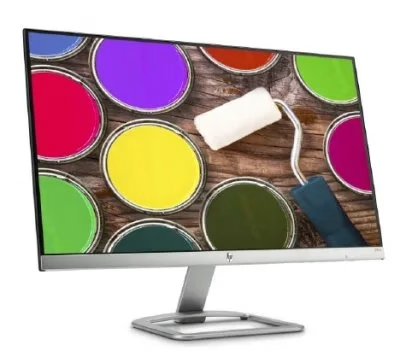
HP P22V G5 Monitor Overview The HP P22V G5 is a 22-inch Full HD monitor designed for daily work and home use. It offers reliable performance and a clean design. As a result, it suits offices, students, and remote workers. 22-Inch Full HD Display This monitor features a 22-inch Full HD resolution. Therefore, text appears sharp and easy to read. Moreover, images look clear and well-defined. Because of this, it supports long working sessions comfortably. In addition, the screen size fits well on most desks. As a result, it saves space without sacrificing clarity. 75Hz Refresh Rate for Smooth Viewing The monitor supports a 75Hz refresh rate. As a result, scrolling feels smoother than standard displays. Furthermore, everyday tasks look more fluid. This makes it suitable for office work and casual entertainment. Eye Comfort and Productivity The HP P22V G5 includes eye comfort features. Therefore, it helps reduce eye strain during long use. In addition, the anti-glare screen improves visibility. As a result, users stay focused throughout the day. Connectivity and Compatibility This monitor includes HDMI and VGA ports. As a result, it connects easily to modern and older devices. Moreover, it supports a wide range of PCs and laptops. Therefore, setup is quick and simple. Design and Mounting Options The monitor features a clean and professional design. In addition, it supports VESA mounting. As a result, users can create a flexible workspace. Everyday Use and Reliability This monitor delivers stable performance for daily tasks. Moreover, it focuses on durability and efficiency. In conclusion, it is a practical choice for work environments. Specifications: Display : 21.45″ VA Resolution : FHD (1920 X 1080) Refresh Rate : 75 Hz Response Rate : 5ms GtG

Philips 22E1N1100LA/71 22-inch frameless monitor delivers smooth motion and clear visuals for everyday use and casual gaming. It focuses on high refresh rate performance, fast response time, and a clean modern design. Additionally, it features a 21.5-inch VA panel with Full HD resolution (1920 × 1080). This provides strong contrast and clear detail, so it improves overall viewing quality for work and media. Moreover, it supports an overclockable 120Hz refresh rate. As a result, it delivers smoother motion and reduces screen stutter during scrolling and gameplay. The monitor includes a 1ms MPRT response time. Therefore, it reduces motion blur and keeps fast-moving visuals sharp and clear. In addition, it supports Adaptive Sync technology. This helps reduce screen tearing and ensures more stable frame delivery in supported content. Furthermore, it includes VA wide-view technology with 178° viewing angles. So it maintains consistent color and brightness from different positions. It also features LowBlue Mode and Flicker-Free technology. These reduce eye strain during long sessions of work, study, or entertainment. Philips 22E1N1100LA/71 22-inch 120Hz monitor provides fast performance, sharp visuals, and comfortable viewing for daily multimedia use. Specifications: 21.5-inch VA panel with Full HD 1920 × 1080 resolution Overclockable 120Hz refresh rate for smooth motion 1ms MPRT response time for reduced blur Adaptive Sync for tear-free performance Frameless design with LowBlue Mode and Flicker-Free technology

REMAX RT-E601 1200MAH TIME II SERIES EYE-CARING LED LAMP Function— Use the power key to turn on/ off the lamp. Tap the power key to adjust the brightness of the lamp (brightest-normal-dimmest-off) four steps are easy to use. When folding the design lamp holder and arm can rotate the angle within a range of 180 degrees up-down adjustment. Press and hold “Mode” Set” Up” Donkey enter normal time mode, alarm clock and snooze mode, birthday reminder mode timer mode, and temperature mode. Time changes 12 hours/24 hours mode and adjusting the hours, minutes, year, month,t,h, and day. Temperature can change to Celsius or Fahrenheit. The red light will be on when it starts charging, and the red light will go out when it is fully charged. Material—ABS+PC Rated voltage—DC5V /0.5A lighting Mode—Direct glow Key Type—Touch key Luminous flux—250m Color rendering index—>80 Rated power—4W Battery Capacity—1200mAh Weight—346g Charging port—Micro SIZE—87*87*263mmCharging time—4-4:30hour Working time—3:30hour

Acer Nitro VG240YSbmiipx 23.8 inchSize Name: 23.8 Style Name: FHD, 165Hz, DP Pattern Name: Single Screen size 23.8 Inches Display resolution maximum 1920 x 1080 Pixels Brand ACER Special feature Blue Light Filter, Tilt Adjustment, Frameless, Flicker-Free Refresh rate 165 Hz Discover the joys of a seamless game experience with Radeon FreeSync, in vivid IPS With a 165Hz refresh rate and 1ms Visual Response Boost (VRB) technology, gameplay is seamless and practically blur-free An IPS panel lets you view your display clearly at angles of up to 178 degrees while maintaining the same level of high-quality colour Take in the full view of the display with its ZeroFrame design atop the sharply-cut three-pronged stand No need to fiddle with buttons Easily modify your monitor settings via the Display Widget utility software

The Arzopa A1 is an ultra-slim, lightweight 15.6-inch portable monitor engineered for seamless travel productivity and entertainment. Delivering crisp Full HD imagery on a premium IPS panel with integrated eye care features, it provides a hassle-free plug-and-play experience using dual full-function USB-C and Mini HDMI inputs. Complete with a built-in adjustable kickstand, it is the perfect dual-screen companion for laptops, smartphones, and gaming consoles. ✅ Full Specifications: Model: ARZOPA Type-C Portable Monitor (ARZOPA-A1) Interface / Connection: Multi-Port Input Panel: 2 x USB Type-C Full Function Ports (Supports concurrent video transmission, data, and power delivery) 1 x Mini HDMI Port (Video signal input only) 1 x 3.5mm Headphone / Audio Output Interface Interface / Connection: Multi-Port Input Panel: 2 x USB Type-C Full Function Ports (Supports concurrent video transmission, data, and power delivery) 1 x Mini HDMI Port (Video signal input only) 1 x 3.5mm Headphone / Audio Output Interface Performance / Screen Quality: Panel Type: IPS (In-Plane Switching) display with 178° wide viewing angles Resolution: Full HD 1920 x 1080p Refresh Rate: 60Hz Aspect Ratio: 16:9 Brightness: 300 cd/m² Contrast Ratio: 1200:1 Display Colors: 262K (8-bit) Color Gamut: 45% NTSC / 72% sRGB space coverage Performance / Screen Quality: Panel Type: IPS (In-Plane Switching) display with 178° wide viewing angles Resolution: Full HD 1920 x 1080p Refresh Rate: 60Hz Aspect Ratio: 16:9 Brightness: 300 cd/m² Contrast Ratio: 1200:1 Display Colors: 262K (8-bit) Color Gamut: 45% NTSC / 72% sRGB space coverage Display Technology: Features built-in HDR rendering technology to boost dynamic contrast alongside a Low Blue Light comfort filter to reduce eye fatigue. Audio: Dual built-in stereo speakers (1W x 2 configuration). Material & Build: Premium, durable metal housing constructed out of a sleek aluminum alloy framework. Design & Form Factor: Ultra-thin bezel layout boasting an integrated adjustable smart kickstand for multi-angle landscape deployment. Power Setup: Driverless plug-and-play architecture. Operates without an internal battery; runs on host device power distribution via USB-C or requires an external 5V/3A power input adapter. Compatibility: Fully compatible with MacBooks, Windows PCs/Laptops, Chromebooks, USB-C supported Android smartphones, and modern gaming consoles (Nintendo Switch, Xbox Series X/S, PS4, PS5). Dimensions: Approx. 355.6 x 220.9 x 9.14 mm (Ultra-slim 0.36-inch profile) Weight: Approx. 725 to 735 grams (1.6 lbs lightweight chassis)

Genuine-spec battery flex cable for MacBook Pro models A2159 (16", 2019), A1708 (13", 2016–2017), and A2338 (13", 2020 M1)—restores critical communication between the battery and logic board for proper power-on, charging, and macOS battery status. Genuine-spec battery flex cable for MacBook Pro models A2159 (16″, 2019), A1708 (13″, 2016–2017), and A2338 (13″, 2020 M1)—restores critical communication between the battery and logic board for proper power-on, charging, and macOS battery status. Carries SMBus (System Management Bus) signals from the battery to the logic board Enables: Accurate battery percentage and health reporting in macOS Proper charging control (start/stop, thermal throttling) Power-on capability (MacBooks will not boot without this connection) Prevention of “Battery Not Charging” or “Service Battery” errors Accurate battery percentage and health reporting in macOS Proper charging control (start/stop, thermal throttling) Power-on capability (MacBooks will not boot without this connection) Prevention of “Battery Not Charging” or “Service Battery” errors MacBook won’t turn on (even with a good battery) Battery shows “–%”, 0%, or “Not Charging” Random shutdowns under load macOS displays “No Battery Available” Logic board powers fans or lights but no display output Battery flex cable only (with OEM-style connector and strain relief) ❌ Does not include: battery, logic board, or trackpad Requires full bottom case removal and battery disconnection Connects via a ZIF or press-fit socket on the logic board Must be routed precisely to avoid tension or micro-tears Highly recommended for experienced or certified technicians—improper installation can cause permanent power or battery communication failure

The Maxfree S2 14″ Portable Laptop Screen Extender lets you expand your workspace with dual or triple displays. First, it connects easily via USB-C or HDMI to your laptop. The screen features full HD resolution, anti-glare technology, and a slim, lightweight design for portability. In addition, it supports multiple monitor setups, boosting productivity for work, gaming, or streaming. Moreover, its adjustable stand and foldable design make it easy to carry and set up anywhere. Therefore, users can enjoy a seamless multi-screen experience without compromising desk space or mobility. Specifications: 14″ full HD screen provides sharp visuals for work and entertainment USB-C and HDMI connectivity support dual or triple monitor setups Slim, lightweight design ensures portability and easy setup Adjustable stand and foldable design for versatile positioning Compatible with laptops and devices for seamless multi-screen productivity

Genuine-spec touchpad flex cable for MacBook Pro 13″ with Touch Bar (Model A1708, 2016–2017)—restores full Force Touch functionality, haptic feedback, and precise multi-touch gesture control during trackpad repair or replacement. Compatible With: MacBook Pro 13″ (2016) – Model A1708 (Model Identifier: MacBookPro13,1) MacBook Pro 13″ (2017) – Model A1708 (Model Identifier: MacBookPro14,1) (Both years share the same internal trackpad assembly and flex cable.) MacBook Pro 13″ (2016) – Model A1708 (Model Identifier: MacBookPro13,1) MacBook Pro 13″ (2017) – Model A1708 (Model Identifier: MacBookPro14,1) (Both years share the same internal trackpad assembly and flex cable.) Part Type: Touchpad flex cable only — does not include the trackpad housing, Taptic Engine, or mounting hardware. This is the OEM-style ribbon cable that connects the trackpad to the logic board. Function: Transmits: Touch input coordinates Force Touch pressure data Haptic feedback signals to the Taptic Engine Enables full macOS gesture support: Force Click, three-finger lookup, swipe navigation, pinch-to-zoom, and smooth cursor tracking. Touch input coordinates Force Touch pressure data Haptic feedback signals to the Taptic Engine Enables full macOS gesture support: Force Click, three-finger lookup, swipe navigation, pinch-to-zoom, and smooth cursor tracking. OEM-Quality Build: Matches Apple’s original specifications in: Cable length and routing path Connector pitch and ZIF latch design EMI shielding and flex durability Cable length and routing path Connector pitch and ZIF latch design EMI shielding and flex durability Common Use Cases: Replacing a torn, creased, or liquid-damaged original flex cable Completing a trackpad replacement when the original cable is compromised Fixing intermittent trackpad behavior, loss of Force Touch, or complete unresponsiveness Replacing a torn, creased, or liquid-damaged original flex cable Completing a trackpad replacement when the original cable is compromised Fixing intermittent trackpad behavior, loss of Force Touch, or complete unresponsiveness Installation Note: Requires full bottom case removal and battery disconnection. Cable routes under internal components near the right speaker and logic board. Connects via a ZIF (Zero Insertion Force) socket—must be aligned carefully and latched gently. Recommended for experienced or certified technicians only. Requires full bottom case removal and battery disconnection. Cable routes under internal components near the right speaker and logic board. Connects via a ZIF (Zero Insertion Force) socket—must be aligned carefully and latched gently. Recommended for experienced or certified technicians only.

The Dell OptiPlex 7050 Micro combines compact design and solid performance with an Intel Core i5 6th Gen processor, DDR4 RAM options, and SSD storage options. Ideal for business and home use, it delivers reliable speed, energy efficiency, and space-saving desktop performance.

The MSI MAG 274QRF QD E2 Gaming Monitor is designed to take your gaming to the next level. With its 27-inch QHD display, you’ll enjoy crystal-clear visuals and vibrant colors that bring your games to life. This monitor features Quantum Dot technology, which enhances color accuracy and brightness. The MSI MAG 274QRF QD E2 delivers a rich and immersive visual experience. Thanks to its 165Hz refresh rate and 1ms response time, the MSI MAG Gaming Monitor ensures smooth and lag-free gameplay. You’ll experience every movement with precision, giving you a competitive edge in any game. The monitor supports NVIDIA G-SYNC technology, which synchronizes the monitor’s refresh rate with your graphics card. This eliminates screen tearing and stuttering, providing a seamless and fluid gaming experience. Designed for comfort during long gaming sessions, the MSI MAG 274QRF QD E2 features an ergonomic stand with adjustable height, tilt, and swivel. You can easily customize the monitor’s position to suit your preferred viewing angle. Connectivity is made easy with multiple ports, including DisplayPort, HDMI, and USB. This ensures compatibility with a wide range of gaming systems and peripherals, so you can set up your gaming station just the way you like it. In conclusion, the MSI MAG 274QRF QD E2 Gaming Monitor combines stunning visuals, fast performance, and ergonomic design for an unparalleled gaming experience. Upgrade to this monitor and immerse yourself in the world of gaming like never before. Specifications: Display : 27″ Rapid IPS Screen : 2560 x 1440 (WQHD) Refresh Rate : 180Hz Response Time : 1ms

Are you in search of a monitor that elevates your gaming experience? Look no further than the Philips 27″ 75Hz 27E1N5600HE LCD Monitor. Designed with gamers in mind, this monitor offers a perfect blend of performance and visual quality. Featuring a generous 27-inch display, the Philips monitor provides ample screen real estate for immersive gaming sessions. Lose yourself in stunning visuals and vibrant colors that bring your games to life. With a refresh rate of 75Hz, this monitor delivers smoother gameplay compared to standard displays. Say goodbye to motion blur and screen tearing, and enjoy a more responsive gaming experience. Equipped with Adaptive-Sync technology, the Philips monitor synchronizes the refresh rate with your GPU, reducing stuttering and input lag. Enjoy seamless gameplay, whether you’re exploring vast landscapes or engaging in fast-paced action. The ultra-narrow bezel design creates a seamless multi-monitor setup, perfect for immersive gaming or multitasking. Dive into your favorite games without distractions, and enjoy a more immersive gaming experience. Designed for comfort and convenience, the Philips monitor features adjustable tilt for optimal viewing angles. Whether you’re sitting at your desk or lounging in your gaming chair, you can find the perfect position for extended gaming sessions. In summary, the Philips 27″ 75Hz 27E1N5600HE LCD Monitor is a must-have for gamers seeking smooth performance and immersive visuals. Upgrade your gaming setup with this feature-packed monitor and take your gaming experience to new heights. Specifications: Display : 27″ IPS Resolution : 2560 x 1440 QHD Refresh Rate : 75hz Response Rater : 4ms

The Riotouch 86″ Interactive Panel is designed to transform educational and professional environments with its cutting-edge features and user-friendly interface. This interactive flat panel offers a seamless blend of performance, connectivity, and intuitive design, making it an ideal choice for classrooms and conference rooms. Featuring a 86-inch 4K UHD display (3840 x 2160 resolution), the panel delivers crisp visuals and vibrant colors. Its 4mm anti-glare tempered glass ensures clear visibility from any angle, reducing eye strain during prolonged use. The panel supports up to 40-point multi-touch and 20-point multi-writing capabilities, allowing multiple users to interact simultaneously. This feature fosters collaborative learning and dynamic presentations, enhancing engagement and productivity. Powered by a quad-core Cortex-A55 processor and equipped with 4GB RAM and 32GB storage, the Riotouch panel ensures smooth performance. Its dual operating system support (Android and Windows) provides versatility, accommodating various software applications and user preferences. Connectivity is robust, with multiple ports including HDMI, USB 3.0, USB-C, VGA, and RJ45, facilitating easy integration with other devices. Built-in Wi-Fi and Bluetooth capabilities enable wireless connections, promoting a clutter-free workspace. The panel comes with integrated 2x15W front-facing speakers, delivering clear audio for multimedia presentations. Additionally, it includes a built-in 13MP 4K camera and microphone, supporting high-quality video conferencing and remote collaboration. Designed with user convenience in mind, the Riotouch panel features intuitive front controls for power, volume, and input selection. Its slim aluminum frame and wall-mountable design ensure it fits seamlessly into any environment. In summary, the Riotouch 86″ Interactive Panel combines high-resolution display, multi-touch interactivity, and versatile connectivity, making it a comprehensive solution for modern collaborative spaces. Specifications: Display : 86″ 4K UHD Touch Memory : 4GB Storage : 32GB OS : Android 11

A1989 Battery Replacement, A1964 Battery for MacBook Pro 13″ A1989 (Mid 2018 2019) A2251(2020 Release) EMC 3214 3358 3348 MR9Q2LL/A MR9R2LL/A MR9T2LL/A MR9U2LL/A MR9V2LL/A MV962LL/A MV9A2LL/A 【Specification】Voltage: 11.41V. Capacity: 58Wh/ 5086mAh. Battery Type: Li-ion. Condition: Brand new, from high quality materials, top circuit boards and smart chip. 【Compatible Part Number】A1964 A1989 A1989(EMC 3214) A1989(EMC 3358) A2251(EMC 3348) 020-02497 616-00419. 【Compatible Laptop Models】MacBook Pro 13-Inch model A1989 (Mid 2018, Mid 2019) , A2251(2020 Release), Order No MR9Q2LL/A MR9R2LL/A MR9T2LL/A MR9U2LL/A MR9V2LL/A MV962LL/A MV972LL/A MV982LL/A MV992LL/A MV9A2LL/A MWP72LL/A MWP82LL/A MWP42LL/A MWP52LL/A MWP62LL/A MR9Q2 MR9R2 MR9T2 MR9U2 MR9V2 MV962 MV972 MV982 MV992 MV9A2 MWP62. 【Note】The tools are included. Double-sided tape is attached to the back of the battery, but NO battery installation instruction. The MBP battery is difficult to disassemble, we suggest you search for related installation videos or find a technician for help.
