
Authentic UK layout keyboard replacement for MacBook Air 13″ (Model A2338, 2020)—featuring Apple’s Magic Keyboard with scissor-switch mechanism, backlighting, and precise OEM fit for reliable performance and typing comfort. Compatible With: MacBook Air 13-inch (2020, Model A2338) – includes both Intel (Core i3/i5/i7) and Apple M1 chip variants. Layout: UK English (QWERTY) with £ symbol, tall vertical Enter key, and standard UK key labeling—exactly matches Apple’s original UK regional keyboard. Keyboard Type: Apple’s Magic Keyboard with scissor-switch mechanism—delivering quiet, responsive keystrokes, 1mm key travel, and greater long-term reliability than Butterfly keyboards. Integrated Features: Backlit keys for dim environments, ambient light sensor compatibility, and factory-matched ribbon cable for seamless connection to the logic board. Precision Build: Engineered to OEM specifications for exact alignment, key spacing, and tactile feedback—ensures a flush, secure fit within the original top case. Installation Note: The keyboard is glued into the top case and requires complete disassembly for replacement. Professional tools and adhesive are needed for proper reinstallation. Recommended for skilled technicians only.

The Riotouch 65″ Interactive Panel is designed to transform educational and professional environments with its cutting-edge features and user-friendly interface. This interactive flat panel offers a seamless blend of performance, connectivity, and intuitive design, making it an ideal choice for classrooms and conference rooms. Featuring a 65-inch 4K UHD display (3840 x 2160 resolution), the panel delivers crisp visuals and vibrant colors. Its 4mm anti-glare tempered glass ensures clear visibility from any angle, reducing eye strain during prolonged use. The panel supports up to 40-point multi-touch and 20-point multi-writing capabilities, allowing multiple users to interact simultaneously. This feature fosters collaborative learning and dynamic presentations, enhancing engagement and productivity. Powered by a quad-core Cortex-A55 processor and equipped with 4GB RAM and 32GB storage, the Riotouch panel ensures smooth performance. Its dual operating system support (Android and Windows) provides versatility, accommodating various software applications and user preferences. Connectivity is robust, with multiple ports including HDMI, USB 3.0, USB-C, VGA, and RJ45, facilitating easy integration with other devices. Built-in Wi-Fi and Bluetooth capabilities enable wireless connections, promoting a clutter-free workspace. The panel comes with integrated 2x15W front-facing speakers, delivering clear audio for multimedia presentations. Additionally, it includes a built-in 13MP 4K camera and microphone, supporting high-quality video conferencing and remote collaboration. Designed with user convenience in mind, the Riotouch panel features intuitive front controls for power, volume, and input selection. Its slim aluminum frame and wall-mountable design ensure it fits seamlessly into any environment. In summary, the Riotouch 65″ Interactive Panel combines high-resolution display, multi-touch interactivity, and versatile connectivity, making it a comprehensive solution for modern collaborative spaces. Specifications: Display : 65″ 4K UHD Touch Memory : 4GB Storage : 32GB OS : Android 11

The BYL-2207 2-in-1 LAN adapter provides fast and stable wired internet through a Gigabit Ethernet port using either USB-C or USB 3.0. Perfect for laptops, MacBooks, and PCs without an Ethernet port, it ensures smooth streaming, online meetings, and reliable network performance. The BYL-2207 2-in-1 Type-C / USB 3.0 to Gigabit LAN Adapter is designed for users who need a reliable wired connection on modern laptops and devices. It supports both USB-C and USB 3.0, making it compatible with a wide range of systems including MacBooks, ultrabooks, and desktops. With Gigabit Ethernet speed, it provides faster and more stable internet compared to Wi-Fi, making it ideal for work, gaming, and streaming. 2-in-1 Connector (USB-C + USB 3.0) for wide compatibility Gigabit Ethernet Port (RJ45) for fast and stable wired internet High-Speed Performance supports up to 1000Mbps network speed Plug & Play installation on most systems Compact & Portable Design easy to carry anywhere Ideal for Work & Streaming improves stability for meetings and downloads Reliable Connection reduces lag compared to Wi-Fi Ideal for MacBooks, laptops, ultrabooks, desktops, and tablets that need a stable wired internet connection. Perfect for online meetings, remote work, gaming, IPTV, streaming, and downloading.

The lg 34g600a b ultrawide gaming monitor is built for immersive gameplay and wide-screen productivity. It features a 34-inch curved display with WQHD resolution, which provides more screen space and sharper image quality. Therefore, it enhances both gaming and multitasking experiences. Moreover, the monitor supports a 160Hz refresh rate, which delivers smoother motion during fast gameplay. In addition, it helps reduce motion blur, allowing players to react more quickly in competitive situations. Furthermore, the UltraWide curved design improves viewing comfort and expands the field of view. As a result, users can enjoy a more engaging experience when gaming, watching content, or working across multiple windows. The monitor also includes modern connectivity options for compatibility with gaming systems and PCs. In addition, it maintains stable display performance during long sessions, which supports consistent usage. In conclusion, this monitor offers smooth visuals, a wide display, and reliable performance for both gaming and daily tasks. Specifications: 34-inch UltraWide curved display WQHD (2560 x 1440) resolution 160Hz refresh rate Wide aspect ratio for multitasking Suitable for gaming and productivity

Genuine-spec touchpad flex cable for MacBook Pro 13″ (Model A2251, 2020, Intel)—essential for restoring full Force Touch functionality, haptic feedback, and precise multi-touch gesture control during trackpad repair or replacement. Compatible With: MacBook Pro 13-inch (2020, Two Thunderbolt Ports, Model A2251, Model Identifier MacBookPro16,1) with Intel Core i5/i7 processors. Part Type: Touchpad flex cable only—does not include the trackpad housing, Taptic Engine, or mounting hardware. This is the OEM-style ribbon cable that connects the trackpad to the logic board. Function: Transmits: Precise touch coordinates Force Touch pressure data Haptic feedback signals to the Taptic Engine Enables full macOS gesture support including Force Click, three-finger lookup, swipe navigation, and inertial scrolling. Precise touch coordinates Force Touch pressure data Haptic feedback signals to the Taptic Engine Enables full macOS gesture support including Force Click, three-finger lookup, swipe navigation, and inertial scrolling. OEM-Quality Build: Matches Apple’s original specifications in: Cable length and routing Connector pitch and ZIF latch design EMI shielding and flex durability Cable length and routing Connector pitch and ZIF latch design EMI shielding and flex durability Common Use Cases: Replacing a torn, creased, or liquid-damaged original flex Completing a trackpad replacement when the original cable is compromised Fixing intermittent trackpad behavior, loss of Force Touch, or complete unresponsiveness Replacing a torn, creased, or liquid-damaged original flex Completing a trackpad replacement when the original cable is compromised Fixing intermittent trackpad behavior, loss of Force Touch, or complete unresponsiveness Installation Note: Requires full bottom case removal and partial disassembly (including battery disconnect). Cable routes under the right speaker and logic board—must be seated in original retention channels. Connects via ZIF (Zero Insertion Force) socket—align carefully and latch gently. Recommended for experienced or certified technicians only. Requires full bottom case removal and partial disassembly (including battery disconnect). Cable routes under the right speaker and logic board—must be seated in original retention channels. Connects via ZIF (Zero Insertion Force) socket—align carefully and latch gently. Recommended for experienced or certified technicians only.

Genuine-quality replacement A1989 battery testing flex cable—brand new and ready for professional MacBook Pro 15" (2018–2019) battery diagnostics and repairs. Genuine-quality replacement A1989 battery testing flex cable—brand new and ready for professional MacBook Pro 15″ (2018–2019) battery diagnostics and repairs. This is a brand-new A1989 Battery Testing Flex Cable, designed specifically for use in MacBook Pro 15-inch models from 2018 and 2019 (A1989) during battery replacement or diagnostic procedures. The flex cable connects the battery to the logic board’s test points, allowing technicians to verify battery health, voltage, and communication before final reassembly—ensuring safe and accurate repairs. Made with high-quality materials and precise engineering, this flex cable matches OEM specifications for fit, function, and reliability. It’s an essential tool for certified repair shops, independent technicians, and advanced DIYers performing battery servicing on T2-chip MacBook Pro models. Please note: This is not a full battery—it is the small flex cable used during battery testing and installation. Proper handling and ESD-safe practices are recommended during installation. Compatible with: MacBook Pro 15″ (2018, A1989) MacBook Pro 15″ (2019, A1989)

A1989 Battery Replacement, A1964 Battery for MacBook Pro 13″ A1989 (Mid 2018 2019) A2251(2020 Release) EMC 3214 3358 3348 MR9Q2LL/A MR9R2LL/A MR9T2LL/A MR9U2LL/A MR9V2LL/A MV962LL/A MV9A2LL/A 【Specification】Voltage: 11.41V. Capacity: 58Wh/ 5086mAh. Battery Type: Li-ion. Condition: Brand new, from high quality materials, top circuit boards and smart chip. 【Compatible Part Number】A1964 A1989 A1989(EMC 3214) A1989(EMC 3358) A2251(EMC 3348) 020-02497 616-00419. 【Compatible Laptop Models】MacBook Pro 13-Inch model A1989 (Mid 2018, Mid 2019) , A2251(2020 Release), Order No MR9Q2LL/A MR9R2LL/A MR9T2LL/A MR9U2LL/A MR9V2LL/A MV962LL/A MV972LL/A MV982LL/A MV992LL/A MV9A2LL/A MWP72LL/A MWP82LL/A MWP42LL/A MWP52LL/A MWP62LL/A MR9Q2 MR9R2 MR9T2 MR9U2 MR9V2 MV962 MV972 MV982 MV992 MV9A2 MWP62. 【Note】The tools are included. Double-sided tape is attached to the back of the battery, but NO battery installation instruction. The MBP battery is difficult to disassemble, we suggest you search for related installation videos or find a technician for help.

The Lenovo Legion R24e is a 23.8-inch Full HD gaming monitor designed for smooth competitive gameplay and responsive visual performance. It uses an IPS panel with a high refresh rate for improved motion clarity and wide viewing angles. Additionally, its slim NearEdgeless design fits modern gaming and workstation setups. This monitor delivers a 1920 × 1080 resolution with up to 180Hz refresh rate support. Moreover, it features a 0.5ms MPRT response time to reduce motion blur during fast-paced gaming sessions. The Lenovo Legion R24e also supports AMD FreeSync technology for smoother gameplay with reduced screen tearing. The IPS panel provides 99% sRGB color coverage and wide 178-degree viewing angles for accurate and consistent image quality. Therefore, the monitor works well for gaming, streaming, and everyday multimedia tasks. It also includes anti-glare screen treatment for improved viewing comfort. The Lenovo Legion R24e includes HDMI 2.1 TMDS and DisplayPort 1.4 connectivity for gaming PCs and consoles. Additionally, the ergonomic stand supports tilt, swivel, pivot, and height adjustment for flexible positioning. VESA mount compatibility also allows wall or monitor arm installation. Community feedback highlights the monitor’s strong color quality, smooth refresh rate performance, and good value for competitive gaming setups. Specifications: 23.8-inch Full HD IPS gaming display 180Hz refresh rate for smooth gameplay 0.5ms MPRT response time for reduced blur AMD FreeSync support for tear-free visuals Ergonomic stand with height, tilt, swivel, and pivot adjustment

The Samsung 65″ OLED 4K S85F Vision AI Smart TV QA65S85FAEXTW delivers a premium viewing experience built on advanced OLED technology. It produces deep blacks, rich colors, and strong contrast, so movies, sports, and games look more realistic and immersive on the 65-inch screen. OLED technology controls each pixel individually, so every detail appears with high precision. This improves dark scenes by keeping blacks deep and detailed, while bright areas stay clean and accurate. As a result, the picture remains balanced in both bright and dark environments. Samsung Vision AI improves picture and sound in real time. It analyzes each scene and adjusts brightness, color, and sharpness automatically. Therefore, the Samsung 65 OLED S85F Vision AI Smart TV QA65S85FAEXTW always delivers optimized visuals without manual settings. In addition, AI upscaling improves lower-resolution content closer to 4K quality for better clarity. HDR expands contrast and color depth, making visuals more lifelike and dynamic. Fast motion also appears smoother and clearer, which improves sports and action viewing. The Smart TV system gives access to streaming apps, games, and smart home features. It runs smoothly and is easy to navigate. In addition, the slim design with thin bezels gives the Samsung 65 OLED S85F Vision AI Smart TV QA65S85FAEXTW a modern and premium look. Overall, this Samsung OLED TV combines strong picture quality, AI optimization, and smart connectivity for a high-end viewing experience. Specifications: OLED display delivers deep blacks and strong contrast 65-inch 4K screen provides immersive viewing experience Vision AI optimizes picture and sound automatically HDR improves brightness, contrast, and color depth Smart TV system supports apps, streaming, and smart features

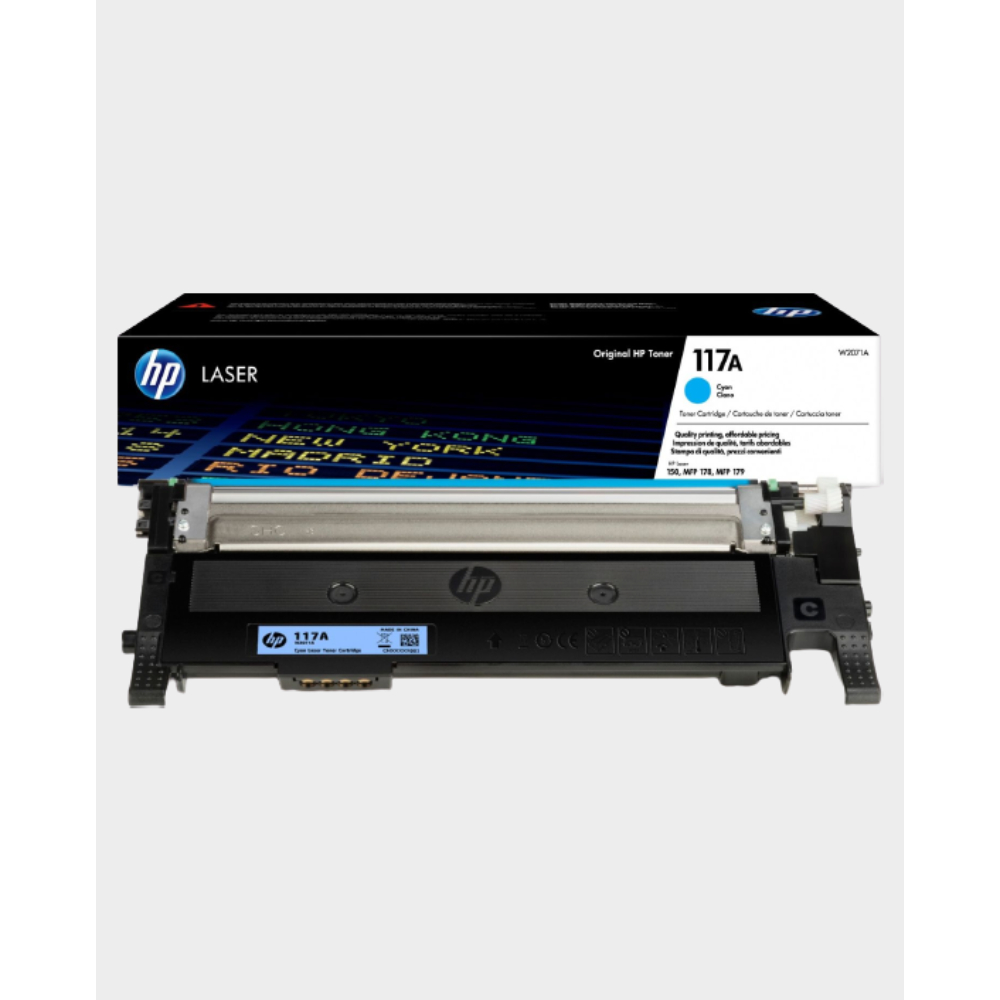
HP 17A Black Toner Cartridge | Works with HP LaserJet Pro M102 Series, HP LaserJet Pro MFP M130 Series | CF217A

Genuine-spec touchpad flex cable for MacBook Pro 13″ (Model A2289, 2020, Intel)—restores full Force Touch functionality, haptic feedback, and preci multi-touch gesture control. OEM-quality replacement for damaged or faulty original cables. Compatible With: MacBook Pro 13-inch (2020, Four Thunderbolt Ports, Model A2289, Model Identifier MacBookPro16,2) with Intel Core i5/i7 processors. Part Type: Touchpad flex cable only — does not include the trackpad housing, Taptic Engine, or mounting hardware. This is the OEM-style ribbon cable that connects the trackpad to the logic board. Function: Transmits: Touch input coordinates Force Touch pressure data Haptic feedback signals to the Taptic Engine Enables full macOS gesture support: Force Click, three-finger lookup, swipe navigation, pinch-to-zoom, and smooth cursor tracking. Touch input coordinates Force Touch pressure data Haptic feedback signals to the Taptic Engine Enables full macOS gesture support: Force Click, three-finger lookup, swipe navigation, pinch-to-zoom, and smooth cursor tracking. OEM-Quality Build: Matches Apple’s original specifications in: Cable length and routing path Connector pitch and ZIF latch design EMI shielding and flex durability Cable length and routing path Connector pitch and ZIF latch design EMI shielding and flex durability Common Use Cases: Replacing a torn, creased, or liquid-damaged original flex cable Completing a trackpad replacement when the original cable is unusable Fixing: Intermittent or erratic trackpad behavior Loss of Force Touch or haptic feedback Complete trackpad unresponsiveness Replacing a torn, creased, or liquid-damaged original flex cable Completing a trackpad replacement when the original cable is unusable Fixing: Intermittent or erratic trackpad behavior Loss of Force Touch or haptic feedback Complete trackpad unresponsiveness Intermittent or erratic trackpad behavior Loss of Force Touch or haptic feedback Complete trackpad unresponsiveness Installation Note: Requires full bottom case removal and battery disconnection. Cable routes under internal components (speaker, logic board)—must follow original path. Connects via ZIF (Zero Insertion Force) socket—align carefully, never force. Recommended for experienced or certified technicians only. Requires full bottom case removal and battery disconnection. Cable routes under internal components (speaker, logic board)—must follow original path. Connects via ZIF (Zero Insertion Force) socket—align carefully, never force. Recommended for experienced or certified technicians only. Important Compatibility Notes: ✅ Only for A2289 (13″, 4 Thunderbolt ports, 2020, Intel) ❌ Not compatible with: A2251 (2 Thunderbolt ports, 2020) A2338 (M1 MacBook Pro, 2020) Any MacBook Air or 14″/16″ MacBook Pro ✅ Only for A2289 (13″, 4 Thunderbolt ports, 2020, Intel) ❌ Not compatible with: A2251 (2 Thunderbolt ports, 2020) A2338 (M1 MacBook Pro, 2020) Any MacBook Air or 14″/16″ MacBook Pro A2251 (2 Thunderbolt ports, 2020) A2338 (M1 MacBook Pro, 2020) Any MacBook Air or 14″/16″ MacBook Pro

WiWU S500 Foldable Lightweight Plastic Laptop Stand Description WiWU S500 Foldable Lightweight Plastic Laptop Stand Brand: wiwu Material: ABS+Aluminum alloy Foldable Height Adjustment. Laptop stand with foldable technology, light weight, easy to carry Adjustable from 20 to 40 degrees and height adjustable from 3.15 to 5.12 inches. There are 6 corners Compatible with laptops (11 inch-15 inch) Macbook, iMac, ipad, Microsoft Surface PR, Thinkpad, Lenovo, Dell, HP and more. With anti-slip rubber pad

Genuine-spec touchpad flex cable for MacBook Pro 13″ with Touch Bar (Model A1708, 2016–2017)—restores full Force Touch functionality, haptic feedback, and precise multi-touch gesture control during trackpad repair or replacement. Compatible With: MacBook Pro 13″ (2016) – Model A1708 (Model Identifier: MacBookPro13,1) MacBook Pro 13″ (2017) – Model A1708 (Model Identifier: MacBookPro14,1) (Both years share the same internal trackpad assembly and flex cable.) MacBook Pro 13″ (2016) – Model A1708 (Model Identifier: MacBookPro13,1) MacBook Pro 13″ (2017) – Model A1708 (Model Identifier: MacBookPro14,1) (Both years share the same internal trackpad assembly and flex cable.) Part Type: Touchpad flex cable only — does not include the trackpad housing, Taptic Engine, or mounting hardware. This is the OEM-style ribbon cable that connects the trackpad to the logic board. Function: Transmits: Touch input coordinates Force Touch pressure data Haptic feedback signals to the Taptic Engine Enables full macOS gesture support: Force Click, three-finger lookup, swipe navigation, pinch-to-zoom, and smooth cursor tracking. Touch input coordinates Force Touch pressure data Haptic feedback signals to the Taptic Engine Enables full macOS gesture support: Force Click, three-finger lookup, swipe navigation, pinch-to-zoom, and smooth cursor tracking. OEM-Quality Build: Matches Apple’s original specifications in: Cable length and routing path Connector pitch and ZIF latch design EMI shielding and flex durability Cable length and routing path Connector pitch and ZIF latch design EMI shielding and flex durability Common Use Cases: Replacing a torn, creased, or liquid-damaged original flex cable Completing a trackpad replacement when the original cable is compromised Fixing intermittent trackpad behavior, loss of Force Touch, or complete unresponsiveness Replacing a torn, creased, or liquid-damaged original flex cable Completing a trackpad replacement when the original cable is compromised Fixing intermittent trackpad behavior, loss of Force Touch, or complete unresponsiveness Installation Note: Requires full bottom case removal and battery disconnection. Cable routes under internal components near the right speaker and logic board. Connects via a ZIF (Zero Insertion Force) socket—must be aligned carefully and latched gently. Recommended for experienced or certified technicians only. Requires full bottom case removal and battery disconnection. Cable routes under internal components near the right speaker and logic board. Connects via a ZIF (Zero Insertion Force) socket—must be aligned carefully and latched gently. Recommended for experienced or certified technicians only.

A reliable pre-owned Dell Latitude 5410 with 14" display, 10th Gen Core i5, 8GB RAM, and 256GB SSD—ideal for business users and students seeking solid performance, security, and portability.

The AOC 27G40 27″ 180Hz Gaming Monitor is built for serious gamers who want fast and smooth performance. It features a 27-inch Fast IPS screen with Full HD resolution. The colors are bright, and the details are sharp from every angle. With a 180Hz refresh rate, your games will run ultra-smooth and clear. Fast motion feels natural with no lag or delay. The 1ms response time helps reduce motion blur and ghosting during fast-paced scenes. Thanks to Adaptive-Sync, you won’t have screen tearing or stuttering. This makes gameplay seamless and enjoyable, even in intense battles. The monitor also supports HDR10 for improved contrast and color accuracy. It covers 128% of the sRGB color space, giving you bold and rich visuals. The screen reaches 300 nits of brightness, so everything stays clear in bright rooms. The AOC 27G40 27″ 180Hz Gaming Monitor includes HDMI 2.0 and DisplayPort 1.4 connections. You can easily connect your PC, console, or other devices. Its ergonomic stand lets you adjust the height, tilt, swivel, and pivot the screen. This helps you find the most comfortable viewing angle. You can also mount it using a VESA-compatible setup for more flexibility. Whether you’re gaming casually or competitively, this gaming monitor delivers excellent speed, clarity, and color. It’s built to meet the demands of modern gaming with style and comfort. Specifications: Display : 27″ Rapid IPS Resolution : 1920×1080 FHD Refresh Rate : 180Hz Response Rate : 0.5ms Speaker : 2W x2 Adjustable : Fully adjustable

Genuine-spec touchpad flex cable for MacBook Pro 13″ (Model A1502, Mid 2014)—restores full trackpad functionality, including precise cursor control and physical click response. Essential for repairing unresponsive or erratic trackpad behavior. Compatible With: MacBook Pro 13-inch (Mid 2014, Model A1502, Model Identifier MacBookPro11,1) with Intel Core i5/i7 processors and Retina display. Part Type: Touchpad flex cable only — does not include the trackpad housing, button mechanism, or mounting hardware. This is the ribbon cable that connects the trackpad to the logic board. Function: Transmits cursor movement and click signals (left/right physical clicks) Supports standard multi-touch gestures (two-finger scroll, tap-to-click, pinch-to-zoom) ⚠️ Note: This model uses a physical click mechanism—not Force Touch (no haptic feedback or pressure sensitivity). Transmits cursor movement and click signals (left/right physical clicks) Supports standard multi-touch gestures (two-finger scroll, tap-to-click, pinch-to-zoom) ⚠️ Note: This model uses a physical click mechanism—not Force Touch (no haptic feedback or pressure sensitivity). OEM-Quality Build: Matches Apple’s original in: Cable length and routing path Connector type and pin alignment Insulation and flexibility for long-term reliability Cable length and routing path Connector type and pin alignment Insulation and flexibility for long-term reliability Common Use Cases: Replacing a torn, frayed, or corroded original flex cable Fixing: Unresponsive or intermittent trackpad Cursor jumping or drifting Click function failure (left or right) Complete trackpad disconnect Replacing a torn, frayed, or corroded original flex cable Fixing: Unresponsive or intermittent trackpad Cursor jumping or drifting Click function failure (left or right) Complete trackpad disconnect Unresponsive or intermittent trackpad Cursor jumping or drifting Click function failure (left or right) Complete trackpad disconnect Installation Note: Requires bottom case removal and battery disconnect. Connects via a ZIF (Zero Insertion Force) socket on the logic board—do not force. Cable routes under the battery; handle with care to avoid strain. Suitable for intermediate to advanced DIYers or technicians. Requires bottom case removal and battery disconnect. Connects via a ZIF (Zero Insertion Force) socket on the logic board—do not force. Cable routes under the battery; handle with care to avoid strain. Suitable for intermediate to advanced DIYers or technicians.

The Cudy AC1200 dual band WiFi extender boosts and extends your wireless coverage with speeds up to 1200Mbps across 2.4GHz and 5GHz bands. Ideal for eliminating dead zones, it provides stronger and more stable WiFi for streaming, gaming, and online work in every corner of your home or office. The Cudy AC1200 Dual Band WiFi Extender is designed to expand your existing WiFi network and deliver stronger coverage where your router signal is weak. With support for both 2.4GHz and 5GHz frequencies, it provides balanced performance for browsing, streaming, video calls, and gaming. Easy to set up and compatible with most routers, this extender is the perfect solution for improving WiFi connectivity in homes, offices, and multi-room spaces. AC1200 Dual Band Speed: Up to 1200Mbps total for smooth browsing and streaming 2.4GHz + 5GHz Support: Better performance and reduced interference Eliminates WiFi Dead Zones: Extends coverage to hard-to-reach rooms Stable Connection: Ideal for HD streaming, gaming, and online meetings Universal Compatibility: Works with most WiFi routers and access points Easy Setup: Simple installation with WPS / web configuration (model dependent) Compact Plug-In Design: Saves space and fits easily in any outlet Multiple Modes: Extender / Access Point (depending on model) Perfect for homes, offices, cafés, and apartments needing stronger WiFi coverage. Works with most routers and improves signal strength for devices like smartphones, laptops, smart TVs, consoles, and IP cameras.

LG 27 inch 4K IPS Monitor 27UP850N-W is designed for sharp visuals, productivity, and content work. It features a 27-inch UHD IPS display with accurate color performance. Additionally, it supports HDR10 and USB Type-C connectivity. Therefore, it works well for office use, creative tasks, and media viewing. The LG 27UP850N-W delivers 3840 × 2160 resolution with a 60Hz refresh rate and 5ms response time. Moreover, it includes VESA DisplayHDR 400 and DCI-P3 95% color coverage for improved color accuracy. It also provides USB-C with up to 90W power delivery, HDMI, and DisplayPort inputs. In addition, it supports AMD FreeSync for smoother visuals during light gaming and video playback. Furthermore, it includes ergonomic adjustments such as height, tilt, and pivot support. As a result, users can maintain a comfortable viewing position during long work sessions. It also includes built-in features like Reader Mode and Black Stabilizer for eye comfort and better detail visibility. manufacturer link Specifications: 27-inch 4K UHD (3840 × 2160) IPS display VESA DisplayHDR 400 with DCI-P3 95% color gamut USB Type-C with up to 90W power delivery 60Hz refresh rate with AMD FreeSync support Height, tilt, and pivot adjustable ergonomic stand

ViewSonic VX2718-2KPC-MHD Gaming Monitor ViewSonic VX2718-2KPC-MHD With an immersive curved screen and 165Hz refresh rate. The ViewSonic VX2718-2KPC-MHD provides a stunning viewing experience. The monitor has been designed with a 1500R curved and borderless panel for an immersive experience. A high 165Hz refresh rate delivers smooth animations with minimal input lag while AMD FreeSync™. Premium prevents screen tearing and stuttering for a fluid gaming experience. With 1ms MPRT response time. the monitor delivers unprecedented screen quality and speed. VX2718-2KPC-MHD is also equipped. with ViewSonic’s exclusive ViewMode™ presets, which offer optimized screen performance. for different home entertainment applications, such as watching movies, editing, or playing video games. In addition, a DisplayPort and two HDMI inputs offer flexible connectivity for both general use and entertainment. Ultimate Immersive Gaming Experience With a 1500R screen curvature, the VX2718-2KPC-MHD provides a truly immersive viewing. experience that lets you enjoy big, bold and stunning panoramic views. Seamless In-Game Actions With a swift 165Hz refresh rate, this monitor delivers great visual fluidity . and flawless graphics no matter how quickly the in-game action unfolds. Smooth Images without Ghosting 1ms (MPRT) response time delivers better performance with smooth . pixel transitions from color to color and reduced ghosting. Prevent Screen Tearing With AMD FreeSync™ technology, the monitor is able to adapt so that there. is less fluctuation and jumpiness in the image. Brace for true darkness See and move fluidly in the shadows with ViewSonic’s Black Stabilization feature. When enabled, the darkest scenes are lit up so can spot . the finer details and stay ahead of the pack. Crisp and Clear Detail At two times the resolution of a traditional 1080p display, QHD results in a much sharper image. with no distortion or stretching, all while maintaining the same 16:9 aspect ratio. Optimal Viewing Conditions ViewSonic’s exclusive ViewMode offers specialized presets to fit different usage including Game. Movie, Web, Text, Mac, and Mono modes. These presets enhance gamma curve, color temperature and brightness to deliver the optimal viewing characteristics for each application. Specifications: Specifications 165Hz refresh rate delivers fluid, tear-free visuals Rapid 1ms (MPRT) response time for crisp movements QHD 1440p resolution AMD FreeSync™ Premium prevents screen tearing 1500R curved screen for a perfect balance of immersion and comfort Flexible connectivity with dual HDMI and DisplayPort input 3-year warranty

Genuine-spec touchpad flex cable compatible with both MacBook Air A2179 (Intel, 2020) and A2337 (M1, 2020)—restores full Force Touch functionality, haptic feedback, and precise multi-touch gesture control during trackpad repair or replacement. Compatible With: MacBook Air 13″ (2020, Intel) – Model A2179 (Model Identifier: MacBookAir9,1) MacBook Air 13″ (2020, Apple M1) – Model A2337 (Model Identifier: MacBookAir10,1) MacBook Air 13″ (2020, Intel) – Model A2179 (Model Identifier: MacBookAir9,1) MacBook Air 13″ (2020, Apple M1) – Model A2337 (Model Identifier: MacBookAir10,1) ✅ Important Note: Despite different processors (Intel vs. M1), Apple used the same trackpad assembly and flex cable in both A2179 and A2337. This makes the flex cable fully interchangeable between the two models. Part Type: Touchpad flex cable only — does not include the trackpad housing, Taptic Engine, or mounting hardware. This is the OEM-style ribbon cable that connects the trackpad to the logic board. Function: Transmits: Touch input coordinates Force Touch pressure data Haptic feedback signals to the Taptic Engine Enables full macOS gesture support: Force Click, three-finger lookup, swipe navigation, pinch-to-zoom, and smooth cursor tracking. Touch input coordinates Force Touch pressure data Haptic feedback signals to the Taptic Engine Enables full macOS gesture support: Force Click, three-finger lookup, swipe navigation, pinch-to-zoom, and smooth cursor tracking. OEM-Quality Build: Matches Apple’s original specifications in: Cable length and routing path Connector pitch and ZIF latch design EMI shielding and flex durability Cable length and routing path Connector pitch and ZIF latch design EMI shielding and flex durability Common Use Cases: Replacing a torn, creased, or liquid-damaged original flex cable Completing a trackpad replacement when the original cable is compromised Fixing intermittent trackpad behavior, loss of Force Touch, or complete unresponsiveness Replacing a torn, creased, or liquid-damaged original flex cable Completing a trackpad replacement when the original cable is compromised Fixing intermittent trackpad behavior, loss of Force Touch, or complete unresponsiveness Installation Note: Requires full bottom case removal and battery disconnection. Cable routes under the right side of the battery and logic board. Connects via a ZIF (Zero Insertion Force) socket—align carefully and latch gently. Recommended for experienced or certified technicians only. Requires full bottom case removal and battery disconnection. Cable routes under the right side of the battery and logic board. Connects via a ZIF (Zero Insertion Force) socket—align carefully and latch gently. Recommended for experienced or certified technicians only.
