
Genuine-spec touchpad flex cable for MacBook Pro 15″ (Model A1706 – 2017 and A1989 – 2018/2019)—restores full Force Touch functionality, haptic feedback, and precise multi-touch gesture control during trackpad repair or replacement. Compatible With: MacBook Pro 15″ (2017) – Model A1706 (Model Identifier: MacBookPro14,3) MacBook Pro 15″ (2018–2019) – Model A1989 (Model Identifier: MacBookPro15,2) ✅ Note: Apple used the same trackpad assembly and flex cable across both A1706 and A1989 15″ models—making this part interchangeable between them. MacBook Pro 15″ (2017) – Model A1706 (Model Identifier: MacBookPro14,3) MacBook Pro 15″ (2018–2019) – Model A1989 (Model Identifier: MacBookPro15,2) ✅ Note: Apple used the same trackpad assembly and flex cable across both A1706 and A1989 15″ models—making this part interchangeable between them. ✅ Note: Apple used the same trackpad assembly and flex cable across both A1706 and A1989 15″ models—making this part interchangeable between them. Part Type: Touchpad flex cable only — does not include the trackpad housing, Taptic Engine, or mounting hardware. This is the OEM-style ribbon cable connecting the trackpad to the logic board. Function: Transmits: Touch input coordinates Force Touch pressure data Haptic feedback signals to the Taptic Engine Enables full macOS gesture support: Force Click, three-finger lookup, swipe navigation, pinch-to-zoom, and smooth cursor tracking. Touch input coordinates Force Touch pressure data Haptic feedback signals to the Taptic Engine Enables full macOS gesture support: Force Click, three-finger lookup, swipe navigation, pinch-to-zoom, and smooth cursor tracking. OEM-Quality Build: Matches Apple’s original in: Cable length and routing Connector pitch and ZIF latch design EMI shielding and flex durability Cable length and routing Connector pitch and ZIF latch design EMI shielding and flex durability Common Use Cases: Replacing a torn, creased, or liquid-damaged original flex cable Completing a trackpad replacement when the original cable is compromised Fixing intermittent trackpad behavior, loss of Force Touch, or complete unresponsiveness Replacing a torn, creased, or liquid-damaged original flex cable Completing a trackpad replacement when the original cable is compromised Fixing intermittent trackpad behavior, loss of Force Touch, or complete unresponsiveness Installation Note: Requires full bottom case removal and battery disconnection. Cable routes under internal components near the right speaker and logic board. Connects via a ZIF (Zero Insertion Force) socket—must be aligned carefully and latched gently. Recommended for experienced or certified technicians only. Requires full bottom case removal and battery disconnection. Cable routes under internal components near the right speaker and logic board. Connects via a ZIF (Zero Insertion Force) socket—must be aligned carefully and latched gently. Recommended for experienced or certified technicians only.

BenQ MOBIUZ EX2710 27″ Display Screen Size 27 inch Panel Type IPS Backlight Technology LED backlight Resolution (max.) 1920×1080 Brightness (typ.) 350 nits Brightness (peak)(HDR) 400 nits HDR HDR10 Native Contrast 1000:1 Viewing Angle (L/R) (CR>=10) 178°/178° Response Times (GtG) 2 ms Response Times (MPRT) 1 ms Refresh Rate (Hz) 144 Color Gamut 99% sRGB Color Mode Cinema HDRi, ePaper, FPS, Game HDRi, HDR, M-Book, Racing game, RPG, sRGB, Standard Aspect Ratio 16:9 Display Colors 16.7 million color PPI 82 Display Screen Coating Anti-Glare Color Temperature Bluish, Normal, Reddish, User Define Gamma 1.8 – 2.6 HDCP 2.2 OSD Language Arabic, Chinese (simplified), Chinese (traditional), Czech, Deutsch, English, French, Hungarian, Italian, Japanese, Korean, Netherlands, Polish, Portuguese, Romanian, Russian, Spanish, Swedish AMA Yes Audio Built-in Speaker 2.5Wx2 Headphone Jack Yes Power Voltage Rating 100 – 240V Power Supply Built-in Power Consumption (normal) 22 W Power Consumption (max) 58 W Power Consumption (sleep mode) <0.5 W Dimension and Weight Tilt (down/up) -5˚ – 20˚ Swivel (left/right) 20˚/ 20˚ Height Adjustment Stand 130 mm Dimensions (HxWxD) (mm) 409.6 – 539.6×614.1×216.7 Dimensions (HxWxD) (inch) 16.1 – 21.2×24.2×8.5 Dimensions (HxWxD) (w/o Base) (mm) 382.2×614.1×64.1 Dimensions (HxWxD) (w/o Base) (inch) 15.1×24.2×2.5 Net Weight (kg) 6.2 Net Weight (lb) 13.7 Net Weight (w/o Base) (kg) 4 Net Weight (w/o Base) (lb) 8.8 VESA Wall Mount 100×100 mm Accessories Other Accessories QSG, Warranty Card Connectivity HDMI (v2.0) 2 DisplayPort (v1.2) 1 Eye Care Flicker-free Technology Yes Low Blue Light Yes Brightness Intelligence Plus (B.I.+) Yes Color Weakness Yes ePaper Yes Certification TUV Certificate Flicker-free, Low Blue Light Video Enjoyment HDRi Yes Professional Video Format Support Yes Specifications: BenQ MOBIUZ EX2710 27″ Screen Size 27 inch Panel Type IPS Backlight Technology LED backlight Resolution (max.) 1920×1080 Brightness (typ.) 350 nits 1 Year Warranty

AOC G2490VX 24″ FreeSync Display Specifications : Model name G2490VX Panel 23.8″ (VA) Pixel Pitch (mm) 0.2745 (H) × 0.2745 (V) Effective Viewing Area (mm) 527.04 (H) × 296.46 (V) Brightness (typical) 350 cd/m² (typical) Contrast Ratio 3500 : 1 (Typical) 80 Million : 1 (DCR) Response Time 1ms (MPRT) Viewing Angle 178° (H) / 178° (V) (CR > 10) Color Gamut sRGB 126% (CIE1931) / DCI -P3 87% (CIE1976) Color Accuracy Delta E < 2 Optimum Resolution 1920 × 1080 @ 144Hz – DisplayPort, HDMI Display Colors 16.7 Million Signal Input HDMI 1.4 × 1, DisplayPort 1.2 × 1 HDCP Version HDMI: 1.4 / DisplayPort: 1.4 USB Hub no Power Supply 100 – 240V ~ 1.5A, 50 / 60Hz Power Consumption (typical) 22W Speakers no Line in & Earphone Earphone Wall-Mount 100mm x 100mm Adjustable Stand Tilt: -5° ~ 23° Product without Stand (mm) 322.9 (H) × 541.2 (W) × 47 (D) Product with Stand (mm) 411 (H) × 541.2 (W) × 199.6 (D) Product without Stand (kg) 2.88 Product with Stand (kg) 3.54 Cabinet Color Black & Red Regulatory Approvals BSMI, KC, KCC, e-Standby, RCM, MEPS, CE, FCC, VCCI, PSE AOC G2490VX 24″ FreeSync *. G2490VX has been upgraded to AMD Freesync Premium version since Jan.1.2021 (manufactured date) Screen tearing and stuttering doesn’t only harm gaming performance, it also destroys immersion. AMD FreeSync Premium addresses this by keeping your monitor’s refresh rate synced with your processor’s. Specifications: Specifications : Panel Size 23.8″ Borderless Brightness 350 cd/m² (typical) 3500 : 1 (Typical) 80 Million : 1 (DCR) 1ms (MPRT) Viewing angle 178° (H) / 178° (V) (CR > 10) sRGB 126% (CIE1931) / DCI -P3 87% (CIE 1976) Color accuracy Delta E < 2 Resolution 1920 × 1080 @ 144Hz – DisplayPort, HDMI 16.7 Million HDR MODE 1 Year Warranty manufacturer link

Professional Grade K9 Dual Wireless Lavalier Mic For Android Smartphones Type C K9 Wireless Collar Microphone For YouTube Voice Recording Live Videos Vlog ASMR Podcast & Interview Expert Features 【Wireless Lavalier Microphone (2 Pcs) 】: Ideal for USB-C, iPhone, Smartphones, iPads and Macs with USB-C ports, Android devices, and laptops with USportsPort | Auto Noise Reduction. 【Dual Microphone Set】:Includes two wireless Lavalier microphones for versatile audio recording options. Simply plug the microphone into the USB port for instant connectivity and ease of use. 【Wide Compatibility】:Ideal for use with USB-C devices, iPhones, smartphones, iPads, Macs, Android devices, and laptops with USB-C ports, ensuring compatibility across various platforms. 【Auto Noise Reduction】: Features built-in noise reduction technology to minimize background noise and ensure clear and crisp audio. 【Long Battery Life】:Powered by lithium-ion batteries, providing reliable performance for extended recording sessions. 【Versatile Applications】:Suitable for a wide range of applications, including vlogging, interviews, presentations, podcasting, and more.

The MSI PRO MP275W E2 27″ 120Hz Business Monitor is designed to enhance productivity with smooth visuals and eye-care features. It features a 27-inch Full HD IPS panel, delivering clear images and wide viewing angles for everyday work tasks. With a 120Hz refresh rate, the monitor provides smoother motion compared to standard displays. This makes it ideal not only for business use but also for light entertainment. The MSI PRO MP275W E2 27″ 120Hz Business Monitor ensures reduced motion blur and a more comfortable viewing experience. The monitor supports Anti-Flicker and Less Blue Light technologies, helping to reduce eye strain during long hours of use. These features are especially useful in office settings or remote work environments. Thanks to its built-in speakers, users can enjoy basic audio without needing external accessories. The MSI PRO MP275W E2 27″ 120Hz Business Monitor also includes HDMI and VGA ports, offering compatibility with modern and older devices. Its sleek, minimal design fits easily into any workspace, whether at home or in an office. The adjustable tilt function allows users to set the screen at the most comfortable viewing angle. This monitor is also VESA mount compatible, making it easy to attach to a monitor arm or wall mount. It supports a clutter-free setup that boosts workspace efficiency. In conclusion, the MSI PRO MP275W E2 27″ 120Hz Business Monitor offers smooth performance, comfort-focused features, and modern connectivity in a professional package. It’s ideal for business users who value quality and simplicity. Specifications: Display : 27″ IPS Resolution : 1920 x 1080 (FHD) Refresh Rate : 120Hz Response Time : 1ms (MPRT) / 4ms (GtG) Speaker : 2x 2W

WiWU S500 Foldable Lightweight Plastic Laptop Stand Description WiWU S500 Foldable Lightweight Plastic Laptop Stand Brand: wiwu Material: ABS+Aluminum alloy Foldable Height Adjustment. Laptop stand with foldable technology, light weight, easy to carry Adjustable from 20 to 40 degrees and height adjustable from 3.15 to 5.12 inches. There are 6 corners Compatible with laptops (11 inch-15 inch) Macbook, iMac, ipad, Microsoft Surface PR, Thinkpad, Lenovo, Dell, HP and more. With anti-slip rubber pad

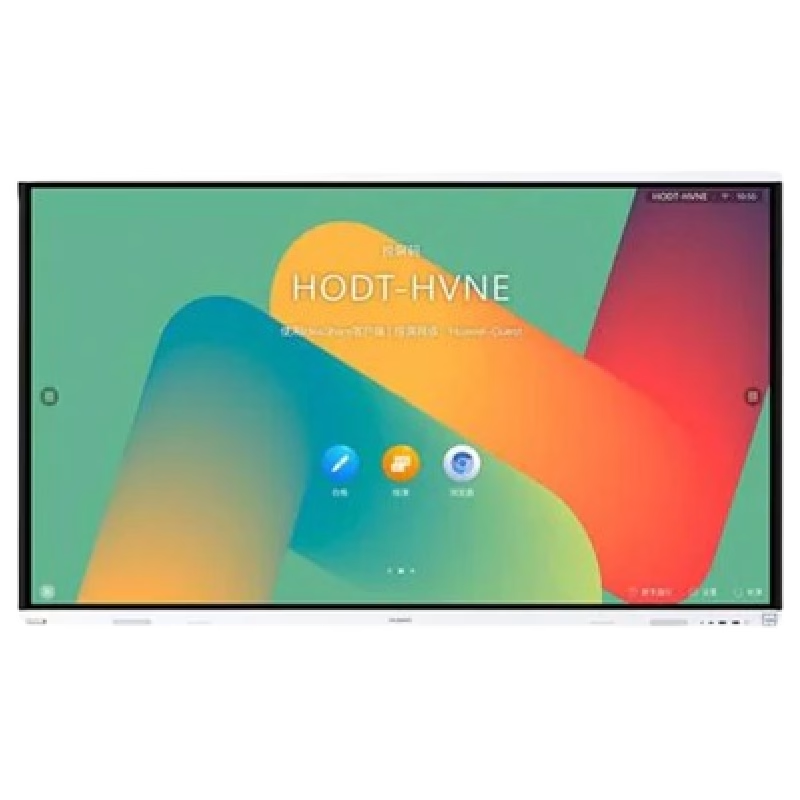
Huawei IdeaHub Board 2 86-inch display delivers an immersive teaching and collaboration experience with large 4K visuals. It helps teachers present clearly and engage students effectively. As a result, classrooms benefit from better interaction and visibility. The 86-inch screen features 4K UHD resolution with zero-gap laminated glass. Therefore, it reduces reflection and improves clarity. Moreover, the D-LED backlight and 60Hz refresh rate ensure stable and consistent visuals. It supports up to 20 touch points using infrared multi-touch technology. In addition, smart handwriting recognition and annotation allow natural writing. The low latency writing response improves accuracy during lessons. The system includes a quad-core processor with 4GB RAM and 32GB storage. Consequently, it runs applications smoothly. It supports Android, Windows, iOS, and macOS for flexible integration. It also includes key capabilities such as 4K UHD resolution, multi-touch interaction, smart annotation tools, wide connectivity options, and cross-platform support. Huawei IdeaHub Board 2 86-inch display is built to enhance collaboration and simplify teaching. Specifications: 86-inch 4K UHD display with 3840 × 2160 resolution Supports up to 20 touch points with infrared technology Zero-gap laminated glass with D-LED backlight Low latency writing with smart annotation support Quad-core CPU with 4GB RAM and 32GB storage

AOC 24G2SPe IPS 165Hz The AOC 24G2SPe monitor elevates your gaming experience, offering immersive gameplay and superior visual performance. Equipped with advanced technology, it’s designed to meet the needs of gamers. Featuring a high refresh rate and quick response time, the 24G2SPe ensures smooth and tear-free gaming sessions, allowing you to stay ahead in the competition. The Full HD display with vivid colors and sharp details enhances your gaming visuals, making it the ideal choice for gamers seeking a competitive edge. The sleek and modern design of the AOC 24G2SPe blends seamlessly with your gaming setup, reflecting your commitment to excellence. Gamers and esports enthusiasts rely on this monitor to elevate their gaming performance, making it an essential component of their gaming rig. In summary, the monitor elevates your gaming with immersive experiences and superior visual performance. Don’t miss out on this gaming monitor that can enhance your gaming performance. Choose AOC 24G2SPe! IPS AdaptiveSync 165Hz 1ms 1920 × 1080 (FHD) HDMI

Genuine-spec touchpad flex cable for MacBook Pro 13″ with Touch Bar (Model A1708, 2016–2017)—restores full Force Touch functionality, haptic feedback, and precise multi-touch gesture control during trackpad repair or replacement. Compatible With: MacBook Pro 13″ (2016) – Model A1708 (Model Identifier: MacBookPro13,1) MacBook Pro 13″ (2017) – Model A1708 (Model Identifier: MacBookPro14,1) (Both years share the same internal trackpad assembly and flex cable.) MacBook Pro 13″ (2016) – Model A1708 (Model Identifier: MacBookPro13,1) MacBook Pro 13″ (2017) – Model A1708 (Model Identifier: MacBookPro14,1) (Both years share the same internal trackpad assembly and flex cable.) Part Type: Touchpad flex cable only — does not include the trackpad housing, Taptic Engine, or mounting hardware. This is the OEM-style ribbon cable that connects the trackpad to the logic board. Function: Transmits: Touch input coordinates Force Touch pressure data Haptic feedback signals to the Taptic Engine Enables full macOS gesture support: Force Click, three-finger lookup, swipe navigation, pinch-to-zoom, and smooth cursor tracking. Touch input coordinates Force Touch pressure data Haptic feedback signals to the Taptic Engine Enables full macOS gesture support: Force Click, three-finger lookup, swipe navigation, pinch-to-zoom, and smooth cursor tracking. OEM-Quality Build: Matches Apple’s original specifications in: Cable length and routing path Connector pitch and ZIF latch design EMI shielding and flex durability Cable length and routing path Connector pitch and ZIF latch design EMI shielding and flex durability Common Use Cases: Replacing a torn, creased, or liquid-damaged original flex cable Completing a trackpad replacement when the original cable is compromised Fixing intermittent trackpad behavior, loss of Force Touch, or complete unresponsiveness Replacing a torn, creased, or liquid-damaged original flex cable Completing a trackpad replacement when the original cable is compromised Fixing intermittent trackpad behavior, loss of Force Touch, or complete unresponsiveness Installation Note: Requires full bottom case removal and battery disconnection. Cable routes under internal components near the right speaker and logic board. Connects via a ZIF (Zero Insertion Force) socket—must be aligned carefully and latched gently. Recommended for experienced or certified technicians only. Requires full bottom case removal and battery disconnection. Cable routes under internal components near the right speaker and logic board. Connects via a ZIF (Zero Insertion Force) socket—must be aligned carefully and latched gently. Recommended for experienced or certified technicians only.

Genuine-spec touchpad flex cable for MacBook Pro 15″ (Model A1990, 2018–2019, Intel)—essential for restoring full Force Touch functionality, haptic feedback, and precise multi-touch gesture control during trackpad repair or replacement. Compatible With: MacBook Pro 15-inch (2018 & 2019, Model A1990, Model Identifiers MacBookPro15,2) with Intel Core i7/i9 processors. Part Type: Touchpad flex cable only — does not include the trackpad housing, Taptic Engine, or mounting hardware. This is the OEM-style ribbon cable that connects the trackpad to the logic board. Function: Transmits: Touch input coordinates Force Touch pressure data Haptic feedback signals to the Taptic Engine Enables full macOS gesture support: Force Click, three-finger lookup, swipe navigation, pinch-to-zoom, and smooth cursor tracking. Touch input coordinates Force Touch pressure data Haptic feedback signals to the Taptic Engine Enables full macOS gesture support: Force Click, three-finger lookup, swipe navigation, pinch-to-zoom, and smooth cursor tracking. OEM-Quality Build: Matches Apple’s original specifications in: Cable length and routing path Connector pitch and ZIF latch design EMI shielding and flex durability Cable length and routing path Connector pitch and ZIF latch design EMI shielding and flex durability Common Use Cases: Replacing a torn, creased, or liquid-damaged original flex cable Completing a trackpad replacement when the original cable is unusable Fixing intermittent trackpad behavior, loss of Force Touch, or complete unresponsiveness Replacing a torn, creased, or liquid-damaged original flex cable Completing a trackpad replacement when the original cable is unusable Fixing intermittent trackpad behavior, loss of Force Touch, or complete unresponsiveness Installation Note: Requires full bottom case removal and battery disconnection. Cable routes under internal components near the right speaker and logic board. Connects via a ZIF (Zero Insertion Force) socket—must be aligned carefully and latched gently. Recommended for experienced or certified technicians only. Requires full bottom case removal and battery disconnection. Cable routes under internal components near the right speaker and logic board. Connects via a ZIF (Zero Insertion Force) socket—must be aligned carefully and latched gently. Recommended for experienced or certified technicians only.

A sleek and secure pre-owned Lenovo ThinkPad T14s with 14" touchscreen, 10th Gen Core i5, 16GB RAM, and 256GB SSD—ideal for professionals who need portability, touch functionality, and enterprise-grade reliability.

The BenQ 32″ 4K UHD HDR Monitor delivers breathtaking clarity for all your computing needs. Whether you’re gaming, working, or streaming, this monitor provides stunning visuals. With its 4K UHD resolution, the BenQ 32″ Monitor offers four times the detail of Full HD. Enjoy crystal-clear images and sharp text for an immersive viewing experience. Featuring HDR technology, the BenQ 32″ 4K UHD Monitor enhances colors and contrast. This results in brighter whites, deeper blacks, and more vibrant colors for a realistic display. Designed for comfort, the BenQ 32″ Monitor includes a height-adjustable stand. Adjust the monitor to your preferred viewing angle and reduce strain during long hours of use. The BenQ 32″ 4K Monitor is perfect for multitasking. With ample screen space, you can easily view multiple windows and applications side by side without any clutter. Gamers will appreciate the BenQ 32″ Monitor’s fast response time and low input lag. Enjoy smooth gameplay and quick reactions, ensuring you stay ahead of the competition. Connectivity is a breeze with multiple ports, including HDMI, DisplayPort, and USB-C. Easily connect your devices and peripherals for a versatile and efficient setup. Eye-care technology is built into the BenQ 32″ 4K Monitor to reduce eye strain. Features like low blue light and flicker-free technology make long viewing sessions more comfortable. In conclusion, the BenQ 32″ 4K UHD HDR Monitor combines stunning visuals, ergonomic design, and advanced features. Upgrade your monitor today and enjoy an unparalleled viewing experience. Specifications: Display : 31.5″ VA Resolution : 4K UHD Refresh Rate : 60Hz Response Rate : 4ms GtG Built-in Speaker : 2W x2

The ViewSonic TD1630-3 16″ Touch Screen Monitor offers smooth touch control in a compact and modern design. It provides clear HD visuals for work and entertainment. The screen shows bright colors and sharp details. This makes browsing, drawing, and viewing content more enjoyable. Moreover, the ViewSonic TD1630-3 16″ Touch Screen Monitor supports 10-point multi-touch. You can tap, pinch, and swipe with fast response. The touch experience feels natural and smooth. This helps you work faster and more comfortably. In addition, the monitor includes HDMI and VGA connections. These ports make setup quick and simple. You can connect laptops, desktops, and other devices with ease. This gives you strong flexibility for daily use. Furthermore, the ViewSonic TD1630-3 16″ Touch Screen Monitor features a durable stand. You can tilt the screen for better viewing angles. This helps reduce strain during long use. The strong design keeps the monitor stable on your desk. Also, the monitor includes built-in speakers for easy audio playback. You can watch videos, join meetings, or listen to music without extra devices. This makes the monitor more convenient and practical. The compact size of the ViewSonic TD1630-3 16″ Touch Screen Monitor fits small desks and workspaces. It works well in homes, offices, shops, and reception areas. The clean design blends nicely with modern setups. This makes it suitable for many environments. Overall, the ViewSonic TD1630-3 16″ Touch Screen Monitor offers responsive touch control, clear visuals, and simple connectivity. It improves productivity and enhances entertainment. It is ideal for students, professionals, and businesses that need a reliable touch display. Specifications: Display : 16″ TN Resolution : 1366×768 Refresh Rate : 60Hz Response Time : 12ms

BenQ RE8604 86” 4K UHD Interactive Flat Panel is a large interactive display designed for classrooms, meeting rooms, and training environments. It supports touch interaction, built-in Android system, and 4K resolution for collaboration and presentations. It features an 86-inch IPS panel with 3840 × 2160 4K UHD resolution. Therefore, it delivers sharp visuals and wide viewing angles for group use. In addition, it supports up to 40-point multi-touch input for writing and collaboration. Moreover, it runs an Android-based system (EDLA-supported depending on configuration). As a result, users can open apps, use whiteboard tools, and present content directly on the display without an external PC. The display includes anti-glare glass. Therefore, it remains readable in bright environments. In addition, it supports 4K 60Hz output for smooth visuals during presentations and video playback. Furthermore, it includes HDMI, USB, USB-C, LAN, and OPS slot connectivity. As a result, it works with laptops, external PCs, and modular computing systems. It also includes built-in speakers for classroom and meeting audio. Therefore, it supports presentations without extra sound systems. Finally, the BenQ RE8604 delivers a large 4K interactive workspace with multi-touch control and flexible connectivity for education and business use. Specifications: Display: 86-inch IPS panel with 3840×2160 4K UHD resolution Touch: Up to 40-point multi-touch support for collaboration System: Android-based interactive platform (EDLA support depending on model) Connectivity: HDMI, USB, USB-C, LAN, and OPS slot Display: Anti-glare screen with 4K 60Hz smooth output

BATTERY DELL F3YGT 7.6V 60Wh Type F3YGT Battery for Dell Latitude 7480 7490 7280 7290 7380 7390 P73G001 P73G002 P28S001 P28S002 P29S002 DM3WC 2X39G DM6WC 451-BBYE 453-BBCF P28S P73G KG7VF 4-Cell About this item REPLACE BATTERY PART : 7.6V 60 WHr 4-Cell F3YGT battery replace part F3YGT DM3WC 2X39G 0DM3WC 0F3YGT 451-BBYE 453-BBCF KG7VF. (Only replace with type 60Wh battery, NOT fit DJ1J0 42WHr 3-Cell! Please check your original battery to make sure you get the correct replacement battery!) FIT LAPTOP MODELS: For Dell Latitude 12 7000 7280 7290 Latitude 13 7000 7380 7390 Latitude 14 7000 7480 7490 Latitude 7280 7290 7380 7390 7480 7490 E7280 E7290 E7380 E7390 E7480 E7490 P28S P73G P28S001 P28S002 P73G001 P73G002 Series laptop. (NOT fit for Dell Latitude 7390 2-in-1 Series) SPECIFICATION: Model Name: 60Wh Standard Rechargeable Li-ion Battery Type F3YGT; Battery Type: Li-Ion Polymer; Voltage: 7.6V; Capacity: 60Wh; Cells: 4-cell; Size: About 9.37×3.78×0.22inch; Weight: About 10OZ / 0.63lb; Condition: 100% New; Life span: About 300-500 discharge per charge cycles; Packages includes: 1PC F3YGT laptop battery(with two free screwdrivers and user manual for easy installation, battery cable NOT included)

SanDisk 2TB Portable SSD - Up to 800MB/s, USB-C, USB 3.2 Gen 2, Updated Firmware - External Solid State Drive - SDSSDE30-2T00-G26 SanDisk 2TB Portable SSD – Up to 800MB/s, USB-C, USB 3.2 Gen 2, Updated Firmware – External Solid State Drive – SDSSDE30-2T00-G26 About this item Solid state performance with up to 800MB/s read speeds in a portable drive. (Based on internal testing; performance may be lower depending on host device, interface, usage conditions and other factors. 1MB=1,000,000 bytes.) Back up your content and memories on a storage solution that fits seamlessly into your mobile lifestyle. Take it with you on your adventures—up to two-meter drop protection means this durable drive can take a beating. (Based on internal testing.) Secure it to your belt loop or backpack for extra peace of mind thanks to the tough rubber hook. From SanDisk, a brand professional photographers trust to take on assignments.

The LG UltraGear 24″ 180Hz Gaming Monitor delivers exceptional performance for gamers seeking speed and visual precision. Its 23.8-inch Full HD IPS display ensures sharp images and vibrant colors from wide viewing angles. With a rapid 180Hz refresh rate and 1ms (GtG) response time, this monitor minimizes motion blur, providing smooth gameplay even in fast-paced scenarios. These features give you a competitive edge by allowing quicker reactions during intense gaming sessions. The monitor supports HDR10 and covers 99% of the sRGB color spectrum, enhancing visual immersion with rich and accurate colors. This ensures that game environments appear more lifelike and engaging. Equipped with both NVIDIA G-SYNC and AMD FreeSync technologies, the UltraGear monitor reduces screen tearing and stuttering. This compatibility ensures a seamless gaming experience across various graphics cards. Its virtually borderless design on three sides offers an immersive viewing experience, making it ideal for multi-monitor setups. The sleek aesthetics complement any gaming or workstation setup. Additional gaming features like Black Stabilizer, Crosshair, and FPS Counter provide enhanced visibility and targeting precision. These tools assist in identifying enemies and maintaining focus during gameplay. The monitor includes both HDMI and DisplayPort inputs, offering flexibility in connectivity options for different devices. This ensures compatibility with various gaming consoles and PCs. In summary, the LG UltraGear 24″ 180Hz Gaming Monitor combines high-speed performance, vivid visuals, and gamer-centric features, making it a solid choice for both casual and competitive gamers. Specifications: Display : 24″ VA Resolution : FHD 1920 x 1080 Refresh Rate : 180Hz Response Rate : 5ms GTG

The Samsung 75″ The Frame Pro 4K Vision AI Smart TV QA75LS03FWUXTW uses a 75-inch 4K LCD panel with 3840 × 2160 resolution. It is designed for both TV viewing and wall-mounted display use. The TV uses Samsung’s Vision AI and image processing to adjust picture settings in real time. As a result, brightness, contrast, and color are optimized based on content type and scene changes. In addition, the system supports 4K upscaling for lower-resolution content. The display supports HDR formats for compatible content, which improves contrast between bright and dark areas. It also includes motion processing to reduce blur during fast-moving scenes such as sports and action content. Samsung equips this model with Tizen OS. Therefore, users access streaming apps, SmartThings integration, and smart features through a unified interface. The TV also supports wireless connectivity through Wi-Fi and Bluetooth for external devices. Connectivity includes HDMI ports, USB ports, Ethernet LAN, and optical audio output. It also supports external audio systems and gaming consoles through standard input options. This model includes The Frame design concept, which allows the display to function as both a TV and a digital art display when not in use. Specifications: 75-inch 4K UHD LCD panel with 3840 × 2160 resolution Vision AI image processing with automatic adjustments HDR support for compatible content Tizen OS smart platform with streaming apps HDMI, USB, Wi-Fi, Bluetooth, Ethernet connectivity

PCE M8-700 UPS (line-interactive) — 700 VA / 360 W backup unit for 220–240 V input. Protects PCs, routers, small electronics from outages and voltage swings. The PCE M8-700 is a line-interactive UPS designed for home or small office use. It provides backup power, voltage regulation (AVR), surge protection, and supports automatic switching during outages. Ideal for desktop PCs, network gear, monitors, or point-of-sale systems. Features & Capabilities Line-interactive topology: regulates input voltage without switching to battery when voltage fluctuates mildly. Automatic Voltage Regulation (AVR) to correct undervolt/overvolt conditions. Simulated (stepped) sine wave output in battery mode. Surge, overload, short circuit, discharge protections built in. Cold start capability (ability to power on from battery with no mains) LED + audible alarms for status (battery mode, overload, fault) USB / RS232 interface in some variants for power management (shutdown, monitoring) Technical Specifications What “Input 220–240 VAC, 50/60 Hz, 3.7 A” Means (and Caveats) If the specification you’re giving is “3.7 A” at input, that corresponds to a maximum input current draw when the UPS is handling a heavy load or during charging cycles. At 230 V × 3.7 A ≈ 850 W of input capacity. The unit’s 360 W output means there’s overhead for losses, inverter inefficiency, battery charging, etc. The UPS must operate within the stated voltage and frequency ranges — if input is too low or too high, it may switch to battery or go into protection mode.

WiWU Waterproof Lycra Cosmo Laptop Slim Bag Laptop Handbag with Strap for Men and Women
