
Genuine-spec touchpad flex cable for MacBook Pro 15″ (Model A1707, 2016–2017)—restores full Force Touch functionality, haptic feedback, and precise multi-touch gesture control during trackpad repair or replacement. Compatible With: MacBook Pro 15″ (2016) – Model A1707 (Model Identifier: MacBookPro13,2) MacBook Pro 15″ (2017) – Model A1707 (Model Identifier: MacBookPro14,2) MacBook Pro 15″ (2016) – Model A1707 (Model Identifier: MacBookPro13,2) MacBook Pro 15″ (2017) – Model A1707 (Model Identifier: MacBookPro14,2) Part Type: Touchpad flex cable only — does not include the trackpad housing, Taptic Engine, or mounting hardware. This is the OEM-style ribbon cable that connects the trackpad to the logic board. Function: Transmits: Touch input coordinates Force Touch pressure data Haptic feedback signals to the Taptic Engine Enables full macOS gesture support: Force Click, three-finger lookup, swipe navigation, pinch-to-zoom, and smooth cursor tracking. Touch input coordinates Force Touch pressure data Haptic feedback signals to the Taptic Engine Enables full macOS gesture support: Force Click, three-finger lookup, swipe navigation, pinch-to-zoom, and smooth cursor tracking. OEM-Quality Build: Matches Apple’s original specifications in: Cable length and routing path Connector pitch and ZIF latch design EMI shielding and flex durability Cable length and routing path Connector pitch and ZIF latch design EMI shielding and flex durability Common Use Cases: Replacing a torn, creased, or liquid-damaged original flex cable Completing a trackpad replacement when the original cable is compromised Fixing intermittent trackpad behavior, loss of Force Touch, or complete unresponsiveness Replacing a torn, creased, or liquid-damaged original flex cable Completing a trackpad replacement when the original cable is compromised Fixing intermittent trackpad behavior, loss of Force Touch, or complete unresponsiveness Installation Note: Requires full bottom case removal and battery disconnection. Cable routes under internal components near the right speaker and logic board. Connects via a ZIF (Zero Insertion Force) socket—must be aligned carefully and latched gently. Recommended for experienced or certified technicians only. Requires full bottom case removal and battery disconnection. Cable routes under internal components near the right speaker and logic board. Connects via a ZIF (Zero Insertion Force) socket—must be aligned carefully and latched gently. Recommended for experienced or certified technicians only.

Fast-charging feature available on select iPhone and iPad models.

The Meetion Mini 4000 Black is a compact wireless keyboard and mouse combo designed for clean and convenient everyday use. With a mini-space-saving layout and stable wireless connection, it’s perfect for office work, home setups, and laptop users who want a neat, clutter-free desk. The Meetion Mini 4000 is a stylish and practical wireless keyboard and mouse set made for users who prefer a compact and modern workspace. Its mini keyboard design saves desk space while still offering comfortable typing for daily tasks. The wireless mouse provides smooth control and easy navigation, making this combo ideal for offices, students, and home users. With plug-and-play wireless connectivity, setup is simple—just connect the receiver and start using it instantly. Wireless Keyboard & Mouse Combo for a clean and clutter-free setup Compact Mini Keyboard Design saves space and fits small desks easily Stable Wireless Connection for smooth performance Plug & Play Receiver – quick setup without drivers Smooth Wireless Mouse for accurate control Comfortable Typing Layout for everyday productivity Modern Black Finish suitable for any workspace Ideal for Laptops & Desktops Perfect for office workers, students, and home users needing a compact wireless combo for laptops or desktops. Works with most devices that support USB.

Genuine-spec touchpad flex cable for Apple’s 12-inch MacBook (Model A1534, Early 2015 / Early 2016 / Mid 2017)—essential for restoring full Force Touch trackpad functionality, haptic feedback, and multi-touch gesture support. Compatible With: MacBook 12″ (Early 2015) – 1.1GHz Core M MacBook 12″ (Early 2016) – 1.1GHz/1.3GHz Core M MacBook 12″ (Mid 2017) – 1.2GHz/1.3GHz Core m3/i5/i7 All share Model Number A1534 and Model Identifier MacBook8,1 / MacBook9,1 / MacBook10,1 respectively. MacBook 12″ (Early 2015) – 1.1GHz Core M MacBook 12″ (Early 2016) – 1.1GHz/1.3GHz Core M MacBook 12″ (Mid 2017) – 1.2GHz/1.3GHz Core m3/i5/i7 All share Model Number A1534 and Model Identifier MacBook8,1 / MacBook9,1 / MacBook10,1 respectively. Part Type: Touchpad flex cable only—does not include the trackpad housing, Taptic Engine, or mounting brackets. This is the ribbon cable that connects the Force Touch trackpad to the logic board. Function: Critical for Force Touch functionality—transmits pressure-sensitive input, multi-touch gestures (e.g., pinch, swipe, Force Click), and haptic feedback signals to the Taptic Engine. OEM-Quality Construction: Precisely matches Apple’s original in length, connector pitch, shielding, and routing—ensures reliable signal integrity and compatibility with macOS. Common Use Cases: Replacing a torn, creased, or liquid-damaged flex cable Restoring unresponsive or erratic trackpad behavior Completing a trackpad replacement when the original cable is unusable Replacing a torn, creased, or liquid-damaged flex cable Restoring unresponsive or erratic trackpad behavior Completing a trackpad replacement when the original cable is unusable Installation Note: Requires full bottom case removal and delicate disconnection of the ZIF connector. The cable routes tightly under the battery—extreme care is required. Recommended for experienced or certified technicians only.

Acer KA222Qbi The Acer KA222Qbi entry-level series provide a superb user experience and don’t compromise . on quality. With a choice of display size and a ZeroFrame. design it is ideal for use in homes and offices. Whether it’s running productivity apps or playing games this monitor has it all. Viewable Screen Size Acer KA222Qbi 54.6 cm (21.5″) Aspect Ratio 16:9 Response Time 1 ms VRB Backlight Technology LED Horizontal Viewing Angle 178° Vertical Viewing Angle 178° Panel Technology In-plane Switching (IPS) Technology Frequency (Horizontal/Vertical) 30KHz-85KHz/48Hz-75Hz Pixel Pitch 0.25 mm Tilt Angle -5° to 15° Maximum Adjustable Height No Video Maximum Resolution 1920 x 1080 Native Contrast Ratio 1,000:1 Dynamic Contrast Ratio 100,000,000:1 Colour Supported 16.7 Million Colours Colour Depth 8-bit Color Gamut 72% NTSC Dynamic Contrast Ratio 100,000,000:1 Brightness 250 cd/m² Tearing Prevention Technology AMD FreeSync™ (HDMI VRR) Interfaces/Ports Acer KA222Qbi VGA Yes HDMI Yes Power Description Standby Power Consumption (Energy Star) 270 mW Off-Mode Power Consumption (Energy Star) 210 mW Operating Power Consumption (Energy Star) 15.50 W Miscellaneous Environmental Certification MPR II Package Contents 1 x KA222Q Widescreen LCD Monitor 1 x Power Cord(EURO/UK) 1 x VGA Cable Physical Characteristics Colour Black VESA Mount Compatible Yes VESA Mount Standard 100 x 100 Height 295 mm Width 490 mm Depth 65 mm Weight (Approximate) 3.09 kg Weight with Stand (Approximate) 3.44 kg Specifications: Specifications 21.5″ ZeroFrame FreeSync 1ms, IPS 1 year warranty

The Samsung Smart Monitor M7 LS43DM702UMXUE features a 43-inch VA panel with 4K UHD resolution (3840 × 2160). It combines a monitor and smart TV platform in a single display, making it suitable for productivity, entertainment, and streaming without requiring a connected PC. The display supports a maximum refresh rate of 60Hz and provides sharp image quality for office work, media consumption, and general computing tasks. In addition, the 4K resolution offers four times the detail of Full HD content. Samsung equips this model with Tizen OS. Therefore, users can access streaming applications, web services, and smart features directly from the monitor. It also supports Samsung TV Plus and cloud-based productivity applications. Connectivity includes HDMI ports, USB ports, Wi-Fi 5, Bluetooth 5.2, and USB-C. The USB-C connection supports display input, data transfer, and up to 65W power delivery for compatible devices. The monitor includes built-in speakers and supports wireless screen mirroring from compatible smartphones, tablets, and laptops. As a result, users can share content without additional cables. This model focuses on productivity, entertainment, and smart connectivity while providing a large 43-inch 4K display. Specifications: 43-inch VA panel with 3840 × 2160 4K UHD resolution 60Hz refresh rate Tizen OS with built-in streaming applications USB-C with up to 65W Power Delivery Wi-Fi 5, Bluetooth 5.2, HDMI, and USB connectivity

Elevate Your Gaming with the ViewSonic VX2728 27” 180Hz Gaming Monitor – Simple, Smooth, and Immersive! Are you searching for a monitor that can elevate your gaming experience? Look no further than the ViewSonic VX2728 27” opens 165 to 180Hz Fast IPS Gaming Monitor, designed to provide a simple, smooth, and immersive gaming experience. First and foremost, let’s talk about simplicity. Setting up this gaming monitor is a breeze. With straightforward instructions, you’ll have your high-quality gaming display ready to go in no time. No need for complicated technical knowledge. therefore One of the standout features of the ViewSonic VX2728 is its impressive 180Hz refresh rate. This means that you can enjoy incredibly smooth and responsive gameplay, free from annoying screen tearing and lag. It’s gaming made easy. The Fast IPS panel on this monitor ensures vibrant colors and wide viewing angles, making your games come to life. You don’t need to be a tech expert to appreciate the stunning visuals that this monitor offers. This gaming monitor has been designed with user-friendliness in mind. It comes with a simple interface that allows you to customize settings such as brightness and contrast easily. No need to navigate complex menus. Additionally, the monitor boasts ultra-slim bezels that minimize distractions, providing an immersive gaming experience. With your focus squarely on the game, you’ll find yourself performing at your best. In conclusion, the ViewSonic VX2728 27” 180Hz Fast IPS Gaming Monitor offers simplicity, smooth gameplay, and an immersive experience. With easy setup, stunning visuals, and user-friendly features, it’s the ideal choice for gamers of all levels. Elevate your gaming experience with the ViewSonic VX2728 today. you can always check here and if you like to see other options you can check here ! Specifications: Fast IPS Display with HDR10 AMD FreeSync™ Premium for smooth gameplay VESA AdaptiveSync for tear-free gaming experience 1 year warranty

The HP Omen 27″ FHD 165Hz Gaming Monitor delivers smooth, sharp visuals for gaming and everyday use. Its Full HD resolution (1920×1080) shows crisp details in games, videos, and work tasks. The 27-inch screen provides ample space for immersive gameplay or multitasking. This helps you stay focused and engaged. Moreover, the HP Omen 27″ FHD 165Hz Gaming Monitor features a fast 165 Hz refresh rate. This high refresh rate makes motion look fluid and clean on screen. Fast-paced games and action scenes appear smoother and more responsive. This reduces blur and improves reaction time during gameplay. In addition, the monitor offers a 1 ms gray-to-gray response time (with overdrive). This helps reduce ghosting and keeps fast movements clear and sharp. Your controls feel more responsive, which is ideal for competitive games. The monitor also supports adaptive sync technology to cut screen tearing and stutter. Furthermore, the HP Omen 27″ FHD 165Hz Gaming Monitor uses an IPS panel that gives wide viewing angles and good color accuracy. Colors stay consistent even when viewed from sides. This helps when you are reading, editing, or sharing your screen with others. Also, the monitor includes eye-comfort features to ease long sessions. A low-blue-light mode helps reduce eye strain during extended gaming or work hours. The anti-glare screen surface helps in bright rooms too. The design of the HP Omen 27″ FHD 165Hz Gaming Monitor is modern and clean with thin bezels. It fits well on desks of different sizes. The stand is adjustable for comfortable viewing angles, and the build feels sturdy and stable. Overall, the HP Omen 27″ FHD 165Hz Gaming Monitor combines speed, clarity, and comfort. It enhances both gaming performance and daily computing tasks. This monitor is ideal for gamers and users wanting a balanced, responsive, and reliable display. Specifications: Display : 27″ IPS Resolution : 1920×1080 Refresh Rate : 165Hz Response Time : 1ms

OEM-quality trackpad replacement (without flex cable) for MacBook Pro 14″ (Model A2442, 2021, M1 Pro/Max) in Silver finish—designed for precise Force Touch performance, seamless gesture control, and perfect visual integration with the original chassis. Compatible With: MacBook Pro 14-inch (2021, Model A2442) with Apple M1 Pro or M1 Max chip. Part Type: Trackpad only—does not include the flex cable, Taptic Engine, or mounting hardware. Intended for professional technicians who will reuse the original internal components. Finish: Silver—matches the Silver and Space Gray top/bottom case (Apple uses the same trackpad finish across both color variants for this model). Force Touch Capable: Fully supports pressure-sensitive input and haptic feedback when paired with the original Taptic Engine and logic board—ensuring full macOS gesture and functionality support. OEM Precision: Features the same glass surface, curvature, and micro-click mechanism as Apple’s original—delivering consistent tracking accuracy and tactile response. Installation Requirements: Requires complete bottom case removal and careful transfer of the original flex cable and Taptic Engine. Adhesive must be applied precisely to maintain structural integrity and sensor alignment. Recommended for certified or experienced repair professionals only.

The ViewSonic VX2779A-HD-PRO 27″ FHD 240Hz Gaming Monitor delivers ultra-smooth visuals for fast games. It features a 27-inch IPS panel that offers wide viewing angles and rich color. Moreover, the high 240 Hz refresh rate helps motion look fluid and responsive in action titles. This gaming monitor supports Full HD 1920×1080 resolution for crisp images and clear details. Additionally, the 1 ms response time (MPRT) reduces blur and ghosting in fast scenes. Adaptive sync tech like AMD FreeSync and NVIDIA G-SYNC compatibility helps cut screen tearing and stutter. The ViewSonic VX2779A-HD-PRO also includes HDR10 support to boost contrast and color depth for games and videos. Furthermore, anti-glare coating and low blue light help reduce eye strain during long play sessions. Multiple ports make setup easy with two HDMI and one DisplayPort connection. This monitor works well for competitive gaming, esports, and general entertainment. Therefore, it suits both PC gamers and console players. Finally, it combines speed, quality visuals, and versatile connectivity for everyday gaming use. Specifications: 27″ IPS panel with 1920×1080 Full HD resolution 240 Hz refresh rate and 1 ms (MPRT) response time HDR10 support and wide 178° viewing angles Connectivity: 2× HDMI 1.4 + 1× DisplayPort 1.4 Eye-care features: anti-glare, low blue light, and flicker-free

VIEWSONIC MONITOR TD2423 Display Size (in.): 24 Viewable Area (in.): 23.6 Panel Type: VA Technology Resolution: 1920 x 1080 Resolution Type: FHD (Full HD) Static Contrast Ratio: 3,000:1 (typ) Dynamic Contrast Ratio: 20M:1 Light Source: LED VIEWSONIC MONITOR Brightness: 250 cd/m² (typ) Colors: 16.7M Color Space Support: 8 bit (6 bit + Hi-FRC) Aspect Ratio: 16:9 Response Time (Typical GTG): 7ms Response Time (GTG w/OD): 7ms Response Time (Typical Tr+Tf): 25ms Viewing Angles: 178º horizontal, 178º vertical Backlight Life (Hours): 40000 Hrs (Min) Curvature: Flat Refresh Rate (Hz): 75 VIEWSONIC MONITOR Blue Light Filter: Yes Flicker-Free: Yes Color Gamut: NTSC: 72% size (Typ) sRGB: 104% size (Typ) Pixel Size: 0.272 mm (H) x 0.272 mm (V) Touch Screen: IR, 10-point multi-touch Surface Treatment: Glossy, Hard Coating (7H) Cover Glass Thickness: 1.85mm CompatibilityVIEWSONIC MONITOR TD2423 PC Resolution (max): 1920×1080 Mac® Resolution (max): 1920×1080 PC Operating System: Windows 7/8.1/10/11 certified; macOS tested Mac® Resolution (min): 1920×1080 Connector VGA: 1 USB 2.0 Type A: 2 USB 2.0 Type B: 1 3.5mm Audio In: 1 3.5mm Audio Out: 1 HDMI 1.4: 1 DVI-D: 1 Power in: 3-pin Socket (IEC C14 / CEE22) Specifications: VIEWSONIC MONITOR TD2423 Display Size (in.): 24 Viewable Area (in.): 23.6 Panel Type: VA Technology Resolution: 1920 x 1080 Resolution Type: FHD (Full HD) Static Contrast Ratio: 3,000:1 (typ) 1 Year Warranty Manufacturer link

Experience premium mobility and intuitive control with the pre-owned ThinkPad T490s. Featuring a powerful Intel Core i5 8th Gen processor, 16GB RAM, and a 256GB NVMe SSD, this ultra-slim professional laptop stands out with its responsive FHD Touchscreen for a more interactive and efficient workflow.

Genuine-spec touchpad flex cable for MacBook Pro 16″ (Model A2159, 2019, Intel)—essential for restoring full Force Touch functionality, haptic feedback, and precise trackpad responsiveness during repair or replacement. Compatible With: MacBook Pro 16-inch (2019, Model A2159) with Intel Core i7/i9 processors (Model Identifier: MacBookPro16,1). Part Type: Touchpad flex cable only—does not include the trackpad, Taptic Engine, or mounting hardware. This is the OEM-style ribbon cable that connects the trackpad to the logic board. Function: Transmits touch input, Force Touch pressure data, and haptic feedback signals—critical for macOS gestures (e.g., Force Click, three-finger swipe, pinch-to-zoom) and Taptic Engine operation. OEM-Quality Build: Matches Apple’s original flex circuit in length, connector pitch, shielding, and bend radius—ensures reliable signal integrity and durability under repeated use. Common Use Cases: Replacing a torn, frayed, or corroded original flex cable Completing a trackpad replacement when the original cable is damaged Fixing intermittent or unresponsive trackpad behavior caused by cable failure Replacing a torn, frayed, or corroded original flex cable Completing a trackpad replacement when the original cable is damaged Fixing intermittent or unresponsive trackpad behavior caused by cable failure Installation Note: Requires full bottom case removal and careful routing beneath the battery and logic board. Connectors use ZIF (Zero Insertion Force) sockets—must be properly aligned and latched without force. Recommended for certified or experienced technicians only.

Genuine-spec US layout keyboard replacement for MacBook Pro 13″ (Model A1466, Late 2015–Early 2016)—featuring traditional scissor-switch mechanism, backlighting, and full OEM compatibility for reliable, comfortable typing. Compatible With: MacBook Pro 13-inch non-Touch Bar models: Late 2015 (Intel Core i5/i7, Retina, A1466, Model Identifier MacBookPro12,1) Early 2016 (Intel Core i5/i7, Retina, A1466, MacBookPro13,1) Late 2015 (Intel Core i5/i7, Retina, A1466, Model Identifier MacBookPro12,1) Early 2016 (Intel Core i5/i7, Retina, A1466, MacBookPro13,1) Layout: Standard US English (QWERTY) with full-size keys, inverted-T arrow keys, and dedicated function row (F1–F12). Keyboard Type: Traditional scissor-switch mechanism—not Butterfly or Magic Keyboard—known for durability, deeper key travel, and tactile feedback. Integrated Features: Backlit keys for low-light use, ambient light sensor support, and OEM-style ribbon cable for direct logic board connection. Build & Fit: Precision-engineered to match Apple’s original dimensions and mounting points—ensures flush alignment within the top case and consistent key height. Installation Note: Keyboard is secured with screws and minimal adhesive (unlike later glued models), making replacement more accessible. Still requires full top case disassembly and battery disconnect. Suitable for intermediate to advanced technicians.

Are you in search of a reliable monitor that combines functionality and style? Look no further than the LG DualUp 28″ Monitor. This comprehensive review will delve into its features, highlighting why it’s an excellent choice for both work and play. Firstly, the dual-screen capabilities of the LG 28″ Monitor provide a seamless multitasking experience. Boost your productivity by effortlessly managing multiple applications side by side, streamlining your workflow. The sleek design of this monitor not only adds a touch of sophistication to your workspace but also ensures practicality. Its slim bezels and adjustable stand contribute to a clutter-free and ergonomic setup, promoting comfort during extended use. With a crisp 4K UHD resolution, this monitor delivers stunning visuals, making it ideal for both work and entertainment. Enjoy sharp images and vibrant colors for a truly immersive experience, whether you’re editing documents or watching your favorite movies. Connectivity is a breeze with the LG 28″ Monitor. Multiple ports, including HDMI and USB-C, offer versatile options for connecting various devices. Say goodbye to cable clutter and hello to a streamlined and organized workspace. The inclusion of reader mode and flicker-safe technology prioritizes your eye health during prolonged use. Reduce eye strain and fatigue, ensuring a comfortable viewing experience for extended periods. In conclusion, the LG DualUp 28″ Monitor is a versatile and stylish addition to any workspace. Its dual-screen capabilities, sleek design, and advanced features make it a top choice for those seeking an enhanced computing experience. Upgrade your setup with the LG DualUp 28″ Monitor today! Specifications: Display : 28″ Nano IPS Resolution : SDQHD (2560 x 2880) Refresh Rate : 60hz Response Time : 5ms GTG

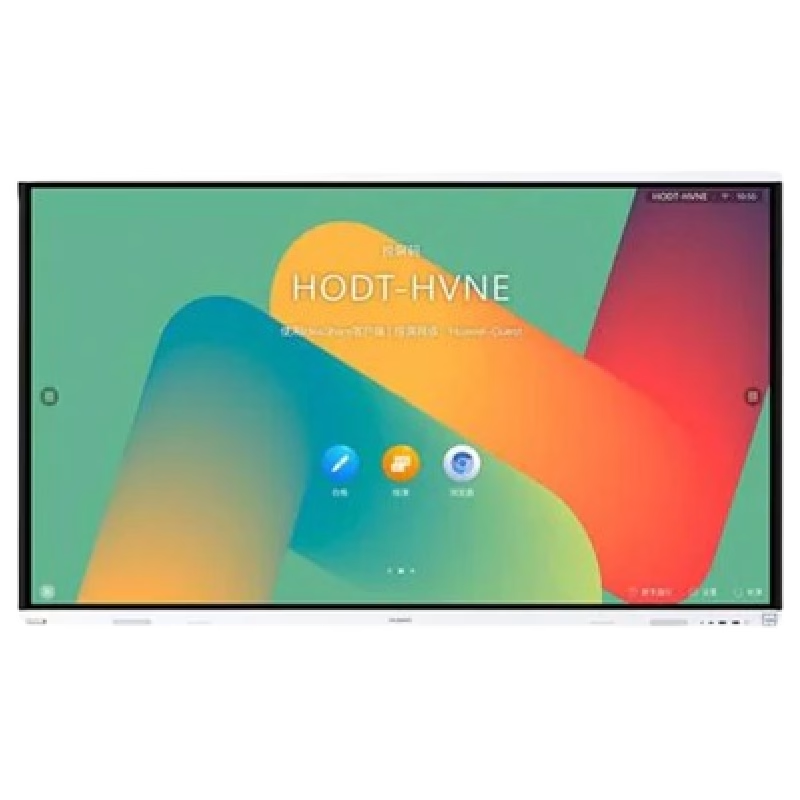
The HUAWEI IdeaHub B3 IHB3-65SA is a 65-inch intelligent collaboration device designed for meetings and hybrid workspaces. It combines a 4K interactive display with built-in audio, video, and whiteboard tools for smooth teamwork. Additionally, it supports cloud meetings and wireless sharing for flexible communication. Moreover, it uses a 4K UHD infrared touch screen with low writing latency of about 16 ms. Therefore, users can write and interact smoothly during presentations and discussions. Furthermore, it includes a built-in 4K camera with intelligent tracking. So, it automatically follows speakers and improves video meeting quality. It also integrates multiple microphones and speakers for clear sound pickup and output. In addition, it supports Wi-Fi 6 connectivity and BYOM (Bring Your Own Meeting). Therefore, users can connect their own devices easily and start meetings without extra setup. Also, it runs on Huawei’s collaboration platform with support for cloud meetings, wireless projection, and digital whiteboarding. Overall, the Huawei IdeaHub B3 65-inch delivers an all-in-one meeting solution with smart collaboration tools, strong connectivity, and interactive display performance for modern offices. Specifications: 65-inch 4K UHD infrared touch display Built-in 4K camera with intelligent tracking Low 16 ms writing latency for smooth interaction Wi-Fi 6 support with BYOM connectivity Integrated speakers and multi-microphone system

Remax F41 6″ Wireless Clamp Fan – USB‑C rechargeable (4,000 mAh), 4 speeds, 720° rotation, up to 3 hrs runtime.Modular 3‑in‑1 design with detachable grille, washable parts, and night‑light feature. Model: Remax F41 6-inch Wireless Air Circulating Clamp Fan Power & Battery: Rechargeable 4,000 mAh battery; USB-C charging (~3 hours to full charge), offers ~3 hours continuous use at high speeds Operation Modes: 4 fan speeds, 3‑in‑1 usage (desktop, clamp, or hanging), 720° wide-angle rotation Design Features: Detachable, washable grille plus built-in warm night light Care Tips: Recharge every two months if unused; avoid inserting objects into blades

The Xiaomi TV A Pro 75 2026 delivers stunning picture quality with its 75″ QLED 4K display. It shows sharp detail in movies, games, and streams thanks to its 3840 × 2160 resolution. The large screen size makes everything feel cinematic and immersive. This transforms your living room into a real home theater. Moreover, the Xiaomi TV A Pro 75 2026 uses a QLED panel covering 94 % of the DCI-P3 color gamut and over 1.07 billion colors. Colors appear vivid, natural, and true to life. Dark scenes stay deep and blacks remain rich. This improves contrast and makes movies and shows look realistic. In addition, the TV supports HDR standards like HDR10+, HLG, and Filmmaker Mode. Highlights, shadows, and contrast all get boosted for better visual depth. Combined with the bright panel and QLED colors, this gives a richer viewing experience for films, nature documentaries, and gaming. Furthermore, Xiaomi TV A Pro 75 2026 includes smooth motion enhancement (MEMC) to reduce motion blur during sports, action movies, or fast-paced games. It also supports a “Game Boost” mode that can reach 120 Hz refresh (when using 1080p over HDMI), giving smoother action and better responsiveness in games. Also, the smart features add real convenience. The TV runs Google TV, giving you access to streaming apps, casting, and voice control. Built-in Chromecast, Google Assistant, and Bluetooth 5.0 make setup and use simple and flexible. This makes it easy to stream films, shows, or mirror your phone quickly. In addition, the Xiaomi TV A Pro 75 2026 features a slim, nearly bezel-less metal design that looks modern and clean. Whether mounted on a wall or placed on its stand, it blends smoothly in living rooms and home theaters. The build quality feels solid and premium. Overall, the Xiaomi TV A Pro 75 2026 blends size, color quality, smart features, and motion performance in one impressive package. It’s ideal for cinema-style entertainment, gaming, and everyday streaming. Specifications: Display Type QLED Resolution 4K, 3840 × 2160 Speaker 2 x 10W Dimensions including base (L × W × H) : 1668*391*1027mm Dimensions not including base (L × W × H) : 1668*76*959mm CPU Quad cortex A55 GPU Mali-G52 MC1 RAM 2GB ROM 8GB

Arabic Keyboard Cover Skin for MacBook Air 13'' (A1369/A1466, NO Touch ID) 2012 -2017 /MacBook Pro 13" 15'' 2013-2015 with or w/out Retina Display Ultra Thin Silicone Keyboard Protector (Black) Arabic Keyboard Cover Skin for MacBook Air 13” (A1369/A1466, NO Touch ID) 2012 -2017 /MacBook Pro 13″ 15” 2013-2015 with or w/out Retina Display Ultra Thin Silicone Keyboard Protector (Black) About this item COMPATIBLE WITH: 2015 and before 2015 version Macbook: 1) MacBook Air 13″ (Models: A1369 and A1466); 2) MacBook Pro 13.3″ (Model: A1278); 3) MacBook Pro 13.3″ with Retina Display (Models: A1502 and A1425, 2013-2012 released); 4) MacBook Pro 15″ with Retina Display (Model: A1398, 2013-2012 released); 5) MacBook Pro 15.4″ Model: A1286 [√] MORE PROTECTION for KEYBOARD: waterproof, dust-proof and dirt-proof design can prevent liquid, dust, cigarette ash, biscuit crumbs falling onto your keyboard to affect your keyboard’s life. [√] ACCURATE KEYS: every key is specially molded, manufactured to the quality available. Flexible, this cover is easy to apply and remove for cleaning [√] SOFT & ULTRA SKIN: ultra thin silicone keyboard cover skin, made it easier for typing. Soft keyboard protector can weaken the sound in typing [XX] ATTENTION!!: NOT FIT FOR: 2020-2016 Released Macbook Pro 13 inch 15 inch with Touch Bar/2020-2018 Released: Macbook Air 13-Inch. You can find the model number on the bottom of the laptop

