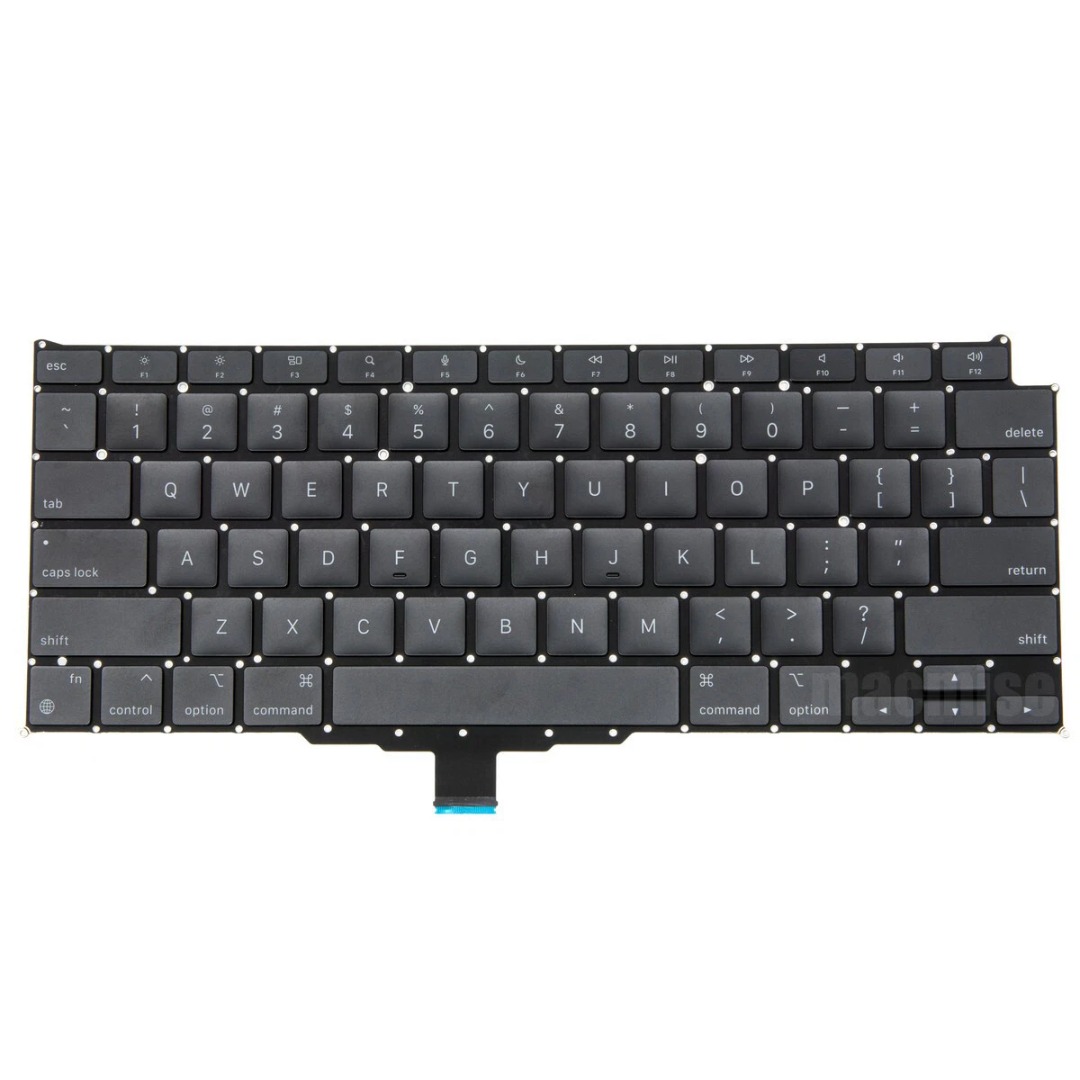

Genuine-spec US layout (QWERTY) black keyboard replacement for MacBook Air 13.6″ and 15″ models (2023–2025, M2/M3/M4 chips)—featuring Apple’s Magic Keyboard with scissor-switch mechanism, backlighting, and precise OEM fit. Compatible With: 13.6″ MacBook Air: A2681 (M2, 2022–2023), A3113 (M3, 2023–2024), A3240 (M4, 2024–2025) 15″ MacBook Air: A2941 (M2, 2023), A3114 (M3, 2023–2024), A3241 (M4, 2024–2025) 13.6″ MacBook Air: A2681 (M2, 2022–2023), A3113 (M3, 2023–2024), A3240 (M4, 2024–2025) 15″ MacBook Air: A2941 (M2, 2023), A3114 (M3, 2023–2024), A3241 (M4, 2024–2025) Keyboard Layout: Standard US English (QWERTY) with wide Enter key, dedicated left/right arrow keys in inverted-T layout, and full function row—matches Apple’s original US configuration. Design: Apple’s Magic Keyboard with scissor-switch mechanism—providing quiet, stable, and responsive typing with 1mm key travel and enhanced durability. Features: Integrated backlighting for low-light use, ambient light sensor compatibility, and OEM-style flex cable for direct logic board connection. Color: Sleek black keycaps—ideal for Space Gray and Midnight finishes, and visually consistent across all color variants. Precision Fit: Engineered to exact Apple specifications for alignment, key spacing, and mounting—ensures seamless integration into the original top case. Installation Note: The keyboard is factory-glued into the top case. Replacement requires full disassembly, careful removal, and professional-grade re-adhesion. Recommended for experienced technicians only.

Are you in the market for a reliable and budget-friendly monitor? Let’s delve into the Lenovo 27″ IPS 75Hz LED Monitor, a promising display that caters to both work and entertainment needs. Beginning with its size, the generous 27-inch screen provides an immersive viewing experience without overwhelming your workspace. The IPS technology ensures vibrant colors and wide viewing angles for optimal visual enjoyment. With a refresh rate of 75Hz, this monitor strikes a balance between smooth performance and affordability. Whether you’re working on spreadsheets, watching videos, or gaming casually, the 75Hz refresh rate ensures fluid on-screen motion. The LED backlighting technology not only contributes to energy efficiency but also enhances contrast, delivering deep blacks and bright whites. This feature is particularly advantageous for photo and video editing tasks, providing a more accurate representation of colors. Connecting peripherals is a breeze with the monitor’s versatile ports, including HDMI and VGA. This compatibility ensures seamless integration with various devices, from laptops to gaming consoles, offering flexibility for different usage scenarios. Lenovo’s commitment to user comfort is evident in the adjustable stand. Tilt and swivel functions allow you to find the optimal viewing angle, reducing eye strain during extended use. In terms of affordability, the Lenovo 27″ IPS 75Hz LED Monitor stands out as a cost-effective option without compromising on performance. It strikes a commendable balance between essential features and budget-conscious pricing. In conclusion, if you’re in search of a dependable 27-inch monitor that delivers on performance and affordability, the Lenovo IPS 75Hz LED Monitor is a worthy contender. Elevate your viewing experience without breaking the bank. Specifications: Display : 27″ IPS Resolution : FHD (1920×1080) Response Rate : Up to 4ms Refresh Rate : 75Hz

Original 12-inch Retina LCD display (Space Gray) for MacBook model A1534, pulled from a working unit. Drop-in replacement for cracked or faulty screens—genuine Apple part, ready to restore visuals. Overview:This is an original Apple Retina display assembly for the 12-inch MacBook (model A1534). It was removed (“pulled”) from a working unit, inspected, and is in usable condition. It’s ideal to replace damaged or failing screens without resorting to aftermarket copies. Key Features & Functionality: Retina resolution with sharp visuals and accurate colors Space Gray color matching original casing Integrated front glass, LCD panel, and display cable assembly Factory-quality optical layers and backlighting Compatible with MacBook A1534 (2015, 2016, 2017) variants Tested for functionality: display, backlight, no dead pixels (unless noted) Requires proper installation (cable alignment, hinge alignment) Detailed Specifications Important Notes & Considerations: Must match A1534 model exactly — other MacBook models won’t be compatible. Compare hinge mounting, cable routing, and connector orientation. Because it’s from a used unit, minor blemishes or microscopic dust may exist; always test before final assembly. Handle with care: the display glass is delicate. Professional installation is recommended unless you’re experienced with MacBook repairs.

MacBook Pro 13″ Keyboard Replacement/Compatible for Apple MacBook Pro A1708 Color :- Black, Layout :- US Apple MacBook Pro A1708 Keyboard is a high quality replacement keyboard which is perfect for replacing your old and broken laptop keyboard. Before you order,Please firstly compare the picture with your keyboard, especially the ribbon cable (position, length and width). Make sure that the model of laptop and part number of keyboard is the right one you need as well as the layout version.

The AOC Q27G3Z is a high-end 27″ gaming monitor with a QHD resolution of 2560×1440. It uses a Fast IPS panel that delivers excellent color and speed. In addition, it supports a refresh rate of 240 Hz and a response time of 0.5 ms (MPRT) for ultra-smooth gameplay. Its adaptive sync support ensures tear-free visuals during fast action. The AOC Q27G3Z covers wide color gamuts: NTSC 110 %, sRGB 123 %, and DCI-P3 101 %. This makes it ideal not only for gaming but also for content creation. Moreover, it is VESA DisplayHDR 400 certified, so highlights pop and blacks look deeper. The brightness reaches around 400 cd/m², making it suitable in well-lit rooms. Connectivity includes two HDMI 2.0 ports and two DisplayPort 1.4 inputs for flexibility across consoles and PCs. Additionally, the ergonomic stand allows height adjustment, tilt, swivel, and pivot for comfortable viewing in any setup. Its sleek black & red design blends into gaming rigs easily. In short, the AOC Q27G3Z combines speed, clarity and color accuracy in one package. It is a great choice for competitive gamers and creators who want a balanced monitor that handles both performance and visuals well. Check out other option here! Specifications: Display : 27″ Fast IPS Resolution : 2560 x 1440 (QHD) Refresh Rate : 240Hz Response Rate : 0.5ms

The ViewSonic VX2476-smhd 24″ 75Hz Monitor offers stunning visuals and smooth performance for both work and play. Its sleek and modern design adds a touch of elegance to any workspace. With a 24-inch Full HD display, the ViewSonic VX2476-smhd delivers crisp and vibrant images. Whether you’re watching movies, editing photos, or browsing the web, you’ll enjoy a clear and immersive viewing experience. The 75Hz refresh rate ensures smooth and fluid motion, reducing screen tearing and stuttering. This makes the ViewSonic VX2476-smhd perfect for gaming and fast-paced videos, providing a seamless experience. Designed with an ultra-thin bezel, the ViewSonic VX2476-smhd maximizes screen space and minimizes distractions. This makes it ideal for multi-monitor setups, allowing you to expand your workspace effortlessly. The ViewSonic VX2476-smhd features advanced IPS technology, ensuring accurate and consistent colors from every angle. This is perfect for collaborative work and shared viewing experiences, as everyone sees the same high-quality image. Connectivity is simple and versatile with the ViewSonic VX2476-smhd. It includes HDMI, DisplayPort, and VGA inputs, making it compatible with a wide range of devices, from computers to gaming consoles. In conclusion, the ViewSonic VX2476-smhd 24″ 75Hz Monitor combines stunning visuals, smooth performance, and sleek design for an exceptional viewing experience. Upgrade to the ViewSonic VX2476-smhd today and transform your digital world. Specifications: Display : 24″ IPS Resolution : FHD 1920 x 1080 Refresh Rate : 75Hz Response Rate : 4ms

Aoc Agon 24-inch WQHD 165Hz Gaming Monitor Product Details Size: 23.8 inches. Panel Type: TN (16.7 Million Colours with 170/160 º viewing angles). Resolution: 2K / WQHD (2560x1440p). Refresh Rate: 165Hz. Respomse Time: 1 ms (GTG). Aspect Ratio: 16:9. Sync Technology: Nvidia G-Sync. Brightness: 350 cd/m2. Contrast Ratio: Static: 1000:1, Dynamic: 50M:1 Anti-Glare 3H hard coating with an Ultra Narrow bezel. Adjustable Height within a 13cm range. Tilt Adjustment: -3.5° ~ +21.5°. Swivel: -20° ~ +20°. Pivots up to 90°. VESA Wall Mounting : 100x100mm. (x2) 2W built-in speakers with microphone. Ports: (x1) HDMI 1.4 (x1) DisplayPort 1.2 (x4) USB-A 3.0 (x1) USB-B (x1) 3.5mm audio jack Dimensions (incl base): 55.5 x 21.3 x 49 cm. Lowblue Light mode: Protection from eye strain without sacrificing color composition. Specifications: Aoc Agon 24-inch WQHD 165Hz Gaming Monitor Size: 23.8 inches. Panel Type: TN (16.7 Million Colours with 170/160 º viewing angles). Resolution: 2K / WQHD (2560x1440p). Refresh Rate: 165Hz.

Dell 19.5V 4.62A 90 Watt Replacement Laptop Adapter/Charger New Small Pin 4.5 x 3.0 mm for Dell Latitude 3500 3379 3400 3301 3590 3490 7370, RWHHR, 450-AECO (Power Cord Included)

NCTS USB Barcode Scanner – High-speed wired scanner for both 1D and 2D barcodes with auto-sensing mode.Plug-and-play solution ideal for retail, inventory, and logistics operations. Model: NCTS 1D/2D Barcode Scanner (USB Wired) Color: Black Scan Type: Image-based CMOS scanner Supported Barcode Types: 1D: Code 128, Code 39, EAN-13, UPC-A, Codabar, ISBN, etc. 2D: QR Code, PDF417, Data Matrix, Aztec, etc. Supported Barcode Types: 1D: Code 128, Code 39, EAN-13, UPC-A, Codabar, ISBN, etc. 2D: QR Code, PDF417, Data Matrix, Aztec, etc. Interface: USB 2.0 (Plug-and-play, no driver required) Scan Speed: Up to 300 scans/second Resolution: ≥ 4mil (0.1mm) Scan Modes: Manual trigger Auto-sensing Continuous mode Scan Modes: Manual trigger Auto-sensing Continuous mode Light Source: White LED illumination + red aiming line Indicators: LED and buzzer for scan confirmation Power Supply: DC 5V (via USB port) Cable Length: ~1.5 meters Build: ABS plastic, ergonomic handheld design Compatibility: Windows, macOS, Linux, Android Applications: POS, inventory, logistics, healthcare, warehouse use

A lightweight and efficient pre-owned Lenovo ThinkPad T14s Gen 2 with 14" display, AMD Ryzen 5 5650U, 16GB RAM, and 512GB SSD—featuring integrated AMD Radeon graphics for smooth productivity and all-day battery life in a premium ultraportable.

Genuine-spec touchpad flex cable for MacBook Pro 15″ (Model A2941, 2023, Apple M2)—restores full Force Touch functionality, haptic feedback, and precise multi-touch gesture control during trackpad repair or replacement. Compatible With: MacBook Pro 15-inch (2023, Model A2941) with Apple M2 chip (Model Identifier: MacBookPro19,1) Part Type: Touchpad flex cable only — does not include the trackpad housing, Taptic Engine, or mounting hardware. This is the OEM-style ribbon cable that connects the trackpad to the logic board. Function: Transmits: Touch input coordinates Force Touch pressure data Haptic feedback signals to the Taptic Engine Enables full macOS gesture support: Force Click, three-finger lookup, swipe navigation, pinch-to-zoom, and smooth cursor tracking. Touch input coordinates Force Touch pressure data Haptic feedback signals to the Taptic Engine Enables full macOS gesture support: Force Click, three-finger lookup, swipe navigation, pinch-to-zoom, and smooth cursor tracking. OEM-Quality Build: Matches Apple’s original specifications in: Cable length and routing path Connector pitch and ZIF latch design EMI shielding and flex durability Cable length and routing path Connector pitch and ZIF latch design EMI shielding and flex durability Common Use Cases: Replacing a torn, creased, or liquid-damaged original flex cable Completing a trackpad replacement when the original cable is compromised Fixing intermittent trackpad behavior, loss of Force Touch, or complete unresponsiveness Replacing a torn, creased, or liquid-damaged original flex cable Completing a trackpad replacement when the original cable is compromised Fixing intermittent trackpad behavior, loss of Force Touch, or complete unresponsiveness Installation Note: Requires full bottom case removal and battery disconnection. Cable routes under internal components near the right speaker and logic board. Connects via a ZIF (Zero Insertion Force) socket—must be aligned carefully and latched gently. Recommended for experienced or certified technicians only. Requires full bottom case removal and battery disconnection. Cable routes under internal components near the right speaker and logic board. Connects via a ZIF (Zero Insertion Force) socket—must be aligned carefully and latched gently. Recommended for experienced or certified technicians only.

AOC G2490VX 24″ FreeSync Display Specifications : Model name G2490VX Panel 23.8″ (VA) Pixel Pitch (mm) 0.2745 (H) × 0.2745 (V) Effective Viewing Area (mm) 527.04 (H) × 296.46 (V) Brightness (typical) 350 cd/m² (typical) Contrast Ratio 3500 : 1 (Typical) 80 Million : 1 (DCR) Response Time 1ms (MPRT) Viewing Angle 178° (H) / 178° (V) (CR > 10) Color Gamut sRGB 126% (CIE1931) / DCI -P3 87% (CIE1976) Color Accuracy Delta E < 2 Optimum Resolution 1920 × 1080 @ 144Hz – DisplayPort, HDMI Display Colors 16.7 Million Signal Input HDMI 1.4 × 1, DisplayPort 1.2 × 1 HDCP Version HDMI: 1.4 / DisplayPort: 1.4 USB Hub no Power Supply 100 – 240V ~ 1.5A, 50 / 60Hz Power Consumption (typical) 22W Speakers no Line in & Earphone Earphone Wall-Mount 100mm x 100mm Adjustable Stand Tilt: -5° ~ 23° Product without Stand (mm) 322.9 (H) × 541.2 (W) × 47 (D) Product with Stand (mm) 411 (H) × 541.2 (W) × 199.6 (D) Product without Stand (kg) 2.88 Product with Stand (kg) 3.54 Cabinet Color Black & Red Regulatory Approvals BSMI, KC, KCC, e-Standby, RCM, MEPS, CE, FCC, VCCI, PSE AOC G2490VX 24″ FreeSync *. G2490VX has been upgraded to AMD Freesync Premium version since Jan.1.2021 (manufactured date) Screen tearing and stuttering doesn’t only harm gaming performance, it also destroys immersion. AMD FreeSync Premium addresses this by keeping your monitor’s refresh rate synced with your processor’s. Specifications: Specifications : Panel Size 23.8″ Borderless Brightness 350 cd/m² (typical) 3500 : 1 (Typical) 80 Million : 1 (DCR) 1ms (MPRT) Viewing angle 178° (H) / 178° (V) (CR > 10) sRGB 126% (CIE1931) / DCI -P3 87% (CIE 1976) Color accuracy Delta E < 2 Resolution 1920 × 1080 @ 144Hz – DisplayPort, HDMI 16.7 Million HDR MODE 1 Year Warranty manufacturer link

A modern pre-owned Dell Latitude 5420 with 14" display, 11th Gen Core i5, 8GB RAM, and 256GB SSD—delivering reliable performance, enterprise security, and all-day productivity in a compact business laptop.

Firstly the Alienware 25″ 360Hz Gaming Monitor AW2523HF is built for gamers who demand fast and smooth performance. It features a 24.5-inch Fast IPS panel with Full HD resolution for sharp visuals and vivid colors. Furthermore this gaming monitor offers a blazing 360Hz refresh rate via DisplayPort and up to 255Hz via HDMI, making motion incredibly smooth. With a 0.5ms response time, fast-paced games feel crisp and responsive with minimal blur. The display supports 99% sRGB color gamut, ensuring rich and accurate colors. It also has an anti-glare coating and 178° wide viewing angles, so your game looks great from every position. It’s compatible with AMD FreeSync Premium and G-SYNC, giving you a tear-free and fluid gameplay experience on both major GPU brands. Gaming features like Dark Stabilizer, AlienVision modes, and a built-in FPS counter give players extra control and awareness in-game. The monitor’s stand is fully adjustable with options to tilt, swivel, pivot, and adjust height for comfort during long gaming sessions. It also supports VESA mounting for flexible desk setups. For connectivity, the AW2523HF includes two HDMI 2.0 ports, one DisplayPort 1.4, four USB 3.2 Gen 1 downstream ports, a USB upstream port, headphone jack, and audio line-out. These ports make it easy to connect accessories and manage your setup neatly. In short, the Alienware 25″ 360Hz Gaming Monitor AW2523HF is a top-tier gaming monitor with extreme refresh rate, color accuracy, and gamer-friendly features. Specifications: Display : 24.5″ Fast IPS Resolution : 1920×1080 FHD Refresh Rate : 360Hz Response Time : 0.5ms

The MSI PRO MP245PG E14 monitor delivers smooth performance for work and daily tasks. It features a 24-inch Full HD display that provides clear visuals and accurate colors. Therefore, users can handle office applications, browsing, and content viewing with ease. Moreover, the 144Hz refresh rate ensures smoother motion during fast screen activity. The 1ms response time helps reduce motion blur for better clarity. As a result, users enjoy a more responsive and comfortable viewing experience throughout the day. In addition, the IPS panel maintains consistent colors across wide viewing angles. This allows multiple users to view the screen without distortion. Furthermore, eye care features help reduce strain during long working hours. The monitor also includes essential connectivity options for flexible device integration. Consequently, the MSI PRO MP245PG E14 monitor supports both productivity and smooth visual performance in any workspace. MSI PRO MP245PG E14 monitor offers reliable display quality and enhanced smoothness for modern business environments. Specifications: 24-inch Full HD (1920 × 1080) IPS display 144Hz refresh rate for smoother motion 1ms response time for reduced blur Wide viewing angles with consistent color Eye care features for comfortable use

A high-performance pre-owned Dell Precision 5540 mobile workstation with 15.6" 4K touchscreen, 9th Gen Core i7, 16GB RAM, 256GB SSD, and NVIDIA Quadro T2000 4GB—engineered for creative professionals, engineers, and designers who demand power and precision.

The Acer V226HQL widescreen LCD monitor offers reliable everyday performance for home and office use. It features a 21.5‑inch display with clear visuals and wide viewing angles, making it suitable for work, school tasks, or streaming content. As a result, you can enjoy crisp text and vibrant colors without strain. In addition, the monitor provides fast response times for smooth motion during videos and light gaming. Furthermore, its slim profile and narrow bezels help maximize screen space while fitting easily into most desk setups. The monitor also includes key connectivity options, so you can connect laptops, desktops, and media players quickly and without extra adapters. Overall, the Acer V226HQL balances essential features with dependable visual performance. Therefore, it is a smart choice for users seeking an affordable and functional widescreen display for everyday computing. Specifications: 21.5‑inch widescreen LCD display for clear visuals Fast response time for smooth motion Slim profile with narrow bezels Essential connectivity for multiple devices Reliable everyday performance for home and office use

The ViewSonic 22″ 60Hz Monitor offers a perfect blend of style and performance for your daily computing needs. Whether you’re working, watching videos, or browsing the web, this monitor delivers stunning visuals. Featuring a Full HD resolution of 1920×1080 pixels, the ViewSonic 22″ 60Hz Monitor provides sharp and clear images. You’ll enjoy every detail, from vibrant colors to crisp text, making it ideal for both work and entertainment. With a refresh rate of 60Hz, this monitor ensures smooth and fluid motion. Whether you’re watching videos or playing games, you’ll experience less lag and more enjoyment. The ViewSonic 22″ 60Hz Monitor is designed with user comfort in mind. Its flicker-free technology and blue light filter reduce eye strain, allowing you to work or play for longer periods without discomfort. Connectivity is simple with the ViewSonic 22″ 60Hz Monitor. It features VGA and HDMI inputs, making it easy to connect to your computer, laptop, or gaming console. You’ll have a seamless setup for all your devices. This monitor’s sleek and modern design adds a touch of elegance to any workspace. Its slim bezels provide a larger viewing area, giving you an immersive visual experience. In conclusion, the ViewSonic 22″ 60Hz Monitor is a reliable and stylish choice for anyone seeking quality visuals and performance. Upgrade your viewing experience with this exceptional monitor and enjoy clear, vibrant, and comfortable viewing every day. Specifications: Display : 22″ TN Resolution : FHD 1920 x 1080 Refresh Rate : 60Hz Response Rate : 2ms GTG

Battery Model: A1493 A1502 Replacement Laptop Battery for MacBook Pro Retina 13 Inch Late 2013 Mid 2014 ; MacBook Pro A1493 A1582 Battery EMC 2678 2875 2835 ME864 ME865 100% Brand New, Battery Type: Li-Polymer; Capacity: 71.8Wh; Voltage:11.34V; Package include two free screwdriver Compatible:A1502 A1493 (Only for Late 2013, Mid 2014 Version) Apple MacBook Pro 13″ Retina ME864LL/A ME866LL/A ,MacBook Pro “Core i5″ 2.4/2.5 13” Late 2013 Retina Overcharger and Discharger Circuit Protection, CE-/FCC-/RoHS-Certified for safety.

Genuine-spec touchpad flex cable for MacBook Air 13″ (Model A1534, Early 2015)—essential for restoring full trackpad functionality, including precise cursor control and physical click response, during repair or replacement. Compatible With: MacBook Air 13-inch (Early 2015, Model A1534, Model Identifier MacBookAir7,2). Part Type: Touchpad flex cable only—does not include the trackpad housing, button mechanism, or mounting brackets. This is the ribbon cable that connects the trackpad to the logic board. Function: Carries input signals from the trackpad to the logic board—critical for cursor movement, tap-to-click, and primary/secondary physical click functionality. (Note: This model uses a physical click mechanism, not Force Touch—so no haptic feedback or pressure-sensing.) OEM-Quality Construction: Matches Apple’s original cable in length, connector type, and shielding—ensures reliable signal transmission and long-term durability. Common Use Cases: Replacing a torn, frayed, or damaged original flex cable Completing a trackpad replacement when the original cable is compromised Fixing erratic cursor movement, unresponsive trackpad, or loss of click function Replacing a torn, frayed, or damaged original flex cable Completing a trackpad replacement when the original cable is compromised Fixing erratic cursor movement, unresponsive trackpad, or loss of click function Installation Note: Requires bottom case removal and careful disconnect/reconnect of the ZIF (Zero Insertion Force) connector on the logic board. The cable routes under the battery—handle with care. Suitable for intermediate to advanced DIYers or technicians.
