
Xprinter XP-80T 80mm Thermal Receipt Printer Press to download driver: XPrinter Driver Setup V7.77

7CJRC Laptop Battery for Dell Latitude 7470 7270 E7270 E7470 Series 21X15 021X15 KNM09 0KNM09 TX283 0TX283 451-BBSW 451-BBWR 11.4V 42Wh 3-Cell About this item Battery type: Li-ion; Voltage: 11.4V; Capacity: 42Wh; Cells: 3-cell Compatible Models: Fit for Dell Latitude 7470 7270 E7470 E7270 Series Replace Part Numbers: 7CJRC KNM09 0KNM09 21X15 021X15 TX283 0TX283 451-BBSW 451-BBWR V6VMN 100% New from Manufacturer. Up to 500 recharge cycles over the life of the battery. The actual operation time will depend on how much electricity is required by the device and how you use it

WIWU Hali Laptop Handbag - Water resistance 14" / 15.6" Black WIWU Hali Laptop Handbag – Water resistance 14″ / 15.6″ Black Handbag with many storage compartments The handbag has many storage compartments of different sizes so you can take your laptop, tablet, charging cable, notepad your mouse, and keyboard all with you to school, work, or on your trip. So you have the functionality of the bag. But also a stylish design. The advantages of the laptop bag at a glance: Made from sustainable materials Waterproof Inside length 38 cm Inside width 26.5 cm Inside height 2.5 cm

Specification Details Input/Output Other Battery Capacity (mAh) 5000 Number of Devices Connectable Simultaneously 1 Touch Screen No Sound Mode Stereo Sound Mode Category Speakers Use Camping Tweeter Material Other Bluetooth Version 5.0 Input Power (W) 25-49 W Voice Control Yes Frequency Range 80 Hz – 20 KHz Display Screen No Waterproof Yes Support APP Yes Support Memory Card Yes Material Plastic Playback Function MP3, FLAC, APE, WAV Remote Control No Intelligent Personal Assistant Built-in Microphone Yes Audio Crossover Full-Range Number of Loudspeaker Enclosures 2 Power Source Battery PMPO 40 W Channels 1.1 Communication Audio Line Speaker Type Portable Cabinet Material Plastic Brand Name YIBOLANG Origin Mainland China Certification CE

Transparent 2.5" USB 3.0 HDD/SSD Enclosure – Supports SATA drives up to 6TB with UASP and tool-free design.Fast, plug-and-play storage case using JMS578 chipset with crystal-clear ABS shell. Transparent 2.5″ USB 3.0 HDD/SSD Enclosure – Supports SATA drives up to 6TB with UASP and tool-free design.Fast, plug-and-play storage case using JMS578 chipset with crystal-clear ABS shell. Model: 2.5″ HDD/SSD Enclosure with JMS578 Chipset Material: Transparent ABS Plastic (durable and lightweight) Interface: USB 3.0 (backward compatible with USB 2.0 & 1.1) Chipset: JMS578 (JMicron) – supports UASP for faster data transfer Drive Compatibility: 2.5″ SATA I/II/III HDD or SSD Supports up to 6TB capacity Fits 7mm or 9.5mm thick drives Drive Compatibility: 2.5″ SATA I/II/III HDD or SSD Supports up to 6TB capacity Fits 7mm or 9.5mm thick drives Data Transfer Rate: Up to 5Gbps via USB 3.0 UASP support enables up to 20% faster transfers (with UASP-enabled OS) Data Transfer Rate: Up to 5Gbps via USB 3.0 UASP support enables up to 20% faster transfers (with UASP-enabled OS) Tool-Free Design: No screws needed – easy slide-in installation Hot Swappable: Plug and play, no drivers needed for most systems LED Indicator: Blue light for power and activity status Operating Systems: Windows 7/8/10/11, macOS, Linux Dimensions: Approx. 125 x 80 x 14 mm Cable Included: USB 3.0 cable (typically 30–50 cm)

Sleek, ultra-thin 24-inch Full HD display with micro-edge design, flicker-free technology, and versatile connectivity—ideal for productivity, home office, or multi-display setups. Model: HP V24v G5 Screen Size: 23.8 inches (viewable), 24-inch class Display Type: IPS (In-Plane Switching) panel Resolution: 1920 x 1080 (Full HD) at 60Hz Brightness: 250 cd/m² Contrast Ratio: 1,000:1 (static), 10,000,000:1 (dynamic) Response Time: 7 ms (gray-to-gray) Viewing Angles: 178° horizontal / 178° vertical (excellent color consistency from wide angles) Design Features: 3-sided micro-edge bezel – ideal for seamless multi-monitor setups Ultra-slim profile – modern, minimalist aesthetic Tilt-only stand: -5° to +25° VESA Mount Compatible: 100 x 100 mm (stand removable) 3-sided micro-edge bezel – ideal for seamless multi-monitor setups Ultra-slim profile – modern, minimalist aesthetic Tilt-only stand: -5° to +25° VESA Mount Compatible: 100 x 100 mm (stand removable) Connectivity: 1 x HDMI 1.4 1 x VGA (D-Sub) Audio Line-out (3.5mm) – for use with external speakers/headphones No built-in speakers 1 x HDMI 1.4 1 x VGA (D-Sub) Audio Line-out (3.5mm) – for use with external speakers/headphones No built-in speakers Eye Comfort & Sustainability: Flicker-free backlight HP Eye Ease (TÜV-certified low blue light mode—reduces eye strain without color distortion) ENERGY STAR® certified Made with post-consumer recycled plastics (up to 85% in enclosure) Flicker-free backlight HP Eye Ease (TÜV-certified low blue light mode—reduces eye strain without color distortion) ENERGY STAR® certified Made with post-consumer recycled plastics (up to 85% in enclosure) Ideal For: Home office & remote work Students and professionals Dual/triple monitor productivity setups Everyday computing, web browsing, and document editing Home office & remote work Students and professionals Dual/triple monitor productivity setups Everyday computing, web browsing, and document editing Dimensions (with stand): 21.26 x 7.76 x 15.83 in (540 x 197 x 402 mm) 21.26 x 7.76 x 15.83 in (540 x 197 x 402 mm) Weight: ~7.5 lbs (3.4 kg)

The Apple Magic Mouse (USB-C version) is a sleek, minimalist multi-touch wireless mouse built for Mac users. It offers smooth gesture support, Bluetooth connectivity and a built-in rechargeable battery — a great choice if you prefer a clean desk setup and full compatibility with macOS and iPadOS. General Name: Magic Mouse (USB-C) — part of Apple’s pointing-device lineup. Wireless connectivity: Bluetooth. Rechargeable battery: built-in, no disposable AA cells. Charging / port: USB-C port (bottom of mouse) for pairing and charging. Compatibility: Requires a Mac with macOS 15.1 or later, or an iPad with iPadOS 18.1 or later. Size & Weight Height: ~0.85 inch (2.16 cm) Width: ~2.25 inch (5.71 cm) Depth: ~4.47 inch (11.35 cm) Weight: ~0.22 pound (0.099 kg) (varies slightly by manufacturing) Features Multi-Touch surface: supports gestures such as swiping between pages, scrolling through documents, zooming. Glide / foot design: optimized for smooth movement across desktop surfaces. Rechargeable battery life: about a month or more between charges (typical use) per Apple spec. Used Condition ConsiderationsSince you’re specifying a used unit: Check for wear on the bottom feet / skates — these degrade and affect glide. Verify battery capacity / health (rechargeable batteries age). Confirm the port is functioning (USB-C) and Bluetooth connectivity is stable. Look for signs of excessive surface scratches on the multi-touch top — may impair gestures. Ensure the firmware / Mac recognizes it fully (gestures working). Upgradability / Limitations Not user-upgradable: You cannot replace the internal battery or change internals easily. Design limitation: The USB-C port remains on the bottom of the mouse, meaning you cannot use it while charging unless you flip it. This design is still criticized. Ergonomics: The flat, low-profile design is stylish but may not suit extended-use comfort for some users.

BATTERY ACER AS16A5K AS16A8K Battery for Acer Aspire E5-523 E5-553 E5-576 E5-774G N16Q2 E5-576G E5-575G E5-475 F5-573 E5-575-52JF E5-575-33BM E5-575G-76YK E5-575-54SM E5-575G-57D4 E5-576-392H E5-575-54E8 4ICR19/66 About this item 【Battery type】 Voltage:14.8V; Capacity: 2200mAh /33Wh Color:black 【Note】It is not compatible with E5-575G-53VG, E5-575G-549D,E5-575G-5341,E5-575G-33BM, E5-575G-51VI. Before placing an order, please ensure your old battery’s model is AS16A5K, KAS16A7K, and AS16A8K (14.8V 4-cell). Please do not order this battery if your old battery’s model is s AS16B5J or AS16B8J (10.95V /11.1V 6-cell). They can not replace each other 【Compatible 】Laptop Models for Acer Aspire E15 E5-475 E5-475G E5-523 E5-523G E5-553 E5-553G E5-575 E5-575G E5-575T E5-575TG E5-576 E5-576G E5-774 E5-774G F5-573 F5-573G F5-573T F5-771 F5-771G Series E5-575-52IF E5-575-53EJ E5-575G-59EE E5-575G-53VG E5-575G-57KJ E5-575-74RC E5-575-72N3 E5-575G-52RJ E576G-5762 E5-575G-53VG E5-575G-549D E5-575G-5341 E5-575G-33BM E5-575G-51VI E5-575G-59EE E5-575G-59GV E5-575G-765N E5-575G-76YK 【Compatible Part Number】AS16A5K AS16A7K AS16A8K 4ICR19/66 N16Q1 N16Q2 KT.00605.002 KT.00405.001 KT.00407.004 KT.0040G.007 【Security】All our products are Certified by CE, and FCC for safety. Strict guidelines for compatibility, and standards compliance for environment safety.

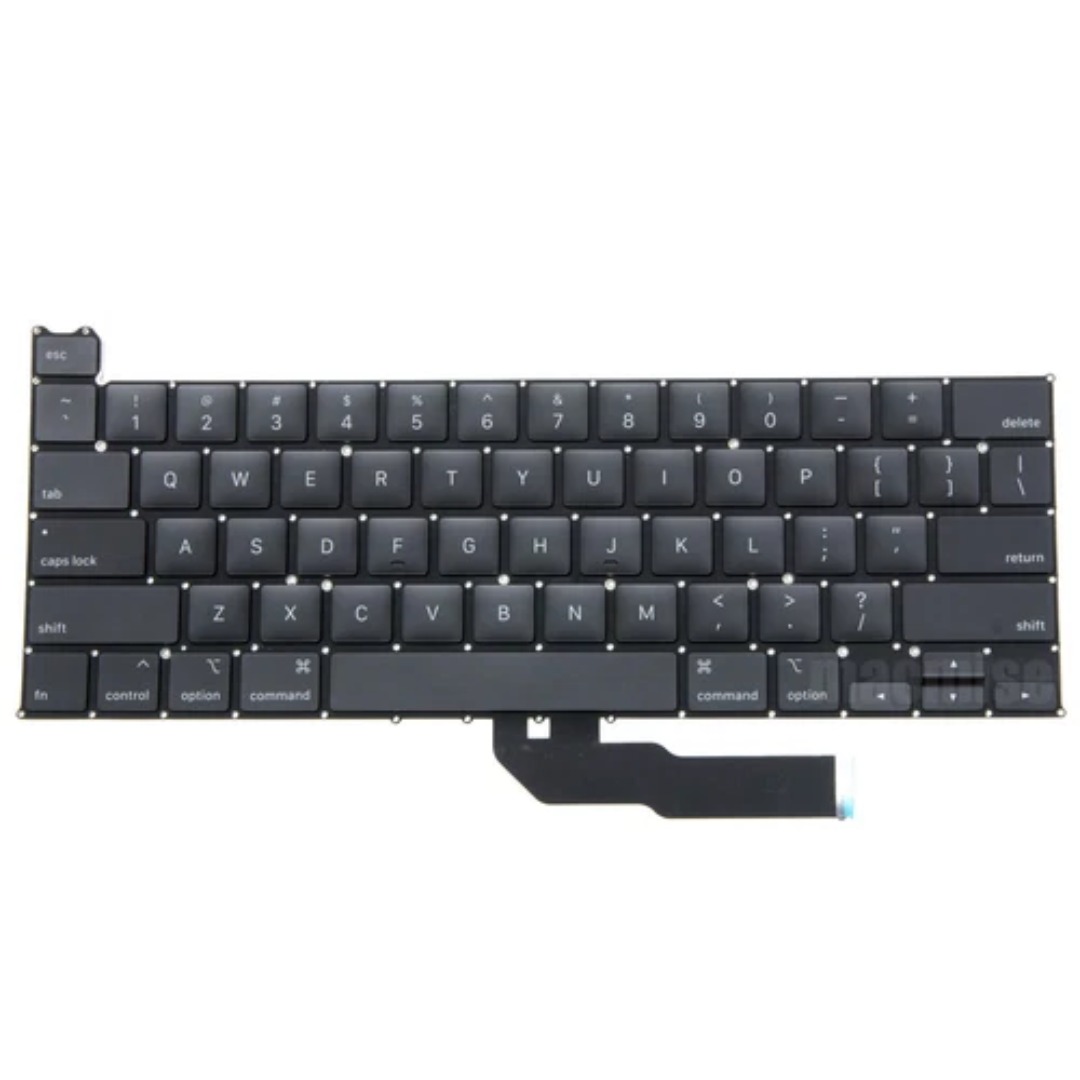
Genuine-spec US layout keyboard replacement for MacBook Pro 13″ (Model A1466, Late 2015–Early 2016)—featuring traditional scissor-switch mechanism, backlighting, and full OEM compatibility for reliable, comfortable typing. Compatible With: MacBook Pro 13-inch non-Touch Bar models: Late 2015 (Intel Core i5/i7, Retina, A1466, Model Identifier MacBookPro12,1) Early 2016 (Intel Core i5/i7, Retina, A1466, MacBookPro13,1) Late 2015 (Intel Core i5/i7, Retina, A1466, Model Identifier MacBookPro12,1) Early 2016 (Intel Core i5/i7, Retina, A1466, MacBookPro13,1) Layout: Standard US English (QWERTY) with full-size keys, inverted-T arrow keys, and dedicated function row (F1–F12). Keyboard Type: Traditional scissor-switch mechanism—not Butterfly or Magic Keyboard—known for durability, deeper key travel, and tactile feedback. Integrated Features: Backlit keys for low-light use, ambient light sensor support, and OEM-style ribbon cable for direct logic board connection. Build & Fit: Precision-engineered to match Apple’s original dimensions and mounting points—ensures flush alignment within the top case and consistent key height. Installation Note: Keyboard is secured with screws and minimal adhesive (unlike later glued models), making replacement more accessible. Still requires full top case disassembly and battery disconnect. Suitable for intermediate to advanced technicians.

Speaker Specifications Feature Value Feature Value Input/Output USB Battery Capacity (mAh) 2000 Maximum Wireless Range (m) 10m-20m Touch Screen No Sound Mode Immersive, Stereo, Live, Standard Category Speakers Use HOME Bluetooth Version 5.1 Input Power (W) 50-99W Voice Control No Frequency Range 100Hz-20KHz Display Screen No Waterproof Yes Support APP No Support Memory Card Yes Playback Function Radio, MP3 Remote Control No Intelligent Personal Assistant None Display Screen No Audio Crossover Full-Range Number of Loudspeaker Enclosures 2 Power Source Battery Channels 1 Speaker Type Portable Communication USB Cabinet Material Plastic Brand Name HONOURSACY Origin Mainland China Function HiFi Sound Quality Function2 IPX6 Waterproof Function3 Support TWS Interconnection Function4 Portable Design Function5 80W High Power Function6 Long Endurance

The Dell OptiPlex 7050 Micro combines compact design and solid performance with an Intel Core i5 6th Gen processor, DDR4 RAM options, and SSD storage options. Ideal for business and home use, it delivers reliable speed, energy efficiency, and space-saving desktop performance.

BATTERY DELL 6MT4T CYDZ 62W 7.6V Laptop Battery Compatible with Dell Latitude 5470 E5470 155570 E5570 3510 M3510 7V69Y, TXF9M, 79VRK, 07V69Y, 0HK6DV, 079VRK, 0TXF9M About this item 6MT4T Voltage: 7.6V, Capacity: 62Wh Compatible Part Number: 7V69Y, TXF9M, 79VRK, 07V69Y, 0HK6DV, 079VRK, 0TXF9M Compatible for Dell Latitude 14 Series 5470 E5470 155570 E5570 Series Compatible for Dell Latitude 15 Series Precision 15 3510 M3510.

Apple 140W USB-C Power Adapter | MLYU3AM/A

Genuine-spec battery flex cable for MacBook Pro models A2159 (16", 2019), A1708 (13", 2016–2017), and A2338 (13", 2020 M1)—restores critical communication between the battery and logic board for proper power-on, charging, and macOS battery status. Genuine-spec battery flex cable for MacBook Pro models A2159 (16″, 2019), A1708 (13″, 2016–2017), and A2338 (13″, 2020 M1)—restores critical communication between the battery and logic board for proper power-on, charging, and macOS battery status. Carries SMBus (System Management Bus) signals from the battery to the logic board Enables: Accurate battery percentage and health reporting in macOS Proper charging control (start/stop, thermal throttling) Power-on capability (MacBooks will not boot without this connection) Prevention of “Battery Not Charging” or “Service Battery” errors Accurate battery percentage and health reporting in macOS Proper charging control (start/stop, thermal throttling) Power-on capability (MacBooks will not boot without this connection) Prevention of “Battery Not Charging” or “Service Battery” errors MacBook won’t turn on (even with a good battery) Battery shows “–%”, 0%, or “Not Charging” Random shutdowns under load macOS displays “No Battery Available” Logic board powers fans or lights but no display output Battery flex cable only (with OEM-style connector and strain relief) ❌ Does not include: battery, logic board, or trackpad Requires full bottom case removal and battery disconnection Connects via a ZIF or press-fit socket on the logic board Must be routed precisely to avoid tension or micro-tears Highly recommended for experienced or certified technicians—improper installation can cause permanent power or battery communication failure

Genuine-spec touchpad flex cable for MacBook Pro 16″ (Model A2159, 2019, Intel)—essential for restoring full Force Touch functionality, haptic feedback, and precise trackpad responsiveness during repair or replacement. Compatible With: MacBook Pro 16-inch (2019, Model A2159) with Intel Core i7/i9 processors (Model Identifier: MacBookPro16,1). Part Type: Touchpad flex cable only—does not include the trackpad, Taptic Engine, or mounting hardware. This is the OEM-style ribbon cable that connects the trackpad to the logic board. Function: Transmits touch input, Force Touch pressure data, and haptic feedback signals—critical for macOS gestures (e.g., Force Click, three-finger swipe, pinch-to-zoom) and Taptic Engine operation. OEM-Quality Build: Matches Apple’s original flex circuit in length, connector pitch, shielding, and bend radius—ensures reliable signal integrity and durability under repeated use. Common Use Cases: Replacing a torn, frayed, or corroded original flex cable Completing a trackpad replacement when the original cable is damaged Fixing intermittent or unresponsive trackpad behavior caused by cable failure Replacing a torn, frayed, or corroded original flex cable Completing a trackpad replacement when the original cable is damaged Fixing intermittent or unresponsive trackpad behavior caused by cable failure Installation Note: Requires full bottom case removal and careful routing beneath the battery and logic board. Connectors use ZIF (Zero Insertion Force) sockets—must be properly aligned and latched without force. Recommended for certified or experienced technicians only.

Genuine-spec touchpad flex cable for MacBook Pro 16″ (Model A2485, 2021, M1 Pro/Max)—critical for restoring full Force Touch functionality, haptic feedback, and precise multi-touch gesture control during trackpad repairs. Compatible With: MacBook Pro 16-inch (2021, Model A2485) with Apple M1 Pro or M1 Max chip (Model Identifiers: MacBookPro18,1 / MacBookPro18,2). Part Type: Touchpad flex cable only—does not include the trackpad, Taptic Engine, or mounting hardware. This is the OEM-style ribbon cable that connects the trackpad to the logic board. Function: Transmits touch coordinates, Force Touch pressure data, and haptic feedback signals—essential for macOS gestures (e.g., pinch-to-zoom, Force Click, three-finger lookup) and Taptic Engine operation. OEM-Quality Construction: Precisely replicated to Apple’s original specifications—including cable length, connector type, EMI shielding, and flex routing—ensuring signal integrity and long-term reliability. Common Use Cases: Replacing a torn, frayed, or liquid-damaged original flex cable Completing a trackpad replacement when the original cable is compromised Fixing intermittent trackpad behavior, lost Force Touch, or complete unresponsiveness Replacing a torn, frayed, or liquid-damaged original flex cable Completing a trackpad replacement when the original cable is compromised Fixing intermittent trackpad behavior, lost Force Touch, or complete unresponsiveness Installation Note: Requires full disassembly of the bottom case and careful routing around the battery and logic board. Connectors use ZIF (Zero Insertion Force) sockets—must be aligned and latched gently. Recommended for certified or professional repair technicians only.

Digital Device Laptop Keyboard Compatible for MacBook AIR 13″ A1369 A1466 (MID 2011- MID 2017) US Layout 【Unique】Pls see detail compatible models in description below. 【Safe】Easy for you replace your faulty, cracked or broken keyboard ,seller remind that you should replace the keyboard in the off state. All pictures are taken from the real item, please check carefully before bidding, Replacement and high quality, Replace your faulty, cracked or broken keyboard. Each keyboard is tested before shipping Compatibility: MacBook Air 13″ A1369 Mid 2011: MC965LL/A (1.7 GHz Core i5) Mid 2011: MC966LL/A (1.7 GHz Core i5) Mid 2011: MD226LL/A (1.8 GHz Core i7) Compatibility: MacBook Air 13″ A1466 Mid 2012: MD231LL/A (1.8 GHz Core i5) Mid 2012: MD232LL/A (1.8 GHz Core i5) Mid 2012: MD232LL/A (2.0 GHz Core i7) Mid 2013: MD760LL/A (1.3 GHz Core i5) Mid 2013: MD761LL/A (1.3 GHz Core i5) Mid 2013: MD761LL/A (1.7 GHz Core i7) Early 2014: MD760LL/B (1.4 GHz Core i5) Early 2014: MD761LL/B (1.4 GHz Core i5) Early 2014: MD761LL/B (1.7 GHz Core i7) Compatibility: Early 2015: MJVE2LL/A (1.6 GHz Core i5 or 2.2 GHz Core i7) Early 2015: MJVG2LL/A (1.6 GHz Core i5 or 2.2 GHz Core i7) Identifying Numbers APN #: 661-6059, 661-6635, 661-7480

WiWU WI‑C052 Converter – Compact aluminum adapter enables OTG and fast PD-style charging (≈27 W) with USB‑C/Lightning on USB‑A ports.Supports high-speed 10 Gbps data transfer, is plug‑and‑play, and works across phones, tablets, and laptops. Functionality: OTG-capable USB-A to USB-C (A→C) Data Transfer: Supports USB 3.2 (up to 10 Gbps) and backward compatible with USB 3.0/2.0 Fast Charging: Supports PD profile fast charging (up to ~27W Apple PD equivalent) without triggering charge pop-ups Build: Durable aluminum-alloy shell with silicone lanyard design for portability and heat dissipation Compatibility: Works with smartphones, tablets, laptops—enabling USB-A peripherals, USB-C or Lightning cables Plug & Play: No drivers required; reversible connector design Portability: Lightweight, compact—easy to carry

Genuine-spec touchpad flex cable for MacBook Pro 16″ (Model A2141, 2019, Intel)—essential for restoring full Force Touch functionality, haptic feedback, and precise multi-touch gesture control during trackpad repair or replacement. Compatible With: MacBook Pro 16-inch (2019, Model A2141) with Intel Core i7/i9 processors (Model Identifier: MacBookPro16,1) (Note: A2141 is the non-base configuration of the 2019 16″ MacBook Pro—typically higher-end Intel models.) Part Type: Touchpad flex cable only—does not include the trackpad housing, Taptic Engine, or mounting hardware. This is the OEM-style ribbon cable that connects the trackpad to the logic board. Function: Transmits touch coordinates, Force Touch pressure data, and haptic feedback signals—critical for macOS gestures (e.g., Force Click, three-finger lookup, pinch-to-zoom) and Taptic Engine responsiveness. OEM-Quality Construction: Replicated to Apple’s exact specifications—including cable length, connector pitch, EMI shielding, and bend radius—ensuring reliable signal integrity and long-term durability. Common Use Cases: Replacing a torn, creased, or liquid-damaged original flex cable Completing a trackpad replacement when the original cable is compromised Fixing intermittent trackpad behavior, loss of Force Touch, or complete unresponsiveness Replacing a torn, creased, or liquid-damaged original flex cable Completing a trackpad replacement when the original cable is compromised Fixing intermittent trackpad behavior, loss of Force Touch, or complete unresponsiveness Installation Note: Requires full disassembly of the bottom case, speaker removal, and careful routing beneath the battery and logic board. Connectors use ZIF (Zero Insertion Force) sockets—must be aligned and latched gently. Recommended for certified or professional repair technicians only. Important: This is flex cable only—not a complete trackpad assembly. Must be used with the original or compatible A2141 trackpad and Taptic Engine. Not compatible with M1 MacBook Pro 16″ (A2485), 14″ models (A2442), or any MacBook Air. This is flex cable only—not a complete trackpad assembly. Must be used with the original or compatible A2141 trackpad and Taptic Engine. Not compatible with M1 MacBook Pro 16″ (A2485), 14″ models (A2442), or any MacBook Air. Model Verification: Confirm your device is MacBook Pro A2141 (16″, 2019, Intel) via > About This Mac > Model Identifier (should read MacBookPro16,1).

