
GAMDIAS 7 Colour Backlit Gaming USB Mechanical Keyboard with 87 Keys, Blue Switches, Anti-ghosting, Multimedia Control Key with Metal Plate, Combo (Multicolour, Hermes E2) About this item Certified mechanical blue switches feature a 50 Million actuation lifecycle Neon Light Spectrum- 7 colors backlight Elegant metal plate mechanical keyboard for added durability N-key rollover Compact 87 Keys Keyboard : By using small tenkeyless keyboard can save the space, and also makes the keyboard and mouse to become closer, so you can maximize the comfort and accuracy of your operation

A high-performance pre-owned MacBook Pro 15" (2015) with a stunning Retina display, upgraded 16GB RAM, 128GB SSD, and powerful 2GB dedicated graphics—ideal for developers, creatives, and power users seeking reliable Apple performance.

SanDisk Ultra Flair USB 3.0 – SDCZ73 – High-speed flash drive with sleek metal design.Up to 150MB/s transfer speeds and password protection software included. Model: SanDisk Ultra Flair USB 3.0 Flash Drive (SDCZ73) Interface: USB 3.0 (Backward compatible with USB 2.0) Read Speed: Up to 150MB/s (on supported USB 3.0 ports) Capacity Options: 64GB / 128GB / 256GB Material: Sleek and durable metal casing Design: Compact with built-in keyring loop Security: Includes SanDisk SecureAccess software for password protection Compatibility: Windows, macOS (reformat may be required), Linux Dimensions: Approx. 42.42 x 13.21 x 6.60 mm Weight: Approx. 5.2 grams

The Dell Latitude 5410 is a dependable, enterprise-grade 14-inch business laptop built for smooth multitasking and daily office productivity. Powered by a 10th Generation Intel Core i5 processor and fast SSD storage, this pre-owned Grade-B unit offers excellent performance value with minor, visible cosmetic wear on the outer chassis.

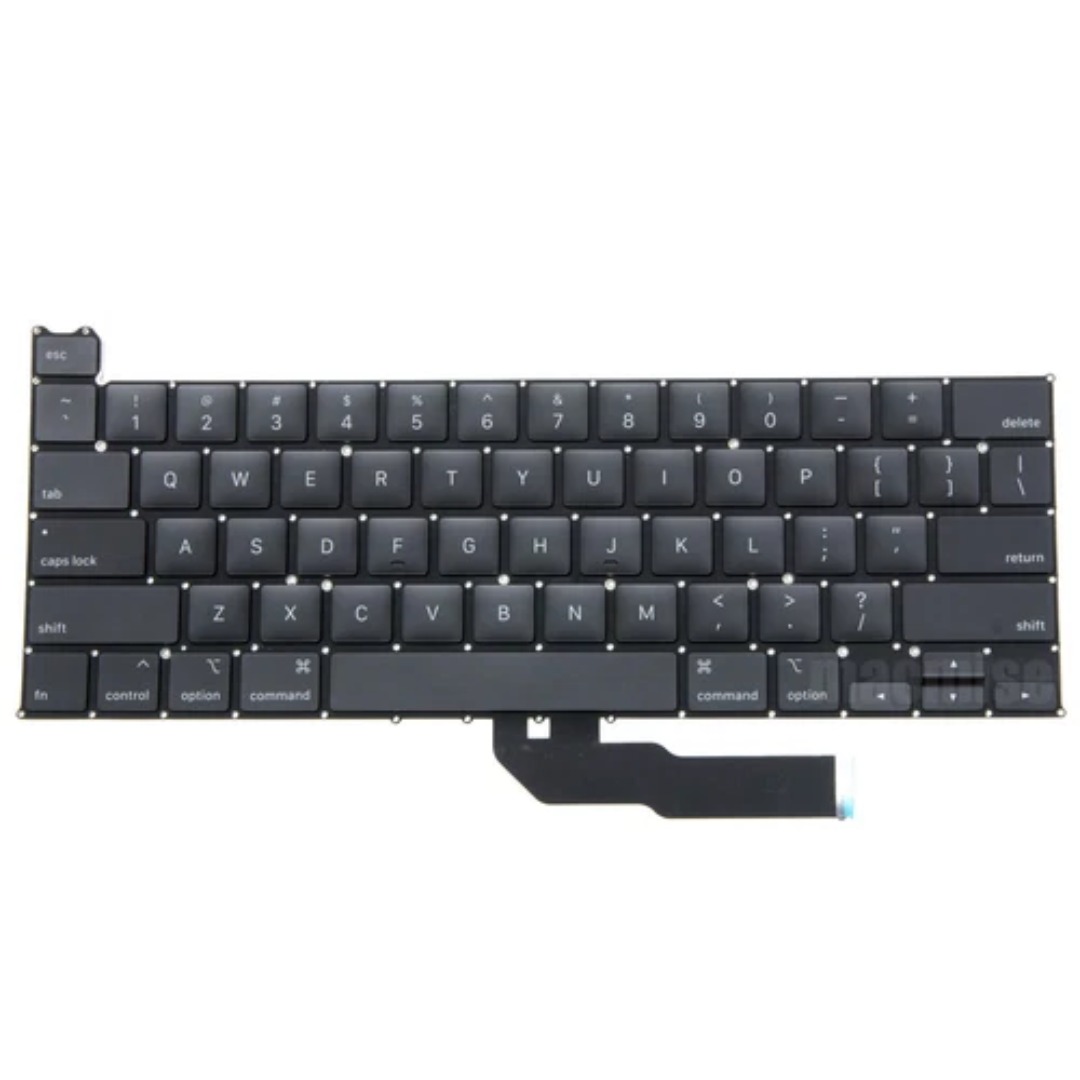
Genuine-spec US layout keyboard replacement for MacBook Pro 13″ (Model A1502, Mid 2014)—featuring durable scissor-switch keys, backlighting, and OEM-fit design for reliable performance and easy installation. Compatible With: MacBook Pro 13-inch (Mid 2014, Model A1502, Model Identifier MacBookPro11,1) with Retina display. Layout: Standard US English (QWERTY) with full-size keys, inverted-T arrow keys, and dedicated function row (F1–F12). Keyboard Type: Traditional scissor-switch mechanism—offers good key travel, tactile feedback, and proven long-term reliability (pre-Butterfly design). Integrated Features: Backlit keys for low-light environments, ambient light sensor compatibility, and original-style ribbon cable connector for direct logic board attachment. Build & Fit: Precision-molded to match Apple’s exact dimensions and mounting points—ensures flush integration into the top case with consistent key alignment. Installation Note: Keyboard is secured with screws and light adhesive—more serviceable than later glued models. Requires top case access and battery disconnection. Suitable for intermediate DIYers or professional technicians.

Lexar NM620 1TB SSD, M.2 2280 PCIe Gen3x4 NVMe 1.4 Internal SSD, Up to 3500MB/s Read, 3000MB/s Write, 3D NAND Flash Internal Solid State Drive for PC Enthusiasts and Gamers (LNM620X001T-RNNNG) About this item High-speed PCIe Gen3x4 interface: Lexar 1TB SSD up to 3500MB/s read and 3000MB/s write – NVMe 1.4 is supported. Lexar Internal SSD M.2 2280 form factor with 3D NAND Lexar Solid state drive maintains 6x the speed of a SATA-based SSD. Lexar SSD is ideal for PC enthusiasts and gamers. Lexar Internal solid state drive is shock and vibration-resistant without moving parts.

Verbatim Vi3000 512 GB NVMe SSD — high-speed PCIe 4.0 storage for desktops & laptops.• Read up to 5,000 MB/s • Write up to 3,200 MB/s • Compact M.2 2280 form factorInterface: PCIe Gen 4 × 4 NVMe 1.4 | Warranty: 3 Years | SKU: Vi3000-512G 🟣 Full Details : The Verbatim Vi3000 512 GB PCIe NVMe M.2 SSD delivers blazing-fast performance for everyday computing, gaming, and creative work. Using the latest PCIe Gen 4 × 4 NVMe 1.4 interface, it achieves read speeds up to 5,000 MB/s and write speeds up to 3,200 MB/s, making it a great upgrade for faster boot times and quicker app loading. PCIe Gen 4 × 4 NVMe 1.4 interface for ultra-fast transfer speeds Up to 5,000 MB/s read and 3,200 MB/s write performance Compact M.2 2280 design for desktops & laptops Low power consumption and quiet operation 3-year limited warranty with Verbatim reliability Works with most modern desktops and laptops that support M.2 NVMe (PCIe) drives. Fully backward compatible with PCIe 3.0 systems (at lower speeds). Verbatim Vi3000 512 GB M.2 NVMe SSD Quick installation & warranty guide

The Moxom MX-ST16 is a 12-in-1 safety power strip with 4 AC outlets, 7 USB-A ports, and 1 USB-C PD port. It supports up to 2500W / 10A total load and provides fast USB charging (PD 20W + QC 18W), making it a practical charging hub for home, office, and desk setups. ⚡ 12-in-1 Multi-Output Design: 4 AC sockets + 7 USB-A + 1 USB-C PD allow powering and charging many devices at once. 🔋 Fast USB Charging: USB-C PD up to 20W for modern phones and tablets. QC fast-charge up to 18W on supported USB-A ports. Smart IC balances output across ports for safe, efficient charging. 🔋 Fast USB Charging: USB-C PD up to 20W for modern phones and tablets. QC fast-charge up to 18W on supported USB-A ports. Smart IC balances output across ports for safe, efficient charging. 🛡️ Multi-Safety Protection: Overload protection, surge/over-voltage protection, over-current and overheating protection, plus foreign-object detection. 👶 Child-Safety Shutters: Safety doors on AC outlets reduce accidental contact. ⏻ One-Key Master Switch: Single button controls all outlets for easy power cut-off. 📏 Long Extension Cord: About 2 meters for flexible placement. 🧊 Heat-Resistant Build: ABS + PC construction designed for durability under continuous load.

Dominate the battlefield with the Genius Scorpion M705, featuring a high-precision 7200 DPI sensor and striking 7-color breathing RGB lighting. Built with a durable braided cable and 6 programmable buttons, it’s the ultimate entry-level weapon for gamers seeking speed, style, and reliability. The Genius Scorpion M705 is designed to provide gamers with a competitive edge without compromising on comfort. Equipped with an optical sensor that reaches up to 7200 DPI, it ensures smooth and accurate tracking across various surfaces. Its ergonomic right-handed shape and lightweight build reduce wrist strain during marathon sessions, while the integrated 32K memory allows you to take your custom macros and profiles wherever you go. Adjustable 7200 DPI Sensor: Seamlessly switch between six sensitivity levels (800/1600/2400/3200/4800/7200 DPI) to match your game’s pace, from high-speed movement to pixel-perfect sniping. Dynamic RGB Breathing Effects: Enhance your gaming atmosphere with 7 dazzling LED colors that pulse with a “breathing” effect. You can easily adjust the lighting mode using the DPI + Forward/Backward shortcuts. 6 Programmable Buttons: Fully customize your controls. Assign macros, shortcut keys, or specific in-game commands to the 6 buttons to execute complex actions with a single click. Built-in 32K Memory: Save your settings directly on the mouse. Your custom profiles and button assignments stay with you, even when switching to a different PC. Professional Durability: Features a 1.8-meter braided USB cable that prevents tangling and increases the lifespan of the device, ensuring a stable, low-latency connection. Sensor Type: Optical Resolution: 800 – 7,200 DPI Number of Buttons: 6 (Programmable) Illumination: 7-Color RGB Breathing LED Interface: USB Wired Cable: 1.8m Braided Cable Internal Memory: 32K Dimensions: 120.2 x 72.7 x 39.6 mm Weight: Approx. 120g (including cable) Compatibility: Windows 8, 10, 11 or later What’s in the Box Compatibility: Windows 8, 10, 11 or later What’s in the Box Genius Scorpion M705 Gaming Mouse Multi-language Quick Guide

Arabic Silicone Keyboard Skin Cover for MacBook Pro 13" A1708 Without Touch bar and MacBook 12" A1534 with Retina Display US Layout (Black) Arabic Silicone Keyboard Skin Cover for MacBook Pro 13″ A1708 Without Touch bar and MacBook 12″ A1534 with Retina Display US Layout (Black) About this item Arabic language silicone keyboard skin, US version, perfect fit for your MacBook 12″ A1534, which was released in 2015 & new MacBook Pro 13-Inch 13″ Model A1708 without/no Touch Bar, which was released in 2016; Do not fit for Europe Version MacBook Handmade Skin – XSKN is the original Manufacturer of these “Keyboard Art Skin” silicone covers. They are durable, thin and soft with a cashmere feel. The keys fit snug over the keyboard, smooth surface treatment, suit for regular laptop user who types a lot and quickly Each XSKN silicone skin is heat molded to ensure, each color is paints taking hand screened using silicone paint which is heat fuses into the silicone keyboard skin to become one, making it Soft, ultra-thin, durable and easy to washable High quality silicone raw material assure no extension with longtime using. Every detail clearly prinited, imported ink keep it looking good, rubber coating help to remain in good condition Aside from being beautiful they protect your keyboard from spills, crumbs, animal hair and dust. Washable, can be cleaned easily

The Cudy WR1200 AC1200 Router offers flexible networking with its 5-in-1 functionality and dual-band WiFi speeds up to 1200Mbps. Ideal for home and office use, it provides stable connectivity, wide coverage, and multiple operating modes to suit different network needs. AC1200 Dual Band WiFi – Combined speeds of up to 1200Mbps (300Mbps on 2.4GHz + 867Mbps on 5GHz) for smooth browsing, streaming, and gaming. 5-in-1 Multi-Mode Functionality – Works as Router, Access Point, Range Extender, WISP, and Client for maximum flexibility. Wide Coverage – High-gain antennas ensure strong and stable WiFi signal throughout your home or office. Fast Ethernet Ports – Reliable wired connections for computers, smart TVs, and other devices. Easy Setup & Management – Simple configuration through an intuitive web interface. Stable Multi-Device Performance – Designed to handle multiple connected devices efficiently. Secure Network – WPA/WPA2 encryption keeps your connection safe and private. 1 × WAN Port 4 × LAN Ports Dual Band WiFi (2.4GHz & 5GHz) Ethernet (RJ45) Wireless Security (WPA/WPA2)

MacBook Air 13″ Retina A1932(2018-2019-2020) Display Assembly (Silver) MacBook Air 13″ Retina Display 2019 A1932 (EMC 3184 MacBookAir8,2) 1.6 GHz MacBook Air 13″ Retina Display 2020 A2179 (EMC 3302 MacBookAir9,1) 1.1 GHz Core i3 A2179 (EMC 3302 MacBookAir9,1) 1.1 GHz Core i5 A2179 (EMC 3302 MacBookAir9,1) 1.2 GHz Core i7 MacBook Air 13” Retina Display Late 2018 A1932 (EMC 3184 MacBookAir8,1) 1.6 GHz

Laptop Battery Compatible for A31N1519 Battery for ASUS X540S X540L X540SA X540S X540LA-SI302 A540 F540 R540LA About this item Compatible model no. :- a31n1519, asus x540s x540l x540sa x540s x540la-si302 a540 f540 r540la Warranty not covered if defects due to external causes, accidental, physical or liquid damage, cut, burnt, misuse and missing warranty stickers or labels Battery capacity/power capability (mah/wattage) may be different from the reference picture but a backup of the battery will be the same as the original Please match your product with the image provided before placing the order for any help please get in touch with us.

WiWU Pilot Backpack 15.6 inch Travelling Polyester Laptop Business School Travelling Backpack WiWU Pilot Backpack 15.6 inch Travelling Polyester Laptop Business School Travelling Backpack

Genuine-spec touchpad flex cable for MacBook Pro 15″ (Model A1706 – 2017 and A1989 – 2018/2019)—restores full Force Touch functionality, haptic feedback, and precise multi-touch gesture control during trackpad repair or replacement. Compatible With: MacBook Pro 15″ (2017) – Model A1706 (Model Identifier: MacBookPro14,3) MacBook Pro 15″ (2018–2019) – Model A1989 (Model Identifier: MacBookPro15,2) ✅ Note: Apple used the same trackpad assembly and flex cable across both A1706 and A1989 15″ models—making this part interchangeable between them. MacBook Pro 15″ (2017) – Model A1706 (Model Identifier: MacBookPro14,3) MacBook Pro 15″ (2018–2019) – Model A1989 (Model Identifier: MacBookPro15,2) ✅ Note: Apple used the same trackpad assembly and flex cable across both A1706 and A1989 15″ models—making this part interchangeable between them. ✅ Note: Apple used the same trackpad assembly and flex cable across both A1706 and A1989 15″ models—making this part interchangeable between them. Part Type: Touchpad flex cable only — does not include the trackpad housing, Taptic Engine, or mounting hardware. This is the OEM-style ribbon cable connecting the trackpad to the logic board. Function: Transmits: Touch input coordinates Force Touch pressure data Haptic feedback signals to the Taptic Engine Enables full macOS gesture support: Force Click, three-finger lookup, swipe navigation, pinch-to-zoom, and smooth cursor tracking. Touch input coordinates Force Touch pressure data Haptic feedback signals to the Taptic Engine Enables full macOS gesture support: Force Click, three-finger lookup, swipe navigation, pinch-to-zoom, and smooth cursor tracking. OEM-Quality Build: Matches Apple’s original in: Cable length and routing Connector pitch and ZIF latch design EMI shielding and flex durability Cable length and routing Connector pitch and ZIF latch design EMI shielding and flex durability Common Use Cases: Replacing a torn, creased, or liquid-damaged original flex cable Completing a trackpad replacement when the original cable is compromised Fixing intermittent trackpad behavior, loss of Force Touch, or complete unresponsiveness Replacing a torn, creased, or liquid-damaged original flex cable Completing a trackpad replacement when the original cable is compromised Fixing intermittent trackpad behavior, loss of Force Touch, or complete unresponsiveness Installation Note: Requires full bottom case removal and battery disconnection. Cable routes under internal components near the right speaker and logic board. Connects via a ZIF (Zero Insertion Force) socket—must be aligned carefully and latched gently. Recommended for experienced or certified technicians only. Requires full bottom case removal and battery disconnection. Cable routes under internal components near the right speaker and logic board. Connects via a ZIF (Zero Insertion Force) socket—must be aligned carefully and latched gently. Recommended for experienced or certified technicians only.

Brand Lenovo Compatible Devices Laptops Input Voltage 240 Volts Mounting Type Wall Mount Wattage 90 watts Output Voltage 20 Volts Current Rating 4.5 Amps Lenovo 90W Slim Tip Ac Adapter (Original)

Feature Specification Packaging and Delivery Details Power Source Battery Selling Units Single item Number of Loudspeaker Enclosure 1 Single package size 19X22X10 cm Cabinet Material Plastic Single gross weight 0.600 kg Display Screen NO Built-in Microphone NO Brand Name Remax Model Number RB-X1 Remax Worldwide Store 9300+ Remax Support Video to see the product and testing Product Name Outdoor Wireless Speaker Color Black Logo Accept Customized Logo Intelligent Personal Assistant None

A1989 Battery Replacement, A1964 Battery for MacBook Pro 13″ A1989 (Mid 2018 2019) A2251(2020 Release) EMC 3214 3358 3348 MR9Q2LL/A MR9R2LL/A MR9T2LL/A MR9U2LL/A MR9V2LL/A MV962LL/A MV9A2LL/A 【Specification】Voltage: 11.41V. Capacity: 58Wh/ 5086mAh. Battery Type: Li-ion. Condition: Brand new, from high quality materials, top circuit boards and smart chip. 【Compatible Part Number】A1964 A1989 A1989(EMC 3214) A1989(EMC 3358) A2251(EMC 3348) 020-02497 616-00419. 【Compatible Laptop Models】MacBook Pro 13-Inch model A1989 (Mid 2018, Mid 2019) , A2251(2020 Release), Order No MR9Q2LL/A MR9R2LL/A MR9T2LL/A MR9U2LL/A MR9V2LL/A MV962LL/A MV972LL/A MV982LL/A MV992LL/A MV9A2LL/A MWP72LL/A MWP82LL/A MWP42LL/A MWP52LL/A MWP62LL/A MR9Q2 MR9R2 MR9T2 MR9U2 MR9V2 MV962 MV972 MV982 MV992 MV9A2 MWP62. 【Note】The tools are included. Double-sided tape is attached to the back of the battery, but NO battery installation instruction. The MBP battery is difficult to disassemble, we suggest you search for related installation videos or find a technician for help.

A next-generation Wi-Fi 6 router delivering AX1500 speeds (1201 Mbps on 5GHz + 300 Mbps on 2.4GHz), 4 high-performance antennas, and Gigabit ports—ideal for 2–3 bedroom homes needing faster speeds, lower latency, and seamless connectivity for 100+ devices. The TP-Link Archer AX12 is a powerful Wi-Fi 6 (802.11ax) dual-band router engineered for modern connected homes. With a combined speed of AX1500—delivering up to 1201 Mbps on the 5GHz band and 300 Mbps on the 2.4GHz band—it provides significantly faster throughput, reduced latency, and improved capacity compared to older Wi-Fi standards. Powered by a 1 GHz dual-core processor and equipped with four fixed high-performance antennas, the Archer AX12 delivers strong, stable coverage throughout 2–3 bedroom homes, eliminating dead zones and buffering. Advanced beamforming technology focuses Wi-Fi signals directly toward connected devices for clearer, stronger connections—even at greater distances. OFDMA + MU-MIMO: Efficiently serves multiple devices simultaneously—perfect for households with smartphones, laptops, smart TVs, and IoT devices connected at once (supports 100+ devices). www.wifi-stock.com WPA3 Security: Next-generation encryption for stronger protection against unauthorized access and cyber threats. www.amazon.in Backward Compatibility: Works seamlessly with all existing Wi-Fi devices (802.11a/b/g/n/ac/ax). www.tp-link.com Wired connectivity includes one Gigabit WAN port and three Gigabit LAN ports for high-speed connections to desktops, game consoles, NAS devices, or smart TVs. Parental Controls: Set schedules, filter content, and manage screen time per device QoS (Quality of Service): Prioritize bandwidth for video calls, gaming, or streaming TP-Link Tether App: Easy setup and management from your smartphone

Genuine-spec touchpad flex cable for MacBook Pro 16″ (Model A2141, 2019, Intel)—essential for restoring full Force Touch functionality, haptic feedback, and precise multi-touch gesture control during trackpad repair or replacement. Compatible With: MacBook Pro 16-inch (2019, Model A2141) with Intel Core i7/i9 processors (Model Identifier: MacBookPro16,1) (Note: A2141 is the non-base configuration of the 2019 16″ MacBook Pro—typically higher-end Intel models.) Part Type: Touchpad flex cable only—does not include the trackpad housing, Taptic Engine, or mounting hardware. This is the OEM-style ribbon cable that connects the trackpad to the logic board. Function: Transmits touch coordinates, Force Touch pressure data, and haptic feedback signals—critical for macOS gestures (e.g., Force Click, three-finger lookup, pinch-to-zoom) and Taptic Engine responsiveness. OEM-Quality Construction: Replicated to Apple’s exact specifications—including cable length, connector pitch, EMI shielding, and bend radius—ensuring reliable signal integrity and long-term durability. Common Use Cases: Replacing a torn, creased, or liquid-damaged original flex cable Completing a trackpad replacement when the original cable is compromised Fixing intermittent trackpad behavior, loss of Force Touch, or complete unresponsiveness Replacing a torn, creased, or liquid-damaged original flex cable Completing a trackpad replacement when the original cable is compromised Fixing intermittent trackpad behavior, loss of Force Touch, or complete unresponsiveness Installation Note: Requires full disassembly of the bottom case, speaker removal, and careful routing beneath the battery and logic board. Connectors use ZIF (Zero Insertion Force) sockets—must be aligned and latched gently. Recommended for certified or professional repair technicians only. Important: This is flex cable only—not a complete trackpad assembly. Must be used with the original or compatible A2141 trackpad and Taptic Engine. Not compatible with M1 MacBook Pro 16″ (A2485), 14″ models (A2442), or any MacBook Air. This is flex cable only—not a complete trackpad assembly. Must be used with the original or compatible A2141 trackpad and Taptic Engine. Not compatible with M1 MacBook Pro 16″ (A2485), 14″ models (A2442), or any MacBook Air. Model Verification: Confirm your device is MacBook Pro A2141 (16″, 2019, Intel) via > About This Mac > Model Identifier (should read MacBookPro16,1).
