
Features Stylish and compact Bluetooth speaker, easy to carry. Supports wireless connectivity via Bluetooth. True Wireless Stereo (TWS): Connect two speakers simultaneously. Durable ABS plastic material with a fabric-covered front panel. Built-in microphone for hands-free calls. LED indicator to display working status. Water-resistant with an IPX7 rating. Continuous playback for 8-12 hours (depending on volume). 5-watt speaker delivering Hi-Fi audio quality. On-speaker controls for music playback and volume adjustment. Built-in battery with Type-C charging port for easy recharging. Technical Specifications Bluetooth Version: V5.4 Transmission Distance: 10 meters Rated Power: 5W Driver Unit: 40mm Input: DC5V Battery Capacity: 1200mAh Charging Time: 2 hours Playback Time: 8-12 hours (depending on volume)

Genuine-spec touchpad flex cable for MacBook Air 13″ (Model A1932, 2018–2019)—essential for restoring full Force Touch functionality, haptic feedback, and precise multi-touch gesture control during trackpad repair or replacement. Compatible With: MacBook Air 13-inch (2018 & 2019, Model A1932, Model Identifier MacBookAir8,1) with Intel Core i5/i7 processors. Part Type: Touchpad flex cable only—does not include the trackpad housing, Taptic Engine, or mounting hardware. This is the OEM-style ribbon cable that connects the trackpad to the logic board. Function: Transmits touch input, Force Touch pressure data, and haptic feedback signals—critical for macOS gestures like Force Click, three-finger lookup, pinch-to-zoom, and smooth cursor tracking. OEM-Quality Build: Matches Apple’s original in length, connector pitch, EMI shielding, and flexibility—ensures reliable signal integrity and long-term durability. Common Use Cases: Replacing a torn, creased, or liquid-damaged original flex cable Completing a trackpad replacement when the original cable is unusable Fixing intermittent trackpad behavior, loss of Force Touch, or complete unresponsiveness Replacing a torn, creased, or liquid-damaged original flex cable Completing a trackpad replacement when the original cable is unusable Fixing intermittent trackpad behavior, loss of Force Touch, or complete unresponsiveness Installation Note: Requires full bottom case removal and careful routing beneath the battery. The cable connects via a ZIF (Zero Insertion Force) socket on the logic board—must be properly aligned and latched without force. Recommended for experienced or certified technicians. Important: This is flex cable only—not a complete trackpad assembly. Must be used with the original or compatible A1932 trackpad and Taptic Engine. Not compatible with MacBook Air M1 (A2337/A2338), M2 (A2681/A2941), or any MacBook Pro model. This is flex cable only—not a complete trackpad assembly. Must be used with the original or compatible A1932 trackpad and Taptic Engine. Not compatible with MacBook Air M1 (A2337/A2338), M2 (A2681/A2941), or any MacBook Pro model.

OEM-quality touchpad replacement (without flex cable) for MacBook Air 15″ (Model A2941, 2023)—in Space Gray finish—designed for precise Force Touch performance and seamless integration with the original chassis. Compatible With: MacBook Air 15-inch (2023, Model A2941) with Apple M2 chip. Part Type: Touchpad only—does not include the flex cable, Taptic Engine, or mounting hardware. Intended for technicians who will reuse or transfer the original internal components. Color: Space Gray—matches the original lower case of Space Gray A2941 models. Force Touch Ready: Fully supports pressure-sensitive gestures and haptic feedback when paired with the original Taptic Engine and logic board. OEM Build Quality: Matches Apple’s original surface texture, curvature, and responsiveness for consistent tracking and click feel. Installation Note: Requires full bottom case disassembly and careful transfer of the original flex cable and Taptic Engine. Adhesive and alignment must be precise to avoid gaps or malfunction. Recommended for professional repair technicians.

The Dell OptiPlex 7050 Micro combines compact design and solid performance with an Intel Core i5 6th Gen processor, DDR4 RAM options, and SSD storage options. Ideal for business and home use, it delivers reliable speed, energy efficiency, and space-saving desktop performance.

The Stylus Pen is an active capacitive stylus pen designed for smooth and precise writing on all capacitive touchscreens. Featuring a superfine copper nib, palm rejection, and rechargeable battery, it’s perfect for note-taking, drawing, and everyday touchscreen use with iPads, iPhones, tablets, and smartphones. The Superfine Nib Active Capacitive Stylus Pen (Silver) is built for users who want accurate and smooth writing on touchscreens without needing Bluetooth or an app. Its superfine elastic copper tip provides delicate strokes while helping protect your screen from scratches. With palm rejection support, rechargeable battery, and one-click operation, it’s ideal for students, professionals, and creators using iPads, iPhones, and other capacitive touchscreen devices. Superfine Copper Nib for smooth writing and accurate strokes Palm Rejection Technology for comfortable writing experience No Bluetooth / No App Required – one-click operation Rechargeable Battery with up to 10 hours working time Magnetic Cap Design prevents loss and keeps the pen protected Compatible with iOS & All Capacitive Touchscreens Lightweight & Portable ideal for travel, school, and office use Compatible with all capacitive touchscreen devices, including iPad Pro, iPad Mini, iPad Air, and iPhones (11 series and earlier generations), plus most Android tablets and touchscreen phones.

A sleek and responsive pre-owned MacBook Pro 15" (2015) with a brilliant Retina display, upgraded 16GB RAM, fast 128GB SSD, and efficient Intel Iris Pro graphics—ideal for students, developers, and everyday productivity.

Original 12-inch Retina LCD display (Space Gray) for MacBook model A1534, pulled from a working unit. Drop-in replacement for cracked or faulty screens—genuine Apple part, ready to restore visuals. Overview:This is an original Apple Retina display assembly for the 12-inch MacBook (model A1534). It was removed (“pulled”) from a working unit, inspected, and is in usable condition. It’s ideal to replace damaged or failing screens without resorting to aftermarket copies. Key Features & Functionality: Retina resolution with sharp visuals and accurate colors Space Gray color matching original casing Integrated front glass, LCD panel, and display cable assembly Factory-quality optical layers and backlighting Compatible with MacBook A1534 (2015, 2016, 2017) variants Tested for functionality: display, backlight, no dead pixels (unless noted) Requires proper installation (cable alignment, hinge alignment) Detailed Specifications Important Notes & Considerations: Must match A1534 model exactly — other MacBook models won’t be compatible. Compare hinge mounting, cable routing, and connector orientation. Because it’s from a used unit, minor blemishes or microscopic dust may exist; always test before final assembly. Handle with care: the display glass is delicate. Professional installation is recommended unless you’re experienced with MacBook repairs.

Genuine-spec touchpad flex cable for MacBook Air 13″ (Model A1534, Early 2015)—essential for restoring full trackpad functionality, including precise cursor control and physical click response, during repair or replacement. Compatible With: MacBook Air 13-inch (Early 2015, Model A1534, Model Identifier MacBookAir7,2). Part Type: Touchpad flex cable only—does not include the trackpad housing, button mechanism, or mounting brackets. This is the ribbon cable that connects the trackpad to the logic board. Function: Carries input signals from the trackpad to the logic board—critical for cursor movement, tap-to-click, and primary/secondary physical click functionality. (Note: This model uses a physical click mechanism, not Force Touch—so no haptic feedback or pressure-sensing.) OEM-Quality Construction: Matches Apple’s original cable in length, connector type, and shielding—ensures reliable signal transmission and long-term durability. Common Use Cases: Replacing a torn, frayed, or damaged original flex cable Completing a trackpad replacement when the original cable is compromised Fixing erratic cursor movement, unresponsive trackpad, or loss of click function Replacing a torn, frayed, or damaged original flex cable Completing a trackpad replacement when the original cable is compromised Fixing erratic cursor movement, unresponsive trackpad, or loss of click function Installation Note: Requires bottom case removal and careful disconnect/reconnect of the ZIF (Zero Insertion Force) connector on the logic board. The cable routes under the battery—handle with care. Suitable for intermediate to advanced DIYers or technicians.

Fast-charging feature available on select iPhone and iPad models.

RK ROYAL KLUDGE RK61 Wireless 60% Mechanical Gaming Keyboard, Ultra-Compact 60 Keys Bluetooth Mechanical Keyboard with Programmable Software (Blue Switch, White) Model: RK ROYAL KLUDGE RK61 Layout: 60% compact layout (61 keys, no number pad or function row) Switch Type: Mechanical switches (Red – Linear, Blue – Clicky, Brown – Tactile) Connectivity: Bluetooth 5.0 (connects up to 3 devices) USB-C Wired Optional 2.4GHz Wireless (on some versions) Connectivity: Bluetooth 5.0 (connects up to 3 devices) USB-C Wired Optional 2.4GHz Wireless (on some versions) Backlight: RGB LED with 18+ lighting modes and effects Battery: 1450mAh rechargeable lithium battery Key Rollover: Full N-Key rollover, anti-ghosting Compatibility: Windows, macOS, Android, iOS Software Support: Key remapping and lighting customization (Windows only) Build Quality: ABS plastic frame, double-shot keycaps Dimensions: Approx. 290 x 100 x 40 mm Weight: ~500g Extras: Hot-swappable switch support (on select versions)

A premium ultralight pre-owned Lenovo ThinkPad T14s Gen 3 with 14" display, AMD Ryzen 7 6850U, 16GB RAM, and 512GB SSD—delivering exceptional performance, all-day battery life, and workstation-class integrated graphics in a featherlight business laptop.

7.4V 51WH Laptop Battery G5M10 for DELL Latitude E5450 E5550 Notebook 15.6" G5M10 8V5GX R9XM9 WYJC2 1KY05-SIKER 7.4V 51WH Laptop Battery G5M10 for DELL Latitude E5450 E5550 Notebook 15.6″ G5M10 8V5GX R9XM9 WYJC2 1KY05-SIKER About this item Battery type: Li-ion Capacity:7.4V 51WH 100% New Manufacturer Features 100% Brand Replacement New battery

Experience premium mobility and intuitive control with the pre-owned ThinkPad T490s. Featuring a powerful Intel Core i5 8th Gen processor, 16GB RAM, and a 256GB NVMe SSD, this ultra-slim professional laptop stands out with its responsive FHD Touchscreen for a more interactive and efficient workflow.

FAVOURITE WIRELESS COMBO MK270 Wireless Combo brings together the convenience and comfort of a full-sized keyboard with a sculpted, compact mouse. With media keys, a number pad and precise cursor control to make your work a whole lot smoother. Plus, the lag-free wireless makes setup easy and saves space on your desk. No wonder this is the world best selling combo!7Based on independent sales data (in units) including all the models of the MK270 family for wireless combo aggregated from major global markets including Canada, China, France, Germany, Indonesia, Republic of Korea, Russian Federation, Sweden, Taiwan, Turkey, UK, US (Nov'19 - Nov'20 period). Retail channel only. FAVOURITE WIRELESS COMBO MK270 Wireless Combo brings together the convenience and comfort of a full-sized keyboard with a sculpted, compact mouse. With media keys, a number pad and precise cursor control to make your work a whole lot smoother. Plus, the lag-free wireless makes setup easy and saves space on your desk. No wonder this is the world best selling combo!7Based on independent sales data (in units) including all the models of the MK270 family for wireless combo aggregated from major global markets including Canada, China, France, Germany, Indonesia, Republic of Korea, Russian Federation, Sweden, Taiwan, Turkey, UK, US (Nov’19 – Nov’20 period). Retail channel only. Height: 5.87 in (149 mm) Width: 17.36 in (441 mm) Depth: 0.71 in (18 mm) Weight: 17.57 oz (498 g) Height: 3.90 in (99 mm) Width: 2.36 in (60 mm) Depth: 1.54 in (39 mm) Weight: 2.65 oz (75.2 g) Height: 0.74 in (18.7 mm) Width: 0.57 in (14.4 mm) Depth: 0.26 in (6.6 mm) Weight: 0.07 oz (2 g) Spill-resistant design 2Tested under limited conditions (maximum of 60 ml liquid spillage). Do not immerse the keyboard in liquid. Adjustable keyboard height 10-Key Number pad Key type: deep profile Caps lock indicator light On/Off power switch 2 AAA batteries(Alkaline Battery) Battery life: 36 months 3Keyboard battery life calculation based on an estimated two million keystrokes/year in an office environment. User experience may vary. Mouse battery life may vary based on user and computing conditions. Sensor technology: Smooth Optical tracking Number of buttons: 3 (Left/Right-click, Middle click) Scrolling: line-by-line Scroll Wheel: Yes, 2D, optical Connect/Power: On/Off power button 1 AA battery(Alkaline Battery) Battery life: 12 months 4Keyboard battery life calculation based on an estimated two million keystrokes/year in an office environment. User experience may vary. Mouse battery life may vary based on user and computing conditions. Mouse plastics: 49% post-consumer recycled material 5Excludes plastic in printed wiring assembly (PWA), receiver and packaging. Keyboard plastics: 54% post-consumer recycled material 6Excludes plastic in printed wiring assembly (PWA), receiver and packaging. An available USB port ChromeOS Windows 10,11 or later

The Cudy WR3000 AX3000 WiFi 6 Router delivers ultra-fast wireless speeds and improved network efficiency with the latest WiFi 6 technology. Designed for modern homes and offices, it offers high-speed Gigabit connectivity, wider coverage, and stable performance for multiple devices. AX3000 WiFi 6 Speed – Combined speeds of up to 3000Mbps for ultra-smooth streaming, gaming, and downloads. Next-Gen WiFi 6 Technology – Improved efficiency, lower latency, and better performance for multiple connected devices. Gigabit Ethernet Ports – High-speed WAN and LAN ports for maximum wired performance. Enhanced Coverage – High-performance antennas provide strong and stable WiFi signal across your space. OFDMA & MU-MIMO – Efficient data transmission to multiple devices simultaneously without slowing down the network. Multiple Operating Modes – Supports Router, Access Point, and Repeater modes for flexible setup. Advanced Security – WPA3/WPA2 encryption ensures a secure and protected network. 1 × Gigabit WAN Port 4 × Gigabit LAN Ports Dual Band WiFi (2.4GHz & 5GHz) WiFi 6 (802.11ax) Ethernet (RJ45) Wireless Security (WPA2/WPA3)

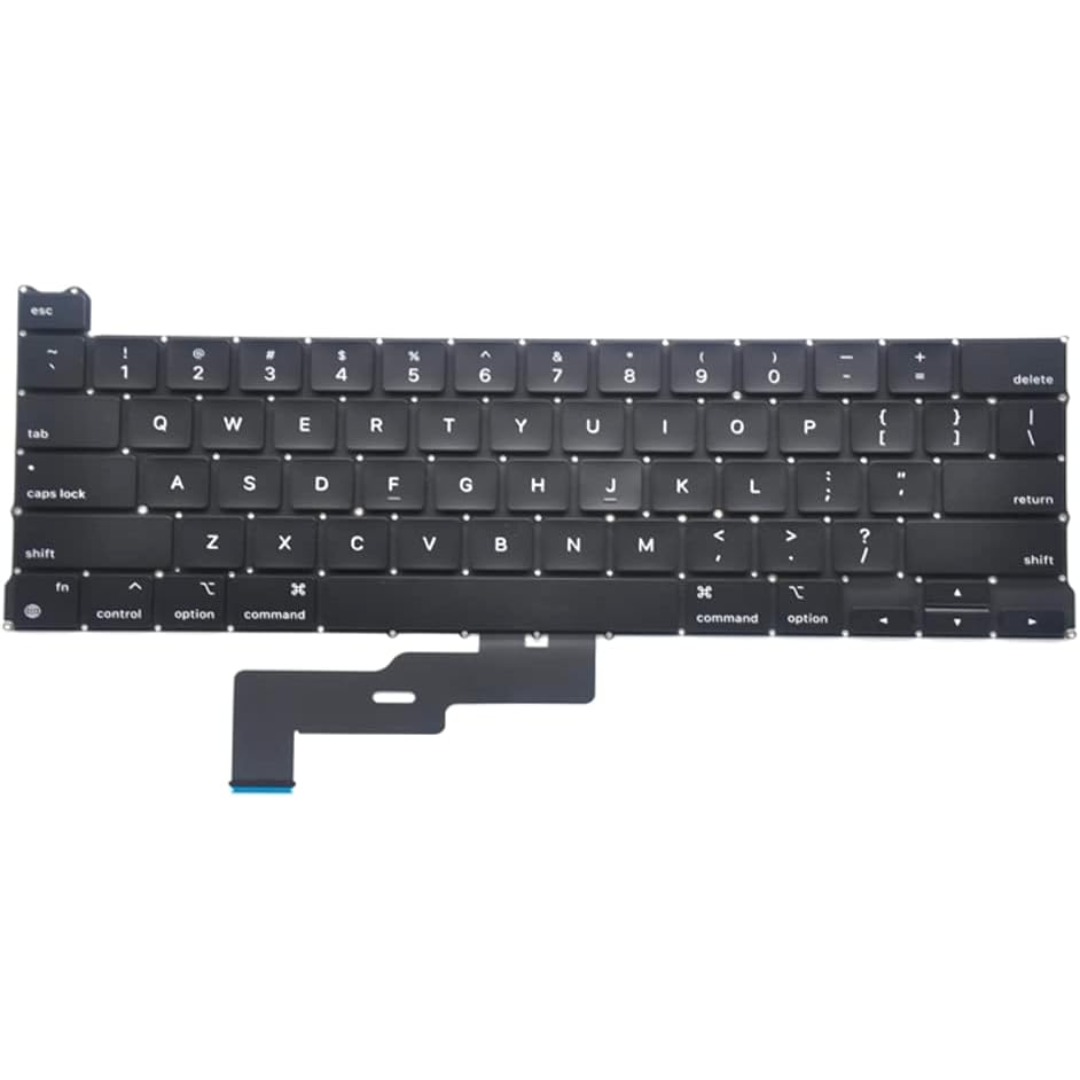
Genuine-spec UK layout (QWERTY) black keyboard replacement for MacBook Air 13.6″ and 15″ models (2023–2025, M2/M3/M4 chips)—featuring Apple’s Magic Keyboard design with scissor-switch mechanism, backlighting, and precise OEM fit. Compatible With: 13.6″ MacBook Air: A2681 (M2, 2022–2023), A3113 (M3, 2023–2024), A3240 (M4, 2024–2025) 15″ MacBook Air: A2941 (M2, 2023), A3114 (M3, 2023–2024), A3241 (M4, 2024–2025) 13.6″ MacBook Air: A2681 (M2, 2022–2023), A3113 (M3, 2023–2024), A3240 (M4, 2024–2025) 15″ MacBook Air: A2941 (M2, 2023), A3114 (M3, 2023–2024), A3241 (M4, 2024–2025) Keyboard Layout: UK English (QWERTY) with £ symbol, taller Enter key, and standard UK key labeling—matches Apple’s original regional configuration. Design: Apple’s Magic Keyboard with scissor-switch mechanism—offering quiet, responsive typing with 1mm travel and improved reliability. Features: Backlit keys, ambient light sensor support, and original-style flex cable connector for seamless integration with the logic board. Color: Matte black keycaps matching the Space Gray and Midnight MacBook Air finishes (also compatible with Silver/Starlight—keycaps are model-agnostic). Precision Engineering: Manufactured to exact OEM specifications for fit, alignment, and tactile performance—ensures flush mounting within the top case. Installation Note: Keyboard is glued into the top case and requires full disassembly and careful re-adhesion. Recommended for professional technicians only due to complexity and risk of damage.

Genuine-spec US layout keyboard replacement for MacBook Pro (Model A1398, Late 2011–Mid 2012)—featuring durable scissor-switch keys, backlighting, and OEM-fit design for reliable typing and straightforward installation. Compatible With: MacBook Pro 13″: Late 2011 (Model A1278, but labeled A1398 in some regions) – Model Identifier MacBookPro8,1 MacBook Pro 15″: Early 2011, Late 2011, and Mid 2012 – Model Identifiers MacBookPro8,2 (15″ early/late 2011) and MacBookPro9,1 (15″ mid 2012) *(Note: “A1398” is primarily associated with the 15″ unibody MacBook Pro with Retina display (Mid 2012), which was the first Retina MacBook Pro.)* This keyboard fits the non-Retina 15″ A1398 (Mid 2012) and compatible Late 2011 models. MacBook Pro 13″: Late 2011 (Model A1278, but labeled A1398 in some regions) – Model Identifier MacBookPro8,1 MacBook Pro 15″: Early 2011, Late 2011, and Mid 2012 – Model Identifiers MacBookPro8,2 (15″ early/late 2011) and MacBookPro9,1 (15″ mid 2012) *(Note: “A1398” is primarily associated with the 15″ unibody MacBook Pro with Retina display (Mid 2012), which was the first Retina MacBook Pro.)* This keyboard fits the non-Retina 15″ A1398 (Mid 2012) and compatible Late 2011 models. Layout: Standard US English (QWERTY) with full-size keys, inverted-T arrow keys, and dedicated function row (F1–F12). Keyboard Type: Traditional scissor-switch mechanism—robust, tactile, and serviceable (pre-Butterfly era). Integrated Features: Backlit keys (adjustable brightness via F5/F6) OEM ribbon cable with ZIF connector Matches original key spacing and actuation force Backlit keys (adjustable brightness via F5/F6) OEM ribbon cable with ZIF connector Matches original key spacing and actuation force Build & Fit: Precision-molded plastic frame with exact screw mounts and alignment pegs—ensures secure, rattle-free installation in the top case. Installation Note: Keyboard is secured with screws and minimal adhesive. Requires full top case access and battery disconnect. Recommended for intermediate to advanced users or technicians.

A reliable, budget-friendly Genius KM-100SE wired keyboard and mouse combo featuring a spill-resistant keyboard, ergonomic design, and plug-and-play USB connectivity—ideal for home, office, or classroom use. Spill-resistant design with drainage holes to protect against accidental liquid damage Quiet, low-profile keys with standard layout (including numeric keypad) for comfortable typing Durable construction with a lifespan of up to 10 million keystrokes Integrated wrist rest for improved ergonomics during long sessions Ambidextrous 3-button design with scroll wheel 1000 DPI optical sensor for smooth, precise tracking on most surfaces Ergonomic shape for comfortable right- or left-handed use Plug-and-play USB connection—no drivers required Compatible with Windows, macOS, Linux, and ChromeOS 1.5-meter braided cable for tangle resistance and durability

Genuine-spec touchpad flex cable for MacBook Pro 15″ (Model A2941, 2023, Apple M2)—restores full Force Touch functionality, haptic feedback, and precise multi-touch gesture control during trackpad repair or replacement. Compatible With: MacBook Pro 15-inch (2023, Model A2941) with Apple M2 chip (Model Identifier: MacBookPro19,1) Part Type: Touchpad flex cable only — does not include the trackpad housing, Taptic Engine, or mounting hardware. This is the OEM-style ribbon cable that connects the trackpad to the logic board. Function: Transmits: Touch input coordinates Force Touch pressure data Haptic feedback signals to the Taptic Engine Enables full macOS gesture support: Force Click, three-finger lookup, swipe navigation, pinch-to-zoom, and smooth cursor tracking. Touch input coordinates Force Touch pressure data Haptic feedback signals to the Taptic Engine Enables full macOS gesture support: Force Click, three-finger lookup, swipe navigation, pinch-to-zoom, and smooth cursor tracking. OEM-Quality Build: Matches Apple’s original specifications in: Cable length and routing path Connector pitch and ZIF latch design EMI shielding and flex durability Cable length and routing path Connector pitch and ZIF latch design EMI shielding and flex durability Common Use Cases: Replacing a torn, creased, or liquid-damaged original flex cable Completing a trackpad replacement when the original cable is compromised Fixing intermittent trackpad behavior, loss of Force Touch, or complete unresponsiveness Replacing a torn, creased, or liquid-damaged original flex cable Completing a trackpad replacement when the original cable is compromised Fixing intermittent trackpad behavior, loss of Force Touch, or complete unresponsiveness Installation Note: Requires full bottom case removal and battery disconnection. Cable routes under internal components near the right speaker and logic board. Connects via a ZIF (Zero Insertion Force) socket—must be aligned carefully and latched gently. Recommended for experienced or certified technicians only. Requires full bottom case removal and battery disconnection. Cable routes under internal components near the right speaker and logic board. Connects via a ZIF (Zero Insertion Force) socket—must be aligned carefully and latched gently. Recommended for experienced or certified technicians only.

