
WiWU Ora Laptop Sleeve Size: 14" and 16" Color: Black/Grey/Ivory Extra Storage Space - Two pockets in front, enough space to keep mouse, cable, cellphone, memory cards, external hard drive, pens, etc. Ultra-slim & Lightweight - Slim, portable, and lightweight to take alone, or slide into your briefcase, backpack, or any other bag, perfect for business, school, or travel. Shockproof - Multiple Layers Protection, polyester foam padding layer, and nylon fabric lining for bump and shock absorption, protect your computer from accidental scratches. Excellent Detail: Use an Exquisite zipper and reinforced stitching on all stress points, ensuring the bag does not fall apart when carrying heavy goods. The first verticle-designed laptop bag, you will feel the beauty of simple and good texture. WiWU Ora Laptop Sleeve Size: 14″ and 16″ Color: Black/Grey/Ivory Extra Storage Space – Two pockets in front, enough space to keep mouse, cable, cellphone, memory cards, external hard drive, pens, etc. Ultra-slim & Lightweight – Slim, portable, and lightweight to take alone, or slide into your briefcase, backpack, or any other bag, perfect for business, school, or travel. Shockproof – Multiple Layers Protection, polyester foam padding layer, and nylon fabric lining for bump and shock absorption, protect your computer from accidental scratches. Excellent Detail: Use an Exquisite zipper and reinforced stitching on all stress points, ensuring the bag does not fall apart when carrying heavy goods. The first verticle-designed laptop bag, you will feel the beauty of simple and good texture.

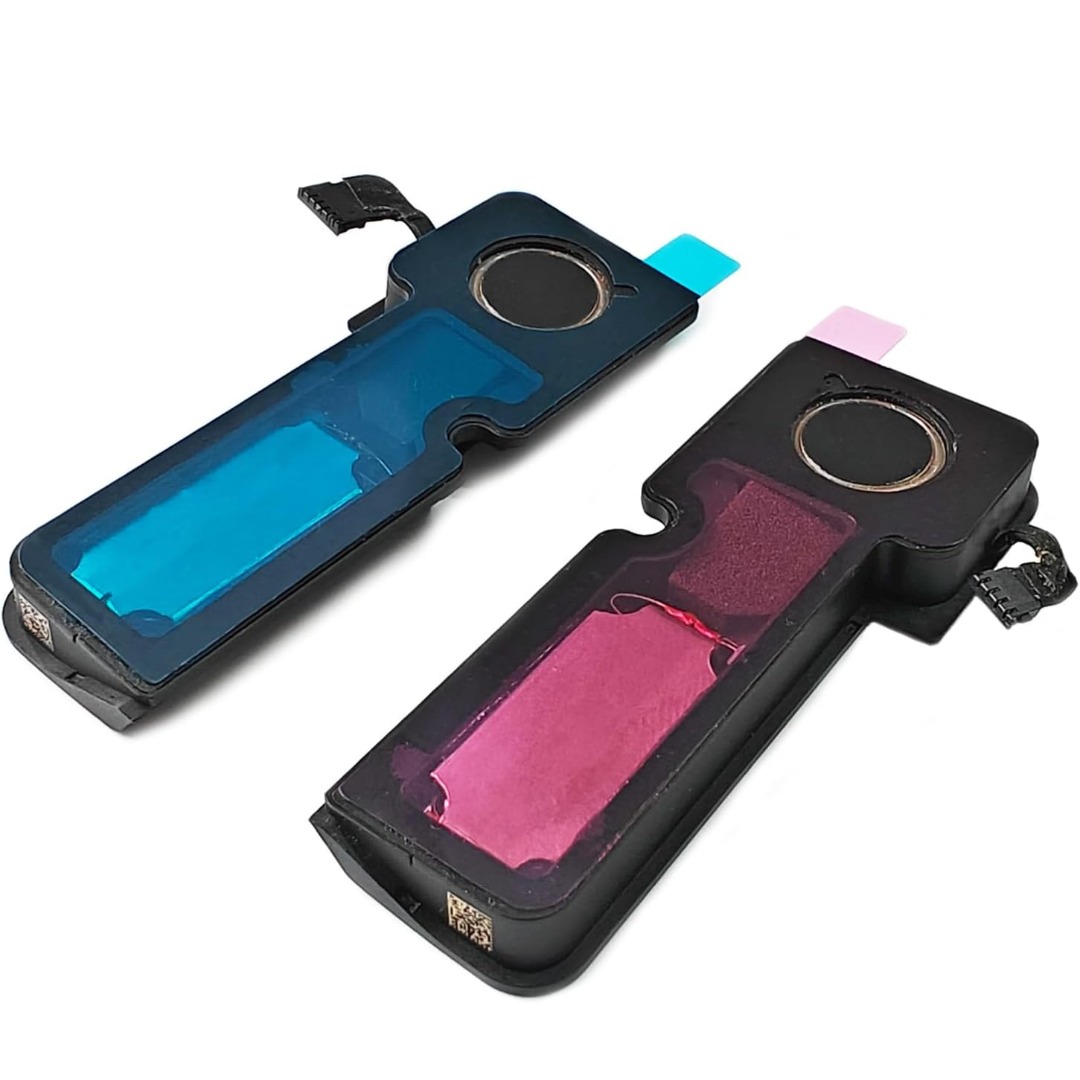
Compatible With: MacBook Pro 15.4-inch (Mid 2012, Model A1398, Model Identifier MacBookPro10,1) — the first Retina MacBook Pro. Includes: Complete left and right speaker units with pre-attached connector cables and mounting brackets, ready for direct installation. Audio Performance: Engineered to match Apple’s original acoustic design—delivers clear mid-range, balanced stereo separation, and consistent volume levels across system audio, video calls, and media playback. OEM Build Quality: Precision-molded housing, original grille pattern, and correct wiring length ensure seamless integration into the MacBook’s chassis without rattling or interference. Common Use Cases: Replaces speakers damaged by liquid spills, physical impact, or aging (e.g., crackling, no sound, or distorted audio). Installation Note: Requires full bottom case and logic board access. Speakers are secured with screws and adhesive tape. Recommended for experienced technicians due to tight internal layout and delicate connectors.

256GB SSD Apple Macbook Pro Air 2013 2014 2015 A1502 A1398 A1466 A1465 | Samsung MZ-JPU512T/A06 | 655-1805D ORIGINAL APPLE PART (Apple sources their SSD’s for MacBooks from Samsung) A1502 – A1398 – A1465 – A1466 100% TESTED WORKING Please check compatibility below before you make your purchase: COMPATIBILITY: MacBook Pro Retina Late 2013 – Mid-2015 MacBookPro11,1 (A1502) – ME864LL/A, ME866LL/A, ME867LL/A, MGX72LL/A, MGX92LL/A, & MGXD2LL/A MacBookPro11,2 (A1398) – ME293LL/A & MGXA2LL/A MacBookPro11,3 (A1398) – ME294LL/A, ME874LL/A, MGXC2LL/A, & MGXG2LL/A MacBookPro11,4 (A1398) – MJLQ2LL/A MacBookPro11,5 (A1398) – MJLT2LL/A & MJLU2LL/A MacBookPro12,1 (A1502) – MF839LL/A, MF841LL/A, & MF843LL/A MacBook Air Mid-2013 – Late 2015 MacBookAir6,1 (A1465) – MD711LL/A, MD760LL/A, MD711LL/B, & MF067LL/A MacBookAir6,2 (A1466) – MD760LL/A, MD760LL/B, & MF068LL/A MacBookAir7,1 (A1465) – MJMVM2LL/A MacBookAir7,2 (A1466) – MJVE2LL/A Model Identifier: Samsung Manufacturer Part# MZ-JPU512T/A06

Genuine-spec touchpad flex cable compatible with both MacBook Air A2179 (Intel, 2020) and A2337 (M1, 2020)—restores full Force Touch functionality, haptic feedback, and precise multi-touch gesture control during trackpad repair or replacement. Compatible With: MacBook Air 13″ (2020, Intel) – Model A2179 (Model Identifier: MacBookAir9,1) MacBook Air 13″ (2020, Apple M1) – Model A2337 (Model Identifier: MacBookAir10,1) MacBook Air 13″ (2020, Intel) – Model A2179 (Model Identifier: MacBookAir9,1) MacBook Air 13″ (2020, Apple M1) – Model A2337 (Model Identifier: MacBookAir10,1) ✅ Important Note: Despite different processors (Intel vs. M1), Apple used the same trackpad assembly and flex cable in both A2179 and A2337. This makes the flex cable fully interchangeable between the two models. Part Type: Touchpad flex cable only — does not include the trackpad housing, Taptic Engine, or mounting hardware. This is the OEM-style ribbon cable that connects the trackpad to the logic board. Function: Transmits: Touch input coordinates Force Touch pressure data Haptic feedback signals to the Taptic Engine Enables full macOS gesture support: Force Click, three-finger lookup, swipe navigation, pinch-to-zoom, and smooth cursor tracking. Touch input coordinates Force Touch pressure data Haptic feedback signals to the Taptic Engine Enables full macOS gesture support: Force Click, three-finger lookup, swipe navigation, pinch-to-zoom, and smooth cursor tracking. OEM-Quality Build: Matches Apple’s original specifications in: Cable length and routing path Connector pitch and ZIF latch design EMI shielding and flex durability Cable length and routing path Connector pitch and ZIF latch design EMI shielding and flex durability Common Use Cases: Replacing a torn, creased, or liquid-damaged original flex cable Completing a trackpad replacement when the original cable is compromised Fixing intermittent trackpad behavior, loss of Force Touch, or complete unresponsiveness Replacing a torn, creased, or liquid-damaged original flex cable Completing a trackpad replacement when the original cable is compromised Fixing intermittent trackpad behavior, loss of Force Touch, or complete unresponsiveness Installation Note: Requires full bottom case removal and battery disconnection. Cable routes under the right side of the battery and logic board. Connects via a ZIF (Zero Insertion Force) socket—align carefully and latch gently. Recommended for experienced or certified technicians only. Requires full bottom case removal and battery disconnection. Cable routes under the right side of the battery and logic board. Connects via a ZIF (Zero Insertion Force) socket—align carefully and latch gently. Recommended for experienced or certified technicians only.

External Seagate 2TB/4TB HDD Expansion Portable Drive Easily store and access 2TB/4TB of content on the go with Seagate Expansion Portable hard drive This external hard drive for Windows computers makes backup a snap just drag and drop To get set up, connect the portable hard drive to your Windows computer for automatic recognition no software required This USB drive provides plug and play simplicity with the included 18 inch USB 3.0 cable Enjoy long term peace of mind with the included one year limited warranty

The Apple Magic Mouse (USB-C version) is a sleek, minimalist multi-touch wireless mouse built for Mac users. It offers smooth gesture support, Bluetooth connectivity and a built-in rechargeable battery — a great choice if you prefer a clean desk setup and full compatibility with macOS and iPadOS. General Name: Magic Mouse (USB-C) — part of Apple’s pointing-device lineup. Wireless connectivity: Bluetooth. Rechargeable battery: built-in, no disposable AA cells. Charging / port: USB-C port (bottom of mouse) for pairing and charging. Compatibility: Requires a Mac with macOS 15.1 or later, or an iPad with iPadOS 18.1 or later. Size & Weight Height: ~0.85 inch (2.16 cm) Width: ~2.25 inch (5.71 cm) Depth: ~4.47 inch (11.35 cm) Weight: ~0.22 pound (0.099 kg) (varies slightly by manufacturing) Features Multi-Touch surface: supports gestures such as swiping between pages, scrolling through documents, zooming. Glide / foot design: optimized for smooth movement across desktop surfaces. Rechargeable battery life: about a month or more between charges (typical use) per Apple spec. Used Condition ConsiderationsSince you’re specifying a used unit: Check for wear on the bottom feet / skates — these degrade and affect glide. Verify battery capacity / health (rechargeable batteries age). Confirm the port is functioning (USB-C) and Bluetooth connectivity is stable. Look for signs of excessive surface scratches on the multi-touch top — may impair gestures. Ensure the firmware / Mac recognizes it fully (gestures working). Upgradability / Limitations Not user-upgradable: You cannot replace the internal battery or change internals easily. Design limitation: The USB-C port remains on the bottom of the mouse, meaning you cannot use it while charging unless you flip it. This design is still criticized. Ergonomics: The flat, low-profile design is stylish but may not suit extended-use comfort for some users.

Professional battery testing flex cable for MacBook Pro 15″ (Model A1990, 2018–2019)—used by technicians to bypass a faulty battery or diagnose power-on issues without permanent battery removal. Enables safe logic board testing and troubleshooting. This is not a replacement battery cable—it’s a diagnostic tool used in repair workflows. It mimics the battery’s presence by providing the necessary SMBus signal and power-enable lines to the logic board, allowing the MacBook to: Power on without a battery installed Test logic board functionality independently Diagnose whether a no-power issue is caused by the battery or logic board MacBook Pro 15″ (2018–2019) Model: A1990 Model Identifiers: MacBookPro15,2 Chip: Intel Core i7/i9 Model: A1990 Model Identifiers: MacBookPro15,2 Chip: Intel Core i7/i9 ⚠️ Not compatible with A1707 (2016–2017), A2159 (16″), or any M1/M2 models. Simulates battery presence via correct SMBus resistance and ID signals Includes power-enable circuitry matching Apple’s safety protocol Pre-terminated with OEM-style connector for A1990 logic board Allows safe bench testing of logic boards during repair Diagnosing “no power, no fan spin, no display” issues Verifying if a logic board powers on without risking a shorted battery Testing after liquid damage or DC-in board replacement Avoiding unnecessary battery replacements during diagnostics Not for permanent installation—intended for temporary diagnostic use only Does not charge or store power—requires connected USB-C power adapter to operate Must be used with a known-good power adapter (87W recommended) Not a consumer part—designed for professional repair shops and technicians

Genuine-spec keyboard replacement for MacBook Pro 14" & 16" (2021–2025, M1 Pro/Max to M4 Pro/Max)—available in US QWERTY or UK QWERTY (with £ symbol). Features Apple’s Magic Keyboard with scissor-switch mechanism, full backlighting, and precise OEM fit. Genuine-spec keyboard replacement for MacBook Pro 14″ & 16″ (2021–2025, M1 Pro/Max to M4 Pro/Max)—available in US QWERTY or UK QWERTY (with £ symbol). Features Apple’s Magic Keyboard with scissor-switch mechanism, full backlighting, and precise OEM fit. US Layout: Wide Enter key @ above 2, # above 3 Standard inverted-T arrow keys Wide Enter key @ above 2, # above 3 Standard inverted-T arrow keys UK Layout: Tall vertical Enter key £ symbol on key 3 @ accessed via Right Alt + 2 Matches Apple’s official UK regional configuration Tall vertical Enter key £ symbol on key 3 @ accessed via Right Alt + 2 Matches Apple’s official UK regional configuration Keyboard Type: Apple Magic Keyboard with scissor-switch mechanism Backlighting: Full per-key white backlight with ambient light sensor support Function Row: Full-height physical function keys (F1–F12) with macOS shortcut toggling Build Quality: OEM-grade keycaps, consistent actuation force, and precise top-case alignment

Genuine-spec Touch Bar assembly with integrated flex cable for 2020 MacBook Pro 13″ models (A2251, A2289, A2338)—restores full Touch ID and Touch Bar functionality with OEM-level fit and performance. Compatible With: MacBook Pro 13″ (2020): A2251 (Intel Core i5/i7, two Thunderbolt ports) A2289 (Intel Core i5/i7, four Thunderbolt ports) A2338 (Apple M1 chip, two Thunderbolt ports) MacBook Pro 13″ (2020): A2251 (Intel Core i5/i7, two Thunderbolt ports) A2289 (Intel Core i5/i7, four Thunderbolt ports) A2338 (Apple M1 chip, two Thunderbolt ports) A2251 (Intel Core i5/i7, two Thunderbolt ports) A2289 (Intel Core i5/i7, four Thunderbolt ports) A2338 (Apple M1 chip, two Thunderbolt ports) Includes: Complete Touch Bar module with integrated flex cable, Touch ID sensor, and ambient light sensor—ready for direct connection to the logic board. Functionality: Fully restores dynamic Touch Bar controls, system functions, app shortcuts, and Touch ID (fingerprint authentication and power button). OEM-Quality Build: Matches Apple’s original design in responsiveness, finish, and sensor alignment—ensures seamless integration with macOS. Color Options: Available in Space Gray and Silver to match your MacBook’s top case (confirm your model’s color before ordering). Installation Note: Requires full top case disassembly and careful handling of adhesive and connectors. The flex cable routes under the speakers and connects near the logic board—precision is essential. Recommended for experienced technicians.

Genuine-spec touchpad flex cable for MacBook Pro 16″ (Model A2159, 2019, Intel)—essential for restoring full Force Touch functionality, haptic feedback, and precise trackpad responsiveness during repair or replacement. Compatible With: MacBook Pro 16-inch (2019, Model A2159) with Intel Core i7/i9 processors (Model Identifier: MacBookPro16,1). Part Type: Touchpad flex cable only—does not include the trackpad, Taptic Engine, or mounting hardware. This is the OEM-style ribbon cable that connects the trackpad to the logic board. Function: Transmits touch input, Force Touch pressure data, and haptic feedback signals—critical for macOS gestures (e.g., Force Click, three-finger swipe, pinch-to-zoom) and Taptic Engine operation. OEM-Quality Build: Matches Apple’s original flex circuit in length, connector pitch, shielding, and bend radius—ensures reliable signal integrity and durability under repeated use. Common Use Cases: Replacing a torn, frayed, or corroded original flex cable Completing a trackpad replacement when the original cable is damaged Fixing intermittent or unresponsive trackpad behavior caused by cable failure Replacing a torn, frayed, or corroded original flex cable Completing a trackpad replacement when the original cable is damaged Fixing intermittent or unresponsive trackpad behavior caused by cable failure Installation Note: Requires full bottom case removal and careful routing beneath the battery and logic board. Connectors use ZIF (Zero Insertion Force) sockets—must be properly aligned and latched without force. Recommended for certified or experienced technicians only.

BATTERY DELL F3YGT 7.6V 60Wh Type F3YGT Battery for Dell Latitude 7480 7490 7280 7290 7380 7390 P73G001 P73G002 P28S001 P28S002 P29S002 DM3WC 2X39G DM6WC 451-BBYE 453-BBCF P28S P73G KG7VF 4-Cell About this item REPLACE BATTERY PART : 7.6V 60 WHr 4-Cell F3YGT battery replace part F3YGT DM3WC 2X39G 0DM3WC 0F3YGT 451-BBYE 453-BBCF KG7VF. (Only replace with type 60Wh battery, NOT fit DJ1J0 42WHr 3-Cell! Please check your original battery to make sure you get the correct replacement battery!) FIT LAPTOP MODELS: For Dell Latitude 12 7000 7280 7290 Latitude 13 7000 7380 7390 Latitude 14 7000 7480 7490 Latitude 7280 7290 7380 7390 7480 7490 E7280 E7290 E7380 E7390 E7480 E7490 P28S P73G P28S001 P28S002 P73G001 P73G002 Series laptop. (NOT fit for Dell Latitude 7390 2-in-1 Series) SPECIFICATION: Model Name: 60Wh Standard Rechargeable Li-ion Battery Type F3YGT; Battery Type: Li-Ion Polymer; Voltage: 7.6V; Capacity: 60Wh; Cells: 4-cell; Size: About 9.37×3.78×0.22inch; Weight: About 10OZ / 0.63lb; Condition: 100% New; Life span: About 300-500 discharge per charge cycles; Packages includes: 1PC F3YGT laptop battery(with two free screwdrivers and user manual for easy installation, battery cable NOT included)

A rugged and versatile pre-owned Lenovo ThinkPad T460 with 14" touchscreen, 6th Gen Core i5, 8GB RAM, and 256GB SSD—ideal for professionals who need durability, touch functionality, and reliable business performance.

The Transcend TS8XDVDS-K is an ultra-slim, lightweight external portable DVD writer designed for laptops, ultrabooks, and thin desktop computers lacking internal optical drives. Offering fast 8X DVD and 24X CD read/write speeds, it provides a seamless plug-and-play solution for burning media, backing up critical data, and playing movies on the go without requiring an external power adapter. ✅ Full Specifications: Model: Transcend Extra Slim Portable DVD Drive (TS8XDVDS-K) – Black Edition Interface / Connection: Mini-USB to USB Type-A interface (Includes a specialized USB double-headed power/data cable) Performance / Speed: * DVD±R Read/Write: Up to 8X DVD±R DL (Double Layer) Read/Write: Up to 6X DVD-RAM Read/Write: Up to 5X CD-R/RW Read/Write: Up to 24X Performance / Speed: * DVD±R Read/Write: Up to 8X DVD±R DL (Double Layer) Read/Write: Up to 6X DVD-RAM Read/Write: Up to 5X CD-R/RW Read/Write: Up to 24X Capacity / Media Compatibility: Supports standard CD-R/RW, DVD±R, DVD±RW, DVD±R DL, and M-DISC long-term archival media formats. Material & Build: Durable, premium hard plastic housing with a sleek, rounded-edge aesthetic. Design & Form Factor: Extra-slim layout measuring just 13.9mm in thickness. Top-loading tray mechanism with an emergency manual eject hole. Power Setup: Fully USB bus-powered (No external power wall adapter required; draws power directly from host computer USB ports). Security & Software: Includes a free download of CyberLink Media Suite 10 (Media Writer) data burning software via registration. Supports TV Connectivity (allows plugging into supported smart TVs to play media files directly). Compatibility: Windows 11 / 10 / 8 / 7, macOS (10.7 and above), and Linux Dimensions: Approx. 142.8 x 148.0 x 13.9 mm (5.62″ x 5.83″ x 0.55″) Weight: Approx. 264 grams (0.58 lbs)

TP-Link TL-WR841N Router – 300Mbps Wi-Fi speed with 2 fixed antennas and 4 LAN ports.Ideal for home and small office use with support for multiple modes and secure encryption. Model: TP-Link TL-WR841N Wi-Fi Standard: IEEE 802.11b/g/n Frequency: 2.4GHz only Speed: Up to 300Mbps (Wireless N) Antennas: 2 Fixed 5dBi Omni-directional Antennas Ports: 1x WAN Port (10/100Mbps) 4x LAN Ports (10/100Mbps) Ports: 1x WAN Port (10/100Mbps) 4x LAN Ports (10/100Mbps) Security: WPA/WPA2, SPI Firewall, MAC address filtering Modes: Router, Range Extender, Access Point, WISP Wireless Features: SSID broadcast control, WDS bridging, bandwidth control Management: Web UI, TP-Link Tether App Dimensions: 192 × 134 × 33 mm

Apple Magic Keyboard - A1644 Wireless Bluetooth - UK English Layout Apple Magic Keyboard – A1644 Wireless Bluetooth – UK English Layout

Genuine-spec US layout keyboard replacement for MacBook Pro 15″ (2018–2019, Models A1989/A1990)—designed for reliable typing, full compatibility, and seamless integration with original top case assemblies. Compatible With: MacBook Pro 15-inch (2018 A1989 and 2019 A1990 models) with Touch Bar. Layout: Standard US English (QWERTY) with full-size keys, including inverted-T arrow keys and dedicated function row. Integrated Features: Includes built-in backlighting, scissor-switch mechanism (3rd-gen Butterfly or revised Butterfly mechanism, depending on original model year), and ribbon cable connector matching Apple’s OEM design. Functionality: Supports all native keyboard features, including brightness, volume, media controls, and Touch ID power button (note: Touch ID sensor is not included—this is the keyboard only). Build Quality: Precision-engineered to match Apple’s original fit, feel, and durability—ideal for professional repairs or top case refurbishment. Installation Note: Requires full top case disassembly. Keyboard is adhered to the top case and must be carefully removed and replaced using proper tools and techniques. Recommended for experienced technicians. Model Verification: Ensure your MacBook is A1989 (2018) or A1990 (2019) before purchase—keycaps and connectors differ from other MacBook generations.

MacBook Pro A1708 Battery A1713 for MacBook Pro 13 Inch A1708 Late 2016 Mid 2017 (EMC 2978 3164), A2171 Laptop Replacement Battery for MacBook Pro 13 Inch A2159 (2019) A2289 (2020) A2338 (2020) 【Macbook pro 13 Inch battery A1713 & A2171 Battery Specification】– Voltage: 11.4V. Capacity: 54.5Wh / 4781mAh, Battery Type: Li-ion 【Newest 4.0 upgraded OEM Battery for Apple macbook pro】– Japan High Performance Electric Core. Cobalt Proportion: >98%. Upgrade chip. Up to 1500+ recharge cycles over the life of the battery. Overcharger and Discharger Circuit Protection, Ensure fast charges and low power consumption, UL-/CE-/FCC-/RoHS-Certified for safety 【Replacement Battery A1713 for A1708 Macbook pro 13 inch】– A1708 Macbook pro 13” Late 2016: MacBook Pro 13-Inch “Core i5” 2.0 & MacBook Pro 13-Inch “Core i7” 2.4 (MacBookPro13,1, EMC2978, MLL42xx/A, MLUQ2xx/A). — A1708 Macbook pro 13” Mid 2017: MacBook Pro 13-Inch “Core i5” 2.3 & MacBook Pro 13-Inch “Core i7” 2.5 (MacBookPro14,1, EMC3164, MPXQ2xx/A, MPXR2xx/A, MPXT2xx/A, MPXU2xx/A) 【Replacement Battery A2171 for A2159 & A2289 & A2338 Macbook pro 13 inch】– A2159 Macbook pro 13” 2019: MacBook Pro 13-Inch “Core i5” 1.4 Touch & “Core i7” 1.7 Touch (MacBookPro15,4, EMC3301, MUHN2xx/A, MUHP2xx/A, MUHQ2xx/A, MUHR2xx/A, MUHR2xx/B). — A2289 Year 2020: MacBook Pro 13-Inch “Core i5” 1.4 & “Core i7” 1.7 (MacBookPro16,3, EMC 3456, MXK32xx/A, MXK52xx/A, MXK62xx/A, MXK72xx/A). — A2338 Year 2020: MacBook Pro 13-Inch “M1” 8-Core 3.2 (MacBookPro17,1, EMC3578, MYDA2LL/A*)

Fast-charging feature available on select iPhone and iPad models.

WiWU Skin Zero Sleeve – Ultra-thin Lycra laptop case with faux-fur lining and scratch-resistant protection, available in multiple sizes.Sleek, featherlight, and travel-ready for everyday carry without the bulk. Model: WiWU Skin Zero Sleeve Sizes: Available for 13″, 14″, and 16″ laptops Material: Eco-friendly water-resistant Lycra exterior Interior: Faux-fur lining to protect against scratches and minor bumps Design: Ultra-slim profile that fits easily into backpacks or briefcases Weight: Approximately 280–330 g, depending on size Colors: Black, Gray, Purple, Burgundy Closure: Secure magnetic or zipper closure (varies by version) Features: Lightweight, minimal branding, soft internal cushioning, stylish and durable build

Dominate the battlefield with the Genius Scorpion M705, featuring a high-precision 7200 DPI sensor and striking 7-color breathing RGB lighting. Built with a durable braided cable and 6 programmable buttons, it’s the ultimate entry-level weapon for gamers seeking speed, style, and reliability. The Genius Scorpion M705 is designed to provide gamers with a competitive edge without compromising on comfort. Equipped with an optical sensor that reaches up to 7200 DPI, it ensures smooth and accurate tracking across various surfaces. Its ergonomic right-handed shape and lightweight build reduce wrist strain during marathon sessions, while the integrated 32K memory allows you to take your custom macros and profiles wherever you go. Adjustable 7200 DPI Sensor: Seamlessly switch between six sensitivity levels (800/1600/2400/3200/4800/7200 DPI) to match your game’s pace, from high-speed movement to pixel-perfect sniping. Dynamic RGB Breathing Effects: Enhance your gaming atmosphere with 7 dazzling LED colors that pulse with a “breathing” effect. You can easily adjust the lighting mode using the DPI + Forward/Backward shortcuts. 6 Programmable Buttons: Fully customize your controls. Assign macros, shortcut keys, or specific in-game commands to the 6 buttons to execute complex actions with a single click. Built-in 32K Memory: Save your settings directly on the mouse. Your custom profiles and button assignments stay with you, even when switching to a different PC. Professional Durability: Features a 1.8-meter braided USB cable that prevents tangling and increases the lifespan of the device, ensuring a stable, low-latency connection. Sensor Type: Optical Resolution: 800 – 7,200 DPI Number of Buttons: 6 (Programmable) Illumination: 7-Color RGB Breathing LED Interface: USB Wired Cable: 1.8m Braided Cable Internal Memory: 32K Dimensions: 120.2 x 72.7 x 39.6 mm Weight: Approx. 120g (including cable) Compatibility: Windows 8, 10, 11 or later What’s in the Box Compatibility: Windows 8, 10, 11 or later What’s in the Box Genius Scorpion M705 Gaming Mouse Multi-language Quick Guide
