
Smooth, precise, and completely wireless. The Apple Magic Trackpad brings the best laptop navigation to your desktop. Available in both White and Black, it features a large glass surface, Force Touch technology for deeper control, and a modern USB-C port for easy charging. It connects instantly to your Mac or iPad and keeps running for a month or more on a single charge. Make navigating your computer effortless with the Apple Magic Trackpad (A3120). Designed with a wide, smooth glass surface, it lets you swipe, scroll, and zoom using the same natural hand gestures you use on a laptop. It is the perfect tool to keep your desk clean and your workflow productive. Key Features: Force Touch: Built-in sensors know how hard you press, letting you click deeper to open previews, look up definitions, and reveal hidden menus. Large Glass Surface: The spacious edge-to-edge design gives you plenty of room to scroll through large documents or edit photos comfortably. Updated with USB-C: Now features a universal USB-C port for charging and pairing, matching all your modern cables. Long Battery Life: The built-in rechargeable battery lasts about a month or more before needing a quick recharge. Easy Setup: Pairs automatically with your Mac via Bluetooth right out of the box, with no complicated configuration needed. Sleek Colors: Choose between classic White or premium Black to perfectly match your desktop setup. Specifications at a Glance: Model: A3120 Colors: White / Black Connection: Wireless / Bluetooth / USB-C Surface: Premium Edge-to-Edge Glass Compatibility: Mac and iPad

The AOC 24″ 75Hz Monitor is designed to enhance your viewing experience, making it ideal for both work and entertainment. Whether you’re editing documents or watching movies, this monitor delivers vibrant and sharp visuals. With a 24-inch Full HD display, the AOC monitor provides clear and detailed images. The 75Hz refresh rate ensures smooth motion, reducing screen tearing and providing a more enjoyable viewing experience. The AOC 24″ Monitor features an ergonomic design, allowing you to adjust the height, tilt, and swivel for maximum comfort. This ensures you can work or play for extended periods without discomfort. Equipped with multiple connectivity options, including HDMI and VGA ports, the AOC 24″ 75Hz Monitor offers flexibility in connecting to various devices. This makes it easy to set up and use with your computer, gaming console, or other gadgets. The AOC 24″ 75Hz Monitor includes flicker-free technology and a Low Blue Light mode. These features help reduce eye strain during prolonged use, making it a great choice for both work and leisure. With its sleek and modern design, the AOC 24″ Monitor adds a touch of elegance to any workspace or gaming setup. Its slim bezels provide a larger viewing area, enhancing your overall visual experience. In conclusion, the AOC 24″ 75Hz Monitor combines excellent performance, ergonomic design, and modern aesthetics for a superior viewing experience. Upgrade to the AOC 24″ Monitor today and enjoy clear, smooth, and comfortable visuals. Specifications: Display : 23.8″ VA Resolution : 1920×1080 FHD Refresh Rate : 75Hz Response Rate : 4ms

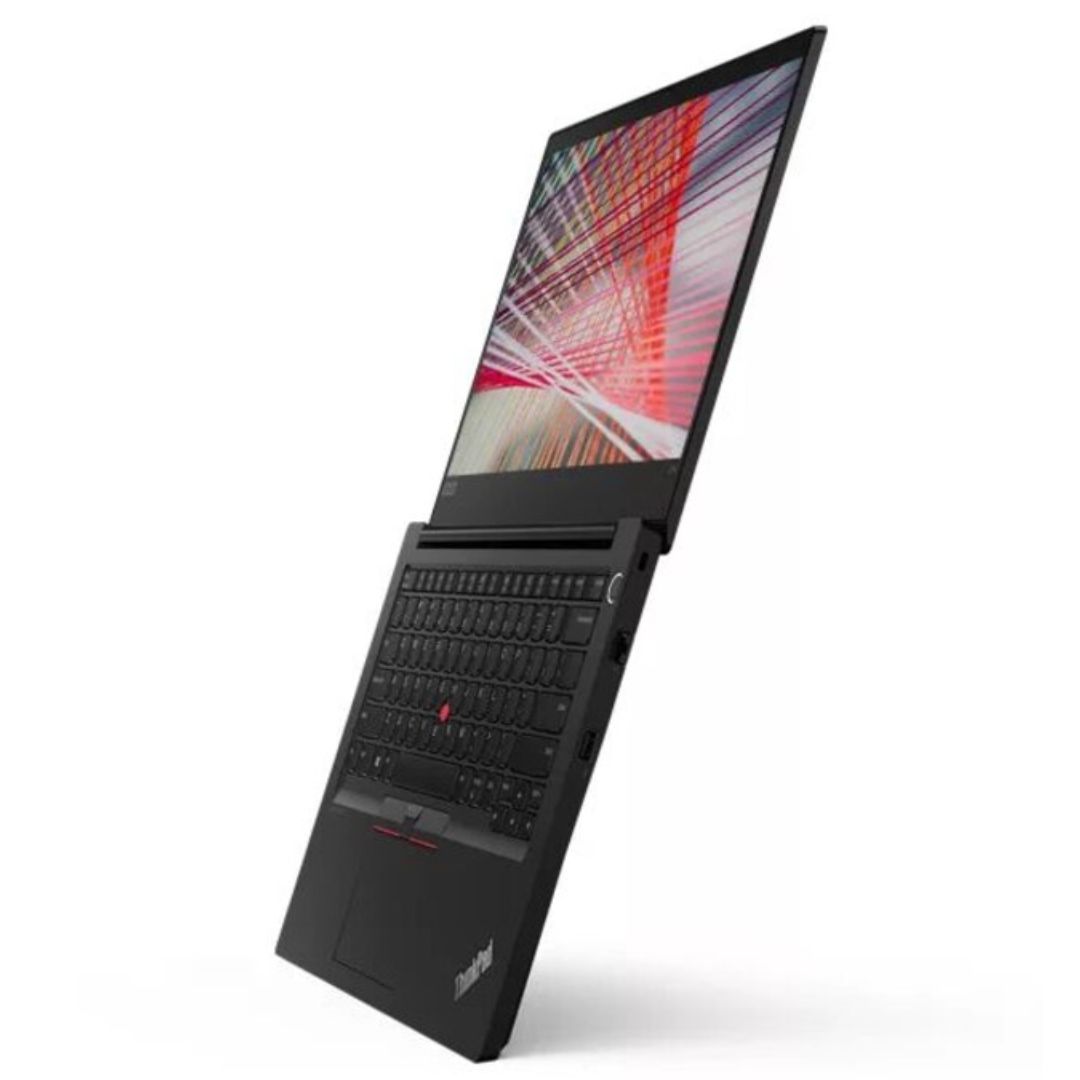
Reliability meets value in this pre-owned ThinkPad E14 Gen 2. Equipped with the AMD Ryzen 5 4500U 6-core processor, 8GB RAM, and a 512GB NVMe SSD, this laptop is built for students and professionals who need a durable, high-performance machine for everyday multitasking.

The Xprinter XP-365B is a compact thermal label printer designed for barcode, shipping, and product labeling. It supports thermal direct printing, USB connectivity, and 58–108mm label widths, making it suitable for retail, logistics, warehousing, and eCommerce operations. Driver Support: Seagull Driver, Xprinter Driver The Xprinter XP-365B is a high-efficiency thermal label printer designed for fast and reliable label printing. It uses direct thermal technology, eliminating the need for ink or toner. With support for a wide range of label types and sizes, the XP-365B is ideal for shipping labels, barcode labels, price tags, shelf labels, and warehouse identification. ⚡ Fast Printing: Up to 127 mm/s for quick label production. 🧾 Flexible Media Support: Works with different label sizes and roll types (gap, continuous, black-mark). 💸 No Ink Needed: Direct thermal technology reduces long-term printing costs. 🖥️ Wide Compatibility: Works with Windows, Linux, and many POS/eCommerce systems. 🔧 Easy Setup: Plug-and-play USB connection with simple driver installation. 🏷️ Perfect for Business Use: Ideal for shipping labels, barcode tags, supermarket labels, and warehouse management.

Genuine-spec touchpad flex cable for MacBook Air 13″ (Model A1534, Early 2015)—essential for restoring full trackpad functionality, including precise cursor control and physical click response, during repair or replacement. Compatible With: MacBook Air 13-inch (Early 2015, Model A1534, Model Identifier MacBookAir7,2). Part Type: Touchpad flex cable only—does not include the trackpad housing, button mechanism, or mounting brackets. This is the ribbon cable that connects the trackpad to the logic board. Function: Carries input signals from the trackpad to the logic board—critical for cursor movement, tap-to-click, and primary/secondary physical click functionality. (Note: This model uses a physical click mechanism, not Force Touch—so no haptic feedback or pressure-sensing.) OEM-Quality Construction: Matches Apple’s original cable in length, connector type, and shielding—ensures reliable signal transmission and long-term durability. Common Use Cases: Replacing a torn, frayed, or damaged original flex cable Completing a trackpad replacement when the original cable is compromised Fixing erratic cursor movement, unresponsive trackpad, or loss of click function Replacing a torn, frayed, or damaged original flex cable Completing a trackpad replacement when the original cable is compromised Fixing erratic cursor movement, unresponsive trackpad, or loss of click function Installation Note: Requires bottom case removal and careful disconnect/reconnect of the ZIF (Zero Insertion Force) connector on the logic board. The cable routes under the battery—handle with care. Suitable for intermediate to advanced DIYers or technicians.

Genuine-spec touchpad flex cable for MacBook Pro 13″ (Model A2289, 2020, Intel)—restores full Force Touch functionality, haptic feedback, and preci multi-touch gesture control. OEM-quality replacement for damaged or faulty original cables. Compatible With: MacBook Pro 13-inch (2020, Four Thunderbolt Ports, Model A2289, Model Identifier MacBookPro16,2) with Intel Core i5/i7 processors. Part Type: Touchpad flex cable only — does not include the trackpad housing, Taptic Engine, or mounting hardware. This is the OEM-style ribbon cable that connects the trackpad to the logic board. Function: Transmits: Touch input coordinates Force Touch pressure data Haptic feedback signals to the Taptic Engine Enables full macOS gesture support: Force Click, three-finger lookup, swipe navigation, pinch-to-zoom, and smooth cursor tracking. Touch input coordinates Force Touch pressure data Haptic feedback signals to the Taptic Engine Enables full macOS gesture support: Force Click, three-finger lookup, swipe navigation, pinch-to-zoom, and smooth cursor tracking. OEM-Quality Build: Matches Apple’s original specifications in: Cable length and routing path Connector pitch and ZIF latch design EMI shielding and flex durability Cable length and routing path Connector pitch and ZIF latch design EMI shielding and flex durability Common Use Cases: Replacing a torn, creased, or liquid-damaged original flex cable Completing a trackpad replacement when the original cable is unusable Fixing: Intermittent or erratic trackpad behavior Loss of Force Touch or haptic feedback Complete trackpad unresponsiveness Replacing a torn, creased, or liquid-damaged original flex cable Completing a trackpad replacement when the original cable is unusable Fixing: Intermittent or erratic trackpad behavior Loss of Force Touch or haptic feedback Complete trackpad unresponsiveness Intermittent or erratic trackpad behavior Loss of Force Touch or haptic feedback Complete trackpad unresponsiveness Installation Note: Requires full bottom case removal and battery disconnection. Cable routes under internal components (speaker, logic board)—must follow original path. Connects via ZIF (Zero Insertion Force) socket—align carefully, never force. Recommended for experienced or certified technicians only. Requires full bottom case removal and battery disconnection. Cable routes under internal components (speaker, logic board)—must follow original path. Connects via ZIF (Zero Insertion Force) socket—align carefully, never force. Recommended for experienced or certified technicians only. Important Compatibility Notes: ✅ Only for A2289 (13″, 4 Thunderbolt ports, 2020, Intel) ❌ Not compatible with: A2251 (2 Thunderbolt ports, 2020) A2338 (M1 MacBook Pro, 2020) Any MacBook Air or 14″/16″ MacBook Pro ✅ Only for A2289 (13″, 4 Thunderbolt ports, 2020, Intel) ❌ Not compatible with: A2251 (2 Thunderbolt ports, 2020) A2338 (M1 MacBook Pro, 2020) Any MacBook Air or 14″/16″ MacBook Pro A2251 (2 Thunderbolt ports, 2020) A2338 (M1 MacBook Pro, 2020) Any MacBook Air or 14″/16″ MacBook Pro

The AOC 27G40 27″ 180Hz Gaming Monitor is built for serious gamers who want fast and smooth performance. It features a 27-inch Fast IPS screen with Full HD resolution. The colors are bright, and the details are sharp from every angle. With a 180Hz refresh rate, your games will run ultra-smooth and clear. Fast motion feels natural with no lag or delay. The 1ms response time helps reduce motion blur and ghosting during fast-paced scenes. Thanks to Adaptive-Sync, you won’t have screen tearing or stuttering. This makes gameplay seamless and enjoyable, even in intense battles. The monitor also supports HDR10 for improved contrast and color accuracy. It covers 128% of the sRGB color space, giving you bold and rich visuals. The screen reaches 300 nits of brightness, so everything stays clear in bright rooms. The AOC 27G40 27″ 180Hz Gaming Monitor includes HDMI 2.0 and DisplayPort 1.4 connections. You can easily connect your PC, console, or other devices. Its ergonomic stand lets you adjust the height, tilt, swivel, and pivot the screen. This helps you find the most comfortable viewing angle. You can also mount it using a VESA-compatible setup for more flexibility. Whether you’re gaming casually or competitively, this gaming monitor delivers excellent speed, clarity, and color. It’s built to meet the demands of modern gaming with style and comfort. Specifications: Display : 27″ Rapid IPS Resolution : 1920×1080 FHD Refresh Rate : 180Hz Response Rate : 0.5ms Speaker : 2W x2 Adjustable : Fully adjustable

A versatile pre-owned Lenovo ThinkPad L13 Yoga Gen 1 with 13.3" touchscreen, 360° hinge, 10th Gen Core i7, 16GB RAM, and 512GB SSD—perfect for professionals who need flexibility, performance, and portability.

Gain the competitive advantage with the Bloody ES7, featuring a high-performance 6000 CPI PixArt Optical Engine. With ultra-fast 1ms click response and customizable 16.8 million color RGB lighting, this mouse is built for gamers who demand precision, speed, and comfort in every match. The A4Tech Bloody ES7 is a professional-grade esports tool designed to translate every hand movement into on-screen action with 1:1 tracking accuracy. Driven by the reliable PixArt Optical Engine, it eliminates “angle snapping” and artificial corrections, ensuring your aim remains raw and precise. Its ergonomic symmetrical shape supports various grip styles, while the anti-sweat matte finish ensures you stay in control even during the most intense gaming sessions. PixArt Optical Engine (6000 CPI): High-precision tracking with 5-level adjustable sensitivity (1000/1200/1600/2000/6000 CPI). Fine-tune your control via software to suit any game genre. Lightning-Fast 1ms Response: Equipped with ahead-of-the-curve technology, the ES7 reacts instantly to your clicks, providing the low-latency performance required for competitive play. Vibrant RGB Lighting: Immerse yourself in your gaming setup with 16.8 million customizable RGB colors and dynamic lighting effects. Customizable “M” Button: The dedicated M button can be programmed via software to execute complex macros or combined functions, putting more power at your fingertips. Extreme Durability: Built to last, the primary buttons are rated for over 10 million clicks, and the high-quality scroll wheel is tested for over 500,000 scrolls. Braided 1.8m Cable: The robust, tangle-free braided cable ensures a stable connection and long-term durability against wear and tear. Sensor: PixArt Optical Engine Resolution: 100 – 6,000 CPI Report Rate: 125 – 1,000 Hz (Adjustable) Key Response: 1 ms Acceleration: 15 g Tracking Speed: 45 ips Frame Speed: 6,000 fps Buttons: 7 Buttons Memory: 256K Onboard Memory Interface: USB Wired (1.8m Cable) System Requirements: Windows 7/8/8.1/10/11 or later Bloody ES7 Esports Gaming Mouse Quick Start Guide

The HP Series 5 Pro 23.8″ FHD USB‑C Conferencing Monitor delivers crisp visuals on a 23.8‑inch Full HD IPS screen with a 16:9 aspect ratio. Additionally, it features a built‑in 5 MP Poly Studio tiltable webcam. This webcam, combined with AI noise reduction, ensures clear video and audio during calls. Moreover, the monitor supports USB‑C video input with up to 100 W power delivery. It also provides USB‑C data transfer, HDMI 2.0, DisplayPort 1.4, USB‑A ports with one charging port, an audio combo jack, and an RJ‑45 Ethernet port. These connections simplify hybrid work setups. Furthermore, the ergonomic stand allows height adjustment for comfort. The ambient light sensor with HP Eye Ease reduces blue light while preserving color accuracy. The monitor incorporates recycled materials in its design and comes with a three‑year limited warranty for peace of mind. Specifications: 23.8″ Full HD (1920 × 1080) IPS display with 350 nits brightness and 1500:1 contrast Built‑in 5 MP Poly Studio webcam with AI noise reduction USB‑C video with up to 100 W power delivery and USB‑C data port HDMI 2.0, DisplayPort 1.4, USB‑A ports, Ethernet, and audio combo jack Ergonomic stand with height adjustment and HP Eye Ease ambient light sensor

Professional Lavalier Microphone Candc DC-C6 Professional Lavalier Microphone Candc DC-C6 Candc DC-C6 Lavalier Microphone for Smartphones, DSLR, Camcorders, Audio recorders, PC etc. Clip microphone to help you get music or sound.One-directional microphone with anti-noise function. type jack can be connected to PC / laptop / wireless microphone transmitter with 3.5mm line-in / mic in. Built-in clip can be easily attached to collar, tie or other clothes-no installation required. Features: Type: microphone Cable length: about 116 cm Sensitivity: -46 ± 2db : one way Operating voltage: DC1.0V-10 VAcurrent consumption

The MSI G32C4X 32″ Monitor delivers ultra-smooth and immersive visuals for gaming and entertainment.It features a 32-inch Full HD curved display that enhances immersion and provides a wide field of view. Moreover, its 250Hz refresh rate ensures extremely smooth motion during fast-paced games. This monitor uses a VA panel for strong contrast and deep colors. Additionally, the fast response time reduces blur and ghosting for competitive gaming. The anti-glare screen helps minimize reflections in bright rooms. HDMI and DisplayPort inputs allow easy connection to gaming PCs and consoles. Furthermore, the curved design and tilt adjustment help you maintain a comfortable viewing angle during long sessions. Low blue light and flicker-free technologies reduce eye strain during extended use. This display is ideal for gamers, esports enthusiasts, and home users alike. Therefore, it supports competitive gaming, streaming, and everyday computing. Finally, it combines fast performance, immersive visuals, and comfort features for daily use. Specifications: Display : 31.5″ VA Resolution : 1920 x 1080 (FHD) Refresh Rate : 250Hz Response Rate : 1ms Curvature : 1500R

Brand Microsoft Connectivity Technology USB Connector Type USB Compatible Devices Laptops Compatible Phone Models Microsoft Special Feature Travel Mounting Type Wall Mount Total USB Ports 1 Wattage 65 watts Microsoft Surface Power Supply 65W and Power Adapter Non Retail Packaging

Genuine-spec touchpad flex cable for MacBook Pro 13″ with Touch Bar (Model A1708, 2016–2017)—restores full Force Touch functionality, haptic feedback, and precise multi-touch gesture control during trackpad repair or replacement. Compatible With: MacBook Pro 13″ (2016) – Model A1708 (Model Identifier: MacBookPro13,1) MacBook Pro 13″ (2017) – Model A1708 (Model Identifier: MacBookPro14,1) (Both years share the same internal trackpad assembly and flex cable.) MacBook Pro 13″ (2016) – Model A1708 (Model Identifier: MacBookPro13,1) MacBook Pro 13″ (2017) – Model A1708 (Model Identifier: MacBookPro14,1) (Both years share the same internal trackpad assembly and flex cable.) Part Type: Touchpad flex cable only — does not include the trackpad housing, Taptic Engine, or mounting hardware. This is the OEM-style ribbon cable that connects the trackpad to the logic board. Function: Transmits: Touch input coordinates Force Touch pressure data Haptic feedback signals to the Taptic Engine Enables full macOS gesture support: Force Click, three-finger lookup, swipe navigation, pinch-to-zoom, and smooth cursor tracking. Touch input coordinates Force Touch pressure data Haptic feedback signals to the Taptic Engine Enables full macOS gesture support: Force Click, three-finger lookup, swipe navigation, pinch-to-zoom, and smooth cursor tracking. OEM-Quality Build: Matches Apple’s original specifications in: Cable length and routing path Connector pitch and ZIF latch design EMI shielding and flex durability Cable length and routing path Connector pitch and ZIF latch design EMI shielding and flex durability Common Use Cases: Replacing a torn, creased, or liquid-damaged original flex cable Completing a trackpad replacement when the original cable is compromised Fixing intermittent trackpad behavior, loss of Force Touch, or complete unresponsiveness Replacing a torn, creased, or liquid-damaged original flex cable Completing a trackpad replacement when the original cable is compromised Fixing intermittent trackpad behavior, loss of Force Touch, or complete unresponsiveness Installation Note: Requires full bottom case removal and battery disconnection. Cable routes under internal components near the right speaker and logic board. Connects via a ZIF (Zero Insertion Force) socket—must be aligned carefully and latched gently. Recommended for experienced or certified technicians only. Requires full bottom case removal and battery disconnection. Cable routes under internal components near the right speaker and logic board. Connects via a ZIF (Zero Insertion Force) socket—must be aligned carefully and latched gently. Recommended for experienced or certified technicians only.

The Alienware AW2724HF 27″ 360Hz Gaming Monitor is built for serious gamers who want speed and clarity. It features a 27-inch Full HD Fast IPS display with sharp visuals and wide viewing angles. With a 360Hz refresh rate via DisplayPort and up to 255Hz through HDMI, the monitor delivers smooth motion in fast-paced games. A 0.5ms response time reduces blur, making every action look sharp and clear. The monitor supports AMD FreeSync Premium and VESA Adaptive-Sync, helping eliminate screen tearing for smoother gameplay. It also covers 99% of the sRGB color range and supports HDR10, offering rich and vibrant visuals. It comes with plenty of ports, including two DisplayPort 1.4, one HDMI 1.4, four USB 3.2 Gen 1 ports, and one USB upstream. This gives you flexible options to connect accessories and gaming gear. The stand is fully adjustable with options to tilt, swivel, pivot, and adjust height for better comfort. It also supports VESA mounting, allowing you to set it up the way you want. The design features thin bezels, making it great for multi-monitor setups. It also includes game-enhancing tools like crosshair overlays and display modes to give players an edge. Overall, the Alienware AW2724HF combines high refresh rates, fast response, and rich visuals in a sleek and adjustable design, perfect for competitive and casual gamers alike. Specifications: Display : 27″ Fast IPS Resolution : 1920×1080 FHD Refresh Rate : 360Hz Response Time : 0.5ms

WiWU ZM‑901 – Sturdy foldable aluminum stand with adjustable angles and silicone pads, weighing just 900 g.Enhances posture, airflow, and workspace ergonomics while staying compact and travel-friendly. Model: WiWU ZM‑901 Material: Metal (aluminum/carbon steel) frame with silicone pads for grip Dimensions (Folded): 260 × 225.5 × 53 mm Package Size: 290 × 250 × 50 mm Net Weight: Approx. 900 g Compatibility: Fits laptops, tablets, and smartphones up to ~17 ” (some listings note 15.6″ limit, but device capacity varies) Features: Adjustable angle configuration, detachable foldable design for portability, silicone surface pads for anti-slip and vibration reduction Build & Design: Durable yet lightweight, crafted to enhance airflow and promote ergonomic posture

Ultra Thin Arabic Keyboard Cover Skin for MacBook Pro 13 Inch 2022 2021 2020 (Apple M2 Chip/Apple M1 Chip A2338/A2289/A2251) and 2019 MacBook Pro 16 Inch (Model A2141) Protector (Black) Ultra Thin Arabic Keyboard Cover Skin for MacBook Pro 13 Inch 2022 2021 2020 (Apple M2 Chip/Apple M1 Chip A2338/A2289/A2251) and 2019 MacBook Pro 16 Inch (Model A2141) Protector (Black) About this item [√] COMPATIBLE WITH: (1) 2022 MacBook Pro 13-Inch with Apple M2 processor, (2) MacBook Pro 13-Inch 2021 2020 with Apple M1 processor (model: A2338), (3) MacBook Pro 13-Inch Early 2020 released (model: A2289/A2251) and (4) 2019 MacBook Pro 16-Inch (model: A2141) [√] MORE PROTECTION for KEYBOARD: waterproof, dust-proof and dirt-proof design can prevent liquid, dust, cigarette ash, biscuit crumbs falling onto your keyboard to affect your keyboard’s life. [√] ACCURATE KEYS: every key is specially molded, manufactured to the quality available. Flexible, this cover is easy to apply and remove for cleaning or disinfecting. [√] 0.26 MM/0.1 IN THICKNESS: ultra thin silicone keyboard cover skin, made it easier for typing. Soft keyboard protector can weaken the sound in typing. [√] 100% CUSTOMER SERVICE and MONEY BACK GUARANTEE: if you are not fully satisfied with the products you received, please feel free to contact us. We will provide you with a 100% customer service and money back guarantee.

Are you in search of a versatile monitor with advanced features? Meet the ViewSonic VG2756V-2K. This 2K 27″ monitor is designed to enhance your productivity and streamline your workflow. Transitioning to its core, the ViewSonic VG2756V-2K boasts a stunning 2560×1440 resolution, delivering crisp and clear visuals for all your tasks. Whether you’re editing documents, designing graphics, or watching videos, enjoy an immersive viewing experience. Its sleek and modern design adds a touch of elegance to any workspace. With its slim bezels and adjustable stand, you can customize the monitor to suit your ergonomic needs. Plus, its built-in webcam docking station makes video conferencing a breeze, eliminating the need for external accessories. Moving on to its display, the ViewSonic VG2756V-2K features a 27-inch screen with a 60Hz refresh rate, ensuring smooth and fluid motion during gaming and multimedia playback. Say goodbye to motion blur and ghosting, and hello to crystal-clear images. Furthermore, with versatile connectivity options including HDMI, DisplayPort, and USB-C, this monitor offers seamless compatibility with a wide range of devices. Whether you’re connecting your laptop, desktop, or gaming console, enjoy hassle-free connectivity. Transitioning to its ergonomic features, the ViewSonic VG2756V-2K is designed with your comfort in mind. Its adjustable stand allows you to tilt, swivel, and pivot the monitor to find the perfect viewing angle. Plus, its flicker-free technology and blue light filter help reduce eye strain during extended use. In summary, the ViewSonic VG2756V-2K is the perfect blend of performance, style, and functionality. Upgrade your workspace today with this feature-packed monitor and take your productivity to the next level. Specifications: Display : 27″ IPS Resolution : 2K (2560 x 1440) Refresh Rate : 60Hz Response Rate : 5ms(GTG)

The MSI Modern MD342CQP 34″ UWQHD Curved Monitor is a premium ultra-wide display for productivity and immersive work. It has a 34-inch curved screen with UWQHD resolution for sharp, detailed visuals. The 1500R curvature reduces eye strain and improves viewing comfort. Its 21:9 ultra-wide screen gives extra space for multitasking and professional workflows. The IPS panel delivers vibrant, consistent colors across wide angles. It supports 100% sRGB, ideal for design, editing, and creative tasks. Connectivity options include HDMI, DisplayPort, and USB-C for flexible device use. Slim bezels and a modern design make it fit elegantly in any workspace. Flicker-free technology and an anti-glare coating protect your eyes during long sessions. Built-in speakers allow audio playback without extra devices. Tilt and height adjustments provide ergonomic comfort and a customized setup. Multiple windows and apps can stay open to enhance productivity. Fast response time ensures smooth visuals for videos and graphics. This monitor is perfect for professionals, content creators, and anyone needing a high-quality display. It combines style, function, and eye-care technology in one elegant package. Specifications: Display : 34″ VA. Resolution : 3440 x 1440 (UWQHD). Curvature : 1500R. Refresh Rate : 120Hz. Response Time : 1ms (MPRT) / 4ms (GTG). Ergonomics : Tilt, swivel, height adjustment, VESA mount. Audio : 2x 3W speakers, headphone jack.

In the world of monitors, the ViewSonic VA2223-H stands out as a reliable and clear solution, offering a perfect blend of visual excellence and simplicity for an enhanced viewing experience. Transitioning to its key features, the VA2223-H excels in providing clear and crisp visuals. This monitor is designed to deliver sharp and vibrant images, ensuring a visually engaging experience for work or entertainment. Moreover, this display impresses with its sleek and minimalistic design. The ViewSonic VA2223-H not only enhances the aesthetics of your workspace but also ensures straightforward setup, making it an ideal choice for users seeking simplicity. In addition to its functionality, the VA2223-H offers user-friendly controls and versatile connectivity options, ensuring a hassle-free experience. This monitor seamlessly adapts to various settings, providing flexibility for different viewing preferences. Furthermore, ViewSonic’s commitment to user satisfaction is evident in the VA2223-H’s energy-efficient design and eye-care technology. It’s a reliable companion for extended viewing periods without compromising on visual quality. In conclusion, the ViewSonic VA2223-H redefines clarity and simplicity, combining clear visuals, sleek design, and user-friendly features. Elevate your viewing experience effortlessly with the VA2223-H – your clear and straightforward solution for visual excellence! Specifications HDMI and VGA input 60Hz Refresh Rate Superior color rendering options Comfortable viewing Low energy consumption VESA mountable 1 Year Warranty
