
Material: Plastic + Mesh fabric Bluetooth version/chipset: 5.4/ATS2853 Transmission Distance: 12M Working voltage: 18.5V Impedance: 4Ω Speaker power: Tweeter: 50W * 2 Subwoofer: 200W Battery (mAh):30000mAH/18.5V*6000;18650/2000mA*15; 3 in series and 5 in parallel Charging time: about 3 hours Calling: 20 hours Music playback: 12 hours Standby time: 6 months 1.5.4 wireless, fast, stable, and efficient connection, excellent sound quality 2 . Sound Card/Karaoke/wireless speaker, all in one, built-in DSP, multiple EQ settings, support internal monitoring/recording/live streaming function, 433/360° omnidirectional remote control (can work through walls) 3. Efficient speakers and power amplifier for loud sound and high-fidelity music playback 4,30000mAh power bank (18.5V*6000mAh; 18650/2000mA*15; 3 in series and 5 in parallel), colorful lights available in various modes, controllable flashing lights CTN GW: 18.5kg ± 0.2kg Carton size: 50.5 * 44.2 * 39cm

OEM-quality left and right loudspeaker replacement pair for MacBook Pro 15″ (Models A1707 – 2016/2017 and A1990 – 2018/2019)—restores rich, balanced stereo sound with precision acoustic tuning and seamless fit. Compatible With: MacBook Pro 15″ (2016) – Model A1707 (MacBookPro13,2) MacBook Pro 15″ (2017) – Model A1707 (MacBookPro14,2) MacBook Pro 15″ (2018) – Model A1990 (MacBookPro15,2) MacBook Pro 15″ (2019) – Model A1990 (MacBookPro15,2) (Note: Apple used the same speaker assembly across all four years of the 15″ Touch Bar MacBook Pro.) MacBook Pro 15″ (2016) – Model A1707 (MacBookPro13,2) MacBook Pro 15″ (2017) – Model A1707 (MacBookPro14,2) MacBook Pro 15″ (2018) – Model A1990 (MacBookPro15,2) MacBook Pro 15″ (2019) – Model A1990 (MacBookPro15,2) (Note: Apple used the same speaker assembly across all four years of the 15″ Touch Bar MacBook Pro.) Includes: Complete left and right speaker units with pre-attached flex cables and mounting brackets—ready for direct installation. Audio Performance: Engineered to match Apple’s original high-fidelity stereo system—delivers deep bass, clear mids, and crisp highs with wide soundstage and distortion-free playback. OEM Build Quality: Precision-molded housings, correct grille patterns, and exact cable routing ensure secure fit, no rattling, and full compatibility with macOS audio calibration. Common Use Cases: Replaces speakers damaged by liquid spills, physical impact, or wear (e.g., muffled sound, no audio from one side, crackling, or complete failure). Installation Note: Requires full display and logic board access. Speakers are secured with adhesive and screws in tight compartments. Recommended for certified or experienced technicians only. Important: This speaker pair is exclusive to 15″ Touch Bar MacBook Pro models (A1707/A1990). Not compatible with 13″ models (A1708/A1989), 16″ MacBook Pro (A2141), or non-Touch Bar MacBooks. This speaker pair is exclusive to 15″ Touch Bar MacBook Pro models (A1707/A1990). Not compatible with 13″ models (A1708/A1989), 16″ MacBook Pro (A2141), or non-Touch Bar MacBooks. Model Verification: Confirm your device via > About This Mac > Model Identifier (e.g., MacBookPro13,2 or MacBookPro15,2).

Apple MacBook Pro 13” (2015) — reliable performance and classic MacBook design.• Intel Core i5 • 8 GB RAM • 128 GB SSD • Retina DisplaymacOS | Backlit Keyboard

Genuine-spec touchpad flex cable for MacBook Pro 13″ (Model A2338, 2020, Apple M1)—essential for restoring full Force Touch functionality, haptic feedback, and precise multi-touch gesture control during trackpad repair or replacement. Compatible With: MacBook Pro 13-inch (2020, Model A2338, Model Identifier MacBookPro17,1) with Apple M1 chip (2 Thunderbolt ports). Part Type: Touchpad flex cable only — does not include the trackpad housing, Taptic Engine, or mounting hardware. This is the OEM-style ribbon cable that connects the trackpad to the logic board. Function: Transmits: Touch input coordinates Force Touch pressure data Haptic feedback signals to the Taptic Engine Enables full macOS gesture support: Force Click, three-finger lookup, swipe navigation, pinch-to-zoom, and smooth cursor tracking. Touch input coordinates Force Touch pressure data Haptic feedback signals to the Taptic Engine Enables full macOS gesture support: Force Click, three-finger lookup, swipe navigation, pinch-to-zoom, and smooth cursor tracking. OEM-Quality Build: Matches Apple’s original specifications in: Cable length and routing Connector pitch and ZIF latch design EMI shielding and flex durability Cable length and routing Connector pitch and ZIF latch design EMI shielding and flex durability Common Use Cases: Replacing a torn, creased, or liquid-damaged original flex cable Completing a trackpad replacement when the original cable is compromised Fixing intermittent trackpad behavior, loss of Force Touch, or complete unresponsiveness Replacing a torn, creased, or liquid-damaged original flex cable Completing a trackpad replacement when the original cable is compromised Fixing intermittent trackpad behavior, loss of Force Touch, or complete unresponsiveness Installation Note: Requires full bottom case removal and battery disconnection. Cable routes under internal components near the right speaker and logic board. Connects via a ZIF (Zero Insertion Force) socket—must be aligned carefully and latched gently. Recommended for experienced or certified technicians only. Requires full bottom case removal and battery disconnection. Cable routes under internal components near the right speaker and logic board. Connects via a ZIF (Zero Insertion Force) socket—must be aligned carefully and latched gently. Recommended for experienced or certified technicians only. Important Compatibility Notes: ✅ Only for A2338 (13″, M1, 2020) ❌ Not compatible with: Intel-based A2251 / A2289 (2020) MacBook Air M1 (A2337) Any MacBook Air or 14″/16″ MacBook Pro ✅ Only for A2338 (13″, M1, 2020) ❌ Not compatible with: Intel-based A2251 / A2289 (2020) MacBook Air M1 (A2337) Any MacBook Air or 14″/16″ MacBook Pro Intel-based A2251 / A2289 (2020) MacBook Air M1 (A2337) Any MacBook Air or 14″/16″ MacBook Pro

✅ Full Specifications: Model: HyperX Cloud II Headphone Type: Over-Ear, Closed-Back Gaming Headset Connection: Wired USB for PC/Mac 3.5mm jack for consoles & mobile Drivers: 53mm Neodymium Surround Sound: Virtual 7.1 Surround Sound (via USB sound card) Frequency Response: Headphones: 15Hz – 25kHz Microphone: 50Hz – 18kHz Impedance: 60 Ohms Sound Pressure Level: 98 ± 3 dB Microphone: Detachable noise-canceling mic TeamSpeak & Discord certified Build: Aluminum frame Memory foam ear cushions Leatherette or velour ear pads Cable Length: 1m headset cable 2m extension with USB control box Compatibility: PC, Mac, PS4, PS5, Xbox (via 3.5mm), Nintendo Switch, Mobile

Replacement Keyboard for MacBook Pro 13" inch A1706 & MacBook Pro 15" inch A1707 Touch Bar (for Late 2016 mid 2017 Year) Replacement Keyboard for MacBook Pro 13″ inch A1706 & MacBook Pro 15″ inch A1707 Touch Bar (for Late 2016 mid 2017 Year) 【Compatibility】This replacement keyboard is Compatible with original MacBook Pro 13″ inch A1706 & MacBook Pro 15″ inch A1707 Touch Bar (for Late 2016 mid 2017 Year) Laptop. 【Compatible Part Numbers】661-06377 【Compatible MBP Numbers】A1706 series :MacBook Pro 13 inch 2017 MacBookPro14,2 & MacBook Pro 13 2016 MacBookPro13,2 MNQF2LL/A MNQG2LL/A MLH12LL/A MLVP2LL/A etc A1707 series:MacBook Pro 15 inch 2016 MacBookPro13,3 & MacBook Pro 15 inch 2017 MacBookPro14,3 Release June 2017 MPTR2LL/A MPTU2LL/A MPTT2LL/A MPTV2LL/A Release October 2016 MLH32LL/A MLW72LL/A MLH42LL/A MLW82LL/A

Meetion Usb Computer 2.4GHz Wireless Mouse, Black | R545 Meetion Usb Computer 2.4GHz Wireless Mouse, Black | R545 Comfortable grip feeling. Stable Wireless. 2.4g wireless transmission technology effective working distance up to 10M. Automatic sleep power saving. AA test battery included.

BATTERY DELL 6MT4T CYDZ 62W 7.6V Laptop Battery Compatible with Dell Latitude 5470 E5470 155570 E5570 3510 M3510 7V69Y, TXF9M, 79VRK, 07V69Y, 0HK6DV, 079VRK, 0TXF9M About this item 6MT4T Voltage: 7.6V, Capacity: 62Wh Compatible Part Number: 7V69Y, TXF9M, 79VRK, 07V69Y, 0HK6DV, 079VRK, 0TXF9M Compatible for Dell Latitude 14 Series 5470 E5470 155570 E5570 Series Compatible for Dell Latitude 15 Series Precision 15 3510 M3510.

WiWU Waterproof Lycra Cosmo Laptop Slim Bag Laptop Handbag with Strap for Men and Women

Used OEM Original Apple Logic Board Working, A1706 Late 2017 Mode 3.3 GHz i7 256gb 16gb RAM Tested using latest industry hardware diagnostic software, Fresh pull from full unit.

BATTERY TOSHIBA PA5185U-1BRS Laptop Battery for Toshiba Satellite C50 C55 C55D C55T L55 L55D L55T Series fit C55-B5200 C55-B5270 C55D-B5310 PA5184U-1BRS PA5186U-1BRS PA5195U-1BRS Battery Type: Li-ion Capacity: 2800Mah Voltage: 14.4V Cells: 4-cell Fit Model: Toshiba Satellite PA5185-1BRS PA5184U-1BRS PA5184-1BRS PA5186-1BRS PA5195-1BRS PA5185U1BRS PA5185U PA5185 PA5195U PA5184 Battery Compatible: Toshiba Satellite C55-B5302 C55-B5299 C55-B5287 C55-B5272 C55-B5270 C55-B5200 C55-B5101 C55-B5100 C55D-B5319 C55D-B5310 C55D-B5241 C55D-B5219 C55D-B5214 C55D-B5212 C55D-B5206 C55D-B5203 C55T-B5349 C55T-B5110 C55T-B5230 C55T-B5109 L55-B5294 L55-B5284 L55-B5276 Battery 100% New from Manufacturer. Up to 500 recharge cycles over the life of the battery. CE-/FCC-Certified for safety If you have any questions, please feel free to contact us, our professional service team will provide you with the most guaranteed support

Genuine-spec touchpad flex cable for MacBook Pro 15″ (Model A1706 – 2017 and A1989 – 2018/2019)—restores full Force Touch functionality, haptic feedback, and precise multi-touch gesture control during trackpad repair or replacement. Compatible With: MacBook Pro 15″ (2017) – Model A1706 (Model Identifier: MacBookPro14,3) MacBook Pro 15″ (2018–2019) – Model A1989 (Model Identifier: MacBookPro15,2) ✅ Note: Apple used the same trackpad assembly and flex cable across both A1706 and A1989 15″ models—making this part interchangeable between them. MacBook Pro 15″ (2017) – Model A1706 (Model Identifier: MacBookPro14,3) MacBook Pro 15″ (2018–2019) – Model A1989 (Model Identifier: MacBookPro15,2) ✅ Note: Apple used the same trackpad assembly and flex cable across both A1706 and A1989 15″ models—making this part interchangeable between them. ✅ Note: Apple used the same trackpad assembly and flex cable across both A1706 and A1989 15″ models—making this part interchangeable between them. Part Type: Touchpad flex cable only — does not include the trackpad housing, Taptic Engine, or mounting hardware. This is the OEM-style ribbon cable connecting the trackpad to the logic board. Function: Transmits: Touch input coordinates Force Touch pressure data Haptic feedback signals to the Taptic Engine Enables full macOS gesture support: Force Click, three-finger lookup, swipe navigation, pinch-to-zoom, and smooth cursor tracking. Touch input coordinates Force Touch pressure data Haptic feedback signals to the Taptic Engine Enables full macOS gesture support: Force Click, three-finger lookup, swipe navigation, pinch-to-zoom, and smooth cursor tracking. OEM-Quality Build: Matches Apple’s original in: Cable length and routing Connector pitch and ZIF latch design EMI shielding and flex durability Cable length and routing Connector pitch and ZIF latch design EMI shielding and flex durability Common Use Cases: Replacing a torn, creased, or liquid-damaged original flex cable Completing a trackpad replacement when the original cable is compromised Fixing intermittent trackpad behavior, loss of Force Touch, or complete unresponsiveness Replacing a torn, creased, or liquid-damaged original flex cable Completing a trackpad replacement when the original cable is compromised Fixing intermittent trackpad behavior, loss of Force Touch, or complete unresponsiveness Installation Note: Requires full bottom case removal and battery disconnection. Cable routes under internal components near the right speaker and logic board. Connects via a ZIF (Zero Insertion Force) socket—must be aligned carefully and latched gently. Recommended for experienced or certified technicians only. Requires full bottom case removal and battery disconnection. Cable routes under internal components near the right speaker and logic board. Connects via a ZIF (Zero Insertion Force) socket—must be aligned carefully and latched gently. Recommended for experienced or certified technicians only.

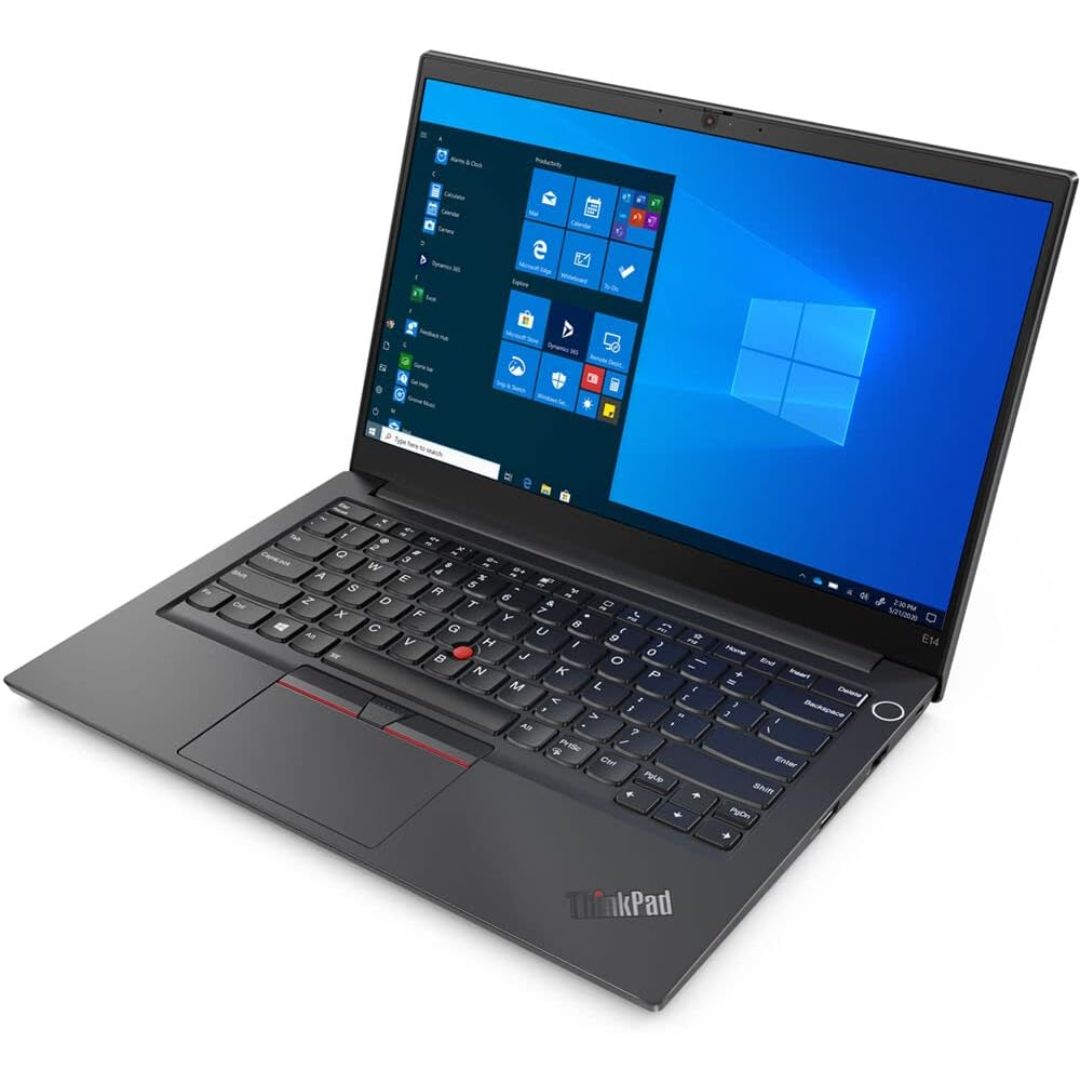
A premium ultralight pre-owned Lenovo ThinkPad T14s Gen 2 with 14" display, 11th Gen Core i5, 16GB RAM, and 512GB SSD—delivering powerful performance, all-day battery life, and exceptional portability for professionals on the move.

Elevate your game with the Logitech G102, featuring a high-precision 8,000 DPI sensor and vibrant Lightsync RGB lighting. Designed with a classic six-button layout and gaming-grade performance, it offers incredible accuracy and responsiveness for both competitive play and daily productivity. The Logitech G102 is engineered for speed, consistency, and comfort. At its core is a gaming-grade sensor that provides adjustable sensitivity, allowing you to tailor your control to your specific playstyle. Whether you are navigating complex spreadsheets or hitting precise headshots, the G102 delivers a seamless experience with a classic design trusted by gamers worldwide. Gaming-Grade 8,000 DPI Sensor: Experience ultra-precise tracking and consistent responsiveness. The sensitivity is fully adjustable from 200 to 8,000 DPI. Lightsync RGB Color Wave: Choose from vibrant animations or customize your own from approximately 16.8 million colors to match your setup’s aesthetic. Mechanical Spring Button Tensioning: The primary left and right buttons feature a metal spring tensioning system, providing crisp, reliable clicks and a premium feel. Classic 6-Button Design: A familiar, comfortable shape that allows you to play or work for hours without fatigue. Each button can be customized via software for specific in-game actions. On-the-Fly DPI Shifting: Cycle through up to five sensitivity settings with the press of a button, allowing you to switch from precision sniping to rapid movement instantly. Resolution: 200 – 8,000 DPI Connection Type: USB 2.0 (Wired) USB Data Format: 16 bits/axis USB Report Rate: 1000Hz (1ms) Microprocessor: 32-bit ARM Cable Length: 2.1 meters Compatibility: Windows 7 or later, macOS 10.13 or later, ChromeOS Logitech G102 Gaming Mouse User Documentation

Genuine-spec touchpad flex cable for MacBook Pro 15″ (Model A1990, 2018–2019, Intel)—essential for restoring full Force Touch functionality, haptic feedback, and precise multi-touch gesture control during trackpad repair or replacement. Compatible With: MacBook Pro 15-inch (2018 & 2019, Model A1990, Model Identifiers MacBookPro15,2) with Intel Core i7/i9 processors. Part Type: Touchpad flex cable only — does not include the trackpad housing, Taptic Engine, or mounting hardware. This is the OEM-style ribbon cable that connects the trackpad to the logic board. Function: Transmits: Touch input coordinates Force Touch pressure data Haptic feedback signals to the Taptic Engine Enables full macOS gesture support: Force Click, three-finger lookup, swipe navigation, pinch-to-zoom, and smooth cursor tracking. Touch input coordinates Force Touch pressure data Haptic feedback signals to the Taptic Engine Enables full macOS gesture support: Force Click, three-finger lookup, swipe navigation, pinch-to-zoom, and smooth cursor tracking. OEM-Quality Build: Matches Apple’s original specifications in: Cable length and routing path Connector pitch and ZIF latch design EMI shielding and flex durability Cable length and routing path Connector pitch and ZIF latch design EMI shielding and flex durability Common Use Cases: Replacing a torn, creased, or liquid-damaged original flex cable Completing a trackpad replacement when the original cable is unusable Fixing intermittent trackpad behavior, loss of Force Touch, or complete unresponsiveness Replacing a torn, creased, or liquid-damaged original flex cable Completing a trackpad replacement when the original cable is unusable Fixing intermittent trackpad behavior, loss of Force Touch, or complete unresponsiveness Installation Note: Requires full bottom case removal and battery disconnection. Cable routes under internal components near the right speaker and logic board. Connects via a ZIF (Zero Insertion Force) socket—must be aligned carefully and latched gently. Recommended for experienced or certified technicians only. Requires full bottom case removal and battery disconnection. Cable routes under internal components near the right speaker and logic board. Connects via a ZIF (Zero Insertion Force) socket—must be aligned carefully and latched gently. Recommended for experienced or certified technicians only.

Compact, affordable all-in-one inkjet printer for home and small office use—print, scan, and copy in color with easy wireless setup, mobile printing, and HP’s efficient ink system.

WiWU Ora Laptop Sleeve Size: 14" and 16" Color: Black/Grey/Ivory Extra Storage Space - Two pockets in front, enough space to keep mouse, cable, cellphone, memory cards, external hard drive, pens, etc. Ultra-slim & Lightweight - Slim, portable, and lightweight to take alone, or slide into your briefcase, backpack, or any other bag, perfect for business, school, or travel. Shockproof - Multiple Layers Protection, polyester foam padding layer, and nylon fabric lining for bump and shock absorption, protect your computer from accidental scratches. Excellent Detail: Use an Exquisite zipper and reinforced stitching on all stress points, ensuring the bag does not fall apart when carrying heavy goods. The first verticle-designed laptop bag, you will feel the beauty of simple and good texture. WiWU Ora Laptop Sleeve Size: 14″ and 16″ Color: Black/Grey/Ivory Extra Storage Space – Two pockets in front, enough space to keep mouse, cable, cellphone, memory cards, external hard drive, pens, etc. Ultra-slim & Lightweight – Slim, portable, and lightweight to take alone, or slide into your briefcase, backpack, or any other bag, perfect for business, school, or travel. Shockproof – Multiple Layers Protection, polyester foam padding layer, and nylon fabric lining for bump and shock absorption, protect your computer from accidental scratches. Excellent Detail: Use an Exquisite zipper and reinforced stitching on all stress points, ensuring the bag does not fall apart when carrying heavy goods. The first verticle-designed laptop bag, you will feel the beauty of simple and good texture.

PCE M8-700 UPS (line-interactive) — 700 VA / 360 W backup unit for 220–240 V input. Protects PCs, routers, small electronics from outages and voltage swings. The PCE M8-700 is a line-interactive UPS designed for home or small office use. It provides backup power, voltage regulation (AVR), surge protection, and supports automatic switching during outages. Ideal for desktop PCs, network gear, monitors, or point-of-sale systems. Features & Capabilities Line-interactive topology: regulates input voltage without switching to battery when voltage fluctuates mildly. Automatic Voltage Regulation (AVR) to correct undervolt/overvolt conditions. Simulated (stepped) sine wave output in battery mode. Surge, overload, short circuit, discharge protections built in. Cold start capability (ability to power on from battery with no mains) LED + audible alarms for status (battery mode, overload, fault) USB / RS232 interface in some variants for power management (shutdown, monitoring) Technical Specifications What “Input 220–240 VAC, 50/60 Hz, 3.7 A” Means (and Caveats) If the specification you’re giving is “3.7 A” at input, that corresponds to a maximum input current draw when the UPS is handling a heavy load or during charging cycles. At 230 V × 3.7 A ≈ 850 W of input capacity. The unit’s 360 W output means there’s overhead for losses, inverter inefficiency, battery charging, etc. The UPS must operate within the stated voltage and frequency ranges — if input is too low or too high, it may switch to battery or go into protection mode.

MacBook Pro 13″ Keyboard Replacement/Compatible for Apple MacBook Pro A1708 Color :- Black, Layout :- US Apple MacBook Pro A1708 Keyboard is a high quality replacement keyboard which is perfect for replacing your old and broken laptop keyboard. Before you order,Please firstly compare the picture with your keyboard, especially the ribbon cable (position, length and width). Make sure that the model of laptop and part number of keyboard is the right one you need as well as the layout version.

