
A reliable pre-owned HP EliteBook 840 G3 with 14" display, 6th Gen Core i5, 8GB RAM, and 256GB SSD—offering solid business performance, security, and durability for everyday professional use.

Get premium ThinkPad reliability at an incredible value with this pre-owned E14 Gen 3. Powered by the efficient AMD Ryzen 5 5500U 6-core processor, 16GB RAM, and a 512GB SSD, it delivers the perfect balance of performance and portability for students and professionals alike.

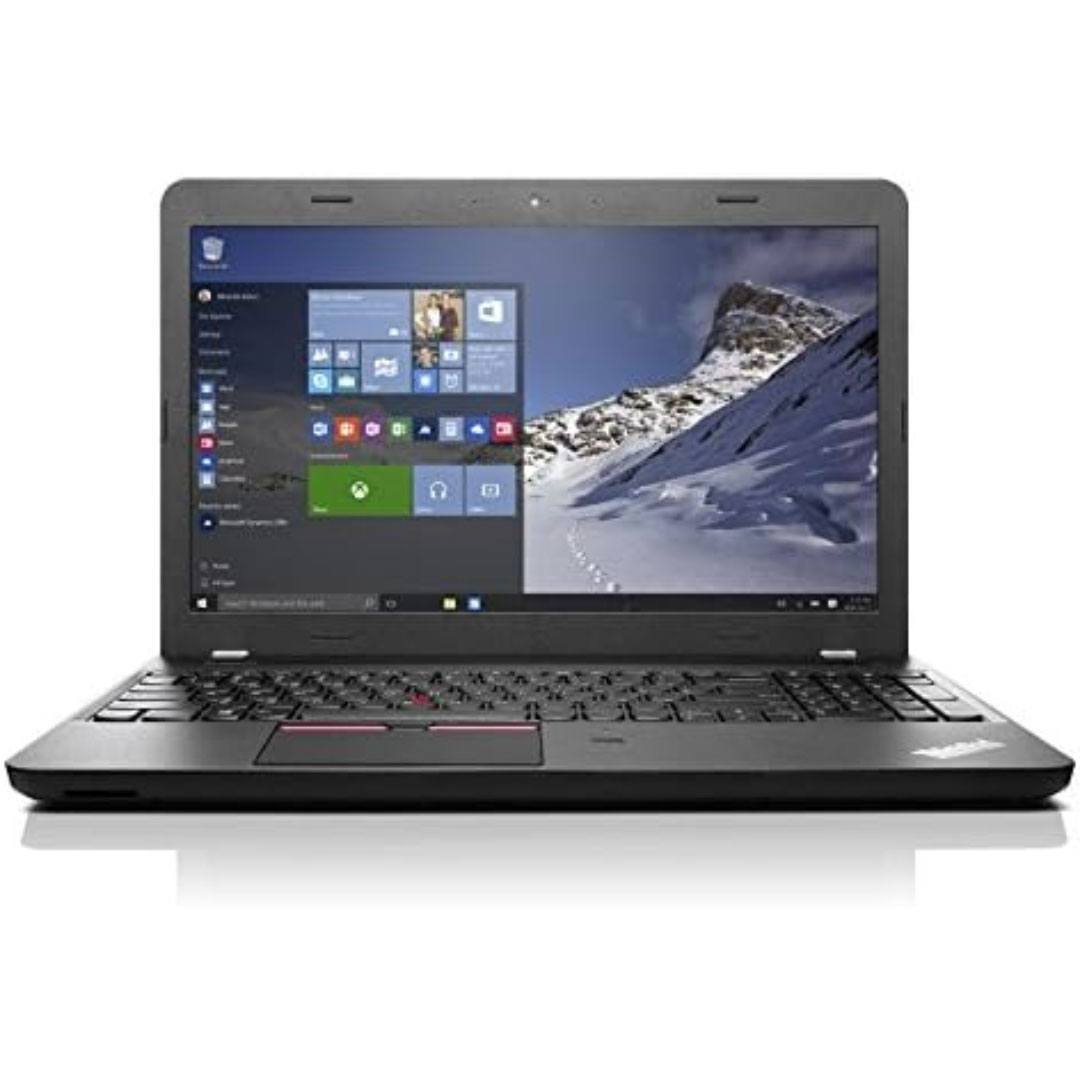
A durable and versatile pre-owned Lenovo ThinkPad T470 with 14" touchscreen, 6th Gen Core i5, 8GB RAM, and 256GB SSD—ideal for professionals who need reliability, touch functionality, and trusted ThinkPad performance.

The Lexar NS100 512GB SSD is a 2.5-inch SATA III solid-state drive built to upgrade laptops and desktops with faster boot times, smoother app loading, and silent operation. It uses reliable flash storage to deliver a clear performance boost over traditional hard drives. ⚡ Faster System Performance: Significantly improves boot speed, application loading, and file transfers versus HDDs. 💾 512GB Storage Capacity: Ideal for OS, software, documents, and everyday multimedia. 🧠 SATA III 6Gb/s Interface: Provides stable, high-speed performance and is backward compatible with SATA II/I systems. 🔇 Silent & Shock-Resistant: No moving parts, making it quieter and more durable for laptops and mobile use. 🌡️ Low Power Consumption: Helps reduce heat and extend laptop battery life. 🛠️ Easy Installation: Standard 2.5″ 7mm design fits most laptops and desktops.

The ViewSonic TD1630-3 16″ Touch Screen Monitor offers smooth touch control in a compact and modern design. It provides clear HD visuals for work and entertainment. The screen shows bright colors and sharp details. This makes browsing, drawing, and viewing content more enjoyable. Moreover, the ViewSonic TD1630-3 16″ Touch Screen Monitor supports 10-point multi-touch. You can tap, pinch, and swipe with fast response. The touch experience feels natural and smooth. This helps you work faster and more comfortably. In addition, the monitor includes HDMI and VGA connections. These ports make setup quick and simple. You can connect laptops, desktops, and other devices with ease. This gives you strong flexibility for daily use. Furthermore, the ViewSonic TD1630-3 16″ Touch Screen Monitor features a durable stand. You can tilt the screen for better viewing angles. This helps reduce strain during long use. The strong design keeps the monitor stable on your desk. Also, the monitor includes built-in speakers for easy audio playback. You can watch videos, join meetings, or listen to music without extra devices. This makes the monitor more convenient and practical. The compact size of the ViewSonic TD1630-3 16″ Touch Screen Monitor fits small desks and workspaces. It works well in homes, offices, shops, and reception areas. The clean design blends nicely with modern setups. This makes it suitable for many environments. Overall, the ViewSonic TD1630-3 16″ Touch Screen Monitor offers responsive touch control, clear visuals, and simple connectivity. It improves productivity and enhances entertainment. It is ideal for students, professionals, and businesses that need a reliable touch display. Specifications: Display : 16″ TN Resolution : 1366×768 Refresh Rate : 60Hz Response Time : 12ms

Ready to elevate your digital workspace to new heights? Meet the ViewSonic 27″ 60Hz Touch Monitor TD2760, designed to revolutionize your computing experience. With its intuitive touch functionality, this monitor offers unparalleled convenience and versatility. Transitioning smoothly between tasks is effortless with the TD2760’s responsive touch screen. Whether you’re browsing the web, editing documents, or creating digital art, interaction feels natural and intuitive. Furthermore, its expansive 27-inch display provides ample screen real estate for multitasking and immersive viewing experiences. Dive into your work or entertainment content with crisp, clear visuals and vibrant colors. Moreover, the TD2760’s ergonomic design ensures comfortable viewing for extended periods. Easily adjust the monitor’s tilt angle to suit your preferred working position, reducing strain on your neck and eyes. In addition, connectivity options such as HDMI and USB-C offer seamless compatibility with a variety of devices, including laptops, desktops, and smartphones. Effortlessly mirror or extend your screen to enhance productivity or share content with ease. Transitioning to the touch aspect, the TD2760’s precise touch response allows for accurate input, whether you’re tapping, swiping, or drawing. Navigate menus, annotate documents, or play touchscreen-enabled games with unparalleled precision and responsiveness. In conclusion, the ViewSonic 27″ 60Hz Touch Monitor TD2760 is a game-changer for digital professionals and enthusiasts alike. With its seamless touch functionality, expansive display, and ergonomic design, it redefines the way you interact with your digital world. Upgrade your workspace today and experience the difference firsthand. Specifications: Display : 27″ VA Resolution : FHD(1920×1080) Refresh Rate : 60Hz Response Rate : 6ms

The MSI MAG 274QPF E20 monitor delivers sharp visuals and smooth performance for competitive gaming and daily use. It features a 27-inch WQHD display that provides clear detail and consistent colors. Therefore, users can enjoy both immersive gameplay and productive work sessions. Moreover, the 200Hz refresh rate ensures fluid motion during fast-paced action. The fast response time reduces motion blur and ghosting effectively. As a result, players can react quickly and maintain accuracy in competitive scenarios. In addition, adaptive sync technology helps eliminate screen tearing and stuttering. This improves visual stability across different frame rates. The monitor also includes multiple connectivity options, allowing easy connection to gaming systems and PCs. Furthermore, the design focuses on comfort and usability for long sessions. It supports ergonomic adjustments that help users find the ideal viewing position. Consequently, the MSI MAG 274QPF E20 monitor delivers both performance and comfort in one solution. This monitor combines high refresh speed, detailed resolution, and reliable performance. MSI MAG 274QPF E20 monitor is a strong choice for gamers who need smooth visuals and consistent responsiveness. Specifications: 27-inch WQHD (2560 × 1440) display 200Hz refresh rate for smooth gameplay Low response time for reduced motion blur Adaptive sync support for tear-free visuals Multiple connectivity options for flexible setup

lenovo battery L16L2PB2 L16M2PB1 L16S2PB2 L16C2PB2 Laptop Notebook Battery for Lenovo 5000-15 2ICP6/55/90 Series 7.4V 30Wh 4050mAh About this item Condition: New Voltage: 7.4V Capacity: 30Wh/4050mAh Replace Part Number: L16M2PB1 L16L2PB2 L16M2PB2 L16S2PB1 L16L2PB3 L16C2PB1 L17L2PF1 L17M2PB7 L16C2PB2 L16L2PB1 L16M2PB3 2ICP6/55/90 Fit For: Lenovo 5000-15 Series Raise the battery life: 1: After receiving the battery, Please charge it fully, discharge it to around 10, and do it three times. 2: If you don’t use the battery for a long time, please charge and discharge it once a month

HP 135W Multifunction Laser Print Speed: Fast and efficient printing with 20ppm. Printing Technology: Utilizes laser printing technology for precise and professional-quality documents. Multifunction Capability: All-in-one functionality for printing, scanning, and copying needs. Connectivity Options: Offers both wired and wireless connectivity options for versatile use. Compact Design: Space-saving design ideal for home offices and small workspaces. User-Friendly Interface: Easy-to-use interface for seamless operation. Energy Efficiency: Designed with energy-saving features to promote sustainability. Ideal for Home and Small Offices: Tailored for users seeking a compact and capable solution for their printing needs. Click for more info

REMAX RT-E601 1200MAH TIME II SERIES EYE-CARING LED LAMP Function— Use the power key to turn on/ off the lamp. Tap the power key to adjust the brightness of the lamp (brightest-normal-dimmest-off) four steps are easy to use. When folding the design lamp holder and arm can rotate the angle within a range of 180 degrees up-down adjustment. Press and hold “Mode” Set” Up” Donkey enter normal time mode, alarm clock and snooze mode, birthday reminder mode timer mode, and temperature mode. Time changes 12 hours/24 hours mode and adjusting the hours, minutes, year, month,t,h, and day. Temperature can change to Celsius or Fahrenheit. The red light will be on when it starts charging, and the red light will go out when it is fully charged. Material—ABS+PC Rated voltage—DC5V /0.5A lighting Mode—Direct glow Key Type—Touch key Luminous flux—250m Color rendering index—>80 Rated power—4W Battery Capacity—1200mAh Weight—346g Charging port—Micro SIZE—87*87*263mmCharging time—4-4:30hour Working time—3:30hour

Logitech MK120 Wired USB Keyboard Mouse Desktop Combo Height: 6.10 in (155 mm) Width: 17.72 in (450 mm) Depth: 0.93 in (23.5 mm) Weight: 19.4 oz (550 g) Cable length: 4.9 ft (150 cm) Height: 4.45 in (113 mm) Width: 2.44 in (62 mm) Depth: 1.50 in (38 mm) Weight: 3.17 oz (90 g) Cable length: 70.87 in (180 cm) Spill-resistant design 1Tested under limited conditions (maximum of 60 ml liquid spillage). Do not immerse the keyboard in liquid. Adjustable keyboard height 10-Key Number pad Caps lock indicator light Num lock indicator light Up to 10 million keystrokes (excludes number lock key) Key type: Deep profile Sensor Technology: Optical tracking Number of Buttons: 3 (Left/Right-click, Middle click) Scrolling: line-by-line Scroll Wheel: Yes, optical Mouse plastics: 72% post-consumer recycled material 2Excludes plastic in cable assembly, printed wiring assembly (PWA) and packaging. Keyboard plastics: 54% post-consumer recycled material 3Excludes plastic in cable assembly, printed wiring assembly (PWA) and packaging. Windows® 10,11 or later Two available USB ports

Genuine-spec touchpad flex cable for MacBook Pro 15″ (Model A1990, 2018–2019, Intel)—essential for restoring full Force Touch functionality, haptic feedback, and precise multi-touch gesture control during trackpad repair or replacement. Compatible With: MacBook Pro 15-inch (2018 & 2019, Model A1990, Model Identifiers MacBookPro15,2) with Intel Core i7/i9 processors. Part Type: Touchpad flex cable only — does not include the trackpad housing, Taptic Engine, or mounting hardware. This is the OEM-style ribbon cable that connects the trackpad to the logic board. Function: Transmits: Touch input coordinates Force Touch pressure data Haptic feedback signals to the Taptic Engine Enables full macOS gesture support: Force Click, three-finger lookup, swipe navigation, pinch-to-zoom, and smooth cursor tracking. Touch input coordinates Force Touch pressure data Haptic feedback signals to the Taptic Engine Enables full macOS gesture support: Force Click, three-finger lookup, swipe navigation, pinch-to-zoom, and smooth cursor tracking. OEM-Quality Build: Matches Apple’s original specifications in: Cable length and routing path Connector pitch and ZIF latch design EMI shielding and flex durability Cable length and routing path Connector pitch and ZIF latch design EMI shielding and flex durability Common Use Cases: Replacing a torn, creased, or liquid-damaged original flex cable Completing a trackpad replacement when the original cable is unusable Fixing intermittent trackpad behavior, loss of Force Touch, or complete unresponsiveness Replacing a torn, creased, or liquid-damaged original flex cable Completing a trackpad replacement when the original cable is unusable Fixing intermittent trackpad behavior, loss of Force Touch, or complete unresponsiveness Installation Note: Requires full bottom case removal and battery disconnection. Cable routes under internal components near the right speaker and logic board. Connects via a ZIF (Zero Insertion Force) socket—must be aligned carefully and latched gently. Recommended for experienced or certified technicians only. Requires full bottom case removal and battery disconnection. Cable routes under internal components near the right speaker and logic board. Connects via a ZIF (Zero Insertion Force) socket—must be aligned carefully and latched gently. Recommended for experienced or certified technicians only.

A premium ultralight pre-owned Lenovo ThinkPad T14s Gen 3 with 14" display, AMD Ryzen 7 6850U, 16GB RAM, and 512GB SSD—delivering exceptional performance, all-day battery life, and workstation-class integrated graphics in a featherlight business laptop.

WiWU Waterproof Lycra Cosmo Laptop Slim Bag Laptop Handbag with Strap for Men and Women

The ViewSonic 27″ 75Hz Monitor offers an exceptional viewing experience for both work and play. Its large 27-inch screen provides ample space for multitasking, gaming, and streaming. Featuring a full HD resolution, the ViewSonic 27″ 75Hz Monitor delivers crisp and clear visuals. Whether you’re editing photos, watching videos, or browsing the web, every detail comes to life with stunning clarity. The 75Hz refresh rate ensures smooth and fluid motion, reducing screen tearing and stuttering. This makes it perfect for fast-paced gaming and high-definition video playback. Designed with user comfort in mind, the ViewSonic 27″ 75Hz Monitor features an adjustable stand. You can easily tilt, swivel, and adjust the height to find the perfect viewing angle. The monitor’s slim bezel design provides an immersive viewing experience, minimizing distractions and maximizing screen space. This sleek and modern design complements any workspace or gaming setup. Equipped with multiple connectivity options, the ViewSonic 27″ 75Hz Monitor is versatile and compatible with various devices. It includes HDMI and VGA ports, making it easy to connect to your computer, gaming console, or other peripherals. The ViewSonic 27″ 75Hz Monitor also features built-in speakers for convenient audio playback. Enjoy clear and immersive sound without the need for external speakers. In conclusion, the ViewSonic 27″ 75Hz Monitor combines stunning visuals, smooth performance, and ergonomic design for an enhanced viewing experience. Upgrade to the ViewSonic 27″ 75Hz Monitor today and enjoy a perfect blend of work and play. Specifications: Display : 27″ IPS Resolution : FHD 1920 x 1080 Refresh Rate : 75Hz Response Rate : 1ms MRPT

NB OMS040 OMS040 NB STAND DESK TV INNOVATIVE SIT STAND DESK MOUNT: UNIVERSAL COMPATIBILITY: Fits Most 22” – 32” Monitor with the load from4.4 lbs up to 33lbs, VESA compliant 75x75mm 100x100mm. Come with ultra-widekeyboard tray, 25.6″L x13.4”W. Keyboard Tray pull out range 2”(50mm). FULL MOTION MOUNT: A Wide range of movements, The monitor can berotated and tilted effortlessly in any direction, Tilt Angel from +9°to -12°with acombined +3°to -3° degree landscape rotation, Upright range is 17.1’’(435mm) withswivel angel ±90 degrees. The mounts extension and retraction 50.4’’ (1280 mm) and3.9’’ (100 mm) display height adjustment. EASY INSTALLATION: Built in durable gas-strut to hover at any workingpositions, Simple installation and easy to use, effortless operation; Switches fromsitting to standing position in just a few seconds. HAT6 STAND 6 LCD/LED DESK MOUNT 12”-24”-JTD003II6 -MAX-LOAD:10KG -TILT:+/-10 degree- SWIVEL:180 degree H148 Specifications: Specifications COMPATIBILITY: Fits Most 22” – 32” Monitor with the load from4.4 lbs up to 33lbs, VESA compliant 75x75mm 100x100mm. Come with ultra-widekeyboard tray, 25.6″L x13.4”W. Keyboard Tray pull out range 2”(50mm). FULL MOTION MOUNT: A Wide range of movements, The monitor can be rotated and tilted effortlessly in any direction

A sleek and durable pre-owned Lenovo ThinkPad T460s with 14" touchscreen, 6th Gen Core i5, 8GB RAM, and 256GB SSD—ideal for professionals who need portability, touch functionality, and trusted ThinkPad reliability.

Replacement Keyboard for MacBook Pro 13" inch A1706 & MacBook Pro 15" inch A1707 Touch Bar (for Late 2016 mid 2017 Year) Replacement Keyboard for MacBook Pro 13″ inch A1706 & MacBook Pro 15″ inch A1707 Touch Bar (for Late 2016 mid 2017 Year) 【Compatibility】This replacement keyboard is Compatible with original MacBook Pro 13″ inch A1706 & MacBook Pro 15″ inch A1707 Touch Bar (for Late 2016 mid 2017 Year) Laptop. 【Compatible Part Numbers】661-06377 【Compatible MBP Numbers】A1706 series :MacBook Pro 13 inch 2017 MacBookPro14,2 & MacBook Pro 13 2016 MacBookPro13,2 MNQF2LL/A MNQG2LL/A MLH12LL/A MLVP2LL/A etc A1707 series:MacBook Pro 15 inch 2016 MacBookPro13,3 & MacBook Pro 15 inch 2017 MacBookPro14,3 Release June 2017 MPTR2LL/A MPTU2LL/A MPTT2LL/A MPTV2LL/A Release October 2016 MLH32LL/A MLW72LL/A MLH42LL/A MLW82LL/A

The BYL-2207 2-in-1 LAN adapter provides fast and stable wired internet through a Gigabit Ethernet port using either USB-C or USB 3.0. Perfect for laptops, MacBooks, and PCs without an Ethernet port, it ensures smooth streaming, online meetings, and reliable network performance. The BYL-2207 2-in-1 Type-C / USB 3.0 to Gigabit LAN Adapter is designed for users who need a reliable wired connection on modern laptops and devices. It supports both USB-C and USB 3.0, making it compatible with a wide range of systems including MacBooks, ultrabooks, and desktops. With Gigabit Ethernet speed, it provides faster and more stable internet compared to Wi-Fi, making it ideal for work, gaming, and streaming. 2-in-1 Connector (USB-C + USB 3.0) for wide compatibility Gigabit Ethernet Port (RJ45) for fast and stable wired internet High-Speed Performance supports up to 1000Mbps network speed Plug & Play installation on most systems Compact & Portable Design easy to carry anywhere Ideal for Work & Streaming improves stability for meetings and downloads Reliable Connection reduces lag compared to Wi-Fi Ideal for MacBooks, laptops, ultrabooks, desktops, and tablets that need a stable wired internet connection. Perfect for online meetings, remote work, gaming, IPTV, streaming, and downloading.

Genuine-spec touchpad flex cable compatible with both MacBook Air A2179 (Intel, 2020) and A2337 (M1, 2020)—restores full Force Touch functionality, haptic feedback, and precise multi-touch gesture control during trackpad repair or replacement. Compatible With: MacBook Air 13″ (2020, Intel) – Model A2179 (Model Identifier: MacBookAir9,1) MacBook Air 13″ (2020, Apple M1) – Model A2337 (Model Identifier: MacBookAir10,1) MacBook Air 13″ (2020, Intel) – Model A2179 (Model Identifier: MacBookAir9,1) MacBook Air 13″ (2020, Apple M1) – Model A2337 (Model Identifier: MacBookAir10,1) ✅ Important Note: Despite different processors (Intel vs. M1), Apple used the same trackpad assembly and flex cable in both A2179 and A2337. This makes the flex cable fully interchangeable between the two models. Part Type: Touchpad flex cable only — does not include the trackpad housing, Taptic Engine, or mounting hardware. This is the OEM-style ribbon cable that connects the trackpad to the logic board. Function: Transmits: Touch input coordinates Force Touch pressure data Haptic feedback signals to the Taptic Engine Enables full macOS gesture support: Force Click, three-finger lookup, swipe navigation, pinch-to-zoom, and smooth cursor tracking. Touch input coordinates Force Touch pressure data Haptic feedback signals to the Taptic Engine Enables full macOS gesture support: Force Click, three-finger lookup, swipe navigation, pinch-to-zoom, and smooth cursor tracking. OEM-Quality Build: Matches Apple’s original specifications in: Cable length and routing path Connector pitch and ZIF latch design EMI shielding and flex durability Cable length and routing path Connector pitch and ZIF latch design EMI shielding and flex durability Common Use Cases: Replacing a torn, creased, or liquid-damaged original flex cable Completing a trackpad replacement when the original cable is compromised Fixing intermittent trackpad behavior, loss of Force Touch, or complete unresponsiveness Replacing a torn, creased, or liquid-damaged original flex cable Completing a trackpad replacement when the original cable is compromised Fixing intermittent trackpad behavior, loss of Force Touch, or complete unresponsiveness Installation Note: Requires full bottom case removal and battery disconnection. Cable routes under the right side of the battery and logic board. Connects via a ZIF (Zero Insertion Force) socket—align carefully and latch gently. Recommended for experienced or certified technicians only. Requires full bottom case removal and battery disconnection. Cable routes under the right side of the battery and logic board. Connects via a ZIF (Zero Insertion Force) socket—align carefully and latch gently. Recommended for experienced or certified technicians only.
