
A4Tech KRS-8372 USB Keyboard QWERTY English Black

Genuine-spec US layout keyboard replacement for MacBook Pro 15″ (2018–2019, Models A1989/A1990)—designed for reliable typing, full compatibility, and seamless integration with original top case assemblies. Compatible With: MacBook Pro 15-inch (2018 A1989 and 2019 A1990 models) with Touch Bar. Layout: Standard US English (QWERTY) with full-size keys, including inverted-T arrow keys and dedicated function row. Integrated Features: Includes built-in backlighting, scissor-switch mechanism (3rd-gen Butterfly or revised Butterfly mechanism, depending on original model year), and ribbon cable connector matching Apple’s OEM design. Functionality: Supports all native keyboard features, including brightness, volume, media controls, and Touch ID power button (note: Touch ID sensor is not included—this is the keyboard only). Build Quality: Precision-engineered to match Apple’s original fit, feel, and durability—ideal for professional repairs or top case refurbishment. Installation Note: Requires full top case disassembly. Keyboard is adhered to the top case and must be carefully removed and replaced using proper tools and techniques. Recommended for experienced technicians. Model Verification: Ensure your MacBook is A1989 (2018) or A1990 (2019) before purchase—keycaps and connectors differ from other MacBook generations.

Fast-charging feature available on select iPhone and iPad models.

Genuine-spec touchpad flex cable for MacBook Pro 13″ with Touch Bar (Model A1708, 2016–2017)—restores full Force Touch functionality, haptic feedback, and precise multi-touch gesture control during trackpad repair or replacement. Compatible With: MacBook Pro 13″ (2016) – Model A1708 (Model Identifier: MacBookPro13,1) MacBook Pro 13″ (2017) – Model A1708 (Model Identifier: MacBookPro14,1) (Both years share the same internal trackpad assembly and flex cable.) MacBook Pro 13″ (2016) – Model A1708 (Model Identifier: MacBookPro13,1) MacBook Pro 13″ (2017) – Model A1708 (Model Identifier: MacBookPro14,1) (Both years share the same internal trackpad assembly and flex cable.) Part Type: Touchpad flex cable only — does not include the trackpad housing, Taptic Engine, or mounting hardware. This is the OEM-style ribbon cable that connects the trackpad to the logic board. Function: Transmits: Touch input coordinates Force Touch pressure data Haptic feedback signals to the Taptic Engine Enables full macOS gesture support: Force Click, three-finger lookup, swipe navigation, pinch-to-zoom, and smooth cursor tracking. Touch input coordinates Force Touch pressure data Haptic feedback signals to the Taptic Engine Enables full macOS gesture support: Force Click, three-finger lookup, swipe navigation, pinch-to-zoom, and smooth cursor tracking. OEM-Quality Build: Matches Apple’s original specifications in: Cable length and routing path Connector pitch and ZIF latch design EMI shielding and flex durability Cable length and routing path Connector pitch and ZIF latch design EMI shielding and flex durability Common Use Cases: Replacing a torn, creased, or liquid-damaged original flex cable Completing a trackpad replacement when the original cable is compromised Fixing intermittent trackpad behavior, loss of Force Touch, or complete unresponsiveness Replacing a torn, creased, or liquid-damaged original flex cable Completing a trackpad replacement when the original cable is compromised Fixing intermittent trackpad behavior, loss of Force Touch, or complete unresponsiveness Installation Note: Requires full bottom case removal and battery disconnection. Cable routes under internal components near the right speaker and logic board. Connects via a ZIF (Zero Insertion Force) socket—must be aligned carefully and latched gently. Recommended for experienced or certified technicians only. Requires full bottom case removal and battery disconnection. Cable routes under internal components near the right speaker and logic board. Connects via a ZIF (Zero Insertion Force) socket—must be aligned carefully and latched gently. Recommended for experienced or certified technicians only.

VSTAR UA80 800VA UPS | Compact Power Backup | 230V Output | Battery Included | For PCs, Routers, POS & More | Universal Outlet Design | Available in Black | Model UPS-U80 Reliable 800VA Power CapacityThe VSTAR UA80 delivers dependable 800VA of backup power—ideal for protecting home or office equipment from sudden power loss and voltage fluctuations. Compact & Efficient DesignSleek and space-saving, this unit fits easily into tight workspaces or under desks without sacrificing performance. Universal Output SocketEquipped with universal-style outlets, allowing compatibility with a wide variety of plugs and devices including PCs, routers, POS systems, and more. Steady 230V OutputProvides consistent 230V output, helping to keep electronics safe during sags, surges, and outages. Easy OperationPlug-and-play functionality with intuitive indicators for power status and battery mode—no complicated setup required. Backup Battery IncludedShips ready to use with internal battery installed. Offers enough runtime to safely power down or continue short-term tasks during outages. Ideal for Light LoadsPerfect for use with routers, modems, home surveillance systems, basic desktops, and point-of-sale devices. Durable Plastic EnclosureBuilt with sturdy, insulated plastic to ensure safety, lightweight portability, and long-term durability. Trusted VSTAR QualityBacked by VSTAR’s reputation for reliability in affordable UPS power protection.

Reliable, secure, and built for productivity—the Lenovo ThinkPad T14 features a 10th Gen Intel Core i5 processor, 16GB RAM, and a fast 256GB SSD in a durable,14-inch business laptop.

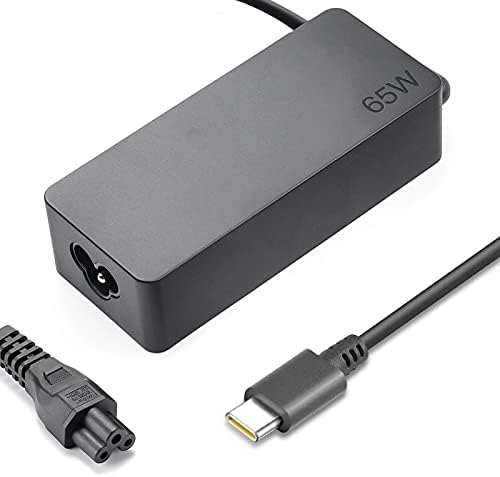
LENOVO 20V/3.25A USB PIN Laptop Charger for Lenovo Thinkpad Compatible Part NO.: 45N0236, 45N0237, 45N0238, 45N0239 0B46994, 0B46995, 0B46996, 0B46997, 0B46997, 0B46998, 0B469990B47000, 0B47001, 0B47002, 0B47003, 0B47004, 0B47005, 0B47006

WiWU WM108 Wimice Dual‑Mode Mouse – Bluetooth 5.0 and 2.4 GHz wireless mouse with 800/1200/1600 DPI, silent clicks, and ergonomic ABS housing.Long battery life (~6 months standby), USB dongle & silent design—ideal for travel, office, and quiet environments. Model: WiWU Wimice WM108 Connection Modes: Bluetooth 5.0 2.4 GHz wireless via USB dongle Connection Modes: Bluetooth 5.0 2.4 GHz wireless via USB dongle DPI Settings: 800 / 1,200 / 1,600 DPI (adjustable) Buttons: 3 standard buttons + clickable scroll wheel (4 keys total) Range: Up to 10 m wireless connectivity Material/Design: Lightweight (67–130 g, depending on source), ergonomic ABS plastic body, magnetic base or “super magnetic absorption” design Operating Range: ≈10 m Silent Clicks: Quiet operation—silent key action Dimensions: Approx. 108 × 64 × 36 mm Weight: 67 g cited by Star Tech and 130 g by others—likely lighter in official spec Compatibility: Windows, macOS, Linux, Android, etc. Plug-and-play, no driver needed

Genuine Apple MagSafe 3 charging cable (2-meter length), originally shipped with MacBook Pro 14"/16" (2021, M1 Pro/Max) and MacBook Pro 16" (2023, M2/M3 Max). Used but fully functional, tested for safe power delivery and data handshake with Apple laptops. Compatibility: MacBook Pro 14″ (2021–2023, M1 Pro/Max, M2 Pro/Max, M3 Pro/Max) MacBook Pro 16″ (2021–2023, M1 Max, M2 Max, M3 Max) Works with Apple 67W, 96W, and 140W USB-C Power Adapters (sold separately) MacBook Pro 14″ (2021–2023, M1 Pro/Max, M2 Pro/Max, M3 Pro/Max) MacBook Pro 16″ (2021–2023, M1 Max, M2 Max, M3 Max) Works with Apple 67W, 96W, and 140W USB-C Power Adapters (sold separately) Connector Type: MagSafe 3 (magnetic, tri-oval tip) on laptop end USB-C on power adapter end MagSafe 3 (magnetic, tri-oval tip) on laptop end USB-C on power adapter end Cable Length: 2 meters (≈6.6 feet) – longer than the standard 1.8m cable, ideal for flexible desk or bedside setups. Condition: Original Apple cable, previously used but fully tested: No fraying, kinks, or exposed wires MagSafe 3 connector intact with strong magnetic hold Charges MacBook at full rated speed (supports up to 140W with compatible adapter) Passes Apple’s authentication handshake (no “Not Supported” warnings) No fraying, kinks, or exposed wires MagSafe 3 connector intact with strong magnetic hold Charges MacBook at full rated speed (supports up to 140W with compatible adapter) Passes Apple’s authentication handshake (no “Not Supported” warnings) What’s Included: MagSafe 3 to USB-C cable only Power adapter NOT included MagSafe 3 to USB-C cable only Power adapter NOT included Why Choose This: Cost-effective alternative to buying new 100% genuine Apple—no third-party risks (overheating, slow charging, compatibility errors) Ideal for backup, travel, or replacing a damaged original cable Cost-effective alternative to buying new 100% genuine Apple—no third-party risks (overheating, slow charging, compatibility errors) Ideal for backup, travel, or replacing a damaged original cable

Genuine-spec US layout keyboard replacement for MacBook Air 13″ (Model A2338, 2020)—featuring Apple’s reliable Magic Keyboard with scissor-switch mechanism, backlighting, and full OEM fit for seamless repair. Compatible With: MacBook Air 13-inch (2020, Model A2338) – includes both Intel Core i3/i5/i7 and M1 chip variants. Keyboard Type: Apple’s Magic Keyboard with scissor-switch mechanism—offering improved durability, quieter typing, and 1mm key travel compared to older Butterfly keyboards. Layout: Standard US English (QWERTY), with full-size keys, inverted-T arrow keys, and dedicated function row. Integrated Features: Backlit keys for low-light use, ambient light sensor compatibility, and original-style ribbon cable connector for direct logic board connection. Precision Fit: Engineered to match Apple’s exact dimensions and mounting points—ensures flush alignment within the original top case. Installation Note: The keyboard is adhered to the top case and requires careful removal and re-gluing. Full disassembly is needed. Recommended for skilled technicians or professional repair centers.

Genuine-spec touchpad flex cable for MacBook Pro 13″ (Model A1502, Mid 2014)—restores full trackpad functionality, including precise cursor control and physical click response. Essential for repairing unresponsive or erratic trackpad behavior. Compatible With: MacBook Pro 13-inch (Mid 2014, Model A1502, Model Identifier MacBookPro11,1) with Intel Core i5/i7 processors and Retina display. Part Type: Touchpad flex cable only — does not include the trackpad housing, button mechanism, or mounting hardware. This is the ribbon cable that connects the trackpad to the logic board. Function: Transmits cursor movement and click signals (left/right physical clicks) Supports standard multi-touch gestures (two-finger scroll, tap-to-click, pinch-to-zoom) ⚠️ Note: This model uses a physical click mechanism—not Force Touch (no haptic feedback or pressure sensitivity). Transmits cursor movement and click signals (left/right physical clicks) Supports standard multi-touch gestures (two-finger scroll, tap-to-click, pinch-to-zoom) ⚠️ Note: This model uses a physical click mechanism—not Force Touch (no haptic feedback or pressure sensitivity). OEM-Quality Build: Matches Apple’s original in: Cable length and routing path Connector type and pin alignment Insulation and flexibility for long-term reliability Cable length and routing path Connector type and pin alignment Insulation and flexibility for long-term reliability Common Use Cases: Replacing a torn, frayed, or corroded original flex cable Fixing: Unresponsive or intermittent trackpad Cursor jumping or drifting Click function failure (left or right) Complete trackpad disconnect Replacing a torn, frayed, or corroded original flex cable Fixing: Unresponsive or intermittent trackpad Cursor jumping or drifting Click function failure (left or right) Complete trackpad disconnect Unresponsive or intermittent trackpad Cursor jumping or drifting Click function failure (left or right) Complete trackpad disconnect Installation Note: Requires bottom case removal and battery disconnect. Connects via a ZIF (Zero Insertion Force) socket on the logic board—do not force. Cable routes under the battery; handle with care to avoid strain. Suitable for intermediate to advanced DIYers or technicians. Requires bottom case removal and battery disconnect. Connects via a ZIF (Zero Insertion Force) socket on the logic board—do not force. Cable routes under the battery; handle with care to avoid strain. Suitable for intermediate to advanced DIYers or technicians.

OEM-quality left and right loudspeaker replacement pair for MacBook Pro 14″ (Model A2442, 2021, M1 Pro/Max)—restores Apple’s high-fidelity six-speaker audio system with precise sound staging, rich bass, and clear highs. Compatible With: MacBook Pro 14-inch (2021, Model A2442) with Apple M1 Pro or M1 Max chip (Model Identifier: MacBookPro18,3 or MacBookPro18,4). Includes: Complete left and right speaker assemblies, each containing: Dual-driver units (force-cancelling woofers + tweeters) Pre-attached flex cables with OEM connectors Mounting brackets and acoustic seals Dual-driver units (force-cancelling woofers + tweeters) Pre-attached flex cables with OEM connectors Mounting brackets and acoustic seals Audio Performance: Matches Apple’s advanced six-speaker sound system with: Wide stereo separation High dynamic range Spatial audio and Dolby Atmos support (when paired with original logic board and firmware) Wide stereo separation High dynamic range Spatial audio and Dolby Atmos support (when paired with original logic board and firmware) OEM Build Quality: Precision-engineered housings with exact acoustic chambers, grille alignment, and cable routing—ensures zero rattling and full macOS audio calibration compatibility. Common Use Cases: Replaces speakers damaged by liquid ingress, physical impact, or internal failure (e.g., no sound, distorted audio, or imbalance between channels). Installation Note: Requires full bottom case and logic board disassembly. Speakers are secured with screws and acoustic adhesive. Highly recommended for certified Apple technicians or experienced professionals only due to complex internal layout and sensitivity of audio components. Important: This speaker pair is exclusive to A2442 (14″, 2021, M1 Pro/Max). Not compatible with 16″ MacBook Pro (A2485), 13″ models, or Intel-based MacBooks. This speaker pair is exclusive to A2442 (14″, 2021, M1 Pro/Max). Not compatible with 16″ MacBook Pro (A2485), 13″ models, or Intel-based MacBooks. Model Verification: Confirm your device via > About This Mac > Model Identifier (must be MacBookPro18,3 or MacBookPro18,4).

Apple Magic Mouse: Wireless, Bluetooth, Rechargeable. Works with Mac or iPad; Multi-Touch Surface - White (Pre-Owned) Apple Magic Mouse: Wireless, Bluetooth, Rechargeable. Works with Mac or iPad; Multi-Touch Surface – White (Pre-Owned) About this item WIRELESS, RECHARGEABLE CONVENIENCE — Magic Mouse connects wirelessly to your device via Bluetooth. And the rechargeable internal battery means no loose batteries to replace. WORKS WITH MAC OR IPAD — It’s ready to go right out of the box and pairs quickly with your Mac or iPad so you can get to work right away. SWIPE AND SCROLL ON THE MULTI-TOUCH SURFACE — The Multi-Touch surface allows you to perform simple gestures such as swiping and scrolling. And an optimized foot design lets Magic Mouse glide smoothly across your desk. GO WEEKS WITHOUT CHARGING — The incredibly long-lasting internal battery will power your Magic Mouse for about a month or more between charges. Comes with a woven USB-C to Lightning Cable that lets you pair and charge by connecting to a USB-C port on your Mac or iPad. SYSTEM REQUIREMENTS — Requires a Bluetooth-enabled Mac with OS X 10.11 or later or an iPad with iPadOS 13.4 or later.

Feature Specification Packaging and Delivery Details Power Source Battery Selling Units Single item Number of Loudspeaker Enclosure 1 Single package size 19X22X10 cm Cabinet Material Plastic Single gross weight 0.600 kg Display Screen NO Built-in Microphone NO Brand Name Remax Model Number RB-X1 Remax Worldwide Store 9300+ Remax Support Video to see the product and testing Product Name Outdoor Wireless Speaker Color Black Logo Accept Customized Logo Intelligent Personal Assistant None

BATTERY TOSHIBA PA5136U-1BRS for Toshiba Portege Z30 Z30-A Z30-A1301 Series PA5136U Tablet Rechargeable Notebook Battery Pack 14.8V 3380mAh About this item Battery type: Voltage: 14.8V Capacity: 3380 mAh(52Wh) Cells: 4-cell Li-Polymer 100% New from Manufacturer Full Compatible for Part# PA5136U-1BRS,500+ recharge cycles over Every battery has passed factory testing; CE-/FCC-/RoHS-Certified ensures safety. Grade A cells battery; Quality assurance This compatibility list is non-exhaustive, if your original part# or your laptop model NO is not included in the compatibility list, but our battery may still fit your laptop. Please feel free to contact us to confirm the compatibility

The Lexar NM620 2TB NVMe SSD delivers exceptional read speeds up to 3,300 MB/s and write speeds up to 3,000 MB/s through its PCIe Gen3x4 NVMe 1.4 interface. Built with 3D NAND Flash and a compact M.2 2280 form factor, it offers fast, efficient, and reliable storage for gaming, video editing, and professional workloads. The Lexar NM620 2TB M.2 2280 NVMe SSD is engineered for users who need high-performance storage without compromise. Using PCIe Gen3x4 lanes and the NVMe 1.4 protocol, it provides up to six times faster transfer speeds than SATA SSDs. Its slim, cable-free design makes it an ideal upgrade for desktops, laptops, and ultrabooks that demand higher data throughput and improved responsiveness. ⚡ High-Speed NVMe Performance: Delivers sequential read/write speeds up to 3,300 MB/s / 3,000 MB/s for faster system boot-ups, game loading, and large-file transfers. 💾 Large 2 TB Capacity: Provides ample storage for 4K media, applications, and high-volume project files. 🔋 Power-Efficient Design: Optimized for lower power draw, helping extend laptop battery life and reduce operating temperatures. 🔒 Advanced Data Protection: Utilizes LDPC (Low-Density Parity-Check) and end-to-end data path protection for accurate, consistent data integrity. 🧊 Compact Form Factor: The M.2 2280 design supports easy installation in modern systems without cables. 🧠 3D NAND Architecture: Ensures improved endurance, sustained performance, and stability during intensive workloads. 🧰 Durability Tested: Resistant to shock and vibration for dependable performance across a range of operating environments.

WIWU Osun PU Leather Backpack – Stylish and compact bag crafted from water-resistant PU leather; fits 15.6″ laptops yet weighs only ~387 g.Offers organized storage, durable build, and comfy straps—perfect for daily commutes, work, or travel. Model: WIWU Osun PU Leather Notebook Backpack Material: Water-resistant 1680D polyester exterior with upscale PU leather finish Laptop Compartment: Padded sleeve fits up to 15.6″ laptops, shock-resistant protection Design: Compact “mini” size (26.5 × 21 × 6 cm), yet offers large internal capacity Pockets: Front zip pocket for phone and accessories; interior organization for tech and essentials Comfort: Adjustable padded shoulder straps, soft and skin-friendly inner lining Weight: Approximately 387 g (including packing) Extras: Sleek metal WIWU logo; suitable for travel, business, daily commuting

Genuine-spec US layout keyboard replacement for MacBook Pro (Model A1398, Late 2011–Mid 2012)—featuring durable scissor-switch keys, backlighting, and OEM-fit design for reliable typing and straightforward installation. Compatible With: MacBook Pro 13″: Late 2011 (Model A1278, but labeled A1398 in some regions) – Model Identifier MacBookPro8,1 MacBook Pro 15″: Early 2011, Late 2011, and Mid 2012 – Model Identifiers MacBookPro8,2 (15″ early/late 2011) and MacBookPro9,1 (15″ mid 2012) *(Note: “A1398” is primarily associated with the 15″ unibody MacBook Pro with Retina display (Mid 2012), which was the first Retina MacBook Pro.)* This keyboard fits the non-Retina 15″ A1398 (Mid 2012) and compatible Late 2011 models. MacBook Pro 13″: Late 2011 (Model A1278, but labeled A1398 in some regions) – Model Identifier MacBookPro8,1 MacBook Pro 15″: Early 2011, Late 2011, and Mid 2012 – Model Identifiers MacBookPro8,2 (15″ early/late 2011) and MacBookPro9,1 (15″ mid 2012) *(Note: “A1398” is primarily associated with the 15″ unibody MacBook Pro with Retina display (Mid 2012), which was the first Retina MacBook Pro.)* This keyboard fits the non-Retina 15″ A1398 (Mid 2012) and compatible Late 2011 models. Layout: Standard US English (QWERTY) with full-size keys, inverted-T arrow keys, and dedicated function row (F1–F12). Keyboard Type: Traditional scissor-switch mechanism—robust, tactile, and serviceable (pre-Butterfly era). Integrated Features: Backlit keys (adjustable brightness via F5/F6) OEM ribbon cable with ZIF connector Matches original key spacing and actuation force Backlit keys (adjustable brightness via F5/F6) OEM ribbon cable with ZIF connector Matches original key spacing and actuation force Build & Fit: Precision-molded plastic frame with exact screw mounts and alignment pegs—ensures secure, rattle-free installation in the top case. Installation Note: Keyboard is secured with screws and minimal adhesive. Requires full top case access and battery disconnect. Recommended for intermediate to advanced users or technicians.

A high-performance pre-owned MacBook Pro 15" (2015) with a stunning Retina display, upgraded 16GB RAM, 128GB SSD, and powerful 2GB dedicated graphics—ideal for developers, creatives, and power users seeking reliable Apple performance.

