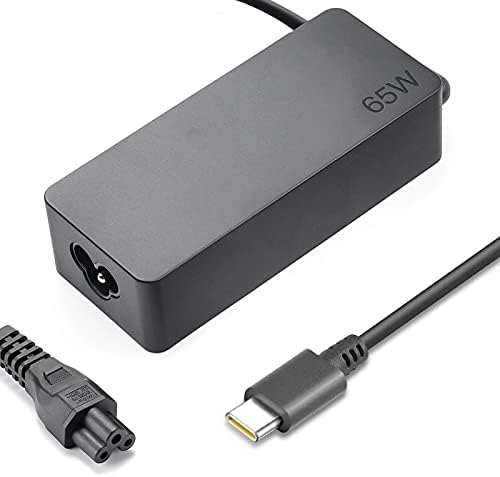

Original Apple - 87W USB-C Power Adapter - White | MNF82LL/A | A1719 Original Apple – 87W USB-C Power Adapter – White | MNF82LL/A | A1719 The Apple 87W USB-C Power Adapter (Model A1719) is designed to provide fast and efficient charging for a variety of Apple devices. Key Features: High Power Output: Delivers up to 87 watts of power, suitable for charging larger devices like the 15-inch MacBook Pro. Versatile Charging: Supports multiple output voltages—20.2V at 4.3A, 9V at 3A, and 5.2V at 2.4A—allowing it to charge a range of USB-C–enabled devices. chargerlab.com Versatile Charging: Supports multiple output voltages—20.2V at 4.3A, 9V at 3A, and 5.2V at 2.4A—allowing it to charge a range of USB-C–enabled devices. Compact Design: Its sleek and portable build makes it convenient for use at home, in the office, or while traveling. Compatibility: While this adapter is compatible with any USB-C–enabled device, Apple recommends pairing it with the 15-inch MacBook Pro with Thunderbolt 3 (USB-C) ports for optimal charging performance.

Brand Lenovo Compatible Devices Laptops Input Voltage 240 Volts Mounting Type Wall Mount Wattage 90 watts Output Voltage 20 Volts Current Rating 4.5 Amps Lenovo 90W Slim Tip Ac Adapter (Original)

WiWU Infinite USB‑C to HDMI Adapter (HB004) – Sleek aluminum dongle offering 4K@60Hz output over USB‑C (DP Alt‑Mode), plug-and-play with no drivers needed.Compact, portable, and reliable—a must-have for mobile productivity, gaming, and media streaming. Model: WiWU Infinite USB‑C to HDMI Adapter (HB004) Video Output: HDMI 2.0, supports up to 4K @ 60 Hz resolution Material & Weight: Robust aluminum alloy body, compact, weighs ~69 g Compatibility: Plug-and-play connector works with USB‑C devices supporting DP Alt‑Mode—compatible with laptops, smartphones, tablets, consoles Design & Build: Slim, portable, durable—no driver/software required Use Cases: Ideal for mirroring/extending screens for presentations, streaming, gaming

Genuine-spec US layout keyboard replacement for MacBook Pro 13″ (Model A1466, Late 2015–Early 2016)—featuring traditional scissor-switch mechanism, backlighting, and full OEM compatibility for reliable, comfortable typing. Compatible With: MacBook Pro 13-inch non-Touch Bar models: Late 2015 (Intel Core i5/i7, Retina, A1466, Model Identifier MacBookPro12,1) Early 2016 (Intel Core i5/i7, Retina, A1466, MacBookPro13,1) Late 2015 (Intel Core i5/i7, Retina, A1466, Model Identifier MacBookPro12,1) Early 2016 (Intel Core i5/i7, Retina, A1466, MacBookPro13,1) Layout: Standard US English (QWERTY) with full-size keys, inverted-T arrow keys, and dedicated function row (F1–F12). Keyboard Type: Traditional scissor-switch mechanism—not Butterfly or Magic Keyboard—known for durability, deeper key travel, and tactile feedback. Integrated Features: Backlit keys for low-light use, ambient light sensor support, and OEM-style ribbon cable for direct logic board connection. Build & Fit: Precision-engineered to match Apple’s original dimensions and mounting points—ensures flush alignment within the top case and consistent key height. Installation Note: Keyboard is secured with screws and minimal adhesive (unlike later glued models), making replacement more accessible. Still requires full top case disassembly and battery disconnect. Suitable for intermediate to advanced technicians.

A sleek and responsive pre-owned MacBook Pro 15" (2015) with a brilliant Retina display, upgraded 16GB RAM, fast 128GB SSD, and efficient Intel Iris Pro graphics—ideal for students, developers, and everyday productivity.

Arabic Language Silicone Keyboard Cover Skin for MacBook Air 13" Macbook Pro with / without Retina Display 13"15" 17" MC184LL/B, NOT COMPATIBLE WITH NEW MacBook Air 13” A1932 (Black) Arabic Language Silicone Keyboard Cover Skin for MacBook Air 13″ Macbook Pro with / without Retina Display 13″15″ 17″ MC184LL/B, NOT COMPATIBLE WITH NEW MacBook Air 13” A1932 (Black) About this item Only compatible with MacBook Air 13″ (Model: A1369 & A1466) , MacBook Pro 13-Inch with DVD Drive (Model: A1278), Pro 13 inch with Retina Display (Model: A1425 & A1502), Pro 15 inch with DVD Drive (Model: A1286), Pro 15 inch with Retina Display (Model: A1398), Pro 17 inch (Model: A1297) and Apple Wireless Bluetooth Keyboard MC184LL/B (A1314). NOT COMPATIBLE WITH NEWEST MacBook Air 13″ 2018 (Model: A1932) Fit for American Version( “Enter” key is a rectangle), DO NOT FIT FOR Europe Version (“Enter” key looks like “7”) Extra slim silicone skin, made it easier for typing. Soft silicone can ELIMINATE THE SOUND when typing FLEXIBLE, WASHABLE, easy to apply and remove for cleaning or disinfecting. Manufactured to the highest quality available, Ultra thin design lets you open and close your computer without any affection

A1932 A2179 A1965 Battery for MacBook Air 13″ Retina (2018 2019, Early 2020) EMC 3184 3302 MRE82 MRE92 MVFH2 MWTJ2 MVH22 MVFM2 MVFK2 MREE2 MREC2 MREA2 MREF2 MUQT2 MUQU2 MacBookAir8,1 8,2 9,1 📄【Specification】Voltage: 11.4V. Capacity: 49.9Wh 4379mAh. Battery Type: Li-Polymer. Condition: Brand new, from high quality materials, top circuit boards and smart chip. 🔋【Replace Part Number】A1965 A1932(EMC 3184) A2179(EMC 3302) 3ICP4/63/119 MacBookAir8,1 MacBookAir8,2 MacBookAir9,1. 💻【Compatible Models】Only fit for MacBook Air 13″ (Model A1932 & Model A2179) Release 2018 2019 2020, fit for MRE82LL/A, MVFH2LL/A, MVFM2LL/A, MVFK2LL/A, MVFJ2LL/A, MVFN2LL/A, MVFL2LL/A, MREE2LL/A, MREC2LL/A, MREA2LL/A, MREF2LL/A, MRE92LL/A, MWTJ2LL/A, MVH22LL/A, MVH52LL/A, MVH42LL/A, MWTL2LL/A, MWTK2LL/A. Please kindly check the model number at the bottom of your laptop (A****). NOT FIT FOR MODEL A2337. 💻【ANTIEE Promise】Each products has undergone rigorous testing to ensure the correct voltage, circuit protection, stable current, low self-discharge and CE / FCC / RoHS Certified for safety. About 500 recharge cycles over the life.

The Lenovo ThinkPad T480s features an Intel Core i5 8th Gen processor, 8GB RAM, 256GB NVMe SSD, and a 14-inch Full HD touchscreen. Lightweight, durable, and business-ready, it’s ideal for productivity, office work, and mobile use.

HP 17A Black Toner Cartridge | Works with HP LaserJet Pro M102 Series, HP LaserJet Pro MFP M130 Series | CF217A

Genuine-spec touchpad flex cable for MacBook Pro 15″ (Model A1706 – 2017 and A1989 – 2018/2019)—restores full Force Touch functionality, haptic feedback, and precise multi-touch gesture control during trackpad repair or replacement. Compatible With: MacBook Pro 15″ (2017) – Model A1706 (Model Identifier: MacBookPro14,3) MacBook Pro 15″ (2018–2019) – Model A1989 (Model Identifier: MacBookPro15,2) ✅ Note: Apple used the same trackpad assembly and flex cable across both A1706 and A1989 15″ models—making this part interchangeable between them. MacBook Pro 15″ (2017) – Model A1706 (Model Identifier: MacBookPro14,3) MacBook Pro 15″ (2018–2019) – Model A1989 (Model Identifier: MacBookPro15,2) ✅ Note: Apple used the same trackpad assembly and flex cable across both A1706 and A1989 15″ models—making this part interchangeable between them. ✅ Note: Apple used the same trackpad assembly and flex cable across both A1706 and A1989 15″ models—making this part interchangeable between them. Part Type: Touchpad flex cable only — does not include the trackpad housing, Taptic Engine, or mounting hardware. This is the OEM-style ribbon cable connecting the trackpad to the logic board. Function: Transmits: Touch input coordinates Force Touch pressure data Haptic feedback signals to the Taptic Engine Enables full macOS gesture support: Force Click, three-finger lookup, swipe navigation, pinch-to-zoom, and smooth cursor tracking. Touch input coordinates Force Touch pressure data Haptic feedback signals to the Taptic Engine Enables full macOS gesture support: Force Click, three-finger lookup, swipe navigation, pinch-to-zoom, and smooth cursor tracking. OEM-Quality Build: Matches Apple’s original in: Cable length and routing Connector pitch and ZIF latch design EMI shielding and flex durability Cable length and routing Connector pitch and ZIF latch design EMI shielding and flex durability Common Use Cases: Replacing a torn, creased, or liquid-damaged original flex cable Completing a trackpad replacement when the original cable is compromised Fixing intermittent trackpad behavior, loss of Force Touch, or complete unresponsiveness Replacing a torn, creased, or liquid-damaged original flex cable Completing a trackpad replacement when the original cable is compromised Fixing intermittent trackpad behavior, loss of Force Touch, or complete unresponsiveness Installation Note: Requires full bottom case removal and battery disconnection. Cable routes under internal components near the right speaker and logic board. Connects via a ZIF (Zero Insertion Force) socket—must be aligned carefully and latched gently. Recommended for experienced or certified technicians only. Requires full bottom case removal and battery disconnection. Cable routes under internal components near the right speaker and logic board. Connects via a ZIF (Zero Insertion Force) socket—must be aligned carefully and latched gently. Recommended for experienced or certified technicians only.

OEM-quality trackpad replacement (without flex cable) for MacBook Pro 13″ (Models A2251 and A2289, 2020) in Silver finish—engineered for precise Force Touch response, smooth multi-touch gestures, and seamless integration with the original chassis. Compatible With: MacBook Pro 13″ (2020, Two Thunderbolt Ports) – Model A2251 (Intel Core i5/i7) MacBook Pro 13″ (2020, Four Thunderbolt Ports) – Model A2289 (Intel Core i5/i7) (Note: Both models share the same trackpad assembly despite port differences.) MacBook Pro 13″ (2020, Two Thunderbolt Ports) – Model A2251 (Intel Core i5/i7) MacBook Pro 13″ (2020, Four Thunderbolt Ports) – Model A2289 (Intel Core i5/i7) (Note: Both models share the same trackpad assembly despite port differences.) Part Type: Trackpad only—does not include the flex cable, Taptic Engine, or mounting hardware. Designed for technicians who will reuse the original internal components. Finish: Silver—matches the Silver MacBook Pro 13″ top and bottom case for perfect aesthetic continuity. Force Touch Support: Fully compatible with pressure-sensitive input and haptic feedback when paired with the original Taptic Engine and logic board—ensuring full macOS gesture functionality (e.g., Force Click, Lookup, Pressure-sensitive drawing). Precision Build: Features the same glass surface texture, curvature, and micro-click mechanism as Apple’s original—delivering consistent tracking accuracy and tactile feel. Installation Requirements: Requires full bottom case disassembly and careful transfer of the original flex cable and Taptic Engine. Adhesive must be applied precisely to maintain structural rigidity and sensor alignment. Recommended for certified or experienced repair technicians only.

Genuine-spec US layout (QWERTY) black keyboard replacement for MacBook Air 13.6″ and 15″ models (2023–2025, M2/M3/M4 chips)—featuring Apple’s Magic Keyboard with scissor-switch mechanism, backlighting, and precise OEM fit. Compatible With: 13.6″ MacBook Air: A2681 (M2, 2022–2023), A3113 (M3, 2023–2024), A3240 (M4, 2024–2025) 15″ MacBook Air: A2941 (M2, 2023), A3114 (M3, 2023–2024), A3241 (M4, 2024–2025) 13.6″ MacBook Air: A2681 (M2, 2022–2023), A3113 (M3, 2023–2024), A3240 (M4, 2024–2025) 15″ MacBook Air: A2941 (M2, 2023), A3114 (M3, 2023–2024), A3241 (M4, 2024–2025) Keyboard Layout: Standard US English (QWERTY) with wide Enter key, dedicated left/right arrow keys in inverted-T layout, and full function row—matches Apple’s original US configuration. Design: Apple’s Magic Keyboard with scissor-switch mechanism—providing quiet, stable, and responsive typing with 1mm key travel and enhanced durability. Features: Integrated backlighting for low-light use, ambient light sensor compatibility, and OEM-style flex cable for direct logic board connection. Color: Sleek black keycaps—ideal for Space Gray and Midnight finishes, and visually consistent across all color variants. Precision Fit: Engineered to exact Apple specifications for alignment, key spacing, and mounting—ensures seamless integration into the original top case. Installation Note: The keyboard is factory-glued into the top case. Replacement requires full disassembly, careful removal, and professional-grade re-adhesion. Recommended for experienced technicians only.

The Stylus Pen is an active capacitive stylus pen designed for smooth and precise writing on all capacitive touchscreens. Featuring a superfine copper nib, palm rejection, and rechargeable battery, it’s perfect for note-taking, drawing, and everyday touchscreen use with iPads, iPhones, tablets, and smartphones. The Superfine Nib Active Capacitive Stylus Pen (Silver) is built for users who want accurate and smooth writing on touchscreens without needing Bluetooth or an app. Its superfine elastic copper tip provides delicate strokes while helping protect your screen from scratches. With palm rejection support, rechargeable battery, and one-click operation, it’s ideal for students, professionals, and creators using iPads, iPhones, and other capacitive touchscreen devices. Superfine Copper Nib for smooth writing and accurate strokes Palm Rejection Technology for comfortable writing experience No Bluetooth / No App Required – one-click operation Rechargeable Battery with up to 10 hours working time Magnetic Cap Design prevents loss and keeps the pen protected Compatible with iOS & All Capacitive Touchscreens Lightweight & Portable ideal for travel, school, and office use Compatible with all capacitive touchscreen devices, including iPad Pro, iPad Mini, iPad Air, and iPhones (11 series and earlier generations), plus most Android tablets and touchscreen phones.

HP 83A Black Toner Cartridge | Works with HP LaserJet Pro M201, HP LaserJet Pro MFP M125, M127, M225 Series | CF283A

✅ Full Specifications: Model: A4Tech HS-30i Type: Over-Ear Stereo Headset Connectivity: 1 x 3.5mm Combo Jack (for audio + mic) Speaker Driver Unit: 40mm Microphone: Built-in adjustable boom mic Noise-canceling for clear voice capture Frequency Response: Speaker: 20Hz – 20kHz Microphone: 100Hz – 10kHz Impedance: 32 Ohms Sensitivity: Speaker: 105dB ± 3dB Microphone: -58dB ± 3dB Cable Length: Approx. 2 meters Design Features: Adjustable headband Soft ear cushions for long-term comfort Compatibility: PC, laptop, mobile (with combo jack)

PCE M8-700 UPS (line-interactive) — 700 VA / 360 W backup unit for 220–240 V input. Protects PCs, routers, small electronics from outages and voltage swings. The PCE M8-700 is a line-interactive UPS designed for home or small office use. It provides backup power, voltage regulation (AVR), surge protection, and supports automatic switching during outages. Ideal for desktop PCs, network gear, monitors, or point-of-sale systems. Features & Capabilities Line-interactive topology: regulates input voltage without switching to battery when voltage fluctuates mildly. Automatic Voltage Regulation (AVR) to correct undervolt/overvolt conditions. Simulated (stepped) sine wave output in battery mode. Surge, overload, short circuit, discharge protections built in. Cold start capability (ability to power on from battery with no mains) LED + audible alarms for status (battery mode, overload, fault) USB / RS232 interface in some variants for power management (shutdown, monitoring) Technical Specifications What “Input 220–240 VAC, 50/60 Hz, 3.7 A” Means (and Caveats) If the specification you’re giving is “3.7 A” at input, that corresponds to a maximum input current draw when the UPS is handling a heavy load or during charging cycles. At 230 V × 3.7 A ≈ 850 W of input capacity. The unit’s 360 W output means there’s overhead for losses, inverter inefficiency, battery charging, etc. The UPS must operate within the stated voltage and frequency ranges — if input is too low or too high, it may switch to battery or go into protection mode.

The XPrinter XP-C260M is a fast and reliable thermal POS receipt printer designed for retail stores, restaurants, and supermarkets. With USB and LAN connectivity and support for 80mm paper, it delivers clear printing, high speed, and smooth operation for daily business use.

WiWU Vivid Laptop Bag – Durable waterproof case with faux-fur lining and two compartments, available in both 14″ and 15.6″ sizes.Stylish, lightweight, and well-padded—perfect for daily professional or student use. Model: WiWU Vivid Laptop Handbag Material: Water-resistant polyester exterior, soft faux-fur lining interior Sizes: 14″ version: fits up to 14-inch laptops 15.6″ version: fits standard 15.6-inch laptops Sizes: 14″ version: fits up to 14-inch laptops 15.6″ version: fits standard 15.6-inch laptops Protection: Shock-resistant padded compartment, anti-scratch lining Storage: Main laptop compartment Zippered front pocket for charger, cables, mouse, or tablet Storage: Main laptop compartment Zippered front pocket for charger, cables, mouse, or tablet Carrying Options: Comfortable padded handles + optional adjustable shoulder strap Design: Lightweight and slim profile with minimalist look; available in multiple colors Weight: Approx. 365 g (14″), approx. 420 g (15.6″) Use Case: Designed for work, school, commuting, or travel

807956-001 807957-001 Replacement HS03 HS04 Laptop Battery for HP 240 G4, 245 G4, 250 G4, 255 G4, 256 G4 Series fits Notebook 14 14G 15 15G HP 807611-421 807611-131 HSTNN-LB6U HSTNN-LB6V About this item Battery Type: Li-ion Voltage: 14.8V Capacity: 2200MAH CELL: 4cell Color: Black. Compatible Models: HP 240 G4 Series, HP 245 246 G4 Series, HP 250 255 256 G4 Series, HP Notebook 14 14g 15 15g Series. Replacement For: HSO4, HSO3, HSTNN-LB6V, HSTNN-LB6U, 807957-001, 807956-001, 807611-421, 807612-421 TPN-C125 TPN-C126 TPN-I119 TPN-I120. 100% New from the Manufacturer, with About 500 recharge cycles over the life of the battery. Overcharger and Discharger Circuit Protection, CE-/FCC-/RoHS-Certified for safety.

Genuine-spec touchpad flex cable compatible with both MacBook Air A2179 (Intel, 2020) and A2337 (M1, 2020)—restores full Force Touch functionality, haptic feedback, and precise multi-touch gesture control during trackpad repair or replacement. Compatible With: MacBook Air 13″ (2020, Intel) – Model A2179 (Model Identifier: MacBookAir9,1) MacBook Air 13″ (2020, Apple M1) – Model A2337 (Model Identifier: MacBookAir10,1) MacBook Air 13″ (2020, Intel) – Model A2179 (Model Identifier: MacBookAir9,1) MacBook Air 13″ (2020, Apple M1) – Model A2337 (Model Identifier: MacBookAir10,1) ✅ Important Note: Despite different processors (Intel vs. M1), Apple used the same trackpad assembly and flex cable in both A2179 and A2337. This makes the flex cable fully interchangeable between the two models. Part Type: Touchpad flex cable only — does not include the trackpad housing, Taptic Engine, or mounting hardware. This is the OEM-style ribbon cable that connects the trackpad to the logic board. Function: Transmits: Touch input coordinates Force Touch pressure data Haptic feedback signals to the Taptic Engine Enables full macOS gesture support: Force Click, three-finger lookup, swipe navigation, pinch-to-zoom, and smooth cursor tracking. Touch input coordinates Force Touch pressure data Haptic feedback signals to the Taptic Engine Enables full macOS gesture support: Force Click, three-finger lookup, swipe navigation, pinch-to-zoom, and smooth cursor tracking. OEM-Quality Build: Matches Apple’s original specifications in: Cable length and routing path Connector pitch and ZIF latch design EMI shielding and flex durability Cable length and routing path Connector pitch and ZIF latch design EMI shielding and flex durability Common Use Cases: Replacing a torn, creased, or liquid-damaged original flex cable Completing a trackpad replacement when the original cable is compromised Fixing intermittent trackpad behavior, loss of Force Touch, or complete unresponsiveness Replacing a torn, creased, or liquid-damaged original flex cable Completing a trackpad replacement when the original cable is compromised Fixing intermittent trackpad behavior, loss of Force Touch, or complete unresponsiveness Installation Note: Requires full bottom case removal and battery disconnection. Cable routes under the right side of the battery and logic board. Connects via a ZIF (Zero Insertion Force) socket—align carefully and latch gently. Recommended for experienced or certified technicians only. Requires full bottom case removal and battery disconnection. Cable routes under the right side of the battery and logic board. Connects via a ZIF (Zero Insertion Force) socket—align carefully and latch gently. Recommended for experienced or certified technicians only.
