
MacBook Pro Keyboard Replacement /Compatible for Apple MacBook - A1990 15" , A1989 13" MacBook Pro Keyboard Replacement /Compatible for Apple MacBook – A1990 15″ , A1989 13″ New A1989 A1990 Keyboard US Standard Replacement for MacBook Pro 13” 15”A1990 A1989 Keyboard 2018 Year

✅ Full Specifications: Model: A4Tech Bloody GR370 Interface / Connection: Triple-Connection Mode: 2.4GHz Wireless (via USB-A Nano Receiver for ultra-low latency) Bluetooth v5.0 (For mobile devices and tablets) 3.5mm Wired Mode (Includes 4-pin 3.5mm audio cable for zero-power use) Audio Technology: 50mm M.O.C.I. Hybrid Diaphragm Drivers (Reduces high-frequency distortion and delivers clear, punchy bass) Performance / Speed: 2.4GHz “Sync-to-Life” low-latency technology (comparable to wired performance) Frequency Response: 20Hz – 20kHz Microphone: Detachable Unidirectional Noise-Canceling Microphone with LED mute indicator Material & Build: Lightweight headband design with soft, protein leather ear pads for extended gaming sessions Design & Form Factor: Over-ear, ergonomic closed-back design with integrated volume and mute controls on the earcup Battery Life: Built-in 1050mAh lithium battery providing up to 45 hours of playback time (depending on volume levels) Compatibility: PC, Mac, PlayStation (PS4/PS5), Nintendo Switch, Android, and iOS Dimensions: Approx. 195 x 100 x 205 mm Weight: Approx. 290 grams

Genuine-spec touchpad flex cable for MacBook Pro 16″ (Model A2141, 2019, Intel)—essential for restoring full Force Touch functionality, haptic feedback, and precise multi-touch gesture control during trackpad repair or replacement. Compatible With: MacBook Pro 16-inch (2019, Model A2141) with Intel Core i7/i9 processors (Model Identifier: MacBookPro16,1) (Note: A2141 is the non-base configuration of the 2019 16″ MacBook Pro—typically higher-end Intel models.) Part Type: Touchpad flex cable only—does not include the trackpad housing, Taptic Engine, or mounting hardware. This is the OEM-style ribbon cable that connects the trackpad to the logic board. Function: Transmits touch coordinates, Force Touch pressure data, and haptic feedback signals—critical for macOS gestures (e.g., Force Click, three-finger lookup, pinch-to-zoom) and Taptic Engine responsiveness. OEM-Quality Construction: Replicated to Apple’s exact specifications—including cable length, connector pitch, EMI shielding, and bend radius—ensuring reliable signal integrity and long-term durability. Common Use Cases: Replacing a torn, creased, or liquid-damaged original flex cable Completing a trackpad replacement when the original cable is compromised Fixing intermittent trackpad behavior, loss of Force Touch, or complete unresponsiveness Replacing a torn, creased, or liquid-damaged original flex cable Completing a trackpad replacement when the original cable is compromised Fixing intermittent trackpad behavior, loss of Force Touch, or complete unresponsiveness Installation Note: Requires full disassembly of the bottom case, speaker removal, and careful routing beneath the battery and logic board. Connectors use ZIF (Zero Insertion Force) sockets—must be aligned and latched gently. Recommended for certified or professional repair technicians only. Important: This is flex cable only—not a complete trackpad assembly. Must be used with the original or compatible A2141 trackpad and Taptic Engine. Not compatible with M1 MacBook Pro 16″ (A2485), 14″ models (A2442), or any MacBook Air. This is flex cable only—not a complete trackpad assembly. Must be used with the original or compatible A2141 trackpad and Taptic Engine. Not compatible with M1 MacBook Pro 16″ (A2485), 14″ models (A2442), or any MacBook Air. Model Verification: Confirm your device is MacBook Pro A2141 (16″, 2019, Intel) via > About This Mac > Model Identifier (should read MacBookPro16,1).

The MSI G255PF E2 monitor delivers fast and responsive performance for competitive gaming. It features a 25-inch Full HD display that provides clear visuals and sharp detail. Therefore, players can enjoy smooth gameplay and accurate image quality. Moreover, the high refresh rate ensures fluid motion during fast-paced action. The rapid response time helps reduce motion blur and ghosting. As a result, gamers can react quickly and maintain control in intense situations. In addition, the Rapid IPS panel offers wide viewing angles and consistent color performance. This improves visibility from different positions. Furthermore, adaptive sync support helps eliminate screen tearing and stuttering for stable visuals. The monitor also includes multiple connectivity options for easy setup with gaming systems. Consequently, the MSI G255PF E2 monitor supports both performance and flexibility for modern gaming setups. MSI G255PF E2 monitor is a strong choice for gamers who need speed, clarity, and reliable performance. Specifications: 25-inch Full HD (1920 × 1080) Rapid IPS display High refresh rate for smooth gameplay Fast response time for reduced motion blur Adaptive sync support for tear-free visuals Multiple connectivity options for flexible setup

The MSI PRO MP251 E2 24.5″ 120Hz Monitor is designed for smooth performance and vibrant visuals. It offers a fast 120Hz refresh rate, providing a fluid viewing experience for work and entertainment. Whether you’re working on tasks or watching videos, this monitor delivers clear and sharp visuals. With a 24.5-inch Full HD display, the MSI PRO MP251 E2 provides stunning image quality. The high resolution ensures crisp details, making it perfect for productivity and multimedia use. The IPS panel technology enhances color accuracy and wide viewing angles, ensuring consistent colors from any angle. The fast 120Hz refresh rate helps reduce motion blur and provides smoother visuals. This makes it great for video editing, casual gaming, and multitasking. You’ll experience a more responsive display that enhances your workflow. Setting up the MSI PRO MP251 E2 24.5″ 120Hz Monitor is easy. It comes with multiple connectivity options, including HDMI and DisplayPort, allowing you to connect your devices effortlessly. Whether you’re using a PC, laptop, or gaming console, this monitor fits perfectly into your setup. The monitor also features an eye-care design with flicker-free technology and a low blue light mode. This helps reduce eye strain, making it ideal for long hours of work or study. Its slim and modern design blends seamlessly into any workspace, saving desk space while enhancing your setup. The adjustable stand allows you to find the perfect viewing angle for comfort and productivity. Upgrade your display with the MSI PRO MP251 E2 24.5″ 120Hz Monitor and enjoy a smooth and vibrant visual experience. Specifications: Display : 24.5″ IPS Screen : FHD (1920×1080) Refresh Rate : 120Hz Response Rate : 1ms

Are you looking to upgrade your monitor for a better viewing experience? The MSI Modern MD272QXPW 27″ 100Hz monitor is the perfect choice. It offers vibrant visuals, smooth performance, and a sleek design. Firstly, let’s talk about the display quality. The 27-inch screen provides ample space for multitasking and immersive viewing. With a resolution of 2560×1440, you get sharp and detailed images. Colors are vivid and true to life, making your content pop. Moreover, the 100Hz refresh rate ensures smooth and fluid visuals. Whether you’re watching videos or playing games, the higher refresh rate reduces motion blur. This results in a more enjoyable and comfortable viewing experience. The MSI Modern MD272QXPW also boasts excellent ergonomics. The adjustable stand allows you to tilt, swivel, and adjust the height. This ensures you can find the most comfortable position for long hours of use. Another great feature is the blue light filter. This reduces eye strain during extended use. Whether you’re working late or enjoying a movie marathon, your eyes will thank you. Additionally, the monitor includes multiple connectivity options. With HDMI, DisplayPort, and USB-C ports, you can easily connect various devices. This versatility makes it suitable for work, gaming, or multimedia consumption. Design-wise, the MSI Modern MD272QXPW is sleek and modern. Its slim bezels provide a clean and minimalist look. This makes it a great addition to any workspace or home setup. In conclusion, the MSI Modern MD272QXPW 27″ 100Hz monitor is an excellent choice for anyone looking to enhance their viewing experience. With its vibrant display, smooth performance, and ergonomic design, it meets all your needs. Upgrade your monitor today and enjoy a better visual experience! Specifications: Display : 27″ IPS Resolution : 2560 x 1440 (WQHD) Refresh Rate : 100Hz Response Rate : 1ms MRPT

product name : AOpen 24″ Curved LED Monitor Dive deep into the game and immerse yourself in super sharp colors with the FHD 1800R curved display. Get lag free entertainment with AMD® Radeon FreeSync™, 144Hz refresh rate, and a 4ms response time of the AOpen 24″ Curved LED Monitor. Experience more cinematic, immersive gameplay and reduced eye strain with a sleek-looking 1800R curved screen. With Radeon FreeSync™, the monitor’s framerate is synced with that of the graphics card, which eliminates screen tearing and delivers an ultra-smooth gaming experience. Enjoy clearer, more immersive gameplay without blurring thanks to a rapid response time of 4ms. Protect your eyes from unnecessary strain by utilizing BlueLightShield™ technology. Eliminate annoying screen flicker and reduce the risk of eye strain with Flickerless™ technology. AOpen 24″ Curved LED Monitor Color Black Display Size 23.6 Active Display Area(mm) 521.4×293.28 Panel type VA Max. Resolution and Refresh Rate DVI-D/DP: 1920×1080 @144Hz HDMI: 1920×1080 @120Hz Glare NA Response Time 4ms Contrast Ratio 100 million:1 max (ACM) Brightness 250(cd/m2) Viewing Angle 178°(H),178°(V) Colors 16.7M Color gamut 84% NTSC Bits 8Bit Input Signal DVI+HDMI+Displayport VESA Wall Mounting NA Speaker NA Power Supply (100 – 240 V) External Tilt -5°~ 20° Specifications: Experience more cinematic, immersive gameplay and reduced eye strain with a sleek-looking 1800R curved screen. 144Hz refresh rate, and a 4ms response time Experience ultra-smooth gameplay with faster frame rendering and lower input lag with a rapid refresh rate of 144Hz. manufacturer link 1 year warranty

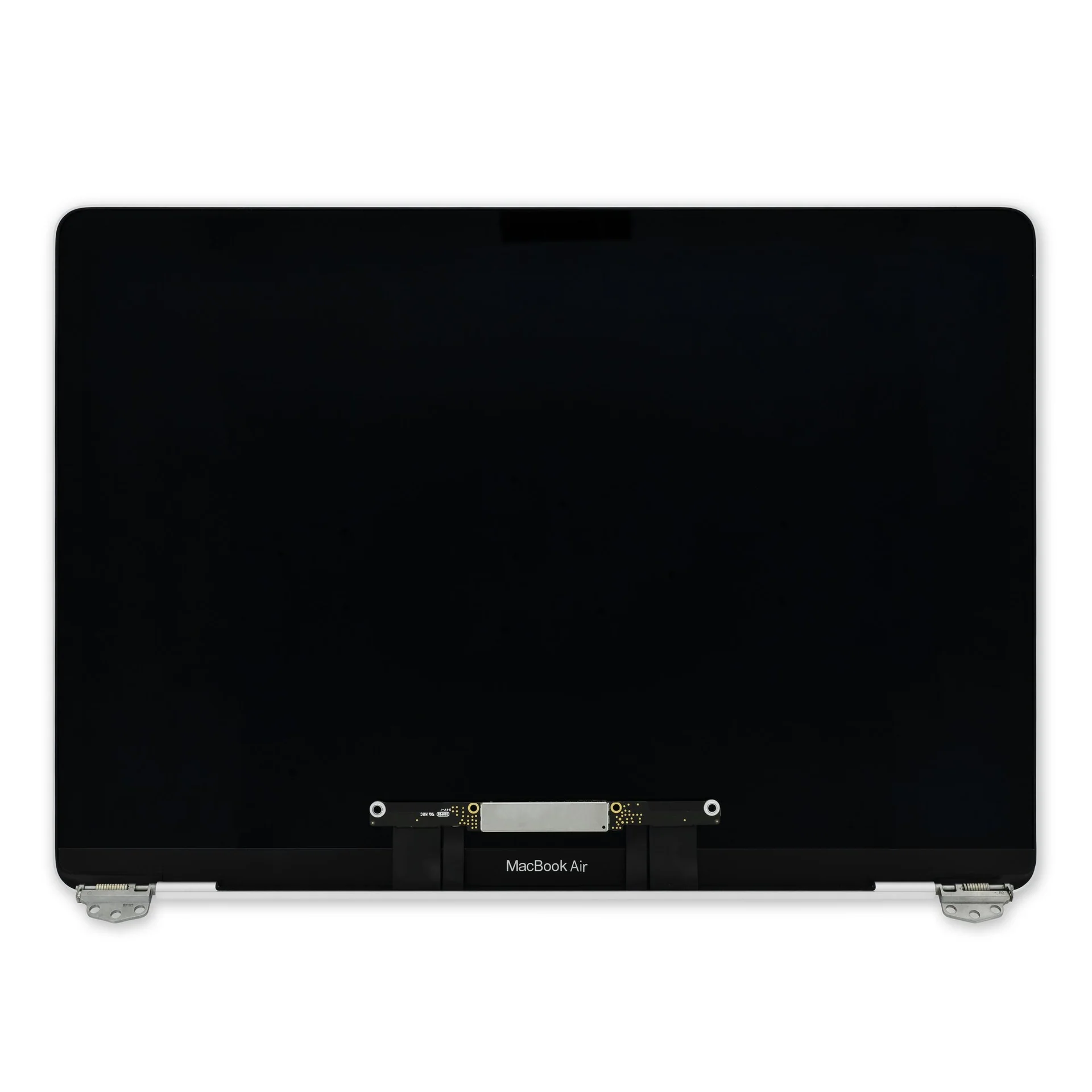
2022 Original New 13" A2681 LCD Screen for MacBook Air M2 EMC 4074 A2681 LCD Screen Replacement 2022 Original New 13″ A2681 LCD Screen for MacBook Air M2 EMC 4074 A2681 LCD Screen Replacement Compatible Model: For MacBook Air 13″ M2 A2681 Screen Display Replacement 2022 Year (Silver) Item Condition: New; Screen Size: 13.6″; Resolution: 2560×1664; Color: Silver.(This is the display replacement accessory is not a laptop) Note: Please be careful to take the screen out of the box. This product should be very careful when installed, we are not responsible for the damage in the process of installation. Please confirm the model and color before buying, do not buy the wrong product. If you have any questions, please get in touch with us.

The Samsung Odyssey G9 49″ 240Hz OLED Gaming Monitor delivers ultra-wide immersive gameplay. First, it features a curved OLED panel with deep blacks and vibrant colors. The monitor offers a 49-inch screen with 240Hz refresh rate and fast response time. In addition, the ultra-wide design expands your field of view for gaming and multitasking. Moreover, the smart features and ergonomic design improve comfort and usability. Therefore, gamers can enjoy smooth performance, sharp visuals, and a fully immersive experience. Specifications: 49″ OLED curved display delivers deep blacks and vibrant colors 240Hz refresh rate ensures ultra-smooth and responsive gameplay Ultra-wide screen improves multitasking and gaming immersion Fast response time reduces motion blur in fast-paced scenes Smart features and ergonomic design enhance usability and comfort

Wireless freedom with zero compromise. The A4Tech 3330N is a high-performance 2.4GHz wireless combo that combines the GK-3 full-size keyboard with the G3-330N optical mouse. Featuring a 10–15m operating range, 12-month battery life, and 12 multimedia hotkeys, it’s the perfect plug-and-play solution for a clean, cable-free workspace. The A4Tech 3330N Wireless Desktop is engineered for consistent stability and long-term durability. Utilizing advanced Smart Wireless SoC technology, this set minimizes circuit loss and interference, providing a reliable connection that feels as responsive as a wired setup. Key Features: Consistent Wireless Stability: Advanced 2.4GHz powerful wireless connection with a distance of up to 10–15 meters. Auto-channel stabilizing ensures essentially no delays or connection conflicts. Energy Efficient Design: Enjoy up to 12 months of battery life thanks to energy-efficient engineering. The set also features Auto Power Saving with a 4-level sleep mode that activates after just 0.2s of inactivity. Full-Size Multimedia Keyboard: The GK-3 keyboard includes 12 Fn hotkeys for quick access to media controls, along with laser-inscribed keys that never fade and adjustable legs for ergonomic comfort. Precision Optical Mouse: The included G3-330N mouse offers a 1200 DPI resolution for smooth and accurate tracking. Its symmetric design makes it comfortable for both right and left-handed users of all hand sizes. 16-in-One Gestures: The mouse supports 16 different gestures to perform selectable hotkey commands, enhancing your workflow and productivity. Spill-Resistant Durability: The keyboard is designed with built-in drain holes, ensuring that accidental liquid spills won’t end your workday. Specifications at a Glance: Connection: 2.4G Hz Wireless (Nano USB Receiver) Keyboard Model: GK-3 (Full-Size) Mouse Model: G3-330N (1200 DPI Optical) Operating Range: 10 to 15 Meters Hotkeys: 12 Fn Multimedia Hotkeys Battery: 1 AA for Keyboard, 1 AA for Mouse (Up to 12 months) Compatibility: Windows 7 / 8 / 8.1 / 10 / 11

Are you in need of a reliable monitor for your daily tasks? Look no further than the ViewSonic 24″ 60Hz monitor. With its sleek design and impressive features, it’s the perfect companion for work, gaming, and entertainment. First and foremost, let’s talk about the display quality. This monitor boasts a 24-inch screen size, providing ample space for multitasking without compromising clarity. Whether you’re editing documents, watching videos, or playing games, every detail is crisp and clear. Furthermore, with a refresh rate of 60Hz, you’ll experience smooth and fluid motion in fast-paced scenes. Say goodbye to motion blur and enjoy seamless gameplay, smooth scrolling, and lag-free video playback. In addition, the ViewSonic monitor offers versatile connectivity options. With HDMI and VGA inputs, you can easily connect to your PC, laptop, gaming console, or other devices. Switch between tasks effortlessly and enjoy hassle-free setup. Moreover, ergonomic design features ensure comfortable viewing for extended periods. Adjustable tilt allows you to find the perfect angle for your workspace, reducing eye strain and fatigue. Enhance your productivity and comfort with this user-friendly monitor. In conclusion, the ViewSonic 24″ 60Hz monitor combines superior display quality, smooth performance, and versatile connectivity in a sleek and ergonomic design. Whether you’re working, gaming, or watching movies, elevate your viewing experience with ViewSonic. Specifications: Display : 24″ IPS Resolution : 1920×1080 FHD Refresh Rate : 60Hz Response Rate : 5ms

TPLINK 300Mbps Wireless N ADSL2+ Modem Router TD-W8961N

Are you seeking a versatile solution for your presentation and collaboration needs? Look no further than the BenQ RE03A 75″ Board Essential. This cutting-edge interactive whiteboard redefines productivity and engagement in meeting rooms and classrooms alike. With its expansive 75-inch display, the BenQ RE03A offers ample space for showcasing your ideas and content. Whether you’re delivering a presentation, brainstorming with colleagues, or teaching a class, this interactive board provides a captivating canvas for your creativity. Transitioning to functionality, the BenQ RE03A boasts intuitive touch controls that make navigation and interaction effortless. Its responsive touch technology ensures smooth and precise input, allowing you to annotate, draw, and manipulate content with ease. Furthermore, the board’s seamless connectivity options enable seamless integration with your existing devices and software. Whether you’re using a laptop, tablet, or smartphone, the BenQ RE03A ensures compatibility and flexibility for all your presentation needs. In addition, collaboration features such as screen sharing and real-time annotation foster teamwork and idea exchange among participants. Break down communication barriers and enhance productivity with the BenQ RE03A’s collaborative tools. Moreover, the board’s durable construction and anti-glare surface ensure reliability and visibility even in brightly lit environments. Say goodbye to distractions and glare, and hello to clear, crisp visuals every time. In conclusion, the BenQ RE03A 75″ Board Essential is a game-changer for presentations and collaboration. With its large display, intuitive controls, and collaborative features, it empowers users to deliver impactful presentations and foster teamwork like never before. Upgrade your meeting room or classroom with the BenQ RE03A and unlock new possibilities for productivity and engagement. Specifications: Screen Size : 75″ Panel Type : IPS Resolution : UHD 3840×2160 Response Time : 8ms

A capable pre-owned Dell Latitude 5401 with 14" display, 10th Gen Core i7, 16GB RAM, 512GB SSD, and NVIDIA GeForce MX330 2GB—ideal for professionals who need extra graphics power for light creative work or multitasking in a durable business laptop.

Acer Nitro VG252QXbmiipx Gaming G-SYNC Screen size 31.5 Inches Display resolution maximum 1920 x 1080 Connectivity technology HDMI Aspect ratio 16:9 Specific uses for product Gaming Response time 4 Milliseconds Resolution FHD 1080p Number of HDMI Ports 2 Image brightness 400 cd/m² Voltage 240 Volts

The 60W MagSafe 2 Power Adapter features a magnetic DC connector so if someone should trip over it, the cord disconnects harmlessly and your MacBook Pro stays put safely. It also helps prevent fraying or weakening of the cables over time. In addition, the magnetic DC helps guide the plug into the system for a quick and secure connection. The 60W MagSafe 2 Power Adapter features a magnetic DC connector so if someone should trip over it, the cord disconnects harmlessly and your MacBook Pro stays put safely. It also helps prevent fraying or weakening of the cables over time. In addition, the magnetic DC helps guide the plug into the system for a quick and secure connection. When the connection is secure, an LED located at the head of the DC connector lights up; an amber light lets you know that your notebook is charging, while a green light tells you that you have a full charge. An AC cord is provided with the adapter for maximum cord length, while the AC wall adapter (also provided) gives you an even easier and more compact way to travel. Designed to be the perfect traveling companion, the adapter has a clever design which allows the DC cable to be wound neatly around itself for easy cable storage. Compatible with MacBook Pro with 13-inch Retina display. See this article for more details about choosing the right one. Knowing which specific Mac model you have is important. If you are running OS X Lion (10.7) or later go to the “” menu at the top left of your screen, choose “About this Mac” then click the “More Info…” button. Your Mac model and generation will be displayed. If you are running an earlier version of OS X, you can enter your serial number here to find out which model you have. COMPATIBILITY Mac Models: MacBook Pro (Retina, 13-inch, Late 2012 – 2015)

In the realm of monitors, the ViewSonic VA2201-H stands out as a reliable and clear solution, offering a perfect blend of visual excellence and simplicity for an enhanced viewing experience. Transitioning to its key features, the VA2201-H excels in providing crystal-clear visuals. This monitor is designed to deliver sharp and vibrant images, ensuring a visually engaging experience for work or entertainment. Moreover, this display impresses with its sleek and minimalistic design. The ViewSonic VA2201-H not only enhances the aesthetics of your workspace but also ensures straightforward setup, making it an ideal choice for users seeking simplicity. In addition to its functionality, the VA2201-H offers user-friendly controls and connectivity options, ensuring a hassle-free experience. This monitor seamlessly adapts to various settings, providing flexibility for different viewing preferences. Furthermore, ViewSonic’s commitment to user satisfaction is evident in the VA2201-H’s energy-efficient design and eye-care technology. It’s a reliable companion for extended viewing periods without compromising on visual quality. In conclusion, the ViewSonic VA2201-H redefines clarity and simplicity, combining clear visuals, sleek design, and user-friendly features. Elevate your viewing experience effortlessly with the VA2201-H – your clear and straightforward solution for visual excellence! Specifications Full HD 1080p 100Hz Refresh Rate 1ms Response Time Flicker-Free & Blue Light Filter View Mode: Game/Movie/Web/Text/Mono Inputs : HDMI/VGA Check other options here!

OEM-quality trackpad replacement (without flex cable) for MacBook Pro 13″ (Models A2251 and A2289, 2020) in Silver finish—engineered for precise Force Touch response, smooth multi-touch gestures, and seamless integration with the original chassis. Compatible With: MacBook Pro 13″ (2020, Two Thunderbolt Ports) – Model A2251 (Intel Core i5/i7) MacBook Pro 13″ (2020, Four Thunderbolt Ports) – Model A2289 (Intel Core i5/i7) (Note: Both models share the same trackpad assembly despite port differences.) MacBook Pro 13″ (2020, Two Thunderbolt Ports) – Model A2251 (Intel Core i5/i7) MacBook Pro 13″ (2020, Four Thunderbolt Ports) – Model A2289 (Intel Core i5/i7) (Note: Both models share the same trackpad assembly despite port differences.) Part Type: Trackpad only—does not include the flex cable, Taptic Engine, or mounting hardware. Designed for technicians who will reuse the original internal components. Finish: Silver—matches the Silver MacBook Pro 13″ top and bottom case for perfect aesthetic continuity. Force Touch Support: Fully compatible with pressure-sensitive input and haptic feedback when paired with the original Taptic Engine and logic board—ensuring full macOS gesture functionality (e.g., Force Click, Lookup, Pressure-sensitive drawing). Precision Build: Features the same glass surface texture, curvature, and micro-click mechanism as Apple’s original—delivering consistent tracking accuracy and tactile feel. Installation Requirements: Requires full bottom case disassembly and careful transfer of the original flex cable and Taptic Engine. Adhesive must be applied precisely to maintain structural rigidity and sensor alignment. Recommended for certified or experienced repair technicians only.

The ViewSonic 24″ 100Hz IPS Monitor is a high-performance display designed for work, entertainment, and gaming. It features a 24-inch Full HD IPS panel, delivering sharp visuals, vibrant colors, and wide viewing angles. Whether you’re working on creative projects, watching movies, or gaming, the high-quality display ensures a smooth and immersive experience. With a 100Hz refresh rate, this monitor provides ultra-smooth motion, reducing screen tearing and stuttering. The fast refresh rate enhances gaming, making movements appear fluid and responsive. It also improves everyday tasks like scrolling and video playback, providing a better overall visual experience. The IPS panel technology ensures consistent and accurate colors, making it ideal for content creators, designers, and professionals. The 178° wide viewing angles allow clear visibility from different positions, ensuring that images and text remain sharp and distortion-free. Designed with eye comfort in mind, the monitor features flicker-free technology and a blue light filter. These features help reduce eye strain and fatigue, making it comfortable for extended use. Whether you’re working long hours or enjoying a gaming session, this monitor keeps your eyes protected. The sleek and modern design fits seamlessly into any workspace or gaming setup. Its thin bezels provide a more immersive viewing experience, perfect for multi-monitor setups. The monitor includes multiple connectivity options, such as HDMI and DisplayPort, ensuring compatibility with a wide range of devices. With its fast refresh rate, stunning color accuracy, and ergonomic design, the ViewSonic 24″ 100Hz IPS Monitor is a great choice for professionals, gamers, and everyday users. It offers smooth performance, vibrant visuals, and long-term eye comfort in a stylish package. Specifications: Display : 24″ IPS Resolution : 1920×1080 FHD Refresh Rate : 100Hz Response Rate : 1ms

Genuine-spec touchpad flex cable for MacBook Air 13″ (Model A1534, Early 2015)—essential for restoring full trackpad functionality, including precise cursor control and physical click response, during repair or replacement. Compatible With: MacBook Air 13-inch (Early 2015, Model A1534, Model Identifier MacBookAir7,2). Part Type: Touchpad flex cable only—does not include the trackpad housing, button mechanism, or mounting brackets. This is the ribbon cable that connects the trackpad to the logic board. Function: Carries input signals from the trackpad to the logic board—critical for cursor movement, tap-to-click, and primary/secondary physical click functionality. (Note: This model uses a physical click mechanism, not Force Touch—so no haptic feedback or pressure-sensing.) OEM-Quality Construction: Matches Apple’s original cable in length, connector type, and shielding—ensures reliable signal transmission and long-term durability. Common Use Cases: Replacing a torn, frayed, or damaged original flex cable Completing a trackpad replacement when the original cable is compromised Fixing erratic cursor movement, unresponsive trackpad, or loss of click function Replacing a torn, frayed, or damaged original flex cable Completing a trackpad replacement when the original cable is compromised Fixing erratic cursor movement, unresponsive trackpad, or loss of click function Installation Note: Requires bottom case removal and careful disconnect/reconnect of the ZIF (Zero Insertion Force) connector on the logic board. The cable routes under the battery—handle with care. Suitable for intermediate to advanced DIYers or technicians.
